
• About Us
    • Contribute or Collaborate with Asia Virtual Solutions
    • llms.txt
    • AI Instructions
  • Affiliates
  • Contact Us
  • My Account
  • Support Tickets
Asia Virtual Solutions
  • Home
  • GSA Search Engine Ranker
    • FAQs for GSA Search Engine Ranker
    • GSA SER Tools & Add-Ons
    • GSA SER Tutorials
  • Blog
    • AI Content & SEO
    • GSA SER Tutorials
    • Hosting & VPS
    • Link Building Strategies
    • News & Updates
    • SEO Software Reviews
    • Xrumer & XEvil
  • Shop
    • Content & AI Articles
    • GSA SER Tools & Add-Ons
    • Hosting Services
    • Link Building Services
    • Money Robot Submitter
    • RankerX
    • Recommended Services
    • Social Media Services
    • Xrumer Services
No Result
View All Result
Asia Virtual Solutions

Home » Blog » Super Easy Ways To Save Money On Paid Captcha Services When Using GSA SER

Super Easy Ways To Save Money On Paid Captcha Services When Using GSA SER

Michael Swart by Michael Swart
8 August, 2020 - Updated on 21 September, 2026
in GSA SER Tutorials
0
Save Money On Paid Captcha Services When Using GSA SER
Table of Contents show
1 2 Super Easy Ways To Save Money On Paid Captcha Services When Using GSA Search Engine Ranker
1.1 The below video is a detailed walk thru showing you exactly how to set it up in GSA Search Engine Ranker.
2 2 Super Easy Ways To Save Money On Paid Captcha Services When Using GSA Search Engine Ranker
2.1 Method 1 to save money with Captcha solving- Use paid captchas for your GSA SER top tiers only
2.1.1 Captcha Options:
2.1.2 Custom Captcha Setup (The Pop Up ):
2.2 Method 2 to save money with captcha solving – Re-Use your accounts
2.2.1 Conclusion – Ways To Save Money On Paid Captcha Services

2 Super Easy Ways To Save Money On Paid Captcha Services When Using GSA Search Engine Ranker


Many GSA Search Engine Ranker Users are using 3rd party captcha-solving services, which they have to pay for the number of solved captchas. If you run many GSA SER projects with multiple tiers, paying for these paid captchas can be very quickly expensive.

So since we all can do with saving a bit of money where possible, I will show you two effortless ways you can reduce the cost of captchas your paid captchas. Some of you might already be aware of these methods, and many of you are unaware of them, so read further to see how to save money with your paid captchas and GSA Search Engine Ranker.

The below video is a detailed walk thru showing you exactly how to set it up in GSA Search Engine Ranker.


2 Super Easy Ways To Save Money On Paid Captcha Services When Using GSA Search Engine Ranker


Method 1 to save money with Captcha solving- Use paid captchas for your GSA SER  top tiers only

Most people think the only way to control captchas is by enabling or disabling them in the GSA Search Engine ranker main settings screen, like the one you see below.

GSA SER Captcha Options

While you have some degree of which captcha types to solve and which not, you can not specify which projects get to use which captcha option, which won’t help you much to save money, keep reading, we will get there …

If you have a multi-tier project, you do not want to waste your money on solving the captchas for the lower tiers, as they are unimportant. The top tiers are the only tiers you want to use your paid captcha services for, but not many people know there is an option where you can select which captchas to use for each project or tier.

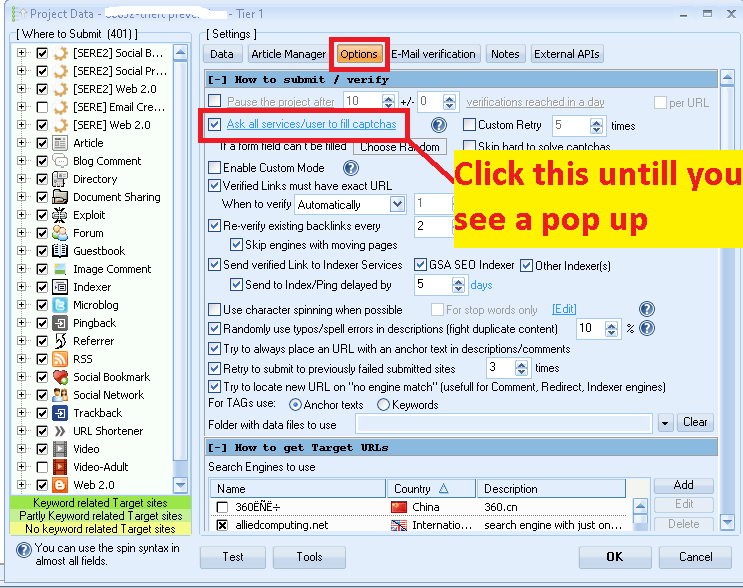
If you go to the OPTIONS tab in your project, you will see the below option for captchas.
 

Project Captcha Options GSA SER Captcha Solving project options popup


Captcha Options:

If you click on the captcha options, you will see the below. Keep clicking on them until you get to the last one, named Ask user /services in custom order.

  • Ask all services/users to fill captchas
  • Ask 1’st services/users to fill captchas
  • Ask 2nd  services/users to fill captchas
  • Ask all services to fill captchas
  • Ask 1’st service to fill captchas
  • Ask 2nd  service to fill captchas
  • Ask user only to fill captchas
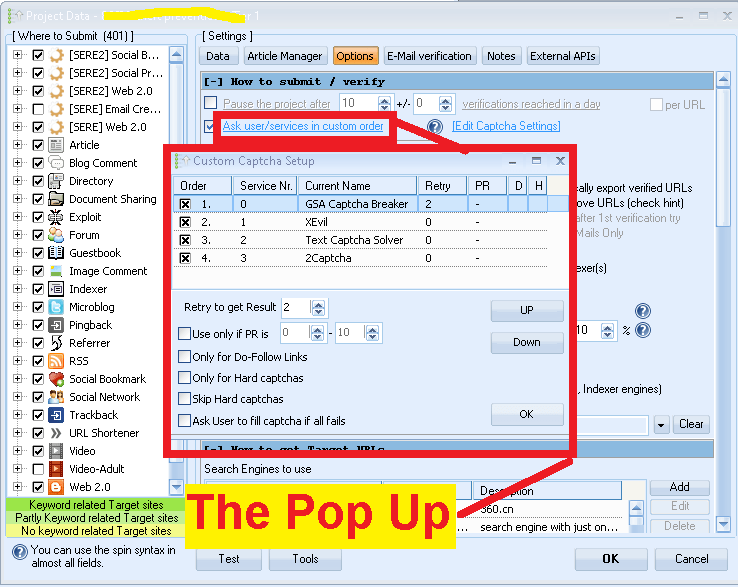
  • Ask user /services in a custom order – This is the one you want with the pop-up, like in the picture above.

Custom Captcha Setup (The Pop Up ):

In the Popup, you will see now see all the captcha settings that you have available, and you have many options here, such as activating or deactivating the captcha service and or turning it on or off for specific post types.

If this is your top tier, you want to use all the captcha services, but if it is a lower tier. If you want to save some money, you do not want to enable your paid captcha options but only use the free captcha options like GSA Captcha Breaker or Xevil, or you want to enable it only for do-follow links.

You can move them up or down; the higher up, the higher the priority, or enable only to try and solve the captcha if it has a specific PR

Method 2 to save money with captcha solving – Re-Use your accounts

This method can be used basically for any tier.

Let’s take a step back for a moment and look at where captchas are required in the process. You will realize that captchas are usually only required when creating a site account. So why always create new accounts when you can reuse your existing accounts and post to them? There is no captcha when you post to an existing account.

We made a detailed post on how to reuse existing accounts, and please click the below banner to view that post.
Reuse GSA Search Engine Ranker Accounts
How to Reuse GSA Search Engine Ranker Accounts


Conclusion – Ways To Save Money On Paid Captcha Services

You don’t need to spend a fortune monthly on paid captcha services. If you use the above two methods, I guarantee you will save a lot of money you can spend on more useful stuff than captcha solving.

I hope to post was of benefit to you; feel free to comment and ask questions if you so want, and don’t forget to share so others can benefit from the knowledge.


Tags: Ask user /services in custom custom ordercaptcha servicesgsa search engine rankerGSA SERPaid Captcha Servicesreuse your existing accountsSave Money
Previous Post

6 Different Ways How to Connect to a Windows VPS Easily

Next Post

Best technical SEO practices for achieving higher ranking

Michael Swart

Michael Swart

Asia Virtual Solutions is proudly owned and maintained by Michael Swart and a team of dedicated virtual assistants.

Next Post
Technical SEO

Best technical SEO practices for achieving higher ranking

Search guides

No Result
View All Result

Blog categories

  • AI Content & SEO
  • GSA SER Tutorials
  • Hosting & VPS
  • Link Building Strategies
  • News & Updates
  • SEO Software Reviews
  • Xrumer & XEvil

Latest guides

  • Buy GSA SER Proxies: Best Proxy Setup for Link BuildingUpdated 5 Oct 2026
  • GSA SEO Software Explained: Which GSA Tools You Actually NeedUpdated 3 Oct 2026
  • GSA SER Projects Done For You: Now Written by GPT-6 Luna and Delivered in About an HourUpdated 1 Oct 2026
  • GSA Search Engine Ranker Review: 13 Years of Daily UseUpdated 18 Sep 2026
  • Our SEO Toolkit: What a Working Link Building Setup Actually CostsUpdated 1 Oct 2026

Get new guides by email

New GSA SER, RankerX and VPS guides, sent to your inbox. No spam. Unsubscribe any time.

Subscription Form

Popular services

  1. 1GSA Search Engine Ranker Projects - Done For YouFrom $9.955.0 (31)
  2. 2GSA Search Engine Ranker Email packsFrom $4.005.0 (15)
  3. 3GSA Search Engine Ranker VPSFrom $139.005.0 (10)
  4. 4GSA SER Verified Link List — Identified & Verified URLsFrom $53.505.0 (17)
4.9

Based on 258 rated reviews across Google, WooCommerce & Facebook

  • Trusted since 2013
  • Handled personally, no bots, no outsourcing
  • Campaigns in over 80 countries

Stuck on a campaign?

Ask about GSA SER, RankerX or your VPS setup. You get a straight answer from someone who runs these tools daily.

Ask Michael

Featured service

SEO NEO VPS 300X300

All The Legal Stuff

  • Affiliate Agreement
  • Antispam
  • Communication preferences
  • Cookie Policy
  • Disclaimer
  • External Links Policy
  • Facebook Policy
  • FTC Statement
  • Privacy Policy
  • Refund & Guarantee Policy
  • Terms and Conditions
  • Testimonials Disclosure

Secure Shopping

Google Save Browsing Certified
The norton safe website logo on a white background.

Get in Touch With Us

Asia Virtual Office

  • Asia Virtual Solutions LLC, Level 29, The Offices at Centralworld 999/9 Rama I Road, Pathumwan, Bangkok, Thailand
  • co*****@******************ns.com
  • +66 64 930 7026
  • asiavirtual
  • Asia Virtual Solutions on LinkedIn
  • Join our Telegram channel

© 2026 - Asia Virtual Solutions LLC. All Rights Reserved. Web site is Operated and Maintained By: Asia Virtual Solutions LLC

No thumbnail
Uploaded
Failed
Remove uploaded file
We've detected you might be speaking a different language. Do you want to change to:
English language flag English
简体中文 language flag 简体中文
Deutsch (Sie) language flag Deutsch (Sie)
Bahasa Indonesia language flag Bahasa Indonesia
Italiano language flag Italiano
日本語 language flag 日本語
한국어 language flag 한국어
Português do Brasil language flag Português do Brasil
Русский language flag Русский
Español de México language flag Español de México
ไทย language flag ไทย
Tiếng Việt language flag Tiếng Việt
Türkçe language flag Türkçe
Change Language
Close and do not switch language
No Result
View All Result
  • Home
  • GSA Search Engine Ranker
    • FAQs for GSA Search Engine Ranker
    • GSA SER Tools & Add-Ons
    • GSA SER Tutorials
  • Blog
    • AI Content & SEO
    • GSA SER Tutorials
    • Hosting & VPS
    • Link Building Strategies
    • News & Updates
    • SEO Software Reviews
    • Xrumer & XEvil
  • Shop
    • Content & AI Articles
    • GSA SER Tools & Add-Ons
    • Hosting Services
    • Link Building Services
    • Money Robot Submitter
    • RankerX
    • Recommended Services
    • Social Media Services
    • Xrumer Services

© 2026 - Asia Virtual Solutions LLC. All Rights Reserved. Web site is Operated and Maintained By: Asia Virtual Solutions LLC

English language flagEnglish
简体中文 language flag简体中文 Deutsch (Sie) language flagDeutsch (Sie) Bahasa Indonesia language flagBahasa Indonesia Italiano language flagItaliano 日本語 language flag日本語 한국어 language flag한국어 Português do Brasil language flagPortuguês do Brasil Русский language flagРусский Español de México language flagEspañol de México ไทย language flagไทย Tiếng Việt language flagTiếng Việt Türkçe language flagTürkçe