



Many GSA Search Engine Ranker users also own a copy of XRumer. Some bought it years ago, and many got it for the XEvil captcha solver that comes with it. Most of them never touch XRumer’s other tools, which is a pity, because one of them is very good at finding new targets for GSA SER.
That tool is Links Pattern Analysis. It reads a list of URLs you already post to and pulls out the URL patterns they share. Those patterns become footprints you can scrape with, so you find more sites that run the same platforms. I first wrote this guide in 2019 and updated it in October 2026, including what has changed in scraping Google since then.
Quick answer: find GSA SER footprints with XRumer
- Use your GSA SER verified list as the source, because GSA SER has already posted to those sites.
- In GSA SER, merge the verified files into one file and remove duplicate domains.
- In XRumer, open Tools > Links Pattern Analysis, load the file, set Analysis Scope to /filename and Report Format to Google “inurl”.
- Limit the report to 1,000 results, click Start, then copy the Text tab into a footprints file.
- In Scrapebox, merge the footprints with your niche keywords and harvest, mainly from Bing and Google.
- Import the scraped URLs into GSA SER and let it identify the platforms.
What are footprints in GSA SER?
A footprint is a piece of text or a URL pattern that every site on a certain platform shares. A WordPress site, for example, usually shows “Powered by WordPress” in the footer unless the owner removed it, and its pages use paths such as /wp-login.php. Every content management system leaves footprints like these in its URLs, page titles or content.
When you scrape for targets, you combine footprints with keywords and send them to a search engine. The search engine returns sites that match, and those are sites GSA SER may be able to post to. GSA SER already has footprints for every engine it supports, but a list made from your own verified sites often finds platforms and URL patterns the default footprints miss.
Which search operators do you need?
| Operator | What it finds | Example |
|---|---|---|
inurl: | Pages with a word or path in the URL | inurl:apple |
intitle: | Pages with a word in the page title | intitle:apple |
site: | Pages from one domain or TLD | site:apple.com |
All three still work on Google in 2026, according to Ahrefs’ list of Google search operators (updated August 2026). Some older operators, such as cache:, link: and info:, no longer work. Not every search engine understands inurl:, which matters later when you scrape.
How do you prepare your GSA SER list for footprint extraction?
Start with your verified site list. These are sites GSA SER has already built links on, so footprints taken from them point to sites it can post to.
- One platform only: use a single file from the verified folder. For WordPress article sites that is
sitelist_Article-WordPress Article. For MediaWiki sites it issitelist_Wiki-MediaWiki. - All platforms: merge every verified file into one file, then remove duplicate domains.
GSA SER has tools for both steps. Go to Options > Advanced > Tools and use Join/Merge many files to one, then Remove duplicate domains from file. The video above shows both.
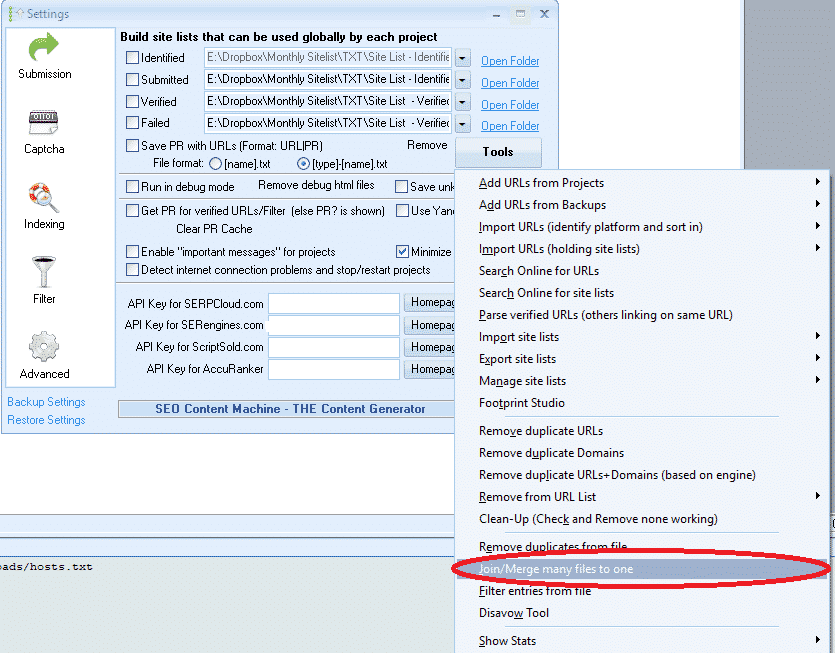
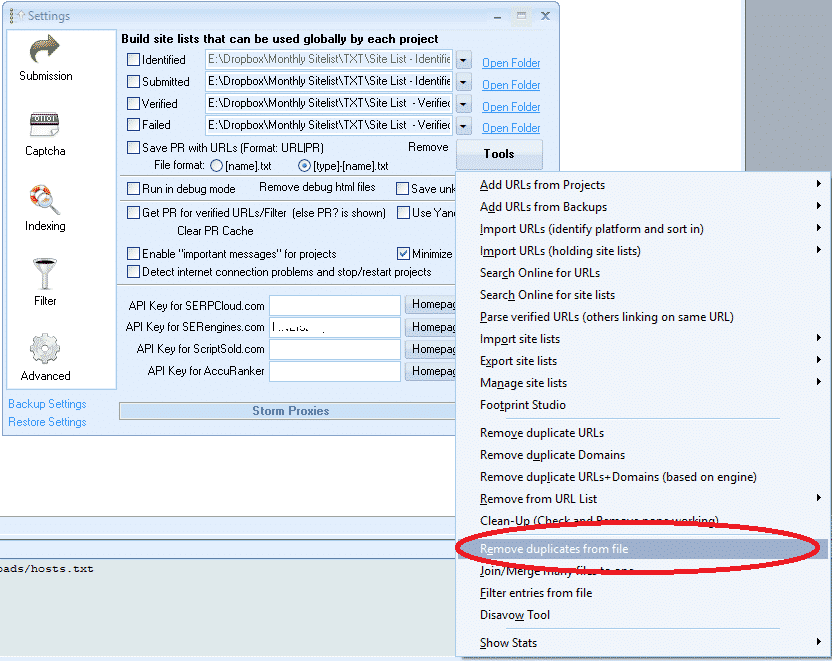
If you do not have a verified list of your own yet, our GSA SER verified link list currently holds 92,393,141 identified URLs and is updated once a day, which gives you a large source to extract footprints from.
How do you extract footprints with XRumer Links Pattern Analysis?
- In the XRumer menu, open Tools.
- Choose Links Pattern Analysis.
- At the top of the screen, browse to the list you prepared in GSA SER.
- Set Analysis Scope to /filename. This gives the most results. Try the other scopes afterwards too, as they find different patterns.
- Set Report Format to Google “inurl”.
- Of the four checkboxes below, tick only Restrict report for and leave it at 1,000 results.
- Click Start.
- When it finishes, open the TXT tab (next to TABLE and CHART).
- Select and copy all the results, paste them into a text file and save it.
- Go through the file and delete footprints you do not want, such as plain keywords. If you are not sure, leave them in.

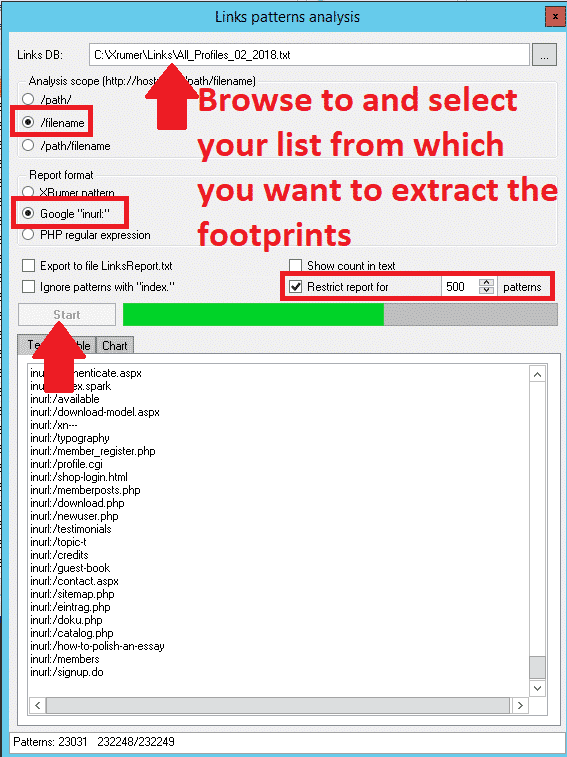
The screenshots are from the XRumer version I used in 2019. The current version is XRumer 23, and I have not re-checked whether the menu labels have moved, so look for the same tool under Tools if your screen looks different.
How do you make the footprints work on other search engines?
Google understands inurl:, but some other search engines do not. If you only scrape Google, leave the file as it is. If you also scrape other engines, make a copy of the file and strip the operator out:
- Open the copy in Notepad and choose Edit > Replace.
- In Find what, enter
inurl:. - Leave Replace with empty and click Replace All.
Use that copy for the non-Google engines, or paste it back into the original file if you want to run one scrape with both versions.
How do you scrape with the new footprints in Scrapebox?
Scrapebox is still the easiest harvester for this. The current version is 2.1.57 (January 2026), sold as a one-time purchase.
- In the main Scrapebox window, select Custom Footprint.
- Enter your keywords or import them from a file. Use keywords related to your niche. The more you add, the longer the scrape takes. Our keyword scraping service can build a large niche keyword list for you.
- Click the M button to merge your footprints file with the keywords.
- Click Start Harvesting.
- Choose the search engines. I start with Bing and Google, because they return the most results.
- On the harvester Proxies tab, tick Enable auto load (from file) and select your proxies file.
- Click Start.
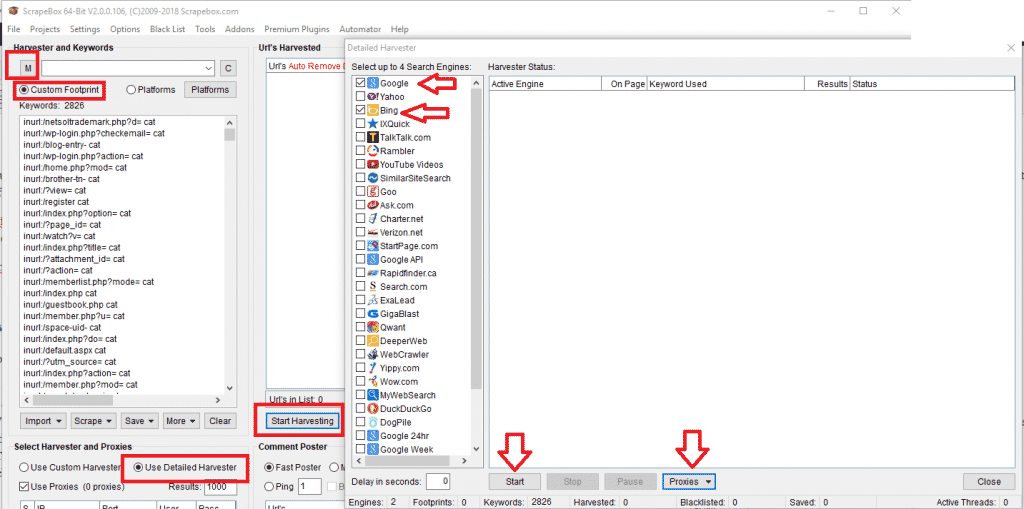
For more detail on the harvester, see the Scrapebox harvester FAQ.
Why is scraping Google harder in 2026?
Two changes since this guide was first written make Google slower to scrape:
- JavaScript requirement: since January 2025 Google asks visitors to enable JavaScript to use Search. A Google spokesperson told TechCrunch it is meant to better protect Search from bots and spam. Simple scrapers that do not run JavaScript now fail more often.
- No more 100 results per page: in September 2025 Google stopped supporting the
&num=100parameter, so a scraper needs ten requests to get 100 results instead of one.
In practice that means more proxies, more failed queries and slower Google harvests. Bing and the other engines Scrapebox supports are often the better source of volume now. Good private proxies matter more than ever: see our proxy service.
What do you do with the scraped URLs?
Remove duplicate domains in Scrapebox, then import the list into GSA SER. You can import it straight into a project as target URLs, or use Options > Advanced > Tools > Import URLs (identify platform and sort in) so GSA SER sorts them into your identified list by platform. Run them through a project and the ones that work end up in your verified list, which you can then feed back into XRumer for the next round.
If you would rather not scrape yourself, our target URL scraping service does it for you.
Frequently asked questions
What is a footprint in GSA Search Engine Ranker?
A footprint is text or a URL pattern shared by every site on a platform, such as a path in the URL or a line in the footer. Combined with keywords in a search engine, footprints find new sites that GSA SER can post to.
Which list should I use to extract footprints?
Use your verified list. GSA SER has already built links on those sites, so the patterns XRumer finds in them point to sites it can post to. Merge the files and remove duplicate domains first.
Which XRumer settings should I use for Links Pattern Analysis?
Set Analysis Scope to /filename, Report Format to Google inurl, and tick only Restrict report for, at 1,000 results. Then copy the results from the TXT tab into a text file.
Do Google search operators like inurl: still work?
Yes. inurl:, intitle: and site: still work on Google in 2026. Older operators such as cache:, link: and info: no longer work, and some other search engines do not understand inurl:.
Why does Scrapebox get fewer Google results now?
Since January 2025 Google requires JavaScript to use Search, and in September 2025 it dropped the option to show 100 results per page. Scrapers need more proxies and more requests, so Bing and other engines are often a better source of volume.
Do I need XRumer to find GSA SER footprints?
No. GSA SER has its own footprints for every engine it supports. XRumer is useful because it finds extra URL patterns in your own verified sites, which often turns up targets the default footprints miss.
More targets mean more verified links. Get our verified link list to extract footprints from, or let us scrape fresh targets for you.




 English
  简体中文
简体中文  Deutsch (Sie)
  Bahasa Indonesia
  Italiano
  日本語
日本語  한국어
한국어  Português do Brasil
  Русский
  Español de México
  ไทย
ไทย  Tiếng Việt
  Türkçe