


Use o Xrumer para encontrar pegadas para a extração de links da lista de classificação do mecanismo de busca GSA.
Conheço vários usuários do GSA Search Engine Ranker que também possuem uma cópia do Xrumer. Alguns o compraram há muito tempo, e outros o adquiriram recentemente. O solucionador de Captcha Xevil foi adicionado ao Xrumer..
Tradicionalmente, o Xrumer tinha uma curva de aprendizado desafiadora, e a maioria dos usuários não entendia exatamente como ele funcionava ou para que serviam algumas de suas funções.
Neste post, compartilharei com você uma função útil do Xrumer que pode ser usada para extrair footprints da sua lista de links existente, que você poderá então usar para coletar informações de outras listas de links. GSA Search Engine Ranker. A função que vou te mostrar em Xrumer é chamada de “Análise de Padrões de Ligações”.”
Antes de começarmos a explicar como extrair as pegadas, vamos dar uma olhada rápida no que exatamente é uma pegada e para que ela será usada.
O que são pegadas (em poucas palavras):
As pegadas digitais são pequenos trechos de código ou conteúdo encontrados no código ou conteúdo de um site. Por exemplo, ao criar um site WordPress, você sempre verá "Powered by WordPress" no rodapé do seu site (a menos que você o tenha removido manualmente). Cada sistema de gerenciamento de conteúdo (CMS) terá suas próprias pegadas digitais no código do conteúdo, na estrutura de URLs ou no site. Portanto, quando você deseja extrair links, você instrui o Google a procurar sites que contenham um texto específico na URL, no título ou no conteúdo de um site.
Sem entrar em muitos detalhes, você precisa entender os três operadores de busca básicos a seguir:
Inurl: – Esta opção pesquisará sites com palavras ou caminhos específicos na URL do site. Exemplo: inurl:apple
Título: – Esta opção pesquisará um texto específico no título de um site. intitle:maçã
Site: – Isso pesquisará domínios/URLs/links de um domínio especificado, ccTLD, etc. site:apple.com
Para uma lista mais detalhada de todos os tipos de Operadores de pesquisa do Google, Sugiro que você dê uma olhada neste site: https://ahrefs.com/blog/google-advanced-search-operators/
Assista ao tutorial em vídeo passo a passo abaixo, que mostra todas as etapas a seguir no GSA SER, Xrumer e também no Scrapebox.
Como preparar sua lista de classificação de mecanismos de busca da GSA para fins de posicionamento. extração:
Primeiro, precisamos de um lista de links que podemos inserir no Xrumer. Para GSA Search Engine Ranker”Usuários do GSA Search Engine Ranker, a lista que vocês devem usar para extrair mais informações deve ser a lista de links verificados, pois sabem que o GSA SER conseguiu criar links nesse site com sucesso. Portanto, queremos obter as informações da lista verificada para que possamos buscar sites semelhantes.
Você pode selecionar um dos arquivos da sua lista de Verificados se quiser coletar dados de uma plataforma específica. Por exemplo, se precisar apenas de dados do WordPress. Artigos diretórios, então você usará o arquivo chamado: sitelist_Artigo-Artigo do WordPress, Ou, se você quiser extrair dados de sites Media Wiki, use o arquivo: sitelist_Wiki-MediaWiki
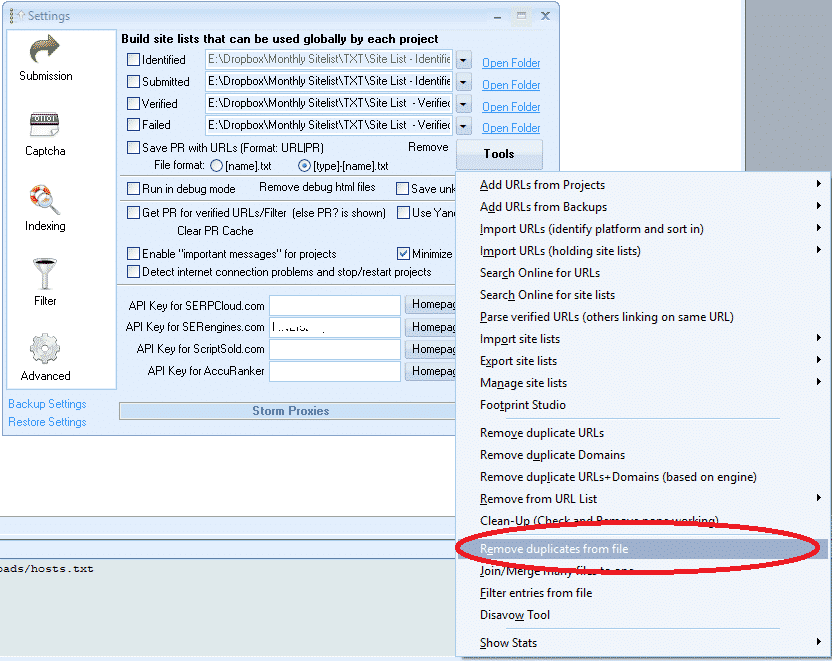
Se você quiser verificar se há pegadas em todos os listas verificadas, Então, primeiro precisamos fazer duas coisas;
- Una todos os arquivos verificados em um único arquivo.
- Após a fusão, você precisa remover os domínios duplicados.
Felizmente, o GSA Search Engine Ranker possui as ferramentas para facilitar os passos acima.
Certifique-se de assistir ao vídeo do YouTube anexado e incorporado a esta publicação para entender como usar as duas funções abaixo.
[largura_total][um_meio padding=”0 10px 0 0″]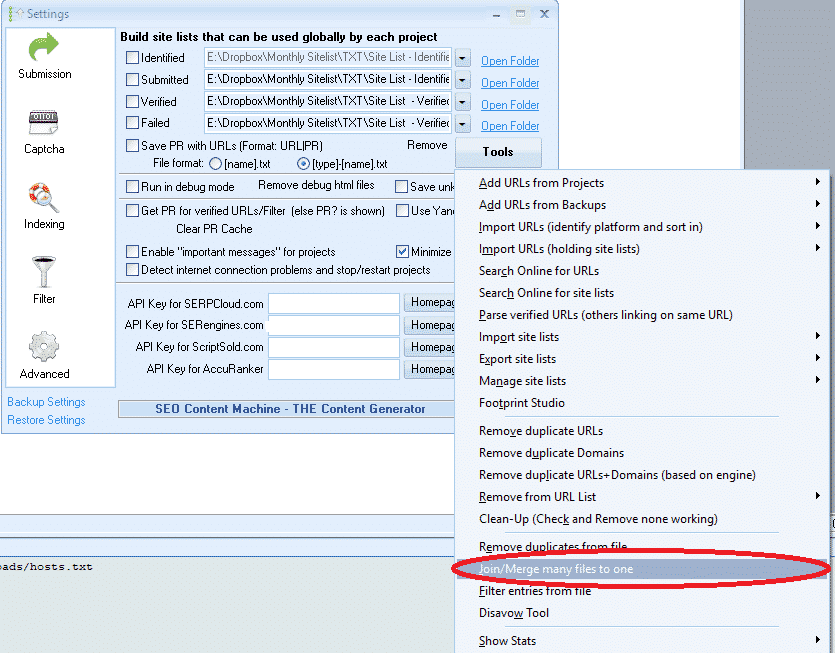 [/one_half][one_half padding=”0 0 0 10px”]
 [/one_half][/full_width]
Como extrair as pegadas usando o Xrumer?
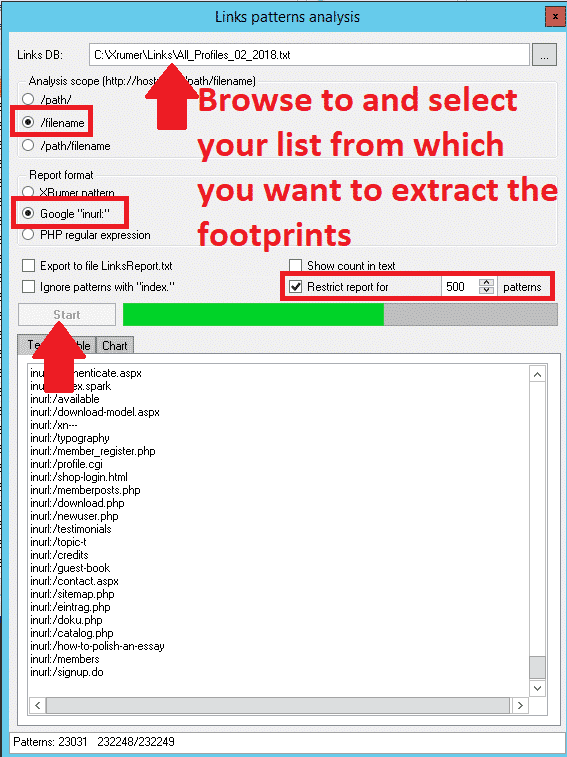
Certo, agora que você preparou a lista da qual deseja extrair as pegadas, podemos finalmente começar. Xrumer Parte da extração das pegadas, ou como Xrumer chama, é a "Análise de Padrões de Links".
Siga os passos simples abaixo para realizar a extração.
- No menu Xrumer, navegue até “Ferramentas."”
- Na lista suspensa, selecione “Análise de Padrões de Links”
- Na parte superior da tela de análise de padrões de links, navegue até o local onde você salvou a lista de links da qual deseja extrair as pegadas.
- Para Escopo da análiseSugiro optar por “/nome do arquivo”"pois essa será a opção que lhe dará os melhores resultados. Mas também recomendo experimentar as outras opções, que proporcionarão resultados adicionais.".
- Sob "“Formato do relatório,”Você deseja selecionar Google “em URL“
- Das próximas 4 caixas de seleção, marque apenas a opção: “Restringir relatório para”e depois altere para o padrão. 1000 resultados
- Clique Começar
- Quando estiver pronto, onde estiver escrito: TEXT | TABELA | GRÁFICO — Selecione a aba: Texto
- Selecione tudo e COPIE todos os resultados, abra um arquivo de bloco de notas e cole o conteúdo lá. Salve o arquivo com o nome que desejar.
- Agora você pode percorrer a lista e remover os rastros indesejados, como palavras-chave. Se não tiver certeza do que apagar, basta deixar tudo como está.
[largura_total][um_meio padding=”0 10px 0 0″]
 [/one_half][one_half padding=”0 0 0 10px”]
 [/one_half][/full_width]
O Google funciona bem para extrair dados usando o INURL como parâmetro, mas infelizmente, alguns mecanismos de busca não são compatíveis com INURL. Se você pretende extrair dados apenas do Google, não precisa fazer nada com sua lista de parâmetros. Mas se você também pretende extrair dados de outros mecanismos de busca, sugiro que copie os arquivos de parâmetros. Selecione EDITAR no menu e escolha SUBSTITUIR na cópia que você criou..
- Para descobrir o quê, digite: inurl:
- No campo "O que substituir", deixe em branco.
Isso removerá o "inurl" do início, e você poderá salvar o arquivo e fazer uma extração separada para mecanismos de busca que não sejam o Google, ou poderá copiá-lo de volta para o arquivo original se quiser executar apenas uma extração com todos os registros.
Como usar suas novas pegadas para extrair dados usando o Scrapebox
Agora que você organizou suas novas pegadas, é hora de colocá-las em prática. Como a maioria das pessoas usa o Scrapebox, que é o mais fácil de usar, vou mostrar passo a passo como extrair dados usando o Scrapebox e as pegadas do Xrumer.
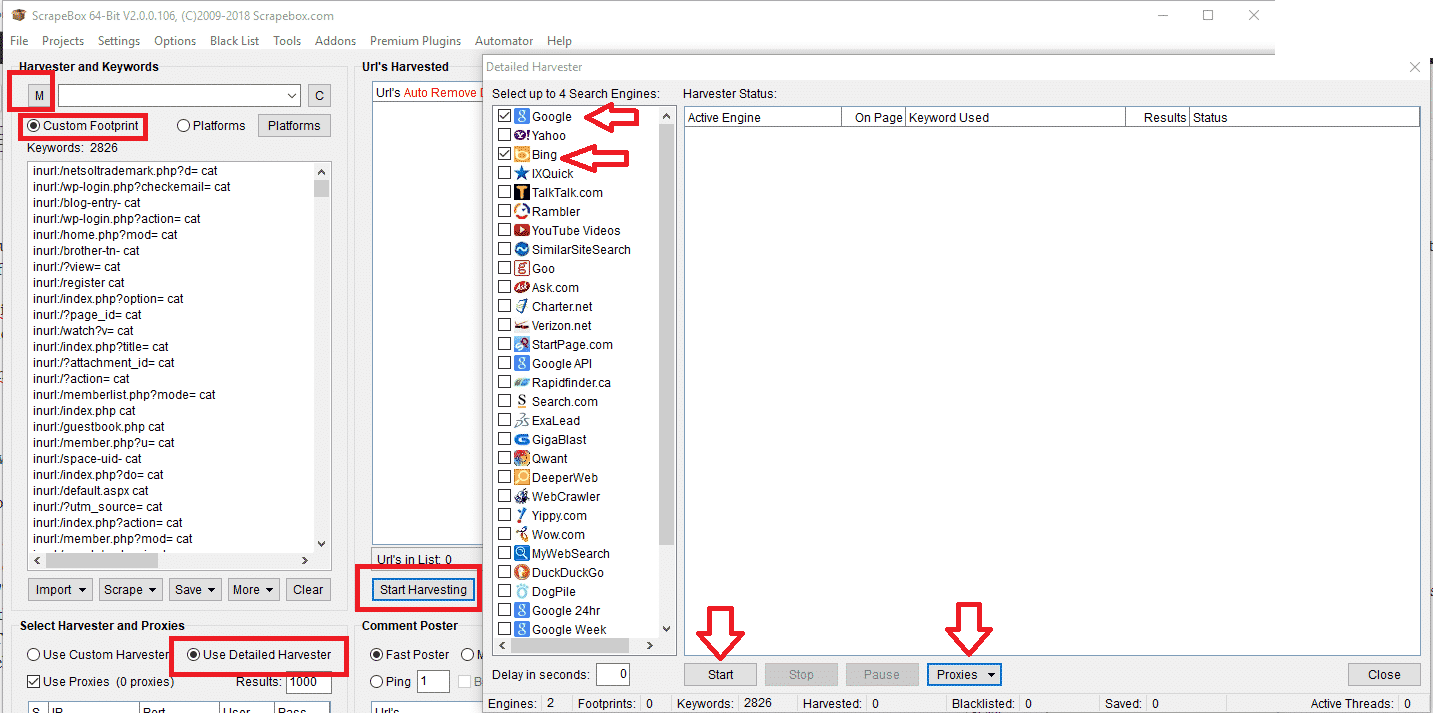
- Na janela principal do Scrapebox, selecione "Custom Footprints" (Pegadas personalizadas).
- Insira suas palavras-chave ou importe-as de um arquivo. Melhor usar palavras-chave relacionadas ao seu nicho, Você pode adicionar quantos quiser, mas quanto mais adicionar, mais tempo levará para extrair os dados.
- Em seguida, clique em “M” (que carrega suas pegadas e as mescla com as suas pegadas). Ao clicar em “M”, uma janela pop-up será aberta para selecionar um arquivo; aqui, você deve escolher a lista com as pegadas que você salvou do Xrumer.
- Isso irá agora mesclar as pegadas com as palavras-chave.
- Agora clique em COMECE A COLHEITA.
- Da lista de mecanismos de busca para extrair dados, sugiro que você use apenas o Bing e/ou o Google. Você pode experimentar outros mecanismos mais tarde, mas esses dois são os maiores e fornecerão mais resultados.
- Sob a Colheitadeira PROCURAÇÕES Na aba, selecione a opção: “Ativar carregamento automático (a partir de um arquivo)”, clique em “Selecionar arquivo de proxies para carregamento automático” e escolha o arquivo que contém todos os seus proxies.
- Clique COMEÇAR para iniciar a colheita.
- Para um guia detalhado sobre como usar o coletor Scrapebox, consulte este link: https://scrapeboxfaq.com/scraping
Com isso, concluímos este tutorial sobre como extrair dados para [nome da empresa/organização]. Pegadas do GSA Search Engine Ranker usando Xrumer. Espero que a publicação tenha sido útil. Se você tiver alguma dúvida sobre este processo, sinta-se à vontade para deixar um comentário ou entrar em contato comigo.












 English
  বাংলা
বাংলা  简体中文
简体中文  Nederlands
  Français
  Deutsch (Sie)
  हिन्दी
  Bahasa Indonesia
  Italiano
  日本語
日本語  한국어
한국어  Bahasa Melayu
  Português do Brasil
  Русский
  Español de México
  Tagalog
  ไทย
ไทย  Tiếng Việt
  اردو
اردو  Türkçe