


В марте 2024 года мы перенесли список ссылок Asia Virtual Solutions с Dropbox на Google Drive. Dropbox доставлял нам слишком много хлопот. Этот перенос решил проблему, но создал новую для клиентов: список приходит в виде... Только для просмотра Папка находится в разделе “Общие со мной”, и папки в этом разделе не отображаются в настольном приложении Google Drive, поэтому GSA Search Engine Ranker их не видит.
Есть способ обойти это, и он займет около двух минут. В этом руководстве подробно описана вся процедура настройки, а видеоинструкция находится чуть ниже, если вы предпочитаете посмотреть её.
Быстрый ответ
- Решение проблемы — всего одна заминка. Общая папка, находящаяся в разделе “Общий доступ”, невидима для Google Диска на рабочем столе. Перетащите её в... Моя поездка И вот оно.
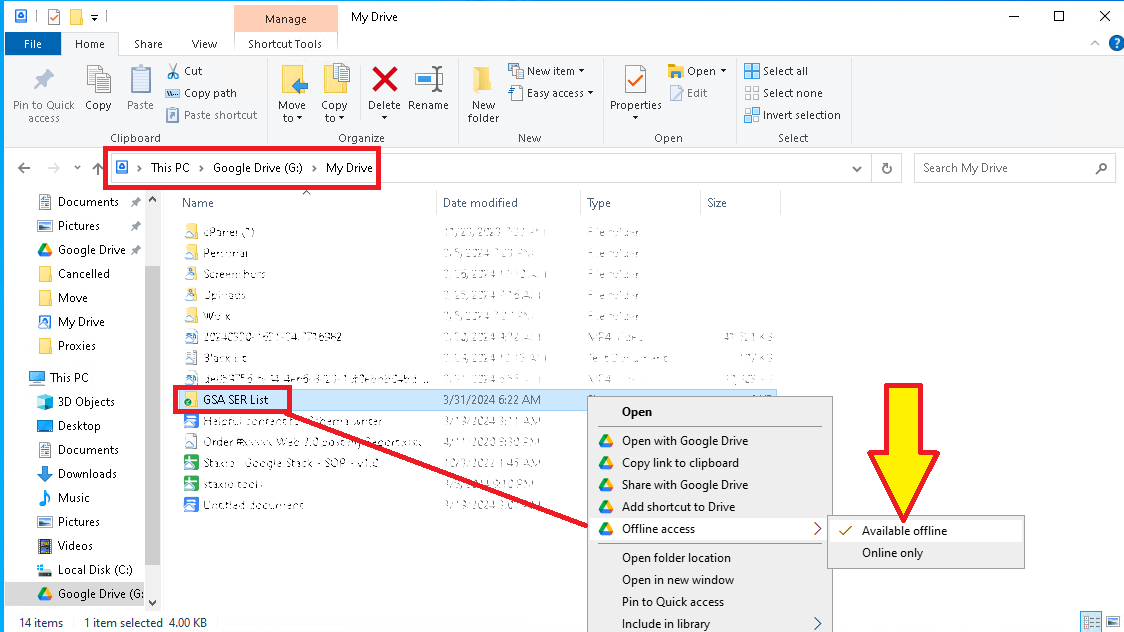
- Затем щелкните правой кнопкой мыши папку на рабочем столе Google Диска и установите для нее следующие параметры: Доступно в автономном режиме, Таким образом, файлы существуют на диске, а не только в облаке.
- В GSA SER: Параметры → Дополнительно → Списки сайтов, галочка Пользовательский список, клик Настройка, и укажите путь к папке.
- Доступ только для просмотра не является проблемой. GSA SER нужно только читать файлы.
- Дайте папке время синхронизироваться, прежде чем указывать на нее в GSA SER. Синхронизация большого списка происходит не мгновенно.
Что вам понадобится перед началом работы
- Ан Список ссылок Asia Virtual Solutions подписка
- GSA Search Engine Ranker
- A Аккаунт Google
- The Приложение Google Drive для настольных компьютеров, устанавливается на ПК или VPS, на котором работает GSA SER.

Видеообзор
Эти шаги предполагают, что вы уже заказали список ссылок. Если у вас еще нет учетной записи Google, сначала рассмотрим этот вопрос в разделе ниже.
Часть 1: Загрузка папки на диск
- Укажите свой адрес электронной почты Gmail на странице оформления заказа. Это должна быть учетная запись, которую вы используете для Google Диска, потому что именно с этого адреса мы предоставляем общий доступ к папке.
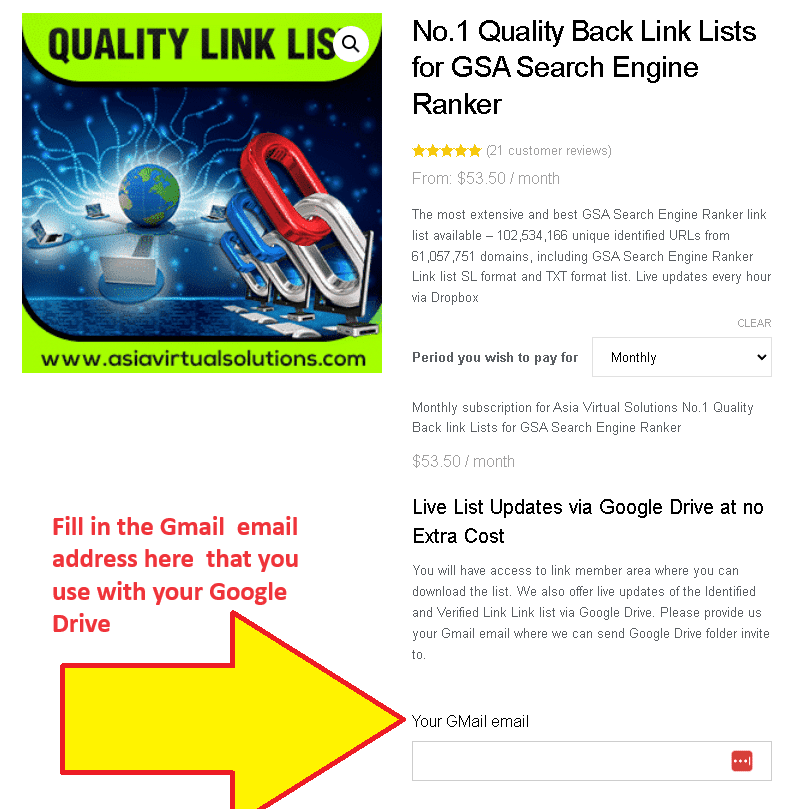
- Мы добавим ваш адрес в общую папку. Это делается вручную после получения вашего заказа, поэтому это не происходит мгновенно.
- Google отправляет вам электронные письма. Это означает, что папка была предоставлена вам в общий доступ.
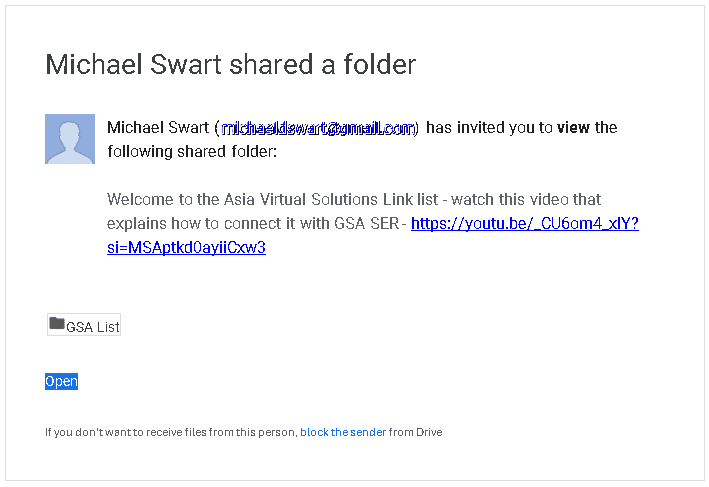
- Перейти к drive.google.com и открытый Поделился со мной.
- Найдите папку с названием СПИСОК GSA и выбирать Не открывайте его — щелкните по нему один раз, чтобы оно выделилось.
- Перетащите папку GSA LIST на Мой диск. В левой панели навигации. Именно этот шаг обеспечивает корректную работу всего остального: Google Диск для настольных компьютеров синхронизирует “Мой Диск”, но не синхронизирует раздел «Общий доступ».
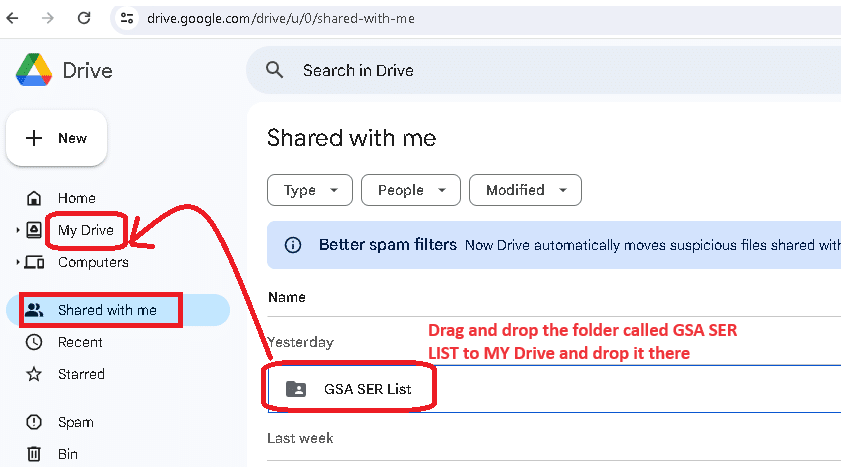
- Дождитесь синхронизации. Иди и приготовь кофе. Список дел большой, и он не будет готов за считанные секунды. Не продолжай, пока не перестанет работать приложение Drive.
- Если вы еще этого не сделали, установить Google Диск для настольных компьютеров на машине, на которой работает GSA SER — на вашем ПК, на вашем VPS или на обоих.
- Открыть Моя поездка в Google Диск на рабочем столе. Папка GSA LIST теперь должна быть там.
- Щелкните правой кнопкой мыши по GSA LIST → Автономный доступ → Доступно в автономном режиме. Без этого файлы представляют собой облачные заполнители, и GSA SER не может их прочитать.
Часть 2: Настройка GSA SER для указания папки
Внутри папки GSA LIST обычно находятся три папки: Оптимизированный Идентифицированный, site_list-identified и site_list-verified. Каждый из них добавляется в GSA SER отдельно, поэтому выберите тот, с которого хотите начать.
- Откройте нужную папку и скопировать его полный путь из адресной строки.
- В GSA SER перейдите по адресу Параметры → Расширенные настройки.
- Откройте Списки сайтов вкладка.
- Поставьте галочку рядом с Пользовательский список.
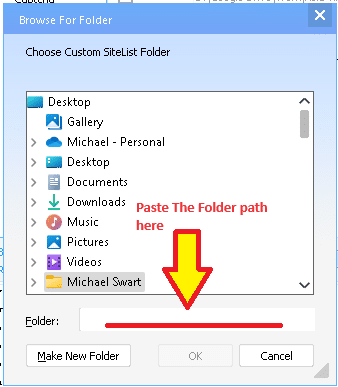
- Нажмите Настройка рядом со списком пользовательских настроек, затем Добавить в папку.
- Вставьте путь к папке. в поле "Папка" в открывшемся диалоговом окне.
- Нажмите ХОРОШО.
- Повторите действия, начиная с шага 11, для остальных папок, которые вы хотите использовать.
Вот и вся настройка. После этого папка обновляется автоматически, и GSA SER считывает всё, что в ней находится.

Если вы новичок в Google Диск
- Создайте учетную запись Google. если у вас его нет, то accounts.google.com/SignUp. Это бесплатно и работает со всеми сервисами Google.
- Откройте Google Диск в браузере. в drive.google.com.
- Установите Drive для настольного компьютера от google.com/drive/download. Именно эта часть важна для GSA SER — одной лишь версии браузера недостаточно.
- Мобильные приложения доступны для iOS и Android Если вы хотите проверить папку со своего телефона.
Внешние ссылки
- Центр поддержки Google Диска — официальная документация, и с нее следует начать, если синхронизация Drive Desktop не работает.
- Официальный сайт GSA Search Engine Ranker — Собственная страница продукта и документация разработчика.
- Как использовать Asia Virtual Solutions Link List — Что делать со списком после того, как его увидит GSA SER?.
- Документация по API Google Drive — для тех, кто хочет автоматизировать этот процесс, вместо того чтобы просто кликать мышкой.
Часто задаваемые вопросы
Папка GSA LIST не отображается на рабочем столе Google Диска. Что я упустил?
Практически наверняка это шаг 6. Папка, которая всё ещё находится в разделе “Общий доступ”, вообще не синхронизируется с рабочим столом Google Диска. Откройте Google Диск в браузере, выберите папку GSA LIST в разделе “Общий доступ” и перетащите её в меню «Мой Диск» в левой панели навигации. После синхронизации она появится на рабочем столе Google Диска.
Папка существует, но GSA SER не находит в ней ни одного сайта.
Возможны две причины. Либо синхронизация папки не завершилась, либо она не настроена должным образом. Доступно в автономном режиме — Без этого Drive сохраняет файлы в качестве облачных заполнителей, и GSA SER видит пустую папку. Щелкните правой кнопкой мыши папку на рабочем столе Drive, выберите «Автономный доступ», затем «Доступно в автономном режиме» и дождитесь завершения процесса.
Препятствует ли доступ только для просмотра использованию списка службой GSA SER?
Нет. GSA SER только читает файлы, никогда не записывает в них данные, поэтому ей достаточно доступа на чтение. Режим «Только для просмотра» установлен нами намеренно — это предотвращает изменение списка, которым пользуются все клиенты, одним клиентом.
Какую из трех папок мне следует использовать?
site_list-verified holds URLs where a link was successfully placed, so it is the smallest and the highest quality — start there. site_list-identified Он значительно больше и включает в себя цели, признанные GSA SER, но не обязательно указанные в них. Оптимизированный Идентифицированный Это идентифицированный список, из которого удалены балластные элементы. Вы можете добавить все три; GSA SER обработает их.
Сколько времени занимает первая синхронизация?
Это гораздо длиннее, чем вы ожидаете. Речь идёт о миллионах URL-адресов в тысячах файлов, и всё это на VPS При слабом интернет-соединении первая синхронизация может занять некоторое время. Дождитесь её завершения, прежде чем указывать GSA SER на папку, иначе GSA SER будет считывать список, заполненный лишь наполовину.
Как часто обновляется этот список?
Общая папка Google Диска обновлена. один раз в день. Because it syncs on its own, you never need to download anything again after the initial setup — GSA SER simply reads whatever is currently in the folder. As of 21 October 2026 the list holds 92,965,773 identified URLs and 5,507,642 verified URLs.
Мне нужна собственная учетная запись Google, или я могу использовать вашу?
Ваша собственная. Мы предоставляем доступ к папке только на тот адрес Gmail, который вы укажете на странице заказа, поэтому это должен быть аккаунт, который вы контролируете. Подойдет и бесплатный аккаунт Google.
Можно ли установить это на нескольких компьютерах?
Да. Установите Drive для настольных компьютеров на каждый ПК или VPS, войдите в систему с одной и той же учетной записью Google и установите для папки режим «Доступна в автономном режиме» на каждом из них. Шаг с перетаскиванием папки в «Мой диск» нужно выполнить только один раз, поскольку он применяется к учетной записи, а не к компьютеру.
Ничего не пришло, хотя я сделал заказ довольно давно.
Адрес Gmail добавляется в общую папку вручную, поэтому после оформления заказа может быть задержка. Убедитесь, что адрес, который вы указали на странице заказа, совпадает с адресом, привязанным к вашему Google Диску — обычно это происходит из-за опечатки или несовпадения адресов. Напишите нам, и мы разберемся.
Получите список ссылок Asia Virtual Solutions
Список предоставляется в собственном формате SL от GSA SER и в виде обычного текстового файла (TXT), и после настройки папки на Диске он автоматически обновляется без вашего участия. Вот как он выглядит сейчас:
| Выявлены уникальные URL-адреса. | 92,965,773 |
|---|---|
| Выявлены уникальные домены. | 21,050,497 |
| Проверено - уникальные URL-адреса | 5,507,642 |
| Проверено - уникальные домены | 114,416 |
Figures as of 21 October 2026. Duplicate URLs and duplicate domains removed.
Список ссылок Asia Virtual Solutions
Данное руководство распространяется через общую папку Google Диска, поэтому оно остается актуальным на каждом вашем компьютере.




 English
  简体中文
简体中文  Deutsch (Sie)
  Bahasa Indonesia
  Italiano
  日本語
日本語  한국어
한국어  Português do Brasil
  Русский
  Español de México
  ไทย
ไทย  Tiếng Việt
  Türkçe