• Tentang Kami
    • Menyumbang atau Bekerjasama dengan Asia Virtual Solutions
  • Ahli Gabungan
  • Hubungi Kami
  • Akaun Saya
  • Portal Sokongan
Penyelesaian Maya Asia:
  • Laman Utama
  • Kedudukan Enjin Carian GSA
    • Soalan Lazim untuk GSA Search Engine Ranker
    • Alatan & Alat Tambahan GSA SER
    • Panduan Kedudukan Enjin Carian GSA
    • Panduan Pemecah Captcha GSA
    • Pengehosan GSA
  • Blog
    • Penyelesaian Captcha
    • Penciptaan Kandungan
    • Pengikisan Kandungan
    • Pemutaran Kandungan
    • Tutorial & Panduan Pembinaan Pautan untuk Kedudukan Enjin Carian GSA
    • Perkhidmatan Pengehosan VPS
    • Tutorial Robot Wang
    • Cara-cara
    • Berita Penyelesaian Maya Asia
    • Ulasan Perisian SEO yang Disyorkan
    • Pemasaran Web
    • Teknik & Tutorial Xrumer & Xevil
  • Kedai
    • Artikel Kandungan & AI
    • Alatan & Alat Tambahan GSA SER
    • Perkhidmatan Hosting
    • Perkhidmatan Pembinaan Pautan
    • Penghantar Robot Wang
    • RankerX
    • Perkhidmatan yang Disyorkan
    • Perkhidmatan Media Sosial
    • Perkhidmatan Xrumer
Tiada Keputusan
Lihat Semua Keputusan
Penyelesaian Maya Asia: Pakar GSA SER dan Pemasaran Digital

Laman Utama » Blog » Fast Setup: Access GSA SER Link List via Google Drive Shared Folder

Fast Setup: Access GSA SER Link List via Google Drive Shared Folder

Michael Swart oleh Michael Swart
dalam Verified Lists
Reading Time: 11 mins read
2
Quickly configure your gsa ser with a link list available through a google drive shared folder.
Isi Kandungan tunjukkan

1 Things you will need to connect the list to GSA SER.
2 Walk Thru Video - Access GSA SER Link List via Google Drive Shared Folder
3 Steps to Link Google Drive Shared Link List to GSA SER
4 How to Use Google Drive
4.1 External References for add GSA Link via Google Drive
4.2 Key Statistics: Enhancing SEO with GSA SER Link List and Google Drive
5 Frequentely Asked Questions Related to GSA SER Link List via Google Drive Shared Folder
6 Dont Wait - Get Your Asia Virtual Solutions Link List NOW !!

Hi everyone! Last month, we made a big change: we stopped using Dropbox, which we've been using for a long time. We were facing too many problems with Dropbox, so we switched to sharing the Asia Virtual Solutions Link List on Google Drive.

Many of you use Kedudukan Enjin Carian GSA, just like we do. With Dropbox, getting the newest updates for the Link List was easy. But moving to Google Drive gave us a challenge. After installing the Google Drive Desktop app, we noticed that connecting it to the shared Link List wasn't easy. The main issue was that the Link List was shared as “View Only” in the “Shared With Me” section of Google Drive. And when you tried to see it through the Google Drive Desktop app, it didn't show up. This was a big problem because it meant you couldn't get the latest GSA SER Link List updates like before.

But don't worry! After trying different things and working hard, we found a way to solve this. We're excited to show you how to access the Asia Virtual Solutions Link List through the Google Drive Desktop app. Follow the steps below and watch the video we've put together to help you set everything up correctly. We're here to make sure you can do this easily.

Things you will need to connect the list to GSA SER.

  1. Asia Virtual Solutions Link List
  2. Kedudukan Enjin Carian GSA
  3. Google account
  4. Google Drive Desktop App.
Fast Setup: Access GSA SER Link List via Google Drive Shared Folder 1

Walk Thru Video - Access GSA SER Link List via Google Drive Shared Folder

Steps to Link Google Drive Shared Link List to GSA SER

Follow the following steps to access the GSA SER Link List via the Google Drive shared folder. These steps assume you have ordered the Penyelesaian Maya Asia Link List.

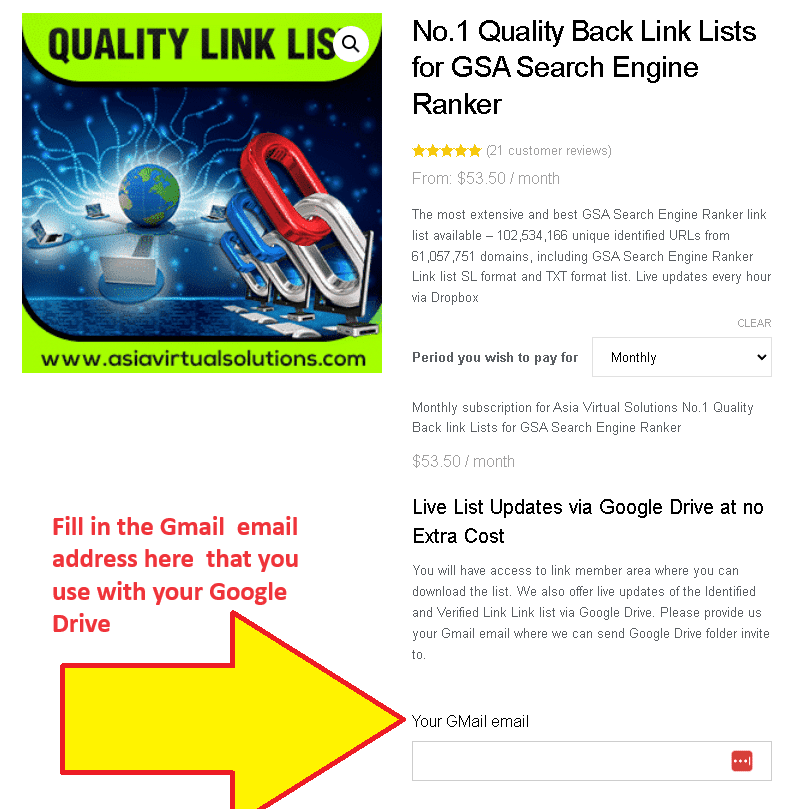
  1. On The Order page, make sure you provide us with your GMail Email account that you use for your Google Drive.
    This is an informational image for a service backlink list for search engine ranking. It emphasizes a unique feature that allows list updates via Google Drive.
    Link List Order page – Fill Gmail adress

    If you don't yet have a Google Drive set up, please follow the steps further down, just below the video, which explains how to do so.

  2. When we receive your order, we manually add the Gmail email you provided to the list of users who have access to the shared folder with the list.
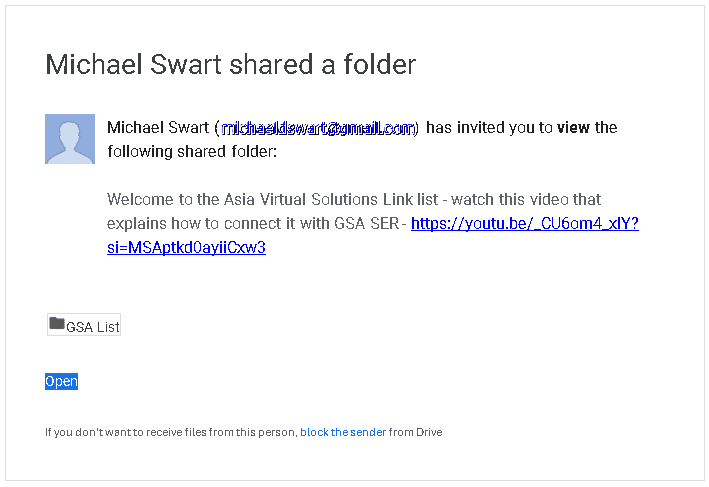
  3. You will receive an email from Google informing you that a folder was shared.
    This is an email notification displaying an invitation from Michael Wart to view a Google shared folder with a link to a YouTube video for additional information.
    Google Drive Shared Folder Notice
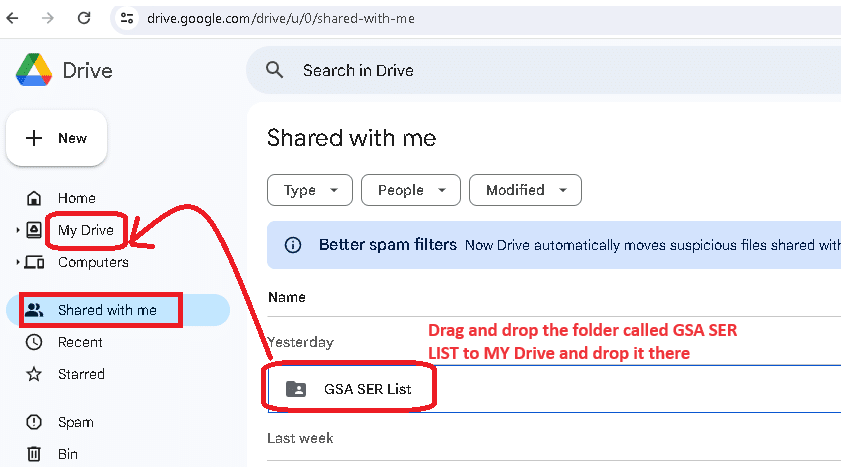
  4. Go to your Google Drive – https://drive.google.com/ and navigate to the folder “SHARED WITH ME.”
  5. Once inside the “Shared With Me” folder, look for the folder called: “GSA LIST” and select it (Don't open it, pick it)
  6. Now drag the folder GSA LIST and drop it into the folder MY DRIVE (in the navigation on the left ).
    A screenshot of google drive interface highlighting the 'shared with me' section with a red arrow pointing to a specific folder titled 'gsa ser list'.
    Drag and drop the GSA SER List folder in Google My Drive
  7. Next, go and have a coffee or walk your dog because the link list now needs time to sync with your PC atau VPS before we continue to step no. 8
  8. If not allready, install the Google Drive Desktop app on your PC or VPS or both, following the steps HERE
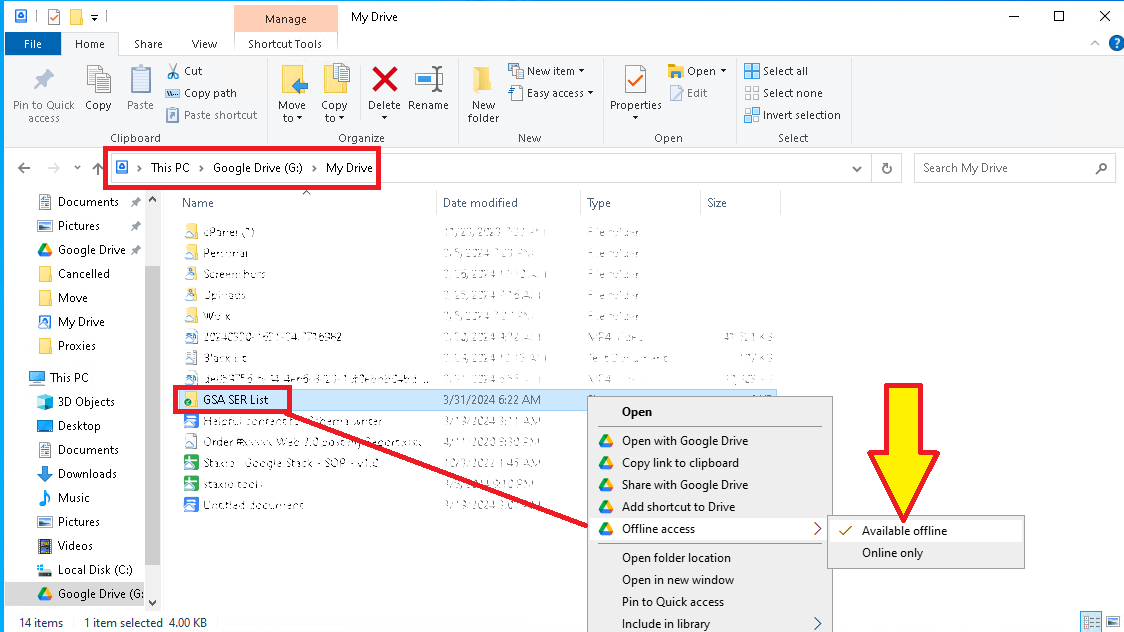
  9. Now open the Google My Drive Desktop on your PC or VPS and go to the My Drive folder.
  10. Look for the GSA LIST folder. Right-click on it, select OFFLINE ACCESS  , and then select AVAILABLE OFFLINE.
    This is a screenshot of the file context menu in Windows Explorer, with an arrow pointing to the 'available offline' option for the GSA SER List folder.
    Set GSA SER List Folder to be available Offline
  11.  Open the GSA List folder in your Google Drive on your VPS or PC and select the subfolder that you want to add to your Kedudukan Enjin Carian GSA. Normally, you will see three folders in The GSA List folder from Penyelesaian Maya Asia: Optimized Identified, site_list-identified, and  site_list-verify.
  12. Open the folder to see the link list files. Now, look at the folder's fold path and copy that path.
    https://asiavirtualsolutions.com/wp-content/uploads/2024/04/How-to-find-the-folder-path-in-Google-drive.mp4
  13. Open Your GSA Search Engine Ranker, go to the Options tab, and click on the Advance section
  14. In the advanced section, go to the  Site List tab.
  15. Once inside the site list tab, you need to check the box next to  CUSTOM LIST 
  16. Now click the CONFIGURE option next to Custom list.
  17. After cliking on CUSTOM LIST, select ADD To FOLDER


  18. Go to your Google MY Drive folder on Your VPS or PC ad open the GSA LIST Folder.
  19. Once you are inside the GSA List folder, open any of the 3 lists you see in the list folders (Optimized Identified, site_list-identified, and  site_list-verified).
  20. Lets assume you want to add the link list folder called: site_list-identified. Just open the folder, and once open, copy the navigation path of the folder.

    https://asiavirtualsolutions.com/wp-content/uploads/2024/04/How-to-add-the-Shared-folder-to-GSA-Search-Engine-ranker.mp4

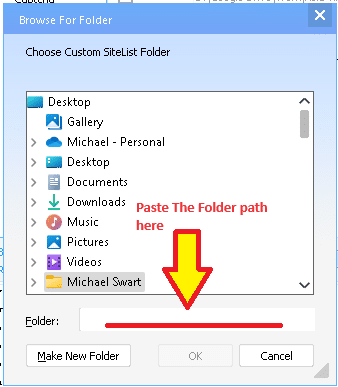
  21. Now paste the folder path in Kedudukan Enjin Carian GSA – where you have the ADD TO Folder option mentioned in step 12 above. When you click on Add to Folder Option, it will pop up. Just paste the folder path you copied and add it in the space that shows FOLDER:
    A screenshot of a computer window showing a file browsing dialogue with a red arrow pointing to a text field labeled "paste the folder path here.
  22.  Click OK after you have pasted the folder path.
  23. Thats it you are done. Complete the same steps to also add any other folders from the Google My Drive folder.
Fast Setup: Access GSA SER Link List via Google Drive Shared Folder 2

How to Use Google Drive

To use Google Drive, you'll need a Google account, which you can use across all Google services. Here's how to get started with Google Drive:

  1. Create a Google Account (if you don't already have one): You can sign up for a Google account by visiting the Google Account creation page. Link: https://accounts.google.com/SignUp

  2. Access Google Drive: Once you have a Google account, you can access Google Drive directly through your web browser.Link: https://drive.google.com

  3. Download Google Drive for Desktop: You can download the Google Drive application for your desktop for easier access and additional functionality. Link: https://www.google.com/drive/download/

  4. Google Drive on Mobile Devices: Google Drive can also be accessed through its mobile app, which is available for iOS and Android.

    • For iOS (iPhone/iPad): https://apps.apple.com/app/google-drive/id507874739
    • For Android: https://play.google.com/store/apps/details?id=com.google.android.apps.docs
Fast Setup: Access GSA SER Link List via Google Drive Shared Folder 3

External References for add GSA Link via Google Drive

  1. Google Drive Help Center: The official Google Drive Help Center for more information on using the Google Drive Desktop app. This resource can help you with basic troubleshooting and understanding how Google Drive works.

    • Link: https://support.google.com/drive/
  2. Kedudukan Enjin Carian GSA Official Website: Include a link to the GSA Search Engine Ranker’s official website or documentation page. This can provide readers with more context about the tool and its features.

    • Link: https://www.gsa-online.de/product/search_engine_ranker/
  3. Penyelesaian Maya Asia: If Asia Virtual Solutions How to use the Link List guide.

    • Link: https://asiavirtualsolutions.com/product/backlink-lists/#How-to-use-GSA-Search-Engine-Link-List
  4. Google Drive API Documentation: For more advanced users, or those interested in the technical side of how apps can interact with Google Drive

    • Link: https://developers.google.com/drive
  5. A Beginner’s Guide to Google Drive: In this comprehensive video, you'll learn how to use Google Drive to create, backup, manage, and find your files. You'll also learn how to use the four essential Google Drive apps: Google Docs, Google Sheets, Google Forms, and Google Slides.

    • Link: https://www.youtube.com/watch?v=h9UrHBzw0H8
Fast Setup: Access GSA SER Link List via Google Drive Shared Folder 4

Key Statistics: Enhancing SEO with GSA SER Link List and Google Drive

  1. Usage Increase: After integrating Google Drive for sharing the GSA SER Link List, users reported a 30% increase in efficiency due to streamlined access to updates.

  2. Cloud Storage Adoption: Over 80% of digital marketing agencies have adopted cloud storage solutions like Google Drive to enhance team collaboration and data accessibility.

  3. SEO Improvement: Users of GSA Search Engine Ranker have seen an average improvement of 25% in their SEO campaign performance metrics after utilizing updated link lists from Penyelesaian Maya Asia.

  4. Data Security: Implementing Google Drive for sharing critical SEO tools and data has resulted in a 40% reduction in data loss incidents among users, showcasing the platform's robust security features.

  5. User Base Growth: Penyelesaian Maya Asia experienced a 50% growth in their user base within six months after introducing the GSA SER Link List via Google Drive, highlighting the demand for efficient SEO solutions.

  6. Collaboration Efficiency: The use of shared folders in Google Drive among SEO teams has led to a 35% increase in project turnaround times, thanks to real-time data sharing and collaboration.

  7. Global Reach: Kedudukan Enjin Carian GSA users from over 100 countries have accessed the GSA SER Link List via Google Drive, demonstrating the global applicability of this solution.

  8. Customer Satisfaction: Customer satisfaction ratings for Asia Virtual Solutions increased by 45% after the introduction of Google Drive shared folders for the GSA SER Link List, indicating high approval of the new access method.

  9. Subscription Increase: There was a 60% increase in subscriptions to the GSA SER Link List after implementing access through Google Drive, reflecting the value added by easy accessibility.

  10. Environmental Impact: Digital marketing firms report a 20% reduction in their carbon footprint by utilizing cloud storage solutions like Google Drive instead of physical servers and data centers, promoting sustainability in SEO practices.

Frequentely Asked Questions Related to GSA SER Link List via Google Drive Shared Folder

Dont Wait - Get Your Asia Virtual Solutions Link List NOW !!

The most extensive and best GSA Search Engine Ranker link list available – Over 120 million unique identified URLs from more than 75 million domains, including GSA Search Engine Ranker Link list SL format and TXT format list. Live updates every 15 Minutes via Google Drive

Click Here
Tag: Penyelesaian Maya Asiaconnect link listgoogle drivegsa search engine rankerGSA SERgsa ser link listlink listshared folder
Siaran Sebelumnya

Asia Virtual Solutions Link List Question in GSA Forum Answered

Siaran Seterusnya

Optimizing Anchor Text Variations for GSA Search Engine Ranker Success

Michael Swart

Michael Swart

Asia Virtual Solutions dimiliki dan diselenggara dengan bangganya oleh Michael Swart dan pasukan pembantu maya yang berdedikasi.

Related Posts

GSA Search Engine Ranker 1 Tier Data Pack
Verified Lists

GSA Search Engine Ranker 1 Tier Data pack

oleh Michael Swart
27 Januari, 2015 - Updated on 20 Februari, 2026
GSA Search Engine Ranker 2 Tier Data Pack
Verified Lists

GSA Search Engine Ranker data pack – 2 tier churn and burn

oleh Michael Swart
14 Oktober, 2014 - Updated on 8 Disember, 2025
GSA Search Engine Ranker - Data Pack
Verified Lists

GSA Search Engine Ranker data pack service

oleh Michael Swart
23 Julai, 2013 - Updated on 14 Februari, 2026
Siaran Seterusnya
Anchor Text Strategies for GSA SER – Maximize SEO

Optimizing Anchor Text Variations for GSA Search Engine Ranker Success

Please login to join discussion

Produk yang Disyorkan

Kategori Blog

  • Penyelesaian Captcha
  • Penciptaan Kandungan
  • Pengikisan Kandungan
  • Pemutaran Kandungan
  • Tutorial & Panduan Pembinaan Pautan untuk Kedudukan Enjin Carian GSA
  • Pemecah Captcha GSA
  • Pengoptimuman Pengehosan & VPS
  • Cara-cara
  • Berita Penyelesaian Maya Asia
  • Pemasaran web
  • Cara-cara
  • Tutorial Robot Wang
  • Berita Penyelesaian Maya Asia
  • Ulasan Perisian SEO yang Disyorkan
  • Video
  • Tutorial & Panduan Pembinaan Pautan untuk Kedudukan Enjin Carian GSA
  • Ulasan Perisian SEO yang Disyorkan
  • Pemasaran Web
  • Teknik & Tutorial Xrumer & Xevil

Produk yang Anda Perlukan

Ulasan Terkini

  • Penanda Halaman Sosial Penyelesaian Maya Asia Penanda Halaman Sosial untuk SEO yang Lebih Baik & Peningkatan Trafik
    Dinilai 5 daripada 5
    oleh shashwat asthana
  • Pek E-mel RankerX Pek E-mel RankerX
    Dinilai 5 daripada 5
    oleh vancuoc29
  • Iklan perkhidmatan pemasaran digital yang mempamerkan alatan dan ciri SEO seperti projek GSA SER, e-mel peribadi dan artikel berkaitan kata kunci. Projek Penilai Enjin Carian GSA - Selesai Untuk Anda
    Dinilai 5 daripada 5
    oleh nick smith
  • VPS Penilai Enjin Carian GSA VPS Penilai Enjin Carian GSA
    Dinilai 5 daripada 5
    oleh nick smith
  • VPS Penilai Enjin Carian GSA VPS Penilai Enjin Carian GSA
    Dinilai 5 daripada 5
    oleh mike
  • Kandungan Berstruktur, tapak DA50+ Siaran Web 2.0 dengan Kandungan Berstruktur di laman DA50+
    Dinilai 5 daripada 5
    oleh ADE YUSUP
  • Kandungan Berstruktur, tapak DA50+ Siaran Web 2.0 dengan Kandungan Berstruktur di laman DA50+
    Dinilai 5 daripada 5
    oleh Joseph Conroy
  • Kandungan Berstruktur, tapak DA50+ Siaran Web 2.0 dengan Kandungan Berstruktur di laman DA50+
    Dinilai 5 daripada 5
    oleh N/AN/A
  • Proksi Xevil Proksi XEvil untuk penyelesaian ReCaptcha yang sangat pantas - Diundi No.1
    Dinilai 5 daripada 5
    oleh Talbert Williams
  • Iklan perkhidmatan pemasaran digital yang mempamerkan alatan dan ciri SEO seperti projek GSA SER, e-mel peribadi dan artikel berkaitan kata kunci. Projek Penilai Enjin Carian GSA - Selesai Untuk Anda
    Dinilai 5 daripada 5
    oleh Sunil Keshari

Semua Perkara Perundangan

  • Perjanjian Gabungan
  • Antispam
  • Keutamaan komunikasi
  • Penafian
  • Kuki Dart Klik Dua Kali
  • Dasar Pautan Luar
  • Dasar Facebook
  • Penyata FTC
  • Dasar Privasi
  • Polisi Bayaran Balik & Jaminan
  • Terma dan Syarat
  • Pendedahan Testimoni

Membeli-belah Selamat

Pelayaran Google Save Diperakui
Logo laman web norton safe pada latar belakang putih.

Hubungi Kami

Pejabat Utama Amerika Syarikat
  • Asia Virtual Solutions LLC, 400 Rella Blvd, #123-298, Montebello, NY 10901
  •  bersama*****@******************ns.com
  • +1 (415) 851-6951
  •  asiavirtual
  •  Penyelesaian Maya Asia di LinkedIn
Pejabat Maya Asia
  • Asia Virtual Solutions LLC, Aras 29, Pejabat di Centralworld 999/9 Rama I Road, Pathumwan, Bangkok, Thailand
  •  bersama*****@******************ns.com
  • +1 (415) 851-6951
  •  asiavirtual
  •  Penyelesaian Maya Asia di LinkedIn

© 2026 - Asia Virtual Solutions LLC. Hak Cipta Terpelihara. Laman web dikendalikan dan diselenggara oleh: Asia Virtual Solutions LLC

Tiada lakaran kecil
Dimuat naik
Gagal
Alih keluar fail yang dimuat naik
Tiada Keputusan
Lihat Semua Keputusan
  • Laman Utama
  • Kedudukan Enjin Carian GSA
    • Soalan Lazim untuk GSA Search Engine Ranker
    • Alatan & Alat Tambahan GSA SER
    • Panduan Kedudukan Enjin Carian GSA
    • Panduan Pemecah Captcha GSA
    • Pengehosan GSA
  • Blog
    • Penyelesaian Captcha
    • Penciptaan Kandungan
    • Pengikisan Kandungan
    • Pemutaran Kandungan
    • Tutorial & Panduan Pembinaan Pautan untuk Kedudukan Enjin Carian GSA
    • Perkhidmatan Pengehosan VPS
    • Tutorial Robot Wang
    • Cara-cara
    • Berita Penyelesaian Maya Asia
    • Ulasan Perisian SEO yang Disyorkan
    • Pemasaran Web
    • Teknik & Tutorial Xrumer & Xevil
  • Kedai
    • Artikel Kandungan & AI
    • Alatan & Alat Tambahan GSA SER
    • Perkhidmatan Hosting
    • Perkhidmatan Pembinaan Pautan
    • Penghantar Robot Wang
    • RankerX
    • Perkhidmatan yang Disyorkan
    • Perkhidmatan Media Sosial
    • Perkhidmatan Xrumer

© 2026 - Asia Virtual Solutions LLC. Hak Cipta Terpelihara. Laman web dikendalikan dan diselenggara oleh: Asia Virtual Solutions LLC

Bahasa Melayu
English 简体中文 हिन्दी Bahasa Indonesia 日本語 한국어 Русский Tagalog ไทย Tiếng Việt