


Gunakan Xrumer untuk menemukan jejak untuk pengambilan data daftar tautan GSA Search Engine Ranker.
Saya mengenal beberapa pengguna GSA Search Engine Ranker yang juga memiliki salinan Xrumer. Beberapa membelinya sudah lama, dan beberapa baru mendapatkannya baru-baru ini. Pemecah Captcha Xevil telah ditambahkan ke Xrumer..
Xrumer secara tradisional memiliki kurva pembelajaran yang menantang, dan sebagian besar pengguna tidak memahami secara tepat bagaimana cara kerjanya atau untuk apa beberapa fungsi tersebut digunakan.
Dalam postingan ini, saya akan membagikan fungsi praktis di dalam Xrumer yang dapat digunakan untuk mengekstrak jejak (footprint) dari daftar tautan yang sudah ada, yang kemudian dapat Anda gunakan untuk mengikis daftar tautan tambahan. Pemeringkat Mesin Pencari GSA. Fungsi yang akan saya tunjukkan kepada Anda di Xrumer disebut “Analisis Pola Tautan.”
Sebelum kita mulai membahas cara mengekstrak footprint, mari kita lihat sekilas apa sebenarnya footprint itu dan untuk apa footprint akan digunakan.
Apa itu Jejak Kaki (Secara Singkat):
Jejak (footprint) adalah potongan kode atau konten yang ditemukan dalam kode atau konten situs web. Misalnya, saat Anda membuat sebuah WordPress Di situs Anda, Anda akan selalu menemukan "Powered by WordPress" di bagian bawah situs (kecuali jika Anda telah menghapusnya secara manual). Setiap sistem manajemen konten (CMS) akan memiliki jejaknya sendiri dalam kode konten, struktur URL, atau situs. Jadi, ketika Anda ingin melakukan scraping tautan, Anda memberi tahu Google untuk mencari situs yang berisi teks tertentu di URL, judul, atau konten situs.
Tanpa perlu membahas detailnya, Anda perlu memahami tiga operator pencarian dasar berikut:
Inurl: – Ini akan mencari situs dengan kata atau jalur tertentu di URL situs tersebut. Contoh: inurl:apple
Judul: – Ini akan mencari teks tertentu dalam judul situs. judul:apel
Lokasi: – Ini akan mencari domain/URL/tautan dari domain yang ditentukan, ccTLD, dll. situs:apple.com
Untuk daftar yang lebih rinci dari semua jenis Operator Pencarian Google, Saya sarankan Anda melihat situs ini: https://ahrefs.com/blog/google-advanced-search-operators/
Saksikan video tutorial langkah demi langkah di bawah ini yang menunjukkan semua langkah yang harus diikuti di GSA SER, Xrumer, dan juga Scrapebox.
Cara mempersiapkan Daftar Peringkat Mesin Pencari GSA Anda untuk jejak digital. ekstraksi:
Pertama, kita membutuhkan sebuah daftar tautan yang dapat kita masukkan ke Xrumer. Untuk Pemeringkat Mesin Pencari GSA”Para pengguna GSA Search Engine Ranker, daftar yang ingin Anda gunakan untuk mengekstrak lebih banyak jejak haruslah daftar tautan terverifikasi Anda karena Anda tahu bahwa GSA SER berhasil membangun tautan di situs tersebut. Jadi, kami ingin mendapatkan jejak dari daftar terverifikasi agar kami dapat melakukan scraping untuk situs-situs serupa.”.
Anda dapat memilih salah satu file dalam daftar Terverifikasi Anda jika Anda HANYA ingin mengambil jejak (footprint) dari platform tertentu. Misalnya, jika Anda hanya membutuhkan jejak untuk WordPress. Artikel direktori, maka Anda akan menggunakan file yang bernama: sitelist_Article-Artikel WordPress, atau jika Anda ingin mengambil data dari situs Media Wiki, gunakan file ini: sitelist_Wiki-MediaWiki
Jika Anda ingin memeriksa jejak kaki di semua daftar terverifikasi, maka kita perlu melakukan 2 hal terlebih dahulu;
- Gabungkan semua file yang telah diverifikasi menjadi satu file tunggal.
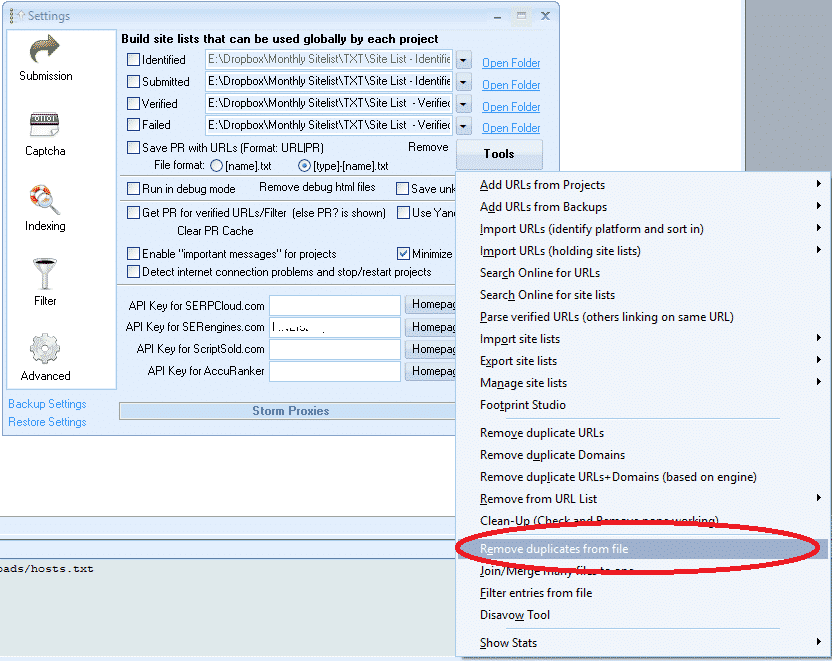
- Setelah Anda menggabungkannya, Anda perlu menghapus domain yang duplikat.
Untungnya, GSA Search Engine Ranker memiliki alat untuk mempermudah langkah-langkah di atas.
Pastikan Anda menonton video YouTube yang terlampir dan disematkan dalam postingan ini untuk memahami cara menggunakan 2 fungsi di bawah ini.
[full_width][one_half padding=”0 10px 0 0″]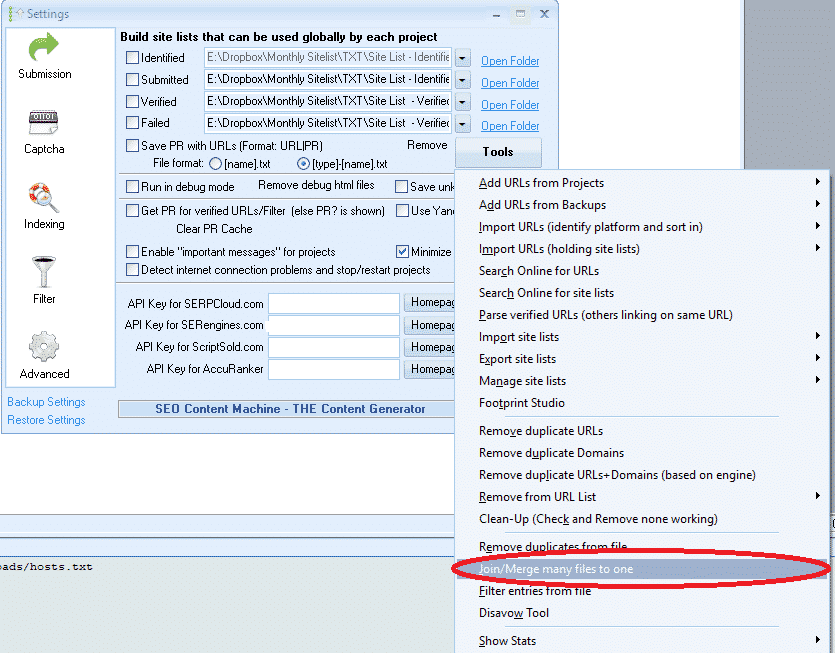 [/one_half][one_half padding=”0 0 0 10px”]
 [/setengah][/lebar_penuh]
Bagaimana cara kita mengekstrak footprint menggunakan Xrumer?
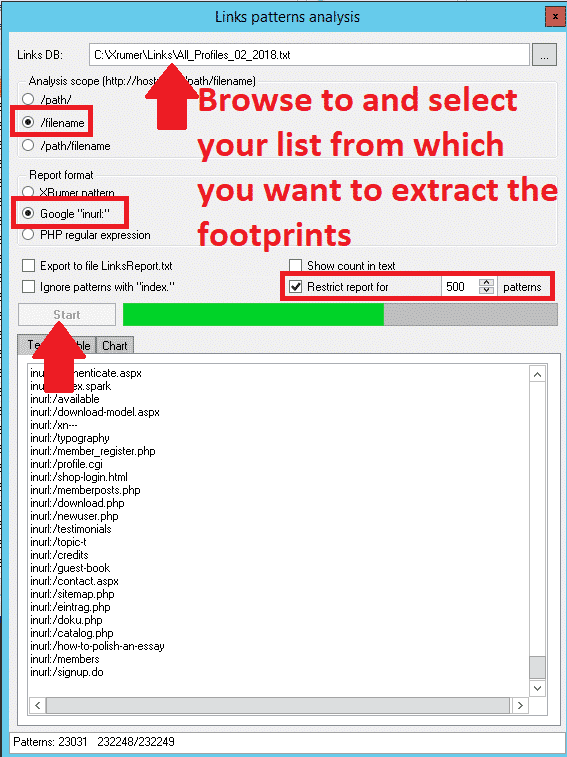
Oke, jadi sekarang Anda telah menyiapkan daftar dari mana Anda ingin mengekstrak jejak kaki, dan akhirnya kita bisa mulai. Xrumer bagian dari mengekstraksi jejak, atau seperti yang disebut Xrumer, melakukan "Analisis Pola Tautan".
Ikuti langkah-langkah sederhana di bawah ini untuk melakukan ekstraksi.
- Pada Anda Xrumer Menu, telusuri ke “Peralatan."”
- Dari daftar tarik-turun, pilih “Analisis Pola Tautan”
- Di bagian atas layar analisis Pola Tautan, telusuri ke tempat Anda menyimpan daftar tautan dari mana Anda ingin mengekstrak jejak kaki (footprint).
- Untuk Lingkup AnalisisSaya sarankan untuk memilih “/nama file” karena itu akan memberikan hasil yang paling banyak. Tetapi saya juga menyarankan untuk mencoba opsi lain, yang akan memberikan hasil tambahan.
- Di bawah "“Format Laporan,” Anda ingin memilih Google “di URL“
- Dari 4 kotak centang berikutnya, centang hanya opsi: “Batasi Laporan Untuk”lalu ubah ke pengaturan default. 1000 hasil
- Klik Awal
- Setelah selesai, di tempat yang tertulis: TEKS | TABEL | BAGAN — Pilih tab: Teks
- Pilih semua dan SALIN semua hasilnya, buka file notepad, dan tempelkan di sana. Simpan dengan nama apa pun yang Anda inginkan.
- Sekarang Anda dapat menelusuri daftar tersebut dan menghapus jejak yang tidak Anda inginkan, seperti kata kunci. Jika Anda tidak yakin apa yang harus dihapus, biarkan saja semuanya.
[full_width][one_half padding=”0 10px 0 0″]
 [/one_half][one_half padding=”0 0 0 10px”]
 [/setengah][/lebar_penuh]
Google baik untuk melakukan scraping menggunakan footprint INURL, tetapi sayangnya, beberapa mesin pencari tidak bekerja dengan INURL. Jika Anda hanya berencana untuk melakukan scraping Google, maka Anda tidak perlu melakukan apa pun pada daftar footprint Anda. Tetapi jika Anda juga bermaksud untuk melakukan scraping mesin pencari lain, saya sarankan Anda menyalin file footprint tersebut. Pilih EDIT dari menu dan pilih REPLACE pada salinan yang telah Anda buat..
- Untuk mencari apa, masukkan: inurl:
- Untuk apa yang akan diganti: biarkan kosong.
Ini akan menghapus inurl di bagian depan, dan Anda dapat menyimpan file tersebut dan melakukan scraping terpisah untuk mesin pencari non-Google, atau Anda dapat menyalinnya kembali ke file asli jika Anda ingin menjalankan hanya 1 scraping dengan semua footprint.
Cara menggunakan jejak kaki baru Anda untuk melakukan scraping menggunakan Scrapebox
Setelah Anda memilah footprint baru Anda, sekarang saatnya untuk menggunakannya. Karena kebanyakan orang memiliki Scrapebox dan ini adalah yang paling mudah digunakan, saya akan memandu Anda melalui langkah-langkah scraping menggunakan Scrapebox dan footprint dari Xrumer.
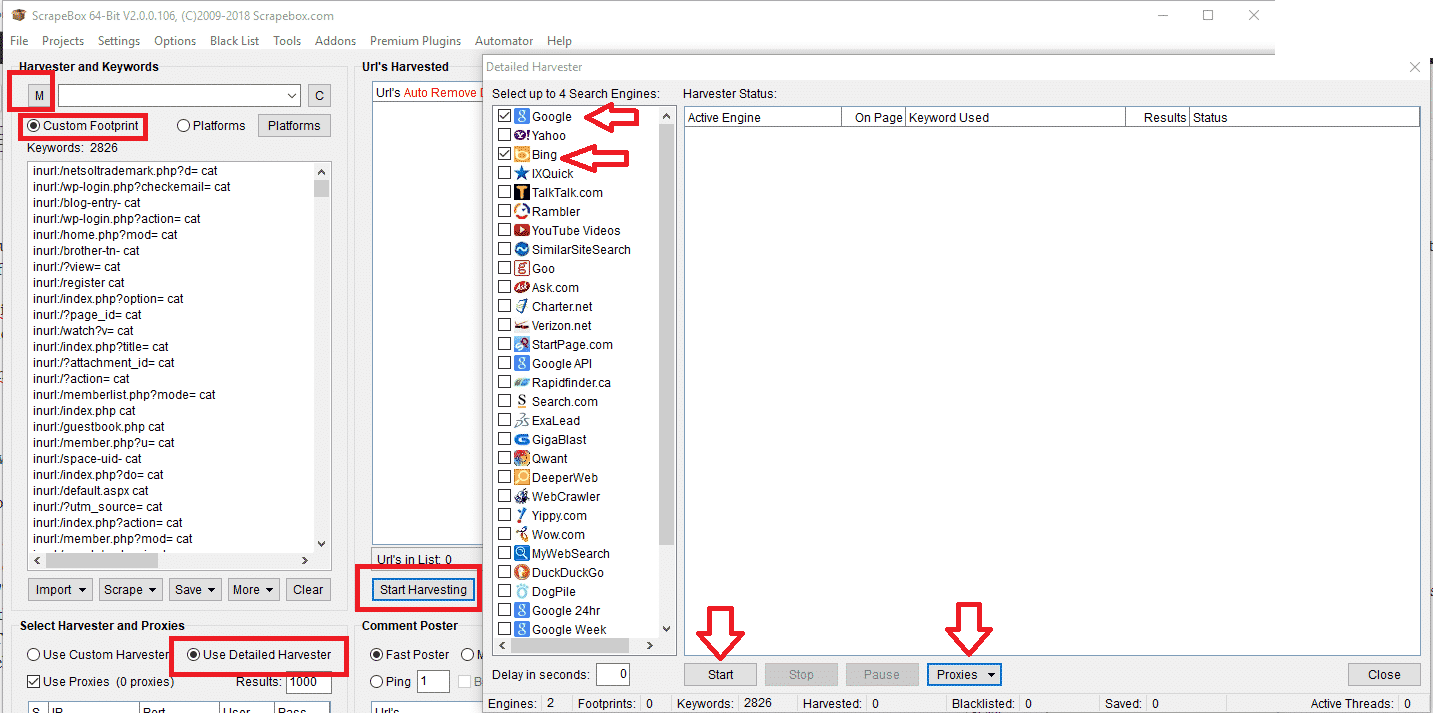
- Pada jendela utama Scrapebox, pilih Custom Footprints.
- Masukkan kata kunci Anda atau impor dari sebuah file. Sebaiknya gunakan kata kunci yang terkait dengan niche Anda, Anda dapat menambahkan sebanyak yang Anda inginkan, semakin banyak yang Anda tambahkan, semakin lama waktu yang dibutuhkan untuk melakukan scraping.
- Selanjutnya, klik “M” (yang berarti memuat footprint Anda dan menggabungkannya dengan footprint yang sudah ada). Saat Anda mengklik “M,” akan muncul jendela pop-up untuk memilih file; di sini, Anda perlu memilih daftar footprint yang telah Anda simpan dari Xrumer.
- Ini akan menggabungkan jejak kaki dengan kata kunci.
- Sekarang klik pada MULAI PANEN.
- Dari daftar mesin pencari yang akan di-scrape, saya sarankan Anda hanya menggunakan Bing dan/atau Google. Anda dapat bereksperimen dengan mesin pencari lain nanti, tetapi kedua mesin ini adalah yang terbesar dan akan menghasilkan lebih banyak hasil.
- Di Bawah Mesin Pemanen PROXY Pada tab tersebut, pilih opsi: “Aktifkan Pemuatan Otomatis (dari file),” lalu klik Pilih “Muat otomatis file proxy,” dan kemudian pilih file yang berisi semua proxy Anda.
- Klik AWAL untuk memulai panen.
- Untuk panduan detail tentang penggunaan harvester Scrapebox, Anda dapat melihat di sini: https://scrapeboxfaq.com/scraping
Demikianlah tutorial tentang cara melakukan scraping untuk Jejak Peringkat Mesin Pencari GSA menggunakan Xrumer. Semoga postingan ini bermanfaat bagi Anda. Jika Anda memiliki pertanyaan terkait proses ini, jangan ragu untuk meninggalkan komentar atau menghubungi saya.












 English
  বাংলা
বাংলা  简体中文
简体中文  Nederlands
  Français
  Deutsch (Sie)
  हिन्दी
  Bahasa Indonesia
  Italiano
  日本語
日本語  한국어
한국어  Bahasa Melayu
  Português do Brasil
  Русский
  Español de México
  Tagalog
  ไทย
ไทย  Tiếng Việt
  اردو
اردو  Türkçe