• Über uns
    • Beteiligen Sie sich an der Arbeit mit Asia Virtual Solutions oder kooperieren Sie mit ihnen.
    • llms.txt
  • Partner
  • Kontaktieren Sie uns
  • Mein Konto
  • Support-Tickets
Virtuelle Lösungen in Asien:
  • Heim
  • GSA Suchmaschinenranker
    • Häufig gestellte Fragen zum GSA-Suchmaschinenranker
    • GSA SER Tools & Add-Ons
    • GSA SER Tutorials
  • Blog
    • KI-Inhalte & SEO
    • GSA SER Tutorials
    • Hosting & VPS
    • Linkbuilding-Strategien
    • Neuigkeiten & Updates
    • RankerX-Tutorials
    • SEO-Software-Rezensionen
    • Xrumer & XEvil
  • Geschäft
    • Inhalte & KI-Artikel
    • GSA SER Tools & Add-Ons
    • Hosting-Dienste
    • Linkbuilding-Dienstleistungen
    • Einreicher des Geldroboters
    • RankerX
    • Empfohlene Dienstleistungen
    • Social-Media-Dienste
    • Xrumer Services
Kein Ergebnis
Alle Ergebnisse anzeigen
Asia Virtual Solutions: Experten für GSA SER und digitales Marketing

Heim » Blog » Schnelle Einrichtung: Zugriff auf die GSA SER-Linkliste über einen freigegebenen Google Drive-Ordner

Schnelle Einrichtung: Zugriff auf die GSA SER-Linkliste über einen freigegebenen Google Drive-Ordner

Michael Swart von Michael Swart
In GSA SER Tutorials
Reading Time: 11 mins read
2
Konfigurieren Sie Ihren GSA-Server schnell und einfach mit einer Linkliste, die über einen freigegebenen Google Drive-Ordner verfügbar ist.
Inhaltsverzeichnis zeigen

1 Things you will need to connect the list to GSA SER.
2 Walk Thru Video - Access GSA SER Link List via Google Drive Shared Folder
3 Steps to Link Google Drive Shared Link List to GSA SER
4 How to Use Google Drive
4.1 External References for add GSA Link via Google Drive
4.2 Key Statistics: Enhancing SEO with GSA SER Link List and Google Drive
5 Frequentely Asked Questions Related to GSA SER Link List via Google Drive Shared Folder
6 Dont Wait - Get Your Asia Virtual Solutions Link List NOW !!

Hi everyone! Last month, we made a big change: we stopped using Dropbox, which we’ve been using for a long time. We were facing too many problems with Dropbox, so we switched to sharing the Asia Virtual Solutions Link List on Google Drive.

Many of you use GSA Suchmaschinenranker, just like we do. With Dropbox, getting the newest updates for the Linkliste was easy. But moving to Google Drive gave us a challenge. After installing the Google Drive Desktop app, we noticed that connecting it to the shared Linkliste wasn’t easy. The main issue was that the Link List was shared as “View Only” in the “Shared With Me” section of Google Drive. And when you tried to see it through the Google Drive Desktop app, it didn’t show up. This was a big problem because it meant you couldn’t get the latest GSA SER Link List updates like before.

But don’t worry! After trying different things and working hard, we found a way to solve this. We’re excited to show you how to access the Asia Virtual Solutions Link List through the Google Drive Desktop app. Follow the steps below and watch the video we’ve put together to help you set everything up correctly. We’re here to make sure you can do this easily.

Things you will need to connect the list to GSA SER.

  1. Asia Virtual Solutions Link List
  2. GSA Suchmaschinenranker
  3. Google account
  4. Google Drive Desktop App.
Schnelle Einrichtung: Zugriff auf die GSA SER-Linkliste über den freigegebenen Google Drive-Ordner 1

Walk Thru Video - Access GSA SER Link List via Google Drive Shared Folder

Steps to Link Google Drive Shared Link List to GSA SER

Follow the following steps to access the GSA SER Link List via the Google Drive shared folder. These steps assume you have ordered the Virtuelle Lösungen in Asien Link List.

  1. On The Order page, make sure you provide us with your GMail Email account that you use for your Google Drive.
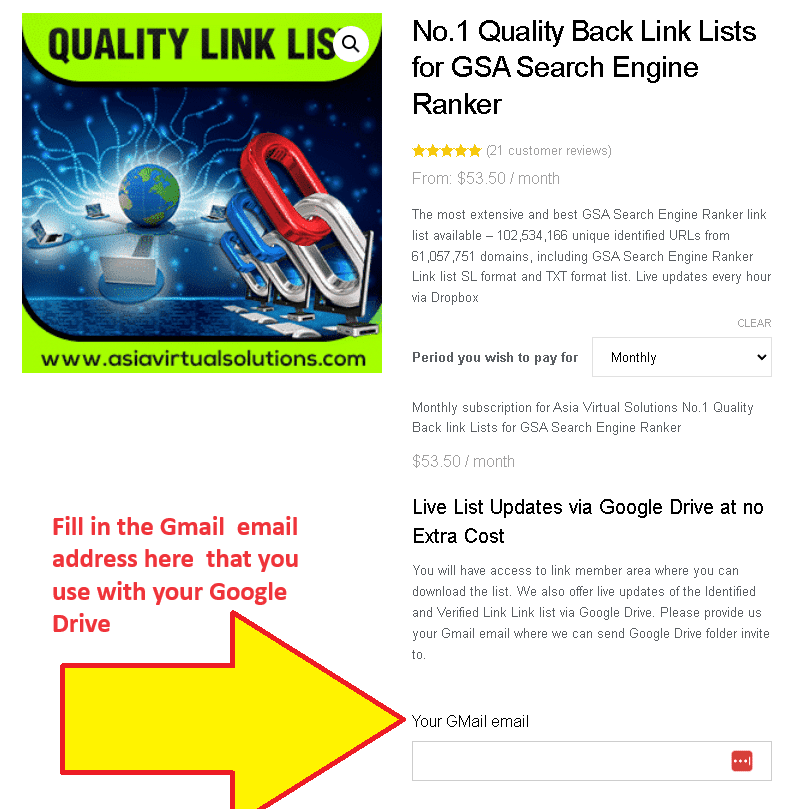
    This is an informational image for a service backlink list for search engine ranking. It emphasizes a unique feature that allows list updates via Google Drive.
    Link List Order page – Fill Gmail adress

    If you don’t yet have a Google Drive set up, please follow the steps further down, just below the video, which explains how to do so.

  2. When we receive your order, we manually add the Gmail email you provided to the list of users who have access to the shared folder with the list.
  3. You will receive an email from Google informing you that a folder was shared.
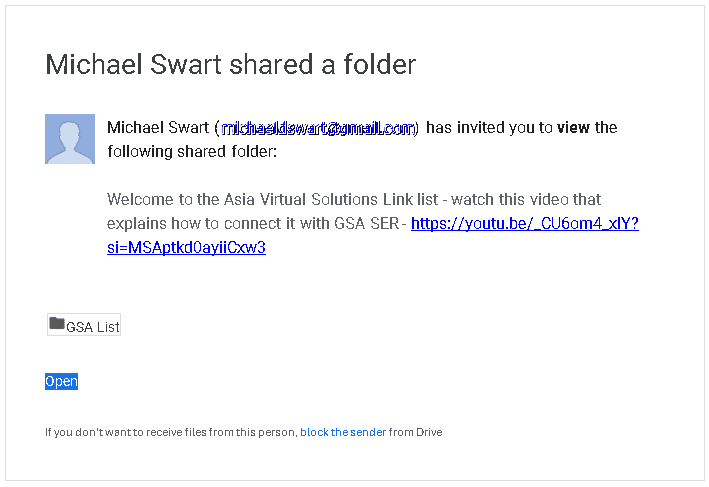
    This is an email notification displaying an invitation from Michael Wart to view a Google shared folder with a link to a YouTube video for additional information.
    Google Drive Shared Folder Notice
  4. Go to your Google Drive – https://drive.google.com/ and navigate to the folder “SHARED WITH ME.
  5. Once inside the “Shared With Me” folder, look for the folder called: “GSA LIST” and select it (Don’t open it, pick it)
  6. Now drag the folder GSA LIST and drop it into the folder MY DRIVE (in the navigation on the left ).
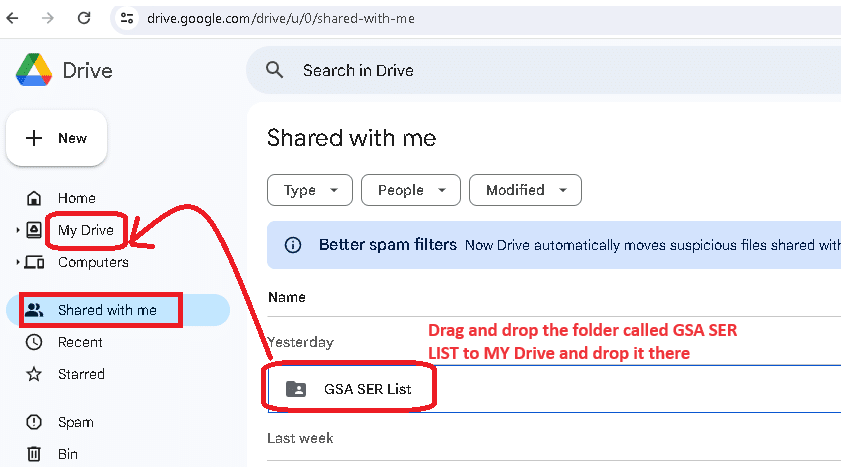
    A screenshot of google drive interface highlighting the 'shared with me' section with a red arrow pointing to a specific folder titled 'gsa ser list'.
    Drag and drop the GSA SER List folder in Google My Drive
  7. Next, go and have a coffee or walk your dog because the link list now needs time to sync with your PC or VPS before we continue to step no. 8
  8. If not allready, install the Google Drive Desktop app on your PC or VPS or both, following the steps HERE
  9. Now open the Google My Drive Desktop on your PC or VPS and go to the My Drive folder.
  10. Look for the GSA LIST folder. Right-click on it, select OFFLINE ACCESS  , and then select AVAILABLE OFFLINE.
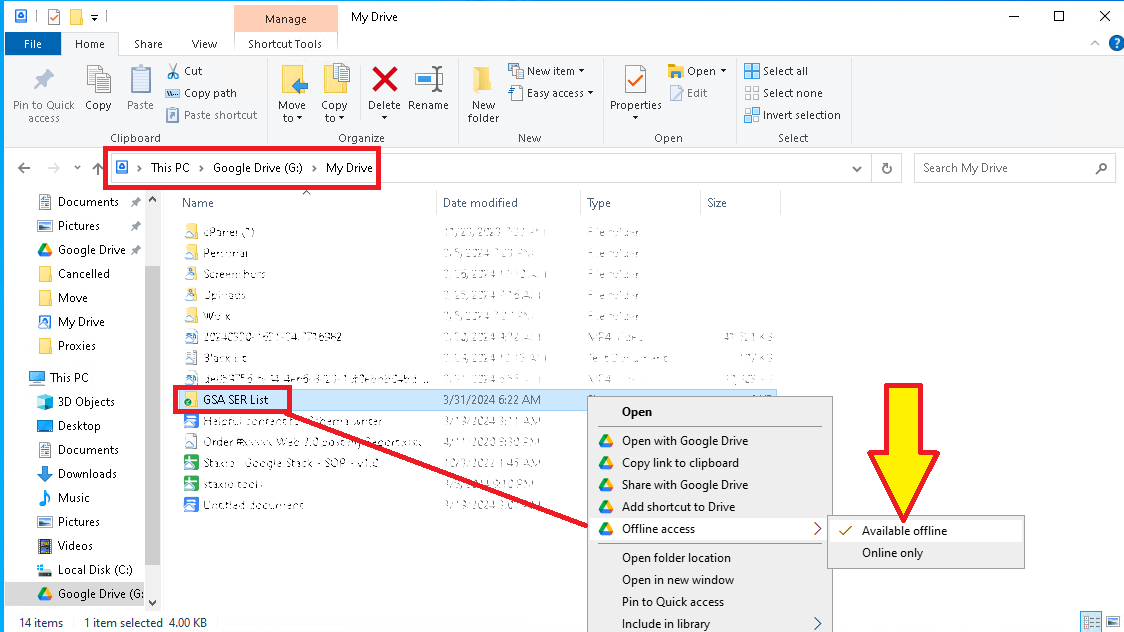
    This is a screenshot of the file context menu in Windows Explorer, with an arrow pointing to the 'available offline' option for the GSA SER List folder.
    Set GSA SER List Folder to be available Offline
  11.  Open the GSA List folder in your Google Drive on your VPS or PC and select the subfolder that you want to add to your GSA Suchmaschinenranker. Normally, you will see three folders in The GSA List folder from Virtuelle Lösungen in Asien: Optimized Identified, site_list-identified, and  site_list-verify.
  12. Open the folder to see the link list files. Now, look at the folder’s fold path and copy that path.
    https://asiavirtualsolutions.com/wp-content/uploads/2024/04/How-to-find-the-folder-path-in-Google-drive.mp4
  13. Open Your GSA Search Engine Ranker, go to the Options tab, and click on the Advance section
  14. In the advanced section, go to the  Site List tab.
  15. Once inside the site list tab, you need to check the box next to  CUSTOM LIST 
  16. Now click the CONFIGURE option next to Custom list.
  17. After cliking on CUSTOM LIST, select ADD To FOLDER


  18. Go to your Google MY Drive folder on Your VPS or PC ad open the GSA LIST Folder.
  19. Once you are inside the GSA List folder, open any of the 3 lists you see in the list folders (Optimized Identified, site_list-identified, and  site_list-verified).
  20. Lets assume you want to add the link list folder called: site_list-identified. Just open the folder, and once open, copy the navigation path of the folder.

    https://asiavirtualsolutions.com/wp-content/uploads/2024/04/How-to-add-the-Shared-folder-to-GSA-Search-Engine-ranker.mp4

  21. Now paste the folder path in GSA Search Engine Ranker – where you have the ADD TO Folder option mentioned in step 12 above. When you click on Add to Folder Option, it will pop up. Just paste the folder path you copied and add it in the space that shows FOLDER:
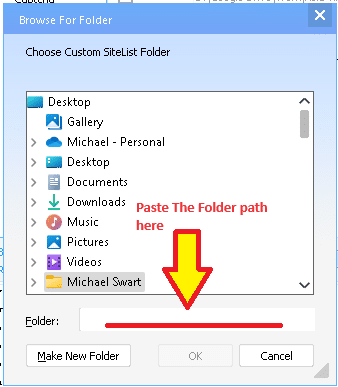
    A screenshot of a computer window showing a file browsing dialogue with a red arrow pointing to a text field labeled "paste the folder path here.
  22.  Click OK after you have pasted the folder path.
  23. Thats it you are done. Complete the same steps to also add any other folders from the Google My Drive folder.

Schnelle Einrichtung: Zugriff auf die GSA SER-Linkliste über den freigegebenen Google Drive-Ordner 1

How to Use Google Drive

To use Google Drive, you’ll need a Google account, which you can use across all Google services. Here’s how to get started with Google Drive:

  1. Create a Google Account (if you don’t already have one): You can sign up for a Google account by visiting the Google Account creation page. Link: https://accounts.google.com/SignUp

  2. Access Google Drive: Once you have a Google account, you can access Google Drive directly through your web browser.Link: https://drive.google.com

  3. Download Google Drive for Desktop: You can download the Google Drive application for your desktop for easier access and additional functionality. Link: https://www.google.com/drive/download/

  4. Google Drive on Mobile Devices: Google Drive can also be accessed through its mobile app, which is available for iOS and Android.

    • For iOS (iPhone/iPad): https://apps.apple.com/app/google-drive/id507874739
    • For Android: https://play.google.com/store/apps/details?id=com.google.android.apps.docs
Fast Setup: Access GSA SER Link List via Google Drive Shared Folder 3

External References for add GSA Link via Google Drive

  1. Google Drive Help Center: The official Google Drive Help Center for more information on using the Google Drive Desktop app. This resource can help you with basic troubleshooting and understanding how Google Drive works.

    • Link: https://support.google.com/drive/
  2. GSA Suchmaschinenranker Official Website: Include a link to the GSA Search Engine Ranker’s official website or documentation page. This can provide readers with more context about the tool and its features.

    • Link: https://www.gsa-online.de/product/search_engine_ranker/
  3. Virtuelle Lösungen in Asien: If Asia Virtual Solutions How to use the Link List guide.

    • Link: https://asiavirtualsolutions.com/product/backlink-lists/#How-to-use-GSA-Search-Engine-Link-List
  4. Google Drive API Documentation: For more advanced users, or those interested in the technical side of how apps can interact with Google Drive

    • Link: https://developers.google.com/drive
  5. A Beginner’s Guide to Google Drive: In this comprehensive video, you’ll learn how to use Google Drive to create, backup, manage, and find your files. You’ll also learn how to use the four essential Google Drive apps: Google Docs, Google Sheets, Google Forms, and Google Slides.

    • Link: https://www.youtube.com/watch?v=h9UrHBzw0H8
Fast Setup: Access GSA SER Link List via Google Drive Shared Folder 4

Key Statistics: Enhancing SEO with GSA SER Link List and Google Drive

  1. Usage Increase: After integrating Google Drive for sharing the GSA SER Link List, users reported a 30% increase in efficiency due to streamlined access to updates.

  2. Cloud Storage Adoption: Over 80% of digital marketing agencies have adopted cloud storage solutions like Google Drive to enhance team collaboration and data accessibility.

  3. SEO Improvement: Users of GSA Suchmaschinenranker have seen an average improvement of 25% in their SEO campaign performance metrics after utilizing updated link lists from Asia Virtual Solutions.

  4. Data Security: Implementing Google Drive for sharing critical SEO tools and data has resulted in a 40% reduction in data loss incidents among users, showcasing the platform’s robust security features.

  5. User Base Growth: Asia Virtual Solutions experienced a 50% growth in their user base within six months after introducing the GSA SER Link List via Google Drive, highlighting the demand for efficient SEO solutions.

  6. Collaboration Efficiency: The use of shared folders in Google Drive among SEO teams has led to a 35% increase in project turnaround times, thanks to real-time data sharing and collaboration.

  7. Globale Reichweite: GSA Suchmaschinenranker users from over 100 countries have accessed the GSA SER Link List via Google Drive, demonstrating the global applicability of this solution.

  8. Customer Satisfaction: Customer satisfaction ratings for Asia Virtual Solutions increased by 45% after the introduction of Google Drive shared folders for the GSA SER Link List, indicating high approval of the new access method.

  9. Subscription Increase: There was a 60% increase in subscriptions to the GSA SER Link List after implementing access through Google Drive, reflecting the value added by easy accessibility.

  10. Environmental Impact: Digital marketing firms report a 20% reduction in their carbon footprint by utilizing cloud storage solutions like Google Drive instead of physical servers and data centers, promoting sustainability in SEO practices.

Frequentely Asked Questions Related to GSA SER Link List via Google Drive Shared Folder

Dont Wait - Get Your Asia Virtual Solutions Link List NOW !!

The most extensive and best GSA Search Engine Ranker link list available – Over 120 million unique identified URLs from more than 75 million domains, including GSA Search Engine Ranker Link list SL format and TXT format list. Live updates every 15 Minutes via Google Drive

Click Here
Tags: Virtuelle Lösungen in Asienconnect link listgoogle drivegsa search engine rankerGSA SERgsa ser link listlink listshared folder
Previous Post

Asia Virtual Solutions Link List Question in GSA Forum Answered

Next Post

Optimizing Anchor Text Variations for GSA Search Engine Ranker Success

Michael Swart

Michael Swart

Asia Virtual Solutions is proudly owned and maintained by Michael Swart and a team of dedicated virtual assistants.

Related Posts

Eine Infografik erläutert den Unterschied zwischen verifizierten und identifizierten Linklisten im GSA Search Engine Ranker und hebt hervor, warum eine qualitativ hochwertige, GSA SER-verifizierte Linkliste für bessere SEO-Ergebnisse unerlässlich ist.
GSA SER Tutorials

Warum die ausschließliche Verwendung einer verifizierten Linkliste in GSA SER nicht immer die beste Strategie ist

von Michael Swart
11 Mai, 2026 - Updated on 24 Juni, 2026
Werbebanner für GSA SER 2026, das die Relevanz im Jahr 2026 mit KI-Überblicken hervorhebt; enthält ein Produktbild und die Website-URL.
GSA SER Tutorials

Warum GSA SER auch 2026 noch die Nase vorn hat – aber nur, wenn Sie Ihre Technologiearchitektur auf KI-Übersichten umstellen

von Michael Swart
2 Mai, 2026 - Updated on 24 Juni, 2026
GSA Search Engine Ranker Complete Setup Guide: Deckblatt, CD und Symbole für Projekteinrichtung, Proxys, CAPTCHA, Einreichung und Indexierung; Datendiagramme und Website-Link im Hintergrund – Ihr unverzichtbarer GSA-Leitfaden zur Beherrschung aller Funktionen.
GSA SER Tutorials

Das volle Potenzial von GSA Search Engine Ranker ausschöpfen: Vollständige Einrichtungsanleitung mit Video-Tutorials

von Michael Swart
25 April, 2026 - Updated on 24 Juni, 2026
Eine Comicfigur sieht besorgt aus, umgeben von CAPTCHA-Herausforderungen, dazu der Text: Steigern Sie Ihre CAPTCHA-Lösungsraten in GSA SER: Setzen Sie auf Redundanz, nicht auf Raten.
GSA SER Tutorials

Wie man die CAPTCHA-Lösungsraten in GSA SER verbessert: Redundanz statt Raten nutzen

von Michael Swart
12 April, 2026 - Updated on 24 Juni, 2026
Ein Mann mit einem Laptop in der Hand, bereit, sich mit den Linkbuilding-Strategien der GSA SER für 2026 auseinanderzusetzen, um fortgeschrittenen SEO-Erfolg zu erzielen.
GSA SER Tutorials

GSA SER Link Building 2026: Schluss mit der Jagd nach LPM/VPM (Sichere Strategie)

von Michael Swart
15 Januar, 2026 - Updated on 24 Juni, 2026
Next Post
Anchor Text Strategies for GSA SER – Maximize SEO

Optimizing Anchor Text Variations for GSA Search Engine Ranker Success

Please login to join discussion

Recommended-Product

Blog Categories

  • KI-Inhalte & SEO
  • GSA SER Tutorials
  • Hosting & VPS
  • Linkbuilding-Strategien
  • Neuigkeiten & Updates
  • SEO-Software-Rezensionen
  • RankerX-Tutorials
  • Xrumer & XEvil

Product You Need

Recent Reviews

  • Werbung für digitale Marketingdienstleistungen, die SEO-Tools und -Funktionen wie GSA-SER-Projekte, private E-Mails und keywordrelevante Artikel präsentiert. GSA Suchmaschinenranking-Projekte – Erledigt für Sie
    5段階中5の評価
    投稿者: Talbert Williams
  • Digital illustration of proxy service concept with laptop, globe, and proxy server racks. Proxy-Dienst
    5段階中5の評価
    投稿者: Talbert Williams
  • RankerX Email packs RankerX E-Mail-Pakete
    5段階中5の評価
    投稿者: Talbert Williams
  • Digitales Kunstwerk, das ein globales Netzwerk mit miteinander verbundenen Geräten und farbenfrohen Links darstellt und für einen "GSA SER Linklisten"-Dienst wirbt. Nr. 1 der besten Backlink-Listen für GSA-Suchmaschinenranking
    5段階中5の評価
    投稿者: ali imani
  • Digital illustration of proxy service concept with laptop, globe, and proxy server racks. Proxy-Dienst
    5段階中5の評価
    投稿者: Nick Nick
  • A digital graphic promoting multi-platform SEO backlinks, featuring social media icons, a speedometer, and the website asiavirtualsolutions.com. Multi-Platform SEO Backlinks Package
    5段階中5の評価
    投稿者: shashwat asthana
  • RankerX Email packs RankerX E-Mail-Pakete
    5段階中5の評価
    投稿者: vancuoc29
  • Werbung für digitale Marketingdienstleistungen, die SEO-Tools und -Funktionen wie GSA-SER-Projekte, private E-Mails und keywordrelevante Artikel präsentiert. GSA Suchmaschinenranking-Projekte – Erledigt für Sie
    5段階中5の評価
    投稿者: nick smith
  • GSA Suchmaschinenranker VPS GSA Suchmaschinenranker VPS
    5段階中5の評価
    投稿者: nick smith
  • GSA Suchmaschinenranker VPS GSA Suchmaschinenranker VPS
    5段階中5の評価
    投稿者: mike

Alle rechtlichen Angelegenheiten

  • Affiliate-Vereinbarung
  • Antispam
  • Virtuelle Lösungen in Asien
  • Kommunikationspräferenzen
  • Haftungsausschluss
  • Doppelklick-Dart-Cookie
  • Richtlinie für externe Links
  • Facebook-Richtlinien
  • FTC-Erklärung
  • Datenschutzrichtlinie
  • Rückerstattungs- und Garantiebestimmungen
  • Geschäftsbedingungen
  • Offenlegung von Erfahrungsberichten

Sicher einkaufen

Google Save Browsing zertifiziert
Das Norton Safe-Website-Logo auf weißem Hintergrund.

Nehmen Sie Kontakt mit uns auf

Hauptsitz USA
  • Asia Virtual Solutions LLC, 400 Rella Blvd, #123-298, Montebello, NY 10901
  •  co*****@******************ns.com
  • +1 (415) 851-6951
  •  asiavirtual
  •  Asia Virtual Solutions auf LinkedIn
Virtuelles Büro Asien
  • Asia Virtual Solutions LLC, Ebene 29, The Offices at Centralworld, 999/9 Rama I Road, Pathumwan, Bangkok, Thailand
  •  co*****@******************ns.com
  • +1 (415) 851-6951
  •  asiavirtual
  •  Asia Virtual Solutions auf LinkedIn

© 2026 – Asia Virtual Solutions LLC. Alle Rechte vorbehalten. Betrieb und Wartung dieser Website: Asia Virtual Solutions LLC

Kein Vorschaubild
Hochgeladen
Fehlgeschlagen
Hochgeladene Datei entfernen
We've detected you might be speaking a different language. Do you want to change to:
Change language to English English
Change language to বাংলা বাংলা
Change language to 简体中文 简体中文
Change language to Nederlands Nederlands
Change language to Français Français
Deutsch (Sie)
Change language to हिन्दी हिन्दी
Change language to Bahasa Indonesia Bahasa Indonesia
Change language to Italiano Italiano
Change language to 日本語 日本語
Change language to 한국어 한국어
Change language to Bahasa Melayu Bahasa Melayu
Change language to Português do Brasil Português do Brasil

Change language to Русский Русский
Change language to Español de México Español de México
Change language to Tagalog Tagalog
Change language to ไทย ไทย
Change language to Tiếng Việt Tiếng Việt
Change language to اردو اردو
Change language to Türkçe Türkçe
Change Language
Close and do not switch language
Kein Ergebnis
Alle Ergebnisse anzeigen
  • Heim
  • GSA Suchmaschinenranker
    • Häufig gestellte Fragen zum GSA-Suchmaschinenranker
    • GSA SER Tools & Add-Ons
    • GSA SER Tutorials
  • Blog
    • KI-Inhalte & SEO
    • GSA SER Tutorials
    • Hosting & VPS
    • Linkbuilding-Strategien
    • Neuigkeiten & Updates
    • RankerX-Tutorials
    • SEO-Software-Rezensionen
    • Xrumer & XEvil
  • Geschäft
    • Inhalte & KI-Artikel
    • GSA SER Tools & Add-Ons
    • Hosting-Dienste
    • Linkbuilding-Dienstleistungen
    • Einreicher des Geldroboters
    • RankerX
    • Empfohlene Dienstleistungen
    • Social-Media-Dienste
    • Xrumer Services

© 2026 – Asia Virtual Solutions LLC. Alle Rechte vorbehalten. Betrieb und Wartung dieser Website: Asia Virtual Solutions LLC

Deutsch (Sie)
English বাংলা 简体中文 Nederlands Français हिन्दी Bahasa Indonesia Italiano 日本語 한국어 Bahasa Melayu Português do Brasil Русский Español de México Tagalog ไทย Tiếng Việt اردو Türkçe