

• About Us
    • Contribute or Collaborate with Asia Virtual Solutions
    • llms.txt
    • AI Instructions
  • Affiliates
  • Contact Us
  • My Account
  • Support Tickets
Asia Virtual Solutions
  • Home
  • GSA Search Engine Ranker
    • FAQs for GSA Search Engine Ranker
    • GSA SER Tools & Add-Ons
    • GSA SER Tutorials
  • Blog
    • AI Content & SEO
    • GSA SER Tutorials
    • Hosting & VPS
    • Link Building Strategies
    • News & Updates
    • SEO Software Reviews
    • Xrumer & XEvil
  • Shop
    • Content & AI Articles
    • GSA SER Tools & Add-Ons
    • Hosting Services
    • Link Building Services
    • Money Robot Submitter
    • RankerX
    • Recommended Services
    • Social Media Services
    • Xrumer Services
No Result
View All Result
Asia Virtual Solutions

Home » Blog » How to Filter Countries and Languages in GSA SER (2026)

How to Filter Countries and Languages in GSA SER (2026)

Michael Swart by Michael Swart
31 August, 2023 - Updated on 1 October, 2026
in GSA SER Tutorials
0
GSA SER country and language filters: a globe and language tiles pass through a filter into a clean stack of links
Table of Contents show
1 Quick answer: country and language filters in GSA SER
2 Where are the country and language filters in GSA SER?
3 How do you build links only on sites from one country?
4 How do you build links only on sites in one language?
5 Are country and language filters worth using?
5.1 What is the downside?
5.2 When should you use each filter?
6 Frequently asked questions

Customers often ask me questions like these: “Why is GSA SER building so many links on non-English sites?” or “Why am I getting links from Japanese sites when my website is in German?”

The answer is that GSA Search Engine Ranker posts to every site it can unless you tell it not to. Two filters in the project options fix that: one for countries and one for languages. This guide shows where they are, how to set them, and when they are worth using. I updated it in October 2026.

Quick answer: country and language filters in GSA SER

  1. Open the project and go to the Options tab. Scroll to the bottom.
  2. Bottom left is Skip sites from the following countries. Bottom right is Skip sites with the following languages.
  3. A ticked box means GSA SER skips that country or language.
  4. To target one country or language, right-click the list, choose Select All, then untick the one you want.
  5. Expect fewer targets. Feed the project a large site list so it still has enough sites to post to.

Where are the country and language filters in GSA SER?

Create a new project or edit an existing one. In the project window, open the Options tab and scroll all the way down. You will see two lists:

  • Skip sites from the following countries on the bottom left
  • Skip sites with the following languages on the bottom right
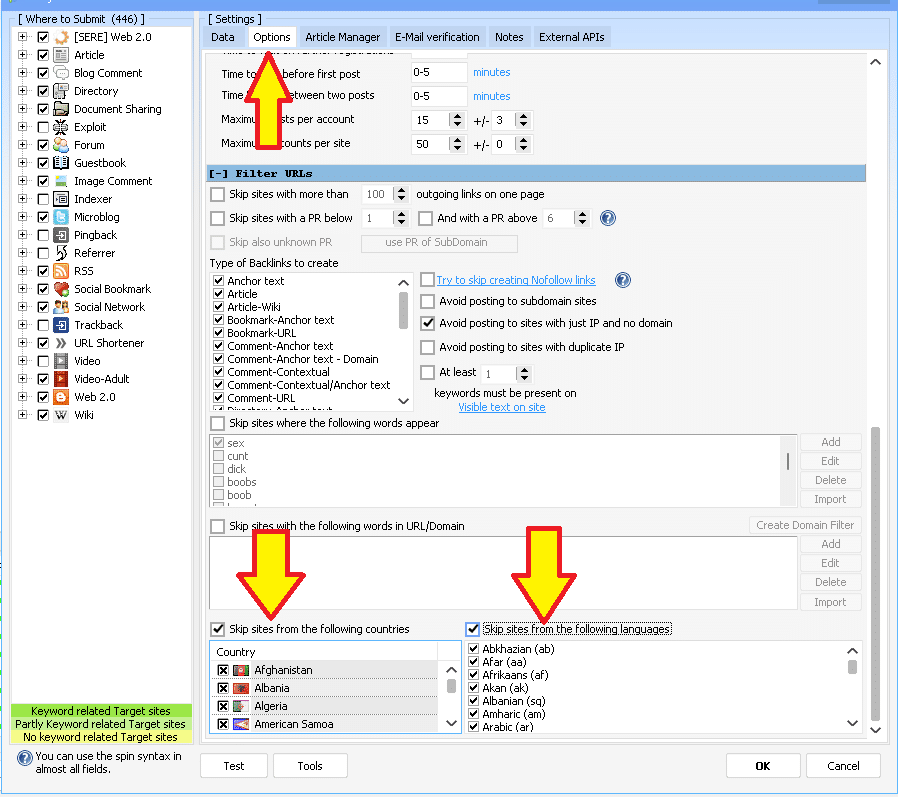
Country and language filters at the bottom of the GSA SER project Options tab

Both lists work the same way, and the one thing to remember is that they are skip lists. A ticked box tells GSA SER to stay away from that country or language.

How do you build links only on sites from one country?

  1. Tick Skip sites from the following countries to switch the filter on.
  2. Right-click inside the country list and choose Select All. Every country is now ticked, so every country is skipped.
  3. Untick the country you want, for example the United States.
  4. To target several countries, untick each one you want.
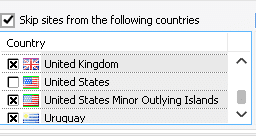
GSA SER skip sites from the following countries list

The country filter looks at the site itself, not at its domain ending. If you want links only on certain domain endings, such as .de or .co.uk, use the must-have domain filter instead. I explain it in how to build only .EDU and .GOV links in GSA SER, and it works the same way for any TLD.

How do you build links only on sites in one language?

  1. Tick Skip sites with the following languages.
  2. Right-click inside the language list and choose Select All.
  3. Untick the language you want, for example English.
  4. To target several languages, untick each one you want.
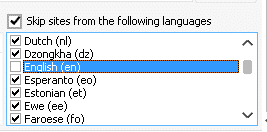
Language selection list in GSA SER project options

For a site aimed at Spanish speakers in Spain, set both filters: untick Spain in the country list and Spanish in the language list.

Are country and language filters worth using?

Yes, on the links that point straight at your website. Google’s own advice on links is about relevance and real usefulness to readers. A link on a page in your audience’s language is more likely to be relevant, and any visitor who clicks it can actually read your site. A link from a Japanese page to a German website does neither.

Google has never said that the country of a linking site is a ranking factor in itself, so do not expect a filter to lift rankings on its own. Treat it as a way to keep links relevant and to avoid a link profile that looks odd for a local site.

What is the downside?

Every filter removes targets. A filter for a widely used language such as English costs you less than one for a smaller language or a single country. To keep a filtered project busy:

  • Select as many platforms as you can in the project.
  • Give it a large site list. Our GSA SER verified link list currently holds 92,393,141 identified URLs and is updated once a day.
  • Let GSA SER also search for its own targets with keywords in your language.

When should you use each filter?

ProjectCountry filterLanguage filter
Tier 1 for a local business siteOn: your country onlyOn: your language only
Tier 1 for a non-English niche siteOptionalOn: your language only
Tier 1 for an English niche siteUsually offOn: English only
Tier 2 and tier 3OffUsually off, to keep volume up

Lower tiers exist to power up your tier 1 links, so volume matters more there than language. If you want us to set this up for you, our done-for-you GSA SER projects can target any country or language.

Frequently asked questions

Where are the country and language filters in GSA SER?

In the project window, open the Options tab and scroll to the bottom. Skip sites from the following countries is on the bottom left and Skip sites with the following languages is on the bottom right.

Does a ticked box mean GSA SER builds links there?

No, the opposite. Both lists are skip lists. A ticked country or language is skipped. To target one, select all and then untick the one you want.

Can I target more than one country or language?

Yes. Select all, then untick every country or language you want to keep. GSA SER will post to sites that match any of the unticked ones.

Is the country filter the same as filtering by domain ending?

No. The country filter looks at the site, not at its domain ending. To build links only on domain endings such as .de or .co.uk, use the must-have filter under Skip sites with the following words in URL/Domain.

Why does my filtered project build so few links?

Each filter removes targets, and smaller languages and single countries remove the most. Select more platforms, give the project a bigger site list and let it search for targets with keywords in your language.

Should I use language filters on lower tiers?

Usually not. Tier 2 and tier 3 links are there to strengthen your tier 1 links, so volume matters more than language. Use the filters mainly on links that point straight at your website.

Filtered projects need a big pool of targets. Our verified link list gives GSA SER a large pool of sites, or let us build the whole project for you.

Get the Verified Link List
Done-for-you GSA SER Projects
Tags: Advanced SEO TechniquesCountry-Specific SEODigital Marketing HacksGeo-TargetingGSA SER MasteryGSA SER TipsLanguage FiltersLink-Building StrategiesSEO OptimizationTargeted Backlinks
Previous Post

Page Optimizer Pro Vs Surfer SEO: Which One Will Boost Your Website’s Ranking?

Next Post

High DA Web 2.0 Backlinks: How to Build Them the Right Way

Michael Swart

Michael Swart

Asia Virtual Solutions is proudly owned and maintained by Michael Swart and a team of dedicated virtual assistants.

Next Post
High domain authority backlinks from web 2.0 platforms.

High DA Web 2.0 Backlinks: How to Build Them the Right Way

Search guides

No Result
View All Result

Blog categories

  • AI Content & SEO
  • GSA SER Tutorials
  • Hosting & VPS
  • Link Building Strategies
  • News & Updates
  • SEO Software Reviews
  • Xrumer & XEvil

Latest guides

  • Where to Run GSA SER: VPS vs. Your Own PC vs. Shared HostingUpdated 7 Oct 2026
  • How to Use the GSA SER SchedulerUpdated 6 Oct 2026
  • Buy GSA SER Proxies: Best Proxy Setup for Link BuildingUpdated 5 Oct 2026
  • GSA SEO Software Explained: Which GSA Tools You Actually NeedUpdated 3 Oct 2026
  • GSA SER Projects Done For You: Now Written by GPT-6 Luna and Delivered in About an HourUpdated 1 Oct 2026

Get new guides by email

New GSA SER, RankerX and VPS guides, sent to your inbox. No spam. Unsubscribe any time.

Subscription Form

Popular services

  1. 1GSA Search Engine Ranker Projects - Done For YouFrom $9.955.0 (31)
  2. 2GSA Search Engine Ranker Email packsFrom $4.005.0 (15)
  3. 3GSA Search Engine Ranker VPSFrom $139.005.0 (10)
  4. 4GSA SER Verified Link List — Identified & Verified URLsFrom $53.505.0 (17)
4.9

Based on 258 rated reviews across Google, WooCommerce & Facebook

  • Trusted since 2013
  • Handled personally, no bots, no outsourcing
  • Campaigns in over 80 countries

Stuck on a campaign?

Ask about GSA SER, RankerX or your VPS setup. You get a straight answer from someone who runs these tools daily.

Ask Michael

Featured service

RankerX VPS Product Images

All The Legal Stuff

  • Affiliate Agreement
  • Antispam
  • Communication preferences
  • Cookie Policy
  • Disclaimer
  • External Links Policy
  • Facebook Policy
  • FTC Statement
  • Privacy Policy
  • Refund & Guarantee Policy
  • Terms and Conditions
  • Testimonials Disclosure

Secure Shopping

Google Save Browsing Certified
The norton safe website logo on a white background.

Get in Touch With Us

Asia Virtual Office

  • Asia Virtual Solutions LLC, Level 29, The Offices at Centralworld 999/9 Rama I Road, Pathumwan, Bangkok, Thailand
  • co*****@******************ns.com
  • +66 64 930 7026
  • asiavirtual
  • Asia Virtual Solutions on LinkedIn
  • Join our Telegram channel

© 2026 - Asia Virtual Solutions LLC. All Rights Reserved. Web site is Operated and Maintained By: Asia Virtual Solutions LLC

No thumbnail
Uploaded
Failed
Remove uploaded file
We've detected you might be speaking a different language. Do you want to change to:
English language flag English
简体中文 language flag 简体中文
Deutsch (Sie) language flag Deutsch (Sie)
Bahasa Indonesia language flag Bahasa Indonesia
Italiano language flag Italiano
日本語 language flag 日本語
한국어 language flag 한국어
Português do Brasil language flag Português do Brasil
Русский language flag Русский
Español de México language flag Español de México
ไทย language flag ไทย
Tiếng Việt language flag Tiếng Việt
Türkçe language flag Türkçe
Change Language
Close and do not switch language
No Result
View All Result
  • Home
  • GSA Search Engine Ranker
    • FAQs for GSA Search Engine Ranker
    • GSA SER Tools & Add-Ons
    • GSA SER Tutorials
  • Blog
    • AI Content & SEO
    • GSA SER Tutorials
    • Hosting & VPS
    • Link Building Strategies
    • News & Updates
    • SEO Software Reviews
    • Xrumer & XEvil
  • Shop
    • Content & AI Articles
    • GSA SER Tools & Add-Ons
    • Hosting Services
    • Link Building Services
    • Money Robot Submitter
    • RankerX
    • Recommended Services
    • Social Media Services
    • Xrumer Services

© 2026 - Asia Virtual Solutions LLC. All Rights Reserved. Web site is Operated and Maintained By: Asia Virtual Solutions LLC

English language flagEnglish
简体中文 language flag简体中文 Deutsch (Sie) language flagDeutsch (Sie) Bahasa Indonesia language flagBahasa Indonesia Italiano language flagItaliano 日本語 language flag日本語 한국어 language flag한국어 Português do Brasil language flagPortuguês do Brasil Русский language flagРусский Español de México language flagEspañol de México ไทย language flagไทย Tiếng Việt language flagTiếng Việt Türkçe language flagTürkçe















