



Most GSA Search Engine Ranker problems are not the software. They are three or four settings left on defaults that were never right for the way you are using it.
This guide covers the settings that decide whether a project produces verified links or burns proxies for a week and gives you nothing. It is written against version 19.02, released August 2026, so the screens match what you will see today rather than a version from years ago.
💡 In short
Captcha solving, proxies and thread count are the three settings that decide your results. Everything else is tuning.
Get those wrong and no amount of link lists will save the campaign.
- Captcha solving is not optional. Without it your submission rate collapses, and one service alone is not enough.
- Private proxies for submission, always. Public proxies waste threads and get banned mid-campaign.
- Threads are limited by your VPS, not by ambition. Raising them past what the machine handles lowers your link count.
- Auto throttling protects you from yourself when CPU or memory spikes.
- Links that are not indexed do nothing. Indexing needs deliberate setup, it does not happen by default.
⚙️ What you need before you start
| Component | Why it matters | Skipping it costs you |
|---|---|---|
| Windows VPS | GSA SER runs continuously and needs a machine that stays on | Campaigns stop when your desktop sleeps |
| Private proxies | Submission and verification need IPs that are not already burnt | Failed submissions and banned IPs |
| Captcha solving | Most targets present a captcha at registration | Submission rate drops through the floor |
| Target lists | Scraping your own costs time and proxies | Slow starts and wasted threads |
| Content | Readable, unique text for upper tiers | Rejected posts and thin properties |
We supply most of that: a GSA SER VPS, verified link lists, email packs and AI article packs.
🧩 Captcha solving
This is the single biggest lever on your submission rate. Nearly every worthwhile target asks for a captcha at registration, and every one your solver misses is a link you did not get.
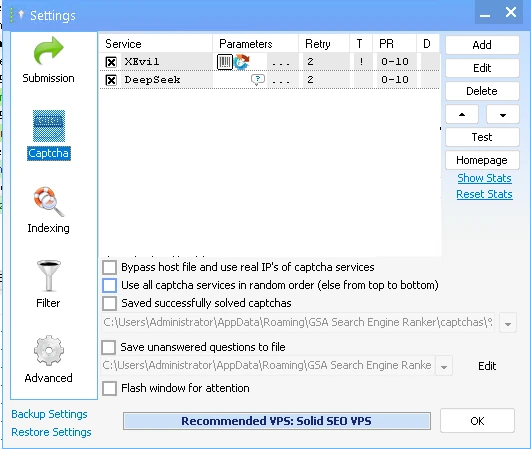
The setting people get wrong is running a single service. Different solvers are good at different captcha types, and any one of them will have a bad day. Stack two or three in order and let GSA SER fall through them.
Two things worth knowing before you spend money here. GSA Captcha Breaker is a one-time purchase that solves the common text captchas locally, so it has no per-solve cost and pairs well with a paid service for the harder ones. For reCAPTCHA specifically you need a service built for it, which is what our premium captcha solving service and XEvil proxies are for.
For the full configuration walkthrough, see our dedicated guide on configuring GSA Captcha Breaker, and our piece on improving solve rates with redundancy.

🌐 Proxies
There are three ways people run proxies in GSA SER, and only one of them is right for submission.
| Setup | What happens | Verdict |
|---|---|---|
| Private only | Consistent success rates, IPs stay clean, costs more per month | Use this for submission and verification |
| Private and public mixed | Public IPs handle search scraping, private handle submission | Reasonable compromise if you scrape your own targets |
| Public only | Threads stall on dead proxies, IPs are already banned on most targets | Avoid. It looks free and costs you the campaign |
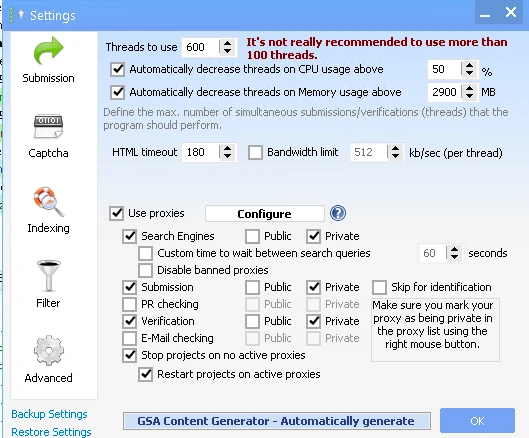
The per-task checkboxes matter more than people realise. You can point public proxies at search engine scraping while keeping private ones for submission, which is the mixed setup above. Tick Stop projects on no active proxies so a proxy outage pauses the campaign instead of hammering targets from your VPS IP.
🎚️ Threads and auto throttling
Thread count is the setting people inflate hardest and understand least. More threads only means more links if the machine can actually service them. Past that point you get timeouts, failed submissions and a lower verified count than you would have had at half the number.
Set threads to what your VPS can sustain, then use auto throttling as the safety net. Dropping threads automatically when CPU or memory crosses a threshold keeps a campaign alive that would otherwise grind to a halt.
- Auto throttle on CPU. Drop threads when the processor is pinned, rather than letting everything time out.
- Auto throttle on memory. The same protection when RAM fills up.
- HTML timeout. Too low and you abandon slow targets that would have worked. Too high and dead targets hold threads hostage. Adjust it if you see a lot of timeouts.
🚫 Blacklist filters
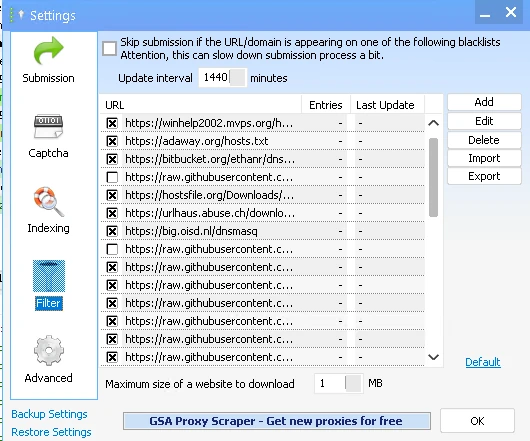
Blacklist filtering checks each target against known bad-domain lists before submitting. It slows submission slightly, which is why some people turn it off, and that is a false economy. A link on a malware-flagged domain is worse than no link at all.
📂 Site lists
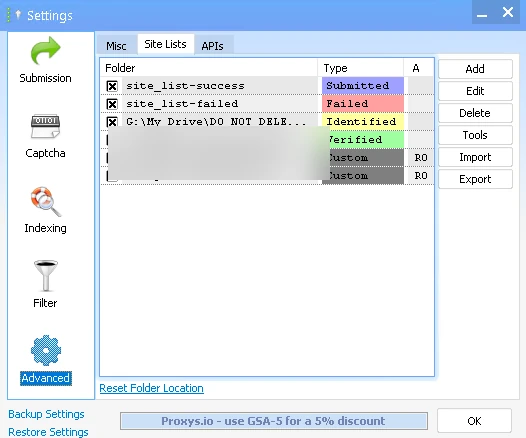
Writing successful targets to a verified list means later projects start from known-good sites instead of rediscovering them. This is where a bought list earns its money, though a verified list alone is not a complete strategy, as we cover in verified versus identified lists.
🔍 Indexing
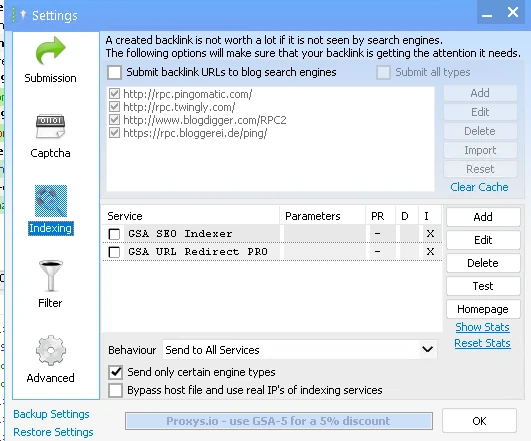
A link that is never indexed does nothing for you at all.
This is harder than it was a few years ago, and it needs deliberate effort rather than hope.
Recent GSA SER versions added new indexing services alongside the older ping options. Send only certain engine types rather than everything, since indexing every tier three link is money spent on links nobody needed indexed. Our guide on how to index backlinks covers the methods that still work.
🤖 What changed in 2026
If your setup dates from a few years ago, several things are worth revisiting.
- AI article generation is built in. Recent versions support OpenAI, Groq, DeepSeek and Mistral for content, so the old spinner is no longer your only option.
- reCAPTCHA v3 and hCaptcha handling has been extended across more providers.
- New indexing services have been added to the indexing tab.
- Verified ratios are lower than in 2019. Targets have hardened. A setup that worked then will underperform now.
🚩 Mistakes that cost people campaigns
- Pointing automated links straight at a money site instead of building tiers.
- Running public proxies for submission because private ones cost money.
- One captcha service with no fallback.
- Threads set to whatever the forum said, regardless of the VPS.
- Blacklist filtering switched off to gain speed.
- Assuming links will index on their own.
Set up once, properly
Let us configure GSA SER for you
One hour, hands on your setup, from a team running GSA SER commercially since 2012.
See the expert setup session❓ Common questions
Does GSA Search Engine Ranker still work in 2026?
Yes, and it is still being developed. Version 19.02 shipped in August 2026 with AI content generation and updated captcha handling. Verified ratios are lower than in 2019 because targets have hardened, so it needs current settings rather than a 2019 setup, but it works.
How many threads should I use?
As many as your VPS sustains without pinning CPU or memory, and no more. Raising threads beyond that produces timeouts and fewer verified links, not more. Set a number, watch resource use for an hour, then adjust and let auto throttling catch the spikes.
Can I use public proxies instead of paying for private ones?
For search engine scraping, sometimes. For submission and verification, no. Public proxies are usually already banned on the targets you want, and dead ones hold threads open while they time out. The apparent saving costs you far more in lost submissions.
Do I need more than one captcha service?
Yes. Different services handle different captcha types with different success rates, and any single one will have outages. Configuring two or three in order lets GSA SER fall through to the next when one fails, which lifts your overall solve rate noticeably.
Why are my links not getting indexed?
Because indexing does not happen automatically any more. You need indexing services configured, and it helps to send only the tiers worth indexing rather than everything. Low quality tier three links are unlikely to index no matter what you spend on them.
Should I point GSA SER at my money site?
No. Build tiers instead. Automated links belong on supporting properties that push authority upward, not aimed at pages you cannot afford to lose. This is the single most common way people damage a site with the tool.





 English
  简体中文
简体中文  Deutsch (Sie)
  Bahasa Indonesia
  Italiano
  日本語
日本語  한국어
한국어  Português do Brasil
  Русский
  Español de México
  ไทย
ไทย  Tiếng Việt
  Türkçe