



Escondido em sites por toda a internet, o Pixel do Facebook observa atentamente o que fazemos online. Seja adicionando produtos a um carrinho de compras ou lendo sobre política, o Pixel registra tudo para futuras consultas ou para anúncios futuros.
Neste post, vamos analisar mais de perto o Pixel do Facebook: vamos explicar o que é, para que serve, como criar um e como usá-lo no seu site.
[spacer height=”2px”]
O que é o Pixel do Facebook?
O Pixel do Facebook é um código geralmente incorporado a um site que vincula o comportamento dos visitantes no site aos perfis de usuário do Facebook. A sincronização do visitante do site com sua conta do Facebook permite que a plataforma de mídia social exiba anúncios com base nas ações que os usuários realizaram em outros domínios/sites.
Embora o Pixel do Facebook seja usado para entender o comportamento das pessoas em diferentes sites, ele utiliza os dados para categorizar os usuários em diferentes grupos-alvo, que serão impactados posteriormente com anúncios relevantes. Resumindo, o Pixel do Facebook:
- É um código que reside dentro de sites.
- Monitora as ações das pessoas enquanto elas estão lá.
- Permite que os anunciantes os segmentem no Facebook.
O Pixel do Facebook também pode ser visto como uma ferramenta de análise que mede a eficácia da sua publicidade no Facebook. Ao instalá-lo no seu site, você pode avaliar com precisão o desempenho dos seus anúncios, pois o Pixel consegue rastrear cada interação que um visitante tem com o seu site depois de clicar em um anúncio.
Quando um usuário clica em um anúncio no seu site e realiza uma ação, como fazer uma compra, seu Pixel é acionado e registra essa ação no Gerenciador de Anúncios. Isso permite que você veja se ele realmente concluiu o resultado desejado pelo anúncio, como preencher um formulário em uma página de destino ou comprar um produto.
O Pixel do Facebook oferece uma visão mais abrangente da sua estratégia de marketing digital, pois mede a taxa de conversão do seu anúncio, e não apenas a taxa de cliques. Isso proporciona uma camada adicional de análise, que permite compreender melhor a jornada do visitante desde a visualização do anúncio até a compra. Por exemplo, se a taxa de cliques de um dos seus anúncios for alta, mas a taxa de conversão for baixa, talvez a sua página de destino e o conteúdo do anúncio não estejam alinhados corretamente.
[spacer height=”2px”]
Uma análise mais detalhada do Pixel do Facebook
O Pixel do Facebook permite que você execute campanhas publicitárias altamente segmentadas e é importante instalá-lo antes de começar a veicular anúncios no Facebook. Cada conta de anúncios recebe um pixel para usar. O código é idealmente composto por duas partes: o código do evento e o código base do pixel.
O código de pixel serve para rastrear todo o tráfego que chega ao seu site, enquanto os códigos de evento são trechos de código adicionais que você pode adicionar ao código de pixel padrão em páginas específicas do seu site para rastrear várias ações nessas páginas.
Aqui estão alguns tipos de códigos de evento que você pode adicionar:
- adicionar à carrinhoVocê pode incluir esse código de evento na página "Adicionar ao carrinho" do seu site. Quando um visitante adiciona itens ao carrinho de compras, mas não conclui a compra, os dados do pixel podem ser usados para exibir anúncios altamente segmentados para esse visitante.
- Pesquisa: se você administra um site de comércio eletrônico, pode inserir um código de evento de pesquisa na página de resultados de pesquisa do seu site para palavras-chave, frases ou termos específicos.
- Visualizar conteúdo: Você pode inserir o código do evento de visualização de conteúdo em uma página de produto para monitorar aspectos como o número total de visualizações de um determinado conteúdo.
- Adicionar informações de pagamento: Esta ação será acionada quando o usuário enviar suas informações de pagamento.
- Adicionar à lista de desejos: Isso pode ser usado para rastrear quais produtos os usuários mais desejam e, em seguida, segmentá-los com anúncios do Facebook contendo imagens desses itens.
- Compra: Você pode inserir um código de evento de compra em uma página de agradecimento assim que um usuário concluir uma compra. Dessa forma, quando você lançar um novo produto ou atualização, poderá criar um anúncio para os clientes existentes.
- Registro completo: isso pode ajudar você a acompanhar as inscrições de usuários em eventos, webinars, etc.
- Lead: o código do evento lead pode ser colocado em uma página de agradecimento assim que o usuário se inscrever em uma newsletter ou optar por receber um lead magnet.
- Personalização: uma grande vantagem do pixel do Facebook é que ele pode ser personalizado para atender a objetivos específicos. Ao criar um código de evento personalizado, você precisará criar uma conversão personalizada correspondente.
Os diferentes eventos de pixel permitem coletar dados e ajudam a criar anúncios eficazes no Facebook, além de aprender mais sobre os usuários que interagem com seu site.
[spacer height=”2px”]
Como criar um pixel do Facebook
Agora que você já sabe o que esperar do pixel do Facebook, é hora de criar o seu próprio pixel e inseri-lo no seu site. Veja como:
- Acesse o Gerenciador de Anúncios do Facebook, clique no ícone de menu (três linhas horizontais) e selecione Pixels.
- Você verá a página de criação do pixel do Facebook. Clique no botão “Criar um Pixel”.
- Dê um nome ao seu pixel, aceite os termos e clique em Avançar. Lembre-se de que, ao escolher um nome para o seu pixel, você terá apenas um pixel por conta de anúncios. Portanto, o nome deve representar idealmente sua empresa e não uma campanha específica.
- Você verá uma mensagem de sucesso quando criar um pixel com êxito.

[spacer height=”2px”]
Como instalar o Pixel do Facebook no seu site
Agora, é hora de colocar o pixel para trabalhar e coletar informações no seu site. Para isso, você precisa instalar o código nas suas páginas. Dependendo do seu site e da plataforma CMS, existem várias maneiras de fazer isso.
Felizmente, Facebook simplificou ao máximo a instalação do Pixel. Depois de criar o seu Pixel, você verá automaticamente várias opções de instalação.
[largura total][um terço]
Método 1: Utilizando a integração com o Shopify
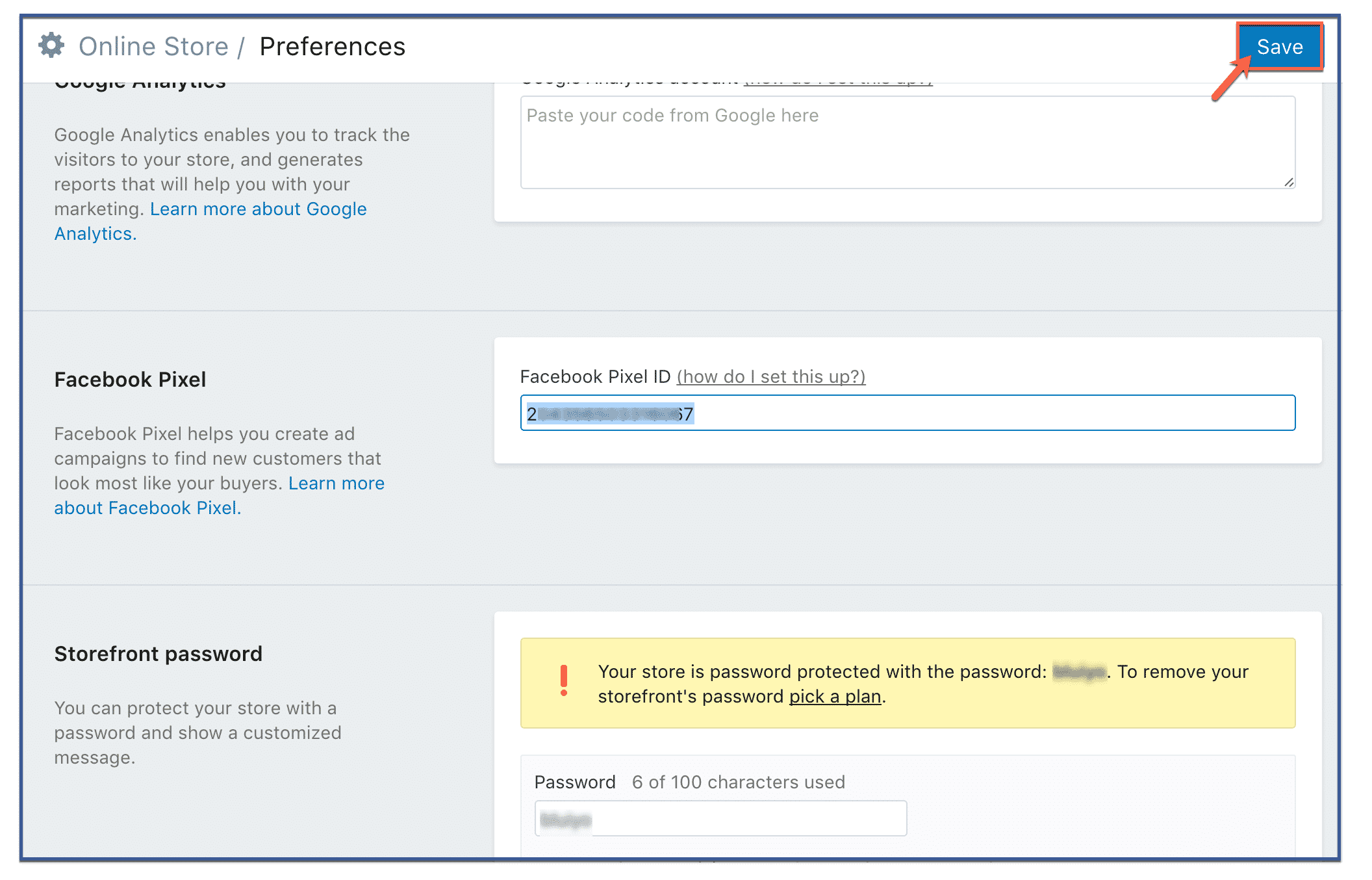
Se você usa o Shopify, a instalação é ainda mais fácil. Basta acessar o Gerenciador de Negócios do Facebook, copiar o ID do seu Pixel (não o código) e inseri-lo nas preferências da sua loja Shopify.
- No painel de administração da Shopify, acesse "Loja virtual" e clique em "Preferências".“
- Role a página até a seção do pixel do Facebook e cole o seu ID do pixel.
- Clique em “Salvar”
[/one_third][one_third]
Método 2: Adicionando manualmente o código do pixel ao seu site
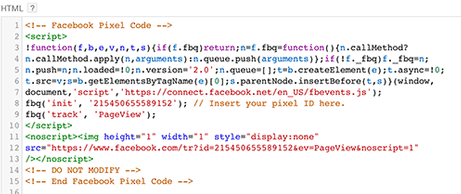
Esta é a forma mais comum de instalar o pixel. Na página do pixel no seu Gerenciador de Anúncios, você verá a opção "Concluir a configuração do seu pixel do Facebook". Clique nela. Em seguida, você verá várias opções; escolha "Instalar manualmente". A próxima tela deverá conter um grande bloco de código. Esse é o seu pixel. Copie-o.
Você pode copiar e colar o código base do pixel no código do cabeçalho do seu site. Isso mesmo – coloque-o depois do etiqueta e antes do Certifique-se de colar essa tag em todas as páginas da web que você deseja rastrear ou em seu modelo Caso você esteja usando um.
[/one_third][one_third]
Método 3: Usando plugins do WordPress
Existem vários plugins do WordPress que facilitam a instalação e o gerenciamento do Pixel do Facebook. No entanto, Pixel Caffeine da AdEspresso É de longe a nossa favorita. Com apenas alguns cliques, você pode ter o Pixel do Facebook funcionando no seu site sem muita complicação.
Uma das coisas mais incríveis sobre o Pixel Caffeine é que, ao contrário de outros plugins disponíveis, ele não tem custos, taxas ou limitações ocultas. É oferecido gratuitamente. Mas, antes de usar qualquer um dos seus inúmeros recursos, você precisará conectá-lo à sua conta de anúncios do Facebook.
No painel de controle, você pode escolher a conta de anúncios que deseja conectar ao seu site e o ID do pixel que deseja usar. Ele buscará automaticamente os IDs de pixel disponíveis com base na conta selecionada. Depois de clicar em "Ativar", pronto! Seu pixel estará ativo.
[/one_third][/full_width]
Pixel Caffeine da AdEspresso
[spacer height=”2px”]
 Certifique-se de que seu Pixel do Facebook esteja funcionando.
Antes de começar a usar os dados do seu pixel, é importante confirmar se ele está funcionando corretamente.
Se você usa o Google Chrome, baixe e instale a extensão Pixel Helper para verificar se o seu dispositivo está configurado corretamente. Facebook O Pixel está rastreando com precisão os eventos em seu site.












 English
  বাংলা
বাংলা  简体中文
简体中文  Nederlands
  Français
  Deutsch (Sie)
  हिन्दी
  Bahasa Indonesia
  Italiano
  日本語
日本語  한국어
한국어  Bahasa Melayu
  Português do Brasil
  Русский
  Español de México
  Tagalog
  ไทย
ไทย  Tiếng Việt
  اردو
اردو  Türkçe