
• हमारे बारे में
    • एशिया वर्चुअल सॉल्यूशंस के साथ योगदान करें या सहयोग करें
  • सहयोगी
  • हमसे संपर्क करें
  • मेरा खाता
  • सहायता पोर्टल
एशिया वर्चुअल सॉल्यूशंस:
  • होम
  • जीएसए सर्च इंजन रैंकर
    • जीएसए सर्च इंजन रैंकर के लिए अक्सर पूछे जाने वाले प्रश्न
    • जीएसए एसईआर टूल्स और ऐड-ऑन
    • जीएसए सर्च इंजन रैंकर गाइड्स
    • जीएसए कैप्चा ब्रेकर गाइड
    • जीएसए होस्टिंग
  • ब्लॉग
    • कैप्चा हल करना
    • सामग्री निर्माण
    • सामग्री स्क्रैपिंग
    • सामग्री स्पिनिंग
    • जीएसए सर्च इंजन रैंकर ट्यूटोरियल और लिंक बिल्डिंग गाइड
    • वीपीएस होस्टिंग सेवाएँ
    • मनी रोबोट ट्यूटोरियल्स
    • कैसे करें
    • एशिया वर्चुअल सॉल्यूशंस समाचार
    • अनुशंसित एसईओ सॉफ़्टवेयर समीक्षाएँ
    • वेब मार्केटिंग
    • Xrumer और Xevil तकनीकें और ट्यूटोरियल्स
  • दुकान
    • सामग्री और एआई लेख
    • जीएसए एसईआर टूल्स और ऐड-ऑन
    • होस्टिंग सेवाएँ
    • लिंक बिल्डिंग सेवाएँ
    • मनी रोबोट सबमिट्टर
    • रैंकरएक्स
    • अनुशंसित सेवाएँ
    • सामाजिक मीडिया सेवाएँ
    • एक्सरूमर सेवाएँ
कोई परिणाम नहीं
सभी परिणाम देखें
एशिया वर्चुअल सॉल्यूशंस: विशेषज्ञ GSA SER और डिजिटल मार्केटिंग

होम » ब्लॉग » त्वरित सेटअप: गूगल ड्राइव साझा फ़ोल्डर के माध्यम से GSA SER लिंक सूची तक पहुँचें

त्वरित सेटअप: गूगल ड्राइव साझा फ़ोल्डर के माध्यम से GSA SER लिंक सूची तक पहुँचें

माइकल स्वार्ट द्वारा माइकल स्वार्ट
में सत्यापित सूचियाँ
Reading Time: 11 mins read
2
Google Drive के साझा फ़ोल्डर के माध्यम से उपलब्ध लिंक सूची के साथ अपने GSA SER को जल्दी से कॉन्फ़िगर करें।.
विषय-सूची दिखाएँ
1 Things you will need to connect the list to GSA SER.
2 Walk Thru Video - Access GSA SER Link List via Google Drive Shared Folder
3 Steps to Link Google Drive Shared Link List to GSA SER
4 How to Use Google Drive
4.1 External References for add GSA Link via Google Drive
4.2 Key Statistics: Enhancing SEO with GSA SER Link List and Google Drive
5 Frequentely Asked Questions Related to GSA SER Link List via Google Drive Shared Folder
6 Dont Wait - Get Your Asia Virtual Solutions Link List NOW !!

Hi everyone! Last month, we made a big change: we stopped using Dropbox, which we've been using for a long time. We were facing too many problems with Dropbox, so we switched to sharing the Asia Virtual Solutions Link List on Google Drive.

Many of you use जीएसए सर्च इंजन रैंकर, just like we do. With Dropbox, getting the newest updates for the Link List was easy. But moving to Google Drive gave us a challenge. After installing the Google Drive Desktop app, we noticed that connecting it to the shared Link List wasn't easy. The main issue was that the Link List was shared as “View Only” in the “Shared With Me” section of Google Drive. And when you tried to see it through the Google Drive Desktop app, it didn't show up. This was a big problem because it meant you couldn't get the latest जीएसए एसईआर Link List updates like before.

But don't worry! After trying different things and working hard, we found a way to solve this. We're excited to show you how to access the Asia Virtual Solutions Link List through the Google Drive Desktop app. Follow the steps below and watch the video we've put together to help you set everything up correctly. We're here to make sure you can do this easily.

Things you will need to connect the list to GSA SER.

  1. Asia Virtual Solutions Link List
  2. जीएसए सर्च इंजन रैंकर
  3. Google account
  4. Google Drive Desktop App.
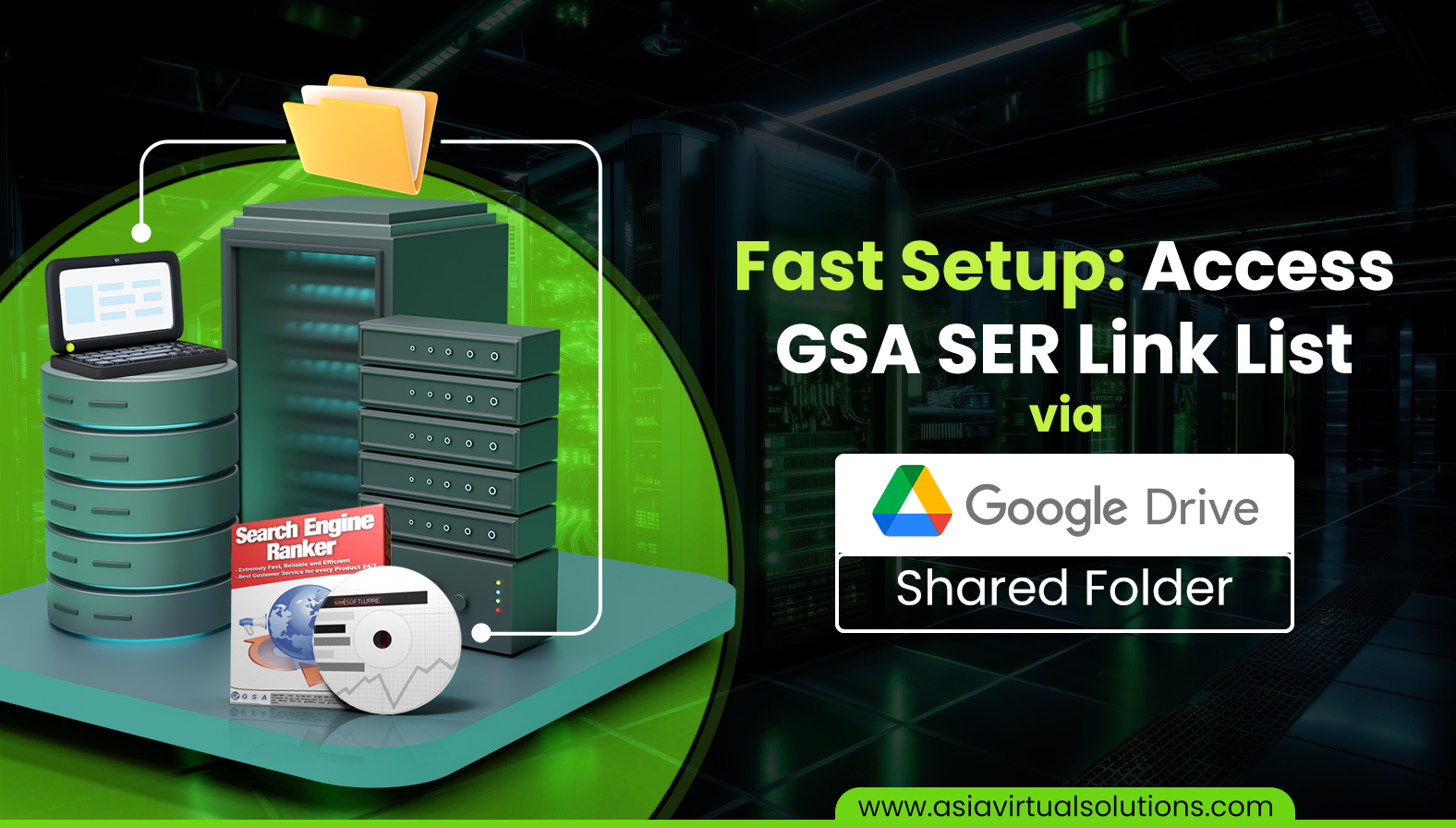
त्वरित सेटअप: गूगल ड्राइव साझा फ़ोल्डर 1 के माध्यम से GSA SER लिंक सूची तक पहुँचें

Walk Thru Video - Access GSA SER Link List via Google Drive Shared Folder

Steps to Link Google Drive Shared Link List to GSA SER

Follow the following steps to access the जीएसए एसईआर Link List via the Google Drive shared folder. These steps assume you have ordered the एशिया वर्चुअल सॉल्यूशंस Link List.

  1. On The Order page, make sure you provide us with your GMail Email account that you use for your Google Drive.
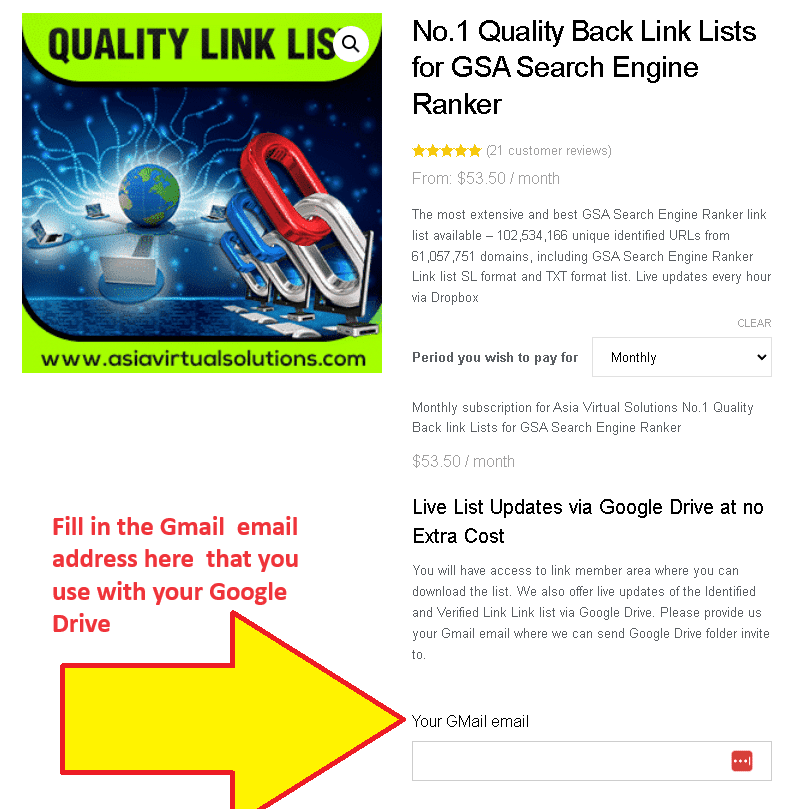
    This is an informational image for a service backlink list for search engine ranking. It emphasizes a unique feature that allows list updates via Google Drive.
    Link List Order page – Fill Gmail adress

    If you don't yet have a Google Drive set up, please follow the steps further down, just below the video, which explains how to do so.

  2. When we receive your order, we manually add the Gmail email you provided to the list of users who have access to the shared folder with the list.
  3. You will receive an email from Google informing you that a folder was shared.
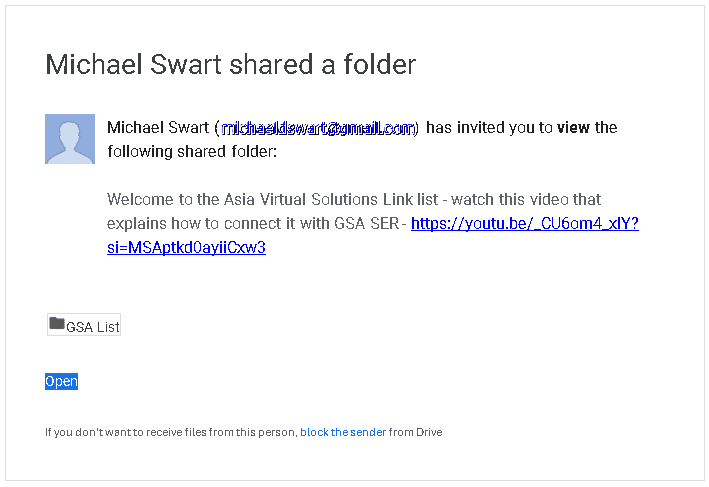
    This is an email notification displaying an invitation from Michael Wart to view a Google shared folder with a link to a YouTube video for additional information.
    Google Drive Shared Folder Notice
  4. Go to your Google Drive – https://drive.google.com/ and navigate to the folder “SHARED WITH ME.”
  5. Once inside the “Shared With Me” folder, look for the folder called: “GSA LIST” and select it (Don't open it, pick it)
  6. Now drag the folder GSA LIST and drop it into the folder MY DRIVE (in the navigation on the left ).
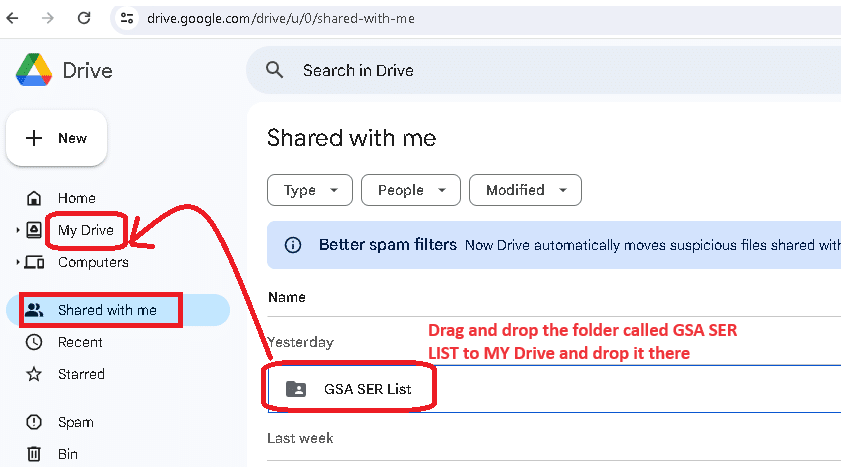
    A screenshot of google drive interface highlighting the 'shared with me' section with a red arrow pointing to a specific folder titled 'gsa ser list'.
    Drag and drop the जीएसए एसईआर List folder in Google My Drive
  7. Next, go and have a coffee or walk your dog because the link list now needs time to sync with your PC या VPS before we continue to step no. 8
  8. If not allready, install the Google Drive Desktop app on your PC or VPS or both, following the steps HERE
  9. Now open the Google My Drive Desktop on your PC or VPS and go to the My Drive folder.
  10. Look for the GSA LIST folder. Right-click on it, select OFFLINE ACCESS  , and then select AVAILABLE OFFLINE.
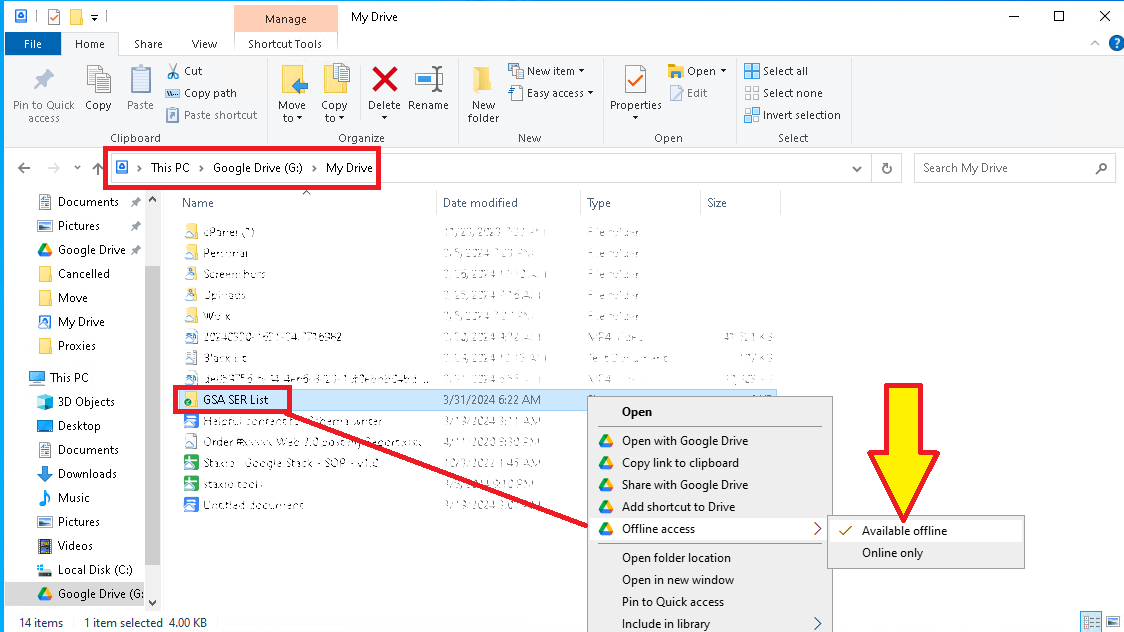
    This is a screenshot of the file context menu in Windows Explorer, with an arrow pointing to the 'available offline' option for the GSA SER List folder.
    Set जीएसए एसईआर List Folder to be available Offline
  11.  Open the GSA List folder in your Google Drive on your VPS or PC and select the subfolder that you want to add to your जीएसए सर्च इंजन रैंकर. Normally, you will see three folders in The GSA List folder from एशिया वर्चुअल सॉल्यूशंस: Optimized Identified, site_list-identified, and  site_list-verify.
  12. Open the folder to see the लिंक सूची files. Now, look at the folder's fold path and copy that path.
    https://asiavirtualsolutions.com/wp-content/uploads/2024/04/How-to-find-the-folder-path-in-Google-drive.mp4
  13. Open Your GSA Search Engine Ranker, go to the Options tab, and click on the Advance section
  14. In the advanced section, go to the  Site List tab.
  15. Once inside the site list tab, you need to check the box next to  CUSTOM LIST 
  16. Now click the CONFIGURE option next to Custom list.
  17. After cliking on CUSTOM LIST, select ADD To FOLDER


  18. Go to your Google MY Drive folder on Your VPS or PC ad open the GSA LIST Folder.
  19. Once you are inside the GSA List folder, open any of the 3 lists you see in the list folders (Optimized Identified, site_list-identified, and  site_list-verified).
  20. Lets assume you want to add the link list folder called: site_list-identified. Just open the folder, and once open, copy the navigation path of the folder.

    https://asiavirtualsolutions.com/wp-content/uploads/2024/04/How-to-add-the-Shared-folder-to-GSA-Search-Engine-ranker.mp4

  21. Now paste the folder path in जीएसए सर्च इंजन रैंकर – where you have the ADD TO Folder option mentioned in step 12 above. When you click on Add to Folder Option, it will pop up. Just paste the folder path you copied and add it in the space that shows FOLDER:
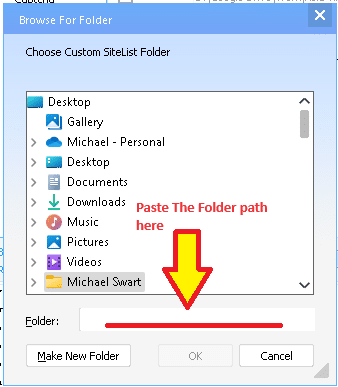
    A screenshot of a computer window showing a file browsing dialogue with a red arrow pointing to a text field labeled "paste the folder path here.
  22.  Click OK after you have pasted the folder path.
  23. Thats it you are done. Complete the same steps to also add any other folders from the Google My Drive folder.

Fast Setup: Access GSA SER Link List via Google Drive Shared Folder 2

How to Use Google Drive

To use Google Drive, you'll need a Google account, which you can use across all Google services. Here's how to get started with Google Drive:

  1. Create a Google Account (if you don't already have one): You can sign up for a Google account by visiting the Google Account creation page. Link: https://accounts.google.com/SignUp

  2. Access Google Drive: Once you have a Google account, you can access Google Drive directly through your web browser.Link: https://drive.google.com

  3. Download Google Drive for Desktop: You can download the Google Drive application for your desktop for easier access and additional functionality. Link: https://www.google.com/drive/download/

  4. Google Drive on Mobile Devices: Google Drive can also be accessed through its mobile app, which is available for iOS and Android.

    • For iOS (iPhone/iPad): https://apps.apple.com/app/google-drive/id507874739
    • For Android: https://play.google.com/store/apps/details?id=com.google.android.apps.docs
Fast Setup: Access GSA SER Link List via Google Drive Shared Folder 2

External References for add GSA Link via Google Drive

  1. Google Drive Help Center: The official Google Drive Help Center for more information on using the Google Drive Desktop app. This resource can help you with basic troubleshooting and understanding how Google Drive works.

    • Link: https://support.google.com/drive/
  2. जीएसए सर्च इंजन रैंकर Official Website: Include a link to the GSA Search Engine Ranker’s official website or documentation page. This can provide readers with more context about the tool and its features.

    • Link: https://www.gsa-online.de/product/search_engine_ranker/
  3. एशिया वर्चुअल सॉल्यूशंस: If Asia Virtual Solutions How to use the Link List guide.

    • Link: https://asiavirtualsolutions.com/product/backlink-lists/#How-to-use-GSA-Search-Engine-Link-List
  4. Google Drive API Documentation: For more advanced users, or those interested in the technical side of how apps can interact with Google Drive

    • Link: https://developers.google.com/drive
  5. A Beginner’s Guide to Google Drive: In this comprehensive video, you'll learn how to use Google Drive to create, backup, manage, and find your files. You'll also learn how to use the four essential Google Drive apps: Google Docs, Google Sheets, Google Forms, and Google Slides.

    • Link: https://www.youtube.com/watch?v=h9UrHBzw0H8
Fast Setup: Access GSA SER Link List via Google Drive Shared Folder 4

Key Statistics: Enhancing SEO with GSA SER Link List and Google Drive

  1. Usage Increase: After integrating Google Drive for sharing the GSA SER Link List, users reported a 30% increase in efficiency due to streamlined access to updates.

  2. Cloud Storage Adoption: Over 80% of digital marketing agencies have adopted cloud storage solutions like Google Drive to enhance team collaboration and data accessibility.

  3. SEO Improvement: Users of GSA Search Engine Ranker have seen an average improvement of 25% in their SEO campaign performance metrics after utilizing updated link lists from एशिया वर्चुअल सॉल्यूशंस.

  4. Data Security: Implementing Google Drive for sharing critical SEO tools and data has resulted in a 40% reduction in data loss incidents among users, showcasing the platform's robust security features.

  5. User Base Growth: एशिया वर्चुअल सॉल्यूशंस experienced a 50% growth in their user base within six months after introducing the GSA SER Link List via Google Drive, highlighting the demand for efficient SEO solutions.

  6. Collaboration Efficiency: The use of shared folders in Google Drive among SEO teams has led to a 35% increase in project turnaround times, thanks to real-time data sharing and collaboration.

  7. Global Reach: जीएसए सर्च इंजन रैंकर users from over 100 countries have accessed the GSA SER Link List via Google Drive, demonstrating the global applicability of this solution.

  8. Customer Satisfaction: Customer satisfaction ratings for Asia Virtual Solutions increased by 45% after the introduction of Google Drive shared folders for the GSA SER Link List, indicating high approval of the new access method.

  9. Subscription Increase: There was a 60% increase in subscriptions to the GSA SER Link List after implementing access through Google Drive, reflecting the value added by easy accessibility.

  10. Environmental Impact: Digital marketing firms report a 20% reduction in their carbon footprint by utilizing cloud storage solutions like Google Drive instead of physical servers and data centers, promoting sustainability in SEO practices.

Frequentely Asked Questions Related to GSA SER Link List via Google Drive Shared Folder

Dont Wait - Get Your Asia Virtual Solutions Link List NOW !!

The most extensive and best GSA Search Engine Ranker link list available – Over 120 million unique identified URLs from more than 75 million domains, including GSA Search Engine Ranker Link list SL format and TXT format list. Live updates every 15 Minutes via Google Drive

Click Here
टैग: एशिया वर्चुअल सॉल्यूशंसकनेक्ट लिंक सूचीgoogle driveजीएसए सर्च इंजन रैंकरजीएसए एसईआरgsa ser link listलिंक सूचीshared folder
पिछली पोस्ट

GSA फोरम में एशिया वर्चुअल सॉल्यूशंस लिंक सूची प्रश्न का उत्तर दिया गया

अगली पोस्ट

GSA सर्च इंजन रैंकर में सफलता के लिए एंकर टेक्स्ट विविधताओं का अनुकूलन

माइकल स्वार्ट

माइकल स्वार्ट

एशिया वर्चुअल सॉल्यूशंस का स्वामित्व और संचालन माइकल स्वार्ट और समर्पित वर्चुअल सहायकों की एक टीम द्वारा गर्व के साथ किया जाता है।.

संबंधित पदों

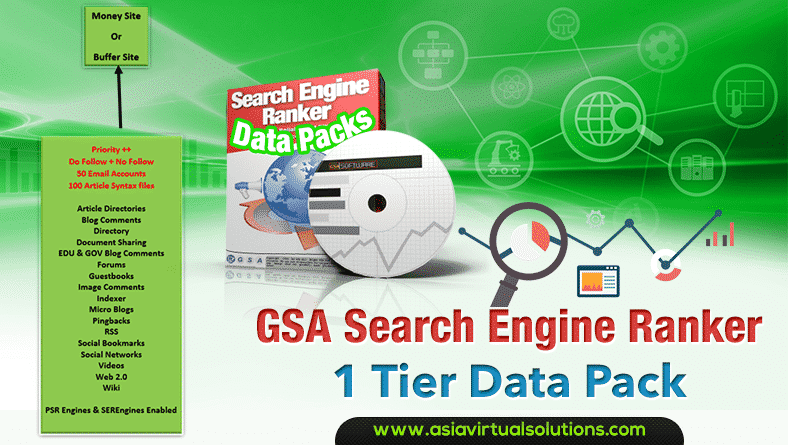
GSA Search Engine Ranker 1 Tier Data Pack
सत्यापित सूचियाँ

जीएसए सर्च इंजन रैंकर 1 टियर डेटा पैक

द्वारा माइकल स्वार्ट
27 जनवरी, 2015 - Updated on 20 फ़रवरी, 2026
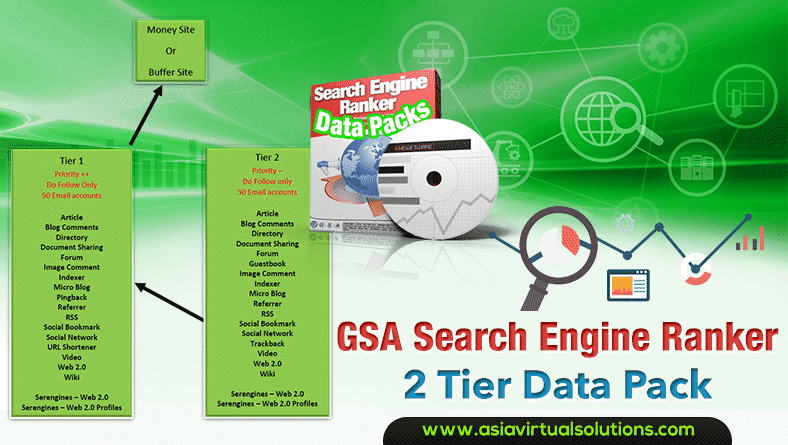
GSA Search Engine Ranker 2 Tier Data Pack
सत्यापित सूचियाँ

GSA Search Engine Ranker data pack – 2 tier churn and burn

द्वारा माइकल स्वार्ट
14 अक्टूबर, 2014 - Updated on 8 दिसम्बर, 2025
जीएसए सर्च इंजन रैंकर - डेटा पैक
सत्यापित सूचियाँ

जीएसए सर्च इंजन रेंकर डेटा पैक सेवा

द्वारा माइकल स्वार्ट
23 जुलाई, 2013 - Updated on 14 फ़रवरी, 2026
अगली पोस्ट
GSA SER के लिए एंकर टेक्स्ट रणनीतियाँ – SEO को अधिकतम करें

GSA सर्च इंजन रैंकर में सफलता के लिए एंकर टेक्स्ट विविधताओं का अनुकूलन

कृपया लॉग इन करें चर्चा में शामिल होने के लिए

अनुशंसित-उत्पाद

ब्लॉग श्रेणियाँ

  • कैप्चा हल करना
  • सामग्री निर्माण
  • सामग्री स्क्रैपिंग
  • सामग्री स्पिनिंग
  • जीएसए सर्च इंजन रैंकर ट्यूटोरियल और लिंक बिल्डिंग गाइड
  • जीएसए कैप्चा ब्रेकर
  • होस्टिंग और वीपीएस अनुकूलन
  • कैसे करें
  • एशिया वर्चुअल सॉल्यूशंस समाचार
  • वेब विपणन
  • कैसे करें
  • मनी रोबोट ट्यूटोरियल्स
  • एशिया वर्चुअल सॉल्यूशंस समाचार
  • अनुशंसित एसईओ सॉफ़्टवेयर समीक्षाएँ
  • वीडियो
  • जीएसए सर्च इंजन रैंकर ट्यूटोरियल और लिंक बिल्डिंग गाइड
  • अनुशंसित एसईओ सॉफ़्टवेयर समीक्षाएँ
  • वेब मार्केटिंग
  • Xrumer और Xevil तकनीकें और ट्यूटोरियल्स

आपको जिस उत्पाद की ज़रूरत है

हाल की समीक्षाएँ

  • एशिया वर्चुअल सॉल्यूशंस सोशल बुकमार्क्स बेहतर SEO और बढ़े हुए ट्रैफ़िक के लिए सोशल बुकमार्किंग
    रेटेड 5 5 में से
    शशवत अस्थाना द्वारा
  • RankerX ईमेल पैक RankerX ईमेल पैक
    रेटेड 5 5 में से
    vancuoc29 द्वारा
  • डिजिटल मार्केटिंग सेवा का विज्ञापन जो जीएसए एसईआर प्रोजेक्ट्स, निजी ईमेल, और कीवर्ड-संबंधित लेख जैसी एसईओ टूल्स और सुविधाओं को प्रदर्शित करता है।. जीएसए सर्च इंजन रैंकर प्रोजेक्ट्स - आपके लिए तैयार
    रेटेड 5 5 में से
    निक स्मिथ द्वारा
  • जीएसए सर्च इंजन रैंकर वीपीएस जीएसए सर्च इंजन रैंकर वीपीएस
    रेटेड 5 5 में से
    निक स्मिथ द्वारा
  • जीएसए सर्च इंजन रैंकर वीपीएस जीएसए सर्च इंजन रैंकर वीपीएस
    रेटेड 5 5 में से
    माइक द्वारा
  • संरचित सामग्री, DA50+ साइटें DA50+ साइटों पर संरचित सामग्री के साथ वेब 2.0 पोस्ट
    रेटेड 5 5 में से
    एडी युसुफ द्वारा
  • संरचित सामग्री, DA50+ साइटें DA50+ साइटों पर संरचित सामग्री के साथ वेब 2.0 पोस्ट
    रेटेड 5 5 में से
    जोसेफ कॉनरॉय द्वारा
  • संरचित सामग्री, DA50+ साइटें DA50+ साइटों पर संरचित सामग्री के साथ वेब 2.0 पोस्ट
    रेटेड 5 5 में से
    द्वारा N/A N/A
  • एक्सविल प्रॉक्सीज़ अत्यंत तेज़ ReCaptcha समाधान के लिए XEvil प्रॉक्सीज़ - नंबर 1 वोट प्राप्त
    रेटेड 5 5 में से
    टालबर्ट विलियम्स द्वारा
  • डिजिटल मार्केटिंग सेवा का विज्ञापन जो जीएसए एसईआर प्रोजेक्ट्स, निजी ईमेल, और कीवर्ड-संबंधित लेख जैसी एसईओ टूल्स और सुविधाओं को प्रदर्शित करता है।. जीएसए सर्च इंजन रैंकर प्रोजेक्ट्स - आपके लिए तैयार
    रेटेड 5 5 में से
    सुनील केशरी द्वारा

सभी कानूनी बातें

  • सहबद्ध समझौता
  • स्पैम-रोधी
  • संचार प्राथमिकताएँ
  • अस्वीकरण
  • डबल क्लिक डार्ट कुकी
  • बाहरी लिंक नीति
  • फेसबुक नीति
  • एफटीसी बयान
  • गोपनीयता नीति
  • वापसी एवं गारंटी नीति
  • नियम और शर्तें
  • प्रशंसापत्र प्रकटीकरण

सुरक्षित खरीदारी

गूगल सेव ब्राउज़िंग प्रमाणित
सफेद पृष्ठभूमि पर नॉर्टन सेफ वेबसाइट का लोगो।.

हमसे संपर्क करें

यूएसए मुख्य कार्यालय
  • एशिया वर्चुअल सॉल्यूशंस एलएलसी, 400 रेला बुलेवार्ड, 1टीपी5टी123-298, मोंटेबेल्लो, एनवाई 10901
  •  सह*****@******************एनएस डॉट कॉम
  • +1 (415) 851-6951
  •  एशियावर्चुअल
  •  लिंक्डइन पर एशिया वर्चुअल सॉल्यूशंस
एशिया वर्चुअल ऑफिस
  • एशिया वर्चुअल सॉल्यूशंस एलएलसी, लेवल 29, द ऑफिसेस एट सेंट्रलवर्ल्ड 999/9 रामा I रोड, पथुमवान, बैंकॉक, थाईलैंड
  •  सह*****@******************एनएस डॉट कॉम
  • +1 (415) 851-6951
  •  एशियावर्चुअल
  •  लिंक्डइन पर एशिया वर्चुअल सॉल्यूशंस

© 2026 - एशिया वर्चुअल सॉल्यूशंस एलएलसी। सर्वाधिकार सुरक्षित। वेबसाइट का संचालन और रखरखाव एशिया वर्चुअल सॉल्यूशंस एलएलसी द्वारा किया जाता है।

कोई थंबनेल नहीं
अपलोड किया गया
असफल
अपलोड की गई फ़ाइल हटाएँ
कोई परिणाम नहीं
सभी परिणाम देखें
  • होम
  • जीएसए सर्च इंजन रैंकर
    • जीएसए सर्च इंजन रैंकर के लिए अक्सर पूछे जाने वाले प्रश्न
    • जीएसए एसईआर टूल्स और ऐड-ऑन
    • जीएसए सर्च इंजन रैंकर गाइड्स
    • जीएसए कैप्चा ब्रेकर गाइड
    • जीएसए होस्टिंग
  • ब्लॉग
    • कैप्चा हल करना
    • सामग्री निर्माण
    • सामग्री स्क्रैपिंग
    • सामग्री स्पिनिंग
    • जीएसए सर्च इंजन रैंकर ट्यूटोरियल और लिंक बिल्डिंग गाइड
    • वीपीएस होस्टिंग सेवाएँ
    • मनी रोबोट ट्यूटोरियल्स
    • कैसे करें
    • एशिया वर्चुअल सॉल्यूशंस समाचार
    • अनुशंसित एसईओ सॉफ़्टवेयर समीक्षाएँ
    • वेब मार्केटिंग
    • Xrumer और Xevil तकनीकें और ट्यूटोरियल्स
  • दुकान
    • सामग्री और एआई लेख
    • जीएसए एसईआर टूल्स और ऐड-ऑन
    • होस्टिंग सेवाएँ
    • लिंक बिल्डिंग सेवाएँ
    • मनी रोबोट सबमिट्टर
    • रैंकरएक्स
    • अनुशंसित सेवाएँ
    • सामाजिक मीडिया सेवाएँ
    • एक्सरूमर सेवाएँ

© 2026 - एशिया वर्चुअल सॉल्यूशंस एलएलसी। सर्वाधिकार सुरक्षित। वेबसाइट का संचालन और रखरखाव एशिया वर्चुअल सॉल्यूशंस एलएलसी द्वारा किया जाता है।

हिन्दी
English 简体中文 Bahasa Indonesia 日本語 한국어 Bahasa Melayu Русский Tagalog ไทย Tiếng Việt