• เกี่ยวกับเรา
    • Contribute or Collaborate with Asia Virtual Solutions
  • ผู้ส่งเสริม
  • ติดต่อเรา
  • บัญชีของฉัน
  • พอร์ทัลสนับสนุน
เอเชีย เวอร์ชวล โซลูชั่นส์:
  • หน้าแรก
  • ผลิตภัณฑ์และบริการของ GSA
    • คำถามที่พบบ่อยสำหรับ GSA Search Engine Ranker
    • GSA Search Engine Ranker
    • คู่มือการใช้ GSA Search Engine Ranker
    • คู่มือการแก้ไข Captcha ของ GSA
    • บริการโฮสติ้ง GSA
  • บล็อก
    • การแก้ Captcha
    • การสร้างเนื้อหา
    • การขูดเนื้อหา
    • การเขียนเนื้อหาแบบหมุนเวียน
    • คู่มือการใช้งาน GSA Search Engine Ranker
    • บริการโฮสติ้ง VPS
    • คู่มือการใช้ Money Robot
    • วิธีการ
    • ข่าวจากเอเชีย วีร์ชวล โซลูชั่นส์
    • รีวิวซอฟต์แวร์ SEO ที่แนะนำ
    • การตลาดออนไลน์
    • เทคนิคและบทเรียน Xrumer & Xevil
  • ร้านค้า
    • บทความเนื้อหาและ AI
    • GSA Search Engine Ranker
    • บริการโฮสติ้ง
    • บริการสร้างลิงก์
    • Money Robot Submitter
    • RankerX
    • บริการที่แนะนำ
    • บริการสื่อสังคมออนไลน์
    • บริการ Xrumer
ไม่มีผลลัพธ์
ดูผลลัพธ์ทั้งหมด
เอเชีย วีรชูล โซลูชั่นส์: ผู้เชี่ยวชาญ GSA SER และการตลาดดิจิทัล

หน้าแรก » บล็อก » วิธีใช้ Xrumer เพื่อค้นหา footprints สำหรับ GSA Search Engine Ranker

วิธีใช้ Xrumer เพื่อค้นหา footprints สำหรับ GSA Search Engine Ranker

ไมเคิล สวาร์ต โดย ไมเคิล สวาร์ต
9 กุมภาพันธ์, 2019 - Updated on 31 มกราคม, 2026
ใน การตั้งค่าและการกำหนดค่า
0
วิธีใช้ Xrumer เพื่อค้นหา footprints สำหรับ GSA Search Engine Ranker
สารบัญ แสดง
1 Use Xrumer to find footprints for GSA Search Engine Ranker link list scraping
1.1 What are Footprints (In a Nutshell ):
1.1.1 Watch the below step-by-step video tutorial showing you all the steps to follow in GSA SER, Xrumer, and also Scrapebox
1.2 How to prepare your GSA Search Engine Ranker List for footprint extraction:
1.2.1 Fortunately, GSA Search Engine Ranker has the tools to make the above steps easy.
1.3 How do we extract the footprints using Xrumer?
1.4 How to use your new footprints to scrape using Scrapebox

Use Xrumer to find footprints for GSA Search Engine Ranker link list scraping

I know of several GSA Search Engine Ranker users who also own a copy of Xrumer. Some purchased it long ago, and some only recently got it when Xevil Captcha solver was added to Xrumer.
Xrumer traditionally had a challenging learning curve, and most users do not understand exactly how it works or what some of the functions are used for.

In this post, I will share with you a handy function within Xrumer that could be used to extract footprints from your existing link list, which you can then use to scrape additional link lists for the GSA Search Engine Ranker. The function I will show you in Xrumer is called “Links Pattern Analysis.”

Before we start with how to extract the footprints, let's have a quick look at exactly what a footprint is and what it will be used for.

What are Footprints (In a Nutshell ):

Footprints are bits of code or content that are found in a website’s code or content. For example, when you create a WordPress site, you will always have “Powered by WordPress” in the footer of your site ( unless you have manually removed it). Every content management system ( CMS ) will have its very own footprints within the content code, the URL structure, or the site. So when you want to scrape for links, then you tell Google to look for sites that contain specific text in the URL, title, or content of a site

Without going into much detail, you need to understand the following three basic search operators:

Inurl: –  This will search for sites with specific words or paths in the URL of the site. Example: inurl:apple
Intitle: – This will search for specific text in the title of a site. intitle:apple
Site: – This will search  domains/URLs/links from a specified domain, ccTLD, etc. site:apple.com

For a more detailed list of all types of  Google Search Operators, I suggest you have a look at this site: https://ahrefs.com/blog/google-advanced-search-operators/

Watch the below step-by-step video tutorial showing you all the steps to follow in GSA SER, Xrumer, and also Scrapebox

How to prepare your GSA Search Engine Ranker List for footprint extraction:

First, we need a รายการลิงก์ that we can feed into Xrumer. For GSA Search Engine Ranker” GSA Search Engine Ranker users, the list you want to use to extract more footprints from should be your verified รายการลิงก์ because you know that GSA SER was able to build links on that site successfully. So, we want to get the footprints from the verified list so we can go and scrape for similar sites.

You can select one of the files in your Verified list if you ONLY want to scrape for footprints from a specific platform. For example, if you only need footprints for WordPress บทความ directories, then you will use the file called: sitelist_Article-WordPress Article, or if you want to scrape for Media Wiki sites, then use the file: sitelist_Wiki-MediaWiki

If you want to check for footprints in all of the รายการที่ตรวจสอบแล้ว, then we need to do 2 things first;

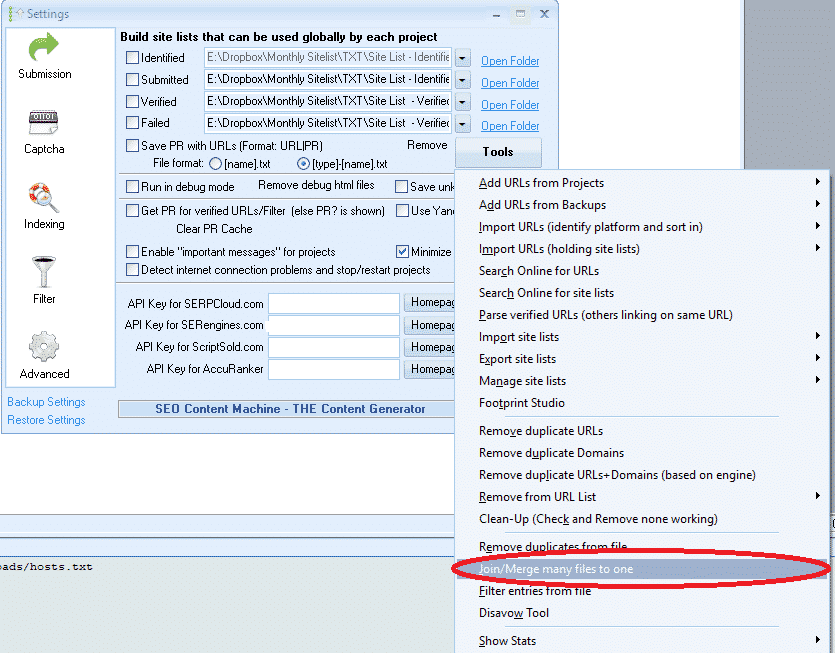
  1. Merge all the verified files into one single file.
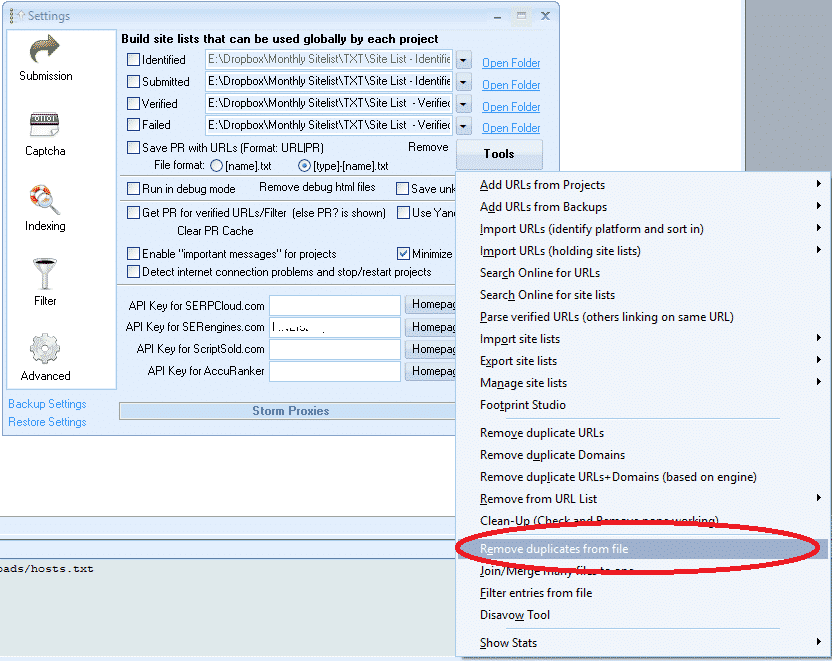
  2. After you merge it, you need to remove the duplicate domains

Fortunately, GSA Search Engine Ranker has the tools to make the above steps easy.

Make sure you watch the YouTube video that is attached and embedded with this post to understand how to use the below 2 functions.

[full_width][one_half padding=”0 10px 0 0″]Join or Merge Many Files to One[/one_half][one_half padding=”0 0 0 10px”]GSA Search Engine Ranker - Remove duplicates from File[/one_half][/full_width]
How do we extract the footprints using Xrumer?

OK, so now you have prepared the list from which you want to extract the footprints, and we can finally get to the Xrumer part of extracting the footprints, or as Xrumer calls it, do the “Links Pattern Analysis.

Follow the below simple steps to do the extraction.

  • On your Xrumer Menu, browse to “Tools.”
  • From the drop-down list, select “Links Pattern Analysis”
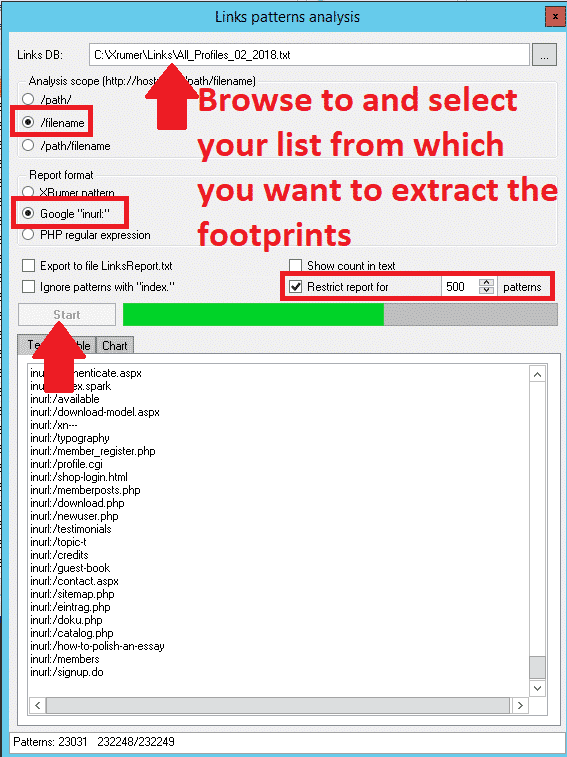
  • At the top of the Links Pattern analysis screen, browse to where you saved the link list from which you want to extract the footprints.
  • สำหรับ Analysis Scope: I suggest going with “/filename” as that will give you the most results. But I also recommend trying the other options, which will provide additional results.
  • Under “Report Format,” you want to select Google “in URL“
  • From the next 4 check-boxes, check only the option: “Restrict Report For” and then change it to default 1000 results
  • คลิก Start
  • When it is done,  Where it says: TXT | TABLE | CHART — Select the tab: Text
  • Select all and COPY all the results, open a notepad file, and paste it there. Save it as whatever you want.
  • Now you can go thru the list and remove footprints you do not want, things like keywords, if you are unsure what to clear, then just leave it all.

[full_width][one_half padding=”0 10px 0 0″]

Xrumer Links pattern analysis[/one_half][one_half padding=”0 0 0 10px”]Xrumer - Links Pattern analysis selections[/one_half][/full_width]
Google is fine for scraping using the footprint INURL, but unfortunately, some search engines do not work with INURL. If you are only planning to scrape Google, then you do not have to do anything at all to your list of footprints. But if you also intend to scrape other search engines, I suggest you copy the footprint files. Select EDIT from the menu and choose REPLACE in the copy you created.

  • To find what, enter : inurl:
  • For what to replace: leave blank.

This will now remove the inurl at the front, and you can either save the file and do a separate scrape for non-Google search engines, or you can copy it back into the original file if you want to run just 1 scrape with all footprints.

How to use your new footprints to scrape using Scrapebox

Now that you have sorted out your new footprints, it is time to put them to use. Since most people have Scrapebox and it is the easiest to use, I will walk you through the steps of scraping using Scrapebox and the footprints from Xrumer.

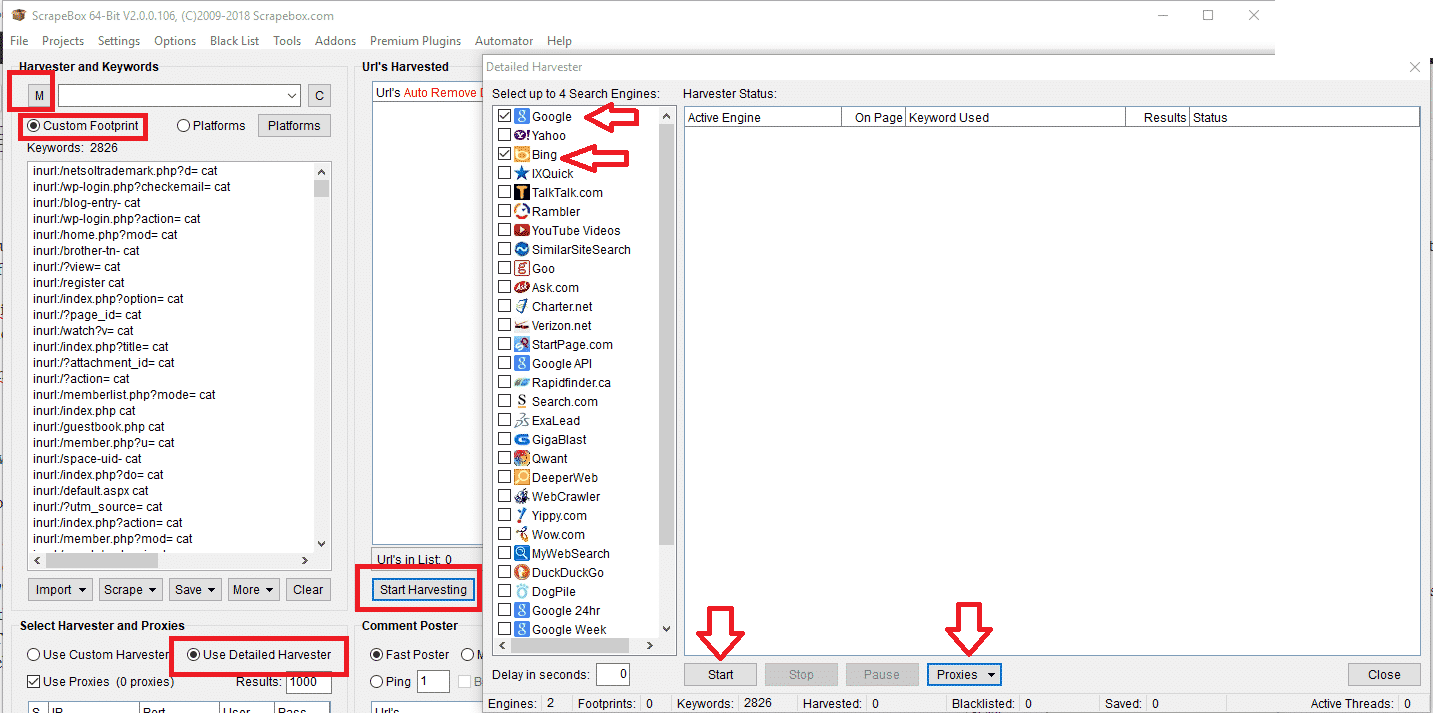
  • On the main window of Scrapebox, select Custom Footprints.
  • Enter your keywords or import them from a file. Best to use keywords related to your niche, you can add as many as you want, the more you add the longer it will take to scrape.
  • Next, click on the “M” ( Which is the load of your footprints and merge them with your footprints ). When you click the “M,” it will open a pop-up to select a file; here, you want to choose the list with the footprints you saved from Xrumer.
  • This will now merge the footprints with the keywords.
  • Now click on START HARVESTING.
  • From the list of Search engines to scrape, I suggest you only do Bing and/or Google. You can experiment later with the other engine, but these 2 are the biggest and will yield more results.
  • Under the Harvester PROXIES tab, select the option: “Enable Auto Load (from file),” then click on Select “Auto load proxies file,” and then choose the file containing all your proxies.
  • คลิก START to begin the harvesting.
  • For a detailed guide on using the Scrapebox harvester, you should have a look here: https://scrapeboxfaq.com/scraping 

Scrapebox Harvester settings

This then concludes this tutorial on how to scrape for GSA Search Engine Ranker footprints using Xrumer. I hope that the post was of help to you. If you have any questions with regard to this process, then please feel free to leave a comment or contact me.

แท็ก: หารอยเท้ารอยเท้าเครื่องมือค้นหา gsaเครื่องมือจัดอันดับเครื่องมือค้นหา gsaวิธีใช้ Xrumerรายการลิงก์การวิเคราะห์รูปแบบลิงก์สแครปบ็อกซ์Xrumer
โพสต์ก่อนหน้า

รีวิวชุดเครื่องมือ SEO – เข้าถึงเครื่องมือ SEO ที่ทรงพลัง 25 รายการ และเพิ่มอันดับเว็บไซต์ของคุณให้สูงขึ้น

โพสต์ถัดไป

บทวิจารณ์ของ SyVID

ไมเคิล สวาร์ต

ไมเคิล สวาร์ต

เอเชีย เวอร์ชวล โซลูชั่นส์ เป็นเจ้าของและดูแลโดยไมเคิล สวาร์ต และทีมผู้ช่วยเสมือนจริงที่ทุ่มเท.

โพสต์ถัดไป

บทวิจารณ์ของ SyVID

สินค้าแนะนำ

หมวดหมู่บล็อก

  • การแก้ Captcha
  • การสร้างเนื้อหา
  • การขูดเนื้อหา
  • การเขียนเนื้อหาแบบหมุนเวียน
  • คู่มือการใช้งาน GSA Search Engine Ranker
  • GSA Captcha Breaker
  • โฮสติ้ง & การเพิ่มประสิทธิภาพ VPS
  • วิธีการ
  • ข่าวจากเอเชีย วีร์ชวล โซลูชั่นส์
  • การตลาดออนไลน์
  • วิธีการ
  • คู่มือการใช้ Money Robot
  • ข่าวจากเอเชีย วีร์ชวล โซลูชั่นส์
  • รีวิวซอฟต์แวร์ SEO ที่แนะนำ
  • วิดีโอ
  • คู่มือการใช้งาน GSA Search Engine Ranker
  • รีวิวซอฟต์แวร์ SEO ที่แนะนำ
  • การตลาดออนไลน์
  • เทคนิคและบทเรียน Xrumer & Xevil

สินค้าที่คุณต้องการ

รีวิวล่าสุด

  • เอเชีย วีร์ชวล โซลูชั่นส์ บุ๊กมาร์คสังคม การบุ๊กมาร์กทางสังคมเพื่อ SEO ที่ดีขึ้นและการเพิ่มปริมาณการเข้าชม
    ได้รับการจัดอันดับ 5 จาก 5
    by shashwat asthana
  • แพ็กเกจอีเมล RankerX แพ็กเกจอีเมล RankerX
    ได้รับการจัดอันดับ 5 จาก 5
    by vancuoc29
  • โฆษณาบริการการตลาดดิจิทัลที่นำเสนอเครื่องมือและคุณสมบัติ SEO เช่น โครงการ GSA SER, อีเมลส่วนตัว และบทความที่เกี่ยวข้องกับคีย์เวิร์ด. โครงการ GSA Search Engine Ranker - ทำเสร็จให้คุณแล้ว
    ได้รับการจัดอันดับ 5 จาก 5
    โดย นิค สมิธ
  • GSA Search Engine Ranker VPS GSA Search Engine Ranker VPS
    ได้รับการจัดอันดับ 5 จาก 5
    โดย นิค สมิธ
  • GSA Search Engine Ranker VPS GSA Search Engine Ranker VPS
    ได้รับการจัดอันดับ 5 จาก 5
    โดย ไมค์
  • เนื้อหาที่มีโครงสร้าง, เว็บไซต์ DA50+ โพสต์ Web 2.0 พร้อมเนื้อหาที่มีโครงสร้างบนเว็บไซต์ DA50+
    ได้รับการจัดอันดับ 5 จาก 5
    โดย เอเด ยุสุฟ
  • เนื้อหาที่มีโครงสร้าง, เว็บไซต์ DA50+ โพสต์ Web 2.0 พร้อมเนื้อหาที่มีโครงสร้างบนเว็บไซต์ DA50+
    ได้รับการจัดอันดับ 5 จาก 5
    โดย โจเซฟ คอนรอย
  • เนื้อหาที่มีโครงสร้าง, เว็บไซต์ DA50+ โพสต์ Web 2.0 พร้อมเนื้อหาที่มีโครงสร้างบนเว็บไซต์ DA50+
    ได้รับการจัดอันดับ 5 จาก 5
    โดย ไม่ระบุ ไม่ระบุ
  • Xevil Proxies XEvil Proxies สำหรับการแก้ ReCaptcha อย่างรวดเร็ว - ได้รับการโหวตอันดับ 1
    ได้รับการจัดอันดับ 5 จาก 5
    โดย ทัลเบิร์ต วิลเลียมส์
  • โฆษณาบริการการตลาดดิจิทัลที่นำเสนอเครื่องมือและคุณสมบัติ SEO เช่น โครงการ GSA SER, อีเมลส่วนตัว และบทความที่เกี่ยวข้องกับคีย์เวิร์ด. โครงการ GSA Search Engine Ranker - ทำเสร็จให้คุณแล้ว
    ได้รับการจัดอันดับ 5 จาก 5
    โดย สุนิล เคชารี

เอกสารทางกฎหมายทั้งหมด

  • ข้อตกลงการเป็นพันธมิตร
  • แอนตี้สแปม
  • ความชอบในการสื่อสาร
  • คำแถลงการณ์ไม่รับผิดชอบ
  • ดับเบิลคลิกดาร์ตคุกกี้
  • นโยบายการเชื่อมโยงภายนอก
  • นโยบายของ Facebook
  • แถลงการณ์ของ FTC
  • นโยบายความเป็นส่วนตัว
  • นโยบายการคืนเงินและการรับประกัน
  • ข้อกำหนดและเงื่อนไข
  • คำรับรอง การเปิดเผยข้อมูล

การช้อปปิ้งอย่างปลอดภัย

Google Save Browsing ได้รับการรับรอง
โลโก้เว็บไซต์ปลอดภัยของนอร์ตันบนพื้นหลังสีขาว.

ติดต่อเรา

สำนักงานใหญ่สหรัฐอเมริกา
  • เอเชีย วีรชูล โซลูชั่นส์ จำกัด, 400 ถนนเรลลา, #123-298, มอนเตเบลโล, นิวยอร์ก 10901
  •  ร่วม*****@******************เอ็นเอส.คอม
  • +1 (415) 851-6951
  •  เอเชียเวอร์ชวล
  •  เอเชีย วีรชูล โซลูชั่นส์ บน ลิงค์อิน
สำนักงานเสมือนเอเชีย
  • เอเชีย วีรชูล โซลูชั่นส์ จำกัด, ชั้น 29 อาคารสำนักงาน เซ็นทรัลเวิลด์ 999/9 ถนนพระราม 1 เขตปทุมวัน กรุงเทพมหานคร ประเทศไทย
  •  ร่วม*****@******************เอ็นเอส.คอม
  • +1 (415) 851-6951
  •  เอเชียเวอร์ชวล
  •  เอเชีย วีรชูล โซลูชั่นส์ บน ลิงค์อิน

© 2024 - เอเชีย วีร์ชวล โซลูชั่นส์ ลิมิตเต็ด ลีช. สงวนลิขสิทธิ์. เว็บไซต์ดำเนินการและบำรุงรักษาโดย: เอเชีย วีร์ชวล โซลูชั่นส์ ลิมิตเต็ด ลีช.

ไม่มีภาพขนาดย่อ
อัปโหลดแล้ว
ล้มเหลว
ลบไฟล์ที่อัปโหลด
ไม่มีผลลัพธ์
ดูผลลัพธ์ทั้งหมด
  • หน้าแรก
  • ผลิตภัณฑ์และบริการของ GSA
    • คำถามที่พบบ่อยสำหรับ GSA Search Engine Ranker
    • GSA Search Engine Ranker
    • คู่มือการใช้ GSA Search Engine Ranker
    • คู่มือการแก้ไข Captcha ของ GSA
    • บริการโฮสติ้ง GSA
  • บล็อก
    • การแก้ Captcha
    • การสร้างเนื้อหา
    • การขูดเนื้อหา
    • การเขียนเนื้อหาแบบหมุนเวียน
    • คู่มือการใช้งาน GSA Search Engine Ranker
    • บริการโฮสติ้ง VPS
    • คู่มือการใช้ Money Robot
    • วิธีการ
    • ข่าวจากเอเชีย วีร์ชวล โซลูชั่นส์
    • รีวิวซอฟต์แวร์ SEO ที่แนะนำ
    • การตลาดออนไลน์
    • เทคนิคและบทเรียน Xrumer & Xevil
  • ร้านค้า
    • บทความเนื้อหาและ AI
    • GSA Search Engine Ranker
    • บริการโฮสติ้ง
    • บริการสร้างลิงก์
    • Money Robot Submitter
    • RankerX
    • บริการที่แนะนำ
    • บริการสื่อสังคมออนไลน์
    • บริการ Xrumer

© 2024 - เอเชีย วีร์ชวล โซลูชั่นส์ ลิมิตเต็ด ลีช. สงวนลิขสิทธิ์. เว็บไซต์ดำเนินการและบำรุงรักษาโดย: เอเชีย วีร์ชวล โซลูชั่นส์ ลิมิตเต็ด ลีช.