


A atualização do GSA Search Engine ranker é importante porque as atualizações contêm correções de bugs e também novos recursos que são essenciais para o bom funcionamento do software.
O mecanismo de busca GSA normalmente é atualizado pelo menos uma vez por semana e, às vezes, várias vezes por semana. No entanto, fico surpreso ao ver que muitos usuários do GSA SER não atualizam imediatamente, ou nunca atualizam, sua instalação do GSA Search Engine Ranker assim que a atualização é disponibilizada. Imagino que ou não sabem como atualizar ou não se importam em atualizar por desconhecerem o motivo.
Por isso, decidi fazer esta postagem no blog para mostrar a você como atualizar seu GSA Search Engine Ranker para garantir que ele esteja funcionando de forma ideal.
Como você sabe quando uma atualização está disponível para o GSA Search Engine Ranker?
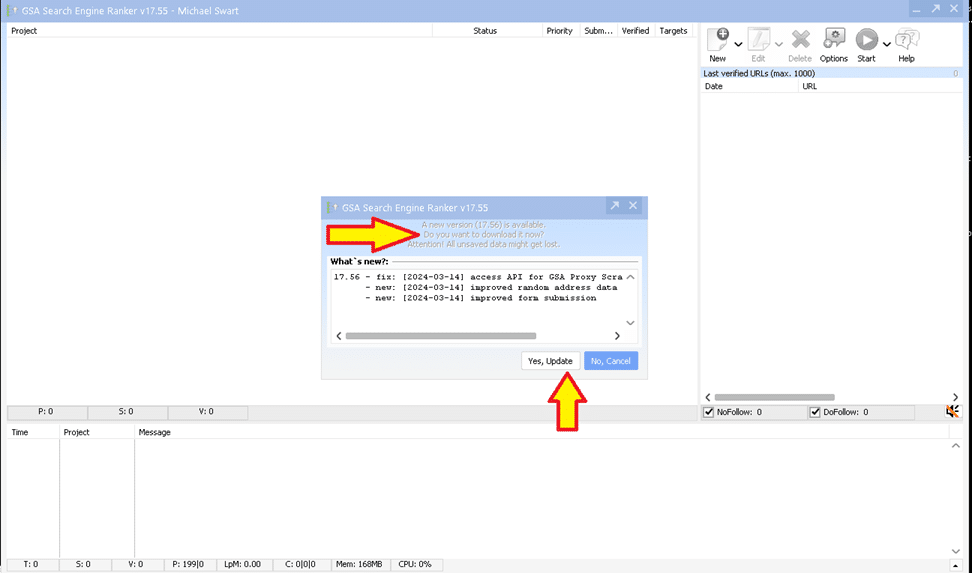
Quando você abre o GSA Search Engine Ranker Se você instalar o software depois que ele for fechado, ele notificará você de que há uma atualização disponível assim que o software for iniciado. Você poderá selecionar “Yes” (Sim) para instalar a atualização (opção recomendada) ou, se por algum motivo, não quiser instalar a atualização GSA Para atualizar o SER, selecione “NÃO” (opção não recomendada).
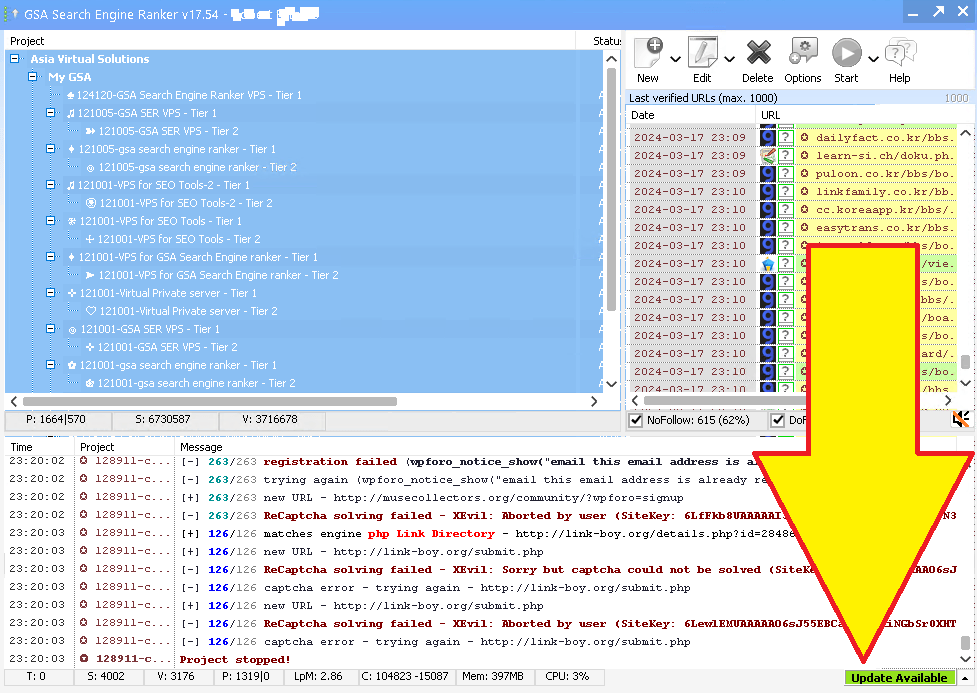
Suponha que o GSA Search Engine Ranker já está em execução em seu VPS Se você estiver usando um computador ou um PC e uma nova atualização estiver disponível. Nesse caso, você verá uma notificação verde no rodapé inferior direito do software indicando que a atualização está disponível. Tudo o que você precisa fazer é simplesmente clicar no botão verde, que indica a atualização, e seguir as etapas.

Como proceder com a atualização do GSA SER
OK, agora que você viu que há uma atualização disponível, o que você faz? Você está falando sério?
Para continuar, clique no botão “Sim Atualização”, como na primeira captura de tela que postei acima, ou se você acabou de fazer login no seu VPS e vê a atualização verde, como mostrado na segunda captura de tela acima, então tudo o que você faz é clicar no rótulo verde que diz “Atualizar”.
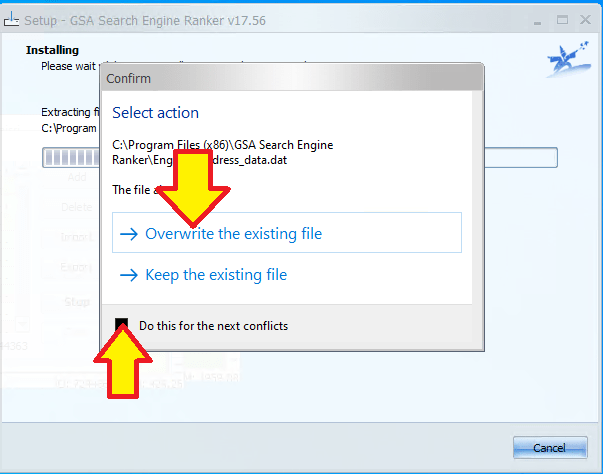
Durante a instalação, você poderá ver uma janela pop-up como a da direita aqui, que solicita que você “confirmar para substituir“.
O GSA Search Engine Ranker fará o download automático da atualização e, em seguida, interromperá todos os projetos em execução, fechará o GSA SER e instalará. Quando a instalação for concluída, ele reiniciará o GSA Search Engine Ranker e você terá concluído a atualização do GSA para a versão mais recente.
Perguntas adicionais sobre o GSA Search Engine Ranker respondidas
Manter a eficiência do seu GSA Search Engine Ranker é fácil com o recurso de atualização automática. Para garantir que o programa permaneça atualizado, abra o GSA Search Engine Ranker e acesse o menu "Configurações". Procure a seção "Atualização Automática" e certifique-se de que a caixa esteja marcada para habilitar o download e a instalação automática de novas atualizações. O software agora verificará rotineiramente se há atualizações e as aplicará quando você iniciar o aplicativo, mantendo sua ferramenta em ótimas condições para lidar com suas tarefas de SEO. Atualizações regulares também significam que você se beneficia dos recursos e otimizações mais recentes lançados pelos desenvolvedores.
Se você perceber que a função de atualização automática não está funcionando, pode atualizar manualmente o GSA Search Engine Ranker para garantir que não fique desatualizado. Comece abrindo o GSA Search Engine Ranker e acessando o menu "Ajuda". Lá, selecione "Verificar atualizações". Se houver uma atualização disponível, siga as instruções para baixar e instalar a versão mais recente. Certifique-se sempre de ter uma conexão de internet estável para evitar interrupções durante o processo de download e instalação. Se as atualizações manuais falharem, consulte o Fórum da GSA ou entre em contato com o suporte ao cliente para obter mais assistência.
Embora o GSA Search Engine Ranker não ofereça um recurso para agendar atualizações para um horário específico, você pode adotar uma rotina para atualizar o software manualmente com regularidade. Você pode criar um lembrete no seu calendário para verificar se há atualizações semanalmente ou mensalmente, dependendo das suas necessidades. Para verificar se há atualizações, abra o software, acesse o menu "Ajuda" e selecione "Verificar atualizações". Manter o software atualizado não só garante um melhor desempenho, como também introduz novos recursos que podem lhe dar uma vantagem na sua estratégia de SEO.
Em alguns casos, pode ser necessário reverter uma atualização do GSA Search Engine Ranker se você encontrar problemas. Para isso, acesse o site oficial da GSA e navegue até a seção "Downloads", onde você encontrará versões anteriores do software. Baixe a versão que você estava usando antes da atualização e instale-a. Lembre-se de fazer backup dos seus projetos antes de reverter a atualização, pois você pode perder alterações ou adições recentes às suas campanhas. Também é recomendável relatar quaisquer problemas com a nova atualização à equipe da GSA para que eles possam corrigi-los em versões futuras.
Garantir que seu GSA Search Engine Ranker esteja atualizado é crucial para manter sua eficácia. Para verificar se você está usando a versão mais recente, abra o programa e confira o número da versão na parte inferior da janela principal. Compare-o com o número da versão mais recente listado no site da GSA, na seção "Notícias" ou "Atualizações". Se sua versão for mais antiga, você pode atualizar o software usando o recurso de atualização automática ou manualmente pelo menu "Ajuda", onde você seleciona "Verificar atualizações". Manter o programa atualizado garante que você esteja usando uma ferramenta totalmente compatível com os algoritmos e metodologias atuais dos mecanismos de busca.
Perguntas frequentes relacionadas às atualizações do GSA Search Engine Ranker
Para manter você GSA Search Engine Ranker Para manter o programa atualizado, ative as atualizações automáticas nas configurações do software. O programa geralmente verifica se há atualizações automaticamente ao ser iniciado e, caso haja uma nova versão, solicitará que você a atualize. Você também pode verificar manualmente se há atualizações acessando o menu "Ajuda" e selecionando "Verificar atualizações". Recomenda-se sempre utilizar a versão mais recente para garantir o melhor desempenho e o acesso aos recursos mais recentes.
Mantendo você GSA Search Engine Ranker atualizado garante que você tenha as últimas correções de bugs, melhorias e recursos. As atualizações podem aumentar a eficiência do software, proporcionar maior estabilidade e oferecer funcionalidades novas ou aprimoradas para a criação de backlinks e a otimização de seu site. mecanismo de busca classificações. As atualizações regulares também ajudam a manter a compatibilidade com vários algoritmos de mecanismos de pesquisa e podem aumentar a taxa de sucesso de seus envios.
O GSA Search Engine Ranker não oferece uma opção para agendar atualizações para um horário específico. No entanto, o software pode verificar e instalar atualizações automaticamente ao ser iniciado. Se você deseja controlar quando as atualizações ocorrem, precisará iniciar manualmente o processo de atualização no horário desejado, verificando se há atualizações disponíveis no menu "Ajuda".
Se o seu GSA Search Engine Ranker não atualizar automaticamente, verifique primeiro se a sua conexão com a internet está ativa e estável. Se a conexão estiver funcionando corretamente, tente verificar manualmente se há atualizações através do menu "Ajuda", selecionando "Verificar atualizações". Se o problema persistir, visite o fórum oficial da GSA ou entre em contato com o suporte para obter assistência. Às vezes, as configurações do firewall ou do antivírus podem bloquear a atualização, portanto, certifique-se de que o GSA Search Engine Ranker esteja na lista de exceções do seu software de segurança.
Se você não atualizar o GSA Search Engine Ranker, poderá correr vários riscos, como redução do desempenho do software, aumento da probabilidade de encontrar bugs e possíveis vulnerabilidades de segurança. Além disso, à medida que os mecanismos de pesquisa atualizam seus algoritmos, as versões mais antigas do software podem não ser tão eficazes nas estratégias de SEO, possivelmente afetando o sucesso de suas campanhas de criação de links. Portanto, geralmente é recomendável que você mantenha o software com as atualizações mais recentes para garantir o melhor desempenho e os melhores resultados.
Links externos para referência e mais informações sobre as atualizações do GSA Search Engine Ranker
- O oficial Site do GSA Search Engine Ranker é o principal recurso para que você faça o download das atualizações mais recentes e leia sobre os novos recursos.
- Para obter um guia detalhado sobre como atualizar seu GSA Search Engine Ranker, acesse Documentação do GSA Search Engine Ranker sobre atualizações que fornece instruções passo a passo.
- Os Fórum GSA é um excelente lugar para você aprender com a comunidade e obter assistência para manter seu software atualizado.
- Revisando o GSA Search Engine Ranker Changelog permite que os usuários vejam as últimas alterações feitas no software e entendam o que cada atualização traz.
- Artigos sobre Soluções virtuais da Ásia frequentemente discutem os benefícios de manter ferramentas de SEO atualizadas, como o GSA Search Engine Ranker, e fornecem insights sobre as práticas recomendadas.

Estatísticas úteis sobre as atualizações do GSA SER
- Aproximadamente 90% dos usuários do GSA Search Engine Ranker que mantêm o software atualizado relatam maior eficiência em suas campanhas de SEO.
- Foi demonstrado que as atualizações regulares do GSA Search Engine Ranker resultaram em uma redução de 70% nos bugs de software relatados e anomalias nas operações dos usuários.
- Uma pesquisa revelou que os usuários que atualizam o GSA Search Engine Ranker assim que as atualizações são disponibilizadas apresentam um desempenho até 50% melhor em tarefas de criação de links em comparação com aqueles que usam versões mais antigas.
- Os dados indicam que quase 80% dos GSA Search Engine Ranker são atribuídos ao uso consistente das atualizações de software mais recentes.
- A análise estatística mostra que o recurso de atualização automática do GSA Search Engine Ranker tem uma taxa de sucesso de 95% em manter o software atualizado sem a intervenção do usuário.
















 English
  বাংলা
বাংলা  简体中文
简体中文  Nederlands
  Français
  Deutsch (Sie)
  हिन्दी
  Bahasa Indonesia
  Italiano
  日本語
日本語  한국어
한국어  Bahasa Melayu
  Português do Brasil
  Русский
  Español de México
  Tagalog
  ไทย
ไทย  Tiếng Việt
  اردو
اردو  Türkçe