
• 会社概要
    • Asia Virtual Solutionsへの貢献またはコラボレーション
    • llms.txt
  • アフィリエイト
  • お問い合わせ
  • マイアカウント
  • サポートチケット
アジア・バーチャル・ソリューションズ
  • ホーム
  • GSAサーチエンジンランカー
    • GSAサーチエンジンランカーのFAQ
    • GSA SER ツールとアドオン
    • GSA SERチュートリアル
  • ブログ
    • AIコンテンツ&SEO
    • GSA SERチュートリアル
    • ホスティング&VPS
    • リンク構築戦略
    • ニュース&最新情報
    • SEOソフトウェアレビュー
    • Xrumer & XEvil
  • ショップ
    • コンテンツとAIの記事
    • GSA SER ツールとアドオン
    • ホスティングサービス
    • リンク構築サービス
    • マネー・ロボット・サブミッター
    • ランカーX
    • 推奨サービス
    • ソーシャルメディア・サービス
    • エクスルーマー・サービス
結果なし
すべての結果を表示する
アジアバーチャルソリューションズGSA SERとデジタルマーケティングのエキスパート

ホーム » ブログ » GSAサーチエンジンランカーの更新方法

GSAサーチエンジンランカーの更新方法

マイケル・スワート によって マイケル・スワート
in GSA SERチュートリアル
読了時間:11分
0
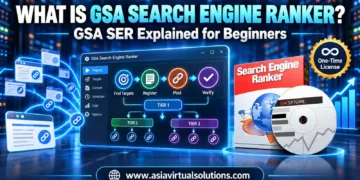
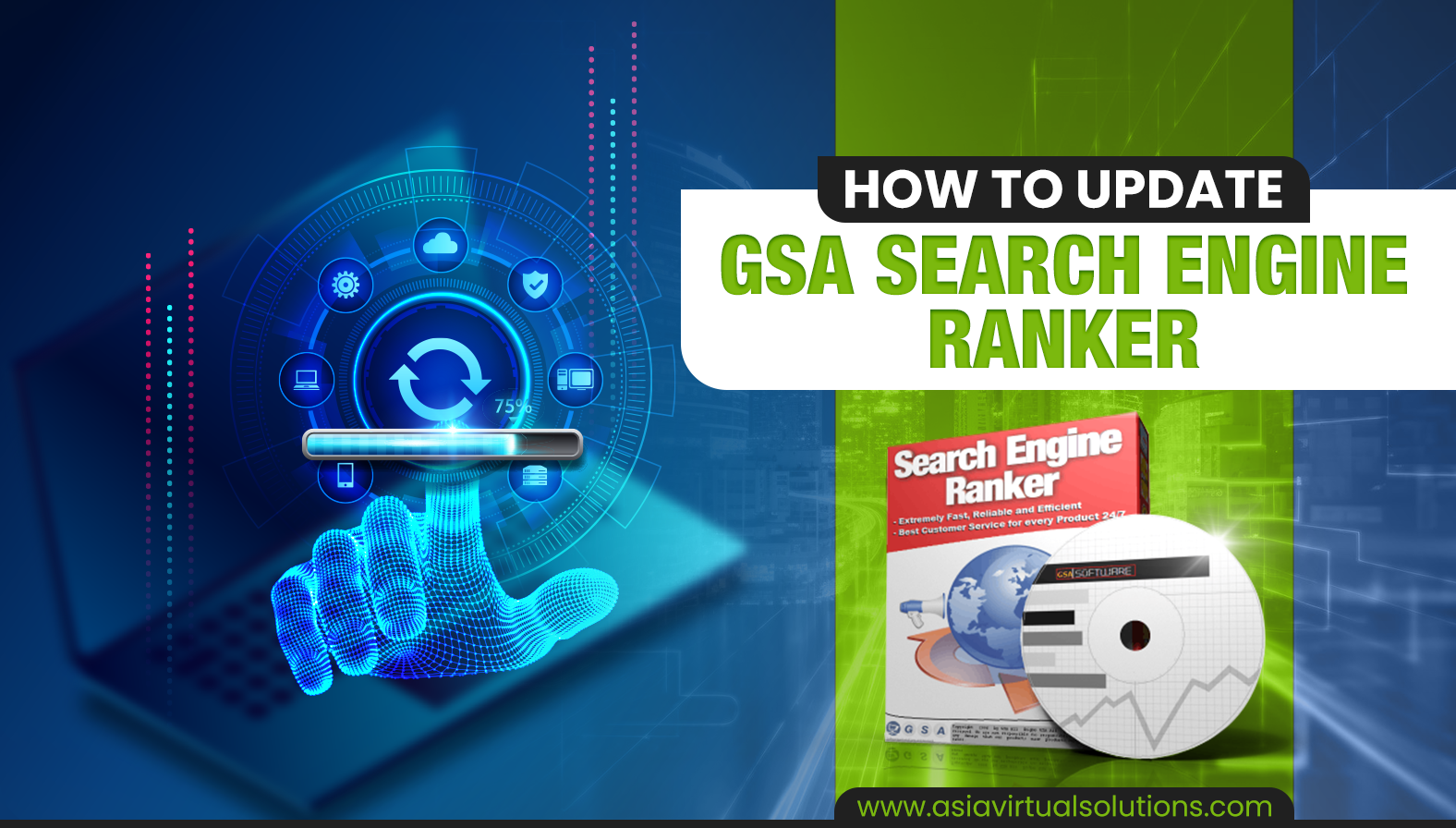
GSA Search Engine Ranker ソフトウェアのアップデートに関するハウツーガイド。アップデートを行うデジタルハンドのグラフィカルな表現を含む。.
目次 ショー
1 Quick answer: how to update GSA Search Engine Ranker
2 How do you know when an update is available for your GSA Search Engine Ranker
2.1 On startup: the update pop-up
2.2 While running: the green Update notice
3 How to proceed with the update of GSA SER
3.1 Steps to update GSA Search Engine Ranker
4 Video: how to update GSA Search Engine Ranker
5 Additional GSA Search Engine Ranker how-to questions answered
6 Frequently asked questions about GSA Search Engine Ranker updates
7 External links for reference and more info on GSA Search Engine Ranker updates
8 Useful statistics on GSA SER updates (2026)
8.1 How often GSA SER is updated
8.2 What a typical GSA SER update contains

Updating GSA Search Engine Ranker is important because the updates contain bug fixes and also new features which are essential for the smooth operation of the software.

Quick answer: how to update GSA Search Engine Ranker

  1. Open GSA Search Engine Ranker. If an update exists, a pop-up asks whether to install it. Click そうだ.
  2. If the software is already running, click the green 更新 label in the bottom-right corner instead.
  3. If asked to confirm overwrite, allow it. GSA SER stops your projects, installs, and restarts on the new version.

No update prompt? Go to Help → Check for Updates. The latest version at the time of writing is 19.03, released 4 September 2026.

GSA 検索エンジンランカー normally gets updated at least once a week and sometimes several times a week, yet I am surprised to see that many GSA SER users do not immediately or never update their installation as soon as an update becomes available. So I guess they either don’t know how to update or they don’t care to update it due to a lack of understanding why.

そこで、私はこのブログ記事で、どのように更新するかを紹介することにした。 GSAサーチエンジンランカー to ensure it is working optimally. If you would rather listen than read, the audio version is below.

How do you know when an update is available for your GSA Search Engine Ranker

There are two ways GSA SER tells you an update is ready, depending on whether the software is starting up or already running.

On startup: the update pop-up

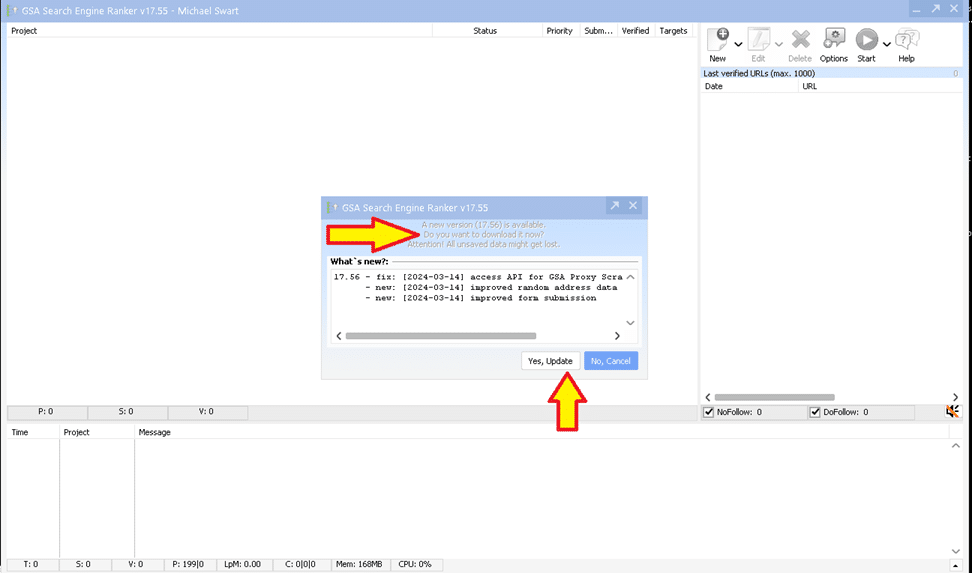
を開く。 GSAサーチエンジンランカー software after it has been closed, it will notify you that an update is available as soon as the software has started. You then can select “Yes” to install the update (recommended option), or if for some reason you do not want to install the GSA SER update you then select “No” (not recommended).

GSA Search Engine Ranker pop-up asking whether to install an available update

While running: the green Update notice

Suppose GSA Search Engine Ranker is already running on your ブイピーエス またはPCで新しいアップデートが利用できる。その場合、ソフトウェアの右下フッターにアップデートが利用可能であることを示す緑色の通知が表示される。アップデートを示す緑色のボタンをクリックし、手順に従うだけだ。.
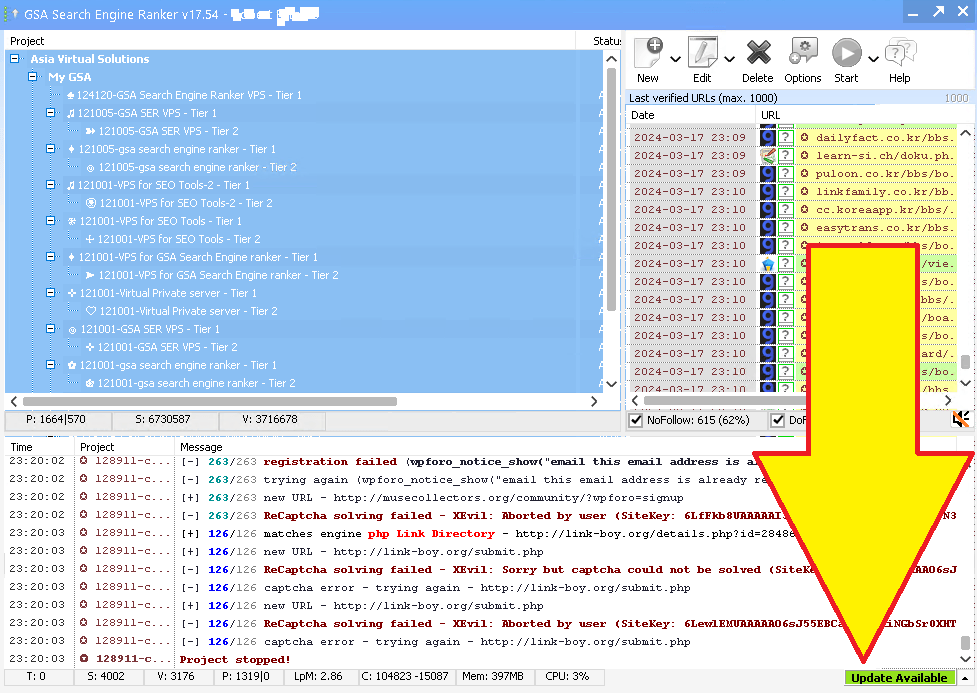

GSA Search Engine Ranker with a yellow arrow pointing to the green update-available notice in the bottom right corner
GSA Search Engine Rankerのアップデートが利用可能に
GSAサーチエンジンランカー1を更新する方法

How to proceed with the update of GSA SER

OK, so now that you see that an update is available, what do you do? The whole process takes about a minute.

Steps to update GSA Search Engine Ranker

  1. クリック はい更新 on the startup pop-up, or click the green 更新 label if GSA SER is already running.
  2. GSA SER downloads the update automatically.
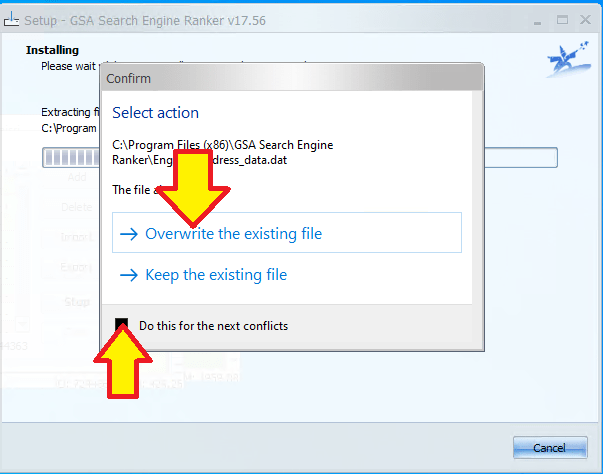
  3. If a 上書きを確認する pop-up appears, click そうだ (tick “apply to all” so it does not ask again).
  4. GSA SER stops all running projects, closes, and installs the new version.
  5. It restarts on its own. Your projects resume and you are on the latest version.
GSA Search Engine Ranker update prompt asking whether to overwrite an existing file or keep the current one
Confirm to overwrite GSA SER

Video: how to update GSA Search Engine Ranker

Additional GSA Search Engine Ranker how-to questions answered

How to automatically update GSA Search Engine Ranker for peak performance

Maintaining the efficiency of your GSA Search Engine Ranker is straightforward with its automatic update feature. Launch GSA Search Engine Ranker and navigate to the Settings menu. Look for the Auto-Update section and ensure the box is checked to enable automatic downloading and installation of new updates. The software will now routinely check for updates and apply them when you start the application, keeping your tool in the best condition to handle your SEO tasks. Regular updates also mean you benefit from the latest features and optimizations that the developers release.

How to manually update GSA Search Engine Ranker when automatic update fails

If you find that the automatic update feature isn’t working, you can manually update GSA Search Engine Ranker so you don’t fall behind. Open GSA Search Engine Ranker and go to the Help menu, then select Check for Updates. If there is an update available, follow the prompts to download and install the latest version. Make sure you have a stable internet connection to avoid interruptions during the download and installation. If manual updates fail, consult the GSA Forum or contact customer support.

How to keep GSA Search Engine Ranker current with a regular update routine

GSA Search Engine Ranker does not offer a feature to schedule updates for a specific time, but you can adopt a routine to update the software manually. Set a reminder on your calendar to check for updates every week, depending on your needs. To check, open the software, go to the Help menu, and select Check for Updates. Keeping the software updated ensures better performance and introduces new features that could give you an edge in your SEO strategy.

How to roll back a GSA Search Engine Ranker update

In some cases you may need to roll back an update if you encounter issues. Visit the official GSA website and navigate to the Download section, where you can find previous versions of the software. Download the version you were using before the update and install it. Back up your projects before rolling back, as you may lose recent changes to your campaigns. It is also worth reporting any issues with the new update to the GSA team so they can address them in future releases.

How to verify your GSA Search Engine Ranker is up to date

To verify you’re using the latest version, open the program and check the version number at the bottom of the main window. Compare this with the newest entry in the GSA Search Engine Ranker changelog. If your version is older, update using the automatic update feature or manually through the Help menu by selecting Check for Updates.

Frequently asked questions about GSA Search Engine Ranker updates

GSAサーチ・エンジン・ランカーが常に最新であることを保証するには?

To keep your GSA Search Engine Ranker up to date, enable automatic updates within the software settings. The program typically checks for updates automatically when you start it, and if there is a new version it will prompt you to update. You can also manually check for updates by navigating to the Help menu and selecting Check for Updates. Always run the latest version for optimal performance and access to the latest features.

GSA Search Engine Rankerを更新する利点は何か?

Keeping GSA Search Engine Ranker updated ensures you have the latest bug fixes, improvements and features. Updates can increase the efficiency of the software, provide better stability, and offer new or improved functionality for building backlinks and optimizing your search engine rankings. Regular updates also maintain compatibility with search engine changes and can improve the success rate of your submissions.

GSA Search Engine Rankerのアップデートを特定の時間に実行するようスケジュールできるか?

GSA Search Engine Ranker does not provide an option to schedule updates for a specific time. However, the software can automatically check for and install updates on startup. If you want to control when updates occur, manually start the update at your preferred time by checking for updates via the Help menu.

GSA Search Engine Rankerが自動更新に失敗した場合、どうすればよいのか?

First check your internet connection is active and stable. If the connection is fine, try manually checking for updates through the Help menu by selecting Check for Updates. If the problem persists, visit the official GSA forum or contact their support. Sometimes firewall or antivirus settings block the updater, so make sure GSA Search Engine Ranker is whitelisted in your security software.

GSA Search Engine Rankerを更新しないことによるリスクはあるか?

Not updating can lead to reduced software performance, a higher likelihood of encountering bugs, and potential security vulnerabilities. As search engines change, older versions of the software may also be less effective, which can affect the success of your link-building campaigns. It is generally recommended to keep the software on the latest update for the best performance and results.

GSAサーチエンジンランカー
GSAサーチエンジンランカー

External links for reference and more info on GSA Search Engine Ranker updates

  • 公式発表 GSAサーチ・エンジン・ランカーのウェブサイト は、最新のアップデートをダウンロードし、新機能について読むための主要なリソースである。.
  • For a detailed guide on how to update your GSA Search Engine Ranker, visit the GSA Search Engine Ranker documentation on updates, which provides step-by-step instructions.
  • その GSAフォーラム は、コミュニティから学び、ソフトウェアを最新の状態に保つための支援を得るための素晴らしい場所である。.
  • を見直す。 GSA Search Engine Ranker changelog lets you see the latest changes made to the software and understand what each update brings.
  • に関する記事 アジア・バーチャル・ソリューションズ GSA Search Engine Rankerのような最新のSEOツールを維持することの利点についてよく議論し、ベストプラクティスについての洞察を提供する。.

GSAサーチエンジンランカー2をアップデートする方法

Useful statistics on GSA SER updates (2026)

These figures come straight from the official GSA Search Engine Ranker changelog, checked on 5 September 2026.

How often GSA SER is updated

  • Latest version: 19.03, released 4 September 2026.
  • 43 releases in 2026 so far (January to early September), roughly one every five to six days.
  • 106 releases in 2025, about two a week.
  • Version 18.88 to 19.03 is 15 releases in 20 weeks (16 April to 4 September 2026). Skip a month and you are typically four or five versions behind.

What a typical GSA SER update contains

  • Search engine parsing fixes, for example the Google parsing fix in 19.03. When Google changes its result pages, GSA SER stops finding targets until this is patched.
  • New captcha services, such as CapSkip added in May 2026, and fixes to existing solvers like the DeepSeek text-captcha fix in 7月 2026.
  • New AI and indexing integrations, including the Ollama AI API in August 2026 and the Neural Indexer service in March 2026.
  • プロキシ provider updates, so the built-in proxy lists keep working.
  • Engine and platform fixes for the sites GSA SER posts to, which is the day-to-day reason verified-link rates drop on old versions.

The practical takeaway: because Google parsing and captcha fixes ship this often, a GSA SER install that is a month old is usually missing several fixes that directly affect how many links it can find and verify. Updating takes a minute. Not updating costs you targets.

タグ: デジタル・マーケティング最新情報GSAランカー新機能GSAサーチエンジン・ランカー更新検索エンジン最適化ツールSEOソフトウェアのメンテナンスSEOソフトウェア・アップデート・ガイドSEOツールのバグ修正ウェブサイトのパフォーマンス向上ウェブサイト・ランキング戦略
前の投稿

SEOにおいて、nofollowリンクにはどのような価値があるのか?

次の投稿

アジア仮想ソリューション関連リンク集:GSAフォーラムの質問への回答

マイケル・スワート

マイケル・スワート

アジア・バーチャル・ソリューションズは、マイケル・スワートと専属のバーチャルアシスタント・チームによって運営されています。.

関連 投稿

GSA SERプロジェクトにおける「自己紹介」と「ブログコメント」のテキストが重複していた状態から、プロジェクトごとに固有のプロフィールとコメントに変更された前後の比較。
GSA SERチュートリアル

すべてのGSA SERユーザーが同じプロファイルとコメントを共有していた問題を修正しました。

によって マイケル・スワート
11 2026 年 9 月
GSASERBuilderの1ヶ月アップデートでは、多言語コンテンツ、一括GSA SERプロジェクト、SEO対応ページ、ティアオプション、アフィリエイト報酬などの新機能が追加されました。.
GSA SERチュートリアル

GSA SER Builderが開設1ヶ月を迎えました ― 追加した機能をご紹介します

によって マイケル・スワート
2026 年 8 月 12 日 - 2026 年 9 月 9 日に更新
GSA SER 2026 SEOとAIの可視性を高めるための最新の階層型リンク構築ワークフロー
GSA SERチュートリアル

2026年版GSA SERリンク構築ワークフロー:ティア1、ティア2、ティア3、およびAI可視化について解説

によって マイケル・スワート
8 2026 年 8 月 - 2026 年 9 月 9 日に更新
GSA Search Engine Rankerにおける検証済みリンクリストと識別済みリンクリストの違いを説明するインフォグラフィック。質の高いGSA SER検証済みリンクリストが、より良いSEO結果を得るために不可欠である理由を強調しています。.
GSA SERチュートリアル

GSA SERで検証済みのリンクリストのみを使用することが必ずしも最善の戦略ではない理由

によって マイケル・スワート
2026 年 11 月 5 日 - 2026 年 9 月 9 日更新
GSA SER 2026のプロモーションバナー。AIの概要を示しながら、2026年におけるその重要性を強調しています。製品ボックスの画像とウェブサイトのURLが掲載されています。.
GSA SERチュートリアル

GSA SERが2026年も勝ち残る理由 ― ただし、AIの概要に基づいてスタックを再構築した場合に限る

によって マイケル・スワート
2 2026 年 5 月 - 2026 年 9 月 9 日に更新
次の投稿
Asia Virtual Solutionsのウェブページが表示されたコンピュータのデスクトップのスクリーンショットで、ページの中央にリンクリストとビデオプレーヤーが表示されている。.

アジア仮想ソリューション関連リンク集:GSAフォーラムの質問への回答

お願い ログイン 議論に参加する

推奨製品

ブログカテゴリー

  • AIコンテンツ&SEO
  • GSA SERチュートリアル
  • ホスティング&VPS
  • リンク構築戦略
  • ニュース&最新情報
  • SEOソフトウェアレビュー
  • Xrumer & XEvil

必要な製品

最近のレビュー

  • GSA Search Engine RankerのためにデザインされたEメールパック用のアニメーション広告。. GSAサーチエンジンランカーEメールパック
    ヴァルタート 5 su 5
    ディ・ペトリソル・マリウス・コロベア
  • デジタルマーケティングサービスの広告で、GSA ser プロジェクト、プライベートメール、キーワード関連記事などの seo ツールや機能を紹介しています。. GSAサーチ・エンジン・ランカー・プロジェクト-あなたのために行います
    ヴァルタート 5 su 5
    ディ・タルバート・ウィリアムズ
  • ラップトップ、地球儀、プロキシサーバーラックを持つプロキシサービスのコンセプトのデジタルイラスト。. プロキシ・サービス
    ヴァルタート 5 su 5
    ディ・タルバート・ウィリアムズ
  • RankerX Emailパック RankerX Email Packs
    ヴァルタート 5 su 5
    ディ・タルバート・ウィリアムズ
  • 相互接続された機器とカラフルなリンクでグローバル・ネットワークを表現したデジタル・アートワークで、「GSA SERリンク・リスト」サービスを宣伝。. GSA SER検証済みリンク一覧 — 識別および検証済みのURL
    ヴァルタート 5 su 5
    ディ・アリ・イマニ
  • ラップトップ、地球儀、プロキシサーバーラックを持つプロキシサービスのコンセプトのデジタルイラスト。. プロキシ・サービス
    ヴァルタート 5 su 5
    ニック・ニック
  • ソーシャルメディアのアイコン、スピードメーター、そしてウェブサイトasiavirtualsolutions.comをフィーチャーした、マルチプラットフォームSEOバックリンクを促進するデジタルグラフィック。. マルチプラットフォームSEOバックリンクパッケージ
    ヴァルタート 5 su 5
    ディ・シャシュワット・アスタナ
  • RankerX Emailパック RankerX Email Packs
    ヴァルタート 5 su 5
    di vancuoc29
  • デジタルマーケティングサービスの広告で、GSA ser プロジェクト、プライベートメール、キーワード関連記事などの seo ツールや機能を紹介しています。. GSAサーチ・エンジン・ランカー・プロジェクト-あなたのために行います
    ヴァルタート 5 su 5
    ディ・ニック・スミス
  • GSAサーチエンジンランカーVPS GSAサーチエンジンランカーVPS
    ヴァルタート 5 su 5
    ディ・ニック・スミス

すべての法的事項

  • アフィリエイト契約
  • アンチスパム
  • アジア・バーチャル・ソリューションズ
  • コミュニケーションの好み
  • クッキーポリシー
  • 免責事項
  • 外部リンクポリシー
  • フェイスブック・ポリシー
  • FTC声明
  • プライバシーポリシー
  • 返金および保証ポリシー
  • ご利用条件
  • 証言の開示

安全なショッピング

グーグル・セーブ・ブラウジング認証
白地にノートンセーフウェブサイトのロゴ。.

お問い合わせ

アジア・バーチャルオフィス
  • アジアバーチャルソリューションズ合同会社, レベル29、セントラルワールドオフィス 999/9 ラマ1世通り、パトゥムワン、バンコク、タイ
  • コ*****@******************ns.com
  • +66 06 4930 7026
  • アジアバーチャル
  • LinkedInのAsia Virtual Solutions
  • 私たちのTelegramチャンネルに参加してください

© 2026 - Asia Virtual Solutions LLC. All Rights Reserved. ウェブサイトの運営および管理はAsia Virtual Solutions LLCが行っています。

サムネイルなし
アップロード済み
失敗
アップロードされたファイルの削除
We've detected you might be speaking a different language. Do you want to change to:
言語をEnglishに変更 English
言語をবাংলাに変更 বাংলা
言語を简体中文に変更 简体中文
言語をNederlandsに変更 Nederlands
言語をFrançaisに変更 Français
言語をDeutsch (Sie)に変更 Deutsch (Sie)
言語をहिन्दीに変更 हिन्दी
言語をBahasa Indonesiaに変更 Bahasa Indonesia
言語をItalianoに変更 Italiano
日本語
言語を한국어に変更 한국어
言語をBahasa Melayuに変更 Bahasa Melayu
言語をPortuguês do Brasilに変更 Português do Brasil
言語をРусскийに変更 Русский
言語をEspañol de Méxicoに変更 Español de México
言語をTagalogに変更 Tagalog
言語をไทยに変更 ไทย
言語をTiếng Việtに変更 Tiếng Việt
言語をاردوに変更 اردو
言語をTürkçeに変更 Türkçe
Change Language
Close and do not switch language
結果なし
すべての結果を表示する
  • ホーム
  • GSAサーチエンジンランカー
    • GSAサーチエンジンランカーのFAQ
    • GSA SER ツールとアドオン
    • GSA SERチュートリアル
  • ブログ
    • AIコンテンツ&SEO
    • GSA SERチュートリアル
    • ホスティング&VPS
    • リンク構築戦略
    • ニュース&最新情報
    • SEOソフトウェアレビュー
    • Xrumer & XEvil
  • ショップ
    • コンテンツとAIの記事
    • GSA SER ツールとアドオン
    • ホスティングサービス
    • リンク構築サービス
    • マネー・ロボット・サブミッター
    • ランカーX
    • 推奨サービス
    • ソーシャルメディア・サービス
    • エクスルーマー・サービス

© 2026 - Asia Virtual Solutions LLC. All Rights Reserved. ウェブサイトの運営および管理はAsia Virtual Solutions LLCが行っています。

日本語
English বাংলা 简体中文 Nederlands Français Deutsch (Sie) हिन्दी Bahasa Indonesia Italiano 한국어 Bahasa Melayu Português do Brasil Русский Español de México Tagalog ไทย Tiếng Việt اردو Türkçe