
• 회사 소개
    • Asia Virtual Solutions에 기여하거나 협력하세요
    • llms.txt
  • 제휴사
  • 문의하기
  • 내 계정
  • 지원 티켓
아시아 가상 솔루션
  • 홈
  • GSA 검색 엔진 랭커
    • GSA 검색 엔진 랭커 관련 자주 묻는 질문
    • GSA SER 도구 및 추가 기능
    • GSA SER 튜토리얼
  • 블로그
    • AI 콘텐츠 및 SEO
    • GSA SER 튜토리얼
    • 호스팅 및 VPS
    • 링크 구축 전략
    • 뉴스 및 업데이트
    • SEO 소프트웨어 리뷰
    • Xrumer & XEvil
  • 쇼핑
    • 콘텐츠 및 AI 기사
    • GSA SER 도구 및 추가 기능
    • 호스팅 서비스
    • 링크 구축 서비스
    • 머니 로봇 제출자
    • 랭커X
    • 추천 서비스
    • 소셜 미디어 서비스
    • Xrumer 서비스
결과 없음
모든 결과 보기
아시아 가상 솔루션: 전문가 GSA SER 및 디지털 마케팅

홈 » 블로그 » GSA 검색 엔진 랭커 업데이트 방법

GSA 검색 엔진 랭커 업데이트 방법

마이클 스와트 by 마이클 스와트
in GSA SER 튜토리얼
읽는 데 걸리는 시간: 11분
0
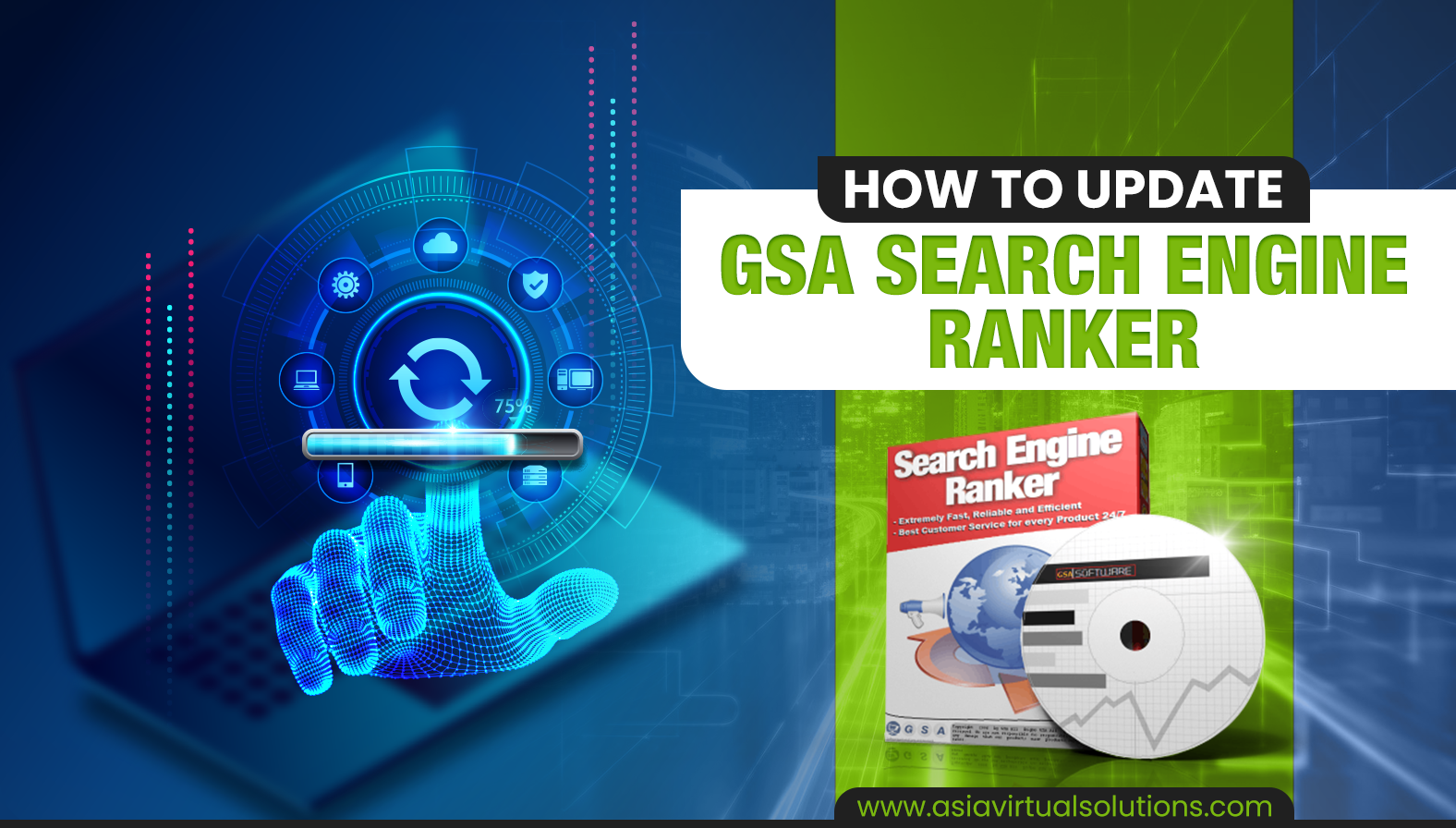
업데이트를 수행하는 디지털 손의 그래픽 표현을 포함한 GSA 검색 엔진 랭커 소프트웨어 업데이트 방법 안내서입니다.
목차 show
1 Quick answer: how to update GSA Search Engine Ranker
2 How do you know when an update is available for your GSA Search Engine Ranker
2.1 On startup: the update pop-up
2.2 While running: the green Update notice
3 How to proceed with the update of GSA SER
3.1 Steps to update GSA Search Engine Ranker
4 Video: how to update GSA Search Engine Ranker
5 Additional GSA Search Engine Ranker how-to questions answered
6 Frequently asked questions about GSA Search Engine Ranker updates
7 External links for reference and more info on GSA Search Engine Ranker updates
8 Useful statistics on GSA SER updates (2026)
8.1 How often GSA SER is updated
8.2 What a typical GSA SER update contains

Updating GSA Search Engine Ranker is important because the updates contain bug fixes and also new features which are essential for the smooth operation of the software.

Quick answer: how to update GSA Search Engine Ranker

  1. Open GSA Search Engine Ranker. If an update exists, a pop-up asks whether to install it. Click 예.
  2. If the software is already running, click the green 업데이트 label in the bottom-right corner instead.
  3. If asked to confirm overwrite, allow it. GSA SER stops your projects, installs, and restarts on the new version.

No update prompt? Go to Help → Check for Updates. The latest version at the time of writing is 19.03, released 4 September 2026.

GSA 검색 엔진 순위 normally gets updated at least once a week and sometimes several times a week, yet I am surprised to see that many GSA SER users do not immediately or never update their installation as soon as an update becomes available. So I guess they either don’t know how to update or they don’t care to update it due to a lack of understanding why.

그래서 저는 이 블로그 포스팅을 통해 GSA 검색 엔진 랭커 to ensure it is working optimally. If you would rather listen than read, the audio version is below.

How do you know when an update is available for your GSA Search Engine Ranker

There are two ways GSA SER tells you an update is ready, depending on whether the software is starting up or already running.

On startup: the update pop-up

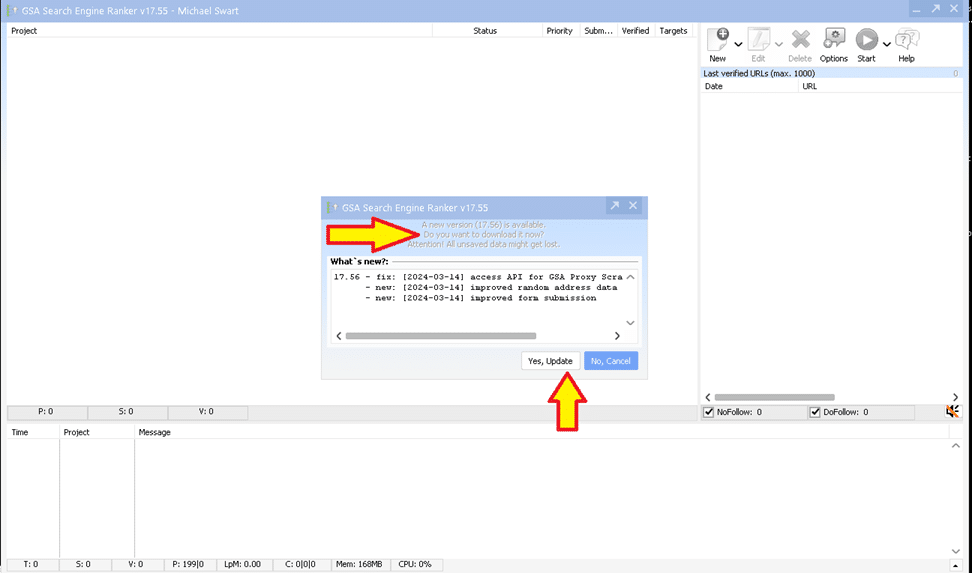
를 열면 GSA 검색 엔진 랭커 software after it has been closed, it will notify you that an update is available as soon as the software has started. You then can select “Yes” to install the update (recommended option), or if for some reason you do not want to install the GSA SER update you then select “No” (not recommended).

GSA Search Engine Ranker pop-up asking whether to install an available update

While running: the green Update notice

Suppose GSA Search Engine Ranker is already running on your VPS 또는 PC에서 새 업데이트를 사용할 수 있습니다. 이 경우 소프트웨어의 오른쪽 하단에 업데이트를 사용할 수 있음을 알리는 녹색 알림이 표시됩니다. 업데이트를 나타내는 녹색 버튼을 클릭한 다음 단계를 따르기만 하면 됩니다.
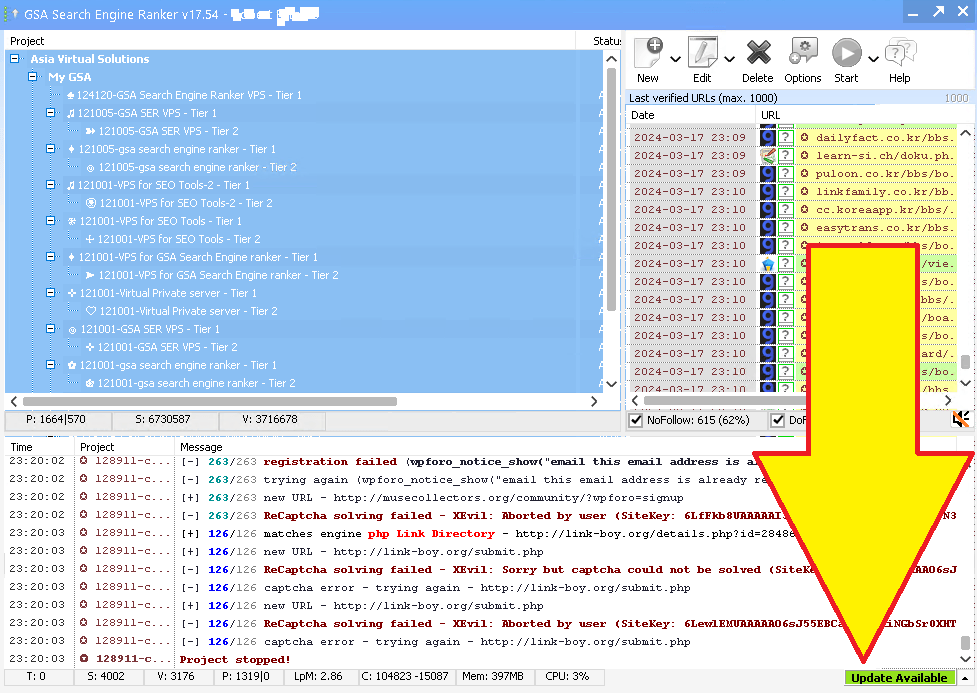

GSA Search Engine Ranker with a yellow arrow pointing to the green update-available notice in the bottom right corner
GSA 검색 엔진 랭커 업데이트 제공
GSA 검색 엔진 랭커 1 업데이트 방법

How to proceed with the update of GSA SER

OK, so now that you see that an update is available, what do you do? The whole process takes about a minute.

Steps to update GSA Search Engine Ranker

  1. 딸깍 하는 소리 예 업데이트 on the startup pop-up, or click the green 업데이트 label if GSA SER is already running.
  2. GSA SER downloads the update automatically.
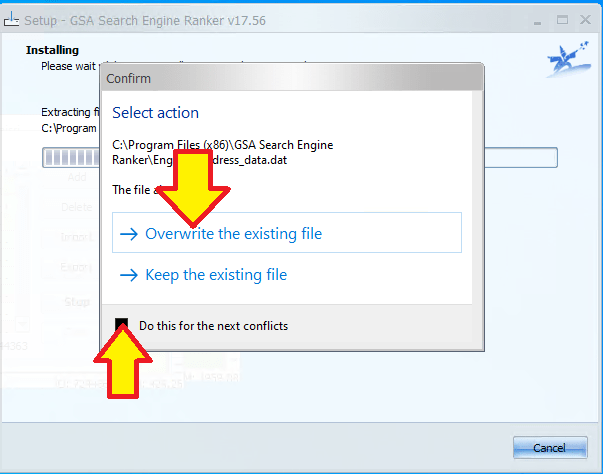
  3. If a 덮어쓰기 확인 pop-up appears, click 예 (tick “apply to all” so it does not ask again).
  4. GSA SER stops all running projects, closes, and installs the new version.
  5. It restarts on its own. Your projects resume and you are on the latest version.
GSA Search Engine Ranker update prompt asking whether to overwrite an existing file or keep the current one
Confirm to overwrite GSA SER

Video: how to update GSA Search Engine Ranker

Additional GSA Search Engine Ranker how-to questions answered

How to automatically update GSA Search Engine Ranker for peak performance

Maintaining the efficiency of your GSA Search Engine Ranker is straightforward with its automatic update feature. Launch GSA Search Engine Ranker and navigate to the Settings menu. Look for the Auto-Update section and ensure the box is checked to enable automatic downloading and installation of new updates. The software will now routinely check for updates and apply them when you start the application, keeping your tool in the best condition to handle your SEO tasks. Regular updates also mean you benefit from the latest features and optimizations that the developers release.

How to manually update GSA Search Engine Ranker when automatic update fails

If you find that the automatic update feature isn’t working, you can manually update GSA Search Engine Ranker so you don’t fall behind. Open GSA Search Engine Ranker and go to the Help menu, then select Check for Updates. If there is an update available, follow the prompts to download and install the latest version. Make sure you have a stable internet connection to avoid interruptions during the download and installation. If manual updates fail, consult the GSA Forum or contact customer support.

How to keep GSA Search Engine Ranker current with a regular update routine

GSA Search Engine Ranker does not offer a feature to schedule updates for a specific time, but you can adopt a routine to update the software manually. Set a reminder on your calendar to check for updates every week, depending on your needs. To check, open the software, go to the Help menu, and select Check for Updates. Keeping the software updated ensures better performance and introduces new features that could give you an edge in your SEO strategy.

How to roll back a GSA Search Engine Ranker update

In some cases you may need to roll back an update if you encounter issues. Visit the official GSA website and navigate to the Download section, where you can find previous versions of the software. Download the version you were using before the update and install it. Back up your projects before rolling back, as you may lose recent changes to your campaigns. It is also worth reporting any issues with the new update to the GSA team so they can address them in future releases.

How to verify your GSA Search Engine Ranker is up to date

To verify you’re using the latest version, open the program and check the version number at the bottom of the main window. Compare this with the newest entry in the GSA Search Engine Ranker changelog. If your version is older, update using the automatic update feature or manually through the Help menu by selecting Check for Updates.

Frequently asked questions about GSA Search Engine Ranker updates

GSA 검색 엔진 랭커를 항상 최신 상태로 유지하려면 어떻게 해야 하나요?

To keep your GSA Search Engine Ranker up to date, enable automatic updates within the software settings. The program typically checks for updates automatically when you start it, and if there is a new version it will prompt you to update. You can also manually check for updates by navigating to the Help menu and selecting Check for Updates. Always run the latest version for optimal performance and access to the latest features.

GSA 검색 엔진 랭커를 업데이트하면 어떤 이점이 있나요?

Keeping GSA Search Engine Ranker updated ensures you have the latest bug fixes, improvements and features. Updates can increase the efficiency of the software, provide better stability, and offer new or improved functionality for building backlinks and optimizing your search engine rankings. Regular updates also maintain compatibility with search engine changes and can improve the success rate of your submissions.

GSA 검색 엔진 랭커가 특정 시간에 실행되도록 업데이트를 예약할 수 있나요?

GSA Search Engine Ranker does not provide an option to schedule updates for a specific time. However, the software can automatically check for and install updates on startup. If you want to control when updates occur, manually start the update at your preferred time by checking for updates via the Help menu.

GSA 검색 엔진 랭커가 자동으로 업데이트되지 않으면 어떻게 해야 하나요?

First check your internet connection is active and stable. If the connection is fine, try manually checking for updates through the Help menu by selecting Check for Updates. If the problem persists, visit the official GSA forum or contact their support. Sometimes firewall or antivirus settings block the updater, so make sure GSA Search Engine Ranker is whitelisted in your security software.

GSA 검색 엔진 랭커를 업데이트하지 않을 경우 어떤 위험이 있나요?

Not updating can lead to reduced software performance, a higher likelihood of encountering bugs, and potential security vulnerabilities. As search engines change, older versions of the software may also be less effective, which can affect the success of your link-building campaigns. It is generally recommended to keep the software on the latest update for the best performance and results.

GSA 검색 엔진 랭커
GSA 검색 엔진 랭커

External links for reference and more info on GSA Search Engine Ranker updates

  • 공식 GSA 검색 엔진 랭커 웹사이트 는 최신 업데이트를 다운로드하고 새로운 기능에 대해 알아볼 수 있는 주요 리소스입니다.
  • For a detailed guide on how to update your GSA Search Engine Ranker, visit the GSA Search Engine Ranker documentation on updates, which provides step-by-step instructions.
  • 그리고 GSA 포럼 는 커뮤니티에서 배우고 소프트웨어를 최신 상태로 유지하는 데 도움을 받을 수 있는 훌륭한 장소입니다.
  • 검토 GSA Search Engine Ranker changelog lets you see the latest changes made to the software and understand what each update brings.
  • 관련 기사 아시아 가상 솔루션 는 종종 GSA 검색 엔진 랭커와 같은 업데이트된 SEO 도구를 유지하는 것의 이점에 대해 논의하고 모범 사례에 대한 인사이트를 제공합니다.

GSA 검색 엔진 랭커 2 업데이트 방법

Useful statistics on GSA SER updates (2026)

These figures come straight from the official GSA Search Engine Ranker changelog, checked on 5 September 2026.

How often GSA SER is updated

  • Latest version: 19.03, released 4 September 2026.
  • 43 releases in 2026 so far (January to early September), roughly one every five to six days.
  • 106 releases in 2025, about two a week.
  • Version 18.88 to 19.03 is 15 releases in 20 weeks (16 April to 4 September 2026). Skip a month and you are typically four or five versions behind.

What a typical GSA SER update contains

  • Search engine parsing fixes, for example the Google parsing fix in 19.03. When Google changes its result pages, GSA SER stops finding targets until this is patched.
  • New captcha services, such as CapSkip added in May 2026, and fixes to existing solvers like the DeepSeek text-captcha fix in 칠월 2026.
  • New AI and indexing integrations, including the Ollama AI API in August 2026 and the Neural Indexer service in March 2026.
  • 대리 provider updates, so the built-in proxy lists keep working.
  • Engine and platform fixes for the sites GSA SER posts to, which is the day-to-day reason verified-link rates drop on old versions.

The practical takeaway: because Google parsing and captcha fixes ship this often, a GSA SER install that is a month old is usually missing several fixes that directly affect how many links it can find and verify. Updating takes a minute. Not updating costs you targets.

태그: 디지털 마케팅 업데이트GSA 랭커의 새로운 기능GSA 검색 엔진 랭커 업데이트검색 엔진 최적화 도구SEO 소프트웨어 유지 관리SEO 소프트웨어 업데이트 가이드SEO 도구 버그 수정웹사이트 성능 향상웹사이트 순위 전략
이전 글

SEO에서 노팔로우 링크는 어떤 가치가 있을까요?

다음 글

아시아 가상 솔루션 링크 목록: GSA 포럼 질문에 대한 답변

마이클 스와트

마이클 스와트

아시아 버추얼 솔루션은 마이클 스와트와 전담 가상 어시스턴트 팀이 자랑스럽게 소유하고 관리합니다.

관련 게시물

GSA SER 프로젝트에서 중복되었던 자기소개 및 블로그 댓글 내용이 프로젝트별로 고유한 프로필과 댓글로 변경되기 전후를 비교해 보세요.
GSA SER 튜토리얼

모든 GSA SER 사용자가 동일한 프로필과 댓글을 공유합니다. 이 문제를 해결했습니다.

by 마이클 스와트
2026년 9월 11일
GSASERBuilder의 한 달 업데이트에는 다국어 콘텐츠, 대량 GSA SER 프로젝트, SEO 최적화 페이지, 등급 옵션 및 제휴 보상 기능이 포함되어 있습니다.
GSA SER 튜토리얼

GSA SER 빌더 출시 한 달째입니다. 새로 추가된 모든 기능을 소개합니다.

by 마이클 스와트
2026년 8월 12일 - 2026년 9월 9일 업데이트
GSA SER 2026 SEO 및 AI 가시성을 위한 최신 계층형 링크 구축 워크플로
GSA SER 튜토리얼

2026년 GSA SER 링크 구축 워크플로우: 1단계, 2단계, 3단계 및 AI 가시성 설명

by 마이클 스와트
2026년 8월 8일 - 2026년 9월 9일 업데이트
GSA 검색 엔진 랭커에서 검증된 링크 목록과 식별된 링크 목록의 차이점을 설명하는 인포그래픽입니다. 품질 높은 GSA SER 검증 링크 목록이 더 나은 SEO 결과를 달성하는 데 필수적인 이유를 강조합니다.
GSA SER 튜토리얼

GSA SER에서 검증된 링크 목록만 사용하는 것이 항상 최선의 전략이 아닌 이유

by 마이클 스와트
2026년 5월 11일 - 2026년 9월 9일 업데이트
GSA SER 2026 홍보 배너로, AI 개요를 통해 2026년의 중요성을 강조합니다. 제품 박스 이미지와 웹사이트 URL이 포함되어 있습니다.
GSA SER 튜토리얼

GSA SER이 2026년에도 여전히 중요한 이유는 무엇일까요? 단, AI 개요를 중심으로 스택을 재구축해야만 가능합니다.

by 마이클 스와트
2026년 5월 2일 - 2026년 9월 9일 업데이트
다음 글
페이지 중간에 링크 목록과 동영상 플레이어가 있는 아시아 가상 솔루션 웹페이지가 표시된 컴퓨터 데스크톱 스크린샷입니다.

아시아 가상 솔루션 링크 목록: GSA 포럼 질문에 대한 답변

부탁드립니다 로그인 토론에 참여하다

추천 제품

블로그 카테고리

  • AI 콘텐츠 및 SEO
  • GSA SER 튜토리얼
  • 호스팅 및 VPS
  • 링크 구축 전략
  • 뉴스 및 업데이트
  • SEO 소프트웨어 리뷰
  • Xrumer & XEvil

필요한 제품

최근 리뷰

  • GSA 검색 엔진 랭커용으로 디자인된 이메일 팩용 애니메이션 광고입니다. GSA 검색 엔진 랭커 이메일 팩
    발루타토 5 수 5
    디 페트리소르 마리우스 코로베아
  • 검색엔진 최적화 도구, 비공개 이메일, 키워드 관련 기사 등의 기능을 소개하는 디지털 마케팅 서비스 광고입니다. GSA 검색 엔진 랭커 프로젝트 - 고객을 위한 프로젝트 완료
    발루타토 5 수 5
    디 탈버트 윌리엄스
  • 노트북, 지구본, 프록시 서버 랙이 있는 프록시 서비스 개념의 디지털 일러스트레이션입니다. 프록시 서비스
    발루타토 5 수 5
    디 탈버트 윌리엄스
  • RankerX 이메일 팩 RankerX 이메일 팩
    발루타토 5 수 5
    디 탈버트 윌리엄스
  • 서로 연결된 장치와 다채로운 링크가 있는 글로벌 네트워크를 표현한 디지털 아트웍으로, "GSA SER 링크 목록" 서비스를 광고합니다. GSA SER 검증 링크 목록 — 식별 및 검증된 URL
    발루타토 5 수 5
    디 알리 이마니
  • 노트북, 지구본, 프록시 서버 랙이 있는 프록시 서비스 개념의 디지털 일러스트레이션입니다. 프록시 서비스
    발루타토 5 수 5
    디 닉 닉
  • 소셜 미디어 아이콘, 속도계, 그리고 웹사이트 asiavirtualsolutions.com을 특징으로 하는 멀티 플랫폼 SEO 백링크를 홍보하는 디지털 그래픽입니다. 멀티 플랫폼 SEO 백링크 패키지
    발루타토 5 수 5
    디 샤슈왓 아스타나
  • RankerX 이메일 팩 RankerX 이메일 팩
    발루타토 5 수 5
    디 반쿠오크29
  • 검색엔진 최적화 도구, 비공개 이메일, 키워드 관련 기사 등의 기능을 소개하는 디지털 마케팅 서비스 광고입니다. GSA 검색 엔진 랭커 프로젝트 - 고객을 위한 프로젝트 완료
    발루타토 5 수 5
    디 닉 스미스
  • GSA 검색 엔진 랭커 VPS GSA 검색 엔진 랭커 VPS
    발루타토 5 수 5
    디 닉 스미스

모든 법률 관련 사항

  • 제휴 계약
  • 스팸 방지
  • 아시아 가상 솔루션
  • 커뮤니케이션 기본 설정
  • 쿠키 정책
  • 면책 조항
  • 외부 링크 정책
  • 페이스북 정책
  • FTC 성명서
  • 개인정보 보호정책
  • 환불 및 보증 정책
  • 이용 약관
  • 사용 후기 공개

안전한 쇼핑

Google 세이브 브라우징 인증
흰색 바탕에 노턴 세이프 웹사이트 로고가 있습니다.

문의하기

아시아 가상 오피스
  • 아시아 가상 솔루션 LLC, 센트럴월드 오피스 29층, 라마 1세 로드 999/9, 방콕, 태국
  • co*****@******************ns.com
  • +66 06 4930 7026
  • 아시아 가상
  • LinkedIn의 아시아 가상 솔루션
  • 저희 텔레그램 채널에 가입하세요

© 2026 - Asia Virtual Solutions LLC. 모든 권리 보유. 본 웹사이트는 Asia Virtual Solutions LLC에서 운영 및 관리합니다.

썸네일 없음
업로드
실패함
업로드된 파일 제거
We've detected you might be speaking a different language. Do you want to change to:
English(으)로 언어 변경 English
বাংলা(으)로 언어 변경 বাংলা
简体中文(으)로 언어 변경 简体中文
Nederlands(으)로 언어 변경 Nederlands
Français(으)로 언어 변경 Français
Deutsch (Sie)(으)로 언어 변경 Deutsch (Sie)
हिन्दी(으)로 언어 변경 हिन्दी
Bahasa Indonesia(으)로 언어 변경 Bahasa Indonesia
Italiano(으)로 언어 변경 Italiano
日本語(으)로 언어 변경 日本語
한국어
Bahasa Melayu(으)로 언어 변경 Bahasa Melayu
Português do Brasil(으)로 언어 변경 Português do Brasil
Русский(으)로 언어 변경 Русский
Español de México(으)로 언어 변경 Español de México
Tagalog(으)로 언어 변경 Tagalog
ไทย(으)로 언어 변경 ไทย
Tiếng Việt(으)로 언어 변경 Tiếng Việt
اردو(으)로 언어 변경 اردو
Türkçe(으)로 언어 변경 Türkçe
Change Language
Close and do not switch language
결과 없음
모든 결과 보기
  • 홈
  • GSA 검색 엔진 랭커
    • GSA 검색 엔진 랭커 관련 자주 묻는 질문
    • GSA SER 도구 및 추가 기능
    • GSA SER 튜토리얼
  • 블로그
    • AI 콘텐츠 및 SEO
    • GSA SER 튜토리얼
    • 호스팅 및 VPS
    • 링크 구축 전략
    • 뉴스 및 업데이트
    • SEO 소프트웨어 리뷰
    • Xrumer & XEvil
  • 쇼핑
    • 콘텐츠 및 AI 기사
    • GSA SER 도구 및 추가 기능
    • 호스팅 서비스
    • 링크 구축 서비스
    • 머니 로봇 제출자
    • 랭커X
    • 추천 서비스
    • 소셜 미디어 서비스
    • Xrumer 서비스

© 2026 - Asia Virtual Solutions LLC. 모든 권리 보유. 본 웹사이트는 Asia Virtual Solutions LLC에서 운영 및 관리합니다.

한국어
English বাংলা 简体中文 Nederlands Français Deutsch (Sie) हिन्दी Bahasa Indonesia Italiano 日本語 Bahasa Melayu Português do Brasil Русский Español de México Tagalog ไทย Tiếng Việt اردو Türkçe