

Updating GSA Search Engine Ranker is important because the updates contain bug fixes and also new features which are essential for the smooth operation of the software.
Quick answer: how to update GSA Search Engine Ranker
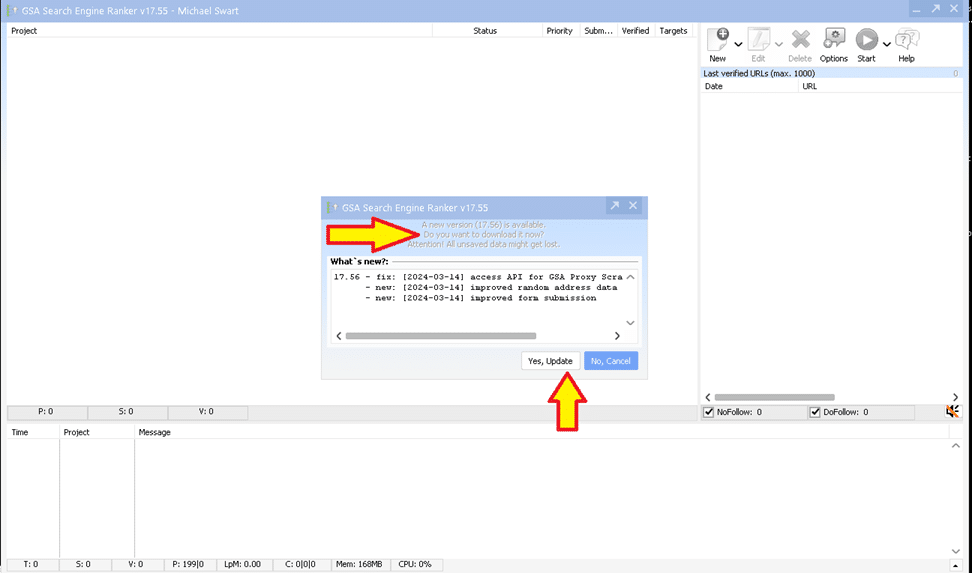
- Open GSA Search Engine Ranker. If an update exists, a pop-up asks whether to install it. Click হাঁ.
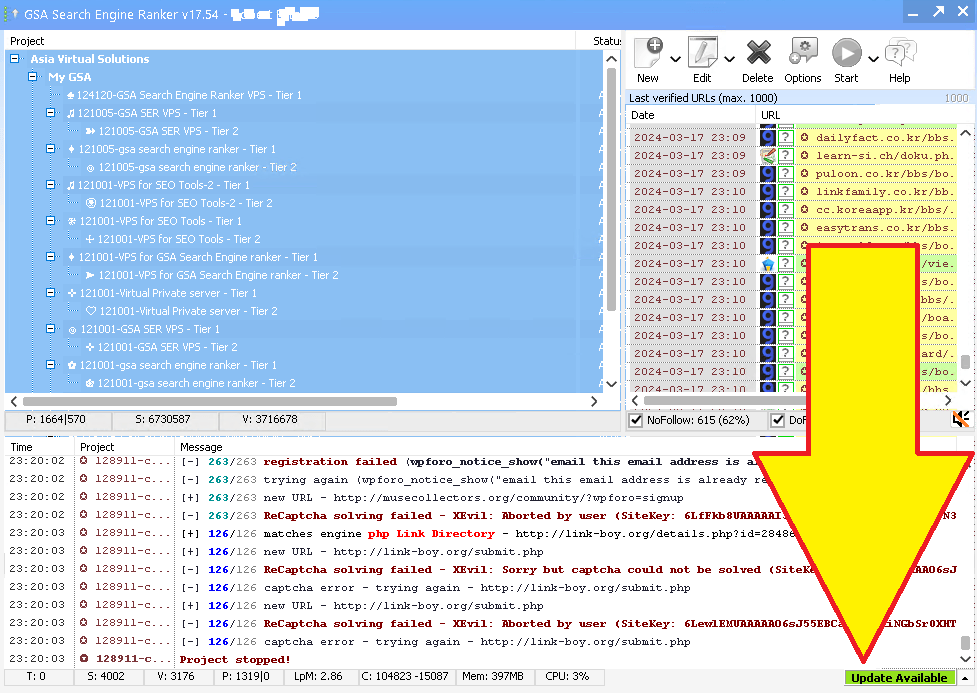
- If the software is already running, click the green আপডেট label in the bottom-right corner instead.
- If asked to confirm overwrite, allow it. GSA SER stops your projects, installs, and restarts on the new version.
No update prompt? Go to Help → Check for Updates. The latest version at the time of writing is 19.03, released 4 September 2026.
GSA Search Engine Ranker normally gets updated at least once a week and sometimes several times a week, yet I am surprised to see that many GSA SER users do not immediately or never update their installation as soon as an update becomes available. So I guess they either don’t know how to update or they don’t care to update it due to a lack of understanding why.
So, I decided to do this blog post to show you how to update your GSA Search Engine Ranker to ensure it is working optimally. If you would rather listen than read, the audio version is below.
How do you know when an update is available for your GSA Search Engine Ranker
There are two ways GSA SER tells you an update is ready, depending on whether the software is starting up or already running.
On startup: the update pop-up
যখন আপনি খুলবেন জিএসএ সার্চ ইঞ্জিন র্যাঙ্কার software after it has been closed, it will notify you that an update is available as soon as the software has started. You then can select “Yes” to install the update (recommended option), or if for some reason you do not want to install the GSA SER update you then select “No” (not recommended).
While running: the green Update notice
Suppose GSA Search Engine Ranker is already running on your ভিপিএস অথবা পিসিতে নতুন আপডেট পাওয়া যায়। সেক্ষেত্রে, আপনি সফ্টওয়্যারের নীচের ডানদিকে একটি সবুজ বিজ্ঞপ্তি দেখতে পাবেন যা ইঙ্গিত করবে যে আপডেটটি উপলব্ধ। আপনাকে কেবল সবুজ বোতামটি ক্লিক করতে হবে, যা আপডেটটি নির্দেশ করে, এবং তারপরে পদক্ষেপগুলি অনুসরণ করুন।.

How to proceed with the update of GSA SER
OK, so now that you see that an update is available, what do you do? The whole process takes about a minute.
Steps to update GSA Search Engine Ranker
- ক্লিক করুন হ্যাঁ আপডেট on the startup pop-up, or click the green আপডেট label if GSA SER is already running.
- GSA SER downloads the update automatically.
- If a ওভাররাইট নিশ্চিত করুন pop-up appears, click হাঁ (tick “apply to all” so it does not ask again).
- GSA SER stops all running projects, closes, and installs the new version.
- It restarts on its own. Your projects resume and you are on the latest version.
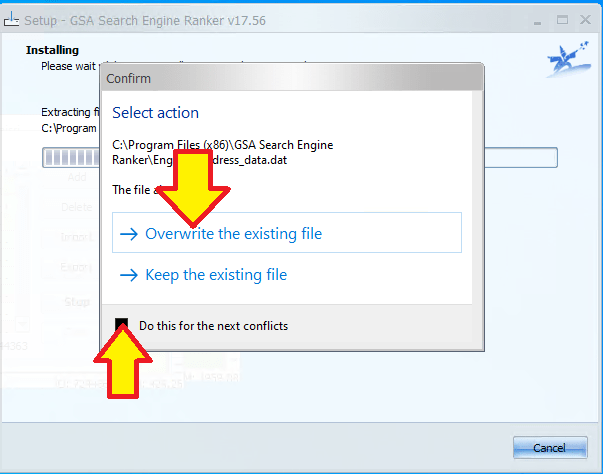
Video: how to update GSA Search Engine Ranker
Additional GSA Search Engine Ranker how-to questions answered
How to automatically update GSA Search Engine Ranker for peak performance
Maintaining the efficiency of your GSA Search Engine Ranker is straightforward with its automatic update feature. Launch GSA Search Engine Ranker and navigate to the Settings menu. Look for the Auto-Update section and ensure the box is checked to enable automatic downloading and installation of new updates. The software will now routinely check for updates and apply them when you start the application, keeping your tool in the best condition to handle your SEO tasks. Regular updates also mean you benefit from the latest features and optimizations that the developers release.
How to manually update GSA Search Engine Ranker when automatic update fails
If you find that the automatic update feature isn’t working, you can manually update GSA Search Engine Ranker so you don’t fall behind. Open GSA Search Engine Ranker and go to the Help menu, then select Check for Updates. If there is an update available, follow the prompts to download and install the latest version. Make sure you have a stable internet connection to avoid interruptions during the download and installation. If manual updates fail, consult the GSA Forum or contact customer support.
How to keep GSA Search Engine Ranker current with a regular update routine
GSA Search Engine Ranker does not offer a feature to schedule updates for a specific time, but you can adopt a routine to update the software manually. Set a reminder on your calendar to check for updates every week, depending on your needs. To check, open the software, go to the Help menu, and select Check for Updates. Keeping the software updated ensures better performance and introduces new features that could give you an edge in your SEO strategy.
How to roll back a GSA Search Engine Ranker update
In some cases you may need to roll back an update if you encounter issues. Visit the official GSA website and navigate to the Download section, where you can find previous versions of the software. Download the version you were using before the update and install it. Back up your projects before rolling back, as you may lose recent changes to your campaigns. It is also worth reporting any issues with the new update to the GSA team so they can address them in future releases.
How to verify your GSA Search Engine Ranker is up to date
To verify you’re using the latest version, open the program and check the version number at the bottom of the main window. Compare this with the newest entry in the GSA Search Engine Ranker changelog. If your version is older, update using the automatic update feature or manually through the Help menu by selecting Check for Updates.
Frequently asked questions about GSA Search Engine Ranker updates
আমার GSA সার্চ ইঞ্জিন র্যাঙ্কার সর্বদা আপ টু ডেট আছে কিনা তা আমি কীভাবে নিশ্চিত করতে পারি?
To keep your GSA Search Engine Ranker up to date, enable automatic updates within the software settings. The program typically checks for updates automatically when you start it, and if there is a new version it will prompt you to update. You can also manually check for updates by navigating to the Help menu and selecting Check for Updates. Always run the latest version for optimal performance and access to the latest features.
GSA সার্চ ইঞ্জিন র্যাঙ্কার আপডেট করার সুবিধা কী কী?
Keeping GSA Search Engine Ranker updated ensures you have the latest bug fixes, improvements and features. Updates can increase the efficiency of the software, provide better stability, and offer new or improved functionality for building backlinks and optimizing your search engine rankings. Regular updates also maintain compatibility with search engine changes and can improve the success rate of your submissions.
আমি কি নির্দিষ্ট সময়ে GSA সার্চ ইঞ্জিন র্যাঙ্কারের আপডেটগুলি চালানোর সময় নির্ধারণ করতে পারি?
GSA Search Engine Ranker does not provide an option to schedule updates for a specific time. However, the software can automatically check for and install updates on startup. If you want to control when updates occur, manually start the update at your preferred time by checking for updates via the Help menu.
আমার GSA সার্চ ইঞ্জিন র্যাঙ্কার যদি স্বয়ংক্রিয়ভাবে আপডেট না হয় তাহলে আমার কী করা উচিত?
First check your internet connection is active and stable. If the connection is fine, try manually checking for updates through the Help menu by selecting Check for Updates. If the problem persists, visit the official GSA forum or contact their support. Sometimes firewall or antivirus settings block the updater, so make sure GSA Search Engine Ranker is whitelisted in your security software.
জিএসএ সার্চ ইঞ্জিন র্যাঙ্কার আপডেট না করার সাথে কি কোনও ঝুঁকি আছে?
Not updating can lead to reduced software performance, a higher likelihood of encountering bugs, and potential security vulnerabilities. As search engines change, older versions of the software may also be less effective, which can affect the success of your link-building campaigns. It is generally recommended to keep the software on the latest update for the best performance and results.
External links for reference and more info on GSA Search Engine Ranker updates
- কর্মকর্তা জিএসএ সার্চ ইঞ্জিন র্যাঙ্কার ওয়েবসাইট সর্বশেষ আপডেট ডাউনলোড এবং নতুন বৈশিষ্ট্য সম্পর্কে পড়ার জন্য এটি প্রাথমিক উৎস।.
- For a detailed guide on how to update your GSA Search Engine Ranker, visit the GSA Search Engine Ranker documentation on updates, which provides step-by-step instructions.
- দ্য জিএসএ ফোরাম কমিউনিটি থেকে শেখার এবং আপনার সফ্টওয়্যার আপ টু ডেট রাখার জন্য সহায়তা পাওয়ার জন্য এটি একটি চমৎকার জায়গা।.
- পর্যালোচনা করা হচ্ছে GSA Search Engine Ranker changelog lets you see the latest changes made to the software and understand what each update brings.
- প্রবন্ধ এশিয়া ভার্চুয়াল সলিউশনস জিএসএ সার্চ ইঞ্জিন র্যাঙ্কারের মতো আপডেটেড এসইও টুলগুলি বজায় রাখার সুবিধাগুলি নিয়ে প্রায়শই আলোচনা করুন এবং সেরা অনুশীলনগুলির অন্তর্দৃষ্টি প্রদান করুন।.

Useful statistics on GSA SER updates (2026)
These figures come straight from the official GSA Search Engine Ranker changelog, checked on 5 September 2026.
How often GSA SER is updated
- Latest version: 19.03, released 4 September 2026.
- 43 releases in 2026 so far (January to early September), roughly one every five to six days.
- 106 releases in 2025, about two a week.
- Version 18.88 to 19.03 is 15 releases in 20 weeks (16 April to 4 September 2026). Skip a month and you are typically four or five versions behind.
What a typical GSA SER update contains
- Search engine parsing fixes, for example the Google parsing fix in 19.03. When Google changes its result pages, GSA SER stops finding targets until this is patched.
- New captcha services, such as CapSkip added in May 2026, and fixes to existing solvers like the DeepSeek text-captcha fix in জুলাই 2026.
- New AI and indexing integrations, including the Ollama AI API in August 2026 and the Neural Indexer service in March 2026.
- প্রক্সি provider updates, so the built-in proxy lists keep working.
- Engine and platform fixes for the sites GSA SER posts to, which is the day-to-day reason verified-link rates drop on old versions.
The practical takeaway: because Google parsing and captcha fixes ship this often, a GSA SER install that is a month old is usually missing several fixes that directly affect how many links it can find and verify. Updating takes a minute. Not updating costs you targets.













 English
  বাংলা
বাংলা  简体中文
简体中文  Nederlands
  Français
  Deutsch (Sie)
  हिन्दी
  Bahasa Indonesia
  Italiano
  日本語
日本語  한국어
한국어  Bahasa Melayu
  Português do Brasil
  Русский
  Español de México
  Tagalog
  ไทย
ไทย  Tiếng Việt
  اردو
اردو  Türkçe