


Verborgen achter websites overal op het internet houdt de Facebook Pixel nauwlettend in de gaten wat we online doen. Of het nu gaat om producten toevoegen aan een winkelmandje of het lezen van politieke artikelen, de Pixel houdt gegevens bij voor toekomstig gebruik of voor toekomstige advertenties.
In dit bericht gaan we dieper in op de Facebook Pixel. We bespreken wat het is, waarvoor het gebruikt wordt, hoe je er zelf een kunt maken en hoe je het op je website kunt gebruiken.
[spacer height=”2px”]
Wat is de Facebook Pixel?
De Facebook Pixel is een code die meestal in een website is ingebed en die het gedrag van bezoekers op de website koppelt aan Facebook-profielen. Door de websitebezoeker te synchroniseren met zijn of haar Facebook-account kan het sociale mediaplatform idealiter advertenties weergeven op basis van de acties die de gebruiker op andere domeinen/sites heeft ondernomen.
Hoewel Facebook Pixel feitelijk wordt gebruikt om het gedrag van mensen op verschillende websites te begrijpen, gebruikt het de gegevens om gebruikers in verschillende doelgroepen te categoriseren, die later relevante advertenties te zien krijgen. Kortom, de Facebook Pixel:
- Het is een code die zich in websites bevindt.
- Houdt toezicht op het gedrag van mensen terwijl ze daar zijn.
- Hiermee kunnen adverteerders ze targeten op Facebook.
De Facebook Pixel kan ook worden gezien als een analysetool die meet hoe effectief je Facebook-advertenties zijn. Wanneer je deze op je site installeert, kun je de prestaties van je advertenties nauwkeurig meten, omdat de Pixel elke interactie van een bezoeker met je site registreert nadat deze op een advertentie heeft geklikt.
Wanneer een gebruiker via een advertentie op uw site klikt en een actie uitvoert, zoals een aankoop doen, wordt uw Pixel geactiveerd en wordt deze actie vervolgens gerapporteerd in de Advertentiebeheerder. Zo kunt u zien of de gebruiker daadwerkelijk het gewenste resultaat van de advertentie heeft bereikt, zoals het invullen van een landingspagina of het kopen van een product.
De Facebook Pixel biedt je idealiter meer inzicht in je digitale marketingstrategie, omdat deze niet alleen de klikfrequentie, maar ook de conversieratio van je advertentie meet. Dit geeft je een extra analyse-laag die een duidelijker beeld schetst van het traject dat je bezoeker aflegt, van het zien van de advertentie tot de uiteindelijke aankoop. Als bijvoorbeeld de klikfrequentie van een van je advertenties hoog is, maar de conversieratio laag, dan zijn je landingspagina en je advertentiemateriaal wellicht niet goed op elkaar afgestemd.
[spacer height=”2px”]
Een nadere blik op de Facebook Pixel
Met de Facebook Pixel kun je zeer gerichte advertentiecampagnes uitvoeren. Het is belangrijk om deze te installeren voordat je begint met adverteren op Facebook. Elk advertentieaccount krijgt één pixel toegewezen. De code bestaat idealiter uit twee delen: de gebeurteniscode en de basiscode van de pixel.
De pixelcode is bedoeld om al het verkeer naar uw site te volgen, terwijl de gebeurteniscodes extra stukjes code zijn die u aan de standaard pixelcode kunt toevoegen op specifieke pagina's van uw site om verschillende acties op die pagina's te volgen.
Hieronder vindt u een aantal voorbeelden van gebeurteniscodes die u kunt toevoegen:
- Toevoegen aan karJe kunt deze gebeurteniscode opnemen in de pagina 'Toevoegen aan winkelwagen' van je website. Wanneer een bezoeker artikelen in zijn winkelwagen plaatst maar de aankoop niet voltooit, kunnen de pixelgegevens worden gebruikt om zeer gerichte advertenties aan die bezoeker te tonen.
- Zoeken: als u een e-commercewebsite beheert, kunt u een zoekgebeurteniscode op een zoekresultatenpagina van uw website plaatsen voor specifieke zoekwoorden, woordgroepen of termen.
- Inhoud bekijken: Je kunt de code voor het bekijken van inhoud op een productpagina plaatsen om bijvoorbeeld het totale aantal weergaven van een bepaald stuk content te monitoren.
- Betaalgegevens toevoegen: Dit wordt geactiveerd wanneer een gebruiker zijn of haar betaalgegevens invoert.
- Toevoegen aan verlanglijstje: Hiermee kun je bijhouden welke producten gebruikers het meest willen hebben en ze vervolgens targeten met Facebook-advertenties die afbeeldingen van die producten bevatten.
- Aankoop: Je kunt een aankoopgebeurteniscode op een bedankpagina plaatsen zodra een gebruiker een aankoop heeft voltooid. Op deze manier kun je, wanneer je een nieuw product lanceert of een update uitvoert, een advertentie ontwerpen voor bestaande klanten.
- Volledige registratie: hiermee kunt u gebruikersregistraties voor evenementen, webinars, enz. bijhouden.
- Lead: de lead event code kan op een bedankpagina worden geplaatst zodra de gebruiker zich heeft aangemeld voor een nieuwsbrief of een leadmagneet heeft geaccepteerd.
- Aangepast: een groot voordeel van de Facebook-pixel is dat deze kan worden aangepast aan specifieke doelstellingen. Wanneer u een aangepaste gebeurteniscode aanmaakt, moet u ook een bijbehorende aangepaste conversie aanmaken.
Met de verschillende pixelgebeurtenissen kun je gegevens verzamelen, effectieve Facebook-advertenties maken en meer te weten komen over de gebruikers die je site bezoeken.
[spacer height=”2px”]
Hoe maak je een Facebook-pixel aan?
Nu je weet wat je van de Facebook-pixel kunt verwachten, is het tijd om je eigen pixel te maken en deze op je eigen website te plaatsen. Zo doe je dat:
- Ga naar je Facebook-advertentiebeheerder, klik op het hamburgermenu-icoon en kies Pixels.
- Je ziet dan de pagina voor het maken van een Facebook-pixel. Klik op de knop 'Een pixel maken'.
- Geef je pixel een naam, accepteer de voorwaarden en klik op 'Volgende'. Houd er rekening mee dat je bij het kiezen van een naam voor je pixel slechts één pixel per advertentieaccount krijgt. De naam moet daarom idealiter je bedrijf vertegenwoordigen en niet een specifieke campagne.
- Als het je lukt om een pixel aan te maken, zie je een succesbericht.

[spacer height=”2px”]
Hoe installeer je Facebook Pixel op je website?
Nu is het tijd om de pixel te gebruiken om informatie over uw website te verzamelen. Hiervoor moet u de code op uw webpagina's installeren. Afhankelijk van uw website en CMS-platform zijn er verschillende manieren om dit te doen.
Gelukkig, Facebook Het installeren van de pixel is daardoor heel eenvoudig gemaakt. Zodra je klaar bent met het maken van je pixel, krijg je automatisch verschillende installatiemogelijkheden aangeboden.
[volledige_breedte][een_derde]
Methode 1: Gebruikmaken van Shopify-integratie
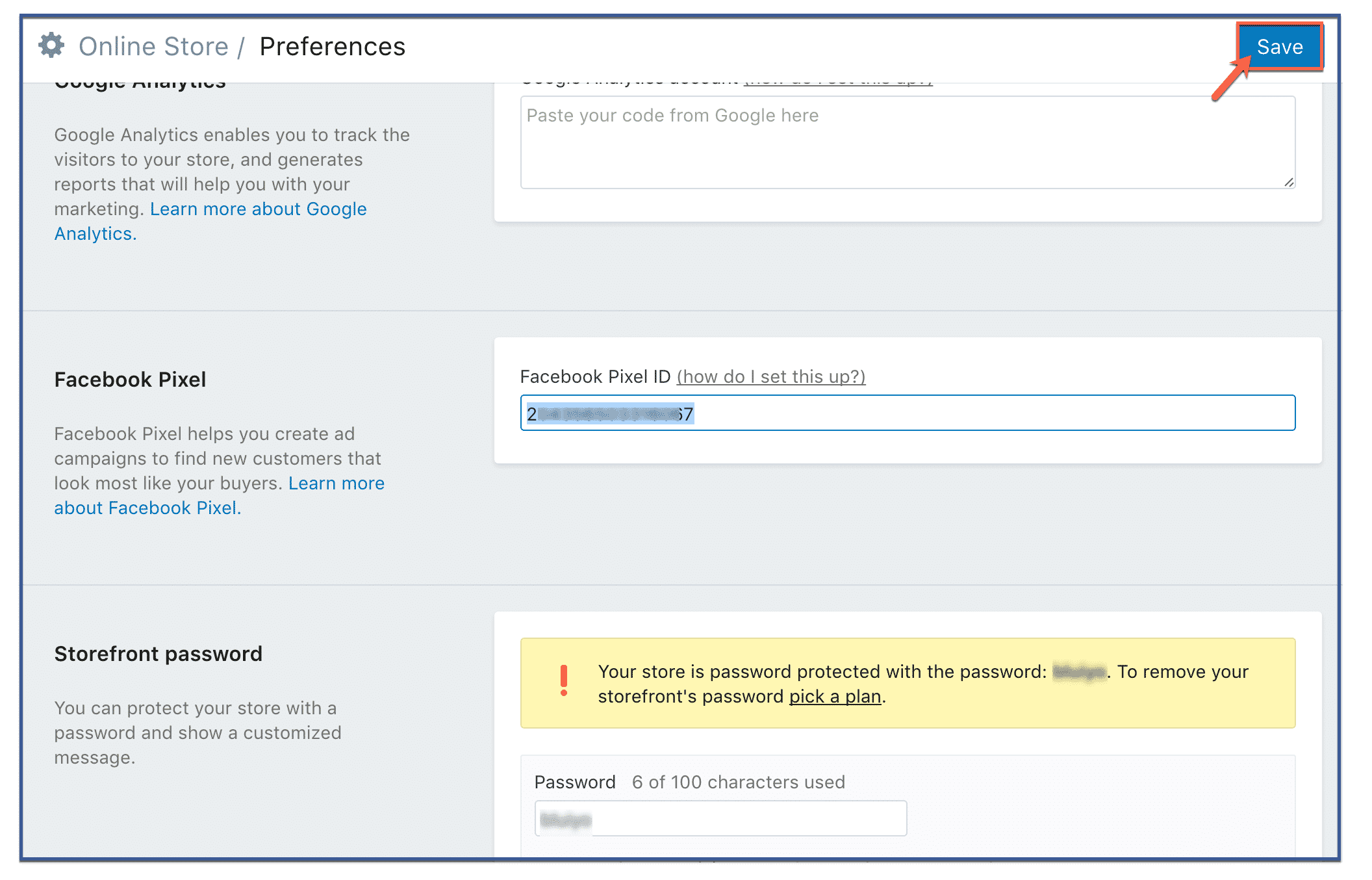
Als je Shopify gebruikt, is de installatie nog veel eenvoudiger. Je hoeft alleen maar naar je Facebook Business Manager te gaan, de ID van je Pixel te kopiëren (niet de code) en deze vervolgens in te voeren in de voorkeuren van je Shopify-winkel.
- Ga in je Shopify-beheerpaneel naar 'Online winkel' en klik op 'Voorkeuren'.“
- Scrol naar het gedeelte 'Facebook-pixel' en plak je pixel-ID.
- Klik op 'Opslaan'.“
[/een derde][een derde]
Methode 2: De pixelcode handmatig aan uw website toevoegen
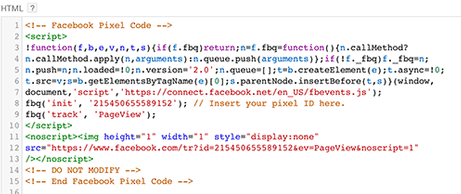
Dit is de meest gebruikelijke manier om de pixel te installeren. Op de pixelpagina in je Advertentiebeheer zie je de optie 'Voltooi de installatie van je Facebook-pixel'. Klik hierop. Je krijgt dan verschillende opties te zien; kies 'Handmatig installeren'. Op het volgende scherm zie je een enorm blok met code. Dat is je pixel. Kopieer deze code.
Je kunt de pixelcode gewoon kopiëren en in de headercode van je website plakken. Ja, dat klopt – plaats hem na de tag en vóór de tag. Zorg ervoor dat je deze in al je webpagina's plakt die je wilt volgen, of in je sjabloon voor het geval je er een gebruikt.
[/een derde][een derde]
Methode 3: WordPress-plugins gebruiken
Er zijn er verschillende WordPress Plugins die het installeren en beheren van Facebook Pixel vereenvoudigen. Desondanks, Pixel Caffeine van AdEspresso Dit is verreweg onze favoriet. Met slechts een paar klikken kun je Facebook Pixel probleemloos op je website activeren.
Een van de meest fantastische dingen aan Pixel Caffeine is dat het, in tegenstelling tot andere beschikbare plugins, geen verborgen kosten, vergoedingen of beperkingen heeft. Het wordt gratis aangeboden. Maar voordat je gebruik kunt maken van de vele functies, moet je het wel koppelen aan je Facebook-advertentieaccount.
Op het dashboard kun je het advertentieaccount kiezen dat je aan je site wilt koppelen, en de pixel-ID die je wilt gebruiken. Het systeem haalt automatisch de pixel-ID's op waaruit je kunt kiezen op basis van het geselecteerde account. En klaar! Je pixel is geactiveerd.
[/een derde][/volledige breedte]
Pixel Caffeine van AdEspresso
[spacer height=”2px”]
 Zorg ervoor dat je Facebook Pixel werkt.
Voordat je de gegevens van je pixel gaat gebruiken, is het belangrijk om te controleren of alles naar behoren werkt.
Als je Google Chrome gebruikt, download en installeer dan de Pixel Helper-extensie om te controleren of je Facebook Pixel registreert nauwkeurig de gebeurtenissen op uw site.












 English
  বাংলা
বাংলা  简体中文
简体中文  Nederlands
  Français
  Deutsch (Sie)
  हिन्दी
  Bahasa Indonesia
  Italiano
  日本語
日本語  한국어
한국어  Bahasa Melayu
  Português do Brasil
  Русский
  Español de México
  Tagalog
  ไทย
ไทย  Tiếng Việt
  اردو
اردو  Türkçe