



Hoe maak je een GSA Zoekmachine Ranker projectsjabloon?
Ik heb van veel mensen de vraag gekregen of ik een GSA-sjabloon voor hen kan maken. Maar zoals het gezegde luidt: “"Geef een man een vis en je voedt hem voor een dag, maar leer hem vissen en je voedt hem voor zijn hele leven."”, Hetzelfde geldt voor mij, ik geef je alleen maar een sjabloon. Vandaag leer ik je hoe je je eigen aangepaste ontwerp kunt maken. GSA Search Engine Ranker-projectsjabloon
Degenen onder u die nu bekend zijn met wat een precies een GSA Zoekmachine Ranker projectsjabloon Ik zal hieronder uitleggen waarom of wanneer je een GSA Search Engine Ranker-projectsjabloon en wat het doet.
[spacer height=”2px”]
[full_width][one_half padding=”0 0 10px 0″]
Waarom heb je een GSA Search Engine Ranker-projectsjabloon nodig?
[spacer height=”2px”]
Sommige mensen, zoals ikzelf, creëren honderden GSA Zoekmachine Ranker projecten Elke maand gebruiken ze meestal dezelfde platforms, dezelfde filters, dezelfde opties en sommige mensen gebruiken zelfs hetzelfde algemene e-mailaccount wanneer ze projecten aanmaken.
Telkens wanneer we een project aanmaken, moeten we alle vakjes aanvinken, dezelfde filters selecteren, dezelfde opties wijzigen, enzovoort. Dit is uiteindelijk erg tijdrovend en de kans op fouten is groot.
[/one_half][one_half padding=”0 0 0 10px”]
Wat doet een GSA Search Engine Ranker-projectsjabloon voor u?
[spacer height=”2px”]
 De belangrijkste iets dat een GSA-zoekmachineranker Het voordeel van een projectsjabloon is dat het je veel tijd bespaart, omdat je gewoon je sjabloon kunt importeren en alle instellingen en filters automatisch worden overgenomen.
De GSA Search Engine Ranker-projectsjabloon kan fouten voorkomen of ervoor zorgen dat u vergeet een optie of filter aan te vinken.
Het GSA Search Engine Ranker-project zorgt voor consistentie bij het aanmaken van projecten.
[/one_half][/full_width]
Bekijk de onderstaande video waarin we laten zien hoe we van begin tot eind een GSA Search Engine Ranker-projectsjabloon maken, of volg de eenvoudige stappen verderop onder de video.
[sociallocker]
Hoe maak je een GSA Zoekmachine Ranker projectsjabloon?
[/sociallocker]
[spacer height=”2px”]
Volg deze stappen om een sjabloon voor een GSA Search Engine Ranker-project te maken.
[spacer height=”2px”]
- Begin een nieuw project zoals je dat normaal gesproken zou doen.
- Selecteer alle platformen waarop u uw content wilt indienen.
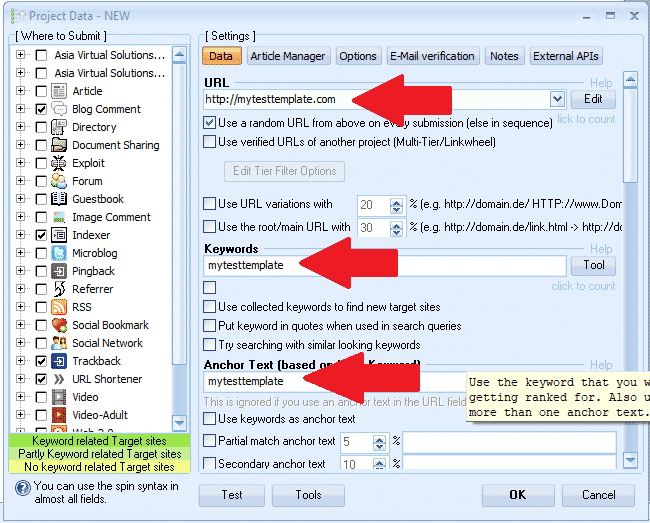
- Kies een woord dat we als markering kunnen gebruiken, bijvoorbeeld: mijntestsjabloon (Dit is puur zodat we de velden later gemakkelijk terug kunnen vinden en de markering kunnen verwijderen.)
- Voer een URL in: http://mytesttemplate.com
- Vervang vervolgens alle lege velden door uw markeringstekst: mijntestsjabloon, Het zou er nu uit moeten zien zoals op de onderstaande schermafbeeldingen.

[spacer height=”2px”]
- Als je het platform 'Documenten' hebt geselecteerd, moet je een PDF-document bijvoegen. Plak het niet zomaar; gebruik 'mytesttemplate' voor documenten, maar blader en selecteer een PDF-bestand. Maak je geen zorgen, we verwijderen dat PDF-bestand later in het proces weer.
- Als je een platform hebt gekozen waarvoor een profielfoto vereist is, plak dan niet zomaar een afbeelding; gebruik mytesttemplate voor de afbeelding, maar blader en selecteer een afbeelding. Geen zorgen, we verwijderen die afbeelding later in het proces weer.
- Nadat u alle velden onder het tabblad 'Gegevens' hebt ingevuld, gaat u verder naar: ARTIKELBEHEERDER tab.
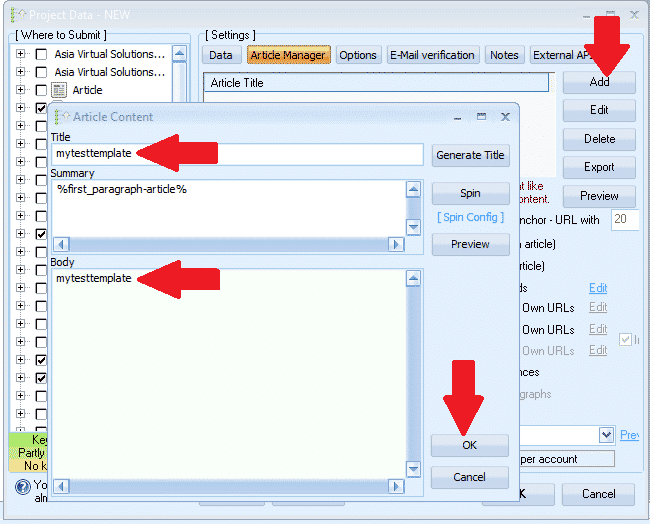
- Klik TOEVOEGEN en selecteer vervolgens HANDMATIG INVOEREN
- Titel van het artikel, plak hier: mytesttemplate
- Artikeltekst, plak hier: mytesttemplate
- Klik nu OK
- Vervolgens gaan we verder met de OPTIES tab
- Maak al je selecties en stel je filters in. Dat is alles, je hoeft verder niets meer te doen op het tabblad Opties.
- Vervolgens ga je naar de E-MAIL tab
- Verwijder het standaard e-mailadres dat u daar ziet en klik vervolgens. TOEVOEGEN
- Select HANDMATIG
- Voer het e-mailadres als volgt in: Mijn************@************te.com en klik OK
- Verwijder nu de eerste e-mail die wordt weergegeven. — je zou alleen het e-mailadres moeten zien dat we zojuist hebben toegevoegd; Mijn************@************te.com
- Klik op je e-mail en vervolgens op de plek waar het wordt weergegeven. POP3-serverVul mail.mytesttemplate.com in.
- Vullen WACHTWOORD als: mijn testsjabloon
- Uw e-mailvelden zouden er nu als volgt uit moeten zien, zoals in de onderstaande schermafbeelding:

[full_width][one_third]Goed gedaan tot nu toe, we zijn klaar met de instellingen en nu hoef je alleen nog maar te klikken OK om het project op te slaan. Wanneer je op OK klikt, krijg je de waarschuwing te zien die je aan de rechterkant ziet. Dat is geen probleem, klik gewoon verder. NEGEREN en je project wordt nu opgeslagen[/one_third][two_third_last]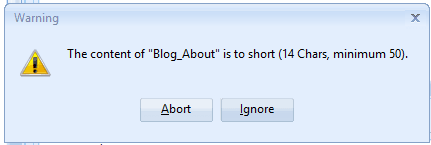 [/two_third_last][/full_width]
[spacer height=”2px”]
Oké, we hebben ons project nu aangemaakt en opgeslagen, maar juich nog niet te vroeg, we zijn er nog niet. Er zijn nog een paar stappen te gaan. GSA Zoekmachine-ranking projectsjabloon is voltooid, dus laten we verdergaan met de resterende stappen.
[volledige_breedte][een_derde]
- Dubbelklik nu op het project om het opnieuw te openen.
- Vervolgens onderaan de GSA zoekmachine ranker Venster, klik op HULPMIDDELEN, en dan verder EXPORTEREN, en SJABLOON (Opties, Gegevensvelden, Motorselectie)
- Sla het bestand op in een map waar u al uw bestanden wilt bewaren. GSA Search Engine Ranker-projecttemplates. De bestandsnaam zou er ongeveer zo uitzien: MyTier1Template.gsatml
[/een derde][twee derde laatste]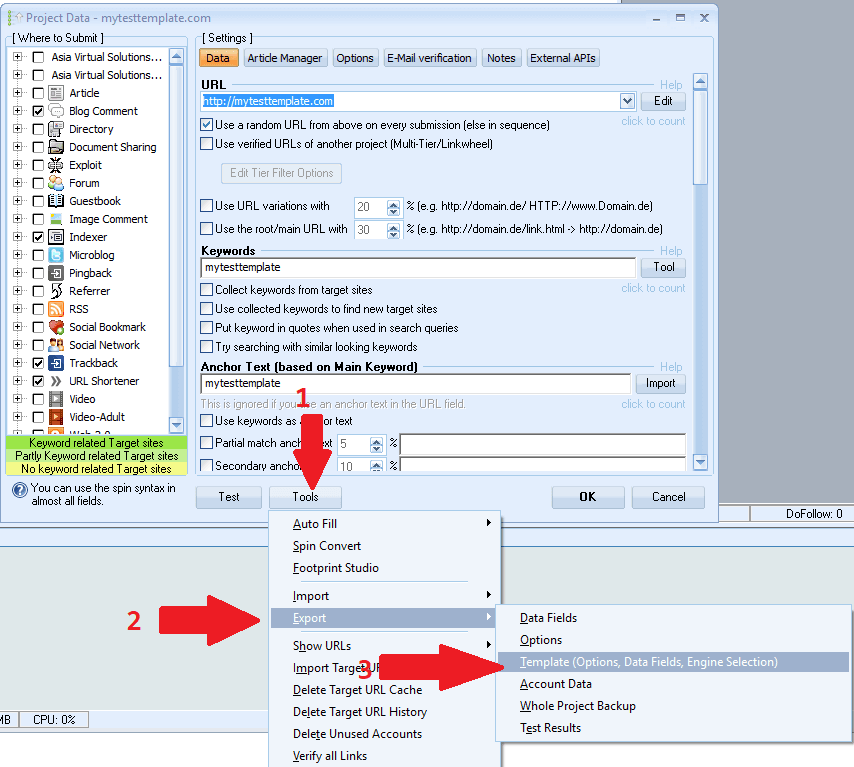 [/two_third_last][/full_width]
[spacer height=”2px”]
Oké, we hebben nu ons projectbestand aangemaakt en geëxporteerd. Vervolgens gaan we dat geëxporteerde project bewerken. We zijn nu klaar. GSA Zoekmachine Ranker Voorlopig. Je kunt het project dat je daar hebt verwijderen en GSA SER sluiten; we zullen het later weer gebruiken.
Laten we beginnen met het bewerken van het geëxporteerde bestand. Hiervoor hebben we een editor nodig zoals NOTEPAD++, Je kunt het hier gratis downloaden: https://notepad-plus-plus.org/downloads/
- Allereerst moet je de map openen waar je het project hebt geëxporteerd.
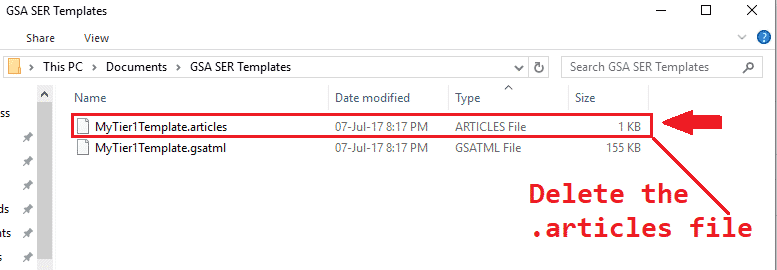
- U zult merken dat er nu 2 bestanden in die map staan, waarvan er één eindigt met .artikelen en de andere zal eindigen met .gsatml
- We hebben niet degene nodig die eindigt met .artikelen, Je kunt dat bestand dus gewoon verwijderen.
- De volgende stap is om rechtermuisklik in het bestand dat eindigt met .gsatml, In mijn geval is het bestand MyTier1Template.gsatml
- De selectie BEWERKEN MET NOTEPAD++ Het bestand wordt nu geopend in Notepad++ en we kunnen ermee aan de slag.
- De tweede regel is de URL die we hebben opgegeven toen we de pagina aanmaakten in GSA Search Engine Ranker. In mijn geval ziet die er zo uit: URL=http://mytesttemplate.com
- Je moet nu de URL verwijderen, zodat je alleen het volgende overhoudt: URL=
- Nu op de menubalk van NotePad++, kiezen ZOEKOPDRACHT en scrol vervolgens naar beneden en selecteer VERVANGEN
- In het venster 'VERVANGEN' dat verschijnt, moet u het markeringswoord typen dat u gebruikte toen u uw GSA Search Engine ranker-project maakte. In mijn geval was dat: mijntestsjabloon, Vul het als volgt in: Zoek naar: =mijntestsjabloon en vervangen door: = Druk vervolgens op de knop ALLES VERVANGEN
- Het zou eruit moeten zien zoals in de onderstaande schermafbeelding:

Prima, dus wat werd er daarvoor getoond? =mytesttemplate zou nu alleen nog het volgende moeten bevatten: =
- Vervolgens scroll je naar beneden en zoek je het pdf-bestand dat je hebt toegevoegd aan Document, Toen je het project aanmaakte, stond er 'Document=c://bestand' in je pdf-bestand.
- Verwijder het bestandspad naar de domein, dus het toont alleen: Document=
- Vervolgens moeten we alle e-mailvermeldingen verwijderen: De gemakkelijkste en snelste manier om dit te doen is met de zoekfunctie. Om deze te laden, opent u Notepad++ en drukt u op Ctrl+F.
- Vind wat Je moet je markeringszin opnieuw invoeren; die van mij was: mytesttemplate
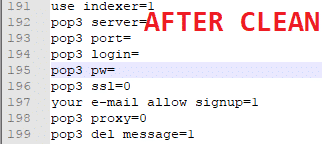
- Klik nu op 'Volgende' en je ziet de eerste invoer. Vervang alles na: = (we willen alleen de =). Je kunt ook het hele wachtwoord wissen. Hieronder zie je een schermafbeelding van voor en na het wissen.
- Oké, we zijn nu klaar., sla het bestand op En dat is alles, je sjabloon is klaar.

[spacer height=”2px”]
Hoe u uw GSA Search Engine Ranker-projectsjabloon kunt gebruiken
[spacer height=”2px”]
Het gebruik van de sjabloon is heel eenvoudig, volg gewoon de onderstaande stappen.
- Klik in GSA Search Engine Ranker op: Nieuw een nieuw project starten.
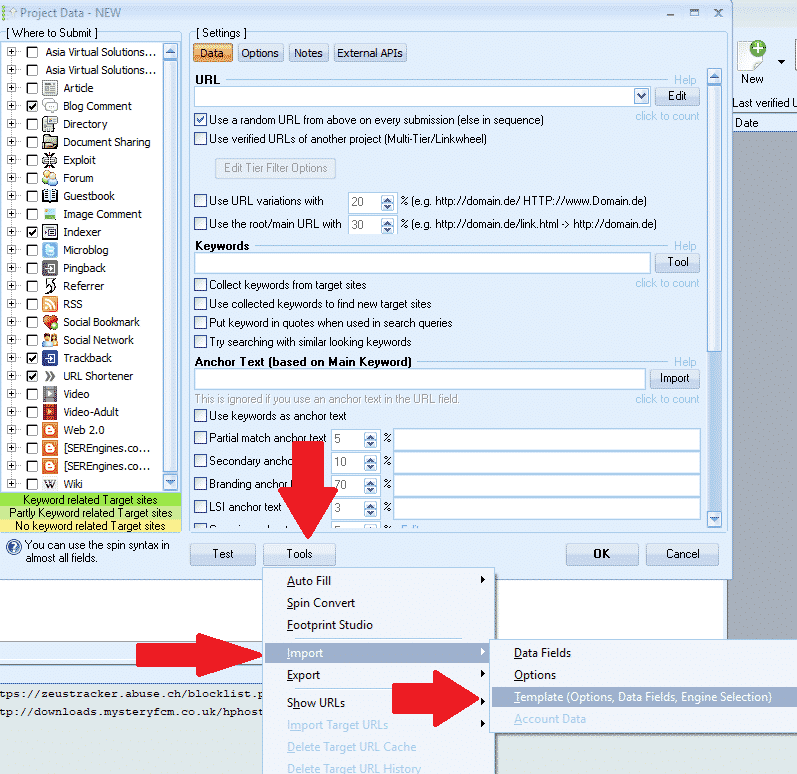
- Vervolgens onderaan de GSA zoekmachine ranker venster, klik op Hulpmiddelen Importeren SJABLOON (Opties, Gegevensvelden, Motorselectie)
- Navigeer naar de locatie waar uw sjabloon is opgeslagen en selecteer deze vervolgens.
[spacer height=”2px”]
Dat is alles! Je hebt nu met succes een sjabloon aangemaakt en geïmporteerd. Het enige wat je nu nog hoeft te doen, is inhoud toevoegen.
Ik hoop dat je het bericht en de video leuk vond. Als je er iets aan hebt gehad, geef het dan een like en deel het, en laat een reactie achter als je vragen hebt.
TE LUI OM EEN GSA SER-SJABLOON TE MAKEN
Wij creëren uw project voor u – volledig uitgewerkte, gelaagde GSA SER-projecten.













 English
  বাংলা
বাংলা  简体中文
简体中文  Nederlands
  Français
  Deutsch (Sie)
  हिन्दी
  Bahasa Indonesia
  Italiano
  日本語
日本語  한국어
한국어  Bahasa Melayu
  Português do Brasil
  Русский
  Español de México
  Tagalog
  ไทย
ไทย  Tiếng Việt
  اردو
اردو  Türkçe