


A 1 tier GSA Search Engine Ranker project is the fastest way to point a large volume of links at one URL. No tier structure to plan, no lower tiers feeding upper tiers — every link GSA builds goes straight at your target.
The problem has never been GSA SER itself. It is the setup. Writing 50 articles, sourcing 50 email accounts, finding on-topic images, building anchor groups, filling every data field, choosing platforms and setting filters is several hours of repetitive work before a single link gets built.
The GSA SER 1 Tier Data Pack removes all of it. You enter your website, keywords and language, and you receive one import-ready RESTORE ME.ser file with the whole project already built. This page shows you exactly what is inside it, with real screenshots from the builder.
💡 In short
One tier, 50 unique articles, 50 email accounts, and a complete GSA SER project file.
This is a fully configured project, not an article bundle. Every field GSA SER needs is already filled in.
- 50 unique articles written for your keywords — roughly 850 to 1,100 words each, not spun syntax.
- 50 email accounts cut from our own pool and allocated to your project.
- 60 anchor texts across six groups: main, partial, secondary, branding, generic and domain.
- Every project field completed — platforms, filters, data fields, search engines and linking tokens.
- Delivered within 24 hours, usually far sooner, as one .ser file you restore in three clicks.
📦 What you actually receive
This is what lands in GSA Search Engine Ranker after you restore the file. One project, in its own order group, already Active and set to high priority — nothing to configure, nothing to fill in.

Below is the same project in the builder. One tier, 50 articles, Standard quality, the audience the content was written for, and the anchor groups ready to go. The green button downloads the .ser file.
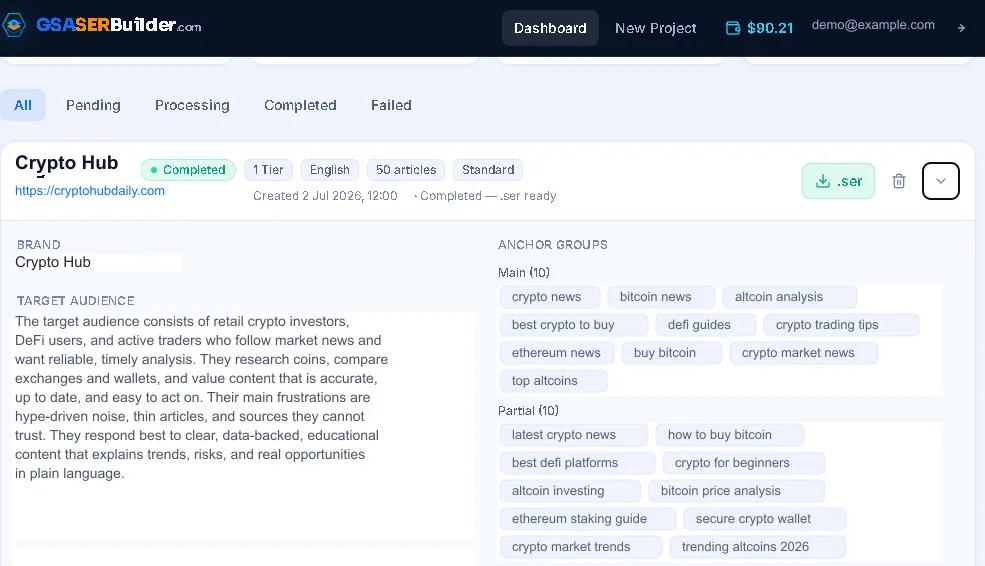
Here is the full contents of a 1 tier project:
| What is included | Detail |
|---|---|
| Configured project | A complete 1 tier GSA SER project structure with every field set |
| Unique articles | 50 unique, human-readable articles — not spun content |
| Email accounts | 50 real, ready-to-use accounts allocated to your project |
| Images | On-topic images sourced and inserted where applicable |
| Linking tokens | GSA linking tokens placed inside the articles so GSA builds your links |
| Anchor groups | Main, partial, secondary, branding, generic and domain — 10 anchors each |
| Content and data fields | The project content vault and data fields filled in |
| Platform selections | Target platforms preselected to match the project type |
| Filters and settings | Skip-content filters and project settings configured |
| Additional URLs | Extra target URLs included where you provide them |
| YouTube links | Optional — video links plus one in-article embed |
| Your own image URLs | Optional — supply images to include |
| HTML banners and iframes | Optional — embedded in the article content |
| Social profile URLs | Optional — included in the project |
| Local business details | Optional NAP contact card, placed on Tier 1 articles |
| Restore file | One import-ready RESTORE ME.ser — download, restore, deploy |
✏️ The articles are written, not spun
This is the single biggest change from the old data packs. There is no spin syntax and no variation count. You get 50 separate articles, each with its own title, written around your keywords.
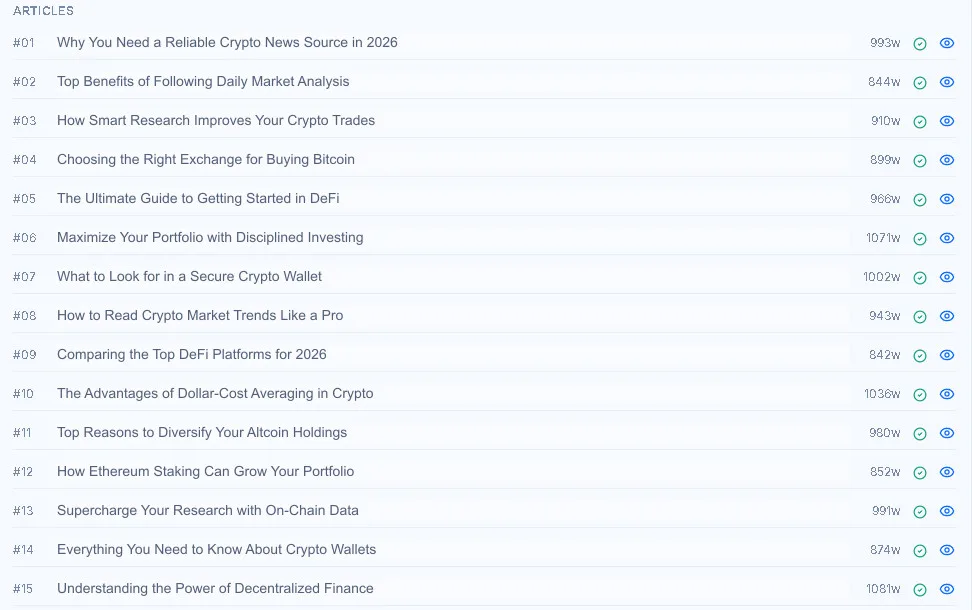
Word counts land between roughly 840 and 1,100 words. Each article carries the GSA linking tokens, so when GSA SER posts it, your links are built inside real content rather than bolted on.
You can order in your own language too. The project language is a field on the order form, and the articles, anchors and delivery email all follow it.
What is inside each article
Each one arrives finished rather than as raw text waiting to be dressed up:
- Proper structure — headings, an FAQ section, and a meta title and description.
- Schema markup already in the body, so platforms that render it get structured data rather than a wall of text.
- Images embedded and marked up, with alt text written from your keywords instead of left blank.
- Images on neutral hosting. Images we find for you load fast from unbranded image hosts, and your own image links are used exactly as you send them.
- GSA tokens in place of links. No real URL or anchor is written into the article. The token is filled at post time from the URL and anchor fields, which is how one article can carry a different anchor every time it is used.
And what we deliberately switch off
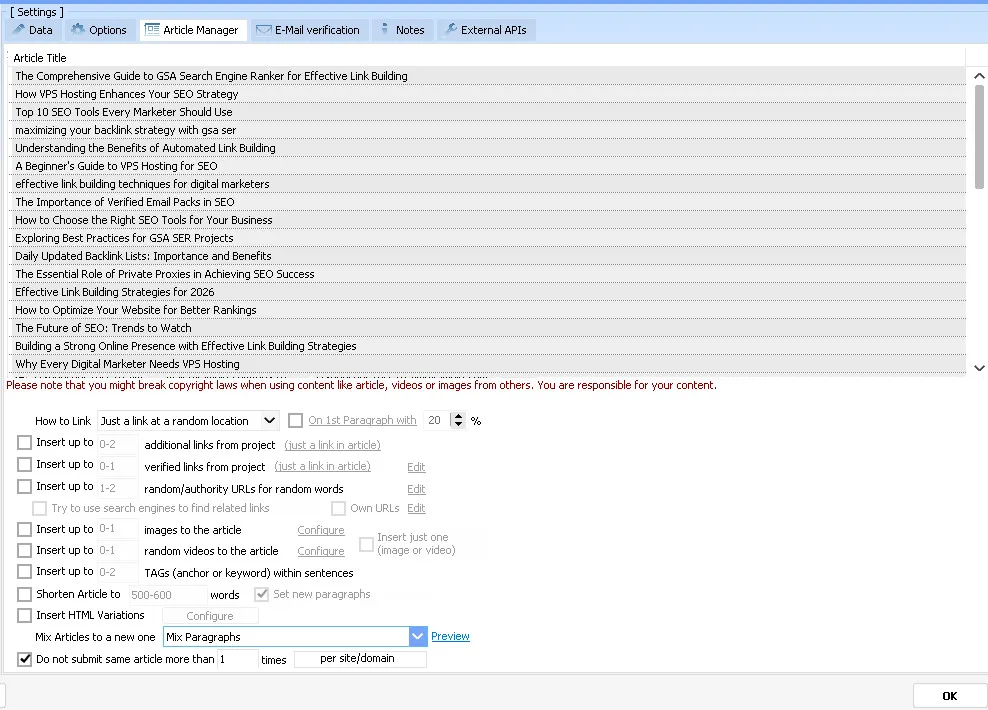
The Article Manager can pad a post on the way out — slot in extra links, hunt down a random image, pull in a video, sprinkle tags through the sentences, chop the article down to 500 words. Every one of those is left off.
They exist to prop up thin content. There is nothing here to prop up: the article already has its images, its structure and its links, so turning them on would only spend time at post time fetching things you already have — and drop material into your article that you never wrote.
The last setting on that tab is the one that matters most: an article is used once and not repeated. No site ends up carrying two copies of your content.
🔗 Six anchor groups, built from your keywords
Anchor text is where most self-built projects go wrong — either one anchor repeated 500 times, or a list that is all exact match. A 1 tier project ships with six separate groups, ten anchors in each.
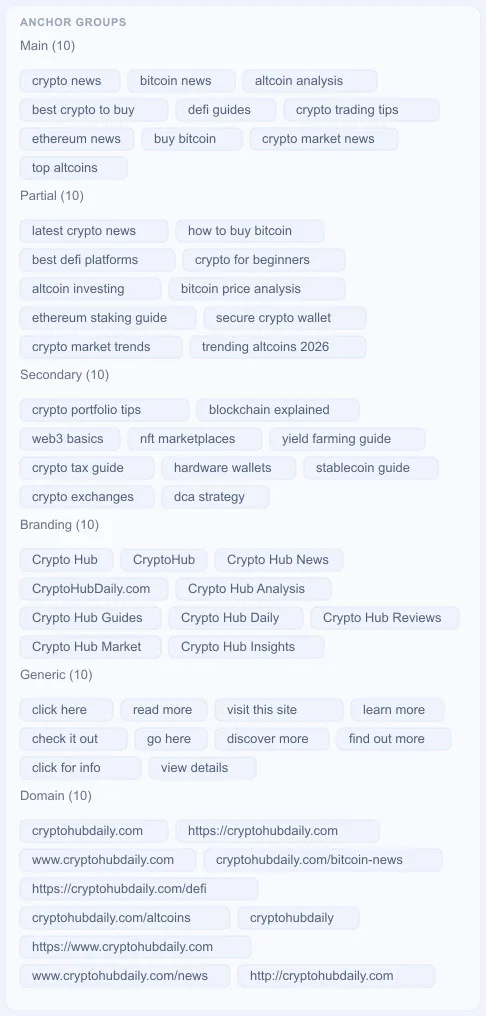
Branding and domain anchors matter as much as the keyword ones. They are what make a link profile look like it was earned rather than built.
The split between them is set in the project too, and it is the part most people get wrong. Here it is inside GSA SER, along with the keywords the order was placed with:
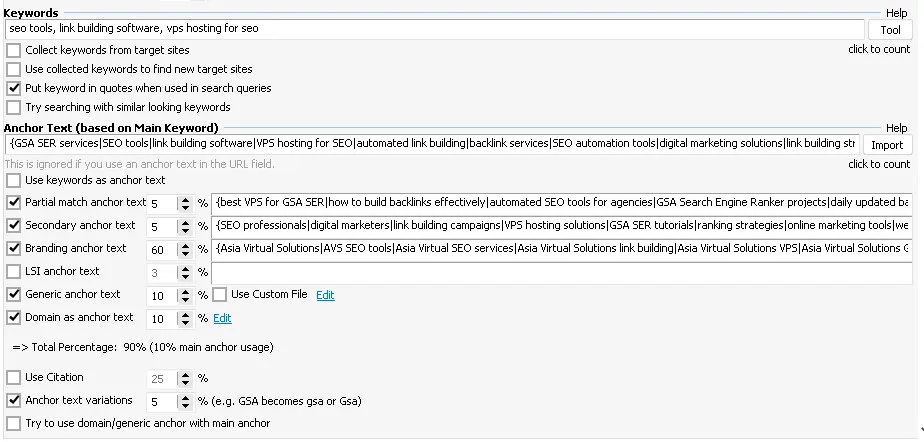
| Anchor type | Share | Why it is set there |
|---|---|---|
| Branding | 60% | Links people give you willingly are mostly your name. A profile dominated by brand anchors is the single clearest sign the links were earned |
| Main keyword | 10% | Exact match is the strongest ranking signal and the strongest spam signal. Ten percent keeps the signal without the pattern |
| Generic | 10% | Click here, read more, visit this site. Real editors write these constantly and a profile without any looks manufactured |
| Domain | 10% | The bare URL or domain name, which is how most forum and directory links appear in the wild |
| Partial match | 5% | Longer phrases containing the keyword, so you gain topical relevance without repeating the exact term |
| Secondary | 5% | Related terms and audience words that widen what the page is seen to be about |
The reason it is built this way is that anchor text is the easiest thing in link building to overdo. A project left on its defaults will hammer the same money keyword into every link, and a few hundred identical anchors pointing at one page is the oldest over-optimisation pattern there is. Flip it around — brand first, keyword last — and the profile reads like a site people actually mention.
There is one more setting worth pointing out: anchor text variations at 5%, which lets the capitalisation drift so the same phrase is not reproduced character for character every time. Real links are not that tidy.
👤 Profiles and comments nobody else is using
GSA SER ships with a default About Yourself block and a default comment list. They work, and almost everybody leaves them exactly as they are — which is the problem. The same paragraph, the same hundred names, the same hundred towns end up on profiles right across the web, and they can be searched for. Anyone can pull up every profile ever built from that stock block, including yours.
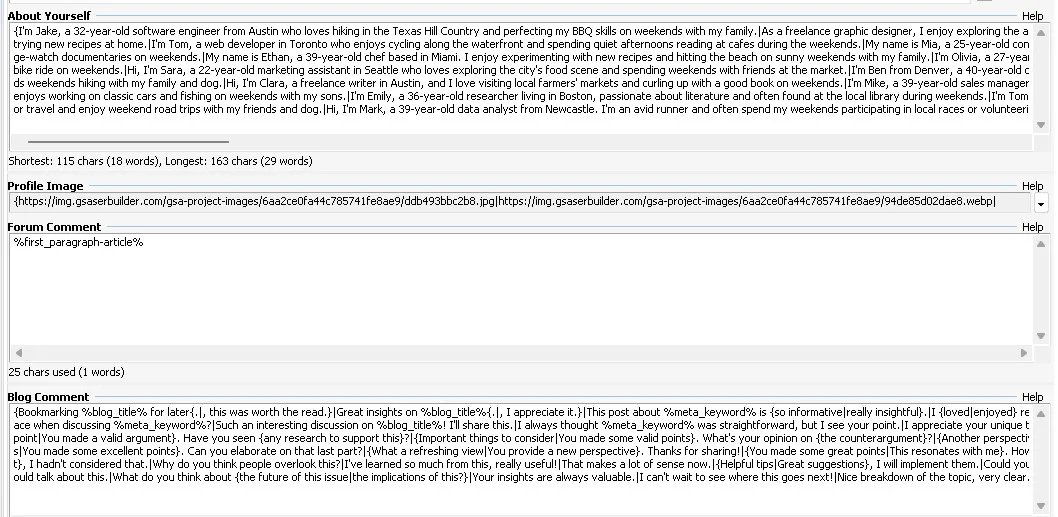
- 50 profile bios, written from your target audience rather than your keywords. Commercial wording in a personal bio reads as spam to a human moderator, so the bios talk about people, not products.
- 100 blog comments, in your project language. The stock comment list is a harvested spam corpus — comment filters have had those exact strings on file for years — so replacing it is as much a deliverability fix as an anti-footprint one.
- Forum comments pull the first paragraph of your own article, so the post is on topic instead of generic praise.
- Profile images sourced for your project and served from neutral image hosts, with nothing that points back to us.
All of it is produced in the language of the project, with names and places that belong there. A Turkish project gets Turkish names and cities like Izmir or Bursa — not American ones run through a translator.
One detail matters more than it looks. A comment that names your niche on somebody else’s unrelated blog is textbook spam, and that is exactly what the stock block does. The comments here use the macros that resolve against the page being commented on — its title, its keyword — so they read as though they were written about that page. Any comment that would inject your own keyword is rejected before it ever ships.
We wrote up the full story when we changed this: every GSA SER user shares the same profiles and comments.
🖼️ On-topic images
Images are sourced for your niche and placed in the articles, so posts on platforms that render images do not look like bare walls of text.
Your own image links are used exactly as you send them — we never copy them to our servers — and if you tick “Only use my images” on the order form, no other images are added. Images we find for you are re-hosted on neutral, unbranded image hosts behind a global CDN, which matters for two reasons. Hotlinking straight from wherever an image was found is fragile — plenty of hosts block it outright, and the picture silently turns into a broken icon on every post you built. And because the hosts are neutral, nothing in your articles points back to us or ties your sites to anyone else’s projects.
📧 Fifty private email accounts
A lot of platforms will not activate an account until somebody clicks a link in a confirmation email. No working mailbox means no account, which means no link — and it is one of the quietest reasons a project underdelivers without the owner ever knowing why.
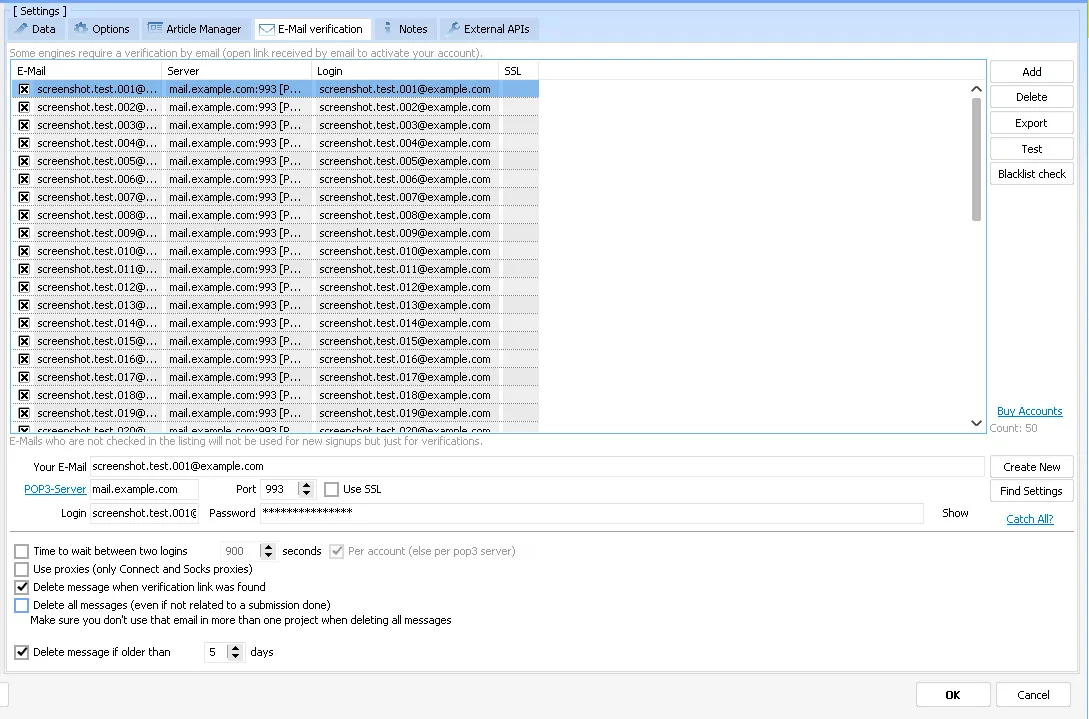
- 50 accounts per tier, allocated to your project and nobody else’s.
- Private domain accounts on our own mail servers — not free webmail signed up in bulk.
- Guaranteed for three months, and in practice they often keep working a good deal longer.
- Already loaded into the project, with server, port and login filled in. Nothing to configure.
The private domain part is what makes the difference. Plenty of platforms refuse signups from the well-known free providers outright, and free accounts get purged in waves whenever a provider decides to tidy up — taking your ability to verify anything with them. These run on our own infrastructure, so they are not at the mercy of somebody else’s spring clean.
The mailbox housekeeping is set up too: a message is deleted once its verification link has been used, and anything older than five days is cleared out, so the account never silently fills up and starts bouncing.
🎯 Why these platforms, and not the rest
A 1 tier project enables 148 platform types, and they were not chosen for volume. Every one of them is a place where your link sits inside an article you supplied, surrounded by text about your topic. That is what contextual means, and it is the only kind worth building when every link points straight at your money site.
| Platform family | Examples | Where your link sits |
|---|---|---|
| Article directories | Article Beach, ArticleMS, Article Friendly, Press Release Script | A full article you supplied |
| Blogs and CMS | WordPress, Drupal, Joomla, Joomla K2, EasyBlog | A published post |
| Forums | phpBB, MyBB, SMF, XenForo, Discourse, Flarum, NodeBB | A topic or reply with real content |
| Social networks | BuddyPress, Elgg, PHPFox, Oxwall, WoWonder, Dolphin | A profile page and its posts |
| Wikis | MediaWiki, DokuWiki, TikiWiki, MoinMoin, Trac | A wiki page |
| Question and answer sites | Question2Answer, OSQA, Askbot, Zendesk | An answer with context around it |
| Classifieds and listings | OSclass, Yclas, ClassiPress, Classiera, Directorist | A listing with a real description |
| Video and media | PHPMotion, ClipShare, ViMP, Vidiscript | A media page description |
| Code and project hosts | Gitea, GitLab, Gogs, Forgejo | A project page or profile |
| Bio-link and vCard pages | 66biolinks, phpBiolinks, InfyVcards | A branded landing page |
This is what that looks like inside GSA SER. It is the Where to Submit tree of a real 1 tier project, and the ticks tell the whole story — the contextual families are on, and the families that only produce a bare link on somebody else’s page are off.
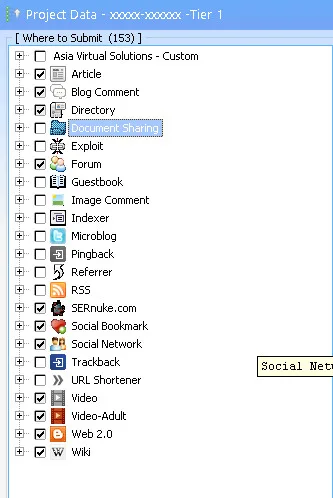
Two of those ticked entries are custom engine sets rather than stock GSA: SERnuke.com, which is a paid add-on, and our own Asia Virtual Solutions engines. If you do not own those, GSA simply skips them and your project runs on everything else — nothing breaks, you just work from a slightly shorter list. Adult platforms are included in the selection but are stripped out automatically unless the project itself is an adult niche, so a local business never picks up links from them.
What is deliberately switched off matters just as much:
- Blog comments — moderated away or stripped in bulk, and they sit at the bottom of somebody else’s page.
- Guestbooks and image comments — abandoned scripts with no surrounding content to give the link meaning.
- Pingbacks, trackbacks and RSS — volume with nothing behind it.
- Indexers and referrer spam — not links in any useful sense.
You can check this yourself once you restore the project: open it in GSA SER and look at the engine selection. None of the above is ticked.
Multi-tier projects work differently on purpose. On a 2, 3 or 5 tier project the lower tiers open up to far more platform types — a Tier 3 runs over 600 — because their job is to push power at the tiers above them, not to carry your brand. A 1 tier project has no tier above it, so the selection stays strictly contextual.
🔎 Where it looks for targets
Knowing which platforms to post to is only half of it. The project also has to go and find sites running them, and that is configured too.
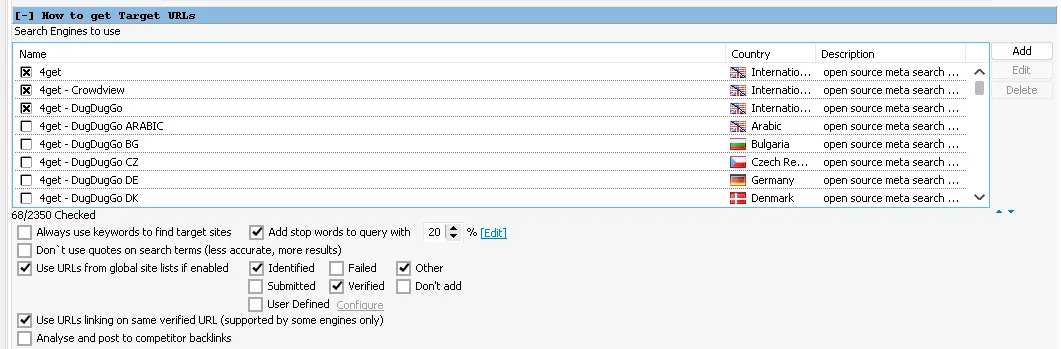
68 search engines, all of them international. GSA lists over two thousand, but most are country editions — a Danish or Czech edition of the same engine returns results weighted to that country, which is noise on a campaign that is not aimed there. If your site or your content is in another language, swapping in that country’s engines is a sensible change to make, and the selection is yours to edit.
Queries are also padded with stop words on 20% of searches, so the project is not asking every engine the same handful of questions over and over.
The bigger lever is the global site lists — the target URLs GSA has already gathered. Three of the five are worth reading and two are not:
| Site list | Used | Why |
|---|---|---|
| Identified | Yes | Sites recognised as a supported platform but not posted to yet — your pool of fresh targets |
| Verified | Yes | Sites that have already produced a working link, so the odds there are good |
| Other | Yes | Your own custom lists, including any link list you have bought |
| Submitted | No | Posted to, but the link never verified. Something went wrong the first time |
| Failed | No | Already tried and refused. Going back costs time, proxies and captcha credits for nothing |
That last pair is where a lot of throughput quietly disappears. A project pointed at its own failed list spends its day re-attempting sites that have already said no, and every one of those attempts burns a proxy request and sometimes a captcha solve. The project also has Use URLs linking on same verified URL switched on, which lets it find more sites of a type that has already worked for you.
🧹 The filters, and the one tuned to your niche
Finding a target is not the same as wanting it. This panel decides what gets thrown away.
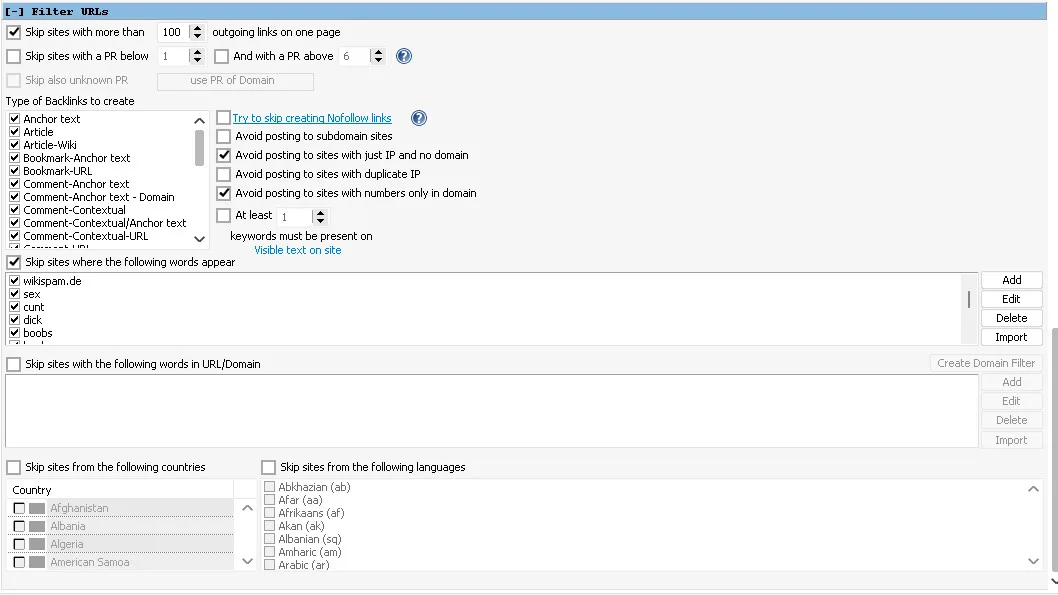
Pages with too many outbound links
Ships at 100 outgoing links on a page. Once a page is carrying hundreds of links out, it starts to look like a link farm rather than a page, and whatever value your link might have had is split hundreds of ways.
Our own advice: drop it further. If the 1 tier project points at a money site you care about, take that number down to somewhere around 10 to 20. You will build fewer links and they will be worth more each. It is one field, and it is the single highest-value change most people can make to a delivered project.
Type of backlinks to create
Everything in that list stays ticked, on purpose. The link types you end up with are already decided by the engine selection — filtering a second time here only fights the first decision and quietly throws away good placements.
The skip-words list, set per order
GSA can throw away any site containing particular words, and the default list covers the usual adult and spam terms. For most projects we leave all of it on.
The catch is obvious once you see it: if you sell in one of those niches, the filter blocks the very sites you need. A pharma site with the pharma words blocked will skip almost every relevant target it finds. So we read your URL and keywords when the project is built, work out the audience, and switch off the words that would work against you — the pharma terms for a pharma site, the gambling terms for a casino, the adult terms for an escort or adult site.
Everything else in the list stays exactly where it is. It is a small thing that is easy to miss and expensive to get wrong, and it is set before the project ever reaches you.
The rest of the panel
- Sites on a bare IP with no domain and domains that are only numbers are skipped. Both are throwaway hosts.
- Try to skip creating nofollow links is switched off — deliberately, for the reasons in the section below.
Country and language filters — leave them alone
Both panels are empty on delivery, and we suggest keeping them that way. The detection behind them is not reliable enough to trust: sites get read as the wrong language or the wrong country often enough that switching either filter on quietly discards a good number of perfectly usable targets. Unless you have a specific reason to be strict, you lose more than you gain.
If you do want links only from pages in one language, it is worth knowing that the filter runs backwards from how most people read it. It is a skip list, not a keep list. So to finish with English-only links you tick every language in the panel and then untick English — you are telling GSA what to throw away, not what to collect. Set it the intuitive way round and you will block the one language you actually wanted.
⏱️ How carefully it posts — and how to check
Most GSA projects get into trouble over pace rather than content. Left at its defaults, GSA will register an account and post to it seconds later, then do the same thing again, and again, until a moderator notices the pattern and the whole account history goes. A 1 tier project points at your money site, so it is configured to behave like somebody who is in no particular hurry.
These are the actual Tier 1 settings, and you can open the project after restoring it and check every one:
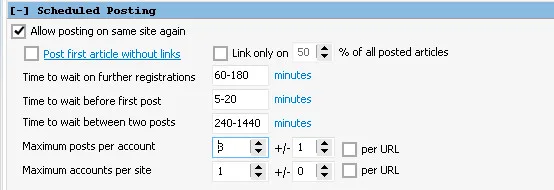
| Setting | Tier 1 | Why |
|---|---|---|
| Accounts per site | 1 | Your site never collects a stack of links from one domain |
| Posts per account | 2 to 4 | Enough to be worth the registration, not enough to look farmed |
| Wait on further registrations | 60–180 min | New accounts do not appear in bursts |
| Wait before the first post | 5–20 min | An account that registers and posts in the same second reads as a bot |
| Wait between two posts | 4–24 hours | The gap a real person would leave |
| Same article on one domain | never | No site ever hosts two copies of your content |
The days of blasting links non-stop are over. It does not get you anywhere except banned or deindexed, and it has not worked for years. So every number above is set to make the project look like a site people came across rather than a site that was pushed. Taking each in turn:
- Posting to the same site again is allowed. The project can return to a platform that already worked instead of hunting for a new one every time. Paired with one account per site and never repeating an article on a domain, that gives you depth on the good sites without duplication.
- 60 to 180 minutes between registrations. Several accounts appearing on one platform within minutes of each other, all from the same source, is precisely the pattern a moderator is watching for. Spread over hours, each signup looks like it arrived on its own.
- 5 to 20 minutes before the first post. A real person registers, has a look around, then writes something. Registering and posting in the same second is the clearest bot tell there is — and plenty of platforms hold a brand-new member’s first post for review anyway.
- 4 to 24 hours between posts. Nobody makes their second post ninety seconds after their first. This is the setting that keeps accounts alive long enough to be worth having registered in the first place.
- A handful of posts per account. Enough to justify the registration, not so many that the account reads as existing purely to drop links.
- One account per site. The one that matters most here, and the one covered below.
- The per URL boxes stay off. A 1 tier project usually points at a single URL, and ticking those would multiply every cap above by the number of targets.
The reason Tier 1 is the most conservative tier of all is simple: these links point straight at your money site, and there is no tier above it to absorb a mistake. On a lower tier you can afford to churn through sites, because its job is to push power upward and nobody is judging your brand by it. Here you cannot, so the project trades raw speed for survivability and spread.
Two of those are worth drawing out. One account per site is the setting most self-built projects get wrong — the default allows fifty, which means fifty links to your money site from a single domain, and that is a footprint rather than a link profile. And an article is never posted twice to the same domain, so nobody browsing that site finds your content sitting there twice with different anchors.
The numbers are also randomised per project rather than fixed. Two customers ordering on the same day get projects that behave differently — a shared, identical configuration across every project a provider ships is itself a pattern, and one that is easy to spot at scale.
The waits sound slow but they are per account, not for the project as a whole. GSA works through many target sites at once, so the project keeps moving the entire time — it simply never hammers any one site. Verified URLs are also handed to the indexing services automatically, so the links you build get seen.
🔧 Submitting, solving and indexing
The Options tab is where a project is told how to behave once it is running. This is the one that arrives with your 1 tier project:
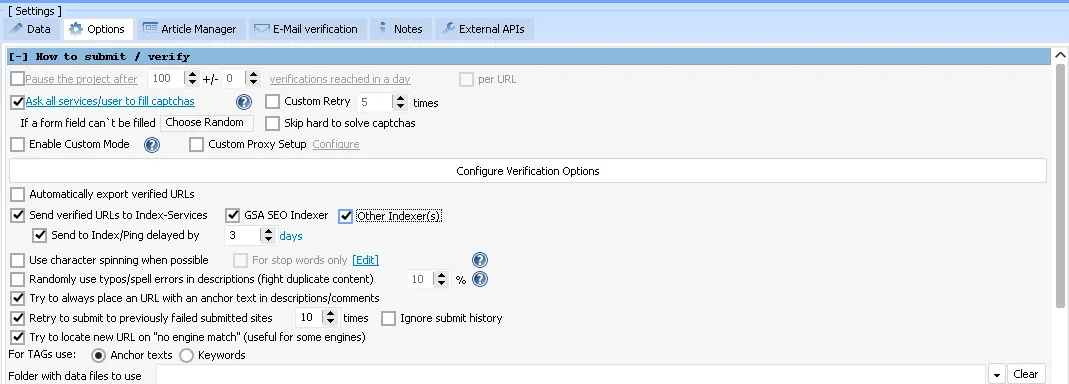
Indexing is held back by three days on purpose. A link that verifies today is not necessarily still there on Friday — posts get moderated, threads get pruned, accounts get cleaned out. Firing every fresh URL at your indexer the moment it verifies means paying to index pages that are already gone. Waiting three days lets the links reverify first, so what reaches the indexers is what actually survived.
The rest of the tab:
- Every captcha service you have is asked. No solver sits idle while submissions fail on a captcha another one could have read.
- Every indexer you have installed is used — Index-Services, GSA SEO Indexer and any others.
- Failed sites are retried up to ten times. A site that refuses once is often just busy.
- Links always carry anchor text in descriptions and comments rather than being dropped in as a bare URL.
Two boxes are deliberately left off, and they are the interesting ones:
- Character spinning — swapping letters for lookalike characters to dodge duplicate-content checks. It makes your content faintly unreadable to a human.
- Randomly inserted typos — the same trick by another route, deliberately misspelling words in your descriptions.
Both exist to make duplicate content look less duplicate. When every article is written once and never repeated on a domain, there is nothing to disguise — so your content goes out the way it was written.
You will also notice no daily cap. The project is not set to pause itself after a fixed number of verifications, because the right number depends entirely on your setup — your VPS, your proxies, how many projects you run at once. It is one checkbox at the top of that tab if you want it, and we are happy to advise on a number for your situation.
⚖️ Dofollow, nofollow and AI search
Your project is not restricted to dofollow links, and that is a deliberate setting rather than an oversight.
The dofollow rule is not what it once was. In March 2020 Google stopped treating rel=nofollow as a directive and began treating it as a hint, alongside the newer ugc and sponsored values. A nofollow link may still be crawled and may still be counted. That is Google’s choice to make, not a hard block.
AI answer engines have moved the goalposts further. The crawlers feeding ChatGPT, Gemini, Perplexity and Google AI Overviews read the page and the words around your brand. There is no indication that any of them apply the dofollow and nofollow split the way classic link scoring did — what gets picked up is a mention sitting inside relevant content.
Filtering to dofollow only throws away good placements and shrinks your footprint, for a rule that has been loosening for years. We would rather you had the mention.
🌐 Available in 22 languages
Language is a field on the order form. Whatever you pick, the articles, the anchor groups and your delivery email are all produced in that language — not translated afterwards.
- Arabic, Bahasa Malaysia, Bengali, Bulgarian, Chinese, Dutch, English, French, German, Hindi, Indonesian
- Italian, Japanese, Korean, Polish, Portuguese, Russian, Slovenian, Spanish, Thai, Turkish, Vietnamese
Non-Latin scripts are handled end to end, so Arabic, Chinese, Japanese, Korean, Thai and Hindi projects import into GSA SER correctly. If the language you need is not on the list, ask us and we will add it — it is usually a quick change.
⚙️ How you order
Four steps, and only the first one needs anything from you.
- Enter your campaign details. Project name, language, website URL, at least three keywords, tier count and article quality. Everything else is optional.
- Order and pay. On the Asia Virtual Solutions product page, by card or with your store credit.
- We build it. Articles, email accounts, images, anchors, fields, platforms and filters — then the project is assembled.
- Download and restore. Your RESTORE ME.ser arrives by email, ready to import.
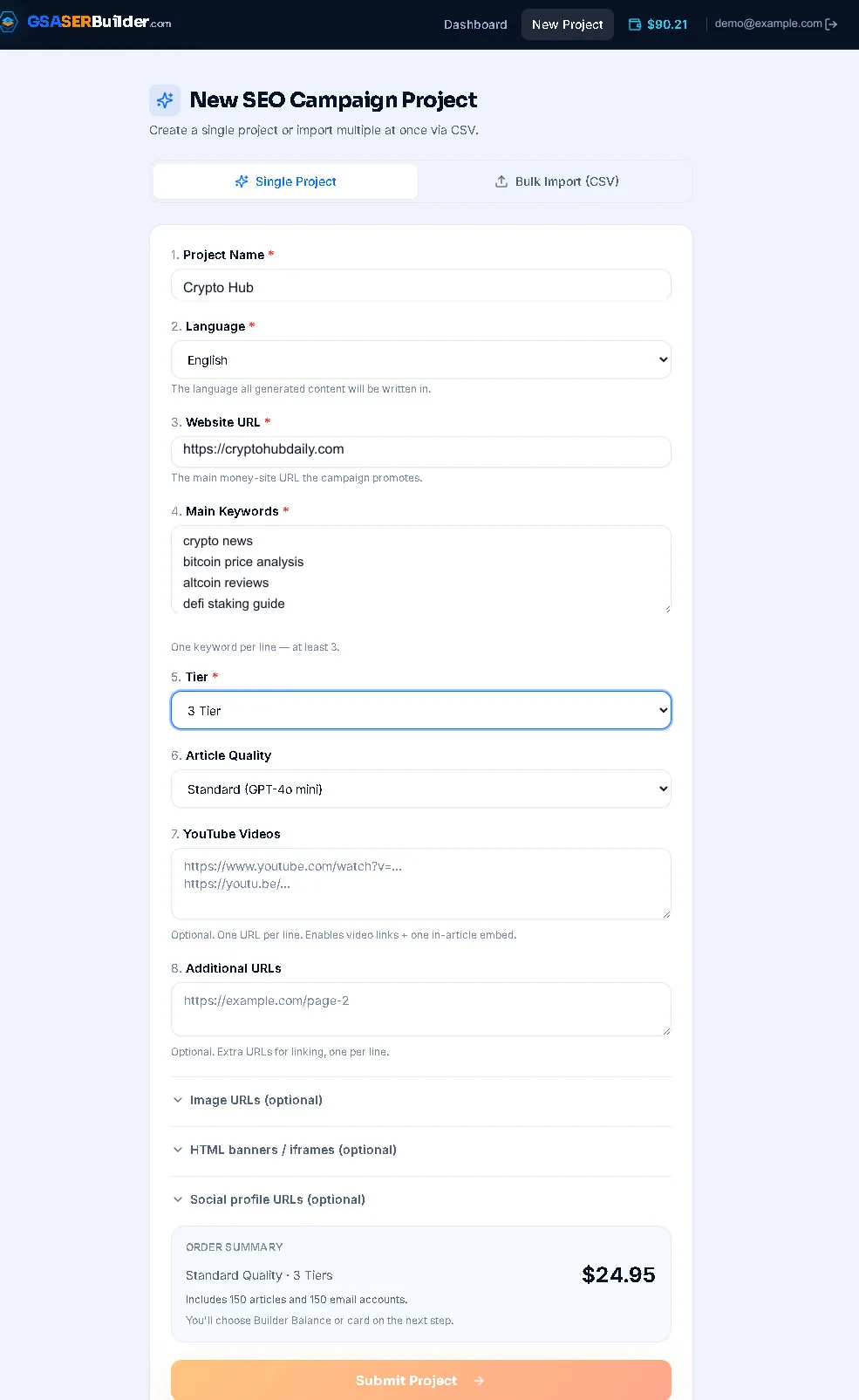
Projects are completed within 24 hours and processed first in, first out. Depending on workload many are ready in roughly 30 minutes to 3 hours, though the shorter time is not guaranteed.
🖥️ Two options you only get from Asia Virtual Solutions
Both are ticked on the order form, and neither is available anywhere else.
We run the project for you
No GSA SER licence, no VPS, nothing to install. We load the project onto our own setup, run it, and hand you the verified links. You pick the volume when you order — 1,000, 5,000, 10,000, 20,000 or 30,000 verified links.
This is the option to take if you want the links without running the software yourself. It is also a sensible way to test what the project produces before you buy a licence and a VPS.
We add it straight to your VPS
If you already host with us on an Asia Virtual Solutions GSA SER VPS, tick the box and we install the project on that VPS for you. Nothing to download, nothing to import — it is sitting in GSA SER waiting to run when you log in.
Only tick this one if your VPS is with us. If it is hosted elsewhere we have no way to reach it, and you want the normal .ser download instead.
📥 Delivery and restoring the project
When the project is finished you get an email with a download button. Keep the file — it is your project, and you can restore it as many times as you like.
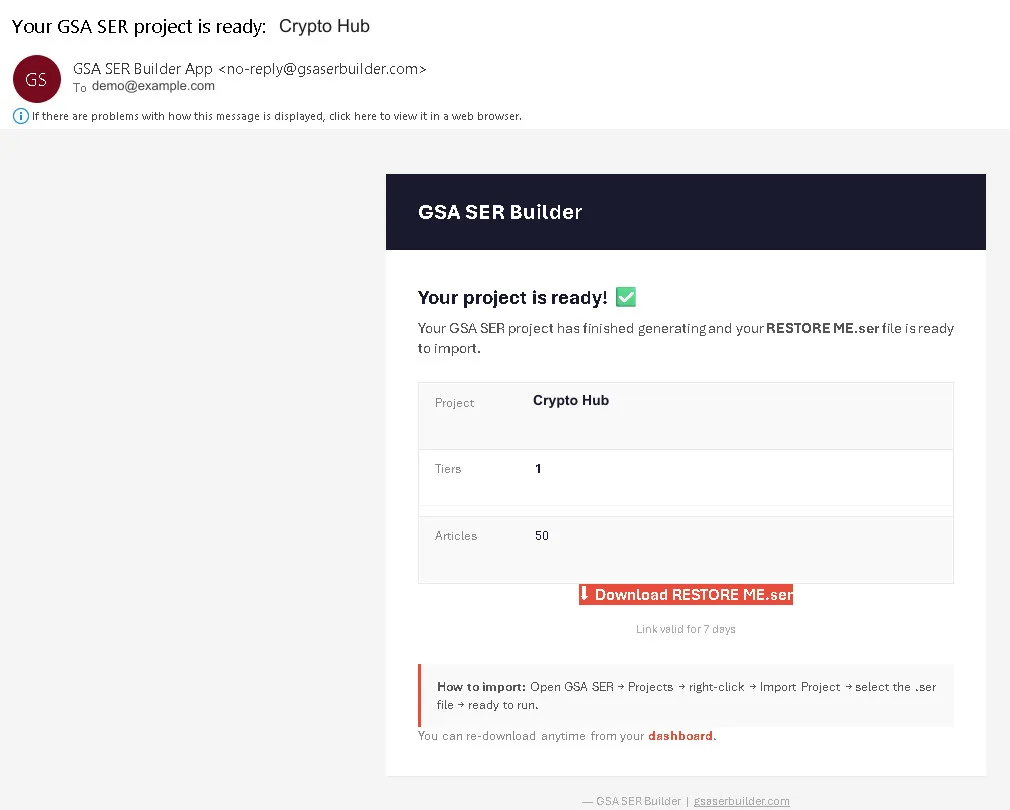
To import it: open GSA SER, go to Projects, right-click, choose Import Project, select the .ser file. The project loads fully configured and is ready to run.
📊 Standard or Premium
The only difference is the writing engine. Everything else — emails, images, anchors, fields, platforms, filters — is identical.
| 1 Tier project | Standard | Premium |
|---|---|---|
| Content engine | GPT-4 class | Claude Sonnet |
| Unique articles | 50 | 50 |
| Email accounts | 50 | 50 |
| Best for | Churn and burn, supporting tiers, volume campaigns | Content pointed at money pages you care about |
For a pure 1 tier volume campaign, Standard is the sensible choice. Premium earns its price when the links point somewhere that matters.
📏 How 1 tier compares to the bigger packs
| Project | Unique articles | Email accounts | Configured tiers |
|---|---|---|---|
| 1 Tier | 50 | 50 | 1 |
| 2 Tiers | 100 | 100 | 2 |
| 3 Tiers | 150 | 150 | 3 |
| 5 Tiers | 250 | 250 | 5 |
Every tier adds another 50 articles and another 50 email accounts, with the lower tiers linking up to the ones above. If you want the reasoning behind tier structures, read our 2026 GSA SER link-building workflow.
🚩 What this is not
- It is not GSA Search Engine Ranker itself. You need your own licence — you can buy GSA SER here.
- It is not spun content. No syntax, no variation counts. 50 separate articles.
- It is not a link list. The project is configured, but it still runs against target sites. Our verified link list is a separate product.
- It is not a ranking guarantee. It is a fully built project, delivered fast. What you do with it is still link building.
❓ Common questions
Is GSA Search Engine Ranker included?
No. You need your own copy of GSA SER to import and run the project. We sell the licence separately, and we have been using the software daily since December 2012, so support questions are answered by people who actually run it.
How quickly will my project be ready?
Within 24 hours. Orders are processed first in, first out, and most are finished in roughly 30 minutes to 3 hours depending on how busy the queue is. The faster time is typical but not guaranteed.
Are the articles spun?
No. You receive 50 separate articles, each with its own title and body, written around the keywords you supply. There is no spin syntax anywhere in the project.
Can I order in a language other than English?
Yes. Language is a field on the order form, and the articles, anchor groups and your delivery email all follow it. Non-Latin scripts are supported.
Are the email accounts guaranteed?
Yes, for three months. They are private domain accounts running on our own mail servers rather than free webmail, so they are not exposed to somebody else deciding to purge accounts in bulk. In practice they usually keep working well beyond that, but three months is what we stand behind.
What platforms will my links be built on?
Only platforms that produce contextual links, where your link sits inside an article you supplied — article directories, blogs and CMS, forums, social networks, wikis, question and answer sites, classifieds, video and code hosts. Blog comments, guestbooks, image comments, pingbacks, trackbacks, RSS and indexers are all deliberately switched off, and you can see that for yourself in the engine list once you restore the project.
What if I need more than one project?
You can upload a CSV and order many projects in one go, with a single payment and one combined restore file for the batch. Useful if you run campaigns for several sites at once.
Can I reuse the project as a template?
Yes, and many experienced users do. Restore it, look at how every field is configured, then copy that setup for your own projects. It is the fastest way to see what a properly built GSA SER project looks like.
📚 Related reading
- GSA SER projects in about an hour — how the builder works
- The 2026 GSA SER link-building workflow: tier 1, 2 and 3 explained
- How to set up GSA Search Engine Ranker: 9 steps with video tutorials
- Why shared profiles and comments leave a footprint — and how we fixed it
- GSA Search Engine Ranker review: 13 years of daily use





 English
  简体中文
简体中文  Deutsch (Sie)
  Bahasa Indonesia
  Italiano
  日本語
日本語  한국어
한국어  Português do Brasil
  Русский
  Español de México
  ไทย
ไทย  Tiếng Việt
  Türkçe