
• À propos de nous
    • Contribuez ou collaborez avec Asia Virtual Solutions
    • llms.txt
  • Affiliés
  • Nous contacter
  • Mon compte
  • Tickets d'assistance
Solutions virtuelles pour l'Asie :
  • Accueil
  • GSA Search Engine Ranker
    • FAQ pour GSA Search Engine Ranker
    • Outils et modules complémentaires GSA SER
    • Tutoriels GSA SER
  • Blog
    • Contenu IA et SEO
    • Tutoriels GSA SER
    • Hébergement et VPS
    • Stratégies de construction de liens
    • Actualités et mises à jour
    • Tutoriels RankerX
    • Avis sur les logiciels de référencement (SEO)
    • Xrumer et XEvil
  • Boutique
    • Contenu et articles sur l'IA
    • Outils et modules complémentaires GSA SER
    • Services d'hébergement
    • Services de construction de liens
    • Money Robot Submitter
    • RankerX
    • Services recommandés
    • Services de médias sociaux
    • Services Xrumer
Pas de résultat
Voir tous les résultats
Asia Virtual Solutions : Expert GSA SER et marketing numérique

Accueil » Blog » Configuring GSA Captcha Breaker

Configuring GSA Captcha Breaker

Michael Swart par Michael Swart
19 octobre, 2015 - Updated on 24 juin, 2026
dans Tutoriels GSA SER
1
Promotional graphic for "Configuring GSA Captcha Breaker," showcasing software packaging and mechanical gears imagery.
Table des matières montrer
1 Configuring GSA Captcha Breaker
2 Configuring GSA Captcha Breaker
2.1 Configuring GSA Captcha Breaker
2.2 Toggle Recaptcha
2.3 To enable the toggle :
3 GET GSA CAPTCHA BREAKER – 15% OFF
3.1 Configuring GSA Captcha Breaker for best results

Configuring GSA Captcha Breaker

Configuring GSA Captcha Breaker is a relatively straight forward task but it is also very easy to get it wrong. In this post we will walk you thru the steps to correctly configure GSA Captcha Breaker for use with GSA Search Engine Ranker.

[spacer height=”2px”]

Configuring GSA Captcha Breaker


[spacer height=”2px”]

Configuring GSA Captcha Breaker

[spacer height=”2px”]

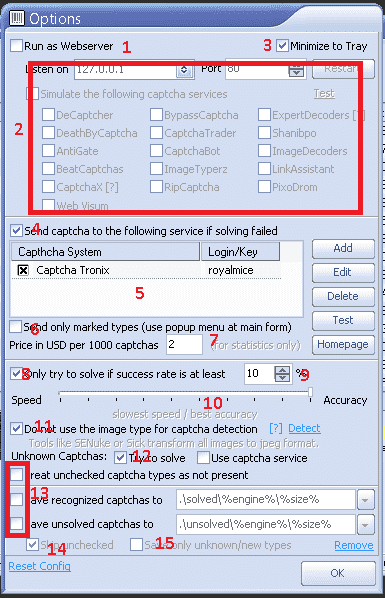
Once you have installed GSA Captcha Breaker the 1st screen apart from the license screen which you will be presented with is the below options screen. This is an important screen as these configuration settings will determine how GSA CB functions.
GSA Captcha Breaker - Options

  1. For normal usage use with GSA Search Engine Ranker you will not need to run it as a web-server.
  2. For normal usage with GSA Search Engine Ranker it is not necessary to simulate any services, as such no need to check any of the items you see in the box next to #2.
  3. Minimize to Tray is self explanatory and have no impact on the operations of GSA Captcha Breaker.
  4. If you use a Captcha service as explained under point number 5 then you need to check this box.
  5. Using GSA Captcha Breaker on it’s own is simply not enough to solve all types of captchas, therefor we need to make use of 3rd party services to solve captchas which GSA CB cant solve, and the most difficult one which GSA Captcha Breaker cant solve is called “recaptcha”, which is these days used by many of the sites we want to submit to. My recommendation is to use a service called Captcha Tronix which focus exclusively on solving recaptchas. Adding a captcha service is straight forward, just click on ADD button and select the service you want to use, then enter your username and password where asked.
  6. No need to check this option.
  7. This is just to show you how much money you are saving by using GSA CB., and it has no impact on the operation of GSA CB, just leave the default value of $2
  8. Check this option. It is pointless to ask GSA CB to solve captchas which it has not been very successful in solving as it is waste of time and resources.
  9. This works together with Number 8 above. The default value is 20%, but i suggest to lower it to 10%. That mean GSA Captcha Breaker will try and solve all captchas which it has a success rate of at least 10%, any captcha below 10% will be skipped.
  10. You definitely want to keep it all the way to the right for maximum accuracy.
  11. Check this option
  12. WE want GSA CB to at least try to solve unknown captchas. WE should NOT send it to the captcha service as the captcha service we use only solve recaptcha captchas, as such a waste sending unknown stuff to it.
  13. Uncheck all of the boxes shown by the box at number 13, unless you for some reason want to save the recognized or unsolved captchas.
  14. Skip any unchecked captchas types – check we only want it to try and solve captchas you have checked ( which by default are all )
  15. No need for this unless you are planning on working on GSA CB development.

Once you have done all the settings – click o.k

[spacer height=”2px”]

Toggle Recaptcha

[spacer height=”2px”]

No this is a very important step and one that many people overlook when they configure GSA Captcha Breaker.

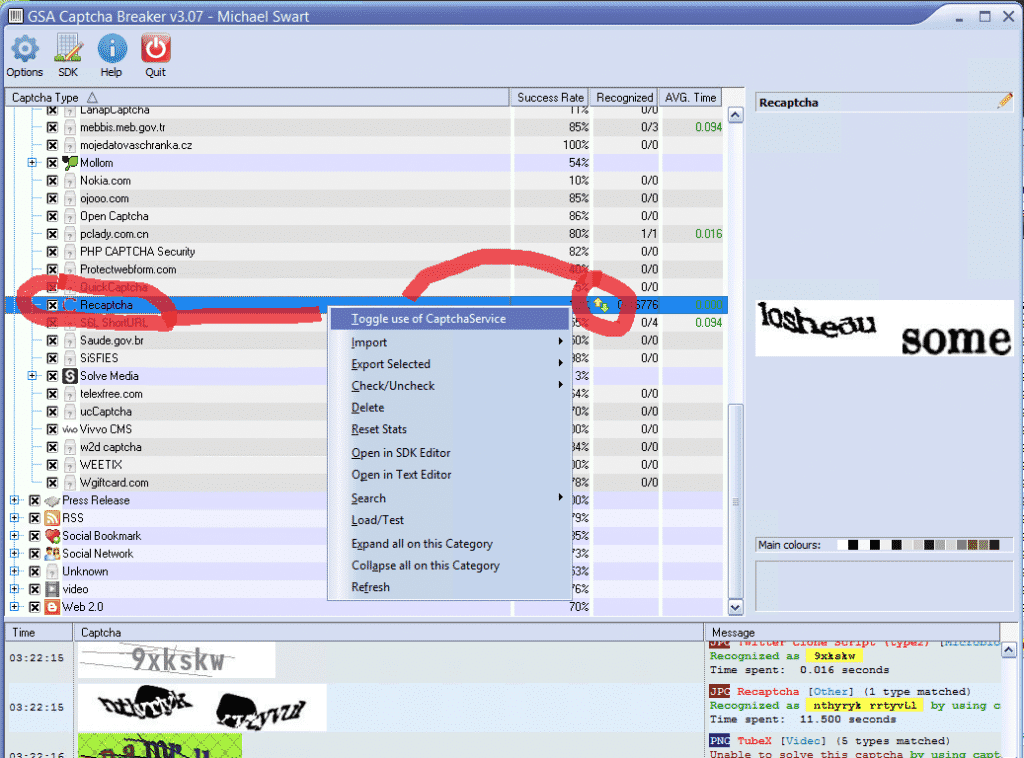
Basically what we need to do is to instruct GSA Captcha Breaker to not try and solve Recaptcha type Captchas since we know it cant do those and we have added Captcha Tronix to solve them.

So by toggling the recaptcha type it means that any recaptchas will immediately be send to our add on service, in my case Captcha Tronix

To enable the toggle :

  • On the Captcha Type Screen expand “OTHER”
  • Scroll down in OTHER section, about 2/3 until down you will see Recaptcha.
  • Highlight Recaptcha type and then right click and select :TOGGLE USE OF CAPTCHA SERVICE
  • It will ask for confirmation, just click YES
  • Ones done you will see a little up/down arrow like in the below screenshot.

You are all done now
 

GSA Captcha Breaker - Toggle Recaptcha


[spacer height=”2px”]

GET GSA CAPTCHA BREAKER – 15% OFF

Get GSA Captcha Breaker Today and Start Saving Money on Captcha Solving


Dont have GSA Captcha Breaker yet – Get it now at 15% off the advertised price

[spacer height=”2px”]

Configuring GSA Captcha Breaker for best results


Étiquettes : Captcha BreakerconfiguringGSA Captcha Breaker
Article précédent

L'importance de la recherche de mots-clés

Prochain article

Tu veux plus d'argent ? Obtenir GSA SER VPS

Michael Swart

Michael Swart

Asia Virtual Solutions est fièrement détenue et gérée par Michael Swart et une équipe d'assistants virtuels dévoués.

Prochain article
Publicité pour l'hébergement VPS par Asia Virtual Solutions, mettant en avant des caractéristiques telles que 10 cœurs de CPU virtuels, 12 Go de RAM ECC, une vitesse de port de 10 Gbps, et un disque NVME de 150 Go, avec divers services d'hébergement.

Tu veux plus d'argent ? Obtenir GSA SER VPS

Produit recommandé

Catégories de blogs

  • Contenu IA et SEO
  • Tutoriels GSA SER
  • Hébergement et VPS
  • Stratégies de construction de liens
  • Actualités et mises à jour
  • Avis sur les logiciels de référencement (SEO)
  • Tutoriels RankerX
  • Xrumer et XEvil

Produit dont tu as besoin

Commentaires récents

  • Annonce de service de marketing numérique présentant des outils et des fonctionnalités de seo tels que les projets gsa ser, les courriels privés et les articles pertinents pour les mots clés. GSA Search Engine Ranker Projects - Fait pour toi
    Note 5 sur 5
    par Talbert Williams
  • Illustration numérique du concept de service proxy avec ordinateur portable, globe terrestre et baies de serveurs proxy. Service de proxy
    Note 5 sur 5
    par Talbert Williams
  • Packs e-mail RankerX Packs d'e-mails RankerX
    Note 5 sur 5
    par Talbert Williams
  • Œuvre d'art numérique représentant un réseau mondial avec des appareils interconnectés et des liens colorés, annonçant un service de "liste de liens GSA SER". Listes de liens retour de qualité n° 1 pour GSA Search Engine Ranker
    Note 5 sur 5
    par Ali Imani
  • Illustration numérique du concept de service proxy avec ordinateur portable, globe terrestre et baies de serveurs proxy. Service de proxy
    Note 5 sur 5
    par Nick Nick
  • Un visuel numérique promouvant les backlinks SEO multiplateformes, comportant des icônes de réseaux sociaux, un compteur de vitesse et le site web asiavirtualsolutions.com. Pack de backlinks SEO multiplateformes
    Note 5 sur 5
    par shashwat asthana
  • Packs e-mail RankerX Packs d'e-mails RankerX
    Note 5 sur 5
    par vancuoc29
  • Annonce de service de marketing numérique présentant des outils et des fonctionnalités de seo tels que les projets gsa ser, les courriels privés et les articles pertinents pour les mots clés. GSA Search Engine Ranker Projects - Fait pour toi
    Note 5 sur 5
    par Nick Smith
  • GSA Search Engine Ranker VPS GSA Search Engine Ranker VPS
    Note 5 sur 5
    par Nick Smith
  • GSA Search Engine Ranker VPS GSA Search Engine Ranker VPS
    Note 5 sur 5
    par Mike

Toutes les questions juridiques

  • Contrat d'affiliation
  • Antispam
  • Solutions virtuelles pour l'Asie
  • Préférences en matière de communication
  • Avis de non-responsabilité
  • Double Click Dart Cookie
  • Politique en matière de liens externes
  • Politique de FaceBook
  • Déclaration de la FTC
  • Politique de confidentialité
  • Politique de remboursement et de garantie
  • Conditions générales d'utilisation
  • Divulgation des témoignages

Achats sécurisés

Certifié Google Save Browsing
Le logo du site web norton safe sur un fond blanc.

Prends contact avec nous

Bureau principal aux États-Unis
  • Asia Virtual Solutions LLC, 400 Rella Blvd, #123-298, Montebello, NY 10901
  •  co*****@******************ns.com
  • +1 (415) 851-6951
  •  asiavirtual
  •  Asia Virtual Solutions sur LinkedIn
Bureau virtuel en Asie
  • Asia Virtual Solutions LLC, Niveau 29, The Offices at Centralworld 999/9 Rama I Road, Pathumwan, Bangkok, Thaïlande
  •  co*****@******************ns.com
  • +1 (415) 851-6951
  •  asiavirtual
  •  Asia Virtual Solutions sur LinkedIn

© 2026 - Asia Virtual Solutions LLC. Tous droits réservés. Site Web exploité et maintenu par : Asia Virtual Solutions LLC

Pas de vignette
Téléchargé
Échec
Supprimer le fichier téléchargé
We've detected you might be speaking a different language. Do you want to change to:
Changer la langue en English English
Changer la langue en বাংলা বাংলা
Changer la langue en 简体中文 简体中文
Changer la langue en Nederlands Nederlands
Français
Changer la langue en Deutsch (Sie) Deutsch (Sie)
Changer la langue en हिन्दी हिन्दी
Changer la langue en Bahasa Indonesia Bahasa Indonesia
Changer la langue en Italiano Italiano
Changer la langue en 日本語 日本語
Changer la langue en 한국어 한국어
Changer la langue en Bahasa Melayu Bahasa Melayu
Changer la langue en Português do Brasil Português do Brasil

Changer la langue en Русский Русский
Changer la langue en Español de México Español de México
Changer la langue en Tagalog Tagalog
Changer la langue en ไทย ไทย
Changer la langue en Tiếng Việt Tiếng Việt
Changer la langue en اردو اردو
Changer la langue en Türkçe Türkçe
Change Language
Close and do not switch language
Pas de résultat
Voir tous les résultats
  • Accueil
  • GSA Search Engine Ranker
    • FAQ pour GSA Search Engine Ranker
    • Outils et modules complémentaires GSA SER
    • Tutoriels GSA SER
  • Blog
    • Contenu IA et SEO
    • Tutoriels GSA SER
    • Hébergement et VPS
    • Stratégies de construction de liens
    • Actualités et mises à jour
    • Tutoriels RankerX
    • Avis sur les logiciels de référencement (SEO)
    • Xrumer et XEvil
  • Boutique
    • Contenu et articles sur l'IA
    • Outils et modules complémentaires GSA SER
    • Services d'hébergement
    • Services de construction de liens
    • Money Robot Submitter
    • RankerX
    • Services recommandés
    • Services de médias sociaux
    • Services Xrumer

© 2026 - Asia Virtual Solutions LLC. Tous droits réservés. Site Web exploité et maintenu par : Asia Virtual Solutions LLC

Français
English বাংলা 简体中文 Nederlands Deutsch (Sie) हिन्दी Bahasa Indonesia Italiano 日本語 한국어 Bahasa Melayu Português do Brasil Русский Español de México Tagalog ไทย Tiếng Việt اردو Türkçe