
• Über uns
    • Beteiligen Sie sich an der Arbeit mit Asia Virtual Solutions oder kooperieren Sie mit ihnen.
    • llms.txt
  • Partner
  • Kontaktieren Sie uns
  • Mein Konto
  • Support-Tickets
Virtuelle Lösungen in Asien:
  • Heim
  • GSA Suchmaschinenranker
    • Häufig gestellte Fragen zum GSA-Suchmaschinenranker
    • GSA SER Tools & Add-Ons
    • GSA SER Tutorials
  • Blog
    • KI-Inhalte & SEO
    • GSA SER Tutorials
    • Hosting & VPS
    • Linkbuilding-Strategien
    • Neuigkeiten & Updates
    • RankerX-Tutorials
    • SEO-Software-Rezensionen
    • Xrumer & XEvil
  • Geschäft
    • Inhalte & KI-Artikel
    • GSA SER Tools & Add-Ons
    • Hosting-Dienste
    • Linkbuilding-Dienstleistungen
    • Einreicher des Geldroboters
    • RankerX
    • Empfohlene Dienstleistungen
    • Social-Media-Dienste
    • Xrumer Services
Kein Ergebnis
Alle Ergebnisse anzeigen
Asia Virtual Solutions: Experten für GSA SER und digitales Marketing

Heim » Blog » Configuring GSA Captcha Breaker

Configuring GSA Captcha Breaker

Michael Swart von Michael Swart
19 Oktober, 2015 - Updated on 24 Juni, 2026
In GSA SER Tutorials
1
Promotional graphic for "Configuring GSA Captcha Breaker," showcasing software packaging and mechanical gears imagery.
Inhaltsverzeichnis zeigen
1 Configuring GSA Captcha Breaker
2 Configuring GSA Captcha Breaker
2.1 Configuring GSA Captcha Breaker
2.2 Toggle Recaptcha
2.3 To enable the toggle :
3 GET GSA CAPTCHA BREAKER – 15% OFF
3.1 Configuring GSA Captcha Breaker for best results

Configuring GSA Captcha Breaker

Configuring GSA Captcha Breaker is a relatively straight forward task but it is also very easy to get it wrong. In this post we will walk you thru the steps to correctly configure GSA Captcha Breaker for use with GSA Search Engine Ranker.

[spacer height=”2px”]

Configuring GSA Captcha Breaker


[spacer height=”2px”]

Configuring GSA Captcha Breaker

[spacer height=”2px”]

Once you have installed GSA Captcha Breaker the 1st screen apart from the license screen which you will be presented with is the below options screen. This is an important screen as these configuration settings will determine how GSA CB functions.
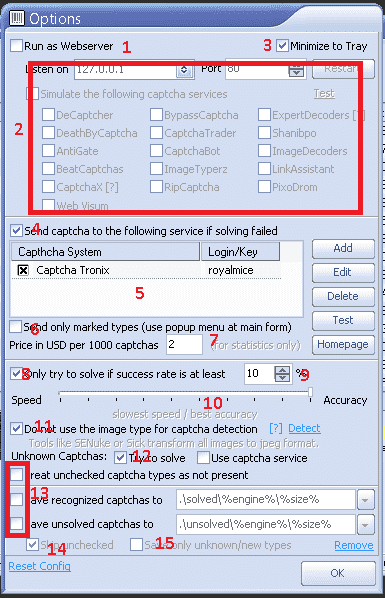
GSA Captcha Breaker - Options

  1. For normal usage use with GSA Suchmaschinenranker you will not need to run it as a web-server.
  2. For normal usage with GSA Suchmaschinenranker it is not necessary to simulate any services, as such no need to check any of the items you see in the box next to #2.
  3. Minimize to Tray is self explanatory and have no impact on the operations of GSA Captcha Breaker.
  4. If you use a Captcha service as explained under point number 5 then you need to check this box.
  5. Using GSA Captcha Breaker on it’s own is simply not enough to solve all types of captchas, therefor we need to make use of 3rd party services to solve captchas which GSA CB cant solve, and the most difficult one which GSA Captcha Breaker cant solve is called “recaptcha”, which is these days used by many of the sites we want to submit to. My recommendation is to use a service called Captcha Tronix which focus exclusively on solving recaptchas. Adding a captcha service is straight forward, just click on ADD button and select the service you want to use, then enter your username and password where asked.
  6. No need to check this option.
  7. This is just to show you how much money you are saving by using GSA CB., and it has no impact on the operation of GSA CB, just leave the default value of $2
  8. Check this option. It is pointless to ask GSA CB to solve captchas which it has not been very successful in solving as it is waste of time and resources.
  9. This works together with Number 8 above. The default value is 20%, but i suggest to lower it to 10%. That mean GSA Captcha Breaker will try and solve all captchas which it has a success rate of at least 10%, any captcha below 10% will be skipped.
  10. You definitely want to keep it all the way to the right for maximum accuracy.
  11. Check this option
  12. WE want GSA CB to at least try to solve unknown captchas. WE should NOT send it to the captcha service as the captcha service we use only solve recaptcha captchas, as such a waste sending unknown stuff to it.
  13. Uncheck all of the boxes shown by the box at number 13, unless you for some reason want to save the recognized or unsolved captchas.
  14. Skip any unchecked captchas types – check we only want it to try and solve captchas you have checked ( which by default are all )
  15. No need for this unless you are planning on working on GSA CB development.

Once you have done all the settings – click o.k

[spacer height=”2px”]

Toggle Recaptcha

[spacer height=”2px”]

No this is a very important step and one that many people overlook when they configure GSA Captcha Breaker.

Basically what we need to do is to instruct GSA Captcha Breaker to not try and solve Recaptcha type Captchas since we know it cant do those and we have added Captcha Tronix to solve them.

So by toggling the recaptcha type it means that any recaptchas will immediately be send to our add on service, in my case Captcha Tronix

To enable the toggle :

  • On the Captcha Type Screen expand “OTHER”
  • Scroll down in OTHER section, about 2/3 until down you will see Recaptcha.
  • Highlight Recaptcha type and then right click and select :TOGGLE USE OF CAPTCHA SERVICE
  • It will ask for confirmation, just click YES
  • Ones done you will see a little up/down arrow like in the below screenshot.

You are all done now
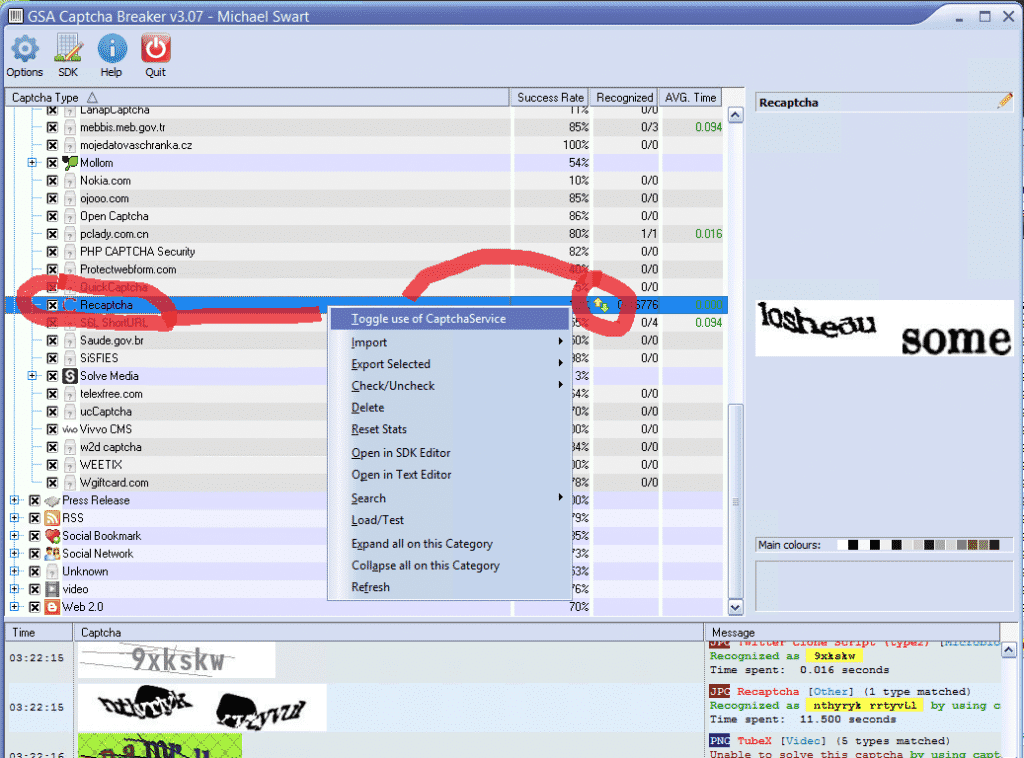
 

GSA Captcha Breaker - Toggle Recaptcha


[spacer height=”2px”]

GET GSA CAPTCHA BREAKER – 15% OFF

Get GSA Captcha Breaker Today and Start Saving Money on Captcha Solving


Dont have GSA Captcha Breaker yet – Get it now at 15% off the advertised price

[spacer height=”2px”]

Configuring GSA Captcha Breaker for best results


Tags: Captcha BreakerconfiguringGSA Captcha Breaker
Previous Post

Bedeutung der Keyword-Recherche

Next Post

Want More Money? Get GSA SER VPS

Michael Swart

Michael Swart

Asia Virtual Solutions is proudly owned and maintained by Michael Swart and a team of dedicated virtual assistants.

Next Post
Advertisement for VPS Hosting by Asia Virtual Solutions, highlighting features like 10 virtual CPU cores, 12 GB ECC RAM, 10 Gbps port speed, and 150 GB NVME drive, with various hosting services.

Want More Money? Get GSA SER VPS

Recommended-Product

Blog Categories

  • KI-Inhalte & SEO
  • GSA SER Tutorials
  • Hosting & VPS
  • Linkbuilding-Strategien
  • Neuigkeiten & Updates
  • SEO-Software-Rezensionen
  • RankerX-Tutorials
  • Xrumer & XEvil

Product You Need

Recent Reviews

  • Werbung für digitale Marketingdienstleistungen, die SEO-Tools und -Funktionen wie GSA-SER-Projekte, private E-Mails und keywordrelevante Artikel präsentiert. GSA Suchmaschinenranking-Projekte – Erledigt für Sie
    Note 5 sur 5
    par Talbert Williams
  • Digital illustration of proxy service concept with laptop, globe, and proxy server racks. Proxy-Dienst
    Note 5 sur 5
    par Talbert Williams
  • RankerX Email packs RankerX E-Mail-Pakete
    Note 5 sur 5
    par Talbert Williams
  • Digitales Kunstwerk, das ein globales Netzwerk mit miteinander verbundenen Geräten und farbenfrohen Links darstellt und für einen "GSA SER Linklisten"-Dienst wirbt. Nr. 1 der besten Backlink-Listen für GSA-Suchmaschinenranking
    Note 5 sur 5
    par ali imani
  • Digital illustration of proxy service concept with laptop, globe, and proxy server racks. Proxy-Dienst
    Note 5 sur 5
    par Nick Nick
  • A digital graphic promoting multi-platform SEO backlinks, featuring social media icons, a speedometer, and the website asiavirtualsolutions.com. Multi-Platform SEO Backlinks Package
    Note 5 sur 5
    par shashwat asthana
  • RankerX Email packs RankerX E-Mail-Pakete
    Note 5 sur 5
    par vancuoc29
  • Werbung für digitale Marketingdienstleistungen, die SEO-Tools und -Funktionen wie GSA-SER-Projekte, private E-Mails und keywordrelevante Artikel präsentiert. GSA Suchmaschinenranking-Projekte – Erledigt für Sie
    Note 5 sur 5
    par nick smith
  • GSA Suchmaschinenranker VPS GSA Suchmaschinenranker VPS
    Note 5 sur 5
    par nick smith
  • GSA Suchmaschinenranker VPS GSA Suchmaschinenranker VPS
    Note 5 sur 5
    par mike

Alle rechtlichen Angelegenheiten

  • Affiliate-Vereinbarung
  • Antispam
  • Virtuelle Lösungen in Asien
  • Kommunikationspräferenzen
  • Haftungsausschluss
  • Doppelklick-Dart-Cookie
  • Richtlinie für externe Links
  • Facebook-Richtlinien
  • FTC-Erklärung
  • Datenschutzrichtlinie
  • Rückerstattungs- und Garantiebestimmungen
  • Geschäftsbedingungen
  • Offenlegung von Erfahrungsberichten

Sicher einkaufen

Google Save Browsing zertifiziert
Das Norton Safe-Website-Logo auf weißem Hintergrund.

Nehmen Sie Kontakt mit uns auf

Hauptsitz USA
  • Asia Virtual Solutions LLC, 400 Rella Blvd, #123-298, Montebello, NY 10901
  •  co*****@******************ns.com
  • +1 (415) 851-6951
  •  asiavirtual
  •  Asia Virtual Solutions auf LinkedIn
Virtuelles Büro Asien
  • Asia Virtual Solutions LLC, Ebene 29, The Offices at Centralworld, 999/9 Rama I Road, Pathumwan, Bangkok, Thailand
  •  co*****@******************ns.com
  • +1 (415) 851-6951
  •  asiavirtual
  •  Asia Virtual Solutions auf LinkedIn

© 2026 – Asia Virtual Solutions LLC. Alle Rechte vorbehalten. Betrieb und Wartung dieser Website: Asia Virtual Solutions LLC

Kein Vorschaubild
Hochgeladen
Fehlgeschlagen
Hochgeladene Datei entfernen
We've detected you might be speaking a different language. Do you want to change to:
Change language to English English
Change language to বাংলা বাংলা
Change language to 简体中文 简体中文
Change language to Nederlands Nederlands
Change language to Français Français
Deutsch (Sie)
Change language to हिन्दी हिन्दी
Change language to Bahasa Indonesia Bahasa Indonesia
Change language to Italiano Italiano
Change language to 日本語 日本語
Change language to 한국어 한국어
Change language to Bahasa Melayu Bahasa Melayu
Change language to Português do Brasil Português do Brasil

Change language to Русский Русский
Change language to Español de México Español de México
Change language to Tagalog Tagalog
Change language to ไทย ไทย
Change language to Tiếng Việt Tiếng Việt
Change language to اردو اردو
Change language to Türkçe Türkçe
Change Language
Close and do not switch language
Kein Ergebnis
Alle Ergebnisse anzeigen
  • Heim
  • GSA Suchmaschinenranker
    • Häufig gestellte Fragen zum GSA-Suchmaschinenranker
    • GSA SER Tools & Add-Ons
    • GSA SER Tutorials
  • Blog
    • KI-Inhalte & SEO
    • GSA SER Tutorials
    • Hosting & VPS
    • Linkbuilding-Strategien
    • Neuigkeiten & Updates
    • RankerX-Tutorials
    • SEO-Software-Rezensionen
    • Xrumer & XEvil
  • Geschäft
    • Inhalte & KI-Artikel
    • GSA SER Tools & Add-Ons
    • Hosting-Dienste
    • Linkbuilding-Dienstleistungen
    • Einreicher des Geldroboters
    • RankerX
    • Empfohlene Dienstleistungen
    • Social-Media-Dienste
    • Xrumer Services

© 2026 – Asia Virtual Solutions LLC. Alle Rechte vorbehalten. Betrieb und Wartung dieser Website: Asia Virtual Solutions LLC

Deutsch (Sie)
English বাংলা 简体中文 Nederlands Français हिन्दी Bahasa Indonesia Italiano 日本語 한국어 Bahasa Melayu Português do Brasil Русский Español de México Tagalog ไทย Tiếng Việt اردو Türkçe