


Oculto tras páginas web de toda internet, el píxel de Facebook vigila atentamente nuestra actividad online. Ya sea añadir productos al carrito de la compra o informarse sobre política, el píxel registra nuestra actividad para futuras consultas o para publicidad.
En esta publicación, analizaremos más de cerca el píxel de Facebook: veremos qué es, para qué se utiliza, cómo puedes crear uno y cómo puedes usarlo en tu sitio web.
[espacio de altura=”2px”]
¿Qué es el píxel de Facebook?
El píxel de Facebook es un código que normalmente se integra en un sitio web y que vincula el comportamiento de los visitantes con sus perfiles de usuario de Facebook. La sincronización de los visitantes con su cuenta de Facebook permite, idealmente, que la plataforma muestre anuncios basados en las acciones que los usuarios hayan realizado en otros dominios o sitios web.
Aunque el píxel de Facebook se utiliza para comprender el comportamiento de las personas en diferentes sitios web, emplea los datos para categorizar a los usuarios en distintos grupos objetivo, a los que posteriormente se les mostrarán anuncios relevantes. En resumen, el píxel de Facebook:
- Es un código que reside dentro de los sitios web.
- Supervisa las acciones de las personas mientras están allí.
- Permite a los anunciantes segmentarlos en Facebook.
El píxel de Facebook también puede considerarse una herramienta de análisis que mide la efectividad de tu publicidad en Facebook. Al instalarlo en tu sitio web, puedes evaluar con precisión el rendimiento de tus anuncios, ya que el píxel rastrea cada interacción que un visitante tiene con tu sitio una vez que hace clic en un anuncio.
Cuando un usuario accede a tu sitio web a través de un anuncio y realiza una acción, como una compra, tu píxel se activará y registrará esta acción en el Administrador de anuncios. Esto te permitirá comprobar si el usuario completó la acción deseada, como rellenar un formulario o comprar un producto.
El píxel de Facebook te ofrece una visión más completa de tu estrategia de marketing digital, ya que mide la tasa de conversión de tus anuncios, no solo la tasa de clics. Esto te proporciona un análisis más profundo que te permite comprender mejor el recorrido del visitante, desde que ve el anuncio hasta que realiza una compra. Por ejemplo, si la tasa de clics de uno de tus anuncios es alta, pero la tasa de conversión es baja, es posible que tu página de destino y tu anuncio no estén bien alineados.
[espacio de altura=”2px”]
Un vistazo más de cerca al píxel de Facebook
El píxel de Facebook te permite ejecutar campañas publicitarias altamente segmentadas, y es importante instalarlo antes de empezar a publicar anuncios en Facebook. Cada cuenta publicitaria recibe un píxel. El código idealmente consta de dos partes: el código del evento y el código base del píxel.
El código de píxel sirve para rastrear todo el tráfico que llega a tu sitio, mientras que los códigos de evento son fragmentos de código adicionales que puedes agregar al código de píxel predeterminado en páginas específicas de tu sitio para rastrear diversas acciones en esas páginas.
Aquí tienes algunos tipos de códigos de eventos que puedes añadir:
- añadir carroPuedes incluir este código de evento en la página de añadir al carrito de tu sitio web. Cuando un visitante añade artículos a su carrito de compra pero no finaliza la compra, los datos del píxel se pueden utilizar para mostrar anuncios altamente segmentados a dicho visitante.
- Búsqueda: si gestionas un sitio de comercio electrónico, puedes colocar un código de evento de búsqueda en la página de resultados de búsqueda de tu sitio web para palabras clave, frases o términos específicos.
- Visualización de contenido: Puede colocar el código del evento de visualización de contenido en una página de producto para monitorear aspectos como el total de visualizaciones de una pieza de contenido determinada.
- Agregar información de pago: Esto se activará cuando un usuario envíe su información de pago.
- Agregar a la lista de deseos: Esto se puede usar para rastrear qué productos desean más los usuarios y luego dirigirles anuncios de Facebook que contengan imágenes de esos artículos.
- Compra: Puedes incluir un código de evento de compra en la página de agradecimiento una vez que el usuario haya completado una compra. De esta forma, cuando lances un nuevo producto o una actualización, podrás diseñar un anuncio para tus clientes actuales.
- Registro completo: esto puede ayudarle a realizar un seguimiento de los registros de usuarios a eventos, seminarios web, etc.
- Cliente potencial: el código del evento de cliente potencial se puede colocar en una página de agradecimiento una vez que el usuario se haya suscrito a un boletín informativo o haya optado por un recurso gratuito para captar clientes potenciales.
- Personalizado: una gran ventaja del píxel de Facebook es que se puede personalizar para cumplir objetivos específicos. Cuando cree un código de evento personalizado, deberá crear una conversión personalizada correspondiente.
Los diferentes eventos de píxeles te permitirán recopilar datos y te ayudarán a crear anuncios de Facebook eficaces, así como a obtener más información sobre los usuarios que interactúan con tu sitio web.
[espacio de altura=”2px”]
Cómo crear un píxel de Facebook
Ahora que ya sabes qué esperar del píxel de Facebook, es hora de crear tu propio píxel e insertarlo en tu sitio web. Así es como se hace:
- Ve a tu Administrador de anuncios de Facebook, haz clic en el icono de hamburguesa y elige Píxeles.
- Verás la página para crear el píxel de Facebook. Haz clic en el botón "Crear un píxel".
- Asigna un nombre a tu píxel, acepta los términos y haz clic en Siguiente. Ten en cuenta que, al elegir un nombre para tu píxel, solo tendrás uno por cada cuenta publicitaria. Por lo tanto, lo ideal es que el nombre represente tu negocio y no una campaña específica.
- A continuación, verás un mensaje de confirmación cuando hayas creado el píxel correctamente.

[espacio de altura=”2px”]
Cómo instalar el píxel de Facebook en tu sitio web
Ahora es el momento de poner en marcha el píxel para recopilar información en tu sitio web. Para ello, necesitas instalar el código en tus páginas web. Dependiendo de tu sitio web y plataforma CMS, existen varias maneras de hacerlo.
Afortunadamente, Facebook Se ha simplificado enormemente la instalación del píxel. Una vez que termines de crearlo, se te ofrecerán automáticamente varias formas de instalarlo.
[ancho completo][un tercio]
Método 1: Uso de la integración con Shopify
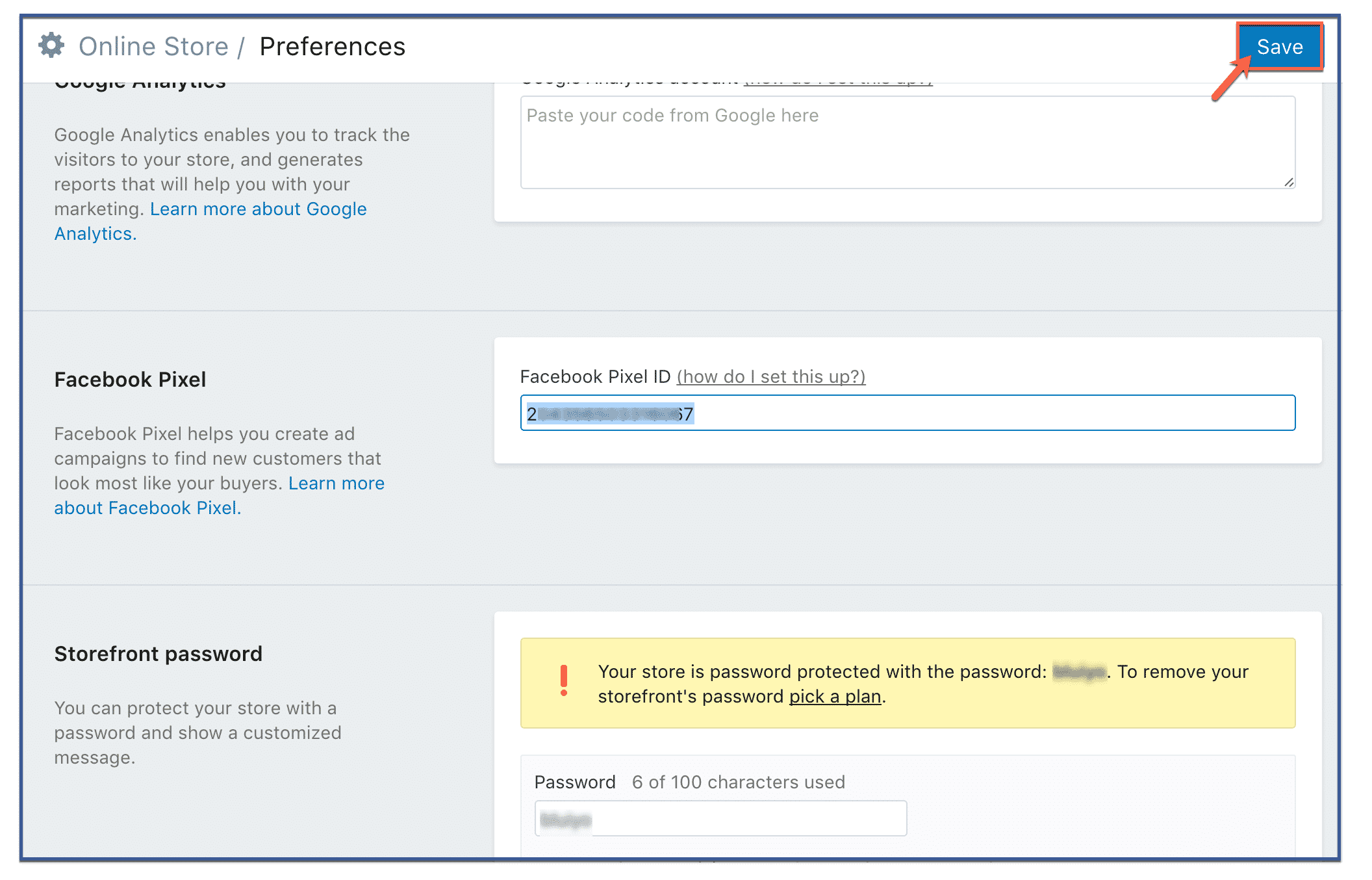
Si usas Shopify, instalarlo es aún más sencillo. Solo tienes que ir a tu Administrador Comercial de Facebook, copiar el ID de tu píxel (no el código) e introducirlo en las preferencias de tu tienda Shopify.
- En el panel de administración de Shopify, ve a "Tienda online" y haz clic en "Preferencias".“
- Desplázate hasta la sección de píxeles de Facebook y pega tu ID de píxel.
- Haz clic en “Guardar”.”
[/un_tercio][un_tercio]
Método 2: Agregar manualmente el código del píxel a su sitio web.
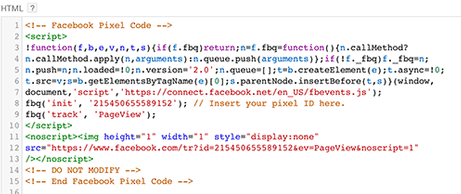
Esta es la forma más común de instalar el píxel. En la página del píxel de tu Administrador de anuncios, verás la opción "Finalizar configuración de tu píxel de Facebook"; haz clic en ella. A continuación, se te mostrarán varias opciones; elige "Instalar manualmente". La siguiente pantalla mostrará un cuadro de código enorme. Ese es tu píxel. Cópialo.
Puedes copiar y pegar el código base del píxel en el código del encabezado de tu sitio. Sí, así es, publícalo después del etiqueta y antes de la etiqueta. Asegúrese de pegarla en cada una de sus páginas web que desea rastrear, o en su plantilla en caso de que estés usando uno.
[/un_tercio][un_tercio]
Método 3: Uso de plugins de WordPress
Hay varios plugins de WordPress que ayudan a facilitar la instalación y gestión de Facebook Pixel. Sin embargo, Pixel Caffeine de AdEspresso Es, sin duda, nuestra opción favorita. Con tan solo unos clics, puedes tener el píxel de Facebook integrado en tu sitio web sin complicaciones.
Una de las características más increíbles de Pixel Caffeine es que, a diferencia de otros plugins disponibles, no tiene costos ocultos, tarifas ni limitaciones. Se ofrece de forma gratuita. Sin embargo, antes de usar todas sus funciones, deberás conectarlo a tu cuenta de anuncios de Facebook.
En su panel de control, puedes elegir la cuenta publicitaria que deseas conectar con tu sitio y el ID de píxel que quieres usar. Automáticamente, se buscarán los ID de píxel disponibles según la cuenta seleccionada. ¡Al hacer clic en "Enviar", tu píxel estará activo!.
[/un_tercio][/ancho_completo]
Pixel Caffeine de AdEspresso
[espacio de altura=”2px”]
 Asegúrate de que tu píxel de Facebook funcione correctamente.
Antes de empezar a utilizar los datos de tu píxel, es importante confirmar que funciona correctamente.
Si utilizas Google Chrome, descarga e instala la extensión Pixel Helper para comprobar si tu Facebook El píxel realiza un seguimiento preciso de los eventos que ocurren en su sitio web.












 English
  বাংলা
বাংলা  简体中文
简体中文  Nederlands
  Français
  Deutsch (Sie)
  हिन्दी
  Bahasa Indonesia
  Italiano
  日本語
日本語  한국어
한국어  Bahasa Melayu
  Português do Brasil
  Русский
  Español de México
  Tagalog
  ไทย
ไทย  Tiếng Việt
  اردو
اردو  Türkçe