
• 关于我们
    • 与亚洲虚拟解决方案公司合作或贡献
  • 附属机构
  • 联系我们
  • 我的账户
  • 支持门户
亚洲虚拟解决方案:
  • 首页
  • GSA 搜索引擎排名器
    • GSA 搜索引擎排名器常见问题
    • GSA SER 工具和插件
    • GSA 搜索引擎排名指南
    • GSA 验证码破解指南
    • GSA 托管
  • 博客
    • 验证码求解
    • 内容创作
    • 内容抓取
    • 内容加工
    • GSA搜索引擎排名教程和链接建设指南
    • VPS 托管服务
    • 赚钱机器人教程
    • 如何
    • 亚洲虚拟解决方案新闻
    • 推荐的搜索引擎优化软件评论
    • 网络营销
    • Xrumer 和 Xevil 技术与教程
  • 商店
    • 内容与人工智能文章
    • GSA SER 工具和插件
    • 托管服务
    • 链接建设服务
    • 赚钱机器人提交器
    • RankerX
    • 推荐服务
    • 社交媒体服务
    • Xrumer 服务
没有结果
查看所有结果
亚洲虚拟解决方案:GSA SER 和数字营销专家

首页 » 博客 » 使用 Windows 远程桌面连接连接到 VPS

使用 Windows 远程桌面连接连接到 VPS

迈克尔-斯沃特 由 迈克尔-斯沃特
2015年11月24日 - 2026年2月14日更新
在 VPS 设置和配置
1
远程桌面连接教程
目录 展览
1 使用 Windows 远程桌面连接连接到 VPS
1.1 The credentials:
1.2 What do you connect with:
1.3 Connecting to your VPS:
2 How To Connect To A VPS with Windows Remote Desktop Connection
3 GET YOUR GSA SER VPS HERE

使用 Windows 远程桌面连接连接到 VPS

How To Connect To A VPS with Windows Remote Desktop Connection is a questioned asked by many when they first start looking at the possibilities of getting a Windows VPS to run their SEO tools and other goodies.

The steps involved in connecting to a Windows VPS is really simple ones you know how, but then again we all need to start somewhere, so i have made this simple video tutorial below walking you thy the steps to connect to your Windows VPS.

The credentials:

When you sign up for your first VPS the hosting provider will send you a welcome letter in which among other things will be the below 3 items which are needed to connect to your VPS:

  • IP Address of your VPS
  • Username to Log in
  • Password to log in.

What do you connect with:

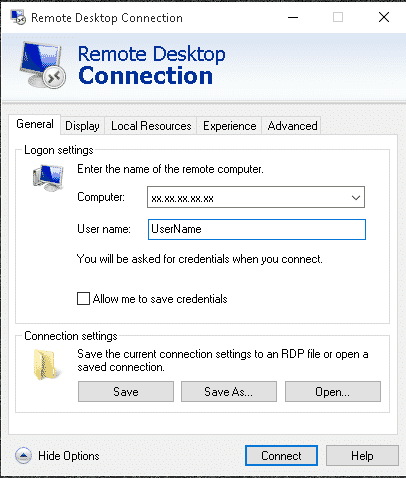
To connect to your Windows VPS you will use something called Remote Desktop Connection. All Windows machines will have it already installed so you don't need to go download or buy something. Simply open the search function of your Windows machine and search for: “Remote Desktop Connection

Remote Desktop Connection AppConnecting to your VPS:

  • Once you have the Remote Desktop app open on your computer, simply fill in the IP address, and then click on “Show more Details”.
  • Now add your user name and check the box “Allow me to save my credentials”
  • Next click on “Save As” and save it in a somewhere like on your desktop.
  • Now click on connect and it will ask for your password.
  • Thats it you are now connected to your Windows VPS
  • One last step, right click on the Remote desktop icon which you have saved on your computer and click edit. Now uncheck the checked box that says “Allow me to save my credentials”

You re all done, next time just click the Remote Desktop Connection icon where you saved it.

[spacer height=”2px”]

For a detailed walk thru of the steps, please watch the below video

How To Connect To A VPS with Windows Remote Desktop Connection

[spacer height=”2px”]

GET YOUR GSA SER VPS HERE

Looking For An Awesome VPS TO 主持人 GSA 搜索引擎排名器 ? – Look No More

Check out The Details

标签: how to connect远程桌面连接教程远程桌面连接vpsvps connection
上一篇

想要更多资金?获取 GSA SER VPS

下一篇

The Power of Edu and Gov Backlinks

迈克尔-斯沃特

迈克尔-斯沃特

亚洲虚拟解决方案公司(Asia Virtual Solutions)由迈克尔-斯沃特(Michael Swart)和一支敬业的虚拟助理团队拥有和维护。.

下一篇
The Power of Edu and Gov Backlinks

The Power of Edu and Gov Backlinks

推荐产品

博客类别

  • 验证码求解
  • 内容创作
  • 内容抓取
  • 内容加工
  • GSA搜索引擎排名教程和链接建设指南
  • GSA 验证码破解器
  • 托管和 VPS 优化
  • 如何
  • 亚洲虚拟解决方案新闻
  • 网络营销
  • 如何
  • 赚钱机器人教程
  • 亚洲虚拟解决方案新闻
  • 推荐的搜索引擎优化软件评论
  • 视频
  • GSA搜索引擎排名教程和链接建设指南
  • 推荐的搜索引擎优化软件评论
  • 网络营销
  • Xrumer 和 Xevil 技术与教程

您需要的产品

最新评论

  • 亚洲虚拟解决方案社交书签 社交书签助力SEO优化与流量增长
    额定值 5 满分 5 分
    作者:shashwat asthana
  • RankerX 电子邮件包 RankerX 电子邮件包
    额定值 5 满分 5 分
    作者:vancuoc29
  • 数字营销服务广告,展示搜索引擎优化工具和功能,如 gsa ser 项目、私人电子邮件和关键词相关文章。. GSA 搜索引擎排名项目 - 为您完成
    额定值 5 满分 5 分
    作者:尼克-史密斯
  • GSA 搜索引擎排名 VPS GSA 搜索引擎排名 VPS
    额定值 5 满分 5 分
    作者:尼克-史密斯
  • GSA 搜索引擎排名 VPS GSA 搜索引擎排名 VPS
    额定值 5 满分 5 分
    作者:麦克
  • 结构化内容,DA50+ 网站 在 DA50+ 网站上发布带有结构化内容的 Web 2.0 帖子
    额定值 5 满分 5 分
    作者:ADE YUSUP
  • 结构化内容,DA50+ 网站 在 DA50+ 网站上发布带有结构化内容的 Web 2.0 帖子
    额定值 5 满分 5 分
    作者:约瑟夫-康罗伊
  • 结构化内容,DA50+ 网站 在 DA50+ 网站上发布带有结构化内容的 Web 2.0 帖子
    额定值 5 满分 5 分
    不适用 不适用
  • 邪恶代理 XEvil Proxies 用于超快解决 ReCaptcha - 票选第一
    额定值 5 满分 5 分
    作者:塔尔伯特-威廉姆斯
  • 数字营销服务广告,展示搜索引擎优化工具和功能,如 gsa ser 项目、私人电子邮件和关键词相关文章。. GSA 搜索引擎排名项目 - 为您完成
    额定值 5 满分 5 分
    作者:苏尼尔-凯沙里

所有法律问题

  • 联属协议
  • 反垃圾邮件
  • 交流偏好
  • 免责声明
  • 双击飞镖饼干
  • 外部链接政策
  • FaceBook 政策
  • 联邦贸易委员会声明
  • 隐私政策
  • 退款及担保政策
  • 条款和条件
  • 感言披露

安全购物

谷歌省时浏览认证
白色背景上的诺顿安全网站徽标。.

与我们联系

美国总办事处
  • 亚洲虚拟解决方案有限责任公司, 400 Rella Blvd, #123-298, Montebello, NY 10901
  •  媾*****@******************ns.com
  • +1 (415) 851-6951
  •  亚洲虚拟
  •  LinkedIn 上的亚洲虚拟解决方案
亚洲虚拟办公室
  • 亚洲虚拟解决方案有限责任公司, 泰国曼谷巴吞旺拉玛一世路 999/9 号中央世界办公楼 29 层
  •  媾*****@******************ns.com
  • +1 (415) 851-6951
  •  亚洲虚拟
  •  LinkedIn 上的亚洲虚拟解决方案

© 2026 - Asia Virtual Solutions LLC。版权所有。网站由 Asia Virtual Solutions LLC 运营和维护。

无缩略图
已上传
失败
删除上传的文件
没有结果
查看所有结果
  • 首页
  • GSA 搜索引擎排名器
    • GSA 搜索引擎排名器常见问题
    • GSA SER 工具和插件
    • GSA 搜索引擎排名指南
    • GSA 验证码破解指南
    • GSA 托管
  • 博客
    • 验证码求解
    • 内容创作
    • 内容抓取
    • 内容加工
    • GSA搜索引擎排名教程和链接建设指南
    • VPS 托管服务
    • 赚钱机器人教程
    • 如何
    • 亚洲虚拟解决方案新闻
    • 推荐的搜索引擎优化软件评论
    • 网络营销
    • Xrumer 和 Xevil 技术与教程
  • 商店
    • 内容与人工智能文章
    • GSA SER 工具和插件
    • 托管服务
    • 链接建设服务
    • 赚钱机器人提交器
    • RankerX
    • 推荐服务
    • 社交媒体服务
    • Xrumer 服务

© 2026 - Asia Virtual Solutions LLC。版权所有。网站由 Asia Virtual Solutions LLC 运营和维护。