• Sobre nós
    • Contribua ou colabore com a Asia Virtual Solutions.
  • Afiliados
  • Entre em contato conosco
  • Minha conta
  • Tickets de suporte
Asia Virtual Solutions:
  • Início
  • GSA Search Engine Ranker
    • Perguntas frequentes sobre o GSA Search Engine Ranker
    • Ferramentas e complementos do GSA SER
    • Tutoriais GSA SER
  • Blog
    • Conteúdo de IA e SEO
    • Tutoriais GSA SER
    • Hospedagem e VPS
    • Estratégias de Link Building
    • Notícias e atualizações
    • Tutoriais do RankerX
    • Análises de software de SEO
    • Xrumer e XEvil
  • Loja
    • Conteúdo e artigos de IA
    • Ferramentas e complementos do GSA SER
    • Serviços de hospedagem
    • Serviços de Link Building
    • Money Robot Submitter
    • RankerX
    • Serviços recomendados
    • Serviços de mídia social
    • Serviços Xrumer
Sem resultado
Ver todos os resultados
Asia Virtual Solutions: Especialista em GSA SER e Marketing Digital

Início » Blog » Aprenda passos simples para usar corretamente a Lista Global de Sites da GSA

Aprenda passos simples para usar corretamente a Lista Global de Sites da GSA

Michael Swart por Michael Swart
22 junho, 2018 - Updated on 21 maio, 2026
em Estratégias de Link Building
0
Aprenda passos simples para usar a lista global de sites da GSA
Índice mostrar
1 Learn Simple Steps How To Correctly Use GSA Search Engine Ranker Global Site List
1.1 Where are the global site list and what is it used for?
1.1.1 Where are the global site list:
1.1.2 What are the GSA SER global site list used for:
1.2 What are those checkboxes next to the Identified, Submitted, Verified and Failed Options?
1.2.1 The Identified Checkbox :
1.2.2 The Submitted Checkbox:
1.2.3 The Verified Checkbox:
1.2.4 The Failed Checkbox:
1.3 What are the 4 file paths next to each option of the GSA SER Global site list?
1.4 How to use paid link list shared via Dropbox from several providers, as well as your own list?
2 GSA Search Engine Ranker – How To Use Multiple GSA SER Link List at Same Time
2.1 How do you set your GSA Search Engine Ranker projects to use the global site list
3 How to use GSA Search Engine Ranker Global Site List in Your GSA SER Projects
3.1 What is the difference between GSA Search Engine target URLs and the global site list.
3.1.1 GSA Search Engine Ranker global site list
3.1.2 GSA Search Engine Ranker target URLs
3.1.2.1 How to import GSA Search Engine Ranker target URLs
4 Asia Virtual Solutions – GSA SER Global Link List

Learn Simple Steps How To Correctly Use GSA Search Engine Ranker Global Site List

GSA SER global site list is one of the main things we have noticed that more than 75% of all GSA Search Engine Ranker users  don’t fully understand and get wrong when they set up their GSA Search Engine Ranker. How do we know this I hear you ask. We can see the GSA SER settings from the 50+ users using our GSA SER VPS service, and we hear the questions people ask when they purchase our GSA SER Link List and GSA Search Engine Ranker data packs.

So I have decided it is time to create a post on the topic of GSA SER Global Site List, to help people better understand what the Global Site list are and how to use the list correctly.


Where are the global site list and what is it used for?

Where are the global site list:

The global site list can be found if you  click on OPTIONS  tab in the main screen, and then under the ADVANCED tab, as is shown in the below screenshot.

By default the the list are saved in your APPDATA folder, but this location can be changed to wherever you want to keep it.
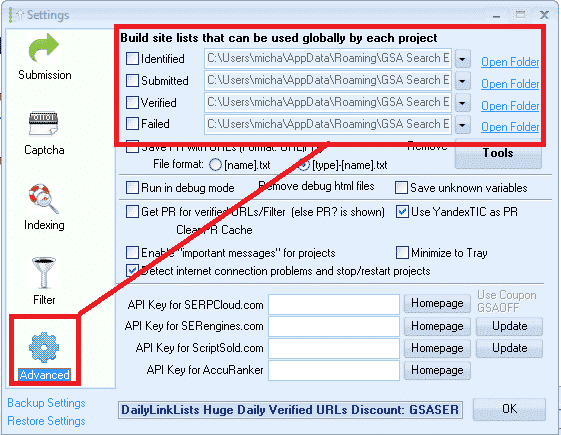
GSA SER Global Site List Location


What are the GSA SER global site list used for:

Lista global de sites are link targets where GSA SER post to too, to create your backlinks.

When you first buy GSA Search Engine Ranker the list will be all empty, and you can import links into the list by using the built in scraper in the projects, or by importing list via the TOOLS menu, or you make used of paid list via a shared folder such as Dropbox.

When creating a new GSA project you have the option to use the Global Site List to post to, as in the below screenshot.
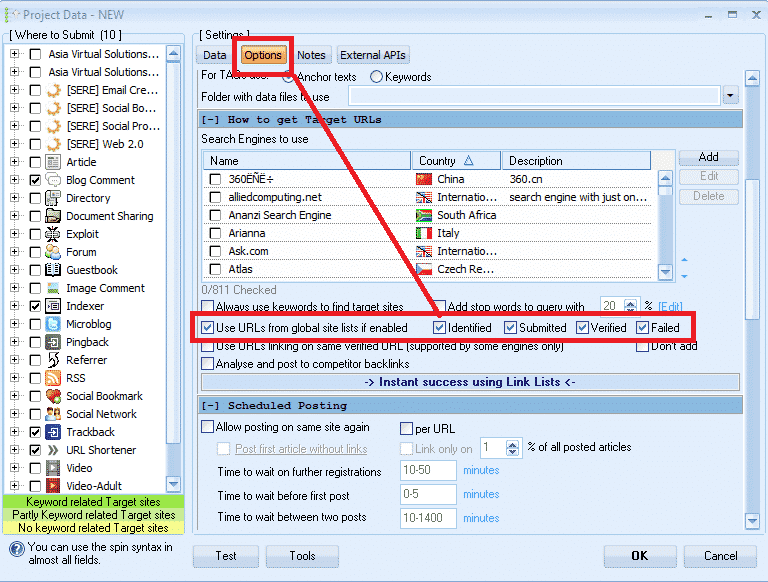
 

Select GSA Global Site List in a Project

What are those checkboxes next to the Identified, Submitted, Verified and Failed  Options?

PAY ATTENTION HERE – THIS IS THE NO.1 THING THAT 75% OF GSA SER USERS GET  WRONG

What I have seen is that most users are not really sure what those checkboxes are for, and most think that it is the option to select to use the list or not so they just go and check all the boxes, which is wrong, it has nothing to do with selecting to use or not use the list.
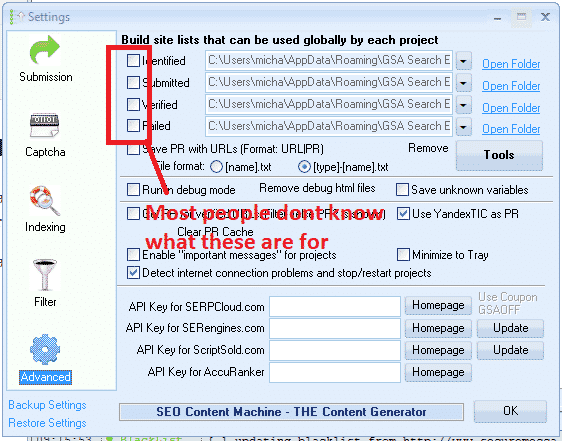
 

What are the global site list check boxes


What those checkboxes actually do is to enable or disable write permissions  to write to the list.


The Identified Checkbox :

If you use the search engines option in your projects to scrape, then it will add the scraped urls in this list

The Submitted Checkbox:

Every time GSA SER submit in any of your projects to a site, it will add the site it submitted to, to this list

The Verified Checkbox:

Every time GSA Verify a link that it has posted in any of your projects it will add that link to this list

The Failed Checkbox:

Every time GSA is unable to post to a site, it will add that site to this list

My recommendation is DO NOT CHECK ANY OF THOSE BOXES, specially if you are using paid link list which are shared via Dropbox or you build your own list.

Reason is because paid  list shared via Dropbox are normally read only, so you are wasting resources trying to save to a list which you only have read access to.

Another reason is because GSA SER already save the links it create and verify in the project data, there is very little to no point in saving then in additional list as this will just bloat your hard drive.

My main reason for not checking any of the boxes is that i use the global site list to load 4 different link list. ( we will cover that a little further below )

How to see the verified, failed and submitted URLs then in the projects you might ask, well it is simple. You right click on any project and select show urls, as in below screenshot.

Check GSA SER Project URLs

What are the 4 file paths next to each option of the GSA SER Global site list?

These are the location where the list are saved. As mentioned earlier, by default GSA create an empty folder for each list in the APPDATA folder, which is not all that easy to navigate to but luckily there is a shortcut in GSA  SER, namely the  OPEN FOLDER next to each list.

You can change the location to anywhere on your computer or even a shared network drive
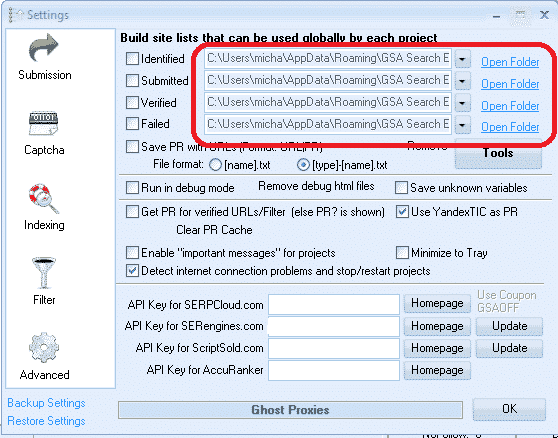
Location of the global site list
Location of the global site list folders


How to use paid link list shared via Dropbox from several providers, as well as your own list?

Many GSA Search Engine Ranker users subscribe to paid link list, such as our own Asia Virtual Solutions Quality link list, which has a identified and a verified link list, and there are other list providers such as Auto Approve Market Place, SER Verified List and many others, and many of these list providers share there link list via Dropbox.

So what u will need to do is install Dropbox on your computer or your VPS GSA SER, then use any of the 4 slots in the GSA SER global site list to load your list.

You don’t have to worry about the fact that it is called Identified, Submitted, Verified or Failed, in fact you can totally ignore the names as it has no meaning if you don’t plan to check the boxes and write to the list. So have a look at the below screenshot of a set up using 4 different list.
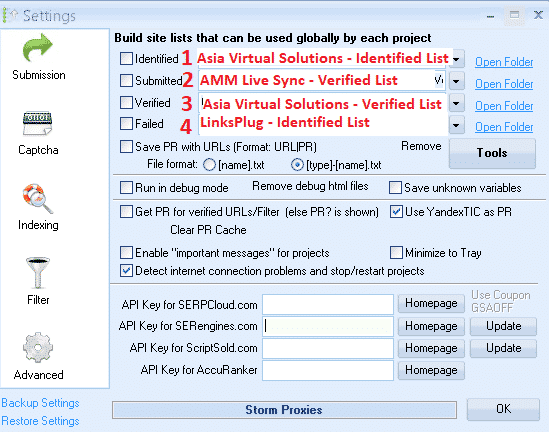
 

Using 4 Different List IN GSA SER Global list
Using 4 Different List in GSA SER Global link list


In the above screenshot all of the 4 list are shared with me via Dropbox, so all i did was click on the dropdown button and then navigate where that Dropbox folder is on my VPS PC

  1. In position no.1 I used the Ásia Virtual Solutions – Identified Link list
  2. In position no.2 I used the AAM Live Sync Verified link list
  3. In position no.3 I used the Asia Virtual Solutions – Verified Link List
  4. In position no.4 I have used the List from LinksPlug

If you maybe want to also have your own list then you simply need to use one of the 4 slots – just browse to the folder where your list is located.


GSA Search Engine Ranker – How To Use Multiple GSA SER Link List at Same Time


How do you set your GSA Search Engine Ranker projects to use the global site list

When you create your projects you select to use the  Global Site list in the project options, like in the below screenshot.

You check the box to use the slot where your list is added. So if you are using several site list from several providers and you have added them as i showed you earlier on then in the project options you select Identified, Submitted, Verified or Failed if your list are in those slots. Your project will then pull the links from the list you have selected to use.

If you order our GSA Search Engine Ranker Data Packs then we by default check the Global site list for you like in the below screenshot.

How do you set your projects to use the global site list


How to use GSA Search Engine Ranker Global Site List in Your GSA SER Projects


What is the difference between GSA Search Engine target URLs and the global site list.

  • GSA Search Engine Ranker global site list

Global site list are list that you can use for any niche and any Projeto GSA SER, they are just general list not scraped for a specific niche. Link list that you buy our subscribe to are all global site list.

  • GSA Search Engine Ranker  target URLs

Target URLs are links that are scraped for a specific project and the links are all relevant to a niche or topic. So you will use your scraper like GScraper or Scrapebox or any others and then bind keywords to the footprints, so the results all have content or titles related to the keyword.

Target URLs are not usually added to the global site list but they are added to the project for which the URLs were scraped, like in the below screenshot.

Target URLs can be imported as .txt or .sl format

How to import GSA Search Engine Ranker target URLs
How to import GSA SER Target URLs


Well that’s it, I hope that this article has given you a better understanding about the GSA Search Engine Global Site list and how to correctly use it to get the most out of your GSA SER projects.

It is very important to have a good site list, and Soluções virtuais da Ásia can help you with that as well, out Quality Link list is not only the biggest GSA format link list available on the internet, but it is also very good quality and we make use of it our self on a daily basis. Have a look below for more a link to more info on our quality global link list.

Asia Virtual Solutions – GSA SER Global Link List

Do you want to start using the best GSA Search Engine Ranker Global Link List Available On The Internet?

Check Out Our Great Global Link Lis

Tags: Global Site ListGSA Global Site Listgsa search engineclassificador de mecanismo de pesquisa gsaGSA Search Engine Ranker Global Site Listlista global de sites da gsa sercomo fazerComo usar corretamente o GSA Search Engine Rankerlista de sites
Post anterior

RGPD: Entendendo o hype e garantindo a conformidade

Próxima publicação

Asia Virtual Solutions – Social Signals Service Updated – Boost Your SEO with Social Signals

Michael Swart

Michael Swart

A Asia Virtual Solutions é orgulhosamente de propriedade e mantida por Michael Swart e uma equipe de assistentes virtuais dedicados.

Próxima publicação
Social Signals Service - Updated

Asia Virtual Solutions - Social Signals Service Updated - Boost Your SEO with Social Signals

Produto recomendado

Categorias de blog

  • Conteúdo de IA e SEO
  • Tutoriais GSA SER
  • Hospedagem e VPS
  • Estratégias de Link Building
  • Notícias e atualizações
  • Análises de software de SEO
  • Tutoriais do RankerX
  • Xrumer e XEvil

Produto que você precisa

Avaliações recentes

  • Arte digital representando uma rede global com dispositivos interconectados e links coloridos, anunciando um serviço de "lista de links GSA SER". Listas de links de retorno de qualidade nº 1 para o GSA Search Engine Ranker
    Dinilai 5 dari 5
    oleh ali imani
  • Ilustração digital do conceito de serviço proxy com laptop, globo terrestre e racks de servidores proxy. Serviço de proxy
    Dinilai 5 dari 5
    oleh Nick Nick
  • Asia Virtual Solutions Marcadores sociais Bookmarking social para melhorar o SEO e aumentar o tráfego
    Dinilai 5 dari 5
    oleh shashwat asthana
  • Pacotes de e-mail RankerX Pacotes de e-mail RankerX
    Dinilai 5 dari 5
    oleh vancuoc29
  • Anúncio de serviço de marketing digital que apresenta ferramentas e recursos de SEO, como projetos gsa ser, e-mails particulares e artigos relevantes para palavras-chave. Projetos do GSA Search Engine Ranker - feitos para você
    Dinilai 5 dari 5
    oleh nick smith
  • GSA Search Engine Ranker VPS GSA Search Engine Ranker VPS
    Dinilai 5 dari 5
    oleh nick smith
  • GSA Search Engine Ranker VPS GSA Search Engine Ranker VPS
    Dinilai 5 dari 5
    oleh mike
  • Conteúdo estruturado, sites DA50+ Postagem na Web 2.0 com conteúdo estruturado em sites DA50+
    Dinilai 5 dari 5
    oleh ADE YUSUP
  • Conteúdo estruturado, sites DA50+ Postagem na Web 2.0 com conteúdo estruturado em sites DA50+
    Dinilai 5 dari 5
    oleh Joseph Conroy
  • Conteúdo estruturado, sites DA50+ Postagem na Web 2.0 com conteúdo estruturado em sites DA50+
    Dinilai 5 dari 5
    oleh N/A N/A

Todos os aspectos legais

  • Contrato de afiliado
  • Antispam
  • Soluções virtuais da Ásia
  • Preferências de comunicação
  • Isenção de responsabilidade
  • Cookie de dardo de clique duplo
  • Política de links externos
  • Política do FaceBook
  • Declaração da FTC
  • Política de privacidade
  • Política de Reembolso e Garantia
  • Termos e condições
  • Divulgação de depoimentos

Compras seguras

Certificação do Google Save Browsing
O logotipo do site do Norton Safe em um fundo branco.

Entre em contato conosco

Escritório principal nos EUA
  • Asia Virtual Solutions LLC, 400 Rella Blvd, #123-298, Montebello, NY 10901
  •  co*****@******************ns.com
  • +1 (415) 851-6951
  •  asiavirtual
  •  Asia Virtual Solutions no LinkedIn
Escritório virtual na Ásia
  • Asia Virtual Solutions LLC, Level 29, The Offices at Centralworld 999/9 Rama I Road, Pathumwan, Bangkok, Tailândia
  •  co*****@******************ns.com
  • +1 (415) 851-6951
  •  asiavirtual
  •  Asia Virtual Solutions no LinkedIn

© 2026 - Asia Virtual Solutions LLC. Todos os direitos reservados. Este site é operado e mantido por: Asia Virtual Solutions LLC

Sem miniatura
Carregado
Falhou
Remover arquivo carregado
We've detected you might be speaking a different language. Do you want to change to:
Alterar o idioma para English English
Alterar o idioma para বাংলা বাংলা
Alterar o idioma para 简体中文 简体中文
Alterar o idioma para Nederlands Nederlands
Alterar o idioma para हिन्दी हिन्दी
Alterar o idioma para Bahasa Indonesia Bahasa Indonesia
Alterar o idioma para 日本語 日本語
Alterar o idioma para 한국어 한국어
Alterar o idioma para Bahasa Melayu Bahasa Melayu
Português do Brasil
Alterar o idioma para Русский Русский
Alterar o idioma para Español de México Español de México
Alterar o idioma para Tagalog Tagalog
Alterar o idioma para ไทย ไทย
Alterar o idioma para Tiếng Việt Tiếng Việt
Alterar o idioma para اردو اردو
Alterar o idioma para Türkçe Türkçe
Change Language
Close and do not switch language
Sem resultado
Ver todos os resultados
  • Início
  • GSA Search Engine Ranker
    • Perguntas frequentes sobre o GSA Search Engine Ranker
    • Ferramentas e complementos do GSA SER
    • Tutoriais GSA SER
  • Blog
    • Conteúdo de IA e SEO
    • Tutoriais GSA SER
    • Hospedagem e VPS
    • Estratégias de Link Building
    • Notícias e atualizações
    • Tutoriais do RankerX
    • Análises de software de SEO
    • Xrumer e XEvil
  • Loja
    • Conteúdo e artigos de IA
    • Ferramentas e complementos do GSA SER
    • Serviços de hospedagem
    • Serviços de Link Building
    • Money Robot Submitter
    • RankerX
    • Serviços recomendados
    • Serviços de mídia social
    • Serviços Xrumer

© 2026 - Asia Virtual Solutions LLC. Todos os direitos reservados. Este site é operado e mantido por: Asia Virtual Solutions LLC

Português do Brasil
English বাংলা 简体中文 Nederlands हिन्दी Bahasa Indonesia 日本語 한국어 Bahasa Melayu Русский Español de México Tagalog ไทย Tiếng Việt اردو Türkçe