



GSAサーチエンジンランカー (GSA SER) is Windows software that builds backlinks automatically. It searches the web for sites that accept user content, creates accounts, posts your links and checks that they went live, 24 hours a day, for as many projects as you set up.
It is made by GSA Software and sold as a one-time licence with free lifetime updates. We have used it every day since December 2012, so this is GSA SER explained in plain English: what it does, how it works, what it needs to run well, and who it suits.
💡要するに
GSA SER is a link building robot: you give it your URLs, anchors, content and settings, and it finds targets and posts links for you around the clock.
It is a tool for scale and tiered campaigns. It does not replace manual outreach for a few editorial links.
- Windows desktop software from GSA, with a one-time licence, free updates and a free trial.
- It finds targets by searching with platform footprints, or it uses a site list you import.
- It registers accounts, confirms them by email, posts your links and checks they are live.
- It needs proxies, captcha solving, email accounts, content and a machine that stays on.
- It suits SEOs who build links at volume, especially in tiers.
🎯 What is GSA Search Engine Ranker?
GSA Search Engine Ranker is an automated link building program made by GSA Software. It runs on Windows, and you organise your work into projects. Each project holds the URLs you want to promote, your anchor text, your content and your filters. Once you press Start, the software does the repetitive work: searching, registering, posting and checking.
On the official GSA Search Engine Ranker page, GSA sells it for $127 as a lifetime licence with free lifetime updates, and offers a free trial download. You can run unlimited projects at the same time.
Why automate links at all? Links still matter for rankings. Google says PageRank “continues to be part of our core ranking systems” in its guide to ranking systems. Yet most pages have none: Ahrefs data from 1 billion pages showed that 66.31% of pages have no backlinks at all. Building links by hand at that scale is slow, and that is the gap GSA SER fills.
⚙️ How does GSA SER work? GSA SER explained step by step
Every project runs the same loop, over and over, until you stop it or it reaches your limits.
The GSA SER loop, repeated 24/7
1. Project
Your URLs, anchors, content and filters.
2. Find targets
Search engines and footprints, or your site list.
3. Identify
Works out the platform, such as a wiki or forum.
4. Register
Creates an account and confirms it by email.
5. Post
Solves the captcha and submits your link.
6. Verify
Checks the link is live and reports it.
Figure 1: how a GSA SER project builds links.
Finding targets. A footprint is a piece of text that a website platform always shows, such as a standard “powered by” line. GSA SER combines footprints with your keywords and searches for matching sites. If you would rather skip this slow stage, you can import a ready-made site list instead. See our guide to the best GSA SER link lists.
Filtering. GSA lets you choose which platform types to post to, and filter targets by language, country and minimum authority. Good filters are what keep a link profile clean.
Submitted and verified. A submitted link means GSA SER sent the form. A verified link means it went back and found your link live on the page. The two speed numbers users watch are LPM (links per minute) and VPM (verified links per minute). Our guide on 検証済みリンクリストと識別済みリンクリスト explains the terms in more depth.

🧰 What GSA SER needs to run well
The software is the engine. These are the parts that keep it running, and most poor results come from a weak link in this list.
| Part | Why GSA SER needs it | オプション |
|---|---|---|
| プロキシ | Hundreds of searches and posts from one IP get blocked fast. Proxies spread the load. | Private or semi-private proxies. See our GSA SER proxy guide. |
| キャプチャの解読 | Many sites show a captcha before you can register or post. | GSAキャプチャ・ブレーカー plus a service. GSA SER supports more than 30 captcha services. |
| メールアカウント | Most sites send a confirmation link before an account goes live. | Fresh accounts that are not blocked, such as our GSA SERメールパック. |
| コンテンツ | Articles, profiles and comments that carry your links. | The built-in Article Manager, spinners or AI tools. |
| Targets (optional) | Saves the time and proxies spent on scraping. | A site list such as our GSA SERリンク一覧. |
| A machine that stays on | Projects run day and night. | Your own Windows PC, or a VPS. Compare them in where to run GSA SER. |
Captcha solving is often the biggest single factor in how many links you land. Our guide on improving captcha solve rates in GSA SER shows how to set it up with backups.
🔗 What types of links can GSA SER build?
GSA SER supports many platform types, and you choose which ones each project uses. The main groups are:
- Articles and Web 2.0 sites, where your link sits inside a full article. These are contextual links.
- Wikis, where the software creates a page or edits a profile.
- Forums and social networks, through posts and member profiles.
- Social bookmarks and directories.
- Blog comments, guestbooks and image comments.
- Indexers, URL shorteners, pingbacks and trackbacks, which are mainly used on lower tiers.
You rarely want every type pointing straight at your main website. That is where tiers come in.
🪜 How GSA SER builds tiered links
A tiered campaign points links at your links. Tier 1 links point at your website, tier 2 links point at tier 1, and so on. GSA SER handles this with a project option to use the verified URLs of another project as its targets, so each tier feeds the one above it automatically.
Your website
The page you want to rank
▲
ティア1
Fewer, cleaner contextual links with strict filters
▲
ティア2
More links that point at your tier 1 links
▲
ティア3
High volume links that help lower tiers get found and indexed
Figure 2: a tiered link structure. Each tier points at the tier above it.
Keep tier 1 small and clean, and use the higher volume platforms lower down. For a full plan, read the 2026 GSA SER link building workflow.
👍 Who should use GSA Search Engine Ranker?
- SEOs and agencies who build links for many sites or many pages.
- Anyone running tiered campaigns, or powering up Web 2.0s and other properties.
- People who want a one-time cost instead of a monthly subscription.
- Users who are happy to learn settings and filters, or to have them set up for them.
- Not the right tool if you only want a handful of editorial links. Manual outreach suits that better.
- Not one-click. Results depend on your proxies, captcha solving, emails, content and filters.
- Not for Mac without help. It is Windows software, so Mac users need a VPS or a virtual machine.
Still deciding between tools? Compare it in XRumer vs GSA 検索エンジン ランカー そして RankerX vs GSA SER vs Money Robot, or read our GSA SER review after 13 years of daily use.
🚀 How to get started with GSA SER
- Get a licence, or start with the free trial from GSA.
- Install it on a Windows PC or VPS that can stay on day and night.
- Add your proxies, captcha solving and email accounts.
- Create one small test project with strict filters, and let it run.
- Check your verified links, then adjust your settings before you scale up.
私たちの complete GSA Search Engine Ranker setup guide walks through each step with videos. Two useful extras are the GSA SER scheduler そして binding URLs to anchor text. If you would rather not do the setup yourself, we offer expert GSA SER setup そして すぐに使えるGSA SERプロジェクト.
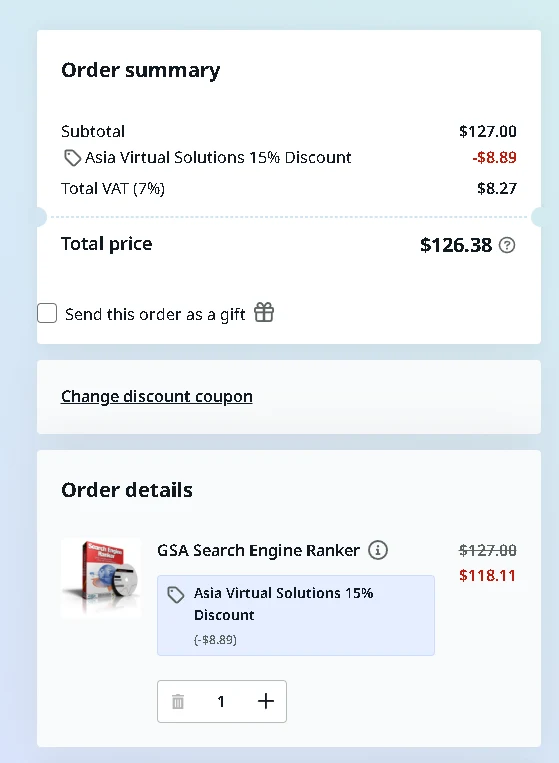
The normal price on GSA’s own checkout is $127. When you buy through our product page, an Asia Virtual Solutions discount code is added for you automatically, so the price drops to $118.11 on the same official checkout:
One-time licence, free updates
GSA検索エンジンランカーを入手
Buy your GSA SER licence through Asia Virtual Solutions for $118.11 instead of $127, from a team that has run it daily since 2012.
GSA SERを取得する
❓よくある質問
GSA Search Engine Rankerとは何か?
GSA Search Engine Ranker is Windows software from GSA that builds backlinks automatically. It finds websites that accept user content, creates accounts, posts your links and checks that they are live, around the clock, for as many projects as you set up.
GSA SERは何のために使用されるのですか?
It is used to build links at a scale that manual work cannot match, most often in tiers. SEOs use it to build tier 1 links to their sites, to power up those links with lower tiers, and to boost Web 2.0s and other properties.
How much does GSA Search Engine Ranker cost?
GSA sells it for $127 as a one-time lifetime licence with free updates, and there is a free trial. Through Asia Virtual Solutions it costs $118.11. You also need to budget for proxies, captcha solving and email accounts.
Does GSA SER work on a Mac?
Not directly. GSA SER is Windows software, so Mac users run it on a Windows VPS or in a virtual machine. A VPS has the added benefit of running 24/7 without tying up your own computer.
Does GSA SER need proxies?
In practice, yes. GSA SER sends a large number of searches and posts, and a single IP address gets blocked quickly. Private or semi-private proxies spread that load, keep your own IP safe and let the software run at full speed.
Where does GSA SER find websites to post to?
It searches search engines using platform footprints combined with your keywords, then identifies each site it finds. You can also skip that stage by importing a site list of targets that have already been found and sorted by platform.
Can GSA SER build tiered links?
Yes. A project can use the verified URLs of another project as its targets. That lets you build tier 2 links to your tier 1 links, tier 3 links to tier 2, and so on, all running automatically.
Is GSA Search Engine Ranker hard to learn?
It has a learning curve. Installing it is simple, but good results depend on proxies, captcha solving, emails, content and filters. Start with one small test project and a setup guide, or have an expert configure your first projects.






 English
  简体中文
简体中文  Deutsch (Sie)
  Bahasa Indonesia
  Italiano
  日本語
日本語  한국어
한국어  Português do Brasil
  Русский
  Español de México
  ไทย
ไทย  Tiếng Việt
  Türkçe