



Come creare un modello di progetto GSA Search Engine Ranker
Molte persone mi hanno chiesto se posso creare un modello GSA per loro. Ma come dice il proverbio... “Dai un pesce a un uomo e lo nutrirai per un giorno, ma insegnagli a pescare e lo nutrirai per tutta la vita.”, lo stesso vale per me che ti fornisco semplicemente un modello. Oggi ti insegnerò come creare il tuo modello personalizzato Modello di progetto GSA Search Engine Ranker
Coloro che sono con voi ora hanno familiarità con cosa sia esattamente un Classificatore del motore di ricerca GSA modello di progetto cioè, ti spiegherò di seguito perché o quando hai bisogno di un Modello di progetto GSA Search Engine Ranker e cosa fa.
[spacer height=”2px”]
[full_width][one_half padding=”0 0 10px 0″]
Perché ti serve un modello di progetto GSA Search Engine Ranker?
[spacer height=”2px”]
Alcune persone come me che creano centinaia di Progetti GSA Search Engine Ranker Ogni mese, di solito, si utilizzano le stesse piattaforme, gli stessi filtri, le stesse opzioni di selezione e alcune persone usano persino lo stesso account di posta elettronica "catch-all" quando creano un progetto.
Quindi, ogni volta che creiamo un progetto, dobbiamo spuntare tutte le caselle, selezionare gli stessi filtri, modificare le stesse opzioni e così via; questo finisce per richiedere molto tempo e aumenta notevolmente la possibilità di commettere errori.
[/one_half][one_half padding=”0 0 0 10px”]
Quali vantaggi offre un modello di progetto GSA Search Engine Ranker?
[spacer height=”2px”]
 Il principale cosa che un GSA Search Engine Ranker Il vantaggio principale dei modelli di progetto è che ti fanno risparmiare molto tempo, perché puoi semplicemente importare il tuo modello e tutte le impostazioni e i filtri saranno già presenti.
Il modello di progetto GSA Search Engine Ranker può prevenire errori o la dimenticanza di selezionare un'opzione o un filtro.
Il progetto GSA Search Engine Ranker garantisce la coerenza nella creazione del progetto
[/metà][/larghezza_completa]
Guarda il video qui sotto che mostra come creare un modello di progetto GSA Search Engine Ranker dall'inizio alla fine, oppure segui i semplici passaggi descritti più in basso, sotto il video.
[sociallocker]
Come creare un modello di progetto GSA Search Engine Ranker
[/sociallocker]
[spacer height=”2px”]
Segui questi passaggi per creare un modello di progetto GSA Search Engine Ranker.
[spacer height=”2px”]
- Avvia un nuovo progetto come faresti normalmente.
- Seleziona tutte le piattaforme a cui vuoi inviare
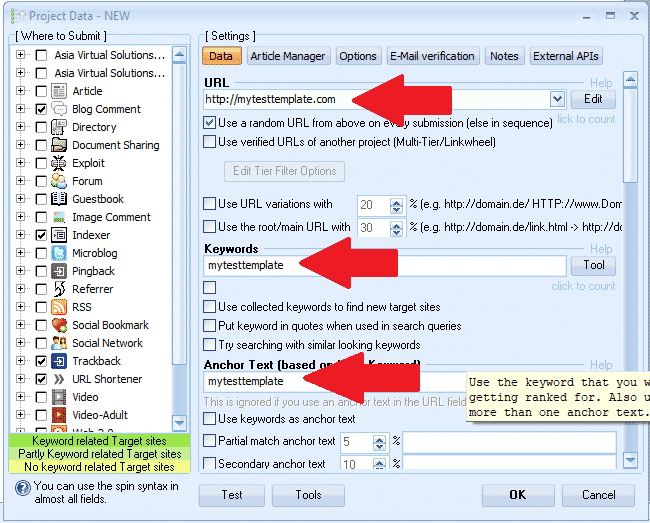
- Scegli una parola che possiamo usare come indicatore, qualcosa del tipo: mytesttemplate (Questo serve solo per poter trovare facilmente i campi in seguito ed eliminare il marcatore)
- Inserisci un URL: http://mytesttemplate.com
- Successivamente, sostituisci tutti i campi vuoti con il testo del tuo marcatore: mytesttemplate, ora dovrebbe apparire come nelle schermate seguenti

[spacer height=”2px”]
- Se hai selezionato la piattaforma Documenti, dovrai allegare un documento PDF: non limitarti a incollare; cerca il documento su mytesttemplate, sfoglia e seleziona un PDF qualsiasi. Non preoccuparti, elimineremo quel PDF in seguito.
- Se hai selezionato una piattaforma che richiede un'immagine del profilo, non limitarti a incollare; usa il modello mytesttemplate per l'immagine, ma sfoglia le opzioni e seleziona un'immagine qualsiasi. Non preoccuparti, elimineremo quell'immagine in seguito.
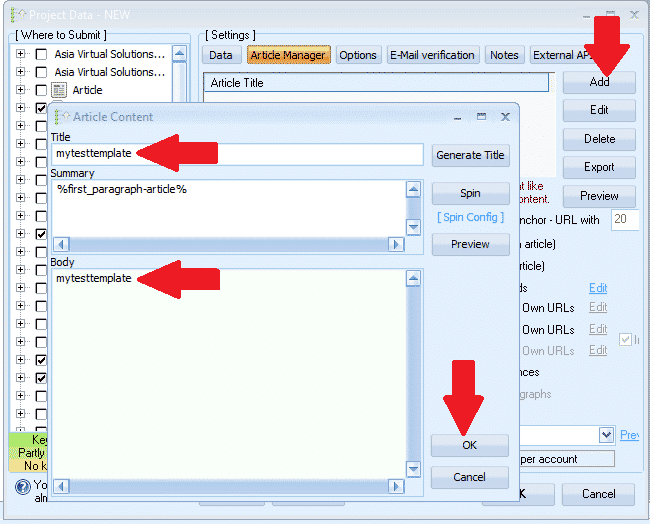
- Una volta completati tutti i campi nella scheda Dati, passare a: RESPONSABILE ARTICOLI tab.
- Clic AGGIUNGERE e quindi selezionare INSERIRE MANUALMENTE
- Titolo dell'articolo, incolla: mytesttemplate
- Corpo dell'articolo, incollare qui: mytesttemplate
- Ora clicca OK
- Successivamente passiamo al OPZIONI scheda
- Effettua tutte le selezioni e imposta i filtri. Questo è tutto, non c'è altro da fare nella scheda Opzioni.
- Il prossimo passo è il E-MAIL scheda
- Elimina l'email predefinita che vedi lì, quindi fai clic AGGIUNGERE
- Selezionare REGOLAMENTARE
- Inserisci l'indirizzo email nel seguente formato: Mio************@************te.com e clicca OK
- Ora cancella la prima email dello spettacolo — dovresti visualizzare solo l'email che abbiamo appena aggiunto; Mio************@************te.com
- Fai clic sulla tua email e poi dove viene visualizzato Server POP3: compila mail.mytesttemplate.com
- Riempire PASSWORD come: mytesttemplate
- I campi relativi al tuo indirizzo email dovrebbero ora apparire come nello screenshot qui sotto:

[full_width][one_third]Ottimo lavoro finora, abbiamo finito con le impostazioni e ora tutto ciò che devi fare è cliccare OK per salvare il progetto. Quando fai clic su OK, ti verrà mostrato l'avviso che vedi sul lato destro. Non è un problema, fai semplicemente clic IGNORARE e il tuo progetto verrà ora salvato[/one_third][two_third_last]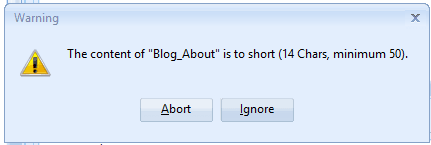 [/due_terzi_ultimi][/larghezza_completa]
[spacer height=”2px”]
Bene, ora abbiamo creato il nostro progetto e lo abbiamo salvato, ma non emozionatevi ancora, non abbiamo ancora finito, ci sono ancora alcuni passaggi prima del nostro GSA Classificatore dei motori di ricerca modello di progetto è completato, quindi procediamo con i passaggi rimanenti.
[larghezza_intera][un_terzo]
- Ora fai doppio clic sul progetto per riaprirlo.
- Successivamente in fondo alla Classificatore del motore di ricerca GSA Finestra, fai clic su UTENSILI, e poi su ESPORTARE, E MODELLO (Opzioni, Campi dati, Selezione del motore)
- Salva il file in una cartella dove intendi conservare tutti i tuoi file Modelli di progetto GSA Search Engine Ranker. Il nome del file sarebbe qualcosa del genere: MyTier1Template.gsatml
[/un_terzo][due_terzi_ultimi]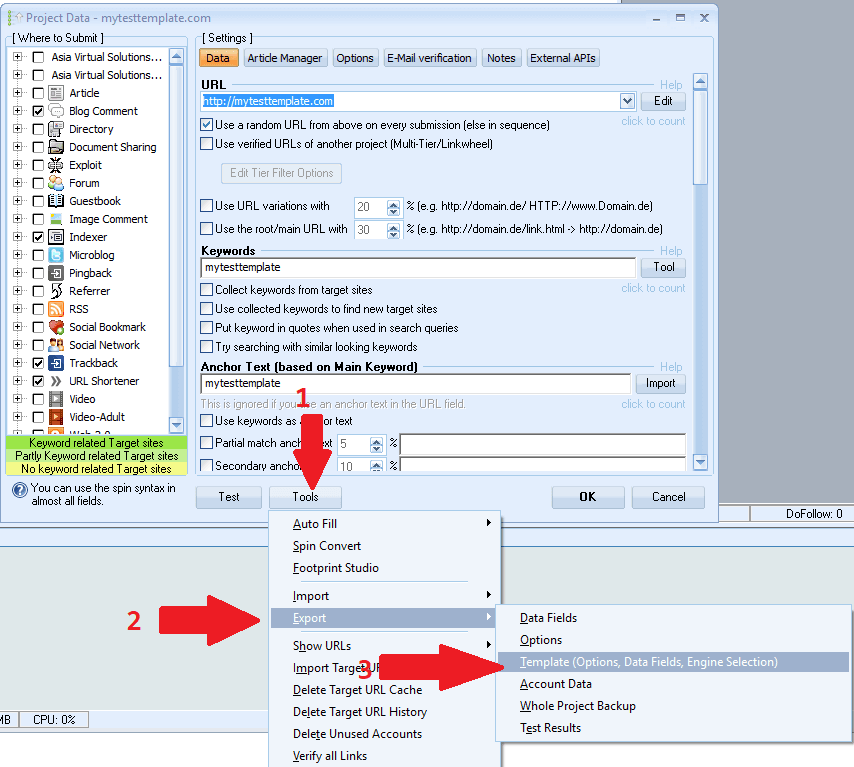 [/due_terzi_ultimi][/larghezza_completa]
[spacer height=”2px”]
OK, quindi ora abbiamo creato il nostro file di progetto e lo abbiamo esportato, ora andremo a modificare il progetto che abbiamo esportato. In questo momento abbiamo finito. Classificatore del motore di ricerca GSA Per ora, puoi eliminare il progetto che hai lì e chiudere GSA SER; lo useremo di nuovo più tardi.
Iniziamo con la modifica del file esportato, per questo avremo bisogno di un editor come BLOCCO NOTE++, puoi scaricarlo gratuitamente da qui: https://notepad-plus-plus.org/downloads/
- Per prima cosa devi aprire la cartella in cui hai esportato il progetto.
- Noterai che ora ci sono 2 file in quella cartella, quello terminerà con .articoli e l'altro terminerà con .gsatml
- Non abbiamo bisogno di quello che finisce con .articoli, quindi puoi semplicemente eliminare quel file.
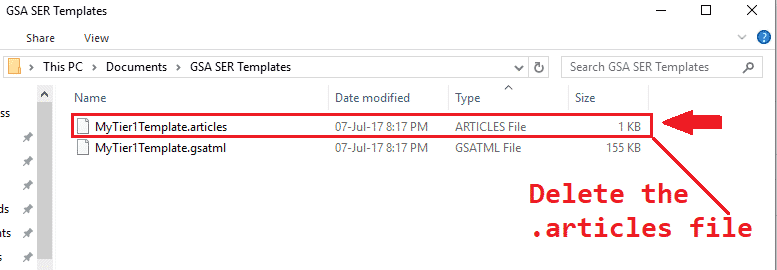
- Il passo successivo è clic destro sul file che termina con .gsatml, Nel mio caso il file è MyTier1Template.gsatml
- La selezione MODIFICA CON NOTEPAD++ In questo modo il file si aprirà in Notepad++ e potremo iniziare a lavorarci.
- La seconda riga sarà l'URL che abbiamo specificato al momento della creazione in GSA Search Engine Ranker, nel mio caso appare così: URL=http://mytesttemplate.com
- Ora devi eliminare l'URL, quindi tutto ciò che dovresti avere è: URL=
- Ora sulla barra dei menu di NotePad++, selezionare RICERCA quindi scorri verso il basso e seleziona SOSTITUIRE
- Nella finestra SOSTITUISCI che è apparsa devi digitare la parola marcatore che hai usato quando hai creato il tuo progetto di ranking del motore di ricerca GSA, nel mio caso era mytesttemplate, Compilare in questo modo: Scopri cosa: =ilmiomodelloditest E sostituendo con: = Quindi fai clic sul pulsante SOSTITUISCI TUTTO
- Dovrebbe apparire come nello screenshot qui sotto:

Ottimo, quindi cosa stava mostrando prima? =mytesttemplate ora dovrebbe essere solo: =
- Successivamente devi scorrere verso il basso e cercare il file pdf che hai aggiunto a Documento, quando hai creato il progetto. Verrà visualizzato Document=c://file al tuo pdf
- Rimuovere il percorso del file dominio, quindi mostra solo: Documento=
- Successivamente dobbiamo rimuovere tutte le voci relative agli indirizzi email: il modo più semplice e veloce per farlo è utilizzare gli strumenti di ricerca. Per aprirli, con Notepad++ aperto, premi CTRL+F.
- Trova ciò che devi inserire di nuovo la tua frase di marcatura, la mia era: mytesttemplate
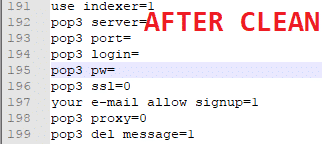
- Ora clicca su Avanti e ti verrà mostrata la prima voce, sostituisci tutto ciò che segue: = (ci interessa solo =). Puoi anche cancellare l'intera password. Di seguito è riportato lo screenshot prima e dopo la pulizia.
- Ok, abbiamo finito, ora., salva il file Ed ecco fatto, il tuo modello è pronto.

[spacer height=”2px”]
Come utilizzare il modello del progetto GSA Search Engine Ranker
[spacer height=”2px”]
Utilizzare il modello è molto semplice, basta seguire i pochi passaggi seguenti.
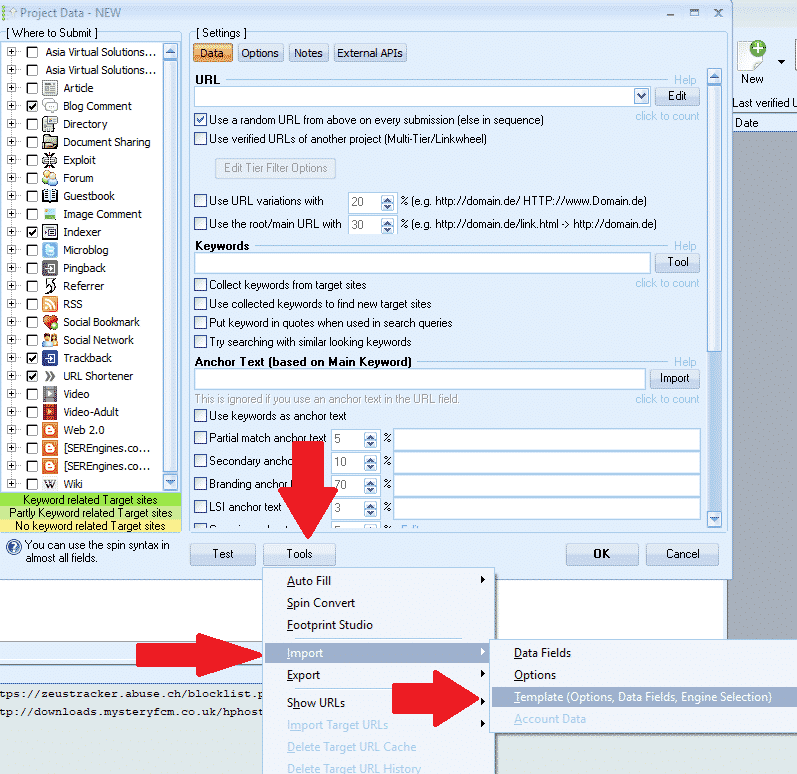
- Nel motore di ricerca GSA Search Engine Ranker clicca qui: Nuovo per avviare un nuovo progetto.
- Poi in fondo al Classificatore del motore di ricerca GSA finestra, fare clic su Utensili Importare MODELLO (Opzioni, Campi dati, Selezione del motore)
- Individua la cartella in cui è stato salvato il modello e selezionalo.
[spacer height=”2px”]
Ecco fatto, hai creato e importato con successo un modello. Ora non ti resta che aggiungere il contenuto.
Spero che il post e il video vi siano piaciuti. Se il post vi è stato utile, mettete un like e condividetelo, e lasciate un commento se avete domande.
TROPPO PIGRO PER CREARE UN MODELLO GSA SER
Lasciate che creiamo il vostro progetto per voi: progetti GSA SER a livelli completamente creati.













 English
  বাংলা
বাংলা  简体中文
简体中文  Nederlands
  Français
  Deutsch (Sie)
  हिन्दी
  Bahasa Indonesia
  Italiano
  日本語
日本語  한국어
한국어  Bahasa Melayu
  Português do Brasil
  Русский
  Español de México
  Tagalog
  ไทย
ไทย  Tiếng Việt
  اردو
اردو  Türkçe