



So erstellen Sie eine GSA-Suchmaschinenranking-Projektvorlage
Viele Leute haben mich gefragt, ob ich eine GSA-Vorlage für sie erstellen kann. Aber wie man so schön sagt: “Gib einem Mann einen Fisch, und du ernährst ihn für einen Tag; lehre ihn fischen, und du ernährst ihn für sein ganzes Leben.”, Dasselbe gilt, wenn ich Ihnen nur eine Vorlage gebe. Heute zeige ich Ihnen, wie Sie Ihre ganz eigene, individuelle Vorlage erstellen. GSA Search Engine Ranker Projektvorlage
Diejenigen unter Ihnen wissen nun, was genau ein/e ist. GSA Suchmaschinenranker Projektvorlage Ich werde Ihnen im Folgenden erklären, warum oder wann Sie ein/e benötigen. GSA Search Engine Ranker Projektvorlage und was es bewirkt.
[spacer height=”2px”]
[full_width][one_half padding=”0 0 10px 0″]
Warum benötigen Sie eine GSA-Suchmaschinenranking-Projektvorlage?
[spacer height=”2px”]
Manche Leute wie ich, die Hunderte von GSA-Suchmaschinenranking-Projekte Jeden Monat verwenden sie in der Regel dieselben Plattformen, dieselben Filter, dieselben Optionsauswahlen, und manche verwenden sogar dasselbe Sammel-E-Mail-Konto, wenn sie Projekte erstellen.
Wenn wir also jedes Mal ein Projekt erstellen, müssen wir alle Kontrollkästchen aktivieren, die gleichen Filter auswählen, die gleichen Optionen ändern usw. Das ist letztendlich sehr zeitaufwändig und die Fehlerwahrscheinlichkeit ist hoch.
[/one_half][one_half padding=”0 0 0 10px”]
Was leistet eine GSA-Suchmaschinenranking-Projektvorlage für Sie?
[spacer height=”2px”]
 Das Haupt etwas, das ein GSA-Suchmaschinenranker Die Projektvorlage spart Ihnen viel Zeit, da Sie einfach Ihre Vorlage importieren können und alle Einstellungen und Filter bereits vorhanden sind.
Die GSA Search Engine Ranker-Projektvorlage kann Fehler verhindern oder dazu führen, dass Sie vergessen, eine Option oder einen Filter auszuwählen.
Das GSA Search Engine Ranker-Projekt gewährleistet Konsistenz bei der Projekterstellung
[/one_half][/full_width]
Sehen Sie sich das untenstehende Video an, das zeigt, wie wir eine GSA-Suchmaschinenranking-Projektvorlage von Anfang bis Ende erstellen, oder folgen Sie den einfachen Schritten weiter unten im Video.
[sociallocker]
So erstellen Sie eine GSA-Suchmaschinenranking-Projektvorlage
[/sociallocker]
[spacer height=”2px”]
Folgen Sie diesen Schritten, um eine GSA Search Engine Ranker-Projektvorlage zu erstellen.
[spacer height=”2px”]
- Beginnen Sie ein neues Projekt wie gewohnt.
- Wählen Sie alle Plattformen aus, auf denen Sie Ihre Beiträge einreichen möchten.
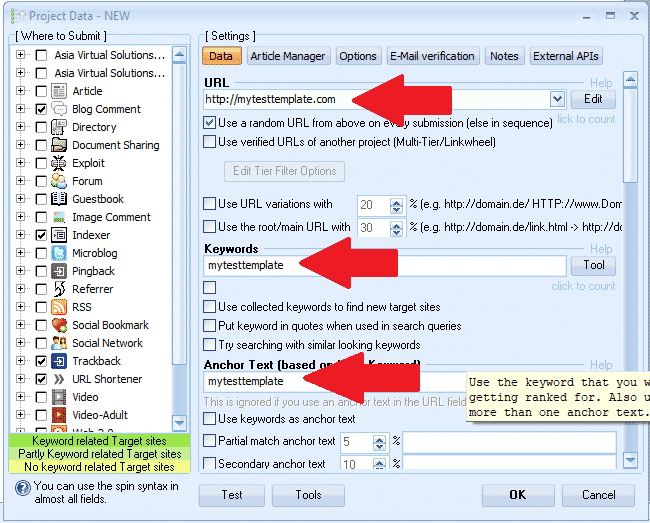
- Entscheiden wir uns für ein Wort, das wir als Marker verwenden können, etwa so: meineTestvorlage (Dies dient lediglich dazu, die Felder später leichter wiederzufinden und die Markierung zu löschen.)
- Geben Sie eine URL ein: http://mytesttemplate.com
- Ersetzen Sie anschließend alle leeren Felder durch Ihren Markierungstext: meineTestvorlage, Es sollte nun wie in den folgenden Screenshots aussehen.

[spacer height=”2px”]
- Wenn Sie die Plattform „Dokumente“ ausgewählt haben, müssen Sie ein PDF-Dokument anhängen – nicht einfach einfügen; geben Sie „mytesttemplate“ für Dokumente ein, sondern suchen Sie einfach nach einer beliebigen PDF-Datei – keine Sorge, wir werden diese PDF-Datei später im Prozess wieder löschen.
- Wenn Sie eine Plattform ausgewählt haben, die ein Profilbild erfordert – fügen Sie das Bild nicht einfach in mytesttemplate ein, sondern suchen Sie es durch und wählen Sie ein beliebiges Bild aus – keine Sorge, wir werden dieses Bild später im Prozess wieder löschen.
- Sobald Sie alle Felder unter der Registerkarte „Daten“ ausgefüllt haben, fahren Sie mit folgendem fort: ARTIKELMANAGER Tab.
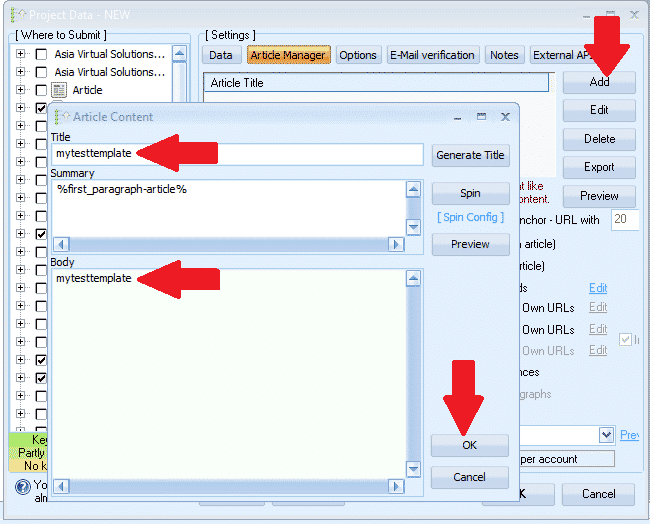
- Klicken HINZUFÜGEN und wählen Sie dann aus MANUELL EINGEBEN
- Artikeltitel, einfügen in: mytesttemplate
- Artikeltext, einfügen in: mytesttemplate
- Jetzt klicken OK
- Als nächstes kommen wir zum Optionen Tab
- Treffen Sie alle gewünschten Auswahlen und legen Sie Ihre Filter fest. Das ist alles – weiter müssen Sie auf der Registerkarte „Optionen“ nichts tun.
- Nächster Schritt zum E-MAIL Tab
- Löschen Sie die dort angezeigte Standard-E-Mail-Adresse und klicken Sie dann auf HINZUFÜGEN
- Wählen MANUELL
- Geben Sie die E-Mail-Adresse wie folgt ein: Mein************@************te.com und klicken OK
- Löschen Sie nun die erste E-Mail, die angezeigt wird. — Sie sollten nur die E-Mail sehen, die wir soeben hinzugefügt haben; Mein************@************te.com
- Klicken Sie auf Ihre E-Mail und dann auf die Stelle, wo sie angezeigt wird. POP3-Server: Füllen Sie mail.mytesttemplate.com aus
- Füllen PASSWORT als: meineTestvorlage
- Ihre E-Mail-Felder sollten nun wie im folgenden Screenshot aussehen:

[full_width][one_third]Hervorragende Arbeit bisher, die Einstellungen sind nun abgeschlossen und Sie müssen nur noch klicken OK Um das Projekt zu speichern, klicken Sie auf „OK“. Daraufhin erscheint die Warnung auf der rechten Seite. Das ist kein Problem, klicken Sie einfach auf „Speichern“. IGNORIEREN und Ihr Projekt wird nun gespeichert[/one_third][two_third_last]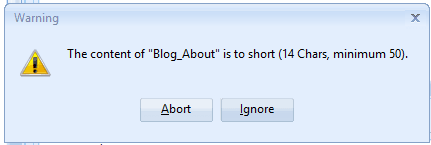 [/two_third_last][/full_width]
[spacer height=”2px”]
So, wir haben unser Projekt nun erstellt und gespeichert, aber freut euch noch nicht zu früh, wir sind noch nicht fertig, es sind noch einige Schritte nötig, bevor wir es abschließen können. GSA Suchmaschinen-Ranking Projektvorlage Dieser Schritt ist abgeschlossen, also fahren wir mit den verbleibenden Schritten fort.
[full_width][one_third]
- Doppelklicken Sie nun auf das Projekt, um es erneut zu öffnen.
- Als nächstes ganz unten GSA Suchmaschinenranker Fenster, klicken Sie auf WERKZEUGE, und dann weiter EXPORT, Und VORLAGE (Optionen, Datenfelder, Motorenauswahl)
- Speichern Sie die Datei in einem Ordner, in dem Sie alle Ihre Dateien aufbewahren möchten. GSA Search Engine Ranker Projektvorlagen. Der Dateiname sähe etwa so aus: MyTier1Template.gsatml
[/one_third][two_third_last]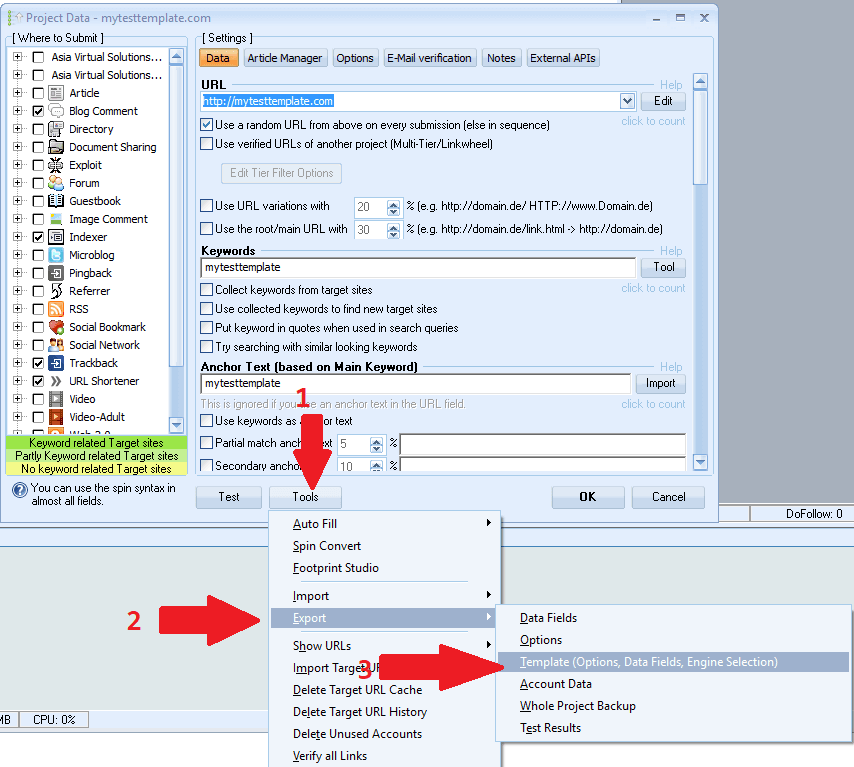 [/two_third_last][/full_width]
[spacer height=”2px”]
Okay, wir haben nun unsere Projektdatei erstellt und exportiert. Als Nächstes bearbeiten wir das exportierte Projekt. Damit sind wir fertig. GSA Suchmaschinenranker Fürs Erste. Sie können das vorhandene Projekt löschen und GSA SER schließen. Wir werden es später wieder benötigen.
Beginnen wir mit der Bearbeitung der exportierten Datei. Dazu benötigen wir einen Editor wie beispielsweise NOTEPAD++, Sie können es hier kostenlos herunterladen: https://notepad-plus-plus.org/downloads/
- Als Erstes musst du den Ordner öffnen, in den du das Projekt exportiert hast.
- Sie werden feststellen, dass sich nun 2 Dateien in diesem Ordner befinden; die eine endet mit .Artikel und die andere wird enden mit .gsatml
- Wir brauchen nicht diejenige, die mit endet .articles, Sie können diese Datei also einfach löschen.
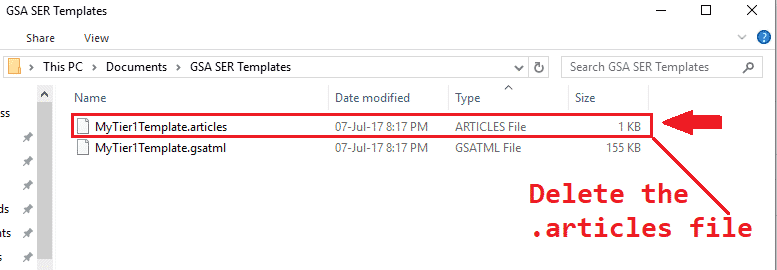
- Der nächste Schritt ist Rechtsklick in der Datei, die mit endet .gsatml, In meinem Fall heißt die Datei MyTier1Template.gsatml.
- Die Auserwählten MIT NOTEPAD++ BEARBEITEN Dadurch wird die Datei nun in Notepad++ geöffnet und wir können mit der Bearbeitung beginnen.
- Die zweite Zeile ist die URL, die wir bei der Erstellung im GSA Search Engine Ranker angegeben haben; in meinem Fall sieht sie so aus: URL=http://mytesttemplate.com
- Sie müssen nun die URL löschen, sodass nur noch Folgendes übrig bleiben sollte: URL=
- Jetzt in der Menüleiste von Notepad++, wählen SUCHEN Scrollen Sie anschließend nach unten und wählen Sie aus ERSETZEN
- Im daraufhin angezeigten ERSETZEN-Fenster müssen Sie das Markierungswort eingeben, das Sie beim Erstellen Ihres GSA-Suchmaschinen-Rankerprojekts verwendet haben. In meinem Fall war es meineTestvorlage, Füllen Sie es folgendermaßen aus: Finde heraus, was: =mytesttemplate Und ersetzen durchKlicken Sie anschließend auf die Schaltfläche ALLE ERSETZEN.
- Es sollte wie im folgenden Screenshot aussehen:

Gut, was wurde denn vorher angezeigt? =mytesttemplate sollte jetzt nur noch Folgendes enthalten: =
- Als Nächstes sollten Sie nach unten scrollen und die PDF-Datei suchen, die Sie hinzugefügt haben. Dokumentieren, Beim Erstellen des Projekts wird in Ihrer PDF-Datei „Dokument=c://Datei“ angezeigt.
- Entfernen Sie den Dateipfad zu Domain, Es wird also nur Folgendes angezeigt: Dokument=
- Als Nächstes müssen wir alle E-Mail-Einträge entfernen: Am einfachsten und schnellsten geht das mit der Suchfunktion – um sie zu öffnen, drücken Sie bei geöffnetem Notepad++ Strg+F.
- Finde heraus, was Sie müssen Ihre Markerphrase erneut eingeben, meine lautete: mytesttemplate
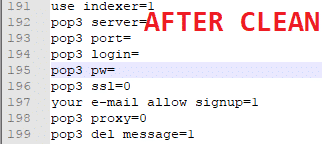
- Klicken Sie nun auf „Weiter“. Der erste Eintrag wird angezeigt. Ersetzen Sie alles nach dem Gleichheitszeichen (=). Sie können das gesamte Passwort auch löschen. Unten sehen Sie Screenshots vor und nach der Bereinigung.
- Okay, wir sind jetzt alle fertig., Speichern Sie die Datei Und das war's, Ihre Vorlage ist fertig.

[spacer height=”2px”]
So verwenden Sie Ihre GSA Search Engine Ranker-Projektvorlage
[spacer height=”2px”]
Die Verwendung der Vorlage ist sehr einfach, folgen Sie einfach den folgenden Schritten.
- Klicken Sie im GSA-Suchmaschinenranker: Neu ein neues Projekt starten.
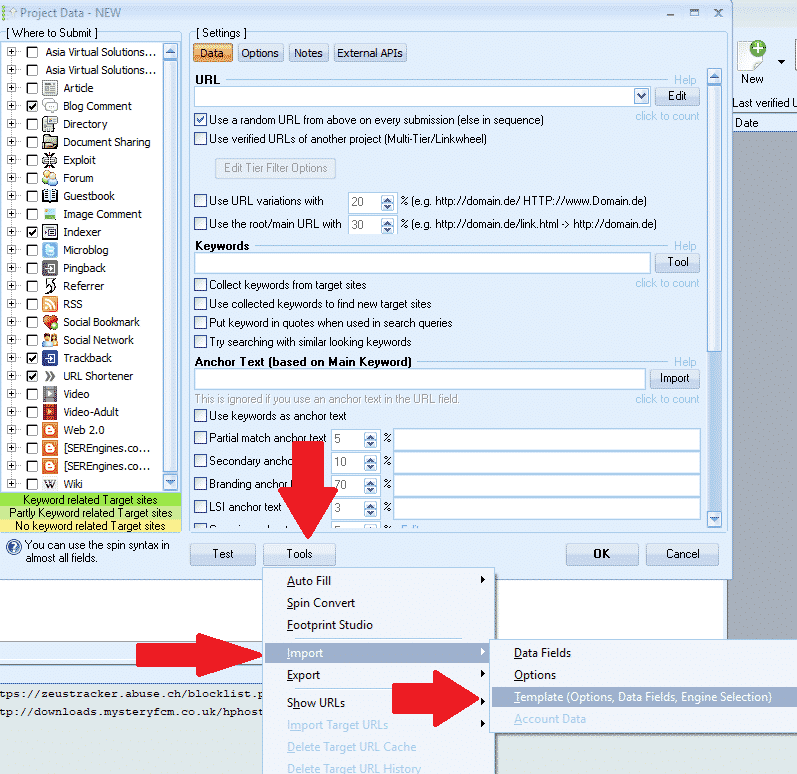
- Dann am unteren Ende des GSA Suchmaschinenranker Fenster, klicken Sie auf Werkzeuge Import VORLAGE (Optionen, Datenfelder, Motorenauswahl)
- Navigieren Sie zu dem Speicherort Ihrer Vorlage und wählen Sie diese aus.
[spacer height=”2px”]
Das war's! Sie haben nun erfolgreich eine Vorlage erstellt und importiert. Jetzt müssen Sie nur noch Inhalte hinzufügen.
Ich hoffe, Ihnen haben der Beitrag und das Video gefallen. Wenn Ihnen der Beitrag geholfen hat, dann liken und teilen Sie ihn bitte und hinterlassen Sie einen Kommentar, falls Sie Fragen haben.
Zu faul, eine GSA-SER-Vorlage zu erstellen
Wir erstellen Ihr Projekt für Sie – vollständig ausgearbeitete, gestaffelte GSA SER-Projekte.













 English
  বাংলা
বাংলা  简体中文
简体中文  Nederlands
  Français
  Deutsch (Sie)
  हिन्दी
  Bahasa Indonesia
  Italiano
  日本語
日本語  한국어
한국어  Bahasa Melayu
  Português do Brasil
  Русский
  Español de México
  Tagalog
  ไทย
ไทย  Tiếng Việt
  اردو
اردو  Türkçe