



GSA سرچ انجن رینکر گلوبل سائٹ لسٹ کو درست طریقے سے استعمال کرنے کے آسان اقدامات سیکھیں۔
GSA SER عالمی سائٹ کی فہرست ان اہم چیزوں میں سے ایک ہے جو ہم نے محسوس کی ہے کہ تمام GSA سرچ انجن رینکر صارفین میں سے 75% سے زیادہ وہ اپنے GSA سرچ انجن رینکر کو سیٹ کرتے وقت پوری طرح سے نہیں سمجھتے اور غلط ہو جاتے ہیں۔ ہم یہ کیسے جانتے ہیں میں آپ سے پوچھتا ہوں. ہم اپنی GSA SER VPS سروس استعمال کرنے والے 50+ صارفین سے GSA SER کی ترتیبات دیکھ سکتے ہیں، اور ہم ان سوالات کو سنتے ہیں جو لوگ پوچھتے ہیں جب وہ ہماری GSA SER لنک لسٹ اور GSA سرچ انجن رینکر ڈیٹا پیک خریدتے ہیں۔.
لہذا میں نے فیصلہ کیا ہے کہ اب وقت آگیا ہے کہ کے عنوان پر ایک پوسٹ بنائیں GSA SER گلوبل سائٹ لسٹ, ، لوگوں کو بہتر طور پر سمجھنے میں مدد کرنے کے لئے کہ گلوبل سائٹ کی فہرست کیا ہے اور فہرست کو صحیح طریقے سے کیسے استعمال کیا جائے۔.
عالمی سائٹ کی فہرست کہاں ہے اور اس کا استعمال کیا ہے؟
عالمی سائٹ کی فہرست کہاں ہے:
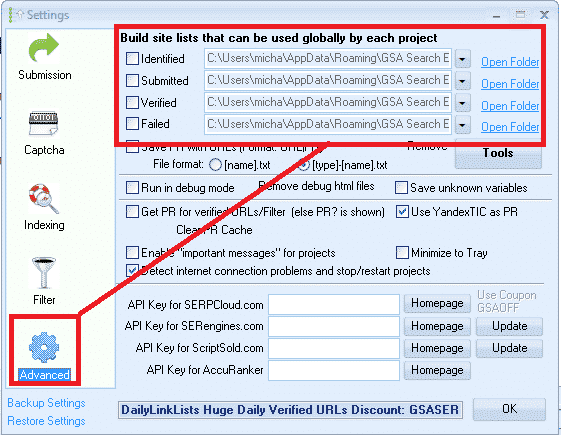
عالمی سائٹ کی فہرست مل سکتی ہے اگر آپ مرکزی اسکرین میں آپشنز ٹیب پر کلک کرتے ہیں، اور پھر ایڈوانسڈ ٹیب کے نیچے، جیسا کہ نیچے اسکرین شاٹ میں دکھایا گیا ہے۔.
پہلے سے طے شدہ طور پر فہرست آپ کے APPDATA فولڈر میں محفوظ ہوتی ہے، لیکن اس مقام کو تبدیل کیا جا سکتا ہے جہاں آپ اسے رکھنا چاہتے ہیں۔.
GSA SER عالمی سائٹ کی فہرست کس کے لیے استعمال کی جاتی ہے:
عالمی سائٹ کی فہرست وہ لنک اہداف ہیں جہاں GSA SER بھی پوسٹ کرتے ہیں، تاکہ آپ کے بیک لنکس بنائیں۔.
جب آپ پہلی بار خریدتے ہیں۔ GSA سرچ انجن رینکر فہرست تمام خالی ہو جائے گی، اور آپ پروجیکٹس میں بلٹ ان سکریپر کا استعمال کرکے، یا ٹولز مینو کے ذریعے فہرست درآمد کرکے، یا آپ ڈراپ باکس جیسے مشترکہ فولڈر کے ذریعے ادا شدہ فہرست کا استعمال کرکے فہرست میں لنکس درآمد کرسکتے ہیں۔.
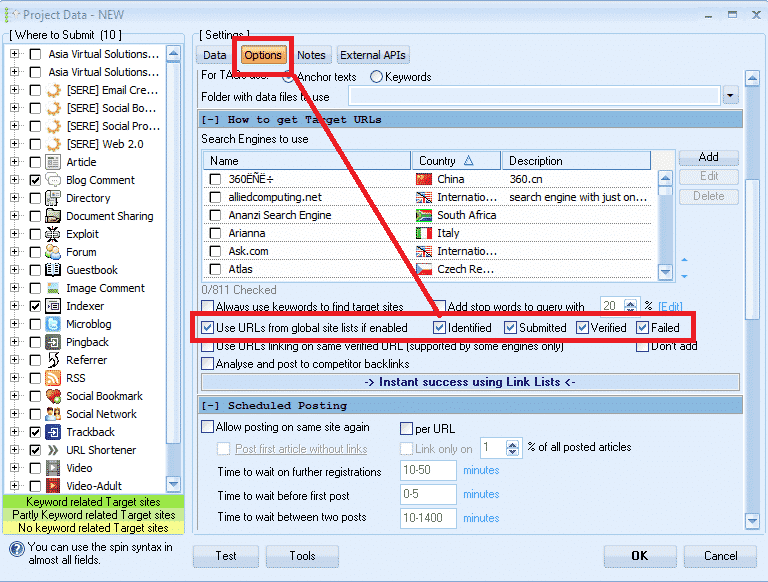
ایک نیا GSA پروجیکٹ بناتے وقت آپ کے پاس استعمال کرنے کا اختیار ہوتا ہے۔ عالمی سائٹ کی فہرست پوسٹ کرنے کے لیے، جیسا کہ ذیل کے اسکرین شاٹ میں ہے۔.
شناخت شدہ، جمع کرائے گئے، تصدیق شدہ اور ناکام اختیارات کے آگے وہ چیک باکس کیا ہیں؟
میں نے جو دیکھا ہے وہ یہ ہے کہ زیادہ تر صارفین کو واقعی اس بات کا یقین نہیں ہے کہ وہ چیک باکس کس کے لیے ہیں، اور زیادہ تر سوچتے ہیں کہ یہ فہرست کو استعمال کرنے کے لیے منتخب کرنے کا اختیار ہے یا نہیں، اس لیے وہ صرف جا کر تمام خانوں کو چیک کرتے ہیں، جو کہ غلط ہے، اس کا فہرست کو استعمال کرنے یا نہ کرنے کے انتخاب سے کوئی تعلق نہیں ہے۔.
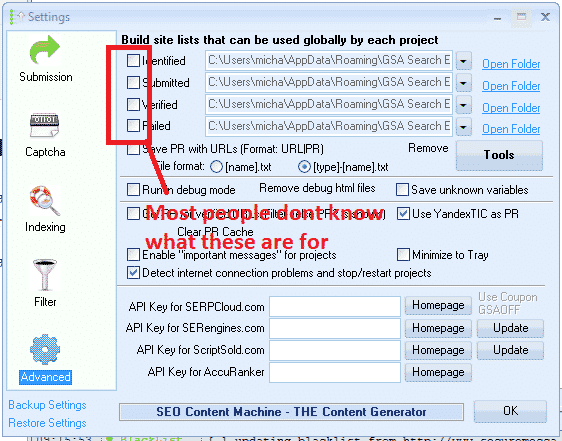
وہ چیک باکس دراصل کیا کرتے ہیں وہ فہرست میں لکھنے کے لیے لکھنے کی اجازت کو فعال یا غیر فعال کرنا ہے۔.
شناخت شدہ چیک باکس:
اگر آپ اپنے پروجیکٹس میں سرچ انجن کے آپشن کو سکریپ کرنے کے لیے استعمال کرتے ہیں، تو یہ اس فہرست میں سکریپ شدہ یو آر ایل کو شامل کر دے گا۔
جمع شدہ چیک باکس:
ہر بار جی ایس اے ایس ای آر اپنے کسی بھی پروجیکٹ کو کسی سائٹ پر جمع کروائیں، یہ اس سائٹ کو اس فہرست میں شامل کر دے گا۔
تصدیق شدہ چیک باکس:
جب بھی GSA کسی لنک کی تصدیق کرتا ہے جو اس نے آپ کے کسی پروجیکٹ میں پوسٹ کیا ہے وہ اس لنک کو اس فہرست میں شامل کر دے گا۔
ناکام چیک باکس:
جب بھی GSA کسی سائٹ پر پوسٹ کرنے سے قاصر ہوتا ہے، یہ اس سائٹ کو اس فہرست میں شامل کر دے گا۔
میری سفارش ہے۔ ان بکسوں میں سے کسی کو بھی چیک نہ کریں۔, ، خاص طور پر اگر آپ ادا شدہ استعمال کر رہے ہیں۔ لنک لسٹ جو ڈراپ باکس کے ذریعے شیئر کی جاتی ہے یا آپ بناتے ہیں۔ آپ کی اپنی فہرست.
وجہ ادا کی گئی ہے۔ کے ذریعے مشترکہ فہرست ڈراپ باکس عام طور پر صرف پڑھا جاتا ہے، لہذا آپ اس فہرست میں محفوظ کرنے کی کوشش میں وسائل ضائع کر رہے ہیں جس تک آپ کو صرف پڑھنے کی رسائی ہے۔.
ایک اور وجہ یہ ہے کہ GSA SER پہلے سے ہی اپنے بنائے ہوئے لنکس کو پروجیکٹ ڈیٹا میں محفوظ کرتا ہے اور اس کی تصدیق کرتا ہے، اس کے بعد اضافی فہرست میں محفوظ کرنے کا کوئی فائدہ نہیں ہے کیونکہ اس سے آپ کی ہارڈ ڈرائیو پھول جائے گی۔.
کسی بھی باکس کو چیک نہ کرنے کی میری بنیادی وجہ یہ ہے کہ میں 4 مختلف لنک لسٹ لوڈ کرنے کے لیے عالمی سائٹ کی فہرست استعمال کرتا ہوں۔ (ہم ذیل میں اس کا احاطہ کریں گے)
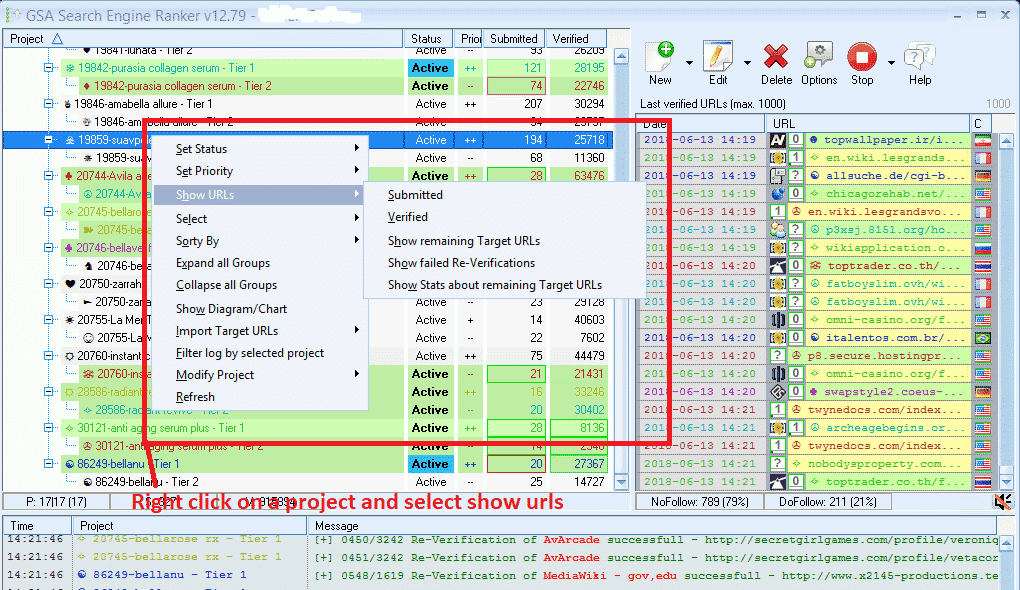
تصدیق شدہ، ناکام اور جمع کرائے گئے یو آر ایل کو کیسے دیکھیں پھر ان پروجیکٹس میں جن سے آپ پوچھ سکتے ہیں، یہ بہت آسان ہے۔ آپ کسی بھی پروجیکٹ پر دائیں کلک کریں اور نیچے اسکرین شاٹ کی طرح شو یو آر ایل کو منتخب کریں۔.
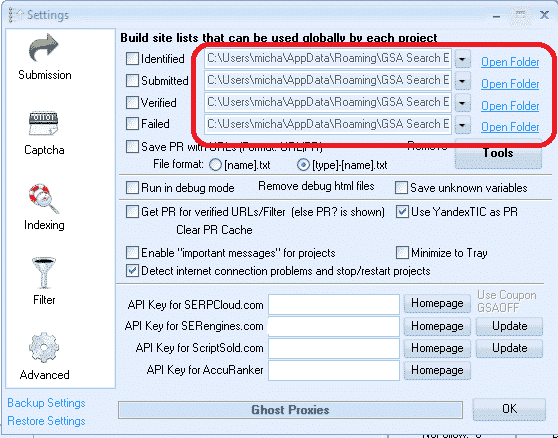
GSA SER گلوبل سائٹ لسٹ کے ہر آپشن کے آگے 4 فائل پاتھ کیا ہیں؟
یہ وہ جگہ ہیں جہاں فہرست محفوظ کی گئی ہے۔ جیسا کہ پہلے ذکر کیا گیا ہے، پہلے سے طے شدہ طور پر GSA ہر فہرست کے لیے APPDATA فولڈر میں ایک خالی فولڈر بناتا ہے، جس پر جانا اتنا آسان نہیں ہوتا لیکن خوش قسمتی سے GSA SER میں ایک شارٹ کٹ ہوتا ہے، یعنی ہر فہرست کے آگے اوپن فولڈر۔.
آپ اپنے کمپیوٹر یا یہاں تک کہ مشترکہ نیٹ ورک ڈرائیو پر کہیں بھی مقام تبدیل کر سکتے ہیں۔
بہت سے GSA سرچ انجن رینکر صارفین ادائیگی شدہ لنک کی فہرست کو سبسکرائب کرتے ہیں، جیسے ہماری اپنی ایشیا ورچوئل سلوشنز کوالٹی لنک لسٹ, ، جس میں ایک شناخت شدہ اور تصدیق شدہ لنک کی فہرست ہے، اور فہرست فراہم کرنے والے دیگر ہیں جیسے آٹو اپروو مارکیٹ پلیس، SER تصدیق شدہ فہرست اور بہت سے دوسرے، اور ان میں سے بہت سے فہرست فراہم کنندگان ڈراپ باکس کے ذریعے وہاں لنک کی فہرست کا اشتراک کرتے ہیں۔.
لہذا آپ کو اپنے کمپیوٹر یا اپنے کمپیوٹر پر ڈراپ باکس انسٹال کرنے کی ضرورت ہوگی۔ GSA SER VPS, ، پھر اپنی فہرست لوڈ کرنے کے لیے GSA SER عالمی سائٹ کی فہرست میں 4 سلاٹوں میں سے کوئی بھی استعمال کریں۔.
آپ کو اس حقیقت کے بارے میں فکر کرنے کی ضرورت نہیں ہے کہ اسے شناخت شدہ، جمع کرایا گیا، تصدیق شدہ یا ناکام کہا جاتا ہے، درحقیقت آپ ناموں کو مکمل طور پر نظر انداز کر سکتے ہیں کیونکہ اگر آپ خانوں کو چیک کرنے اور فہرست میں لکھنے کا ارادہ نہیں رکھتے ہیں تو اس کا کوئی مطلب نہیں ہے۔ لہذا 4 مختلف فہرستوں کا استعمال کرتے ہوئے سیٹ اپ کے نیچے اسکرین شاٹ پر ایک نظر ڈالیں۔.
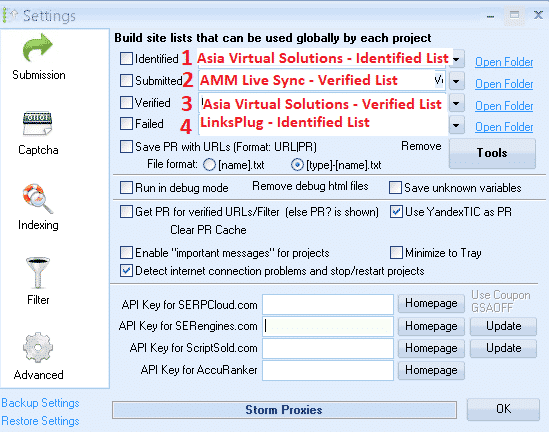
مندرجہ بالا اسکرین شاٹ میں تمام 4 فہرستیں میرے ساتھ ڈراپ باکس کے ذریعے شیئر کی گئی ہیں، اس لیے میں نے صرف ڈراپ ڈاؤن بٹن پر کلک کیا اور پھر اس جگہ پر جائیں جہاں وہ ڈراپ باکس فولڈر ہے وی پی ایس پی سی
- پوزیشن نمبر 1 میں میں نے ایشیا ورچوئل سلوشنز - شناخت شدہ لنک کی فہرست استعمال کی۔
- پوزیشن نمبر 2 میں میں نے AAM Live Sync تصدیق شدہ لنک کی فہرست استعمال کی۔
- پوزیشن نمبر 3 میں میں نے ایشیا ورچوئل سلوشنز - تصدیق شدہ لنک کی فہرست استعمال کی۔
- پوزیشن نمبر 4 میں میں نے LinksPlug سے لسٹ استعمال کی ہے۔
اگر آپ شاید اپنی فہرست بھی رکھنا چاہتے ہیں تو آپ کو صرف 4 سلاٹوں میں سے ایک استعمال کرنے کی ضرورت ہے - صرف اس فولڈر کو براؤز کریں جہاں آپ کی فہرست واقع ہے۔.
GSA سرچ انجن رینکر - ایک ہی وقت میں ایک سے زیادہ GSA SER لنک لسٹ کا استعمال کیسے کریں۔
عالمی سائٹ کی فہرست کو استعمال کرنے کے لیے آپ اپنے GSA سرچ انجن رینکر پروجیکٹس کو کیسے ترتیب دیتے ہیں۔
جب آپ اپنے پروجیکٹ بناتے ہیں تو آپ استعمال کرنے کا انتخاب کرتے ہیں۔ عالمی سائٹ کی فہرست پروجیکٹ کے اختیارات میں، جیسا کہ ذیل میں اسکرین شاٹ میں۔.
آپ اس سلاٹ کو استعمال کرنے کے لیے باکس کو چیک کرتے ہیں جہاں آپ کی فہرست شامل کی گئی ہے۔ لہذا اگر آپ متعدد فراہم کنندگان کی متعدد سائٹوں کی فہرست استعمال کر رہے ہیں اور آپ نے انہیں شامل کیا ہے جیسا کہ میں نے آپ کو پہلے دکھایا تھا تو پروجیکٹ کے اختیارات میں آپ شناخت شدہ، جمع کرائے گئے، تصدیق شدہ یا ناکام کو منتخب کرتے ہیں اگر آپ کی فہرست ان سلاٹس میں ہے۔ آپ کا پروجیکٹ پھر اس فہرست سے لنکس کو کھینچ لے گا جسے آپ نے استعمال کرنے کے لیے منتخب کیا ہے۔.
اگر آپ ہمارا آرڈر دیتے ہیں۔ GSA سرچ انجن رینکر ڈیٹا پیک پھر ہم آپ کے لیے پہلے سے طے شدہ طور پر ذیل کے اسکرین شاٹ کی طرح گلوبل سائٹ کی فہرست کو چیک کرتے ہیں۔.
اپنے GSA SER پروجیکٹس میں GSA سرچ انجن رینکر گلوبل سائٹ لسٹ کا استعمال کیسے کریں۔
GSA سرچ انجن ٹارگٹ یو آر ایل اور عالمی سائٹ کی فہرست میں کیا فرق ہے۔.
-
GSA سرچ انجن رینکر عالمی سائٹ کی فہرست
عالمی سائٹ کی فہرست وہ فہرست ہے جسے آپ کسی بھی جگہ اور کسی کے لیے استعمال کر سکتے ہیں۔ GSA SER پروجیکٹ, ، وہ صرف عام فہرست ہیں جو کسی مخصوص جگہ کے لیے نہیں کھرچتی ہیں۔ لنک کی فہرست جس کے لیے آپ ہماری سبسکرائب خریدتے ہیں وہ تمام عالمی سائٹ کی فہرست ہے۔.
-
GSA سرچ انجن رینکر ہدف URLs
ٹارگٹ یو آر ایل ایسے لنکس ہیں جو کسی خاص پروجیکٹ کے لیے سکریپ کیے جاتے ہیں اور لنکس سبھی کسی مقام یا موضوع سے متعلق ہوتے ہیں۔ لہذا آپ اپنے سکریپر جیسے GScraper یا Scrapebox یا کوئی اور استعمال کریں گے اور پھر کلیدی الفاظ کو پاؤں کے نشانات سے جوڑیں گے، اس لیے نتائج سبھی میں مطلوبہ الفاظ سے متعلق مواد یا عنوانات ہیں۔.
ٹارگٹ یو آر ایل کو عام طور پر میں شامل نہیں کیا جاتا ہے۔ عالمی سائٹ کی فہرست لیکن انہیں اس پروجیکٹ میں شامل کیا جاتا ہے جس کے لیے یو آر ایل کو سکریپ کیا گیا تھا، جیسا کہ نیچے دیے گئے اسکرین شاٹ میں۔.
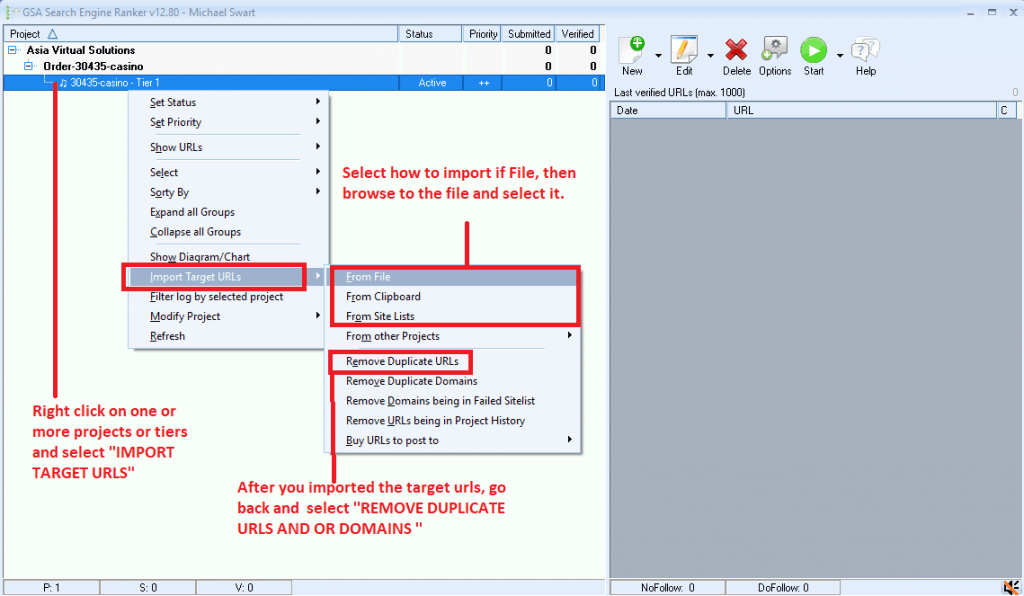
ٹارگٹ URLs کو .txt یا .sl فارمیٹ کے طور پر درآمد کیا جا سکتا ہے۔
GSA سرچ انجن رینکر ٹارگٹ یو آر ایل کیسے درآمد کریں۔
ٹھیک ہے، میں امید کرتا ہوں کہ اس مضمون نے آپ کو اس کے بارے میں بہتر تفہیم فراہم کی ہے۔ GSA سرچ انجن گلوبل سائٹ کی فہرست اور اپنے GSA SER پروجیکٹس سے زیادہ سے زیادہ فائدہ اٹھانے کے لیے اس کا صحیح استعمال کیسے کریں۔.
ایک اچھی سائٹ کی فہرست کا ہونا بہت ضروری ہے، اور ایشیا ورچوئل حل اس کے ساتھ ساتھ آپ کی مدد کر سکتے ہیں، باہر کوالٹی لنک کی فہرست یہ نہ صرف انٹرنیٹ پر دستیاب GSA فارمیٹ کی سب سے بڑی لنک لسٹ ہے، بلکہ یہ بہت اچھی کوالٹی بھی ہے اور ہم روزانہ کی بنیاد پر خود اس کا استعمال کرتے ہیں۔ ہماری معیاری عالمی لنک لسٹ پر مزید معلومات کے لیے مزید لنک کے لیے نیچے ایک نظر ڈالیں۔.
ایشیا ورچوئل سلوشنز - GSA SER گلوبل لنک لسٹ
کیا آپ بہترین استعمال شروع کرنا چاہتے ہیں؟ GSA سرچ انجن رینکر گلوبل لنک لسٹ انٹرنیٹ پر دستیاب ہے؟











 English
  বাংলা
বাংলা  简体中文
简体中文  Nederlands
  Français
  Deutsch (Sie)
  हिन्दी
  Bahasa Indonesia
  Italiano
  日本語
日本語  한국어
한국어  Bahasa Melayu
  Português do Brasil
  Русский
  Español de México
  Tagalog
  ไทย
ไทย  Tiếng Việt
  اردو
اردو  Türkçe