



GSA Arama Motoru Sıralama Projesi Şablonu Nasıl Oluşturulur?
Birçok kişi benden onlar için bir GSA şablonu oluşturup oluşturamayacağımı sordu. Ama atasözünde de denildiği gibi... “"Bir adama balık verirseniz onu bir günlüğüne doyurursunuz, ama ona balık tutmayı öğretirseniz onu ömür boyu doyurursunuz."”, Aynı şey benim için de geçerli, size sadece bir şablon veriyorum. Bugün size tamamen size özel bir şablon oluşturmayı öğreteceğim. GSA Arama Motoru Sıralayıcısı proje şablonu
Yanınızdakiler artık bir şeyin tam olarak ne olduğunu biliyor. GSA Arama Motoru Sıralayıcısı proje şablonu Yani, aşağıda size neden veya ne zaman bir şeye ihtiyacınız olduğunu açıklayacağım. GSA Arama Motoru Sıralayıcısı proje şablonu ve ne işe yaradığı.
[spacer height=”2px”]
[full_width][one_half padding=”0 0 10px 0”]
GSA Arama Motoru Sıralama projesi şablonuna neden ihtiyacınız var?
[spacer height=”2px”]
Benim gibi yüzlerce eser üreten bazı insanlar GSA Arama Motoru Sıralama Projeleri Her ay, genellikle aynı platformları, aynı filtreleri, aynı seçenekleri kullanırlar ve bazı kişiler proje oluştururken aynı genel e-posta hesabını bile kullanırlar.
Dolayısıyla her proje oluşturduğumuzda tüm kutuları işaretlememiz, aynı filtreleri seçmemiz, aynı seçenekleri değiştirmemiz vb. gerekecek; bu da gerçekten zaman alıcı ve hata yapma olasılığının yüksek olduğu bir süreç oluyor.
[/one_half][one_half padding=”0 0 0 10px”]
GSA Arama Motoru Sıralama projesi şablonu sizin için ne yapar?
[spacer height=”2px”]
 Ana GSA Arama Motoru Sıralayıcısı'nın yaptığı şey Proje şablonunun en büyük avantajı, size çok zaman kazandırmasıdır; çünkü şablonunuzu içe aktarmanız yeterlidir ve tüm ayarlar ve filtreler orada hazır olacaktır.
GSA Arama Motoru Sıralama projesi şablonu, hata yapmanızı veya bir seçeneği ya da filtreyi işaretlemeyi unutmanızı önleyebilir.
GSA Arama Motoru Sıralama Projesi, proje oluşturmada tutarlılığı sağlar.
[/one_half][/full_width]
Aşağıdaki videoda GSA Arama Motoru Sıralama projesi şablonunu baştan sona nasıl oluşturduğumuzu görebilirsiniz veya videonun altında yer alan basit adımları takip edebilirsiniz.
[sosyalkilit]
GSA Arama Motoru Sıralama Projesi Şablonu Nasıl Oluşturulur?
[/sociallocker]
[spacer height=”2px”]
GSA Arama Motoru Sıralayıcısı proje şablonu oluşturmak için şu adımları izleyin.
[spacer height=”2px”]
- Yeni bir projeye her zamanki gibi başlayın.
- Başvuru yapmak istediğiniz tüm platformları seçin.
- İşaretleyici olarak kullanabileceğimiz bir kelime belirleyelim, örneğin: test şablonum (Bu, daha sonra alanları kolayca bulup işaretleyiciyi silebilmemiz için yapılıyor.)
- Lütfen şu adresi girin: http://mytesttemplate.com
- Ardından, boş alanların tümünü işaretleme metninizle doldurun: test şablonum, Artık aşağıdaki ekran görüntülerine benzer şekilde görünmelidir.
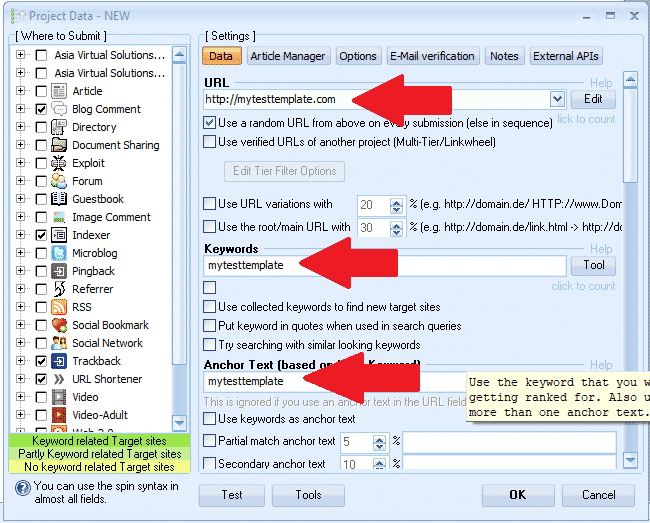

[spacer height=”2px”]
- Eğer "Belgeler" platformunu seçtiyseniz, bir PDF belgesi eklemeniz gerekecek; sadece yapıştırmayın; belge için mytesttemplate yerine, herhangi bir PDF dosyasını tarayıp seçin; endişelenmeyin, bu PDF dosyasını daha sonra işlem sırasında tekrar sileceğiz.
- Profil resmi gerektiren bir platform seçtiyseniz, resmi sadece yapıştırmayın; mytesttemplate'ten herhangi bir resmi seçin, endişelenmeyin, işlemin ilerleyen aşamalarında bu resmi tekrar sileceğiz.
- Veri sekmesindeki tüm alanları doldurduktan sonra, aşağıdaki adıma geçin: MAKALE YÖNETİCİSİ sekme.
- Tıklamak EKLEMEK ve ardından seçin MANUEL OLARAK GİRİN
- Makale Başlığı, yapıştırın: mytesttemplate
- Makale metni, şuraya yapıştırın: mytesttemplate
- Şimdi tıklayın TAMAM
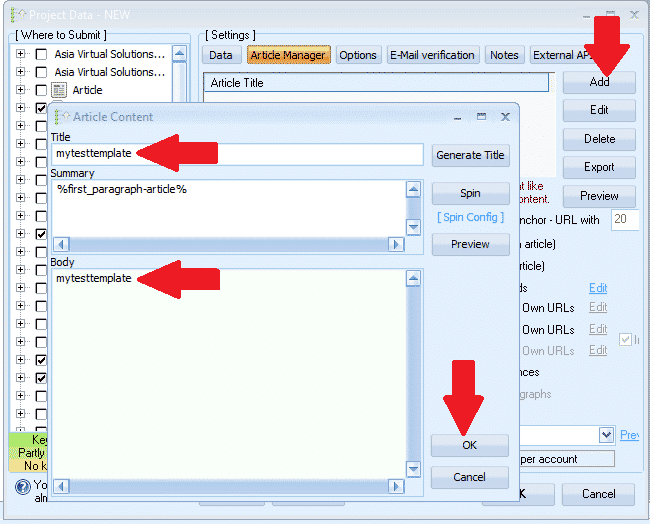
- Şimdi sırada şu var: SEÇENEKLER sekme
- Tüm seçimlerinizi yapın ve filtrelerinizi ayarlayın. Hepsi bu, Seçenekler sekmesinde başka yapacak bir şey yok.
- Sonraki adım... E-POSTA sekme
- Orada gördüğünüz varsayılan e-postayı silin ve ardından tıklayın. EKLEMEK
- Seçme MANUEL OLARAK
- E-posta adresinizi aşağıdaki gibi girin: Benim************@************te.com ve tıklayın TAMAM
- Şimdi gösteriyle ilgili ilk e-postayı silin. — yalnızca az önce eklediğimiz e-postayı görmelisiniz; Benim************@************te.com
- E-postanıza tıklayın ve ardından gösterilen yere gidin. POP3 Sunucusumail.mytesttemplate.com adresini doldurun.
- Doldurmak ŞİFRE olarak: mytesttemplate
- E-posta alanlarınız artık aşağıdaki ekran görüntüsündeki gibi görünmelidir:

[full_width][one_third]Şimdiye kadar harika bir iş çıkardınız, ayarlarımızı tamamladık ve artık tek yapmanız gereken tıklamak. TAMAM Projeyi kaydetmek için. Tamam'a tıkladığınızda, sağ tarafta gördüğünüz uyarıyı alacaksınız. Bu bir sorun değil, sadece tıklayın. GÖRMEZDEN GELMEK ve projeniz şimdi kaydedilecek[/one_third][two_third_last]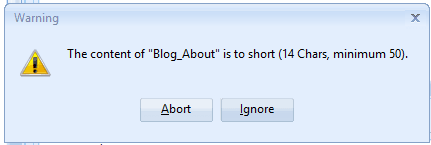 [/two_third_last][/full_width]
[spacer height=”2px”]
Evet, projemizi oluşturduk ve kaydettik, ancak henüz heyecanlanmayın, işimiz henüz bitmedi, projemizi tamamlamadan önce birkaç adım daha var. GSA Arama Motoru Sıralayıcısı proje şablonu Tamamlandı, o halde kalan adımlara devam edelim.
[tam_genişlik][üçte_bir]
- Şimdi projeyi tekrar açmak için çift tıklayın.
- Sırada en altta GSA Arama Motoru sıralayıcısı Pencereye tıklayın. ALETLER, ve sonra İHRACAT, ve ŞABLON (Seçenekler, Veri Alanları, Motor Seçimi)
- Dosyayı, tüm dosyalarınızı saklamak istediğiniz bir klasöre kaydedin. GSA Arama Motoru Sıralama projesi şablonları. Dosya adı şöyle bir şey olurdu: MyTier1Template.gsatml
[/bir_üçte_bir][iki_üçte_son]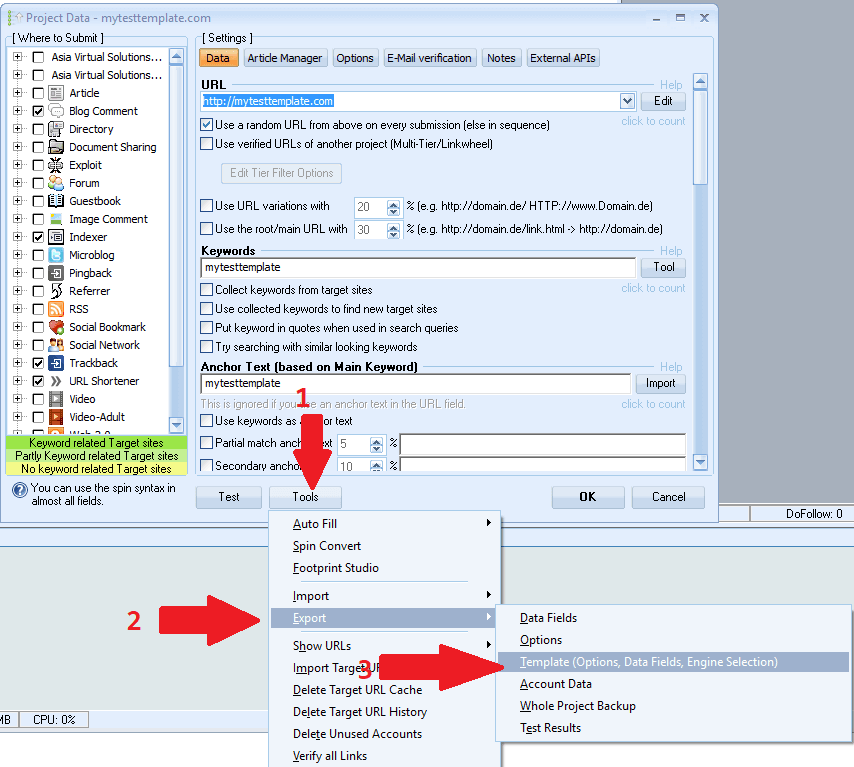 [/two_third_last][/full_width]
[spacer height=”2px”]
Tamam, şimdi proje dosyamızı oluşturduk ve dışa aktardık, şimdi dışa aktardığımız bu projeyi düzenlemeye geçeceğiz. Bu aşamada işimiz bitti. GSA Arama Motoru Sıralayıcısı Şimdilik. Oradaki projeyi silebilir ve GSA SER'i kapatabilirsiniz, biraz sonra tekrar kullanacağız.
Şimdi dışa aktarılan dosyayı düzenlemeye başlayalım, bunun için bir düzenleyiciye ihtiyacımız olacak. NOTEPAD++, Buradan ücretsiz olarak indirebilirsiniz: https://notepad-plus-plus.org/downloads/
- Öncelikle projeyi dışa aktardığınız klasörü açmanızı rica ediyorum.
- Klasörde artık 2 dosya olduğunu fark edeceksiniz, bunlardan biri şu şekilde bitecek. .makaleler ve diğeri de bununla sona erecek. .gsatml
- "Şununla bitene ihtiyacımız yok" .makaleler, Yani o dosyayı silebilirsiniz.
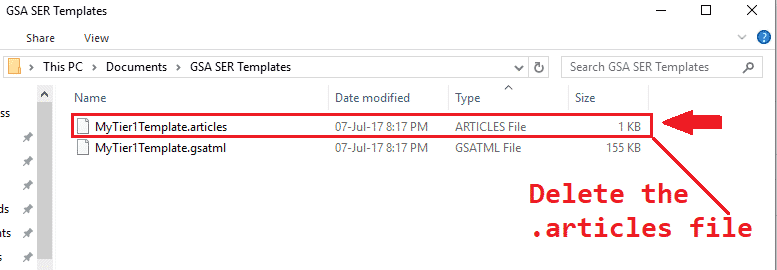
- Sonraki adım şudur: sağ tıklama ile biten dosyada .gsatml, Benim durumumda dosya MyTier1Template.gsatml.
- Seçilenler NOTEPAD++ İLE DÜZENLEYİN Bu işlem dosyayı Notepad++'da açacak ve biz de üzerinde çalışmaya başlayabiliriz.
- İkinci satır, GSA Search Engine Ranker'da oluştururken belirttiğimiz URL olacak; benim durumumda şöyle görünüyor: URL=http://mytesttemplate.com
- Şimdi URL'yi silmeniz gerekiyor, böylece geriye sadece şu kalmalı: URL=
- Şimdi menü çubuğunda Not Defteri++, seçiniz ARAMAK ve ardından aşağı kaydırıp seçin. YER DEĞİŞTİRMEK
- Açılan DEĞİŞTİR penceresinde, GSA Arama Motoru sıralama projenizi oluştururken kullandığınız işaretleyici kelimeyi yazmanız gerekiyor; benim durumumda bu kelime şuydu: test şablonum, Lütfen şu şekilde doldurun: Aranacak Şey: =testtemplate ve şununla değiştir: = Ardından TÜMÜNÜ DEĞİŞTİR düğmesine basın
- Aşağıdaki ekran görüntüsüne benzer görünmelidir:

Harika, peki daha önce ne gösteriliyordu? =mytesttemplate artık sadece şu şekilde olmalıdır: =
- Ardından aşağı kaydırarak eklediğiniz PDF dosyasını bulun. Belge, Projeyi oluşturduğunuzda, "Document=c://pdf dosyanız" şeklinde bir ifade görünecektir.
- Dosya yolunu kaldırın. ihtisas, Bu nedenle yalnızca şunları gösterir: Belge=
- Şimdi de tüm e-posta kayıtlarını silmemiz gerekiyor: Bunu yapmanın en kolay ve hızlı yolu, BUL araçlarını kullanmaktır — Yüklemek için, Notepad++ açıkken CTR+F tuşlarına basın.
- Bulmak istediğim şey İşaretleyici ifadenizi tekrar girmeniz gerekiyor, benimki şuydu: mytesttemplate
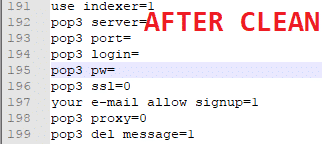
- Şimdi "İleri"ye tıklayın ve ilk girişi göreceksiniz, "=" işaretinden sonraki her şeyi değiştirin (sadece "=" işaretini istiyoruz). Ayrıca tüm şifreyi de silebilirsiniz. Aşağıda temizlemeden önceki ve sonraki ekran görüntüleri bulunmaktadır.
- Tamam, işimiz bitti., dosyayı kaydet İşte bu kadar, şablonunuz hazır.

[spacer height=”2px”]
GSA Arama Motoru Sıralama projesi şablonunuzu nasıl kullanabilirsiniz?
[spacer height=”2px”]
Şablonu kullanmak çok kolay, sadece aşağıdaki birkaç adımı izleyin.
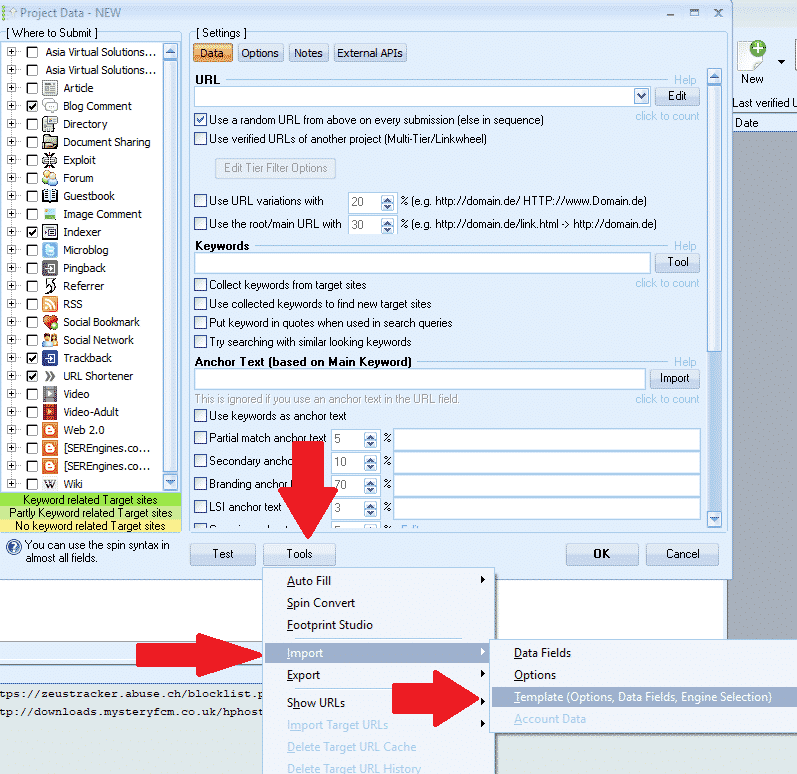
- GSA Arama Motoru Sıralayıcısı'nda tıklayın: Yeni Yeni bir projeye başlamak için.
- Sonra en altta GSA Arama Motoru sıralayıcısı pencereye tıklayın Aletler İçe aktarmak ŞABLON (Seçenekler, Veri Alanları, Motor Seçimi)
- Şablonunuzun kaydedildiği yere gidin ve ardından onu seçin.
[spacer height=”2px”]
İşte bu kadar, şablonu başarıyla oluşturdunuz ve içe aktardınız, şimdi tek yapmanız gereken içerik eklemek.
Umarım gönderiyi ve videoyu beğenmişsinizdir. Eğer gönderiden faydalandıysanız lütfen beğenin ve paylaşın, sorularınız varsa yorum bırakın.
GSA SER ŞABLONU OLUŞTURMAK İÇİN ÇOK TEMBELİM
Projenizi sizin için biz oluşturalım – tamamen oluşturulmuş kademeli GSA SER projeleri.













 English
  বাংলা
বাংলা  简体中文
简体中文  Nederlands
  Français
  Deutsch (Sie)
  हिन्दी
  Bahasa Indonesia
  Italiano
  日本語
日本語  한국어
한국어  Bahasa Melayu
  Português do Brasil
  Русский
  Español de México
  Tagalog
  ไทย
ไทย  Tiếng Việt
  اردو
اردو  Türkçe