



เรียนรู้ขั้นตอนง่ายๆ ในการใช้งาน GSA Search Engine Ranker Global Site List อย่างถูกต้อง
รายชื่อเว็บไซต์ทั่วโลกของ GSA SER เป็นหนึ่งในสิ่งสำคัญที่เราสังเกตเห็นว่าผู้ใช้ GSA Search Engine Ranker มากกว่า 75% ไม่เข้าใจอย่างถ่องแท้และตั้งค่า GSA Search Engine Ranker ผิดพลาด คุณอาจสงสัยว่าเรารู้ได้อย่างไร? เราสามารถดูการตั้งค่า GSA SER จากผู้ใช้กว่า 50 รายที่ใช้บริการ GSA SER VPS ของเรา และเราได้ยินคำถามที่ผู้คนถามเมื่อซื้อแพ็กเกจรายชื่อลิงก์ GSA SER และแพ็กเกจข้อมูล GSA Search Engine Ranker ของเรา.
ดังนั้นฉันจึงตัดสินใจว่าถึงเวลาแล้วที่จะเขียนโพสต์เกี่ยวกับหัวข้อนี้ รายชื่อไซต์ทั่วโลกของ GSA SER, เพื่อช่วยให้ผู้คนเข้าใจมากขึ้นว่ารายชื่อเว็บไซต์ทั่วโลกคืออะไร และวิธีการใช้งานรายชื่อดังกล่าวอย่างถูกต้อง.
รายชื่อเว็บไซต์ทั่วโลกอยู่ที่ไหน และใช้ทำอะไร?
รายชื่อเว็บไซต์ทั่วโลกอยู่ที่ไหน:
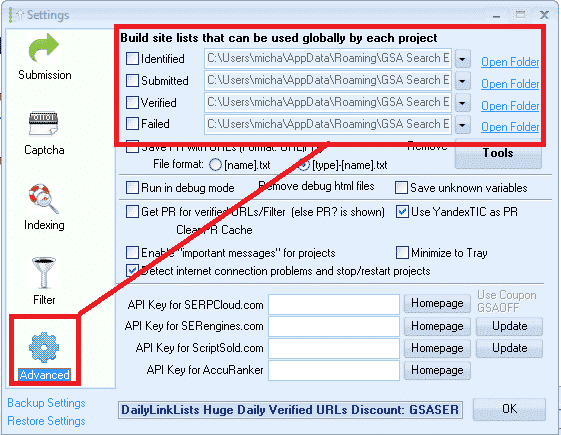
คุณสามารถดูรายชื่อเว็บไซต์ทั่วโลกได้โดยคลิกที่แท็บ OPTIONS ในหน้าจอหลัก จากนั้นไปที่แท็บ ADVANCED ดังที่แสดงในภาพหน้าจอด้านล่าง.
โดยค่าเริ่มต้น รายชื่อจะถูกบันทึกไว้ในโฟลเดอร์ APPDATA ของคุณ แต่คุณสามารถเปลี่ยนตำแหน่งนี้ไปยังที่ใดก็ได้ที่คุณต้องการ.
รายชื่อไซต์ทั่วโลกของ GSA SER ใช้สำหรับอะไร:
รายชื่อเว็บไซต์ทั่วโลก GSA SER จะโพสต์ลิงก์ไปยังเป้าหมายเหล่านี้ด้วย เพื่อสร้างแบ็กลิงก์ของคุณ.
เมื่อคุณซื้อครั้งแรก GSA Search Engine Ranker รายการทั้งหมดจะว่างเปล่า และคุณสามารถนำเข้าลิงก์ลงในรายการได้โดยใช้โปรแกรมดึงข้อมูลในตัวของโปรเจกต์ หรือโดยการนำเข้ารายการผ่านเมนูเครื่องมือ หรือคุณสามารถใช้รายการแบบชำระเงินผ่านโฟลเดอร์ที่แชร์ เช่น Dropbox.
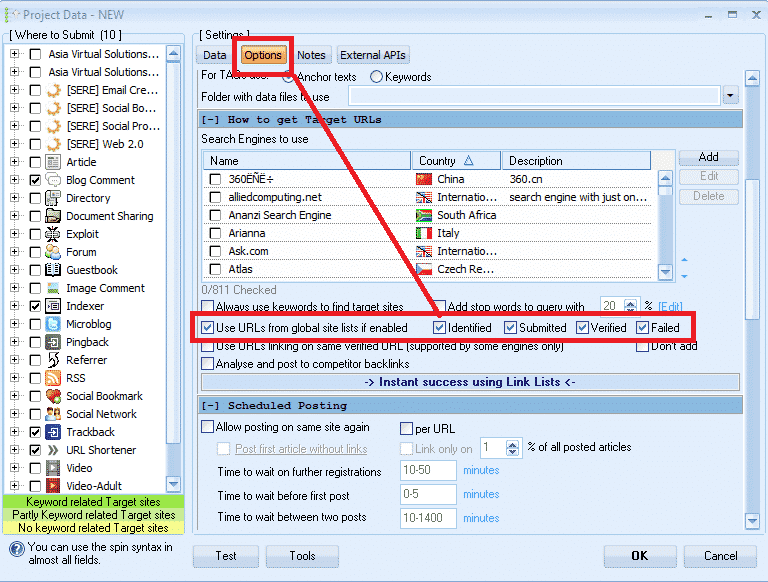
เมื่อสร้างโครงการ GSA ใหม่ คุณมีตัวเลือกในการใช้ รายการไซต์ทั่วโลก เพื่อโพสต์ไปยังที่อยู่ตามที่แสดงในภาพหน้าจอด้านล่าง.
ช่องทำเครื่องหมายที่อยู่ถัดจากตัวเลือก "ระบุแล้ว", "ส่งแล้ว", "ตรวจสอบแล้ว" และ "ล้มเหลว" นั้นหมายถึงอะไร?
จากที่ผมสังเกต ผู้ใช้ส่วนใหญ่ไม่แน่ใจว่าช่องทำเครื่องหมายเหล่านั้นมีไว้ทำอะไร และส่วนใหญ่คิดว่ามันเป็นตัวเลือกในการเลือกใช้รายการหรือไม่ ดังนั้นพวกเขาจึงไปทำเครื่องหมายในช่องทั้งหมด ซึ่งเป็นความเข้าใจผิด มันไม่เกี่ยวข้องกับการเลือกใช้รายการหรือไม่ใช้รายการเลย.
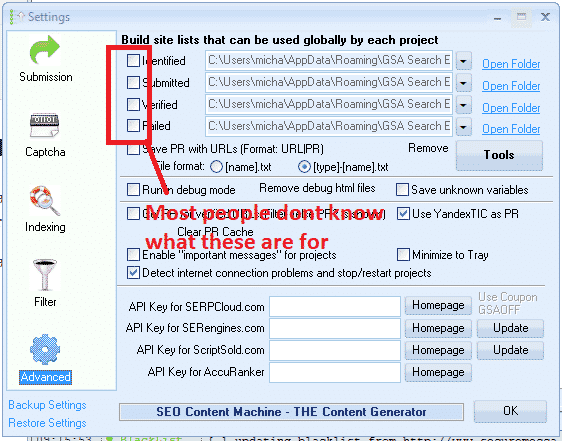
ช่องทำเครื่องหมายเหล่านั้นมีหน้าที่เปิดหรือปิดสิทธิ์ในการเขียนข้อมูลลงในรายการ.
ช่องทำเครื่องหมายที่ระบุไว้ :
หากคุณใช้ตัวเลือกเครื่องมือค้นหาในโปรเจ็กต์ของคุณเพื่อดึงข้อมูล URL ที่ดึงมาได้จะถูกเพิ่มลงในรายการนี้
ช่องทำเครื่องหมายที่ส่งแล้ว:
ทุกครั้ง GSA SER ส่งโปรเจ็กต์ของคุณไปยังเว็บไซต์ใดก็ได้ ระบบจะเพิ่มเว็บไซต์ที่คุณส่งโปรเจ็กต์ไปลงในรายการนี้
ช่องทำเครื่องหมายยืนยัน:
ทุกครั้งที่ GSA ตรวจสอบความถูกต้องของลิงก์ที่โพสต์ในโครงการใดๆ ของคุณ ลิงก์นั้นจะถูกเพิ่มลงในรายการนี้
ช่องทำเครื่องหมายที่ล้มเหลว:
ทุกครั้งที่ GSA ไม่สามารถโพสต์ไปยังเว็บไซต์ใดเว็บไซต์หนึ่งได้ ระบบจะเพิ่มเว็บไซต์นั้นลงในรายการนี้
คำแนะนำของฉันคือ ห้ามทำเครื่องหมายในช่องเหล่านั้น, โดยเฉพาะอย่างยิ่งหากคุณใช้บริการแบบเสียเงิน รายการลิงก์ที่แชร์ผ่าน Dropbox หรือที่คุณสร้างขึ้นเอง รายชื่อของคุณเอง.
เหตุผลก็เพราะว่าจ่ายเงินไปแล้ว รายชื่อที่แชร์ผ่าน โดยปกติ Dropbox จะเป็นแบบอ่านอย่างเดียว ดังนั้นคุณจึงสิ้นเปลืองทรัพยากรหากพยายามบันทึกข้อมูลลงในรายการที่คุณมีสิทธิ์เข้าถึงแบบอ่านอย่างเดียวเท่านั้น.
อีกเหตุผลหนึ่งก็คือ เนื่องจาก GSA SER ได้บันทึกลิงก์ที่สร้างและตรวจสอบแล้วลงในข้อมูลโครงการอยู่แล้ว การบันทึกลิงก์เหล่านั้นลงในรายการเพิ่มเติมจึงแทบไม่มีประโยชน์ เพราะจะทำให้ฮาร์ดไดรฟ์ของคุณเต็มเร็วขึ้นเท่านั้น.
เหตุผลหลักที่ฉันไม่ได้เลือกช่องใด ๆ เลยก็คือ ฉันใช้รายการเว็บไซต์ทั่วโลกเพื่อโหลดรายการลิงก์ 4 รายการที่แตกต่างกัน (เราจะกล่าวถึงเรื่องนี้เพิ่มเติมในภายหลัง)
คุณอาจสงสัยว่าแล้วจะดู URL ที่ได้รับการยืนยัน URL ที่ล้มเหลว และ URL ที่ส่งแล้วในโปรเจ็กต์ได้อย่างไร คำตอบนั้นง่ายมาก คุณคลิกขวาที่โปรเจ็กต์ใดก็ได้แล้วเลือก "แสดง URL" ดังภาพหน้าจอด้านล่าง.

เส้นทางไฟล์ทั้ง 4 เส้นทางที่อยู่ถัดจากแต่ละตัวเลือกในรายการไซต์ GSA SER Global คืออะไร?
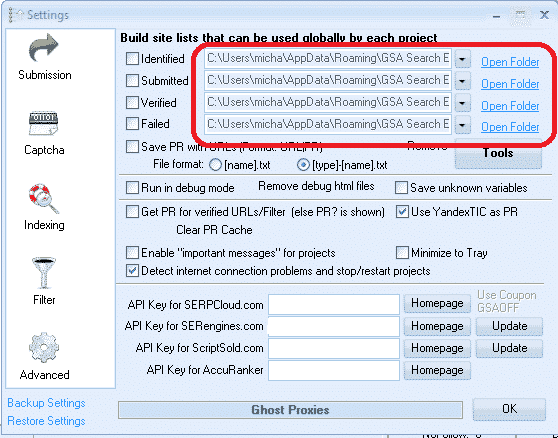
นี่คือตำแหน่งที่บันทึกรายการไว้ ดังที่กล่าวไว้ก่อนหน้านี้ โดยค่าเริ่มต้น GSA จะสร้างโฟลเดอร์ว่างสำหรับแต่ละรายการในโฟลเดอร์ APPDATA ซึ่งอาจเข้าถึงได้ไม่สะดวกนัก แต่โชคดีที่มีทางลัดใน GSA SER นั่นคือปุ่ม OPEN FOLDER ที่อยู่ถัดจากแต่ละรายการ.
คุณสามารถเปลี่ยนตำแหน่งที่ตั้งไปที่ใดก็ได้บนคอมพิวเตอร์ของคุณ หรือแม้แต่ไดรฟ์เครือข่ายที่ใช้ร่วมกัน
หลาย GSA Search Engine Ranker ผู้ใช้สมัครรับรายชื่อลิงก์แบบเสียค่าใช้จ่าย เช่น รายชื่อลิงก์ของเราเอง รายการลิงก์คุณภาพของ Asia Virtual Solutions, ซึ่งมีรายการลิงก์ที่ระบุและตรวจสอบแล้ว และยังมีผู้ให้บริการรายการอื่นๆ เช่น Auto Approve Market Place, SER Verified List และอื่นๆ อีกมากมาย และผู้ให้บริการรายการเหล่านี้จำนวนมากแชร์รายการลิงก์ของตนผ่าน Dropbox.
สิ่งที่คุณต้องทำคือติดตั้ง Dropbox บนคอมพิวเตอร์ของคุณหรืออุปกรณ์ของคุณ GSA SER VPS, จากนั้นให้ใช้ช่องใดช่องหนึ่งจาก 4 ช่องในรายการไซต์ทั่วโลกของ GSA SER เพื่อโหลดรายการของคุณ.
คุณไม่ต้องกังวลว่ามันจะชื่อว่า "ระบุแล้ว" "ส่งแล้ว" "ตรวจสอบแล้ว" หรือ "ล้มเหลว" เพราะจริงๆ แล้วคุณสามารถเพิกเฉยต่อชื่อเหล่านั้นได้เลย เนื่องจากมันไม่มีความหมายอะไรหากคุณไม่ได้วางแผนที่จะติ๊กช่องและเขียนข้อมูลลงในรายการ ดังนั้นลองดูภาพหน้าจอการตั้งค่าโดยใช้รายการที่แตกต่างกัน 4 รายการด้านล่างนี้.
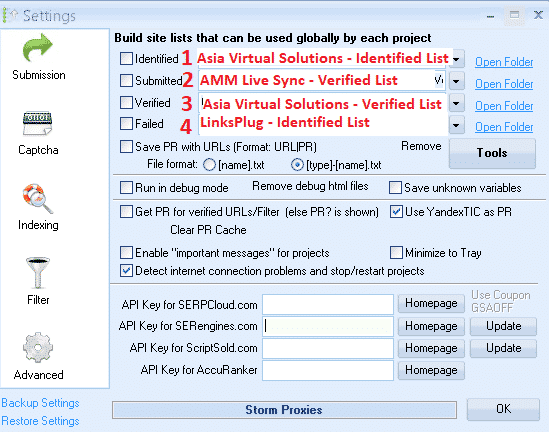
ในภาพหน้าจอข้างต้น รายชื่อทั้ง 4 รายการถูกแชร์กับฉันผ่าน Dropbox ดังนั้นสิ่งที่ฉันทำก็แค่คลิกที่ปุ่มดรอปดาวน์ แล้วไปยังตำแหน่งที่โฟลเดอร์ Dropbox นั้นอยู่บนเครื่องของฉัน VPS พีซี
- ในตำแหน่งที่ 1 ฉันใช้รายการลิงก์ที่ระบุไว้ของ Asia Virtual Solutions
- ในตำแหน่งที่ 2 ฉันใช้รายการลิงก์ที่ตรวจสอบแล้วของ AAM Live Sync
- ในตำแหน่งที่ 3 ฉันใช้รายการลิงก์ที่ได้รับการตรวจสอบแล้วของ Asia Virtual Solutions
- ในตำแหน่งที่ 4 ฉันได้ใช้รายการจาก LinksPlug
หากคุณต้องการมีรายการของคุณเองด้วย คุณก็เพียงแค่ใช้ช่องใดช่องหนึ่งจาก 4 ช่องที่มีอยู่ – เพียงแค่เลือกโฟลเดอร์ที่เก็บรายการของคุณไว้.
GSA Search Engine Ranker – วิธีการใช้งานรายการลิงก์ GSA SER หลายรายการพร้อมกัน
คุณจะตั้งค่าโปรเจ็กต์ GSA Search Engine Ranker ของคุณให้ใช้รายการเว็บไซต์ทั่วโลกได้อย่างไร
เมื่อคุณสร้างโปรเจ็กต์ คุณจะเลือกใช้ รายชื่อเว็บไซต์ทั่วโลก ในตัวเลือกโปรเจ็กต์ ดังตัวอย่างในภาพหน้าจอด้านล่าง.
คุณเลือกช่องเพื่อใช้สล็อตที่เพิ่มรายการของคุณไว้ ดังนั้น หากคุณใช้รายการเว็บไซต์หลายรายการจากผู้ให้บริการหลายราย และคุณได้เพิ่มรายการเหล่านั้นตามที่ผมแสดงให้ดูไปก่อนหน้านี้แล้ว ในตัวเลือกโครงการ ให้เลือก Identified, Submitted, Verified หรือ Failed หากรายการของคุณอยู่ในสล็อตเหล่านั้น โครงการของคุณจะดึงลิงก์จากรายการที่คุณเลือกใช้โดยอัตโนมัติ.
หากคุณสั่งซื้อสินค้าของเรา ชุดข้อมูลการจัดอันดับเครื่องมือค้นหาของ GSA จากนั้นระบบจะตรวจสอบรายชื่อไซต์ทั่วโลกให้คุณโดยอัตโนมัติ ดังเช่นในภาพหน้าจอด้านล่าง.
วิธีใช้งาน GSA Search Engine Ranker Global Site List ในโครงการ GSA SER ของคุณ
ความแตกต่างระหว่าง URL เป้าหมายของเครื่องมือค้นหา GSA กับรายการเว็บไซต์ทั่วโลกคืออะไร.
-
รายชื่อเว็บไซต์ระดับโลกของ GSA Search Engine Ranker
รายชื่อเว็บไซต์ทั่วโลกคือรายชื่อที่คุณสามารถใช้ได้กับทุกกลุ่มเป้าหมายและทุกรูปแบบ โครงการ GSA SER, ลิงก์เหล่านั้นเป็นเพียงรายการทั่วไป ไม่ได้คัดกรองมาเพื่อกลุ่มเป้าหมายเฉพาะ รายการลิงก์ที่คุณซื้อหรือสมัครรับนั้นเป็นรายการเว็บไซต์ทั่วโลก.
-
เป้าหมายการจัดอันดับเครื่องมือค้นหา GSA URL
URL เป้าหมายคือลิงก์ที่ถูกดึงมาเพื่อใช้ในโครงการเฉพาะ และลิงก์เหล่านั้นเกี่ยวข้องกับหัวข้อหรือกลุ่มเฉพาะนั้นๆ ดังนั้นคุณจะใช้โปรแกรมดึงข้อมูล เช่น GScraper หรือ Scrapebox หรือโปรแกรมอื่นๆ แล้วผูกคำหลักเข้ากับข้อมูลเหล่านั้น เพื่อให้ผลลัพธ์ทั้งหมดมีเนื้อหาหรือชื่อเรื่องที่เกี่ยวข้องกับคำหลัก.
โดยปกติแล้ว URL เป้าหมายจะไม่ถูกเพิ่มเข้าไปใน รายการเว็บไซต์ทั่วโลก แต่ URL เหล่านั้นจะถูกเพิ่มเข้าไปในโปรเจกต์ที่ดึงข้อมูล URL มา ดังเช่นในภาพหน้าจอด้านล่าง.
สามารถนำเข้า URL เป้าหมายได้ในรูปแบบ .txt หรือ .sl
วิธีการนำเข้า URL เป้าหมายของ GSA Search Engine Ranker

ก็จบเพียงเท่านี้ หวังว่าบทความนี้จะช่วยให้คุณเข้าใจเรื่องนี้ได้ดียิ่งขึ้น รายชื่อเว็บไซต์ทั่วโลกของเครื่องมือค้นหา GSA และวิธีการใช้งานอย่างถูกต้องเพื่อให้ได้ประโยชน์สูงสุดจากโครงการ GSA SER ของคุณ.
การมีรายชื่อเว็บไซต์ที่ดีนั้นสำคัญมาก และ เอเชีย เวอร์ชวล โซลูชั่นส์ สามารถช่วยคุณในเรื่องนั้นได้เช่นกัน รายการลิงก์คุณภาพ นี่ไม่ใช่แค่รายการลิงก์รูปแบบ GSA ที่ใหญ่ที่สุดที่มีอยู่บนอินเทอร์เน็ตเท่านั้น แต่ยังมีคุณภาพดีมาก และเราเองก็ใช้มันเป็นประจำทุกวัน ลองดูลิงก์ด้านล่างเพื่อดูข้อมูลเพิ่มเติมเกี่ยวกับรายการลิงก์คุณภาพสูงระดับโลกของเรา.
Asia Virtual Solutions – รายชื่อลิงก์ทั่วโลกของ GSA SER
คุณต้องการเริ่มใช้สิ่งที่ดีที่สุดหรือไม่ GSA Search Engine Ranker มีรายการลิงก์ทั่วโลกให้ดูบนอินเทอร์เน็ตหรือไม่?












 English
  বাংলা
বাংলা  简体中文
简体中文  Nederlands
  Français
  Deutsch (Sie)
  हिन्दी
  Bahasa Indonesia
  Italiano
  日本語
日本語  한국어
한국어  Bahasa Melayu
  Português do Brasil
  Русский
  Español de México
  Tagalog
  ไทย
ไทย  Tiếng Việt
  اردو
اردو  Türkçe