
• Sobre nós
    • Contribua ou colabore com a Asia Virtual Solutions.
  • Afiliados
  • Entre em contato conosco
  • Minha conta
  • Tickets de suporte
Asia Virtual Solutions:
  • Início
  • GSA Search Engine Ranker
    • Perguntas frequentes sobre o GSA Search Engine Ranker
    • Ferramentas e complementos do GSA SER
    • Tutoriais GSA SER
  • Blog
    • Conteúdo de IA e SEO
    • Tutoriais GSA SER
    • Hospedagem e VPS
    • Estratégias de Link Building
    • Notícias e atualizações
    • Tutoriais do RankerX
    • Análises de software de SEO
    • Xrumer e XEvil
  • Loja
    • Conteúdo e artigos de IA
    • Ferramentas e complementos do GSA SER
    • Serviços de hospedagem
    • Serviços de Link Building
    • Money Robot Submitter
    • RankerX
    • Serviços recomendados
    • Serviços de mídia social
    • Serviços Xrumer
Sem resultado
Ver todos os resultados
Asia Virtual Solutions: Especialista em GSA SER e Marketing Digital

Início » Blog » Como atualizar o XEvil Beta e como receber notificações de atualização do Xrumer

Como atualizar o XEvil Beta e como receber notificações de atualização do Xrumer

Michael Swart por Michael Swart
10 outubro, 2018 - Updated on 21 maio, 2026
em Xrumer e XEvil
0
Como atualizar o XEvil Beta e como receber notificações de atualização do Xrumer
Índice mostrar
1 How to update XEvil Beta and receive update notifications via email for Xrumer and XEvil
2 How to update XEvil Beta and receive update notifications via email for Xrumer and XEvil
2.1 How to get the update XEvil Beta update patch.
2.1.1 Where to see your current XEvil Beta Version number.
2.1.2 [spacer height=”2px”]
2.1.3 Where to download the latest XEvil Beta patch version.
2.2 How to extract the downloaded XEvil Beta patch.
2.3 How to apply the XEvil Beta update patch.
2.4 How to receive email notifications from Botmasterlabs when they push updates.
2.4.1 Download Google Translate
2.4.2 Creating account on the Botmasterlabs Russian forum ( in English )
2.5 How to read the Russian language emails from the Russian Botmaster forum.
2.5.1 Microsoft Outlook Users follow these steps:
3 DONT HAVE XEVIL YET?

How to update XEvil Beta and receive update notifications via email for Xrumer and XEvil

I have noticed that many GSA Search Engine Ranker users have started to use the captcha solver from Xrumer for solving of captchas in GSA SER. We have also noticed that Botmaster seldom if ever sends out emails to users who sign up on the English Xrumer site,  informing you when there  are updated and what has been updated.

So I have decided to make a this quick post and a walk thru video showing you how to update your XEvil Beta version to the latest Beta version, and then i will also explain to you how you can sign up to the Russian forum of Xrumer and get all in English, including update notifications.


[sociallocker]

How to update XEvil Beta and receive update notifications via email for Xrumer and XEvil

[/sociallocker]

How to get the update XEvil Beta update patch.

I will show you where to find your current XEvil Beta  version number and then also where to download the latest XEvil Beta patch version.


Where to see your current  XEvil Beta Version number.

Os Xevil Beta Version number can be seen at the top left of the application window, as shown in the screenshot below. In the Below screenshot the XEvil Beta version is [Beta 16]
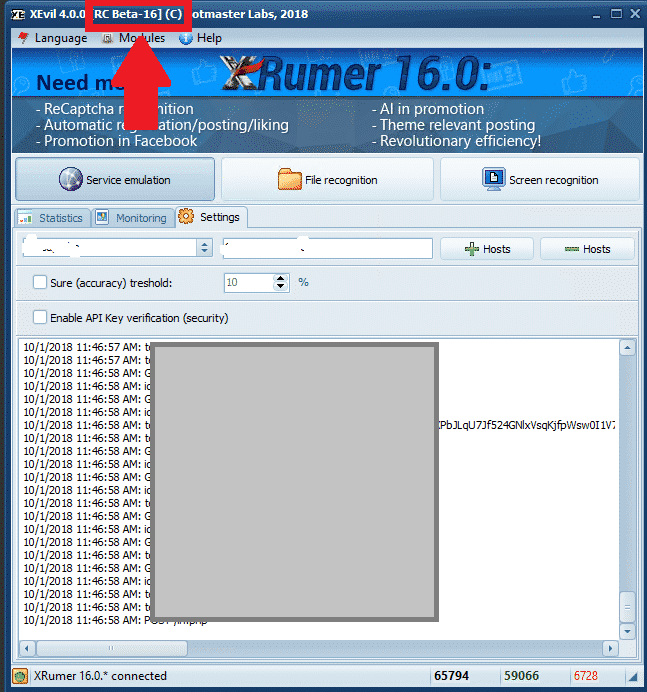
XEvil Current Beta Version

[spacer height=”2px”]

Where to download the latest XEvil Beta patch version.

To download any of the Xrumer, XEvil, Hrefer  and there related plugins you will need to login to your account at : http://www.botmasterlabs.net

If you are signed up for the XEvil beta program then you will see the XEvil download at the top of the list of downloads and the Beta version will be indicated, as you can see in the below screenshot.
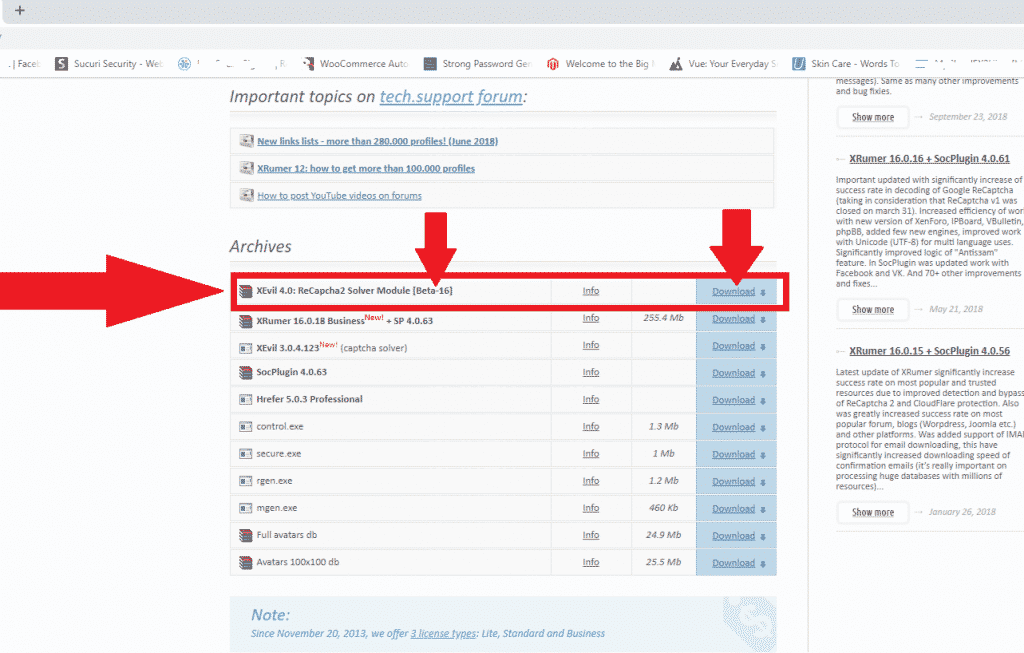
XEvil Beta Download


How to extract the downloaded XEvil Beta patch.

OK, so you have now downloaded the latest XEvil Beta patch and it is now in the downloads folder of your computer or VPS

The downloaded patch  will be in .rar format, if you do not have anything to unzip it with then you can download a free winrar copy from here : https://www.win-rar.com

[full_width][one_half padding=”0 0 10px 0″]Your Downloaded patch
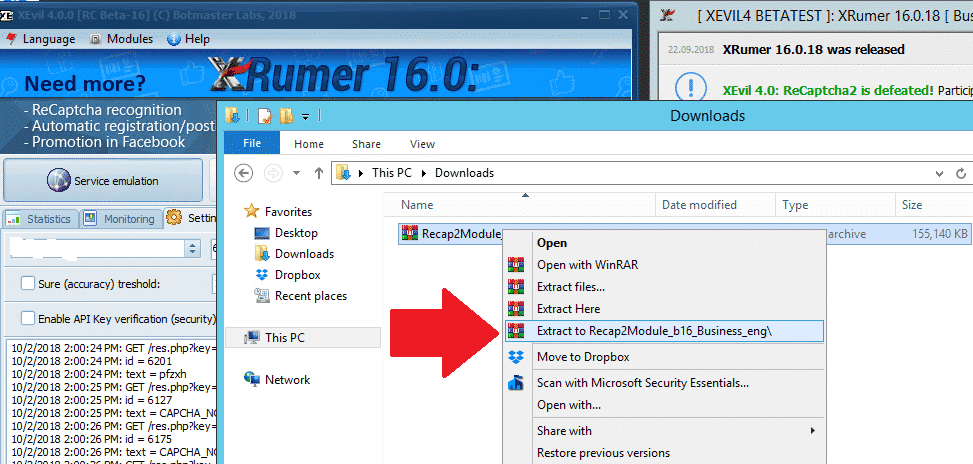
XEvil downloaded patch

[/one_half][one_half padding=”0 0 0 10px”]Your Extracted XEvil Beta Patch
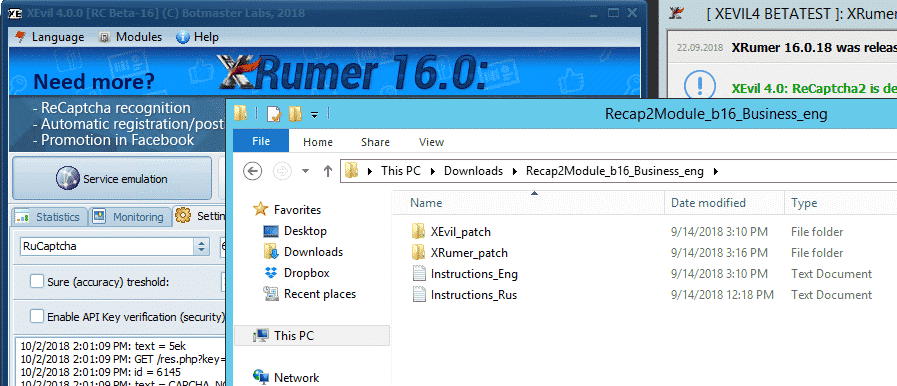
XEvil extracted rar patch

[/one_half][/full_width]

[spacer height=”2px”]

How to apply the XEvil Beta update patch.

Now that we have extracted the update .rar file all we need to do is copy it to the existing program files. Please note that to update XEvil Beta to latest version you have to patch both XEvil as well as Xrumer, that is then why there is a Xrumer and a XEvil folder in the downloaded update.

First thing to do now is to close Xrumer and XEvil if they are running, then follow the below simple steps.

On your computer VPS in a new window open the Xrumer Program folder : C:Xrumer and also open the the Xrumer patch that you have just downloaded C:UsersAdministratorDownloadsRecap2Module_b16_Business_engXRumer_patch .

Now select all the files and folders in C:UsersAdministratorDownloadsRecap2Module_b16_Business_engXRumer_patch   and copy it and then paste it in  C:Xrumer  – You will receive a warning that the files already exist, just select to replace all the files.
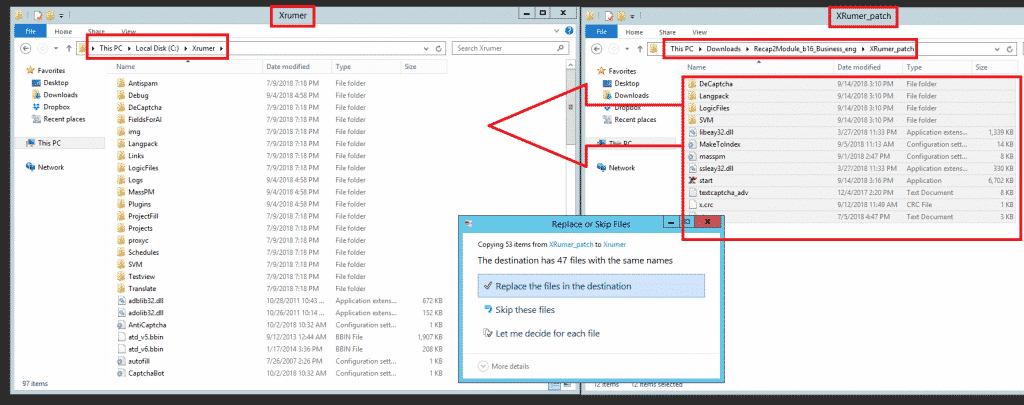
Apply Xrumer - XEvil Beta patch
Apply Xrumer – XEvil Beta patch


Next we will need to also apply the XEvil beta patch, to do so  now select all the files and folders in C:UsersAdministratorDownloadsRecap2Module_b16_Business_engXEvil_patch   and copy it and then paste it in  C:Xevil – You will receive a warning that the files already exist, just select to replace all the files, as shown in the below screenshot.
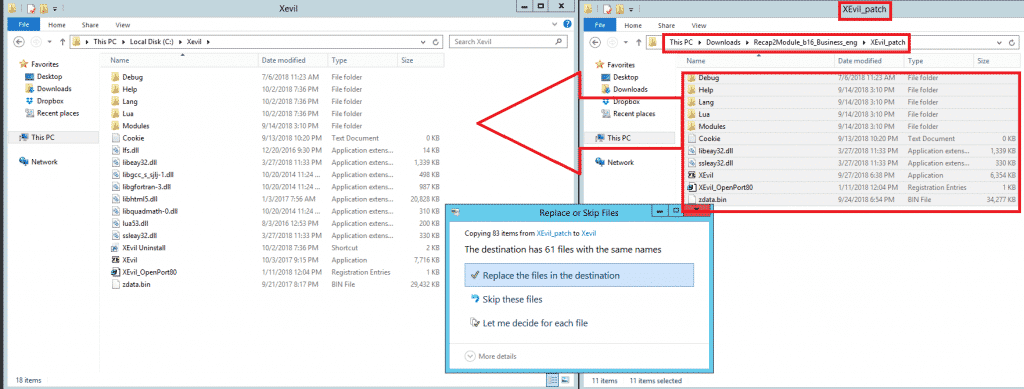
 

Apply XEvil patch
Apply XEvil patch


And that my friends is how you apply the updates for XEvil beta.

[spacer height=”2px”]

How to receive email notifications from Botmasterlabs when they push updates.

To get support for Xrumer, XEvil, Referência and all the other stuff from Botmasterlabs, you need to sign up to their English support forum at http://en.botmastersupport.com/, but i have learned over the past 10 years that the English support forum is not very active at all, and it is pretty much useless if you need info and help.

I found that the Botmasterlabs  Russian support forum are 100 times more active and updates are posted over there first and then later after they had time to translate some it will gets posted on the English forum.  The Russian Forum also send out an email when there products get updated.

By now I know you will be thinking WTF – I cant read Russian, but do not worry, neither do I, but i am going to show you how to make the Russian Forum English. You will need the following  items:

  • Google Chrome ( Have not tried it with Firefox or any other browsers, might work, give it a try )
  • Google Translate Extension for Chrome

Download Google Translate

If you already have Google Chrome then open the extensions or go to the Chrome web store and search for Google Translate  – https://chrome.google.com/webstore/detail/google-translate/aapbdbdomjkkjkaonfhkkikfgjllcleb?hl=en and add the extension.
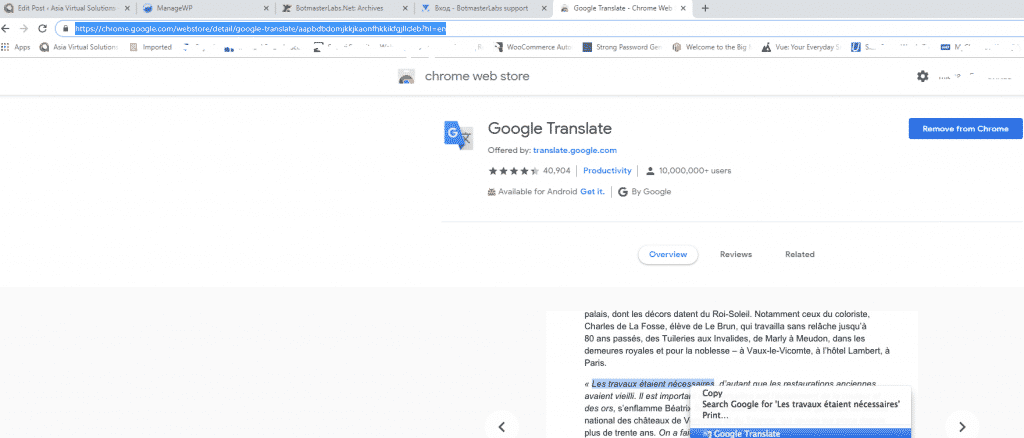
Google Translate Chrome Extension

Creating account on the Botmasterlabs Russian forum ( in English )

Once you have added the Google translate extension, you should browse over to  the Botmasterlabs Russian support forum, which is over here : http://ru.botmastersupport.com/  Unfortunately and as it should be expected everything will be in Russian. All you need to do is:  anywhere on the page right click and select “TRANSLATE TO ENGLISH”
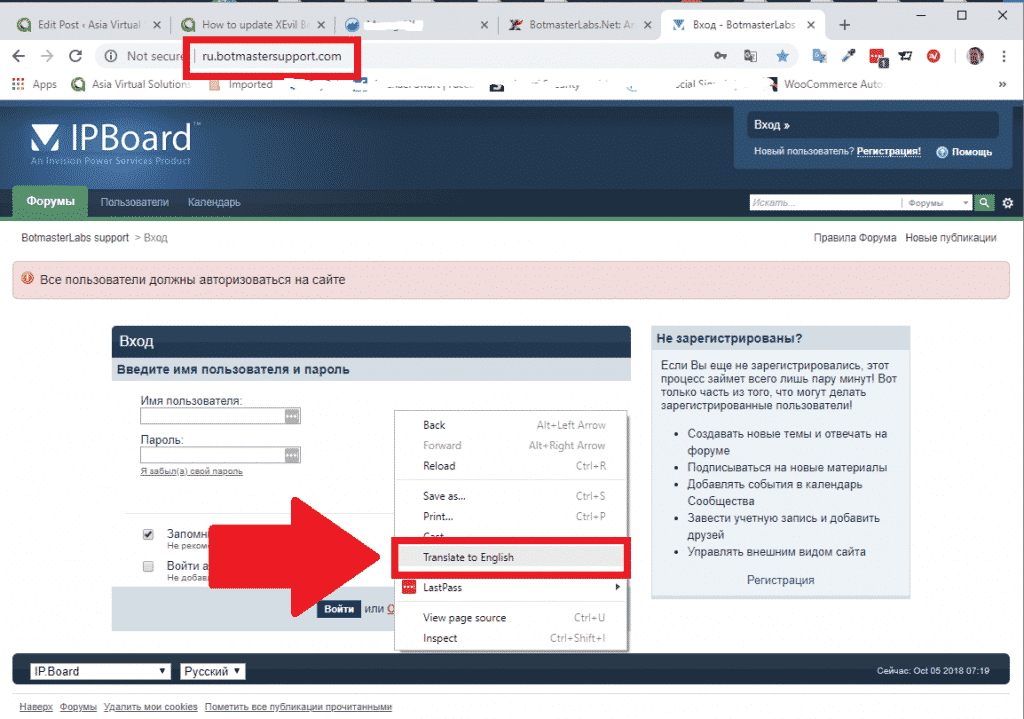
Botmasterlabs Suppot Forum - Translate to English


It will be instantly translated and all the text will be in English and you can easily see where to register for a new forum account.
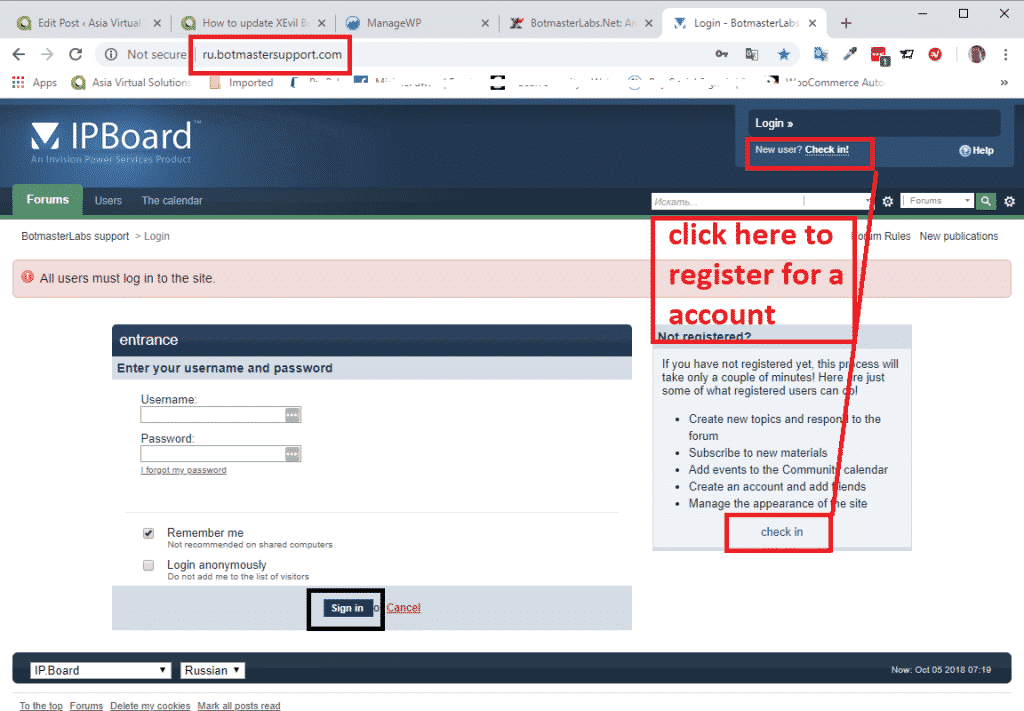
 

Botmasterlabs Suppot Forum - Register a new aaccount


From here onward just follow the instructions to create a new account.

At the bottom of the page it will ask for your Login to BotmasterRu.com, here just enter your Botmasterlabs account username – the one where you download Xrumer and all the other software.

Once you have registered send your username you registered with to Botmaster via Skype, and tell him you registered on the Russian Forum, and ask him to please activate your forum account.

That is it you are now registered.
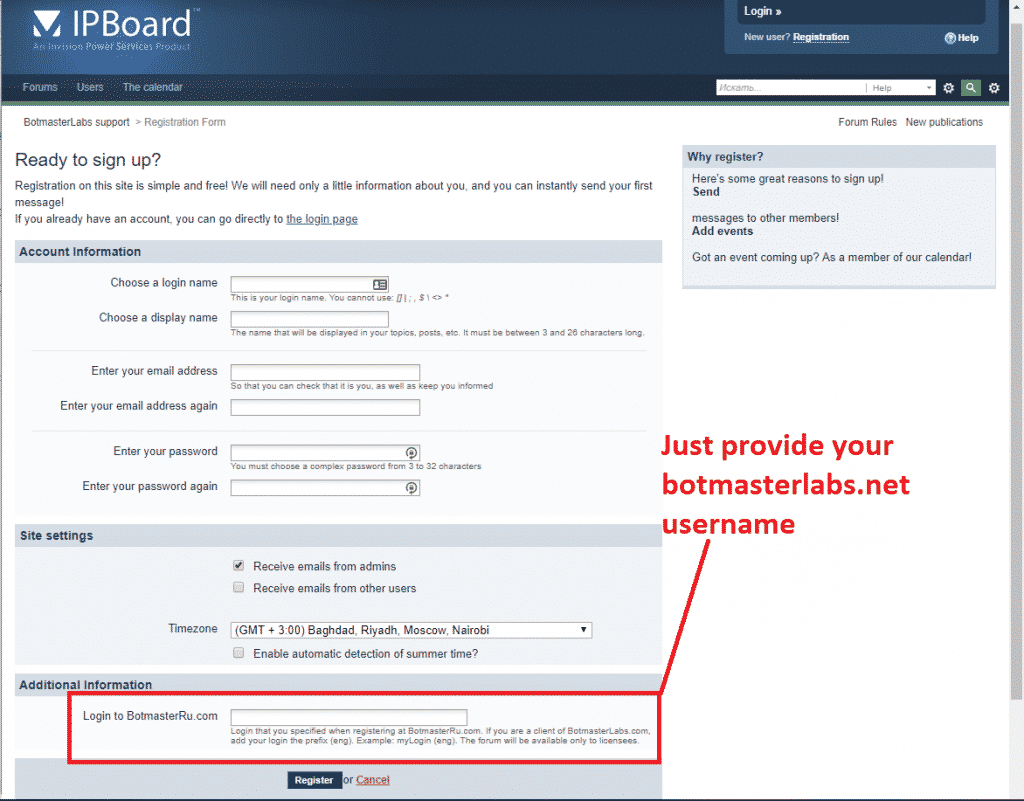
Botmasterlabs Suppot Forum - Complete registration


[spacer height=”2px”]

How to read the Russian language emails from the Russian Botmaster forum.

When you registered for the Russian Botmaster forum and enabled the option to receive email updates, those emails will be in Russian language. But again not a problem we can translate them right inside Microsoft Outlook. If you use any other email client then you will need to find a translate that plugs in to your email client.

Microsoft Outlook Users follow these steps:

Open Microsoft App store, and search for Microsoft Translator.

  • Select the one in the screenshot below.
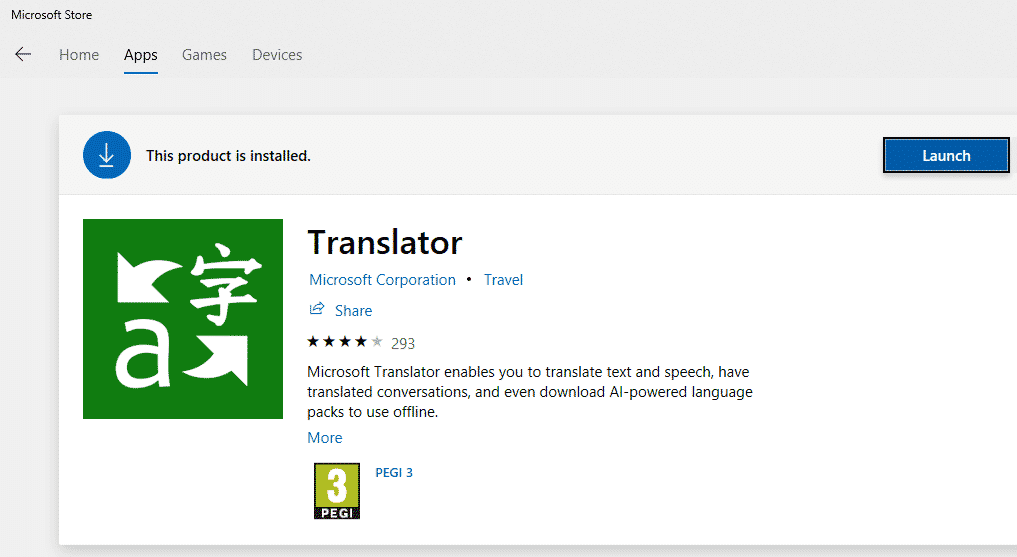
Microsoft Translator


  • Proceed  install the app.
  • Now when you receive an email that is in another language, all you need to do is open the email and then right click anywhere in the email, or click the translate at the top of the emails, like in the below screenshot. ( sorry i do not have a email in Russian on the moment ).
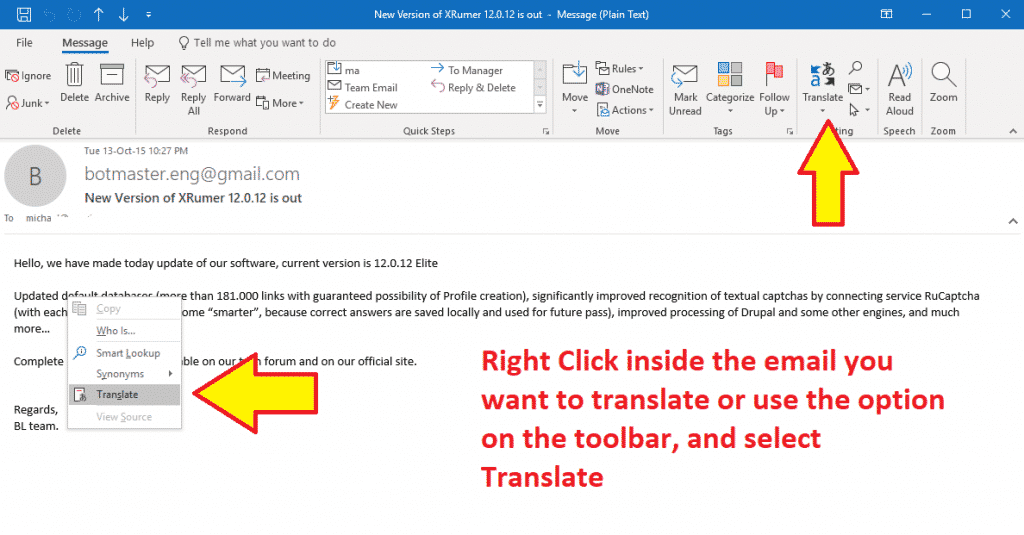
 

Translate an Email
Translate an Email


  • You will see the language to translate to and from show in the sidebar, make your selections and click the green buttons, and your text will be translated to your selected Augean.
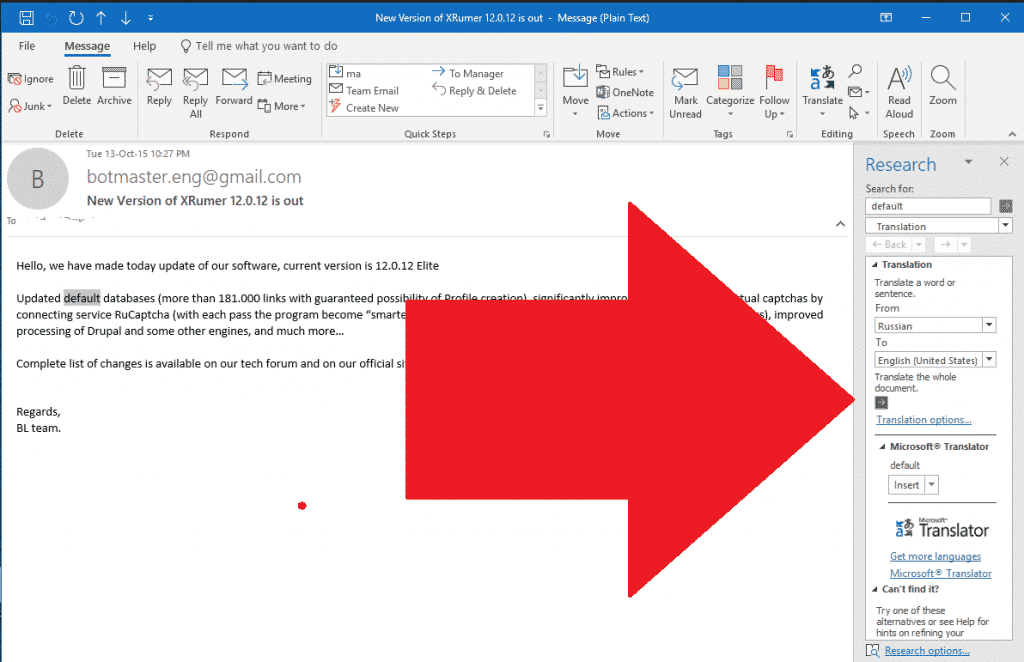
Select language to translate email


Well that is  all there is folk there is to updating your Xevil Beta and to translate the notification emails from Russian to English. Please drop a note in the comments if you have any questions.


[spacer height=”2px”]

DONT HAVE XEVIL YET?

Xevil is part of the package when you purchase Xrumer, purchase it thru our discounted link today


Purchase Xrumer

Tags: botmasterlabsSolucionador de Captchaemail translateGoogle Recaptcha V2como fazerRecaptcha SolverupdateXEvilXEvil downloadXrumer
Post anterior

Como os backlinks da Web 2.0 podem aliviar sua dor

Próxima publicação

As melhores ferramentas automatizadas de link building para 2019 e os perigos de usá-las

Michael Swart

Michael Swart

A Asia Virtual Solutions é orgulhosamente de propriedade e mantida por Michael Swart e uma equipe de assistentes virtuais dedicados.

Próxima publicação
As melhores ferramentas automatizadas de link building para 2019 e os perigos de usá-las.

As melhores ferramentas automatizadas de link building para 2019 e os perigos de usá-las

Produto recomendado

Categorias de blog

  • Conteúdo de IA e SEO
  • Tutoriais GSA SER
  • Hospedagem e VPS
  • Estratégias de Link Building
  • Notícias e atualizações
  • Análises de software de SEO
  • Tutoriais do RankerX
  • Xrumer e XEvil

Produto que você precisa

Avaliações recentes

  • Arte digital representando uma rede global com dispositivos interconectados e links coloridos, anunciando um serviço de "lista de links GSA SER". Listas de links de retorno de qualidade nº 1 para o GSA Search Engine Ranker
    Avaliação 5 de 5
    por ali imani
  • Ilustração digital do conceito de serviço proxy com laptop, globo terrestre e racks de servidores proxy. Serviço de proxy
    Avaliação 5 de 5
    por Nick Nick
  • Asia Virtual Solutions Marcadores sociais Bookmarking social para melhorar o SEO e aumentar o tráfego
    Avaliação 5 de 5
    por shashwat asthana
  • Pacotes de e-mail RankerX Pacotes de e-mail RankerX
    Avaliação 5 de 5
    por vancuoc29
  • Anúncio de serviço de marketing digital que apresenta ferramentas e recursos de SEO, como projetos gsa ser, e-mails particulares e artigos relevantes para palavras-chave. Projetos do GSA Search Engine Ranker - feitos para você
    Avaliação 5 de 5
    por Nick Smith
  • GSA Search Engine Ranker VPS GSA Search Engine Ranker VPS
    Avaliação 5 de 5
    por Nick Smith
  • GSA Search Engine Ranker VPS GSA Search Engine Ranker VPS
    Avaliação 5 de 5
    por Mike
  • Conteúdo estruturado, sites DA50+ Postagem na Web 2.0 com conteúdo estruturado em sites DA50+
    Avaliação 5 de 5
    por ADE YUSUP
  • Conteúdo estruturado, sites DA50+ Postagem na Web 2.0 com conteúdo estruturado em sites DA50+
    Avaliação 5 de 5
    por Joseph Conroy
  • Conteúdo estruturado, sites DA50+ Postagem na Web 2.0 com conteúdo estruturado em sites DA50+
    Avaliação 5 de 5
    por N/A N/A

Todos os aspectos legais

  • Contrato de afiliado
  • Antispam
  • Soluções virtuais da Ásia
  • Preferências de comunicação
  • Isenção de responsabilidade
  • Cookie de dardo de clique duplo
  • Política de links externos
  • Política do FaceBook
  • Declaração da FTC
  • Política de privacidade
  • Política de Reembolso e Garantia
  • Termos e condições
  • Divulgação de depoimentos

Compras seguras

Certificação do Google Save Browsing
O logotipo do site do Norton Safe em um fundo branco.

Entre em contato conosco

Escritório principal nos EUA
  • Asia Virtual Solutions LLC, 400 Rella Blvd, #123-298, Montebello, NY 10901
  •  co*****@******************ns.com
  • +1 (415) 851-6951
  •  asiavirtual
  •  Asia Virtual Solutions no LinkedIn
Escritório virtual na Ásia
  • Asia Virtual Solutions LLC, Level 29, The Offices at Centralworld 999/9 Rama I Road, Pathumwan, Bangkok, Tailândia
  •  co*****@******************ns.com
  • +1 (415) 851-6951
  •  asiavirtual
  •  Asia Virtual Solutions no LinkedIn

© 2026 - Asia Virtual Solutions LLC. Todos os direitos reservados. Este site é operado e mantido por: Asia Virtual Solutions LLC

Sem miniatura
Carregado
Falhou
Remover arquivo carregado
We've detected you might be speaking a different language. Do you want to change to:
Alterar o idioma para English English
Alterar o idioma para বাংলা বাংলা
Alterar o idioma para 简体中文 简体中文
Alterar o idioma para Nederlands Nederlands
Alterar o idioma para हिन्दी हिन्दी
Alterar o idioma para Bahasa Indonesia Bahasa Indonesia
Alterar o idioma para 日本語 日本語
Alterar o idioma para 한국어 한국어
Alterar o idioma para Bahasa Melayu Bahasa Melayu
Português do Brasil
Alterar o idioma para Русский Русский
Alterar o idioma para Español de México Español de México
Alterar o idioma para Tagalog Tagalog
Alterar o idioma para ไทย ไทย
Alterar o idioma para Tiếng Việt Tiếng Việt
Alterar o idioma para اردو اردو
Alterar o idioma para Türkçe Türkçe
Change Language
Close and do not switch language
Sem resultado
Ver todos os resultados
  • Início
  • GSA Search Engine Ranker
    • Perguntas frequentes sobre o GSA Search Engine Ranker
    • Ferramentas e complementos do GSA SER
    • Tutoriais GSA SER
  • Blog
    • Conteúdo de IA e SEO
    • Tutoriais GSA SER
    • Hospedagem e VPS
    • Estratégias de Link Building
    • Notícias e atualizações
    • Tutoriais do RankerX
    • Análises de software de SEO
    • Xrumer e XEvil
  • Loja
    • Conteúdo e artigos de IA
    • Ferramentas e complementos do GSA SER
    • Serviços de hospedagem
    • Serviços de Link Building
    • Money Robot Submitter
    • RankerX
    • Serviços recomendados
    • Serviços de mídia social
    • Serviços Xrumer

© 2026 - Asia Virtual Solutions LLC. Todos os direitos reservados. Este site é operado e mantido por: Asia Virtual Solutions LLC

Português do Brasil
English বাংলা 简体中文 Nederlands हिन्दी Bahasa Indonesia 日本語 한국어 Bahasa Melayu Русский Español de México Tagalog ไทย Tiếng Việt اردو Türkçe