


For years, automated link building meant one thing: point a tool at a list of targets, set the threads high, and hope some of it sticks. That worked when Google counted links. It works far less well now that Google looks at where a link sits, what page it sits on, and whether that page has any reason to exist.
The result is a familiar problem. You finish a month of running your tool, the dashboard says 40,000 submissions, and your rankings have not moved. The links were built. Nothing was built around them — no structure, no content that reads like content, no plan for which link points where.
SEO NEO takes a different road. Instead of handing you a submission engine and leaving the strategy to you, it builds and hosts its own properties — blogs on 12 major cloud providers, high-authority placements, and your own WordPress network — then wires them together using strategies that are already built into the software. This guide covers what it does, how it works, what it costs, and what you need to run it properly.
Disclosure: we are an SEO NEO affiliate. We do not sell the software licence — that comes direct from the developer, and we earn a commission if you buy through our links at no extra cost to you. The SEO NEO VPS hosting package is our own product. Everything technical below comes from the official SEO NEO documentation and our own use of the software.
💡 Resumindo
SEO NEO is an automated criação de links platform that creates its own web properties on cloud infrastructure, fills them with AI content, and links them to your money site using ten ready-made ranking strategies.
It comes from the team behind SEO Autopilot, runs on both Windows and macOS, and is aimed at agencies and SEOs who want structured campaigns rather than raw submission volume.
- SEO NEO builds backlinks on cloud storage blogs, high-authority websites and your own self-hosted WordPress sites. It does not depend on scraped site lists.
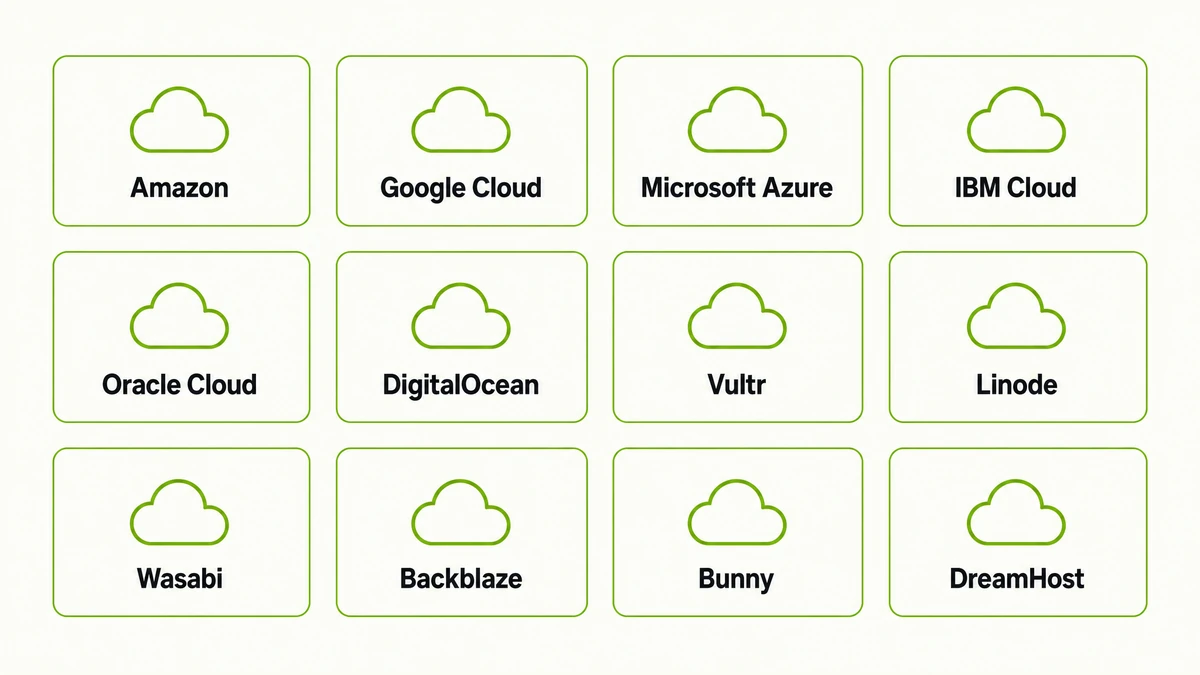
- Cloud blogs can be generated automatically on 12 providers, including Amazon, Google Cloud, Microsoft Azure, IBM, DigitalOcean, Vultr, Linode, Oracle, Wasabi, Backblaze, Bunny and DreamHost.
- Ten built-in strategy wizards — Domain Authority Stacking, RD100, Zero to Hero, Fast Rank, Hades, Wiki Stacking, GBP Sniper, GBP Blast and two content posters — plan the campaign structure for you.
- Minimum requirements are Windows 10 or Windows Server 2016 (or macOS on Intel and M chips), 4 CPU cores, 8 GB RAM and 10 GB of SSD space. 16 GB RAM is recommended, and a VPS is needed for campaigns that run around the clock.
- SEO NEO costs $149 per month or $1,499 per year, with a free trial available. Hosting, proxies and a captcha solver are separate costs unless you use a ready-made VPS package.
🔍 What is SEO NEO?
SEO NEO is desktop link building software that creates, hosts and interlinks its own web properties to push a target URL up the search results. It is the successor to SEO Autopilot, rebuilt from the ground up, and the company behind it reports 12+ years in the market, 750 agency customers and 19,149 clients across 24 countries.
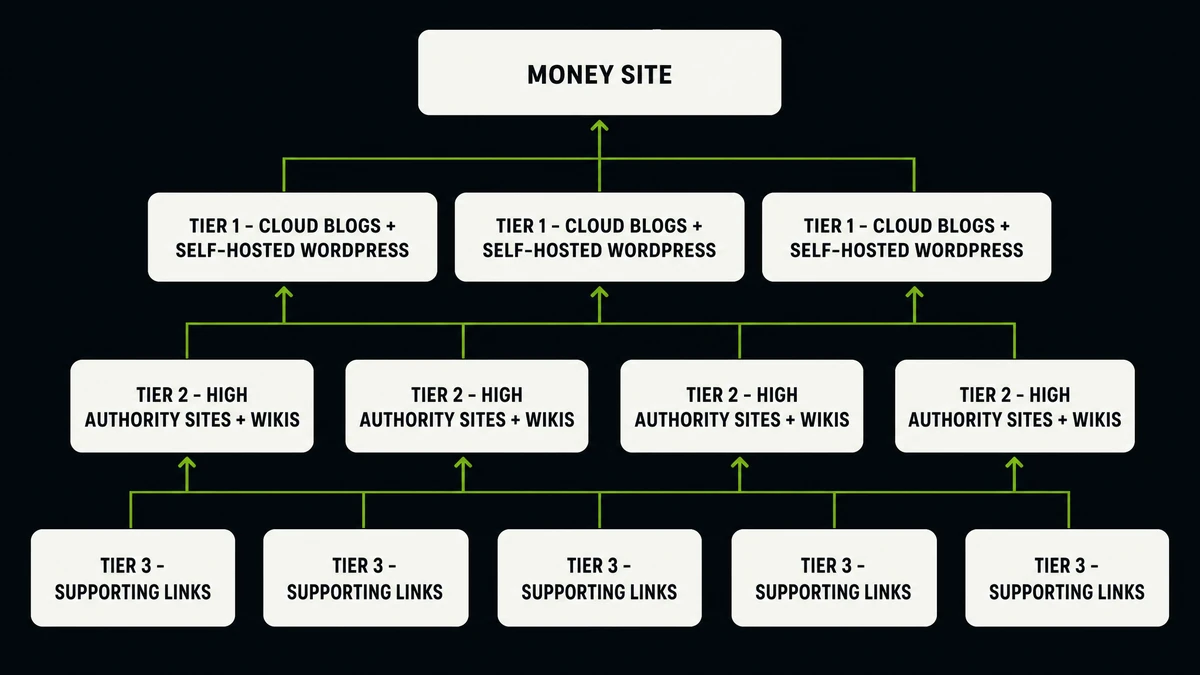
The important difference from older tools is where the links live. A traditional blaster finds someone else’s guestbook, forum or wiki and posts to it. SEO NEO creates the asset itself — a blog inside your own Amazon S3 bucket, a post on your own WordPress site, an account on a high-authority platform — writes the content for it, and then links it. You own the property, so it does not vanish when somebody else’s site gets cleaned up.
Broadly, there are three ways to automate link building today. They are not really competitors — they are different jobs:
| Approach | How it gets links | Melhor utilizado para | Main weakness |
|---|---|---|---|
| Volume submitters (GSA SER, Xrumer) | Submits to thousands of third-party CMS platforms from a site list | Tier 2 and tier 3 power, indexing pressure, high-volume campaigns | Quality depends entirely on the list, and targets die constantly |
| Asset builders (SEO NEO) | Creates its own cloud blogs, WordPress posts and authority accounts | Tier 1 foundations, local SEO, client work that needs reports | Lower raw volume, and needs cloud accounts plus setup time |
| Manual outreach | Email pitches to real site owners | Highly competitive money pages | Slow, expensive, does not scale past a few links a week |
Most serious link builders end up running two of these at once. SEO NEO builds the tier 1 layer that points at your money site. A volume tool then powers those assets up from below.

⚙️ How SEO NEO actually works
SEO NEO is built in four layers. Once you understand these, every wizard and every campaign screen makes sense. Skip one of them and your campaigns will underperform no matter which strategy you pick.
1. Account Buckets — the identities that post
What it does: An Account Bucket is a pool of registered accounts on a platform type — cloud storage providers, Web 2.0 sites, wikis, social bookmarking sites. SEO NEO generates these in bulk with the Generate Account Buckets tool, using Account Templates that hold the email, name and profile data.
Por que isso é importante: Accounts are the bottleneck. A campaign cannot post to a platform you have no account on, so the size and health of your buckets sets the ceiling on everything else. Build them once and reuse them across every client.
What goes wrong: People start a campaign with 15 accounts and wonder why the diagram only half fills. Build the buckets first, verify the emails, then run campaigns.
2. Content Buckets — what actually gets published
What it does: Content Buckets hold the articles, titles, descriptions and images your campaigns publish. You can write them yourself, import them, or generate them with OpenAI inside the software. The Article Builder assembles longer pieces from your inputs, and tagging lets you steer which content goes to which link group.
Por que isso é importante: A cloud blog with real, readable, on-topic content behaves like a website. The same blog filled with spun nonsense behaves like a footprint. Because you own these properties, content quality is entirely in your hands — and that is the whole advantage of owning them.
What goes wrong: Reusing one bucket of 10 articles across 40 properties. Duplicate content across your own network is a pattern, and patterns get found. Generate enough unique pieces to cover the campaign size.
3. The Diagram Editor — the shape of the campaign
What it does: This is the visual canvas where you draw the link structure. Each node is a link group — a platform type and how many links to build — and the connections between nodes decide what points at what. Link Matching aligns each backlink with relevant content, Auto Link Diversity spreads anchor text so no keyword gets over-used, and Sibling Groups let related properties interlink at the same tier.
Por que isso é importante: This is the part that separates SEO NEO from a blaster. You are not just building links, you are building a hierarchy — and you can see it on screen before a single account is used.
What goes wrong: Drawing a diagram where 500 tier 1 links all point straight at one money page with the same anchor text. Use the wizards until you can read a diagram at a glance, then start editing them.
4. Campaigns — drip feed and scheduling
What it does: A campaign ties a target URL, a keyword set, a diagram and your buckets together, then executes the whole thing over time. Drip feed spreads the build across days or weeks instead of dumping it all at once. Internal Linking and Campaign Linking connect properties across campaigns so the same assets keep gaining value.
Por que isso é importante: A new domain that gains 800 backlinks in six hours looks nothing like a site that earns links. Drip feed is a ranking setting, not a politeness setting.
What goes wrong: Turning drip feed off to see results faster. You will see results faster — just not the ones you wanted.
🧩 The ten strategy wizards
The wizards are the reason SEO NEO has a shorter learning curve than its depth suggests. Each one is a complete, pre-planned campaign structure: pick a target URL, pick your keywords, and the software lays out the diagram for you. Eight are ranking strategies and two are content utilities.
| Wizard | Tipo | What it is for |
|---|---|---|
| Domain Authority Stacking (DAS) | Estratégia | Warming up a brand-new website that has no authority and no history yet |
| RD100 | Estratégia | Giving every tier 1 URL backlinks from at least 100 different referring domains |
| Zero to Hero | Estratégia | The full path from a fresh site to competitive rankings — stacking, warm-up and advanced techniques in one run |
| Fast Rank | Estratégia | Quicker movement using cloud blog posts, quality marcadores sociais and trusted authority links |
| Hades | Estratégia | Trust building through cloud blogs, Web 2.0 properties, wiki links and authority placements |
| Wiki Stacking | Estratégia | High-authority wiki networks for local SEO and YouTube video ranking |
| GBP Sniper | Estratégia | Building credibility for a Google Business Profile and the brand behind it |
| GBP Blast | Estratégia | Advanced local SEO using Google Maps directional URLs |
| Cloud Content Poster | Utility | Creating and scheduling posts across your cloud blogs |
| SHW Content Poster | Utility | Creating and scheduling posts across your self-hosted WordPress sites |
A common sequence users report for local clients is DAS → GBP Sniper → GBP Blast: warm the site up, build brand credibility around the profile, then push with directional URLs. For a new affiliate or service site, Zero to Hero → RD100 is the usual pairing.
☁️ Cloud blogs on 12 providers
This is the feature nothing else in the automated link building space matches. SEO NEO connects to major cloud storage and hosting platforms through their APIs and generates real blogs inside your own accounts. The domains carry the provider’s authority, the content is yours, and nobody can delete the site out from under you.
Alongside cloud blogs, SEO NEO posts to high-authority websites and to self-hosted WordPress sites you already own. If you run a private blog network, the software writes the posts, publishes them and handles the internal linking automatically — turning a network you maintain by hand into one that maintains itself.
📍 The Google Business Profile module
Local SEO is where SEO NEO gets its strongest user feedback, and it is the part of the software that has no equivalent in older link building tools. The GBP module is a separate workspace with its own projects, keyword buckets, grid templates and heatmap reporting.
- GBP Projects — one workspace per business location you are ranking.
- Keyword Buckets — the local search terms you track for that location.
- Grid Templates — the geographic grid used to sample rankings around the business address, so you see rankings street by street instead of one national average.
- Heatmap reporting and scheduling — visual rank maps that generate on a schedule and drop straight into a client report. Heatmaps run on the credit system, which is billed separately from the subscription.
Pair that reporting with the white-label report generator and the agency case makes itself: the client sees a map of exactly where they rank, before and after, with your logo on it.
⚔️ SEO NEO vs GSA Search Engine Ranker vs RankerX
These three get compared constantly, usually by someone trying to pick one. That is the wrong question. They sit in different positions in a campaign, and plenty of experienced link builders run two of them side by side.
| SEO NEO | GSA Search Engine Ranker | RankerX | |
|---|---|---|---|
| Sistema operacional | Windows and macOS (Intel and M) | Windows only | Windows only |
| Licence model | Monthly or yearly subscription | One-time licence | Subscrição |
| Where links come from | Cloud blogs it creates, high-authority sites, your own WordPress | Thousands of third-party CMS targets from site lists | Web 2.0 and social properties |
| Site list needed | Não | Yes — results depend heavily on list quality | Partly |
| Campaign planning | 10 wizards plus a visual diagram editor | You design the tier structure yourself | Template based |
| Geração de conteúdo | OpenAI content buckets and Article Builder built in | External spinners and scrapers | Built in, plus spinner support |
| Local SEO and GBP | Dedicated module with grid heatmaps | Not built in | Not built in |
| Client reporting | White-label reports, one click | Not built in | Limitado |
| Typical volume | Lower volume, higher-quality owned assets | Very high volume | Medium volume |
| Best role | Tier 1 foundation and local SEO | Tier 2 and tier 3 power | Tier 1 and tier 2 filler |
The practical takeaway: if you want maximum links per dollar, GSA Search Engine Ranker is hard to beat and always will be. If you want structured, owned properties that survive, plus local SEO tools and reports you can hand to a paying client, SEO NEO does things GSA SER was never designed to do.
🚩 Mistakes that waste your subscription
Most people who give up on SEO NEO in the first month give up for one of these reasons. Every one of them is avoidable.
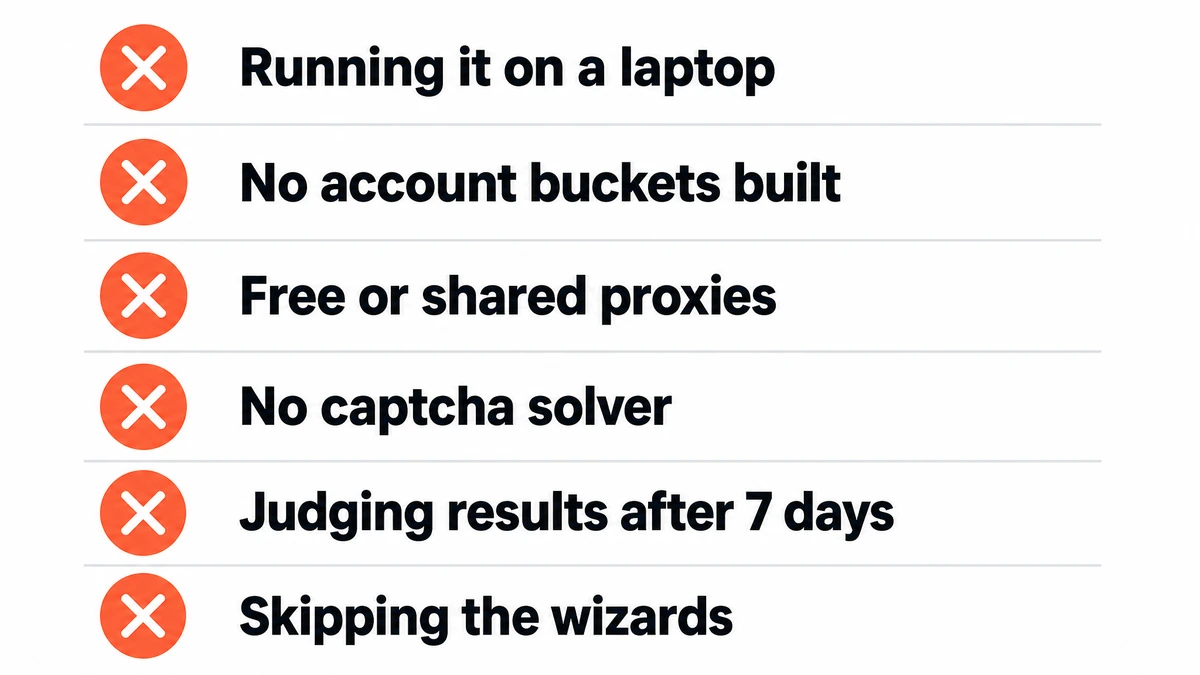
- Running it on your laptop. Campaigns need to run continuously. Close the lid and you lose the run. The official documentation says a VPS or equivalent always-on device is needed, and it means it.
- Starting a campaign before building account buckets. Empty buckets mean half-empty diagrams and a campaign that reports far fewer links than the wizard planned.
- Using free or shared datacentre proxies. Account creation fails, platforms flag the IPs, and you spend your first week debugging something that was never going to work.
- No captcha solver configured. Registration and posting both hit captchas. Without a solver, success rates collapse and it looks like the software is broken.
- Judging results after seven days. Drip feed campaigns build over weeks. User reports of movement usually land in the two to four week range, not the first weekend.
- Skipping the wizards to hand-draw a diagram on day one. The wizards encode structures the developers spent years refining. Learn from them before you rewrite them.
🖥️ What you need to run SEO NEO properly
SEO NEO is a desktop application, so the machine it runs on directly affects how many campaigns you can execute and how fast they finish. Here are the official requirements next to what actually works in production.
| Exigência | Official minimum | What works in practice |
|---|---|---|
| Sistema operacional | Windows 10+ / Windows Server 2016+, or macOS (Intel and M) | Windows Server on a VPS, so it never sleeps |
| CPU | 4 cores | 8–10 cores once you run several campaigns at once |
| BATER | 8 GB (16 GB recommended) | 16 GB — the database grows as campaign history builds up |
| Armazenar | 10 GB free, SSD preferred | 100 GB NVMe, so old campaign data never forces a cleanup |
| Tempo de atividade | Não especificado | 24/7 — drip feed campaigns run for weeks |
| Proxies | Residential ISP proxies recommended | 20 good proxies as a starting point, scaling up with volume |
| Resolução de Captcha | 2Captcha API recommended | A self-hosted solver removes per-captcha costs entirely |
| At least one Gmail account | Gmail with an App Password, plus extra accounts for buckets | |
| conteúdo de IA | OpenAI API for content buckets | Same — budget for tokens as a separate line item |
SEO NEO also plugs into the wider link building stack most people already pay for: captcha services including 2Captcha, XEvil, CapMonster, Anti-Captcha and Image Typerz; content from OpenAI and Article Forge; spinners including Spin Rewriter, WordAI, SpinnerChief and Espinner; and indexers including Omega Indexer, Colinkri, Speedlinks and Index Inject. The interface is available in English, Spanish, French and Vietnamese.

🚀 Getting started the right way
This is the order that avoids every mistake listed above. Expect setup to take a day rather than an hour. This is a professional tool with a real learning curve, and the users who succeed with it treat day one as setup, not campaigns.
- Sort the machine first. Get SEO NEO onto a VPS Windows with at least 16 GB RAM before you install anything. Moving later means redoing the whole configuration.
- Connect the essentials. Captcha solver, proxies, a Gmail account with an App Password, and your OpenAI key. Test each one in Settings before you go further.
- Add your cloud provider APIs. Start with two or three providers instead of all 12. Add the rest once you have watched a campaign complete.
- Build your account buckets. Use Account Templates and the bulk generator, let it run, and verify the accounts before touching a campaign.
- Fill a content bucket. Generate enough unique articles with OpenAI to cover the campaign size you are planning, and tag them by topic.
- Run one wizard, unmodified. Domain Authority Stacking for a new site, GBP Sniper for a local client. Do not edit the diagram on your first run — watch what it does.
- Leave drip feed on and wait. Check the campaign report weekly, not hourly. Then run RD100 or Fast Rank on the properties your first campaign created.
💰 What SEO NEO costs
| Item | Custo | Notas |
|---|---|---|
| SEO NEO monthly | $149 por mês | Full feature access |
| SEO NEO yearly | $1.499 por ano | Reduced from $1,788 — around two and a half months free |
| Avaliação gratuita | $0 | See the interface before you commit |
| Heatmap credits | Pay as you go | Only consumed by the GBP heatmap feature |
| VPS, proxies, captcha | Separate | Bundled together in the AVS SEO NEO VPS package |
🛒 SEO NEO and the hosting to run it
We have been working with automated link building tools since December 2012, and we have supported SEO NEO users since the software launched. To be clear about what we do: we are an SEO NEO affiliate, not a reseller. The licence comes direct from the developer. The hosting is ours, and it is built for this software.
- SEO NEO licence — monthly or yearly with a free trial, bought direct from the developer. Our link is an affiliate link, so it costs you nothing extra and supports the guides we publish here.
- SEO NEO VPS package — a machine built specifically for this software, not a generic box you still have to configure yourself.
The VPS package exists because the requirements table above is the part most people get wrong. Here is exactly what is in it:
| Incluído | Specification |
|---|---|
| CPU and RAM | 10 dynamic CPU cores, 16 GB RAM |
| Armazenar | 100 GB enterprise NVMe |
| Network | 10 Gbps connection, unlimited bandwidth, 1 dedicated IPv4 |
| Sistema operacional | Windows Server 2022, fully licensed |
| Resolução de Captcha | XEvil Beta V6 included — image captchas, reCAPTCHA V1, V2 and V3, Fun captcha and hCaptcha, with no per-solve fees |
| Proxies | 20 semi-dedicated proxies renewed monthly, upgradeable to 50, 100, 250 or 500 dedicated |
| Software setup | SEO NEO installed and configured for you |
| Free Gmail account with App Password already set up | |
| Acesso | Remote Desktop credentials sent on delivery |
| Delivery | Ready within 1 day of ordering, usually 1–6 hours during Thailand business hours (GMT+7) |
| Tempo de atividade | 99.9% guaranteed |
| Preço | $149 per month, with discounts at 3, 6 and 12 months |
Add up a comparable VPS, a captcha service and 20 proxies bought separately and you land in the same price range — except you would still have the installation and configuration ahead of you. One thing to note: the VPS package does not include the SEO NEO licence itself, so you need your own.
Stop fighting your hosting. Stop losing campaign runs to a sleeping laptop. Let a machine built for the job do the work while you plan the strategy.
❓ Perguntas frequentes
Does SEO NEO work on a Mac?
Yes. SEO NEO runs on macOS with both Intel and M-series processors, as well as Windows 10 or higher and Windows Server 2016 or higher. That makes it one of the very few automated link building tools a Mac user can run without a virtual machine. Even so, most serious users put it on a Windows VPS so campaigns keep running when the computer is off.
Do I need a VPS to use SEO NEO?
For real campaigns, yes. The official documentation states that a VPS or equivalent always-on device is needed to run the software properly. Drip feed campaigns run for days or weeks, and every time your own computer sleeps or restarts, the run stops. Our SEO NEO VPS arrives with the software installed and proxies plus captcha solving already included.
How is SEO NEO different from GSA Search Engine Ranker?
GSA SER submits to third-party sites from a site list, at very high volume. SEO NEO creates its own properties — cloud blogs, high-authority accounts and posts on your own WordPress sites — and links them using built-in strategy wizards. They fill different roles: SEO NEO for tier 1 assets and local SEO, GSA SER for tier 2 and tier 3 power. Many link builders run both together.
Is SEO NEO suitable for beginners?
It has a learning curve, and users say so openly. What makes it manageable for a newcomer is the wizard system: ten pre-built strategies mean you can run a correct campaign structure on day one without understanding tier theory first. Give the setup a full day, run one wizard without editing it, and the rest of the interface starts making sense quickly.
What does SEO NEO cost?
SEO NEO is $149 per month, or $1,499 per year instead of the $1,788 list price. A free trial is available so you can see the interface before committing. Hosting, proxies, captcha solving and OpenAI usage are separate costs, which is why we bundle the first three into a single VPS package.
Can I use SEO NEO for local SEO and Google Business Profiles?
Yes, and it is one of the strongest parts of the software. The GBP module has its own projects, keyword buckets, grid templates and heatmap reporting, plus two dedicated wizards — GBP Sniper for building brand credibility around a profile, and GBP Blast for advanced work using Google Maps directional URLs. Heatmap generation runs on the credit system.
How long before I see ranking movement?
Campaigns are drip fed on purpose, so results build over weeks rather than days. User reports commonly describe movement in the two to four week range on local and mid-competition terms, with brand-new domains taking longer because they need the warm-up phase first. Turning drip feed off to speed things up is the fastest way to get the opposite result.
Can I use SEO NEO for client work?
Yes — it is built for it. White-label link building reports generate at the click of a button, GBP heatmaps give clients a visual before-and-after, and the developer reports 750 agencies among its customer base. Campaign Linking also lets you reuse properties across clients, so your asset network keeps growing in value.
What do I need besides the software itself?
Four things: a machine that stays on, good proxies (residential ISP proxies are recommended), a captcha solver, and at least one Gmail account. An OpenAI key is needed if you want the software to write your content. Our VPS package covers the first three plus a configured Gmail account, so the only thing left to add is your OpenAI key.














 English
  বাংলা
বাংলা  简体中文
简体中文  Nederlands
  Français
  Deutsch (Sie)
  हिन्दी
  Bahasa Indonesia
  Italiano
  日本語
日本語  한국어
한국어  Bahasa Melayu
  Português do Brasil
  Русский
  Español de México
  Tagalog
  ไทย
ไทย  Tiếng Việt
  اردو
اردو  Türkçe