



Hoe update je XEvil Beta en ontvang je updatemeldingen via e-mail voor Xrumer en XEvil?
Ik heb gemerkt dat veel GSA Zoekmachine Ranker Gebruikers zijn begonnen met het gebruiken van de captcha-oplosser van Xrumer om captcha's in GSA SER op te lossen. We hebben ook gemerkt dat Botmaster zelden of nooit e-mails verstuurt naar gebruikers die zich aanmelden op de Engelstalige Xrumer-website, om hen te informeren over updates en wat er precies is bijgewerkt.
Daarom heb ik besloten om een kort bericht en een instructievideo te maken waarin ik laat zien hoe je je XEvil Beta-versie kunt updaten naar de nieuwste Beta-versie. Ook leg ik uit hoe je je kunt aanmelden voor het Russische Xrumer-forum, zodat je alles in het Engels kunt lezen, inclusief meldingen over updates.
[sociallocker]
Hoe update je XEvil Beta en ontvang je updatemeldingen via e-mail voor Xrumer en XEvil?
[/sociallocker]
Hoe krijg ik de XEvil Beta-updatepatch?.
Ik zal je laten zien waar je je huidige gegevens kunt vinden. XEvil Het bètaversienummer en waar de nieuwste XEvil bèta-patch te downloaden is.
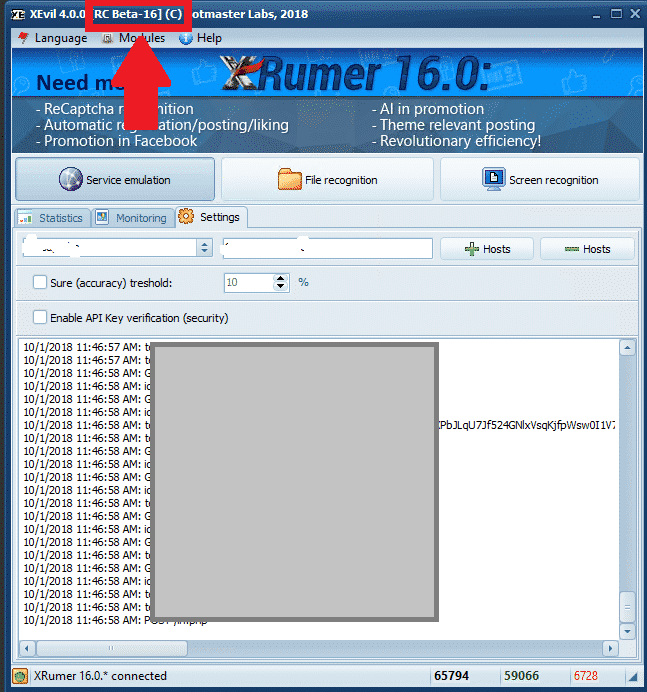
Waar kunt u uw huidige XEvil Beta-versienummer bekijken?.
De Xevil Beta Het versienummer is linksboven in het toepassingsvenster te zien, zoals weergegeven in de onderstaande schermafbeelding. In de onderstaande schermafbeelding is de XEvil Beta-versie [Beta 16].
[spacer height=”2px”]
Waar kan ik de nieuwste XEvil Beta-patch downloaden?.
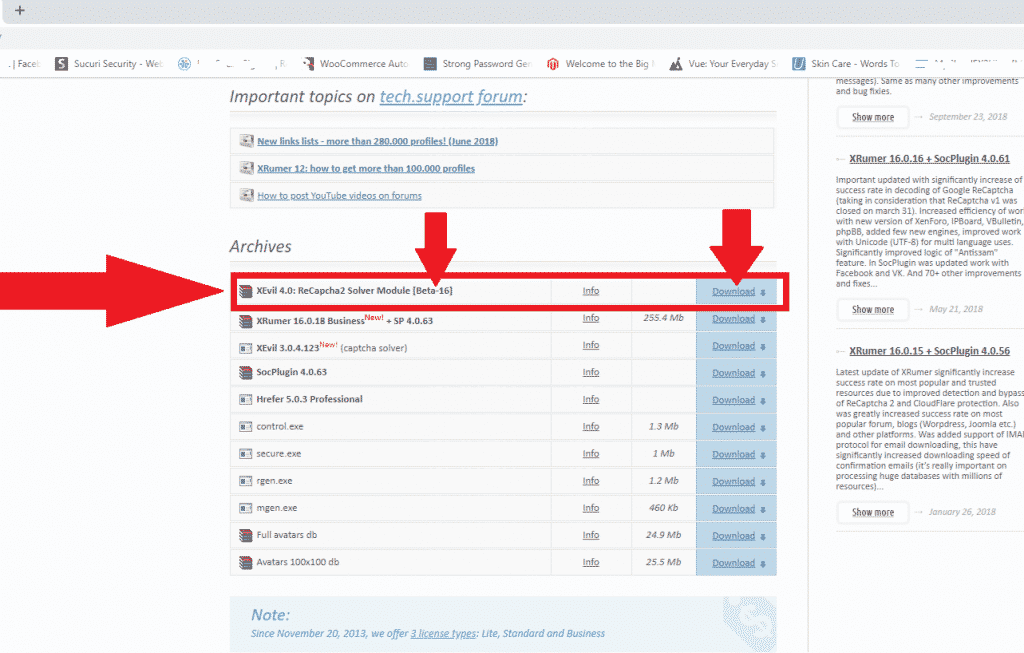
Om een van de volgende te downloaden: Xrumer, Voor XEvil, Hrefer en de bijbehorende plugins moet u inloggen op uw account via: http://www.botmasterlabs.net
Als je bent aangemeld voor het XEvil-bètaprogramma, dan zie je het volgende: XEvil downloaden Bovenaan de lijst met downloads wordt de bètaversie aangegeven, zoals je in de onderstaande schermafbeelding kunt zien.
Hoe pak je de gedownloade XEvil Beta-patch uit?.
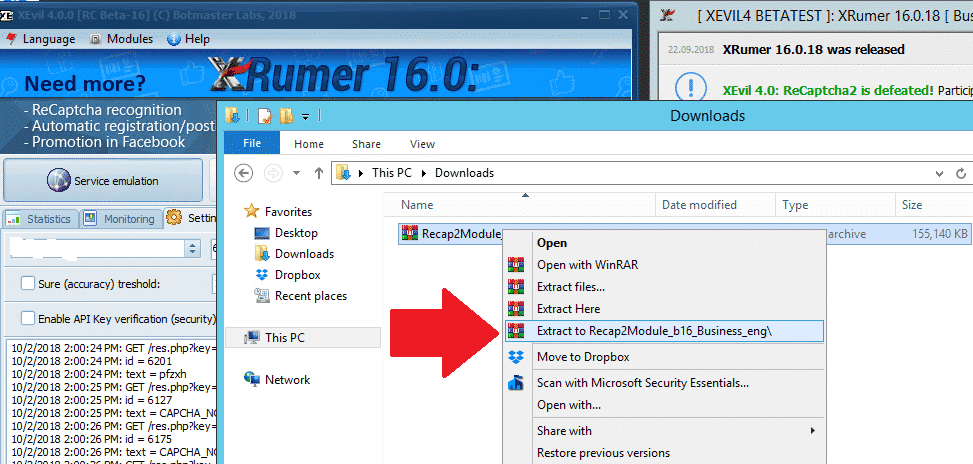
Oké, je hebt nu de nieuwste XEvil Beta-patch gedownload en deze staat nu in de downloadmap van je computer. VPS
De gedownloade patch heeft een .rar-bestand. Als je geen programma hebt om het uit te pakken, kun je hier een gratis versie van WinRAR downloaden: https://www.win-rar.com
[full_width][one_half padding=”0 0 10px 0″]Uw gedownloade patch
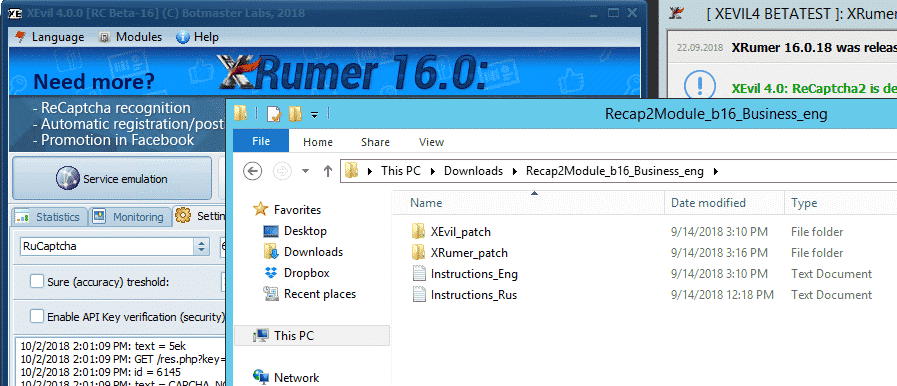
[/one_half][one_half padding=”0 0 0 10px”]Uw uitgepakte XEvil Beta-patch
[/one_half][/full_width]
[spacer height=”2px”]
Hoe installeer je de XEvil Beta-updatepatch?.
Nu we het updatebestand (.rar) hebben uitgepakt, hoeven we het alleen nog maar naar de bestaande programmamappen te kopiëren. Houd er rekening mee dat je, om XEvil Beta naar de nieuwste versie te updaten, zowel XEvil als Xrumer moet patchen. Vandaar de melding "...". Xrumer en een XEvil-map in de gedownloade update.
Het eerste wat we nu moeten doen, is afsluiten. Xrumer En als XEvil actief is, volg dan de onderstaande eenvoudige stappen.
Open de VPS op uw computer in een nieuw venster. Xrumer Ga naar de programmamap C:Xrumer en open ook de Xrumer-patch die je zojuist hebt gedownload: C:UsersAdministratorDownloadsRecap2Module_b16_Business_engXRumer_patch. .
Selecteer nu alle bestanden en mappen in C:UsersAdministratorDownloadsRecap2Module_b16_Business_engXRumer_patch, kopieer ze en plak ze vervolgens in C:Xrumer. U krijgt een waarschuwing dat de bestanden al bestaan; selecteer in dat geval de optie om alle bestanden te vervangen.
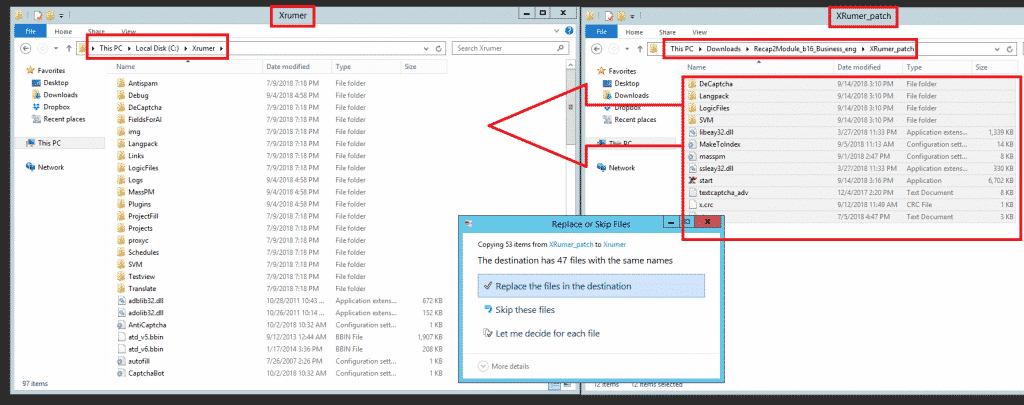
Vervolgens moeten we ook de XEvil-bètapatch toepassen. Selecteer hiervoor alle bestanden en mappen in C:UsersAdministratorDownloadsRecap2Module_b16_Business_engXEvil_patch, kopieer ze en plak ze in C:Xevil. U krijgt een waarschuwing dat de bestanden al bestaan; selecteer in dat geval de optie om alle bestanden te vervangen, zoals weergegeven in de onderstaande schermafbeelding.
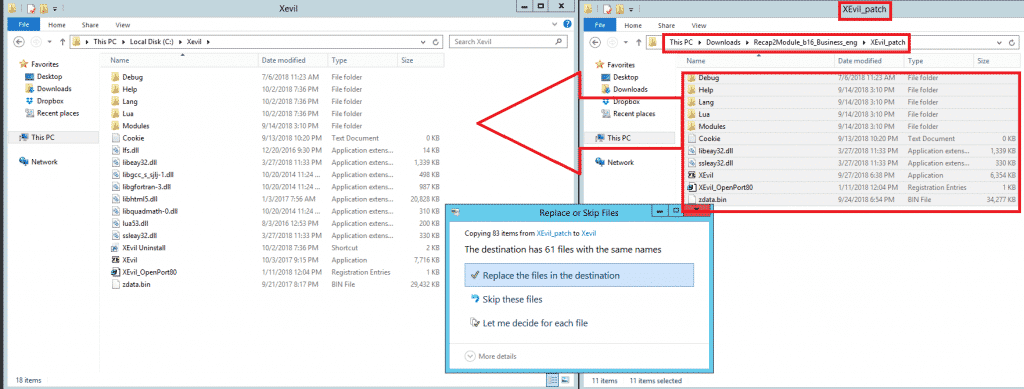
En zo, beste vrienden, installeer je de updates voor de XEvil-beta.
[spacer height=”2px”]
Hoe ontvang ik e-mailmeldingen van Botmasterlabs wanneer ze updates uitbrengen?.
Om ondersteuning te krijgen voor Xrumer, XEvil, Hrefer En voor alle andere producten van Botmasterlabs moet je je aanmelden op hun Engelstalige supportforum via http://en.botmastersupport.com/, maar ik heb in de afgelopen 10 jaar gemerkt dat het Engelstalige supportforum helemaal niet erg actief is en vrijwel nutteloos is als je informatie en hulp nodig hebt.
Ik ontdekte dat de Botmasterlabs Russisch ondersteuningsforum Ze zijn honderd keer actiever en updates worden daar eerst geplaatst. Nadat ze de tijd hebben gehad om een deel ervan te vertalen, worden ze ook op het Engelse forum geplaatst. Het Russische forum stuurt ook een e-mail wanneer hun producten worden bijgewerkt.
Ik weet dat je nu denkt: WTF – ik kan geen Russisch lezen, maar maak je geen zorgen, ik kan het ook niet. Ik ga je echter laten zien hoe je het Russische forum in het Engels kunt zetten. Je hebt de volgende dingen nodig:
- Google Chrome (Ik heb het nog niet geprobeerd met Firefox of andere browsers, maar het zou kunnen werken, probeer het eens.)
- Google Translate-extensie voor Chrome
Download Google Translate
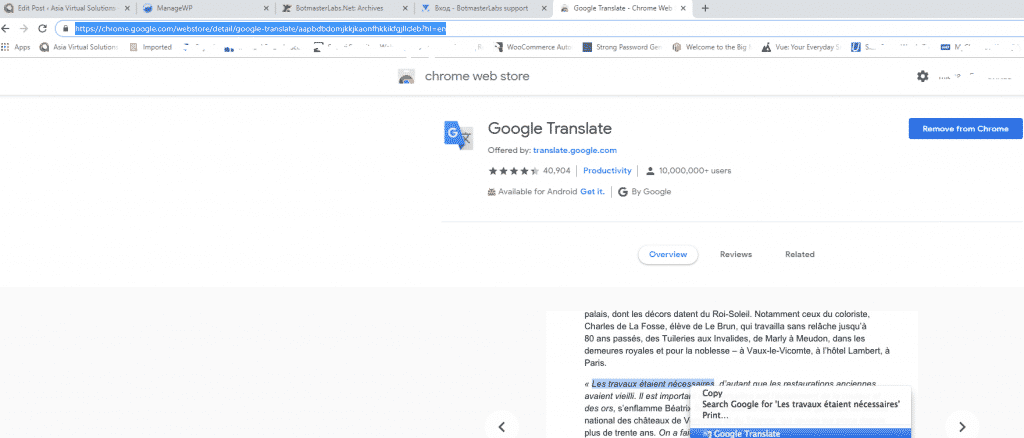
Als je al hebt Google Chrome Open vervolgens de extensies of ga naar de Chrome Web Store en zoek naar Google Translate. https://chrome.google.com/webstore/detail/google-translate/aapbdbdomjkkjkaonfhkkikfgjllcleb?hl=en en voeg de extensie toe.
Een account aanmaken op het Russische Botmasterlabs-forum (in het Engels)
Nadat je de Google Translate-extensie hebt toegevoegd, ga je naar het Russische ondersteuningsforum van Botmasterlabs, dat je hier kunt vinden: http://ru.botmastersupport.com/ Helaas, en zoals te verwachten, zal alles in het Russisch zijn. Het enige wat u hoeft te doen is: ergens op de pagina met de rechtermuisknop klikken en " selecteren" selecteren.“VERTAAL NAAR HET ENGELS”
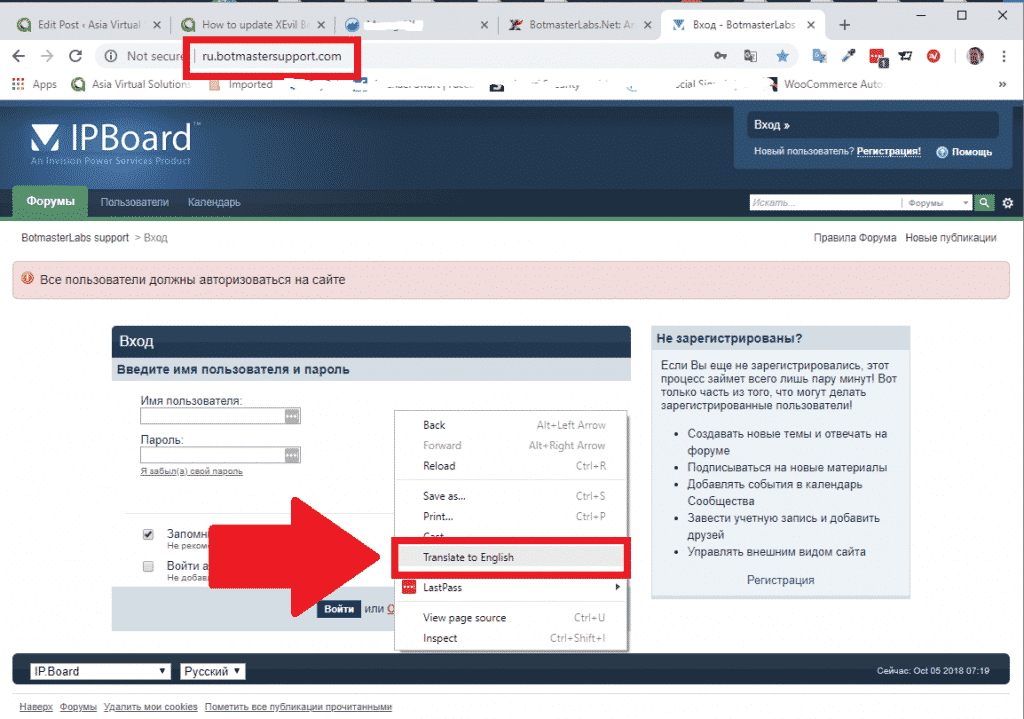
Het wordt direct vertaald en alle tekst zal in het Engels zijn. Je kunt ook gemakkelijk zien waar je een nieuw forumaccount kunt aanmaken.
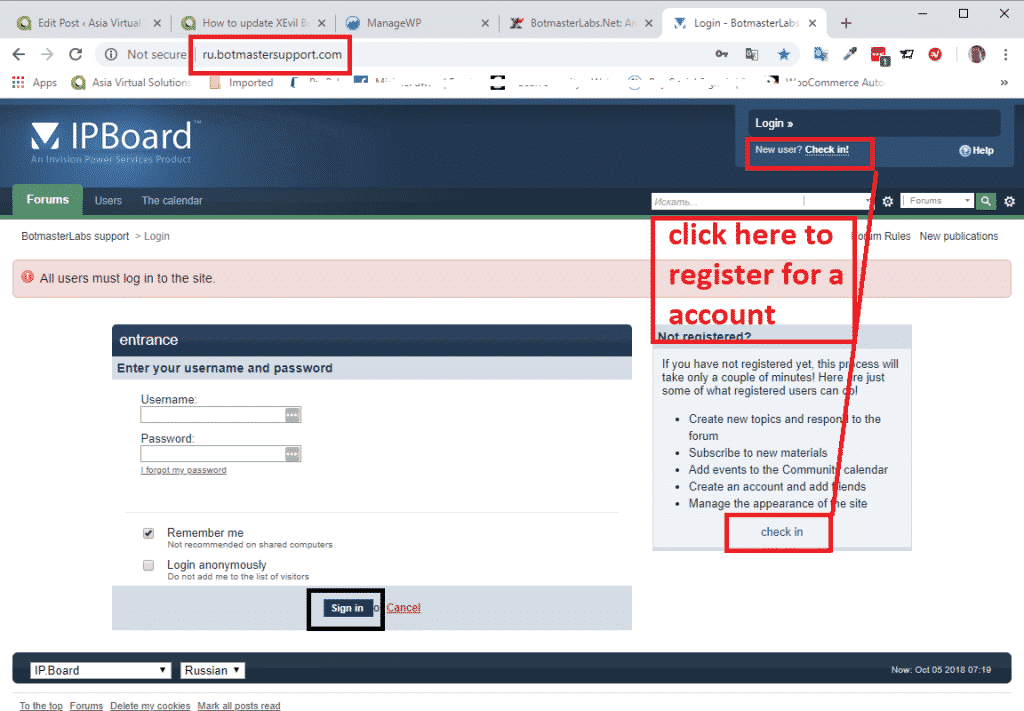
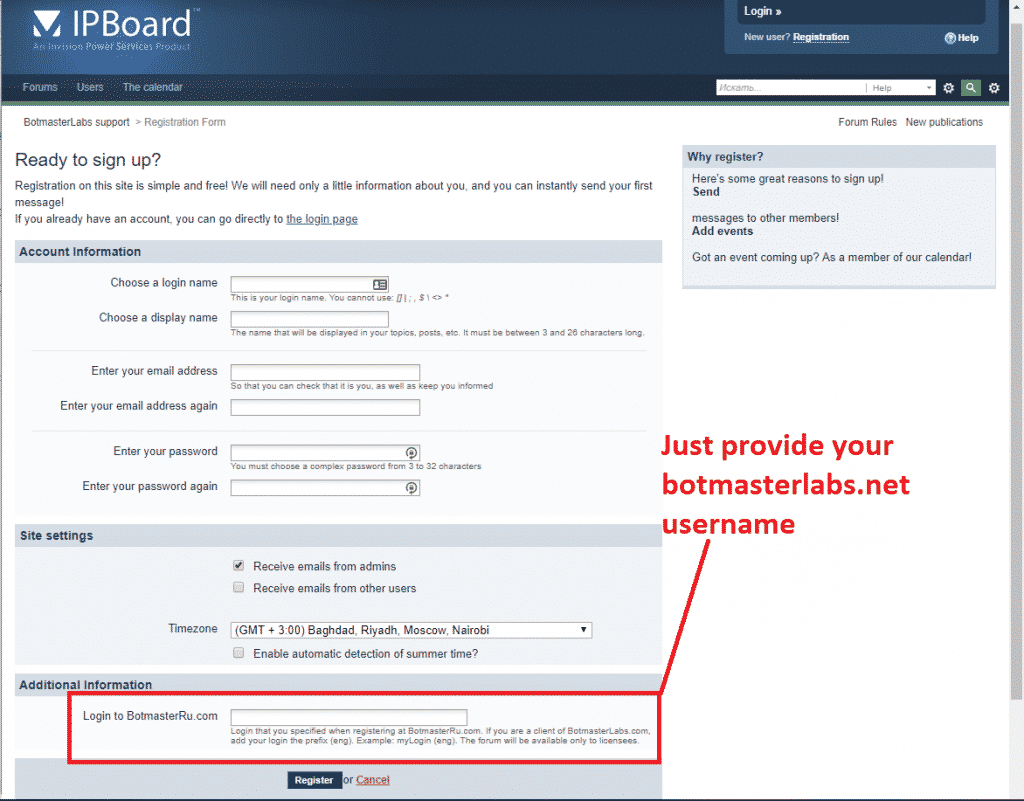
Volg vanaf nu gewoon de instructies om een nieuw account aanmaken.
Onderaan de pagina wordt u gevraagd om in te loggen op BotmasterRu.com. Voer hier uw Botmasterlabs-accountgebruikersnaam in – de gebruikersnaam waarmee u Xrumer en alle andere software downloadt.
Nadat je je hebt geregistreerd, stuur je de gebruikersnaam waarmee je je hebt geregistreerd via Skype naar Botmaster en vertel je hem dat je je hebt geregistreerd op het Russische forum. Vraag hem vervolgens om je forumaccount te activeren.
Dat is alles, u bent nu geregistreerd.
[spacer height=”2px”]
Hoe lees je de Russischtalige e-mails van het Russische Botmaster-forum?.
Als je je hebt geregistreerd voor het Russische Botmaster-forum en de optie hebt ingeschakeld om e-mailupdates te ontvangen, zullen die e-mails in het Russisch zijn. Maar dat is geen probleem, we kunnen ze gewoon in Microsoft Outlook vertalen. Als je een andere e-mailclient gebruikt, moet je een vertaalprogramma vinden dat je in je e-mailclient kunt integreren.
Microsoft Outlook-gebruikers volgen deze stappen:
Open de Microsoft App Store en zoek naar Microsoft Translator.
- Selecteer de optie in de onderstaande schermafbeelding.
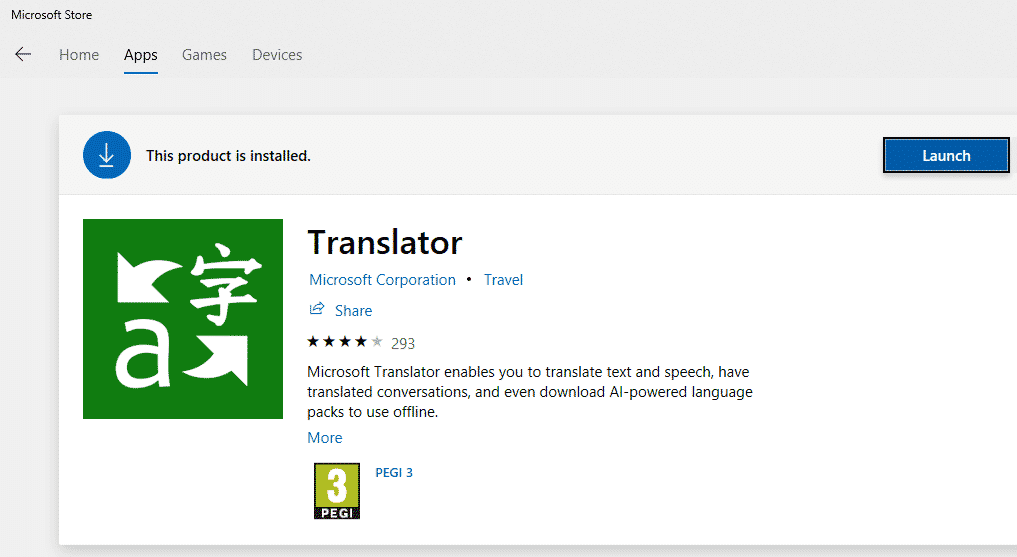
- Ga verder met het installeren van de app.
- Als je nu een e-mail in een andere taal ontvangt, hoef je alleen maar de e-mail te openen en vervolgens met de rechtermuisknop ergens in de e-mail te klikken, of op 'Vertalen' bovenaan de e-mail te klikken, zoals in de onderstaande schermafbeelding. (Sorry, ik heb momenteel geen e-mail in het Russisch.).
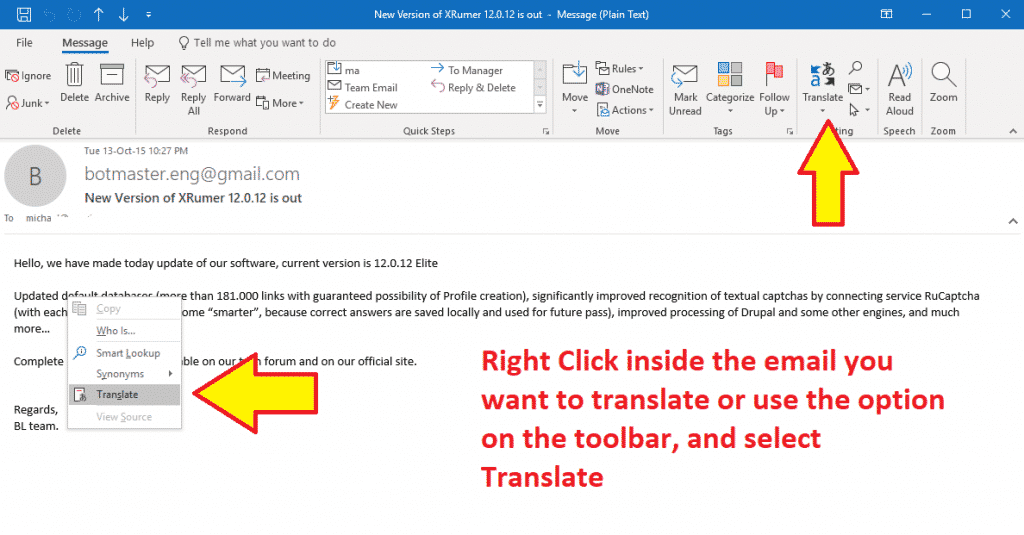
- In de zijbalk ziet u de talen waarnaar en waarvan u wilt vertalen. Maak uw selectie en klik op de groene knoppen. Uw tekst wordt vervolgens vertaald naar de door u gekozen Augeïsche taal.
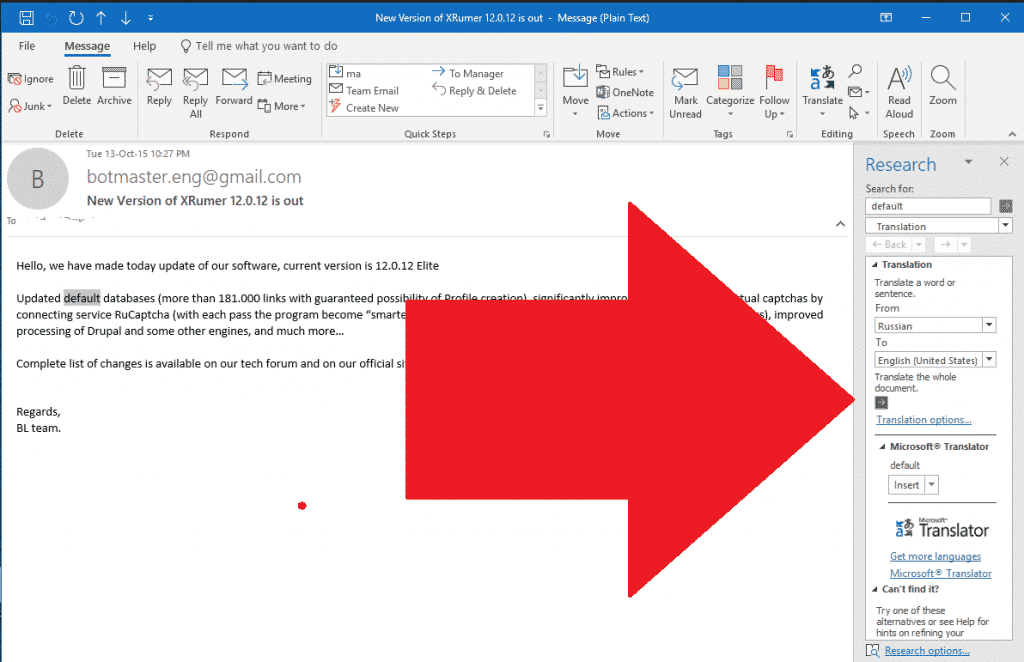
Dat is alles wat er te weten valt over het updaten van je Xevil Beta en het vertalen van de notificatiemails van Russisch naar Engels. Laat een reactie achter als je vragen hebt.
[spacer height=”2px”]
Heb je XEVIL nog niet?
Xevil is inbegrepen bij de aanschaf van Xrumer; koop het vandaag nog via onze kortingslink.













 English
  বাংলা
বাংলা  简体中文
简体中文  Nederlands
  Français
  Deutsch (Sie)
  हिन्दी
  Bahasa Indonesia
  Italiano
  日本語
日本語  한국어
한국어  Bahasa Melayu
  Português do Brasil
  Русский
  Español de México
  Tagalog
  ไทย
ไทย  Tiếng Việt
  اردو
اردو  Türkçe