



So aktualisieren Sie XEvil Beta und erhalten Update-Benachrichtigungen per E-Mail für Xrumer und XEvil
Mir ist aufgefallen, dass viele GSA Suchmaschinenranker Nutzer verwenden zunehmend den Captcha-Löser von Xrumer, um Captchas in GSA SER zu lösen. Uns ist außerdem aufgefallen, dass Botmaster selten bis nie E-Mails an Nutzer versendet, die sich auf der englischen Xrumer-Website registrieren, um sie über Aktualisierungen und deren Inhalt zu informieren.
Deshalb habe ich mich entschlossen, diesen kurzen Beitrag und ein Schritt-für-Schritt-Video zu erstellen, das Ihnen zeigt, wie Sie Ihre XEvil Beta-Version auf die neueste Beta-Version aktualisieren können. Anschließend erkläre ich Ihnen auch, wie Sie sich im russischen Forum von Xrumer anmelden und alles auf Englisch erhalten können, einschließlich Update-Benachrichtigungen.
[sociallocker]
So aktualisieren Sie XEvil Beta und erhalten Update-Benachrichtigungen per E-Mail für Xrumer und XEvil
[/sociallocker]
So erhalten Sie den XEvil Beta-Update-Patch.
Ich zeige Ihnen, wo Sie Ihren aktuellen finden können. XEvil Beta-Versionsnummer und wo man die neueste XEvil Beta-Patch-Version herunterladen kann.
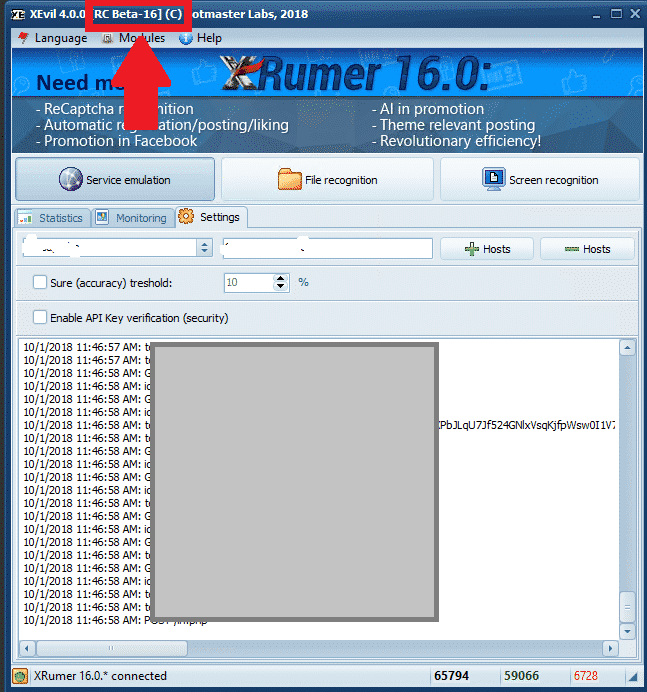
Wo Sie Ihre aktuelle XEvil Beta-Versionsnummer einsehen können.
Der Xevil Beta Die Versionsnummer ist oben links im Anwendungsfenster zu sehen, wie im folgenden Screenshot dargestellt. Im Screenshot unten ist die XEvil-Beta-Version [Beta 16] zu erkennen.
[spacer height=”2px”]
Wo kann man die neueste XEvil Beta-Patchversion herunterladen?.
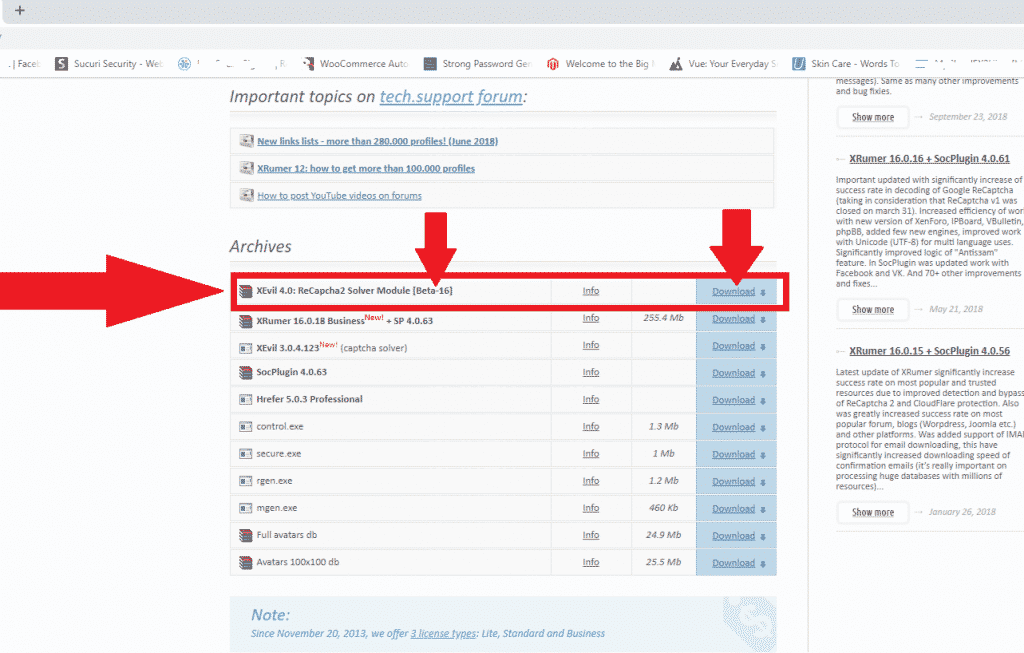
Um eine der folgenden Dateien herunterzuladen: Xrumer, Für XEvil, Hrefer und die zugehörigen Plugins müssen Sie sich in Ihrem Konto anmelden unter: http://www.botmasterlabs.net
Wenn Sie für das XEvil-Betaprogramm angemeldet sind, dann werden Sie Folgendes sehen: XEvil herunterladen Ganz oben in der Liste der Downloads wird die Beta-Version angezeigt, wie Sie im folgenden Screenshot sehen können.
So extrahieren Sie den heruntergeladenen XEvil Beta-Patch.
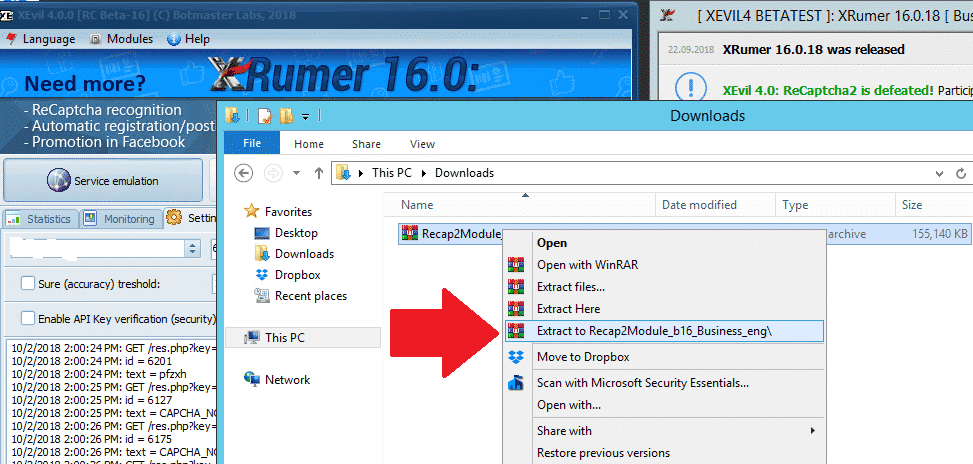
Okay, Sie haben also den neuesten XEvil Beta-Patch heruntergeladen und er befindet sich nun im Download-Ordner Ihres Computers oder VPS
Der heruntergeladene Patch liegt im .rar-Format vor. Falls Sie kein Programm zum Entpacken besitzen, können Sie WinRAR hier kostenlos herunterladen: https://www.win-rar.com
[full_width][one_half padding=”0 0 10px 0″]Ihr heruntergeladener Patch
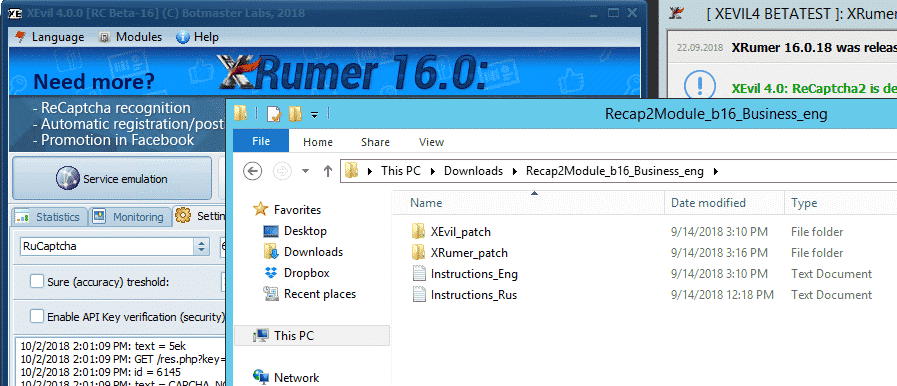
[one_half padding=”0 0 0 10px”]Ihr extrahierter XEvil Beta-Patch
[/one_half][/full_width]
[spacer height=”2px”]
So installieren Sie den XEvil Beta-Update-Patch.
Nachdem wir die Update-RAR-Datei extrahiert haben, müssen wir sie nur noch in den bestehenden Programmordner kopieren. Bitte beachten Sie, dass Sie für die Aktualisierung von XEvil Beta auf die neueste Version sowohl XEvil als auch Xrumer patchen müssen. Daher gibt es eine Xrumer und ein XEvil-Ordner im heruntergeladenen Update.
Als Erstes sollte man jetzt schließen Xrumer Wenn XEvil läuft, befolgen Sie die folgenden einfachen Schritte.
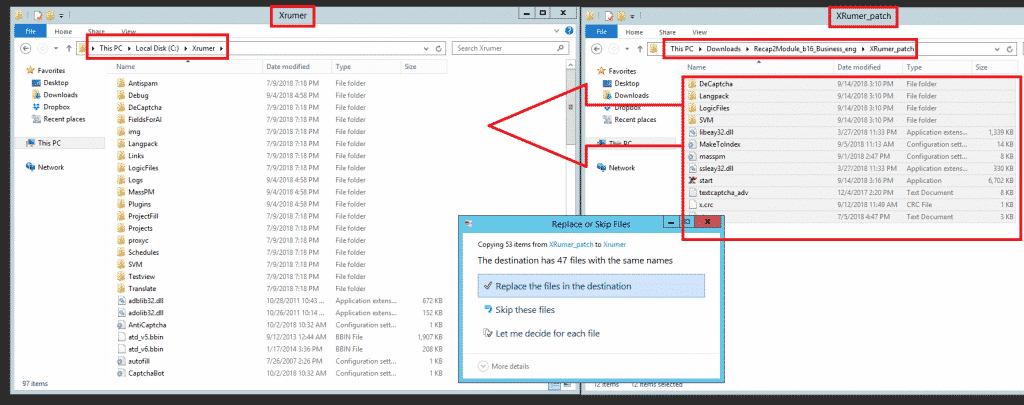
Öffnen Sie auf Ihrem Computer (VPS) in einem neuen Fenster die folgende Datei: Xrumer Programmordner: C:Xrumer und öffnen Sie auch den Xrumer-Patch, den Sie gerade heruntergeladen haben: C:UsersAdministratorDownloadsRecap2Module_b16_Business_engXRumer_patch. .
Wählen Sie nun alle Dateien und Ordner in C:\Users\Administrator\Downloads\Recap2\Module_b16_Business_eng\XRumer_patch aus, kopieren Sie diese und fügen Sie sie anschließend in C:\Xrumer ein. – Sie erhalten eine Warnung, dass die Dateien bereits vorhanden sind; wählen Sie einfach aus, um alle Dateien zu ersetzen.
Als Nächstes müssen wir auch den XEvil-Beta-Patch anwenden. Wählen Sie dazu alle Dateien und Ordner in C:\Users\Administrator\Downloads\Recap2\Module_b16_Business_eng\XEvil_patch aus, kopieren Sie sie und fügen Sie sie dann in C:\Xevil ein. Sie erhalten eine Warnung, dass die Dateien bereits vorhanden sind. Wählen Sie einfach aus, um alle Dateien zu ersetzen, wie im folgenden Screenshot gezeigt.
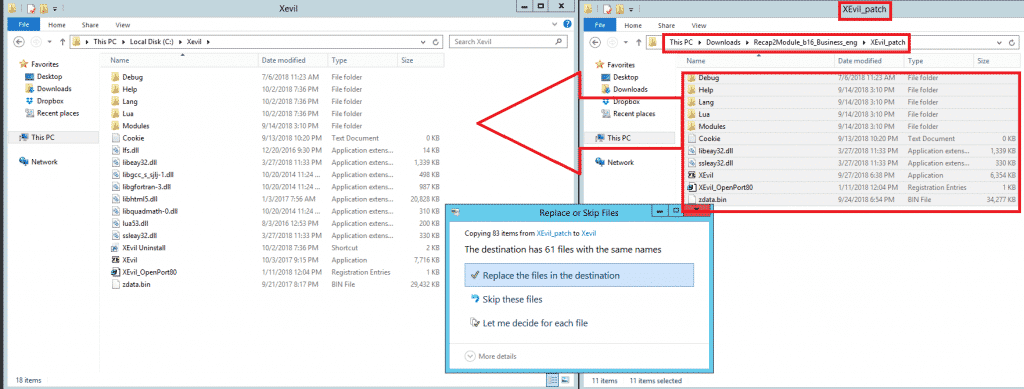
Und so, meine Freunde, wendet man die Updates für die XEvil-Beta an.
[spacer height=”2px”]
Wie Sie E-Mail-Benachrichtigungen von Botmasterlabs erhalten, wenn diese Updates veröffentlichen.
Um Unterstützung für Xrumer, XEvil, Hrefer Für alle anderen Produkte von Botmasterlabs müssen Sie sich im englischen Supportforum unter http://en.botmastersupport.com/ anmelden. Allerdings habe ich in den letzten 10 Jahren festgestellt, dass das englische Supportforum überhaupt nicht aktiv ist und so gut wie nutzlos, wenn man Informationen und Hilfe benötigt.
Ich stellte fest, dass die Botmasterlabs Russisches Support-Forum Sie sind hundertmal aktiver, und Aktualisierungen werden dort zuerst veröffentlicht. Später, nachdem sie Zeit hatten, einige zu übersetzen, werden sie auch im englischen Forum veröffentlicht. Das russische Forum versendet außerdem eine E-Mail, wenn es Produktaktualisierungen gibt.
Ich weiß, Sie denken jetzt bestimmt: „Was soll das denn? Ich kann kein Russisch!“ Aber keine Sorge, ich auch nicht. Ich zeige Ihnen trotzdem, wie Sie das russische Forum auf Englisch umstellen. Sie benötigen dazu Folgendes:
- Google Chrome (Ich habe es weder mit Firefox noch mit anderen Browsern getestet, es könnte funktionieren, probieren Sie es aus.)
- Google Translate-Erweiterung für Chrome
Google Translate herunterladen
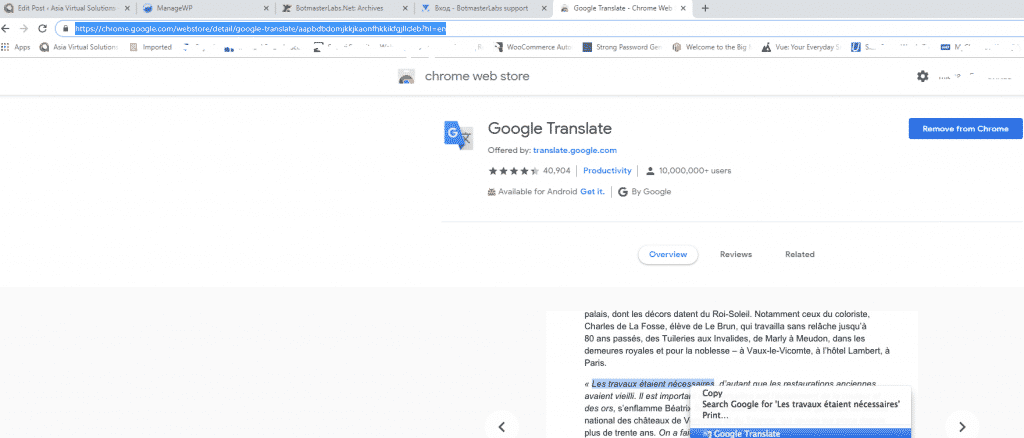
Wenn Sie bereits haben Google Chrome Öffnen Sie dann die Erweiterungen oder gehen Sie zum Chrome Web Store und suchen Sie nach Google Translate – https://chrome.google.com/webstore/detail/google-translate/aapbdbdomjkkjkaonfhkkikfgjllcleb?hl=en und fügen Sie die Erweiterung hinzu.
Kontoerstellung im russischen Botmasterlabs-Forum (auf Englisch)
Sobald Sie die Google Translate-Erweiterung hinzugefügt haben, sollten Sie das russische Supportforum von Botmasterlabs besuchen, das Sie hier finden: http://ru.botmastersupport.com/ Leider ist, wie zu erwarten, alles auf Russisch. Sie müssen lediglich: irgendwo auf der Seite mit der rechten Maustaste klicken und “ÜBERSETZEN SIE INS ENGLISCHE”
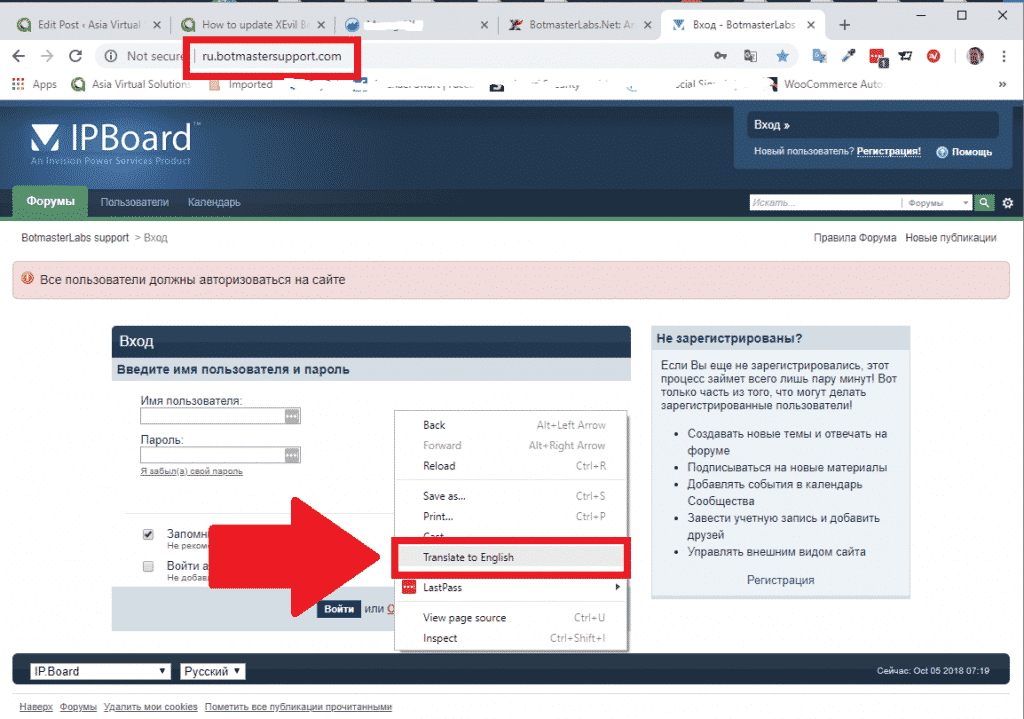
Der Text wird sofort übersetzt und ist vollständig auf Englisch. Außerdem können Sie ganz einfach sehen, wo Sie sich für ein neues Forum-Konto registrieren können.
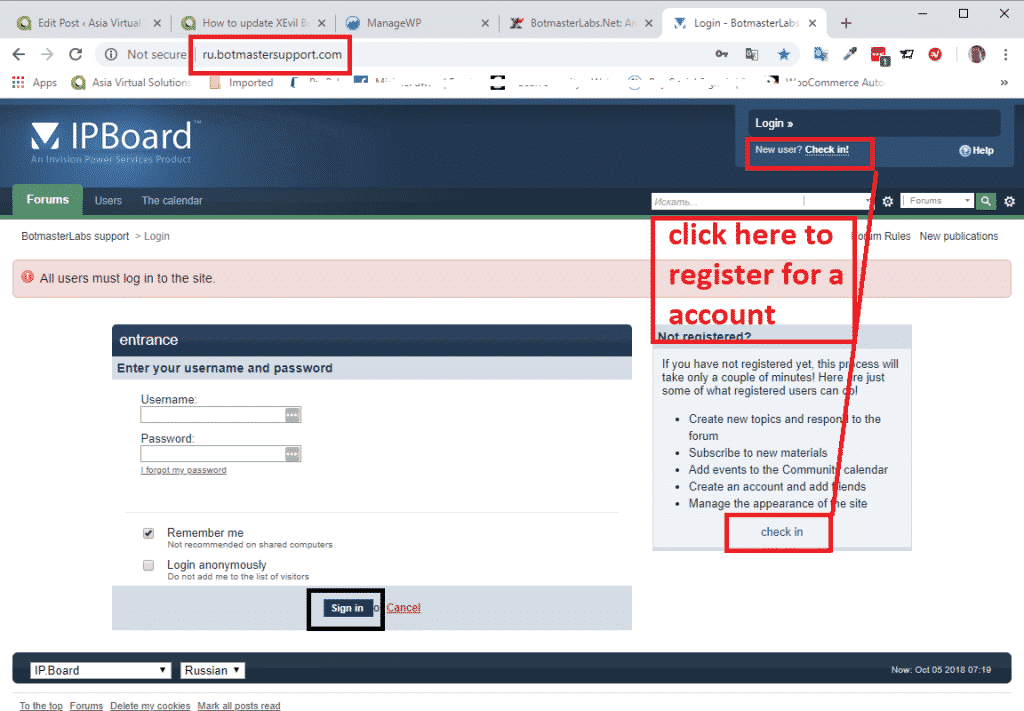
Folgen Sie ab jetzt einfach den Anweisungen. Neues Konto erstellen.
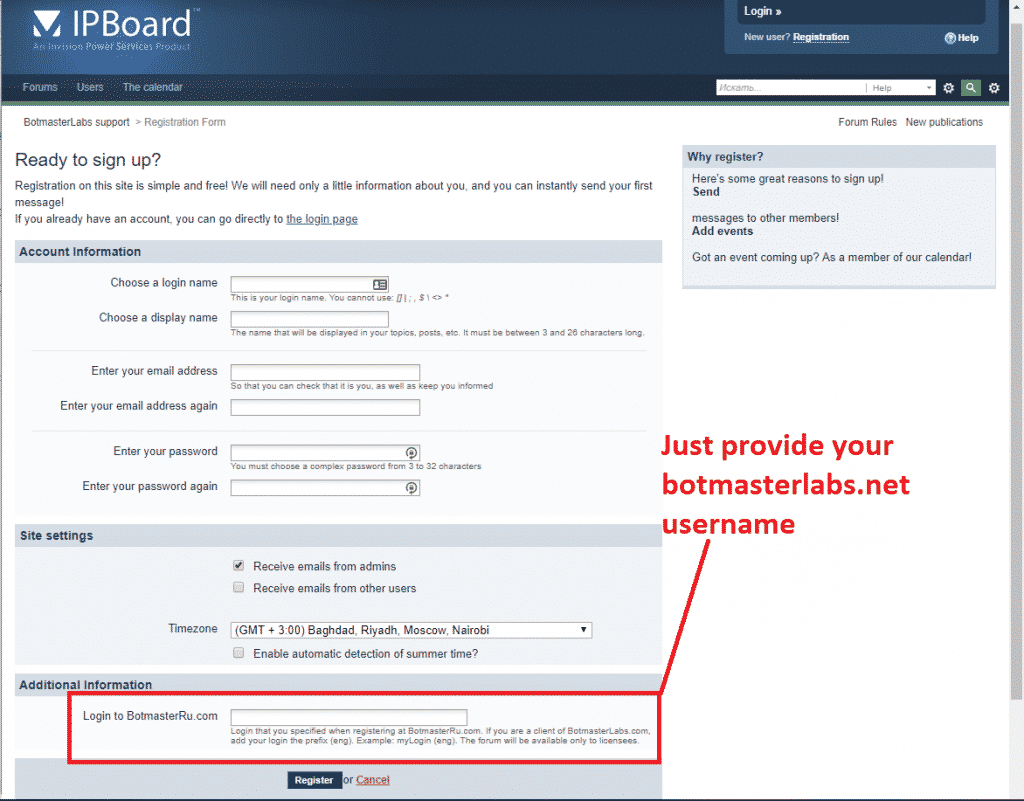
Am Ende der Seite werden Sie nach Ihren Anmeldedaten für BotmasterRu.com gefragt. Geben Sie hier einfach Ihren Botmasterlabs-Benutzernamen ein – den Benutzernamen, mit dem Sie Xrumer und die gesamte andere Software heruntergeladen haben.
Sobald Sie sich registriert haben, senden Sie Ihren Benutzernamen, mit dem Sie sich registriert haben, über Skype an Botmaster und teilen Sie ihm mit, dass Sie sich im russischen Forum registriert haben. Bitten Sie ihn, Ihr Forum-Konto zu aktivieren.
Das war's, Sie sind jetzt registriert.
[spacer height=”2px”]
Wie man russischsprachige E-Mails aus dem russischen Botmaster-Forum liest.
Wenn Sie sich im Forum „Russian Botmaster“ registriert und die Option für E-Mail-Benachrichtigungen aktiviert haben, erhalten Sie diese E-Mails auf Russisch. Das ist aber kein Problem, wir können sie direkt in Microsoft Outlook übersetzen. Falls Sie einen anderen E-Mail-Client verwenden, benötigen Sie ein Übersetzungsprogramm, das in Ihren Client integriert ist.
Microsoft Outlook-Benutzer befolgen diese Schritte:
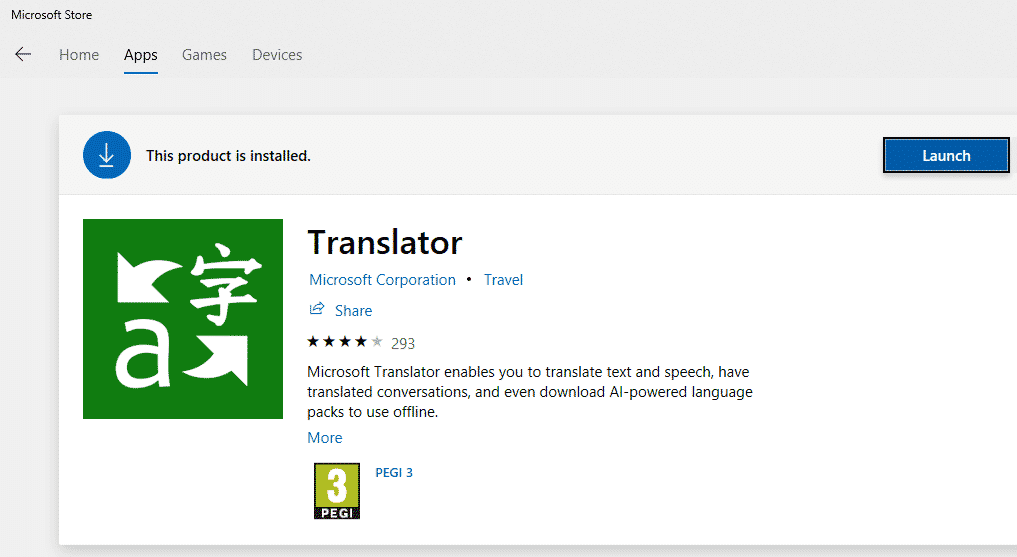
Öffnen Sie den Microsoft App Store und suchen Sie nach Microsoft Translator.
- Wählen Sie dasjenige aus dem untenstehenden Screenshot aus.
- Installieren Sie nun die App.
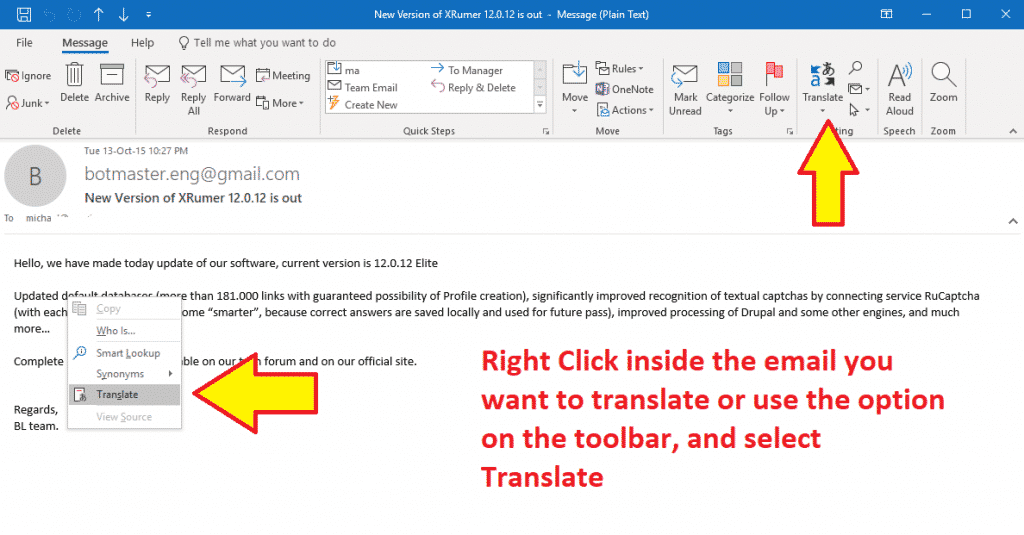
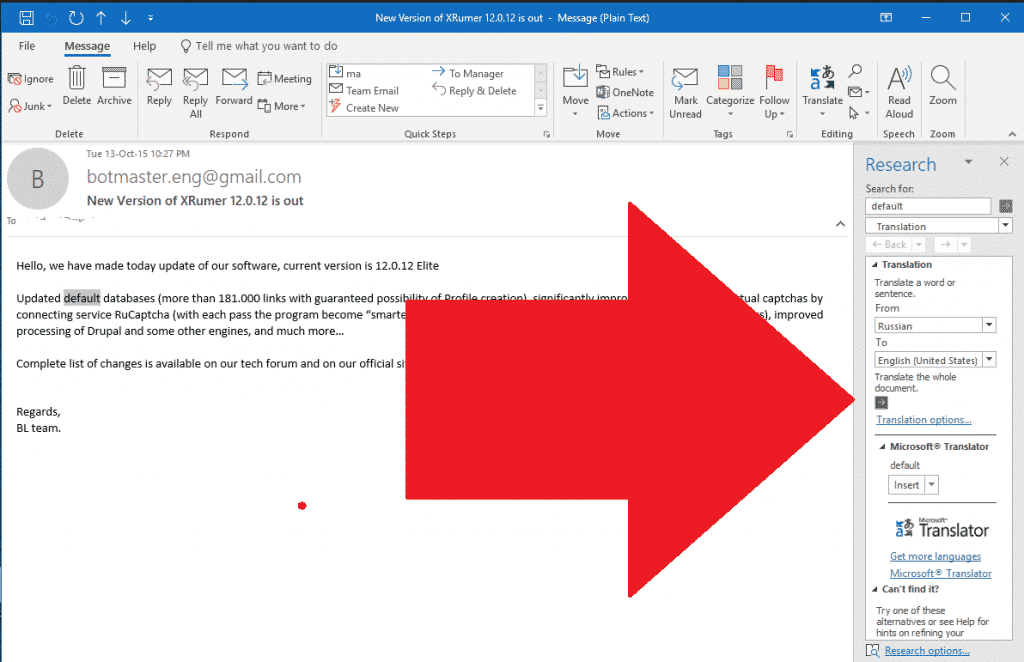
- Wenn Sie nun eine E-Mail in einer anderen Sprache erhalten, müssen Sie diese lediglich öffnen und dann mit der rechten Maustaste irgendwo in der E-Mail klicken oder oben in der E-Mail auf „Übersetzen“ klicken, wie im folgenden Screenshot dargestellt. (Leider habe ich momentan keine russische E-Mail zur Hand.).
- In der Seitenleiste werden Ihnen die Ziel- und Ausgangssprache angezeigt. Treffen Sie Ihre Auswahl und klicken Sie auf die grünen Schaltflächen. Ihr Text wird dann in die von Ihnen gewählte Augiassprache übersetzt.
Das war's also, Leute, um eure Xevil Beta zu aktualisieren und die Benachrichtigungs-E-Mails von Russisch nach Englisch zu übersetzen. Schreibt einfach einen Kommentar, falls ihr Fragen habt.
[spacer height=”2px”]
HABEN SIE XEVIL NOCH NICHT?
Xevil ist im Lieferumfang von Xrumer enthalten. Nutzen Sie noch heute unseren Rabattlink, um es zu erwerben.













 English
  简体中文
简体中文  Deutsch (Sie)
  Bahasa Indonesia
  Italiano
  日本語
日本語  한국어
한국어  Português do Brasil
  Русский
  Español de México
  ไทย
ไทย  Tiếng Việt
  Türkçe