• Chi siamo
    • Contribuisci o collabora con Asia Virtual Solutions
    • llms.txt
  • Affiliati
  • Contattaci
  • Il mio conto
  • Biglietti di supporto
Soluzioni virtuali per l'Asia:
  • Casa
  • Classificatore del motore di ricerca GSA
    • Domande frequenti su GSA Search Engine Ranker
    • Strumenti e componenti aggiuntivi GSA SER
    • Tutorial GSA SER
  • Blog
    • Contenuti basati sull'intelligenza artificiale e SEO
    • Tutorial GSA SER
    • Hosting e VPS
    • Strategie di link building
    • Notizie e aggiornamenti
    • Tutorial di RankerX
    • Recensioni di software SEO
    • Xrumer e XEvil
  • Negozio
    • Articoli su contenuti e intelligenza artificiale
    • Strumenti e componenti aggiuntivi GSA SER
    • Servizi di hosting
    • Servizi di link building
    • Inviatore di Money Robot
    • RankerX
    • Servizi consigliati
    • Servizi di social media
    • Servizi Xrumer
Nessun risultato
Visualizza tutti i risultati
Asia Virtual Solutions: esperti GSA SER e marketing digitale

Casa » Blog » How to update XEvil Beta and how to receive update notifications from Xrumer

How to update XEvil Beta and how to receive update notifications from Xrumer

Michael Swart di Michael Swart
10 Ottobre, 2018 - Updated on 24 Giugno, 2026
in Xrumer e XEvil
0
How to update XEvil Beta and how to receive update notifications from Xrumer
Table of Contents show
1 How to update XEvil Beta and receive update notifications via email for Xrumer and XEvil
2 How to update XEvil Beta and receive update notifications via email for Xrumer and XEvil
2.1 How to get the update XEvil Beta update patch.
2.1.1 Where to see your current XEvil Beta Version number.
2.1.2 [spacer height=”2px”]
2.1.3 Where to download the latest XEvil Beta patch version.
2.2 How to extract the downloaded XEvil Beta patch.
2.3 How to apply the XEvil Beta update patch.
2.4 How to receive email notifications from Botmasterlabs when they push updates.
2.4.1 Download Google Translate
2.4.2 Creating account on the Botmasterlabs Russian forum ( in English )
2.5 How to read the Russian language emails from the Russian Botmaster forum.
2.5.1 Microsoft Outlook Users follow these steps:
3 DONT HAVE XEVIL YET?

How to update XEvil Beta and receive update notifications via email for Xrumer and XEvil

I have noticed that many Classificatore del motore di ricerca GSA users have started to use the captcha solver from Xrumer for solving of captchas in GSA SER. We have also noticed that Botmaster seldom if ever sends out emails to users who sign up on the English Xrumer site,  informing you when there  are updated and what has been updated.

So I have decided to make a this quick post and a walk thru video showing you how to update your XEvil Beta version to the latest Beta version, and then i will also explain to you how you can sign up to the Russian forum of Xrumer and get all in English, including update notifications.


[sociallocker]

How to update XEvil Beta and receive update notifications via email for Xrumer and XEvil

[/sociallocker]

How to get the update XEvil Beta update patch.

I will show you where to find your current XEvil Beta  version number and then also where to download the latest XEvil Beta patch version.


Where to see your current  XEvil Beta Version number.

The Xevil Beta Version number can be seen at the top left of the application window, as shown in the screenshot below. In the Below screenshot the XEvil Beta version is [Beta 16]
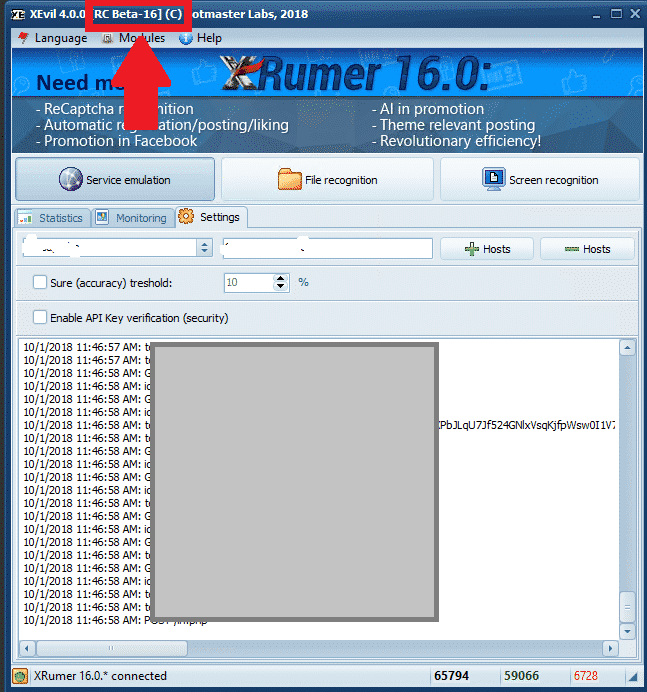
XEvil Current Beta Version

[spacer height=”2px”]

Where to download the latest XEvil Beta patch version.

To download any of the Xrumer, XEvil, Hrefer  and there related plugins you will need to login to your account at : http://www.botmasterlabs.net

If you are signed up for the XEvil beta program then you will see the XEvil download at the top of the list of downloads and the Beta version will be indicated, as you can see in the below screenshot.
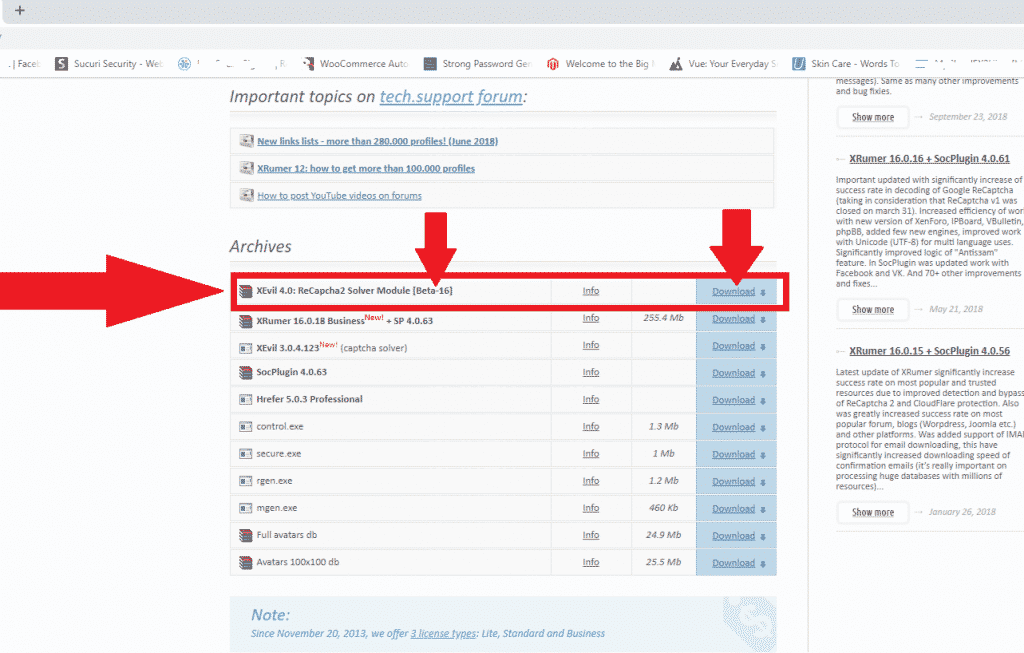
XEvil Beta Download


How to extract the downloaded XEvil Beta patch.

OK, so you have now downloaded the latest XEvil Beta patch and it is now in the downloads folder of your computer or VPS

The downloaded patch  will be in .rar format, if you do not have anything to unzip it with then you can download a free winrar copy from here : https://www.win-rar.com

[full_width][one_half padding=”0 0 10px 0″]Your Downloaded patch
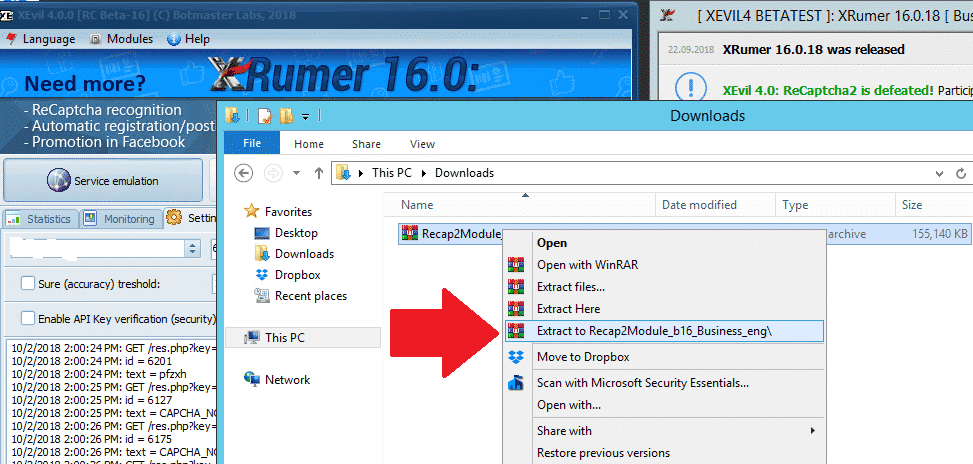
XEvil downloaded patch

[/one_half][one_half padding=”0 0 0 10px”]Your Extracted XEvil Beta Patch
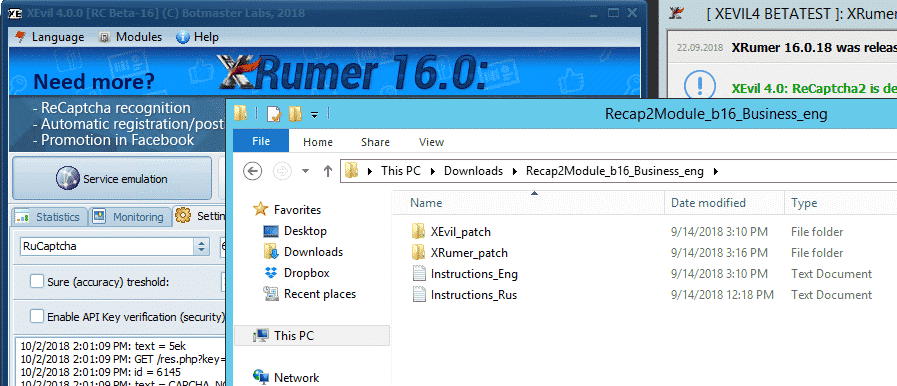
XEvil extracted rar patch

[/one_half][/full_width]

[spacer height=”2px”]

How to apply the XEvil Beta update patch.

Now that we have extracted the update .rar file all we need to do is copy it to the existing program files. Please note that to update XEvil Beta to latest version you have to patch both XEvil as well as Xrumer, that is then why there is a Xrumer and a XEvil folder in the downloaded update.

First thing to do now is to close Xrumer and XEvil if they are running, then follow the below simple steps.

On your computer VPS in a new window open the Xrumer Program folder : C:Xrumer and also open the the Xrumer patch that you have just downloaded C:UsersAdministratorDownloadsRecap2Module_b16_Business_engXRumer_patch .

Now select all the files and folders in C:UsersAdministratorDownloadsRecap2Module_b16_Business_engXRumer_patch   and copy it and then paste it in  C:Xrumer  – You will receive a warning that the files already exist, just select to replace all the files.
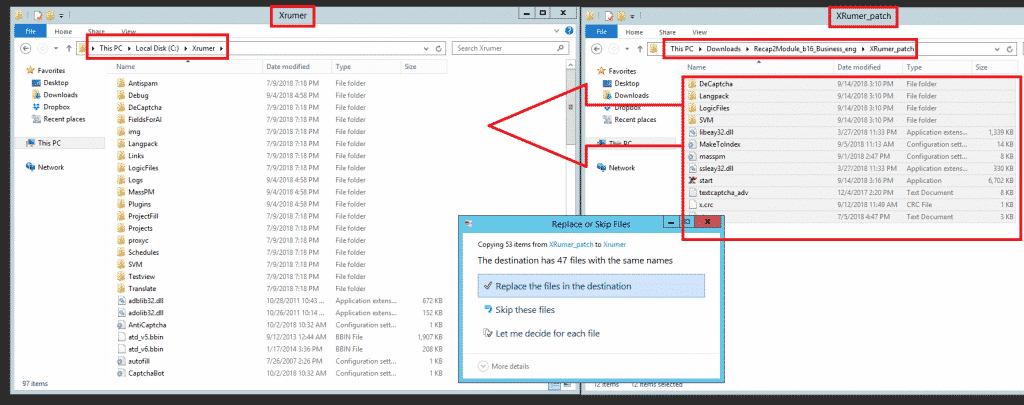
Apply Xrumer - XEvil Beta patch
Apply Xrumer – XEvil Beta patch


Next we will need to also apply the XEvil beta patch, to do so  now select all the files and folders in C:UsersAdministratorDownloadsRecap2Module_b16_Business_engXEvil_patch   and copy it and then paste it in  C:Xevil – You will receive a warning that the files already exist, just select to replace all the files, as shown in the below screenshot.
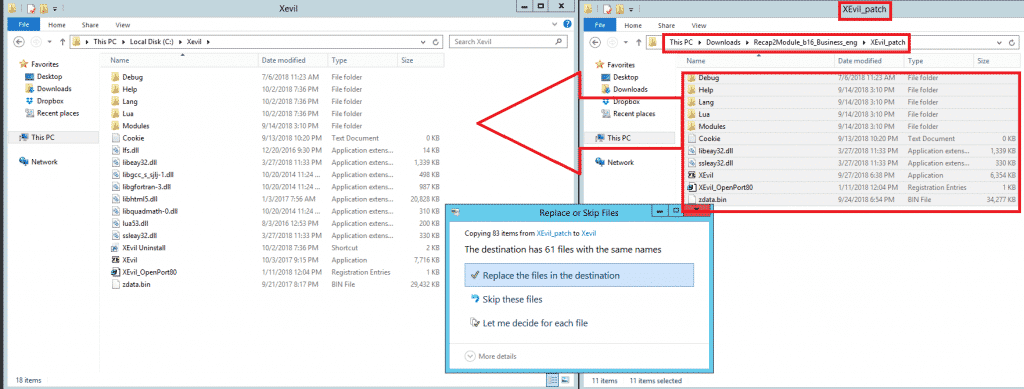
 

Apply XEvil patch
Apply XEvil patch


And that my friends is how you apply the updates for XEvil beta.

[spacer height=”2px”]

How to receive email notifications from Botmasterlabs when they push updates.

To get support for Xrumer, XEvil, Hrefer and all the other stuff from Botmasterlabs, you need to sign up to their English support forum at http://en.botmastersupport.com/, but i have learned over the past 10 years that the English support forum is not very active at all, and it is pretty much useless if you need info and help.

I found that the Botmasterlabs  Russian support forum are 100 times more active and updates are posted over there first and then later after they had time to translate some it will gets posted on the English forum.  The Russian Forum also send out an email when there products get updated.

By now I know you will be thinking WTF – I cant read Russian, but do not worry, neither do I, but i am going to show you how to make the Russian Forum English. You will need the following  items:

  • Google Chrome ( Have not tried it with Firefox or any other browsers, might work, give it a try )
  • Google Translate Extension for Chrome

Download Google Translate

If you already have Google Chrome then open the extensions or go to the Chrome web store and search for Google Translate  – https://chrome.google.com/webstore/detail/google-translate/aapbdbdomjkkjkaonfhkkikfgjllcleb?hl=en and add the extension.
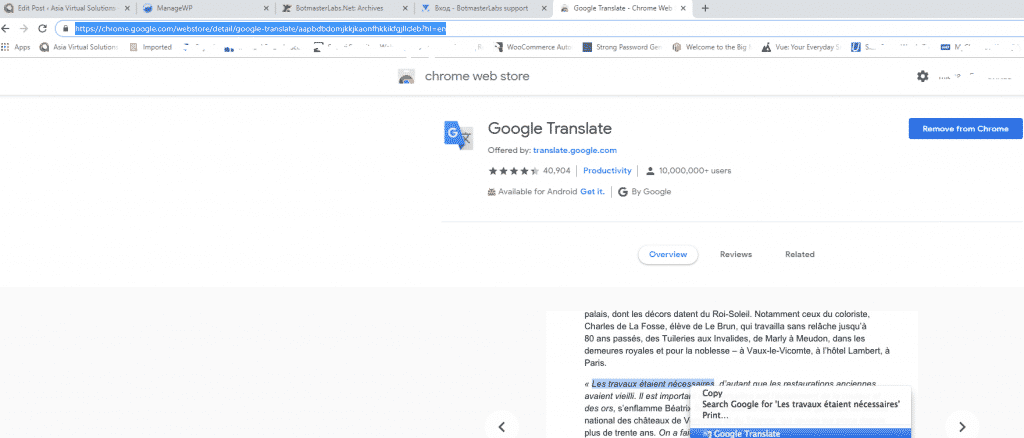
Google Translate Chrome Extension

Creating account on the Botmasterlabs Russian forum ( in English )

Once you have added the Google translate extension, you should browse over to  the Botmasterlabs Russian support forum, which is over here : http://ru.botmastersupport.com/  Unfortunately and as it should be expected everything will be in Russian. All you need to do is:  anywhere on the page right click and select “TRANSLATE TO ENGLISH”
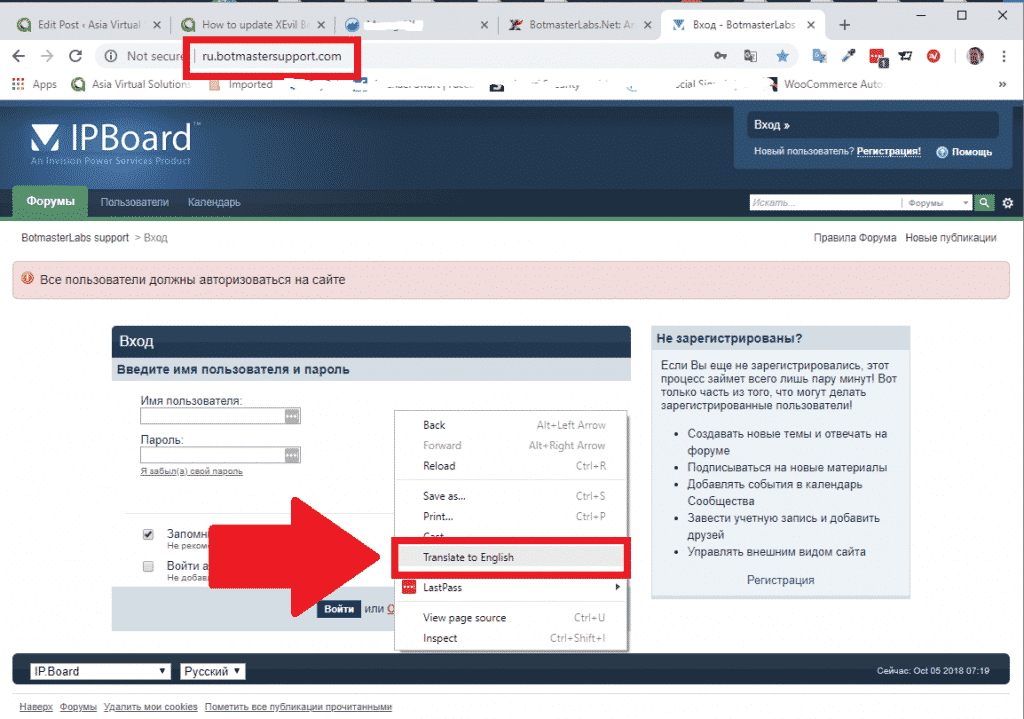
Botmasterlabs Suppot Forum - Translate to English


It will be instantly translated and all the text will be in English and you can easily see where to register for a new forum account.
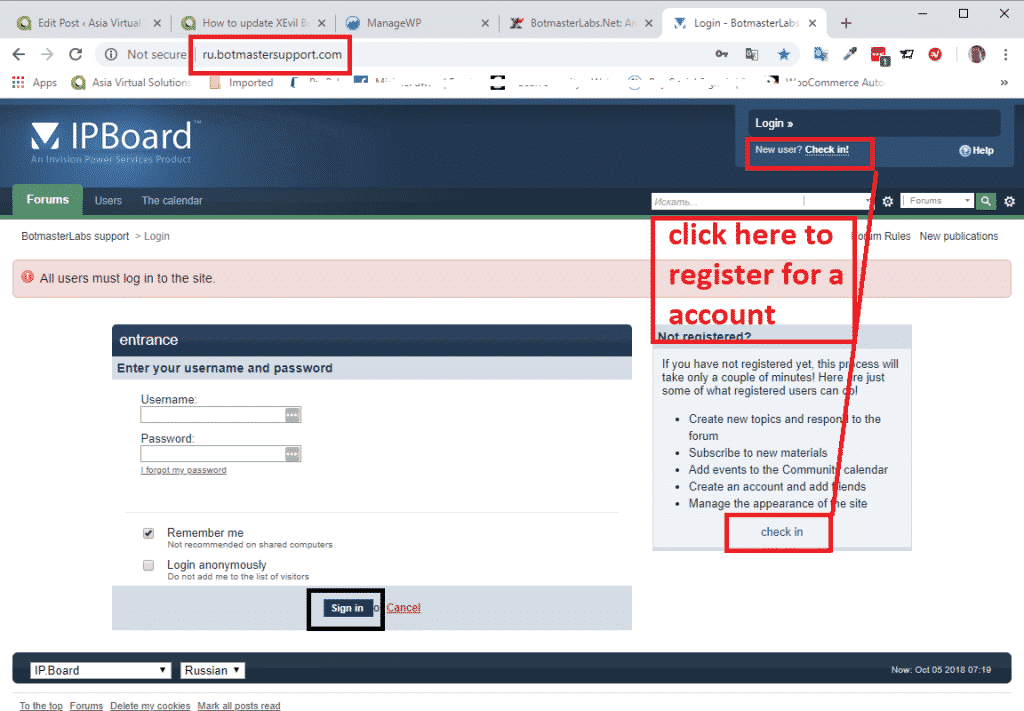
 

Botmasterlabs Suppot Forum - Register a new aaccount


From here onward just follow the instructions to create a new account.

At the bottom of the page it will ask for your Login to BotmasterRu.com, here just enter your Botmasterlabs account username – the one where you download Xrumer and all the other software.

Once you have registered send your username you registered with to Botmaster via Skype, and tell him you registered on the Russian Forum, and ask him to please activate your forum account.

That is it you are now registered.
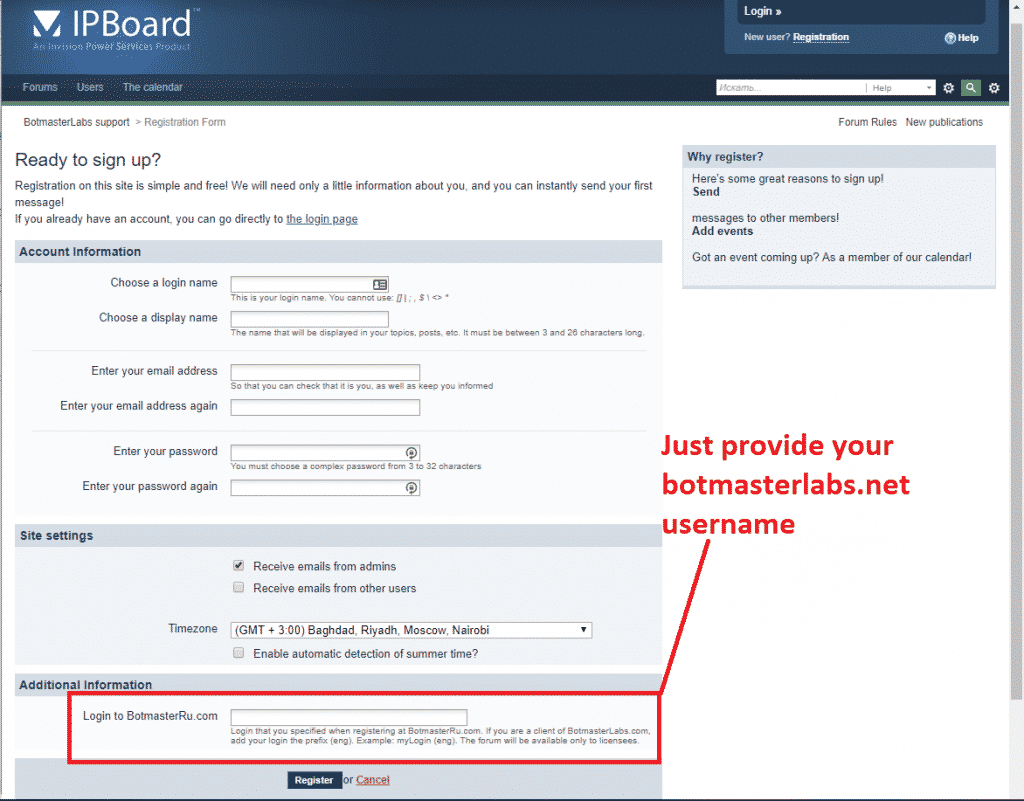
Botmasterlabs Suppot Forum - Complete registration


[spacer height=”2px”]

How to read the Russian language emails from the Russian Botmaster forum.

When you registered for the Russian Botmaster forum and enabled the option to receive email updates, those emails will be in Russian language. But again not a problem we can translate them right inside Microsoft Outlook. If you use any other email client then you will need to find a translate that plugs in to your email client.

Microsoft Outlook Users follow these steps:

Open Microsoft App store, and search for Microsoft Translator.

  • Select the one in the screenshot below.
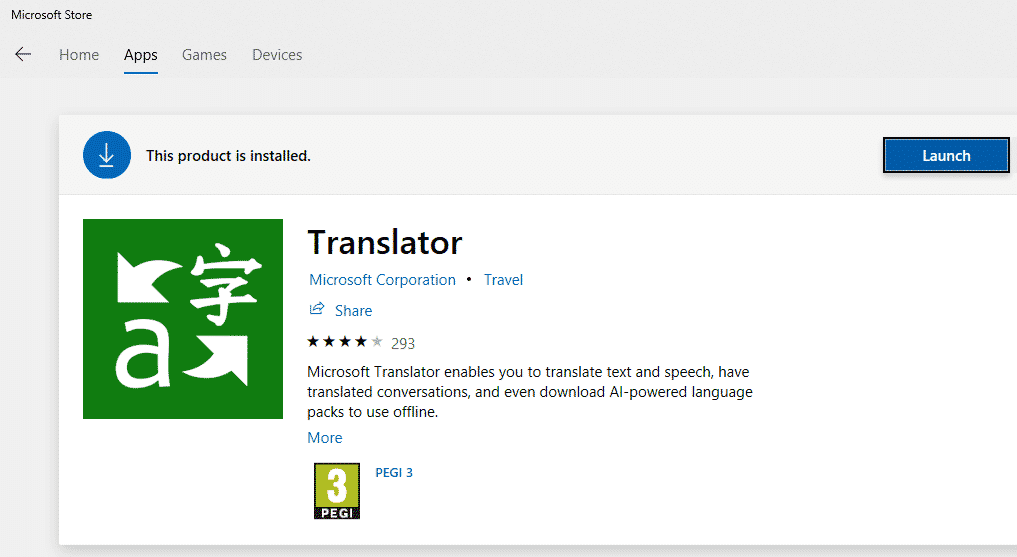
Microsoft Translator


  • Proceed  install the app.
  • Now when you receive an email that is in another language, all you need to do is open the email and then right click anywhere in the email, or click the translate at the top of the emails, like in the below screenshot. ( sorry i do not have a email in Russian on the moment ).
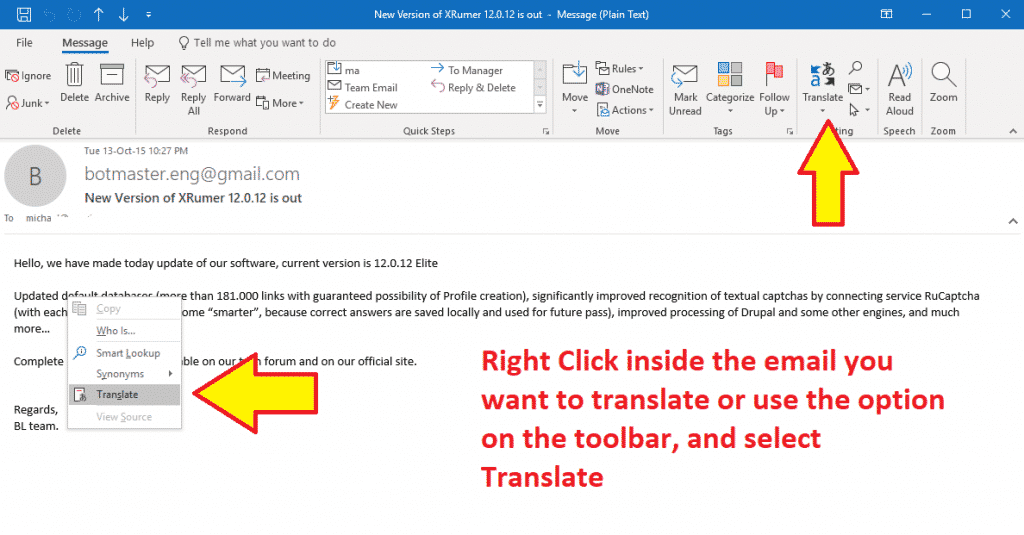
 

Translate an Email
Translate an Email


  • You will see the language to translate to and from show in the sidebar, make your selections and click the green buttons, and your text will be translated to your selected Augean.
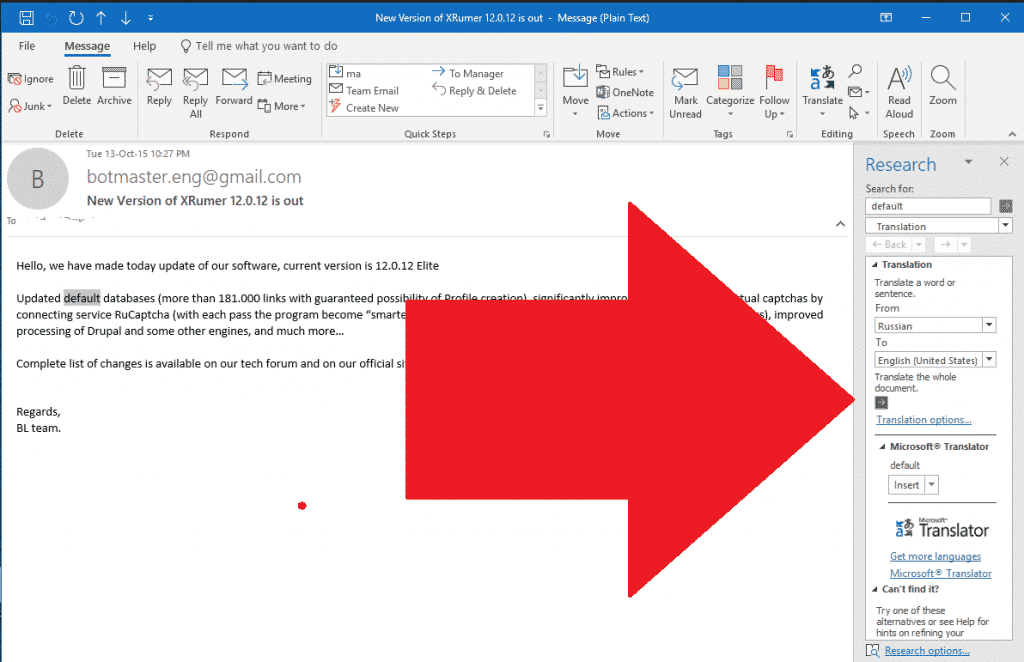
Select language to translate email


Well that is  all there is folk there is to updating your Xevil Beta and to translate the notification emails from Russian to English. Please drop a note in the comments if you have any questions.


[spacer height=”2px”]

DONT HAVE XEVIL YET?

Xevil is part of the package when you purchase Xrumer, purchase it thru our discounted link today


Purchase Xrumer

Tags: botmasterlabsCaptcha Solveremail translateGoogle Recaptcha V2how toRecaptcha SolverupdateXEvilXEvil downloadXrumer
Previous Post

How Web 2.0 Backlinks can Ease your Pain

Next Post

Best Automated Link Building Tools For 2019 And The Dangers Using Them

Michael Swart

Michael Swart

Asia Virtual Solutions is proudly owned and maintained by Michael Swart and a team of dedicated virtual assistants.

Next Post
The Best Automated Link Building Tools For 2019 And The Dangers Using Them.

Best Automated Link Building Tools For 2019 And The Dangers Using Them

Prodotto consigliato

Categorie del blog

  • Contenuti basati sull'intelligenza artificiale e SEO
  • Tutorial GSA SER
  • Hosting e VPS
  • Strategie di link building
  • Notizie e aggiornamenti
  • Recensioni di software SEO
  • Tutorial di RankerX
  • Xrumer e XEvil

Il prodotto di cui hai bisogno

Recensioni recenti

  • Pubblicità di servizi di marketing digitale che presenta strumenti e funzionalità SEO quali progetti GSA ser, e-mail private e articoli pertinenti alle parole chiave. Progetti di posizionamento sui motori di ricerca GSA: realizzati per te
    Note 5 sur 5
    par Talbert Williams
  • Illustrazione digitale del concetto di servizio proxy con laptop, mappamondo e rack per server proxy. Servizio proxy
    Note 5 sur 5
    par Talbert Williams
  • Pacchetti email di RankerX Pacchetti email RankerX
    Note 5 sur 5
    par Talbert Williams
  • Opera d'arte digitale che rappresenta una rete globale con dispositivi interconnessi e collegamenti colorati, che pubblicizza un servizio "elenco collegamenti GSA SER". Elenco dei backlink di qualità n. 1 per GSA Search Engine Ranker
    Note 5 sur 5
    par ali imani
  • Illustrazione digitale del concetto di servizio proxy con laptop, mappamondo e rack per server proxy. Servizio proxy
    Note 5 sur 5
    par Nick Nick
  • Un'immagine grafica digitale che promuove i backlink SEO multipiattaforma, con icone dei social media, un tachimetro e il sito web asiavirtualsolutions.com. Pacchetto di backlink SEO multipiattaforma
    Note 5 sur 5
    par shashwat asthana
  • Pacchetti email di RankerX Pacchetti email RankerX
    Note 5 sur 5
    par vancuoc29
  • Pubblicità di servizi di marketing digitale che presenta strumenti e funzionalità SEO quali progetti GSA ser, e-mail private e articoli pertinenti alle parole chiave. Progetti di posizionamento sui motori di ricerca GSA: realizzati per te
    Note 5 sur 5
    par nick smith
  • VPS per la classificazione dei motori di ricerca GSA VPS per la classificazione dei motori di ricerca GSA
    Note 5 sur 5
    par nick smith
  • VPS per la classificazione dei motori di ricerca GSA VPS per la classificazione dei motori di ricerca GSA
    Note 5 sur 5
    par mike

Tutto il materiale legale

  • Contratto di affiliazione
  • Antispam
  • Soluzioni virtuali per l'Asia
  • Preferenze di comunicazione
  • Disclaimer
  • Doppio clic sul cookie Dart
  • Politica sui link esterni
  • Politica di Facebook
  • Dichiarazione della FTC
  • politica sulla riservatezza
  • Politica di rimborso e garanzia
  • Termini e Condizioni
  • Divulgazione delle testimonianze

Acquisti sicuri

Google Save Browsing Certified
Il logo del sito web Norton Safe su sfondo bianco.

Contattaci

Sede centrale negli Stati Uniti
  • Asia Virtual Solutions LLC, 400 Rella Blvd, #123-298, Montebello, NY 10901
  •  co*****@******************ns.com
  • +1 (415) 851-6951
  •  asiavirtual
  •  Asia Virtual Solutions su LinkedIn
Ufficio virtuale in Asia
  • Asia Virtual Solutions LLC, Livello 29, The Offices at Centralworld 999/9 Rama I Road, Pathumwan, Bangkok, Thailandia
  •  co*****@******************ns.com
  • +1 (415) 851-6951
  •  asiavirtual
  •  Asia Virtual Solutions su LinkedIn

© 2026 - Asia Virtual Solutions LLC. Tutti i diritti riservati. Il sito web è gestito e mantenuto da: Asia Virtual Solutions LLC

Nessuna miniatura
Caricare
Non riuscito
Rimuovi il file caricato
We've detected you might be speaking a different language. Do you want to change to:
Cambia lingua in English English
Cambia lingua in বাংলা বাংলা
Cambia lingua in 简体中文 简体中文
Cambia lingua in Nederlands Nederlands
Cambia lingua in Français Français
Cambia lingua in Deutsch (Sie) Deutsch (Sie)
Cambia lingua in हिन्दी हिन्दी
Cambia lingua in Bahasa Indonesia Bahasa Indonesia
Italiano
Cambia lingua in 日本語 日本語
Cambia lingua in 한국어 한국어
Cambia lingua in Bahasa Melayu Bahasa Melayu
Cambia lingua in Português do Brasil Português do Brasil

Cambia lingua in Русский Русский
Cambia lingua in Español de México Español de México
Cambia lingua in Tagalog Tagalog
Cambia lingua in ไทย ไทย
Cambia lingua in Tiếng Việt Tiếng Việt
Cambia lingua in اردو اردو
Cambia lingua in Türkçe Türkçe
Change Language
Close and do not switch language
Nessun risultato
Visualizza tutti i risultati
  • Casa
  • Classificatore del motore di ricerca GSA
    • Domande frequenti su GSA Search Engine Ranker
    • Strumenti e componenti aggiuntivi GSA SER
    • Tutorial GSA SER
  • Blog
    • Contenuti basati sull'intelligenza artificiale e SEO
    • Tutorial GSA SER
    • Hosting e VPS
    • Strategie di link building
    • Notizie e aggiornamenti
    • Tutorial di RankerX
    • Recensioni di software SEO
    • Xrumer e XEvil
  • Negozio
    • Articoli su contenuti e intelligenza artificiale
    • Strumenti e componenti aggiuntivi GSA SER
    • Servizi di hosting
    • Servizi di link building
    • Inviatore di Money Robot
    • RankerX
    • Servizi consigliati
    • Servizi di social media
    • Servizi Xrumer

© 2026 - Asia Virtual Solutions LLC. Tutti i diritti riservati. Il sito web è gestito e mantenuto da: Asia Virtual Solutions LLC

Italiano
English বাংলা 简体中文 Nederlands Français Deutsch (Sie) हिन्दी Bahasa Indonesia 日本語 한국어 Bahasa Melayu Português do Brasil Русский Español de México Tagalog ไทย Tiếng Việt اردو Türkçe