



Comment mettre à jour XEvil Beta et recevoir des notifications de mise à jour par e-mail pour Xrumer et XEvil
J'ai remarqué que beaucoup GSA Search Engine Ranker Les utilisateurs ont commencé à utiliser le solveur de captchas de Xrumer pour résoudre les captchas dans GSA SER. Nous avons également constaté que Botmaster envoie rarement, voire jamais, d'e-mails aux utilisateurs inscrits sur le site anglais de Xrumer pour les informer des mises à jour et de leur contenu.
J'ai donc décidé de rédiger ce court article et de réaliser une vidéo explicative vous montrant comment mettre à jour votre version bêta de XEvil vers la dernière version bêta. Je vous expliquerai ensuite comment vous inscrire au forum russe de Xrumer et obtenir toutes les informations en anglais, y compris les notifications de mise à jour.
[sociallocker]
Comment mettre à jour XEvil Beta et recevoir des notifications de mise à jour par e-mail pour Xrumer et XEvil
[/sociallocker]
Comment obtenir le correctif de mise à jour bêta de XEvil ?.
Je vais vous montrer où trouver votre courant XEvil Numéro de version bêta et où télécharger la dernière version du correctif bêta de XEvil.
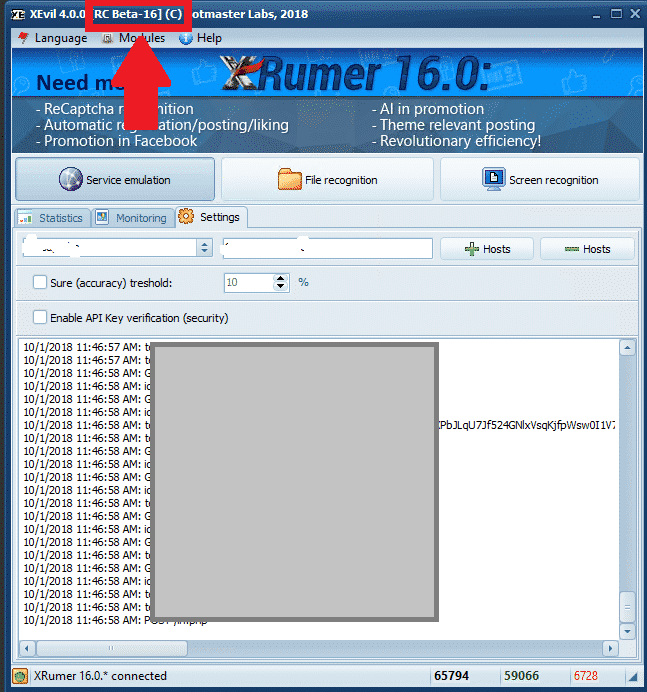
Où trouver le numéro de version bêta de votre version actuelle de XEvil ?.
Le Xevil Beta Le numéro de version est visible en haut à gauche de la fenêtre de l'application, comme indiqué dans la capture d'écran ci-dessous. Dans cette capture d'écran, la version bêta de XEvil est [Beta 16].
[spacer height=”2px”]
Où télécharger la dernière version du patch bêta de XEvil ?.
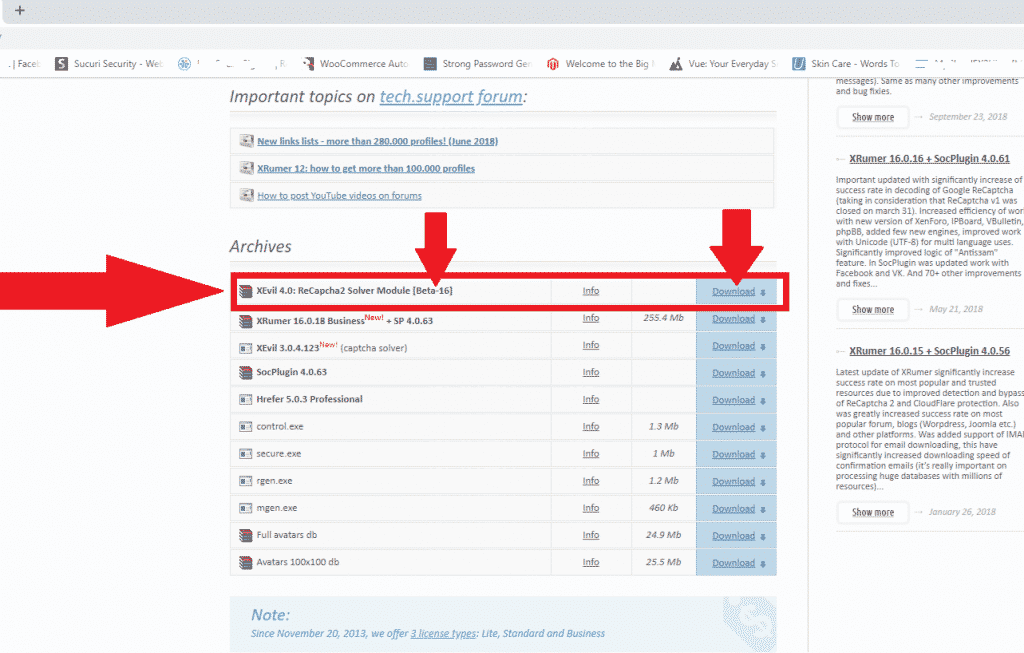
Pour télécharger l'un des Xrumer, Pour utiliser XEvil, Hrefer et leurs plugins associés, vous devrez vous connecter à votre compte à l'adresse suivante : http://www.botmasterlabs.net
Si vous êtes inscrit au programme bêta de XEvil, vous verrez le Téléchargement de XEvil La version bêta apparaîtra en haut de la liste des téléchargements, comme vous pouvez le voir sur la capture d'écran ci-dessous.
Comment extraire le patch bêta XEvil téléchargé.
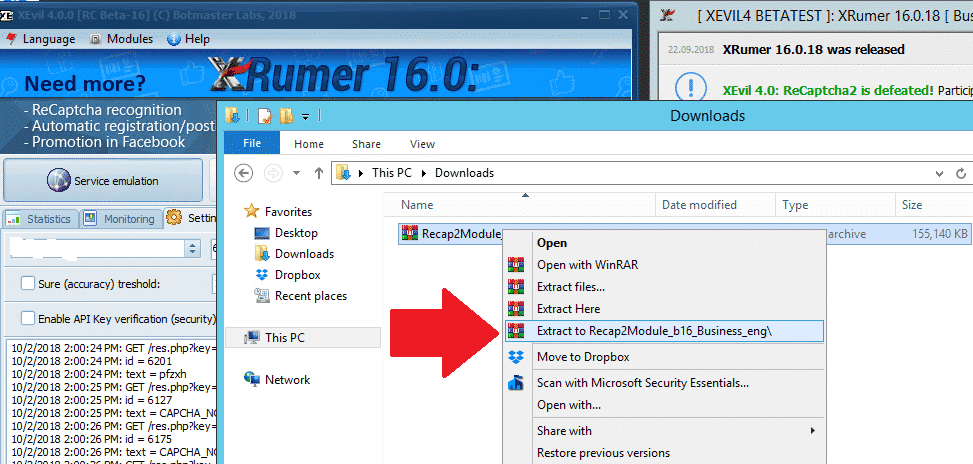
OK, vous avez donc téléchargé le dernier patch bêta de XEvil et il se trouve maintenant dans le dossier téléchargements de votre ordinateur ou VPS
Le correctif téléchargé sera au format .rar. Si vous ne possédez pas de logiciel pour le décompresser, vous pouvez télécharger gratuitement WinRAR ici : https://www.win-rar.com
[full_width][one_half padding=”0 0 10px 0″]Votre patch téléchargé
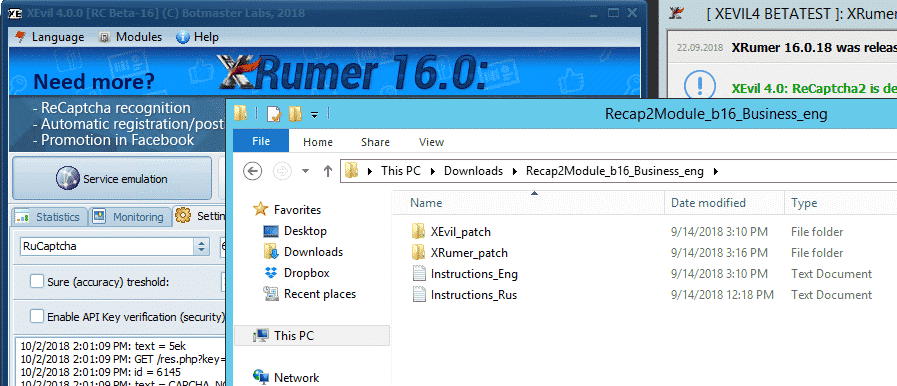
[one_half][one_half padding=”0 0 0 10px”]Votre patch bêta XEvil extrait
[/one_half][/full_width]
[spacer height=”2px”]
Comment appliquer le correctif de mise à jour bêta de XEvil.
Maintenant que nous avons extrait le fichier .rar de mise à jour, il suffit de le copier dans le dossier des fichiers du programme. Veuillez noter que pour mettre à jour XEvil Beta vers la dernière version, vous devez patcher à la fois XEvil et Xrumer. C'est pourquoi il y a un Xrumer et un dossier XEvil dans la mise à jour téléchargée.
La première chose à faire maintenant est de fermer Xrumer et XEvil s'ils sont en cours d'exécution, suivez les étapes simples ci-dessous.
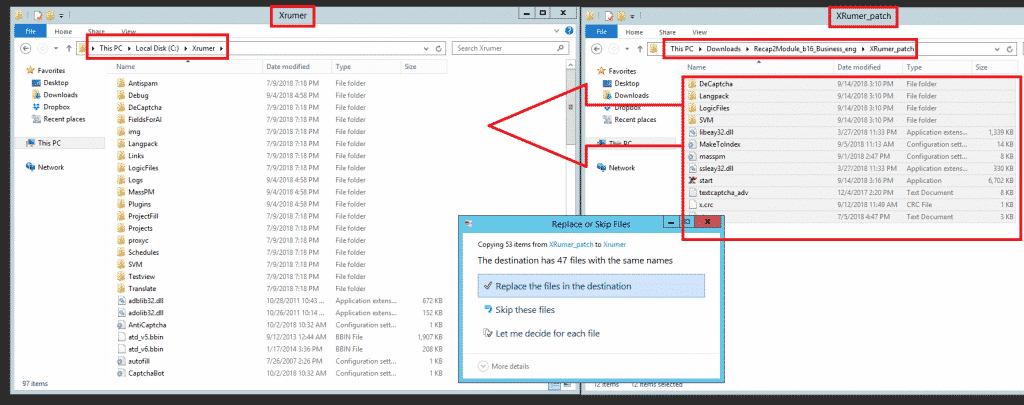
Sur votre ordinateur VPS, ouvrez dans une nouvelle fenêtre le Xrumer Dossier du programme : C:\Xrumer et ouvrez également le patch Xrumer que vous venez de télécharger C:\Users\Administrator\Downloads\Recap2\Module_b16_Business_eng\XRumer_patch. .
Now select all the files and folders in C:UsersAdministratorDownloadsRecap2Module_b16_Business_engXRumer_patch and copy it and then paste it in C:Xrumer – You will receive a warning that the files already exist, just select to replace all the files.
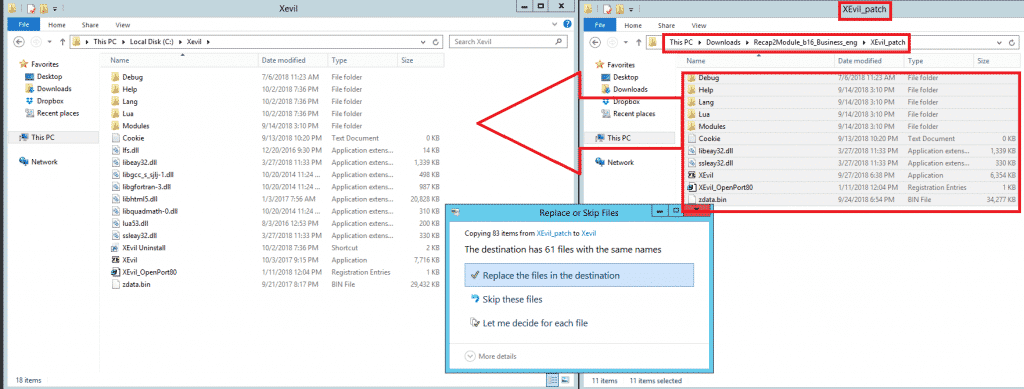
Ensuite, nous devrons également appliquer le correctif bêta XEvil. Pour ce faire, sélectionnez tous les fichiers et dossiers dans C:\Users\Administrator\Downloads\Recap2\Module_b16_Business_eng\XEvil_patch, copiez-les et collez-les dans C:\Xevil. Vous recevrez un avertissement indiquant que les fichiers existent déjà ; sélectionnez simplement l’option permettant de remplacer tous les fichiers, comme indiqué dans la capture d’écran ci-dessous.
Et voilà, mes amis, comment appliquer les mises à jour pour la version bêta de XEvil.
[spacer height=”2px”]
Comment recevoir des notifications par e-mail de Botmasterlabs lors de la publication de mises à jour ?.
Pour obtenir de l'aide pour Xrumer, XEvil, Hrefer Pour tout le reste des produits Botmasterlabs, vous devez vous inscrire sur leur forum d'assistance en anglais à l'adresse http://en.botmastersupport.com/, mais j'ai constaté au cours des 10 dernières années que ce forum est très peu actif et pratiquement inutile si vous avez besoin d'informations et d'aide.
J'ai constaté que le Forum d'assistance russe de Botmasterlabs Le forum russe est 100 fois plus actif et les mises à jour y sont publiées en premier. Une fois la traduction terminée, elles sont ensuite publiées sur le forum anglais. Le forum russe envoie également un courriel lors des mises à jour de ses produits.
Je sais que vous vous dites sûrement : « Mais qu'est-ce que c'est que ça ? Je ne lis pas le russe ! » Ne vous inquiétez pas, moi non plus ! Je vais vous montrer comment passer le forum russe en anglais. Vous aurez besoin des éléments suivants :
- Google Chrome (Je ne l'ai pas testé avec Firefox ni avec d'autres navigateurs, ça pourrait fonctionner, essayez-le.)
- Extension Google Traduction pour Chrome
Télécharger Google Traduction
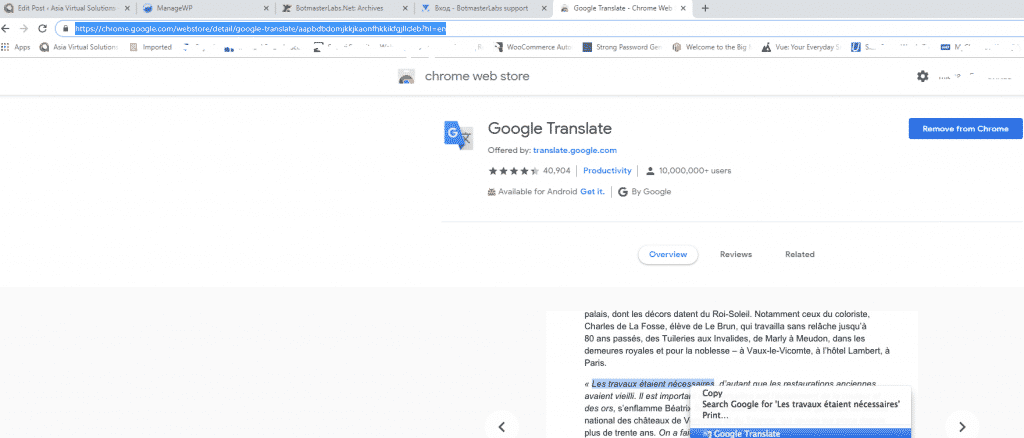
Si vous avez déjà Google Chrome Ouvrez ensuite les extensions ou rendez-vous sur le Chrome Web Store et recherchez Google Traduction. https://chrome.google.com/webstore/detail/google-translate/aapbdbdomjkkjkaonfhkkikfgjllcleb?hl=en et ajoutez l'extension.
Création d'un compte sur le forum russe de Botmasterlabs (en anglais)
Une fois l'extension Google Traduction installée, vous devriez vous rendre sur le forum d'assistance russe de Botmasterlabs, qui se trouve ici : http://ru.botmastersupport.com/ Malheureusement, et comme on pouvait s'y attendre, tout sera en russe. Il vous suffit de faire un clic droit n'importe où sur la page et de sélectionner “ “TRADUIRE EN ANGLAIS”
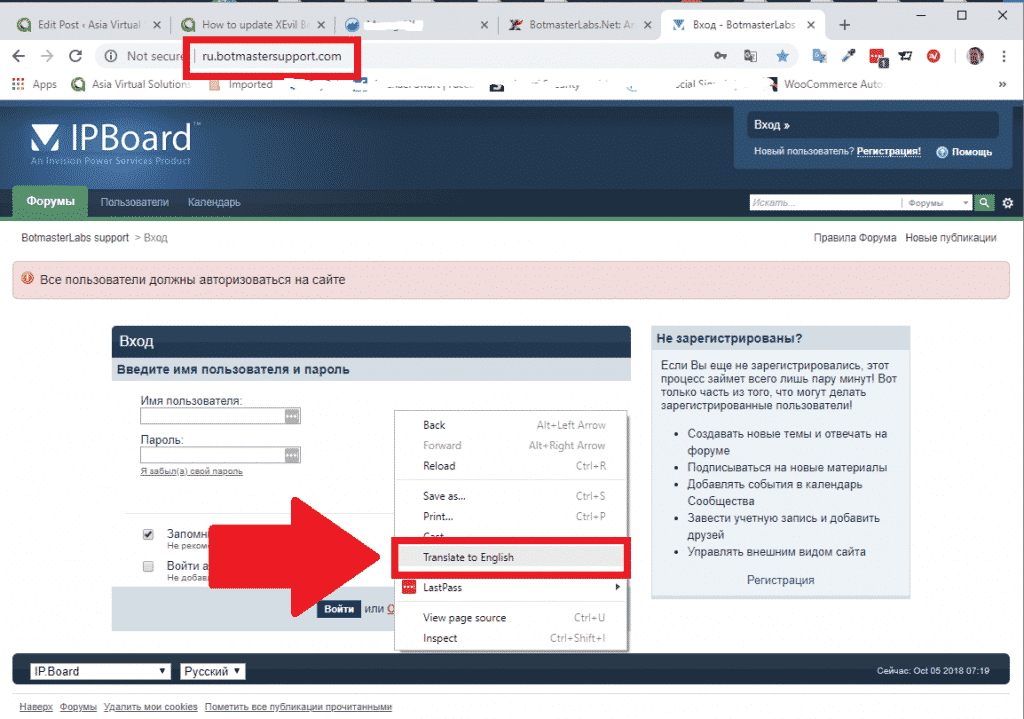
La traduction sera instantanée et tout le texte sera en anglais ; vous pourrez ainsi facilement voir où créer un compte sur le forum.
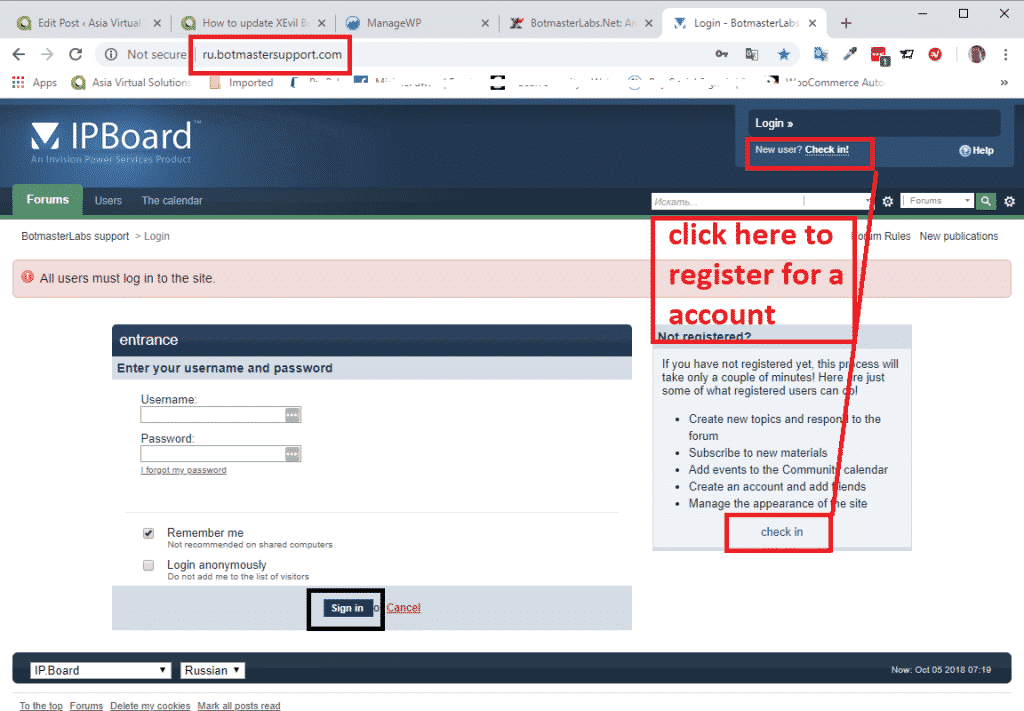
À partir de maintenant, suivez simplement les instructions pour créer un nouveau compte.
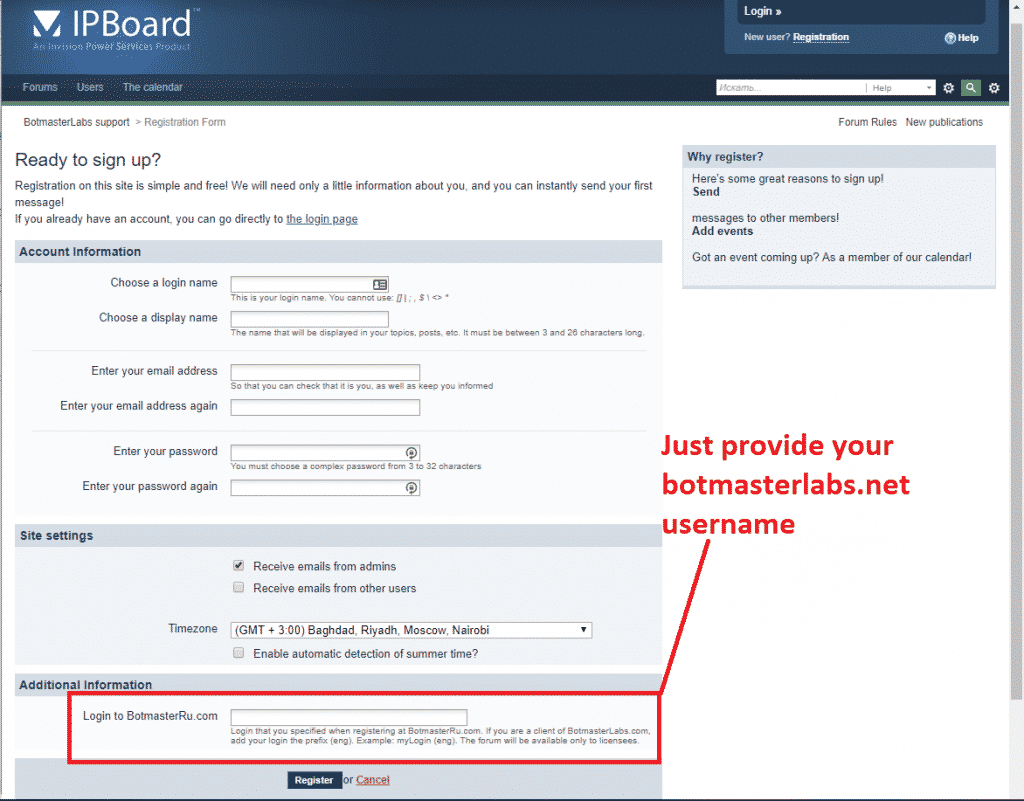
En bas de la page, il vous sera demandé de vous connecter à BotmasterRu.com. Entrez simplement votre nom d'utilisateur de compte Botmasterlabs – celui sur lequel vous téléchargez Xrumer et tous les autres logiciels.
Une fois inscrit, envoyez votre nom d'utilisateur à Botmaster via Skype, indiquez-lui que vous vous êtes inscrit sur le forum russe et demandez-lui d'activer votre compte.
Voilà, vous êtes maintenant inscrit.
[spacer height=”2px”]
Comment lire les courriels en russe du forum russe Botmaster ?.
Lorsque vous vous inscrivez au forum russe Botmaster et activez l'option de réception des mises à jour par e-mail, ces e-mails sont en russe. Mais pas de souci : nous pouvons les traduire directement dans Microsoft Outlook. Si vous utilisez un autre client de messagerie, vous devrez trouver un module de traduction compatible.
Les utilisateurs de Microsoft Outlook doivent suivre les étapes suivantes :
Ouvrez le Microsoft Store et recherchez Microsoft Translator.
- Sélectionnez celui qui figure dans la capture d'écran ci-dessous.
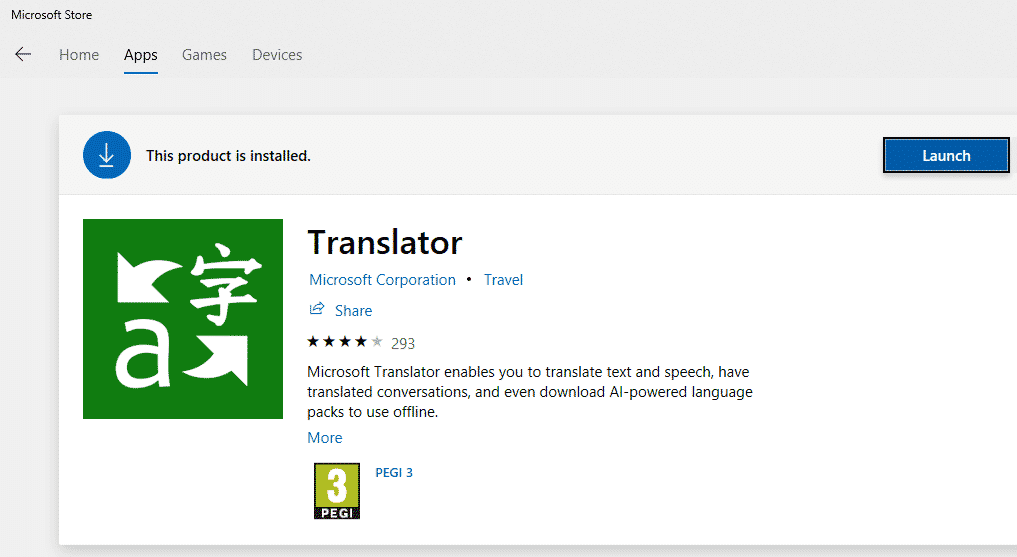
- Procédez à l'installation de l'application.
- Désormais, lorsque vous recevez un courriel dans une autre langue, il vous suffit de l'ouvrir, puis de faire un clic droit n'importe où dans le courriel, ou de cliquer sur « Traduire » en haut du courriel, comme dans la capture d'écran ci-dessous. (Je n'ai malheureusement pas de courriel en russe sous la main pour le moment.).
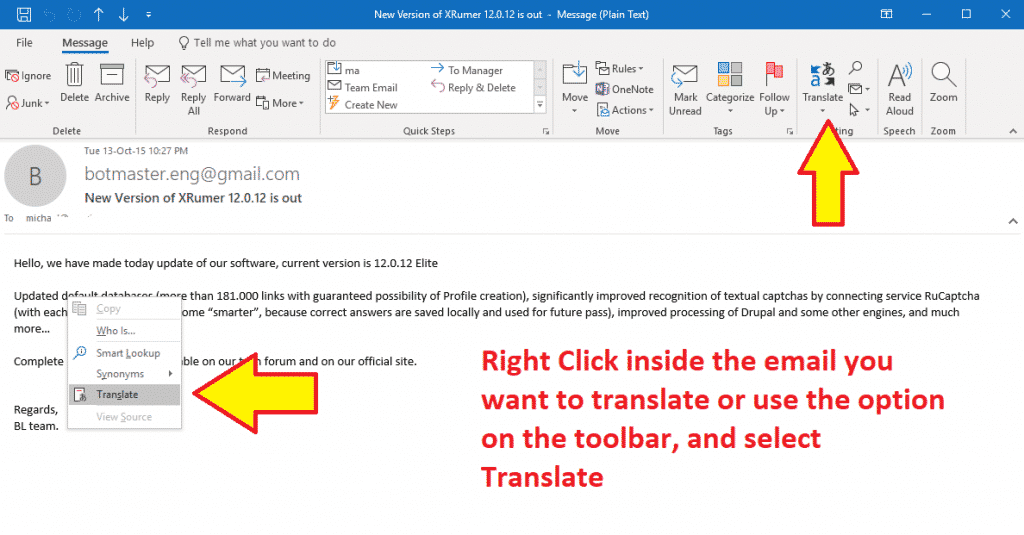
- Vous verrez apparaître dans la barre latérale les langues de traduction source et cible ; faites votre choix et cliquez sur les boutons verts, et votre texte sera traduit dans la langue augéenne sélectionnée.
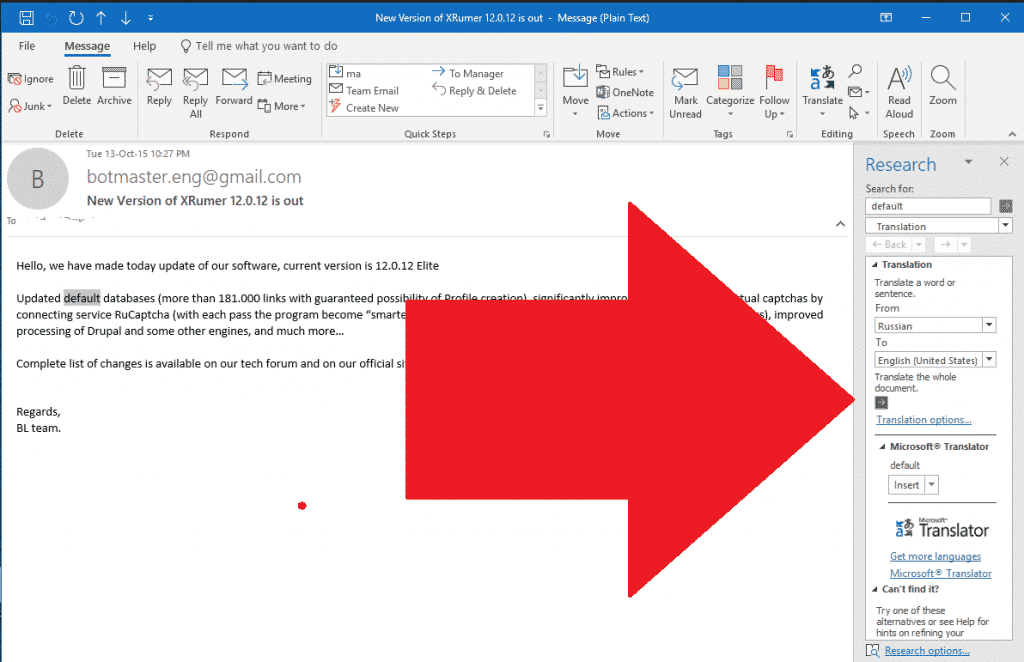
Voilà, c'est tout pour la mise à jour de votre version bêta de Xevil et la traduction des e-mails de notification du russe vers l'anglais. N'hésitez pas à poser vos questions dans les commentaires.
[spacer height=”2px”]
VOUS N'AVEZ PAS ENCORE XEVIL ?
Xevil est inclus dans l'offre lorsque vous achetez Xrumer. Profitez-en dès aujourd'hui en l'achetant via notre lien promotionnel.













 English
  বাংলা
বাংলা  简体中文
简体中文  Nederlands
  Français
  Deutsch (Sie)
  हिन्दी
  Bahasa Indonesia
  Italiano
  日本語
日本語  한국어
한국어  Bahasa Melayu
  Português do Brasil
  Русский
  Español de México
  Tagalog
  ไทย
ไทย  Tiếng Việt
  اردو
اردو  Türkçe