



Comment créer un modèle de projet GSA Search Engine Ranker
On m'a souvent demandé si je pouvais créer un modèle GSA pour quelqu'un. Mais comme on dit, “ Donne un poisson à un homme, tu le nourriras pour un jour ; apprends-lui à pêcher, tu le nourriras pour la vie. ”, C'est la même chose si je vous fournis simplement un modèle. Aujourd'hui, je vais vous apprendre à créer votre propre modèle personnalisé. Modèle de projet GSA Search Engine Ranker
Ceux qui vous accompagnent savent maintenant ce qu'est exactement un GSA Search Engine Ranker modèle de projet Je vais vous expliquer ci-dessous pourquoi ou quand vous avez besoin d'un Modèle de projet GSA Search Engine Ranker et ce qu'il fait.
[spacer height=”2px”]
[full_width][one_half padding=”0 0 10px 0″]
Pourquoi avez-vous besoin d'un modèle de projet GSA Search Engine Ranker ?
[spacer height=”2px”]
Certaines personnes comme moi qui créent des centaines de Projets de classement des moteurs de recherche GSA Chaque mois, ils utilisent généralement les mêmes plateformes, les mêmes filtres, les mêmes options de sélection, et certains utilisent même le même compte de messagerie générique lorsqu'ils créent des projets.
Ainsi, à chaque création de projet, nous devrons cocher toutes les cases, sélectionner les mêmes filtres, modifier les mêmes options, etc., ce qui finit par être très chronophage et augmente considérablement le risque d'erreurs.
[/one_half][one_half padding=”0 0 0 10px”]
Que vous apporte un modèle de projet GSA Search Engine Ranker ?
[spacer height=”2px”]
 Le principal chose qu'un classeur de moteur de recherche GSA L'avantage du modèle de projet est qu'il vous fait gagner beaucoup de temps, car vous pouvez simplement importer votre modèle et tous les paramètres et filtres seront déjà là.
Le modèle de projet GSA Search Engine Ranker peut vous éviter des erreurs ou des oublis de cocher une option ou un filtre.
Le projet GSA Search Engine Ranker garantit la cohérence dans la création de projets
[/one_half][/full_width]
Regardez la vidéo ci-dessous qui montre comment créer un modèle de projet GSA Search Engine Ranker de A à Z, ou suivez les étapes simples décrites plus bas.
[sociallocker]
Comment créer un modèle de projet GSA Search Engine Ranker
[/sociallocker]
[spacer height=”2px”]
Suivez ces étapes pour créer un modèle de projet GSA Search Engine Ranker
[spacer height=”2px”]
- Démarrez un nouveau projet comme vous le feriez normalement.
- Sélectionnez toutes les plateformes sur lesquelles vous souhaitez soumettre votre contenu.
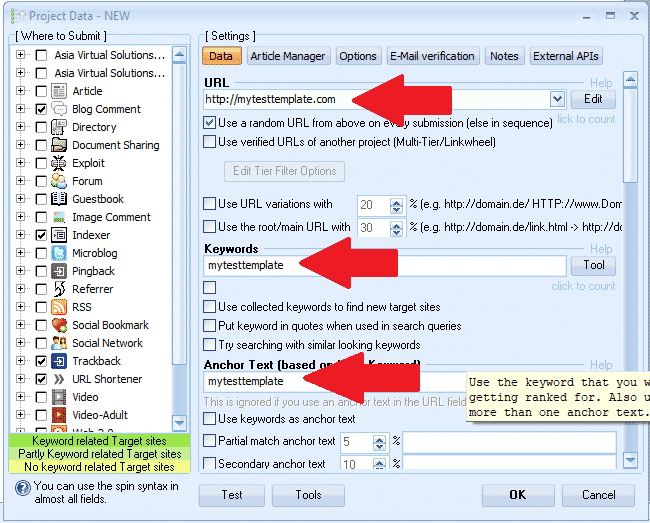
- Choisissez un mot que nous pourrons utiliser comme marqueur, par exemple : monmodèle de test (Ceci nous permettra de retrouver facilement les champs et de supprimer le marqueur ultérieurement.)
- Saisissez une URL : http://mytesttemplate.com
- Ensuite, remplacez tous les champs vides par votre texte de marqueur : monmodèle de test, cela devrait maintenant ressembler aux captures d'écran ci-dessous.

[spacer height=”2px”]
- Si vous avez sélectionné la plateforme Documents, vous devrez joindre un document PDF — ne vous contentez pas de le coller ; par exemple, recherchez et sélectionnez un PDF — ne vous inquiétez pas, nous le supprimerons plus tard.
- Si vous avez sélectionné une plateforme qui nécessite une image de profil, ne vous contentez pas de coller l'image ; parcourez vos fichiers et sélectionnez une image au hasard. Ne vous inquiétez pas, nous la supprimerons plus tard.
- Une fois que vous avez rempli tous les champs de l'onglet Données, passez à : GESTIONNAIRE D'ARTICLES languette.
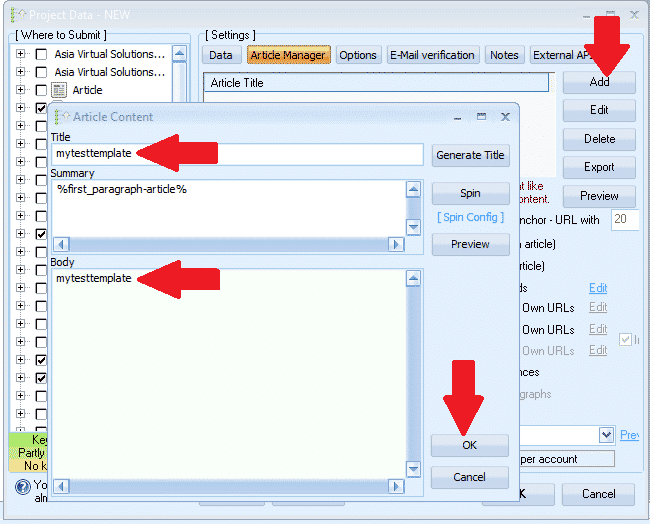
- Cliquez AJOUTER puis sélectionnez SAISIR MANUELLEMENT
- Titre de l'article, collez-le dans : mytesttemplate
- Corps de l'article, collez dans : mytesttemplate
- Cliquez maintenant D'ACCORD
- Ensuite, nous passons au OPTIONS languette
- Effectuez toutes vos sélections et définissez vos filtres. C'est tout, il n'y a rien d'autre à faire dans l'onglet Options.
- Prochaine étape : E-MAIL languette
- Supprimez l'adresse e-mail par défaut qui s'affiche, puis cliquez sur AJOUTER
- Sélectionner MANUELLEMENT
- Saisissez l'adresse e-mail comme suit : mon************@************te.com et cliquez D'ACCORD
- Supprimez maintenant le premier e-mail de l'émission — vous ne devriez voir que l'e-mail que nous venons d'ajouter ; mon************@************te.com
- Cliquez sur votre e-mail, puis sur l'endroit où il s'affiche. Serveur POP3: remplissez le formulaire mail.mytesttemplate.com
- Remplir MOT DE PASSE comme : monmodèledetest
- Vos champs d'adresse e-mail devraient maintenant ressembler à la capture d'écran ci-dessous :

[full_width][one_third]Excellent travail jusqu'ici, nos paramètres sont maintenant configurés et il ne vous reste plus qu'à cliquer D'ACCORD pour enregistrer le projet. Lorsque vous cliquez sur OK, un avertissement s'affichera à droite. Ce n'est pas un problème, cliquez simplement dessus. IGNORER et votre projet sera maintenant enregistré[/one_third][two_third_last]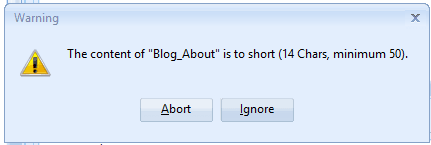 [/two_third_last][/full_width]
[spacer height=”2px”]
Nous avons maintenant créé et enregistré notre projet, mais ne vous emballez pas trop vite, ce n'est pas terminé. Il reste encore quelques étapes avant la finalisation. GSA Référencement sur les moteurs de recherche modèle de projet Cette étape est terminée, passons donc aux étapes restantes.
[pleine_largeur][un_tiers]
- Double-cliquez maintenant sur le projet pour l'ouvrir à nouveau.
- Ensuite, en bas de la Moteur de recherche GSA Fenêtre, cliquez sur OUTILS, puis sur EXPORTER, et MODÈLE (Options, Champs de données, Sélection du moteur)
- Enregistrez le fichier dans un dossier où vous prévoyez de conserver tous vos fichiers. Modèles de projet GSA Search Engine Ranker. Le nom du fichier ressemblerait à ceci : MyTier1Template.gsatml
[/one_third][two_third_last]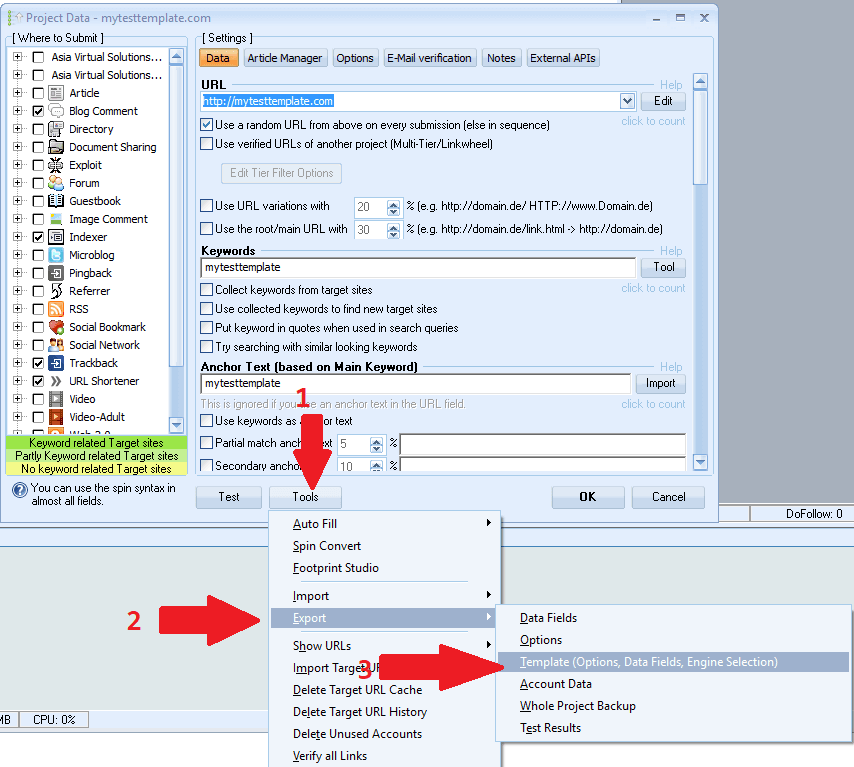 [/two_third_last][/full_width]
[spacer height=”2px”]
Bien, nous avons maintenant créé notre fichier de projet et nous l'avons exporté. Nous allons maintenant modifier ce projet exporté. Pour l'instant, nous avons terminé. GSA Search Engine Ranker Pour l'instant, vous pouvez supprimer le projet et fermer GSA SER ; nous le réutiliserons plus tard.
Commençons par modifier le fichier exporté ; pour cela, nous aurons besoin d’un éditeur comme… BLOC-NOTES++, vous pouvez le télécharger gratuitement ici : https://notepad-plus-plus.org/downloads/
- Tout d'abord, je vous demande d'ouvrir le dossier dans lequel vous avez exporté le projet.
- Vous remarquerez qu'il y a maintenant 2 fichiers dans ce dossier, l'un se terminera par .articles et l'autre se terminera par .gsatml
- Nous n'avons pas besoin de celui qui se termine par .articles, Vous pouvez donc simplement supprimer ce fichier.
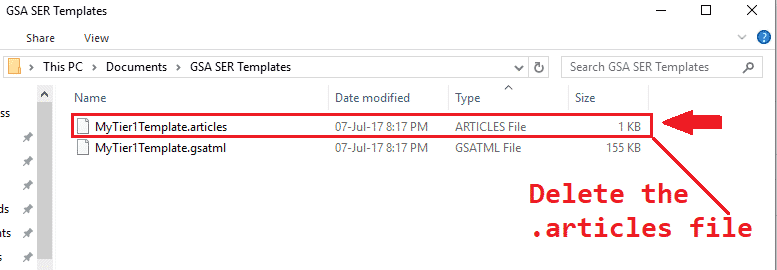
- L'étape suivante consiste à clic droit sur le fichier qui se termine par .gsatml, Dans mon cas, le fichier est MyTier1Template.gsatml
- La sélection MODIFIER AVEC NOTEPAD++ Cela ouvrira maintenant le fichier dans Notepad++ et nous pourrons commencer à travailler dessus.
- La deuxième ligne correspond à l'URL que nous avons spécifiée lors de sa création dans GSA Search Engine Ranker ; dans mon cas, elle ressemble à ceci : URL=http://mytesttemplate.com
- Vous devez maintenant supprimer l'URL, vous ne devriez donc avoir que : URL=
- Maintenant, dans la barre de menu de Bloc-notes++, Sélectionne RECHERCHE puis faites défiler vers le bas et sélectionnez REMPLACER
- Dans la fenêtre REMPLACER qui s'est affichée, vous devez saisir le mot-clé que vous avez utilisé lors de la création de votre projet de classement du moteur de recherche GSA. Dans mon cas, il s'agissait de : monmodèle de test, Remplissez comme ceci : Trouver quoi : =monmodèledetest et remplacer par: = Appuyez ensuite sur le bouton REMPLACER TOUT
- Cela devrait ressembler à la capture d'écran ci-dessous :

Super, alors qu'est-ce qui s'affichait avant ? =mytesttemplate ne devrait plus contenir que : =
- Ensuite, faites défiler vers le bas et recherchez le fichier PDF que vous avez ajouté à Document, Lors de la création du projet, le chemin d'accès à votre PDF sera indiqué comme « Document=c://file ».
- Supprimez le chemin d'accès au fichier domaine, donc il n'affiche que : Document=
- Ensuite, nous devons supprimer toutes les entrées d'e-mail : la méthode la plus simple et la plus rapide consiste à utiliser l'outil de recherche. Pour l'ouvrir avec Notepad++, appuyez sur Ctrl+F.
- Trouvez ce que Vous devez saisir à nouveau votre phrase de marquage ; la mienne était : mytesttemplate
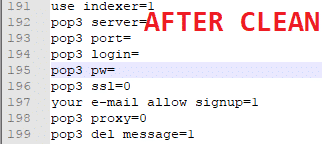
- Cliquez sur Suivant pour afficher la première entrée. Remplacez tout ce qui suit le signe égal (=). Vous pouvez également effacer l'intégralité du mot de passe. Ci-dessous, vous trouverez une capture d'écran avant et après suppression.
- Voilà, c'est terminé., enregistrer le fichier Et voilà, votre modèle est prêt.

[spacer height=”2px”]
Comment utiliser votre modèle de projet GSA Search Engine Ranker
[spacer height=”2px”]
L'utilisation du modèle est très simple, il suffit de suivre les quelques étapes ci-dessous.
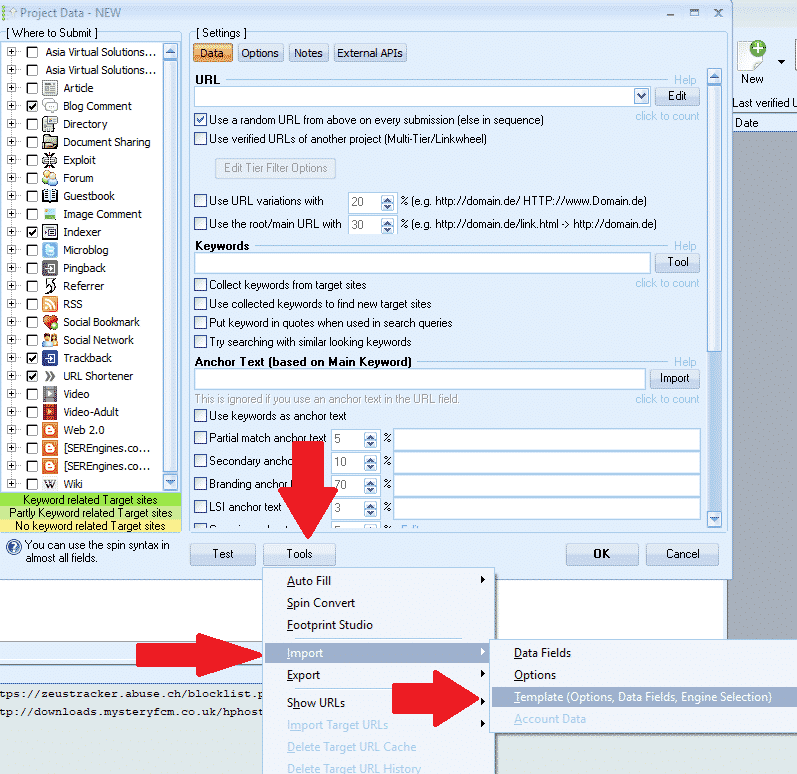
- Dans GSA Search Engine Ranker, cliquez : Nouveau démarrer un nouveau projet.
- Puis, tout en bas du Moteur de recherche GSA fenêtre, cliquez sur Outils Importer MODÈLE (Options, Champs de données, Sélection du moteur)
- Accédez à l'emplacement où votre modèle a été enregistré, puis sélectionnez-le.
[spacer height=”2px”]
Voilà, vous avez maintenant créé et importé avec succès un modèle ; il ne vous reste plus qu’à ajouter du contenu.
J'espère que vous avez apprécié l'article et la vidéo. Si l'article vous a été utile, merci de le liker et de le partager, et de laisser un commentaire si vous avez des questions.
Trop paresseux pour créer un modèle GSA SER
Laissez-nous créer votre projet pour vous – des projets GSA SER à plusieurs niveaux entièrement créés.













 English
  বাংলা
বাংলা  简体中文
简体中文  Nederlands
  Français
  Deutsch (Sie)
  हिन्दी
  Bahasa Indonesia
  Italiano
  日本語
日本語  한국어
한국어  Bahasa Melayu
  Português do Brasil
  Русский
  Español de México
  Tagalog
  ไทย
ไทย  Tiếng Việt
  اردو
اردو  Türkçe