• Sobre nosotros
    • Contribuya o colabore con Asia Virtual Solutions
  • Afiliados
  • Contáctenos
  • Mi cuenta
  • Tickets de soporte
Soluciones virtuales de Asia:
  • Hogar
  • Ranking de motores de búsqueda de GSA
    • Preguntas frecuentes sobre GSA Search Engine Ranker
    • Herramientas y complementos de GSA SER
    • Tutoriales de GSA SER
  • Blog
    • Contenido y SEO con IA
    • Tutoriales de GSA SER
    • Alojamiento y VPS
    • Estrategias para la creación de enlaces
    • Noticias y actualizaciones
    • Tutoriales de RankerX
    • Reseñas de software SEO
    • Xrumer y XEvil
  • Comercio
    • Artículos sobre contenido e inteligencia artificial
    • Herramientas y complementos de GSA SER
    • Servicios de alojamiento
    • Servicios de construcción de enlaces
    • Robot remitente de dinero
    • RankerX
    • Servicios recomendados
    • Servicios de redes sociales
    • Servicios de Xrumer
Sin resultado
Ver todos los resultados
Asia Virtual Solutions: Expertos en GSA SER y marketing digital

Hogar » Blog » Learn Simple Steps How To Correctly Use GSA Global Site List

Learn Simple Steps How To Correctly Use GSA Global Site List

Michael Swart por Michael Swart
22 junio, 2018 - Updated on 21 mayo, 2026
en Estrategias para la creación de enlaces
0
Learn simple steps to use gsa global site list
Tabla de contenido espectáculo
1 Learn Simple Steps How To Correctly Use GSA Search Engine Ranker Global Site List
1.1 Where are the global site list and what is it used for?
1.1.1 Where are the global site list:
1.1.2 What are the GSA SER global site list used for:
1.2 What are those checkboxes next to the Identified, Submitted, Verified and Failed Options?
1.2.1 The Identified Checkbox :
1.2.2 The Submitted Checkbox:
1.2.3 The Verified Checkbox:
1.2.4 The Failed Checkbox:
1.3 What are the 4 file paths next to each option of the GSA SER Global site list?
1.4 How to use paid link list shared via Dropbox from several providers, as well as your own list?
2 GSA Search Engine Ranker – How To Use Multiple GSA SER Link List at Same Time
2.1 How do you set your GSA Search Engine Ranker projects to use the global site list
3 How to use GSA Search Engine Ranker Global Site List in Your GSA SER Projects
3.1 What is the difference between GSA Search Engine target URLs and the global site list.
3.1.1 GSA Search Engine Ranker global site list
3.1.2 GSA Search Engine Ranker target URLs
3.1.2.1 How to import GSA Search Engine Ranker target URLs
4 Asia Virtual Solutions – GSA SER Global Link List

Learn Simple Steps How To Correctly Use GSA Search Engine Ranker Global Site List

GSA SER global site list is one of the main things we have noticed that more than 75% of all GSA Search Engine Ranker users  don’t fully understand and get wrong when they set up their GSA Search Engine Ranker. How do we know this I hear you ask. We can see the GSA SER settings from the 50+ users using our GSA SER VPS service, and we hear the questions people ask when they purchase our GSA SER Link List and GSA Search Engine Ranker data packs.

So I have decided it is time to create a post on the topic of GSA SER Global Site List, to help people better understand what the Global Site list are and how to use the list correctly.


Where are the global site list and what is it used for?

Where are the global site list:

The global site list can be found if you  click on OPTIONS  tab in the main screen, and then under the ADVANCED tab, as is shown in the below screenshot.

By default the the list are saved in your APPDATA folder, but this location can be changed to wherever you want to keep it.
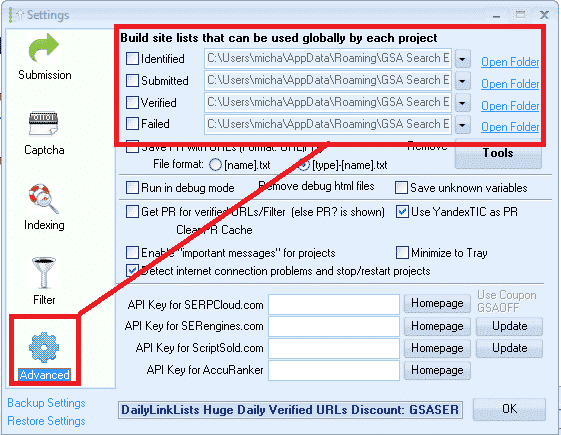
GSA SER Global Site List Location


What are the GSA SER global site list used for:

Global site list are link targets where GSA SER post to too, to create your backlinks.

When you first buy Ranking de motores de búsqueda de GSA the list will be all empty, and you can import links into the list by using the built in scraper in the projects, or by importing list via the TOOLS menu, or you make used of paid list via a shared folder such as Dropbox.

When creating a new GSA project you have the option to use the Global Site List to post to, as in the below screenshot.
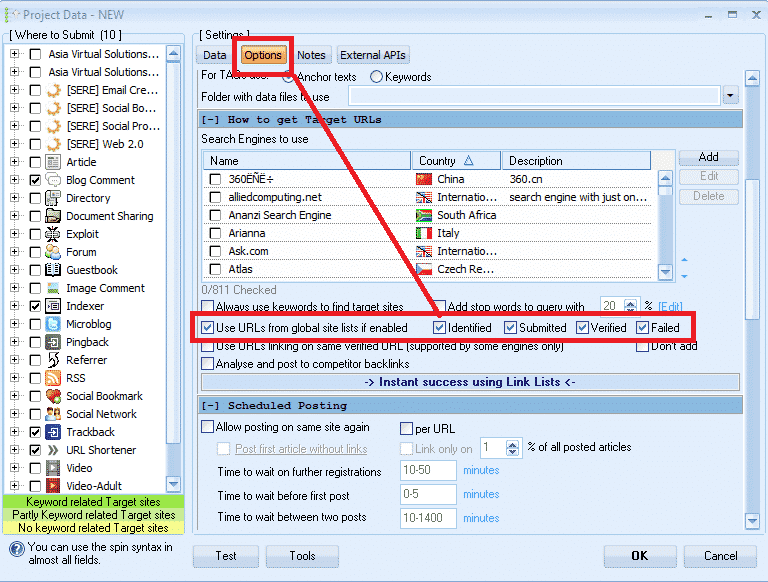
 

Select GSA Global Site List in a Project

What are those checkboxes next to the Identified, Submitted, Verified and Failed  Options?

PAY ATTENTION HERE – THIS IS THE NO.1 THING THAT 75% OF GSA SER USERS GET  WRONG

What I have seen is that most users are not really sure what those checkboxes are for, and most think that it is the option to select to use the list or not so they just go and check all the boxes, which is wrong, it has nothing to do with selecting to use or not use the list.
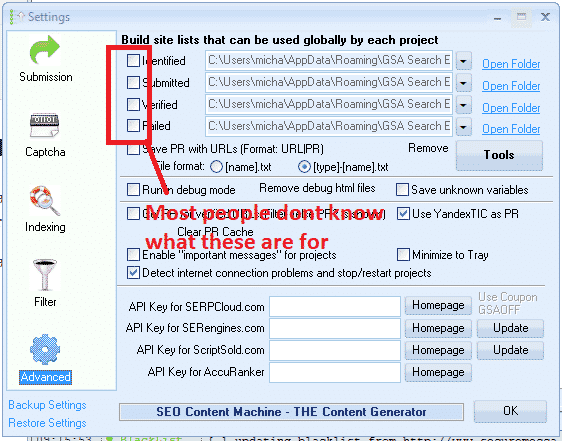
 

What are the global site list check boxes


What those checkboxes actually do is to enable or disable write permissions  to write to the list.


The Identified Checkbox :

If you use the search engines option in your projects to scrape, then it will add the scraped urls in this list

The Submitted Checkbox:

Every time GSA SER submit in any of your projects to a site, it will add the site it submitted to, to this list

The Verified Checkbox:

Every time GSA Verify a link that it has posted in any of your projects it will add that link to this list

The Failed Checkbox:

Every time GSA is unable to post to a site, it will add that site to this list

My recommendation is DO NOT CHECK ANY OF THOSE BOXES, specially if you are using paid link list which are shared via Dropbox or you build your own list.

Reason is because paid  list shared via Dropbox are normally read only, so you are wasting resources trying to save to a list which you only have read access to.

Another reason is because GSA SER already save the links it create and verify in the project data, there is very little to no point in saving then in additional list as this will just bloat your hard drive.

My main reason for not checking any of the boxes is that i use the global site list to load 4 different link list. ( we will cover that a little further below )

How to see the verified, failed and submitted URLs then in the projects you might ask, well it is simple. You right click on any project and select show urls, as in below screenshot.

Check GSA SER Project URLs

What are the 4 file paths next to each option of the GSA SER Global site list?

These are the location where the list are saved. As mentioned earlier, by default GSA create an empty folder for each list in the APPDATA folder, which is not all that easy to navigate to but luckily there is a shortcut in GSA  SER, namely the  OPEN FOLDER next to each list.

You can change the location to anywhere on your computer or even a shared network drive
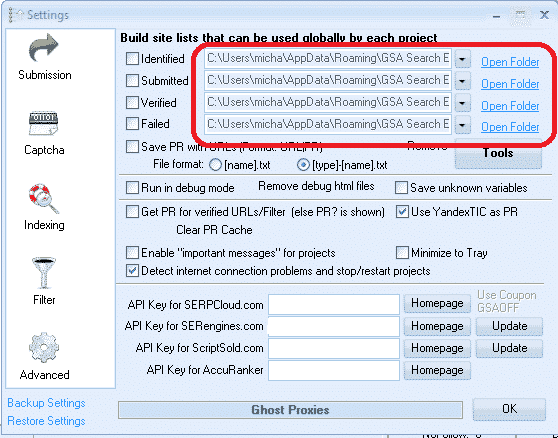
Location of the global site list
Location of the global site list folders


How to use paid link list shared via Dropbox from several providers, as well as your own list?

Many Ranking de motores de búsqueda de GSA users subscribe to paid link list, such as our own Asia Virtual Solutions Quality link list, which has a identified and a verified link list, and there are other list providers such as Auto Approve Market Place, SER Verified List and many others, and many of these list providers share there link list via Dropbox.

So what u will need to do is install Dropbox on your computer or your VPS de GSA SER, then use any of the 4 slots in the GSA SER global site list to load your list.

You don’t have to worry about the fact that it is called Identified, Submitted, Verified or Failed, in fact you can totally ignore the names as it has no meaning if you don’t plan to check the boxes and write to the list. So have a look at the below screenshot of a set up using 4 different list.
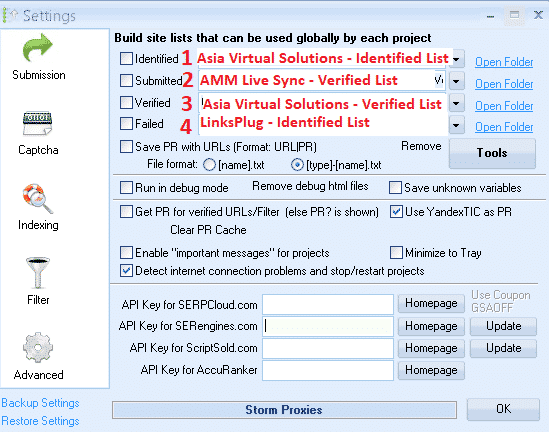
 

Using 4 Different List IN GSA SER Global list
Using 4 Different List in GSA SER Global link list


In the above screenshot all of the 4 list are shared with me via Dropbox, so all i did was click on the dropdown button and then navigate where that Dropbox folder is on my VPS PC

  1. In position no.1 I used the Asia Virtual Solutions – Identified Link list
  2. In position no.2 I used the AAM Live Sync Verified link list
  3. In position no.3 I used the Asia Virtual Solutions – Verified Link List
  4. In position no.4 I have used the List from LinksPlug

If you maybe want to also have your own list then you simply need to use one of the 4 slots – just browse to the folder where your list is located.


GSA Search Engine Ranker – How To Use Multiple GSA SER Link List at Same Time


How do you set your GSA Search Engine Ranker projects to use the global site list

When you create your projects you select to use the  Global Site list in the project options, like in the below screenshot.

You check the box to use the slot where your list is added. So if you are using several site list from several providers and you have added them as i showed you earlier on then in the project options you select Identified, Submitted, Verified or Failed if your list are in those slots. Your project will then pull the links from the list you have selected to use.

If you order our GSA Search Engine Ranker Data Packs then we by default check the Global site list for you like in the below screenshot.

How do you set your projects to use the global site list


How to use GSA Search Engine Ranker Global Site List in Your GSA SER Projects


What is the difference between GSA Search Engine target URLs and the global site list.

  • GSA Search Engine Ranker global site list

Global site list are list that you can use for any niche and any Proyecto GSA SER, they are just general list not scraped for a specific niche. Link list that you buy our subscribe to are all global site list.

  • GSA Search Engine Ranker  target URLs

Target URLs are links that are scraped for a specific project and the links are all relevant to a niche or topic. So you will use your scraper like GScraper or Scrapebox or any others and then bind keywords to the footprints, so the results all have content or titles related to the keyword.

Target URLs are not usually added to the global site list but they are added to the project for which the URLs were scraped, like in the below screenshot.

Target URLs can be imported as .txt or .sl format

How to import GSA Search Engine Ranker target URLs
How to import GSA SER Target URLs


Well that’s it, I hope that this article has given you a better understanding about the GSA Search Engine Global Site list and how to correctly use it to get the most out of your GSA SER projects.

It is very important to have a good site list, and Soluciones virtuales de Asia can help you with that as well, out Quality Link list is not only the biggest GSA format link list available on the internet, but it is also very good quality and we make use of it our self on a daily basis. Have a look below for more a link to more info on our quality global link list.

Asia Virtual Solutions – GSA SER Global Link List

Do you want to start using the best Ranking de motores de búsqueda de GSA Global Link List Available On The Internet?

Check Out Our Great Global Link Lis

Etiquetas: Global Site ListGSA Global Site Listgsa search engineclasificador de motores de búsqueda de la GSAGSA Search Engine Ranker Global Site Listgsa ser global site listhow toHow To Correctly Use GSA Search Engine Rankersite list
Entrada anterior

GDPR: Decoding the hype and ensuring compliance

Siguiente publicación

Asia Virtual Solutions – Social Signals Service Updated – Boost Your SEO with Social Signals

Michael Swart

Michael Swart

Asia Virtual Solutions es propiedad de Michael Swart y un equipo de asistentes virtuales especializados, quienes también se enorgullecen de su gestión.

Siguiente publicación
Social Signals Service - Updated

Asia Virtual Solutions - Social Signals Service Updated - Boost Your SEO with Social Signals

Producto recomendado

Categorías del blog

  • Contenido y SEO con IA
  • Tutoriales de GSA SER
  • Alojamiento y VPS
  • Estrategias para la creación de enlaces
  • Noticias y actualizaciones
  • Reseñas de software SEO
  • Tutoriales de RankerX
  • Xrumer y XEvil

El producto que necesitas

Reseñas recientes

  • Obra de arte digital que representa una red global con dispositivos interconectados y enlaces coloridos, que publicita un servicio de "lista de enlaces GSA SER". Listas de backlinks de calidad n.° 1 para el ranking de motores de búsqueda de GSA
    Oценка 5 de 5
    от ali imani
  • Ilustración digital del concepto de servicio proxy con computadora portátil, globo terráqueo y racks de servidores proxy. Servicio proxy
    Oценка 5 de 5
    от Nick Nick
  • Marcadores sociales de Asia Virtual Solutions Marcadores sociales para un mejor SEO y mayor tráfico
    Oценка 5 de 5
    sobre shashwat asthana
  • Paquetes de correo electrónico de RankerX Paquetes de correo electrónico de RankerX
    Oценка 5 de 5
    de vancuoc29
  • Anuncio de servicio de marketing digital que muestra herramientas y funciones de SEO, como proyectos GSA SER, correos electrónicos privados y artículos relevantes para palabras clave. Proyectos de posicionamiento en buscadores de GSA: listos para usar
    Oценка 5 de 5
    Por Nick Smith
  • VPS clasificador de motores de búsqueda de GSA VPS clasificador de motores de búsqueda de GSA
    Oценка 5 de 5
    Por Nick Smith
  • VPS clasificador de motores de búsqueda de GSA VPS clasificador de motores de búsqueda de GSA
    Oценка 5 de 5
    Por Mike
  • Contenido estructurado, sitios DA50+ Publicaciones Web 2.0 con contenido estructurado en sitios DA50+
    Oценка 5 de 5
    de ADE YUSUP
  • Contenido estructurado, sitios DA50+ Publicaciones Web 2.0 con contenido estructurado en sitios DA50+
    Oценка 5 de 5
    Por Joseph Conroy
  • Contenido estructurado, sitios DA50+ Publicaciones Web 2.0 con contenido estructurado en sitios DA50+
    Oценка 5 de 5
    de N/AN/A

Todos los asuntos legales

  • Acuerdo de afiliación
  • Antispam
  • Soluciones virtuales de Asia
  • Preferencias de comunicación
  • Descargo de responsabilidad
  • Cookie de dardo de doble clic
  • Política de enlaces externos
  • Política de Facebook
  • Declaración de la FTC
  • política de privacidad
  • Política de reembolso y garantía
  • Términos y condiciones
  • Divulgación de testimonios

Compras seguras

Navegación segura certificada por Google
El logotipo del sitio web Norton Safe sobre un fondo blanco.

Contáctanos

Oficina principal en EE. UU.
  • Soluciones virtuales de Asia LLC, 400 Rella Blvd, #123-298, Montebello, Nueva York 10901
  •  co*****@******************ns.com
  • +1 (415) 851-6951
  •  Asia Virtual
  •  Soluciones virtuales de Asia en LinkedIn
Oficina Virtual de Asia
  • Soluciones virtuales de Asia LLC, Nivel 29, Oficinas en Centralworld 999/9 Rama I Road, Pathumwan, Bangkok, Tailandia
  •  co*****@******************ns.com
  • +1 (415) 851-6951
  •  Asia Virtual
  •  Soluciones virtuales de Asia en LinkedIn

© 2026 - Asia Virtual Solutions LLC. Todos los derechos reservados. El sitio web es operado y mantenido por: Asia Virtual Solutions LLC

Sin miniatura
Subido
Fallido
Eliminar archivo cargado
We've detected you might be speaking a different language. Do you want to change to:
Change language to English English
Change language to বাংলা বাংলা
Change language to 简体中文 简体中文
Change language to Nederlands Nederlands
Change language to हिन्दी हिन्दी
Change language to Bahasa Indonesia Bahasa Indonesia
Change language to 日本語 日本語
Change language to 한국어 한국어
Change language to Bahasa Melayu Bahasa Melayu
Change language to Русский Русский
Español de México
Change language to Tagalog Tagalog
Change language to ไทย ไทย
Change language to Tiếng Việt Tiếng Việt
Change language to اردو اردو
Change language to Türkçe Türkçe
Change Language
Close and do not switch language
Sin resultado
Ver todos los resultados
  • Hogar
  • Ranking de motores de búsqueda de GSA
    • Preguntas frecuentes sobre GSA Search Engine Ranker
    • Herramientas y complementos de GSA SER
    • Tutoriales de GSA SER
  • Blog
    • Contenido y SEO con IA
    • Tutoriales de GSA SER
    • Alojamiento y VPS
    • Estrategias para la creación de enlaces
    • Noticias y actualizaciones
    • Tutoriales de RankerX
    • Reseñas de software SEO
    • Xrumer y XEvil
  • Comercio
    • Artículos sobre contenido e inteligencia artificial
    • Herramientas y complementos de GSA SER
    • Servicios de alojamiento
    • Servicios de construcción de enlaces
    • Robot remitente de dinero
    • RankerX
    • Servicios recomendados
    • Servicios de redes sociales
    • Servicios de Xrumer

© 2026 - Asia Virtual Solutions LLC. Todos los derechos reservados. El sitio web es operado y mantenido por: Asia Virtual Solutions LLC

Español de México
English বাংলা 简体中文 Nederlands हिन्दी Bahasa Indonesia 日本語 한국어 Bahasa Melayu Русский Tagalog ไทย Tiếng Việt اردو Türkçe