• Giới thiệu về chúng tôi
    • Đóng góp hoặc hợp tác với Asia Virtual Solutions
  • Đối tác liên kết
  • Liên hệ với chúng tôi
  • Tài khoản của tôi
  • Cổng hỗ trợ
Giải pháp Ảo hóa Châu Á:
  • Trang chủ
  • Công cụ xếp hạng công cụ tìm kiếm GSA
    • Câu hỏi thường gặp về GSA Search Engine Ranker
    • Công cụ và tiện ích bổ sung GSA SER
    • Hướng dẫn xếp hạng công cụ tìm kiếm của GSA
    • Hướng dẫn sử dụng GSA Captcha Breaker
    • Dịch vụ lưu trữ GSA
  • Blog
    • Giải mã Captcha
    • Tạo nội dung
    • Trích xuất nội dung
    • Quay nội dung
    • Hướng dẫn xếp hạng công cụ tìm kiếm GSA và cẩm nang xây dựng liên kết
    • Dịch vụ lưu trữ VPS
    • Hướng dẫn sử dụng Money Robot
    • Cách làm
    • Tin tức Giải pháp Ảo hóa Châu Á
    • Đánh giá phần mềm SEO được khuyến nghị
    • Tiếp thị trực tuyến
    • Xrumer & Xevil: Kỹ thuật và Hướng dẫn
  • Cửa hàng
    • Nội dung & Bài viết về Trí tuệ nhân tạo (AI)
    • Công cụ và tiện ích bổ sung GSA SER
    • Dịch vụ lưu trữ
    • Dịch vụ Xây dựng Liên kết
    • Phần mềm nộp đơn tự động Money Robot
    • RankerX
    • Dịch vụ được khuyến nghị
    • Dịch vụ Mạng xã hội
    • Dịch vụ Xrumer
Không có kết quả
Xem tất cả kết quả
Giải pháp Ảo hóa Châu Á: Chuyên gia về GSA SER và Tiếp thị Kỹ thuật số

Trang chủ » Blog » Học các bước đơn giản để sử dụng danh sách trang web toàn cầu GSA một cách chính xác

Học các bước đơn giản để sử dụng danh sách trang web toàn cầu GSA một cách chính xác

Michael Swart bởi Michael Swart
22 Tháng 6, 2018 - Updated on 20 Tháng 2, 2026
trong Liên kết theo ngữ cảnh, Video
0
Học các bước đơn giản để sử dụng danh sách trang web toàn cầu GSA.
Mục lục hiển thị
1 Learn Simple Steps How To Correctly Use GSA Search Engine Ranker Global Site List
1.1 Where are the global site list and what is it used for?
1.1.1 Where are the global site list:
1.1.2 What are the GSA SER global site list used for:
1.2 What are those checkboxes next to the Identified, Submitted, Verified and Failed Options?
1.2.1 The Identified Checkbox :
1.2.2 The Submitted Checkbox:
1.2.3 The Verified Checkbox:
1.2.4 The Failed Checkbox:
1.3 What are the 4 file paths next to each option of the GSA SER Global site list?
1.4 How to use paid link list shared via Dropbox from several providers, as well as your own list?
2 GSA Search Engine Ranker – How To Use Multiple GSA SER Link List at Same Time
2.1 How do you set your GSA Search Engine Ranker projects to use the global site list
3 How to use GSA Search Engine Ranker Global Site List in Your GSA SER Projects
3.1 What is the difference between GSA Search Engine target URLs and the global site list.
3.1.1 GSA Search Engine Ranker global site list
3.1.2 GSA Search Engine Ranker target URLs
3.1.2.1 How to import GSA Search Engine Ranker target URLs
4 Asia Virtual Solutions – GSA SER Global Link List

Learn Simple Steps How To Correctly Use GSA Search Engine Ranker Global Site List

GSA SER global site list is one of the main things we have noticed that more than 75% of all GSA Search Engine Ranker users  don't fully understand and get wrong when they set up their GSA Search Engine Ranker. How do we know this I hear you ask. We can see the GSA SER settings from the 50+ users using our GSA SER VPS service, and we hear the questions people ask when they purchase our GSA SER Link List and GSA Search Engine Ranker data packs.

So I have decided it is time to create a post on the topic of GSA SER Global Site List, to help people better understand what the Global Site list are and how to use the list correctly.


Where are the global site list and what is it used for?

Where are the global site list:

The global site list can be found if you  click on OPTIONS  tab in the main screen, and then under the ADVANCED tab, as is shown in the below screenshot.

By default the the list are saved in your APPDATA folder, but this location can be changed to wherever you want to keep it.
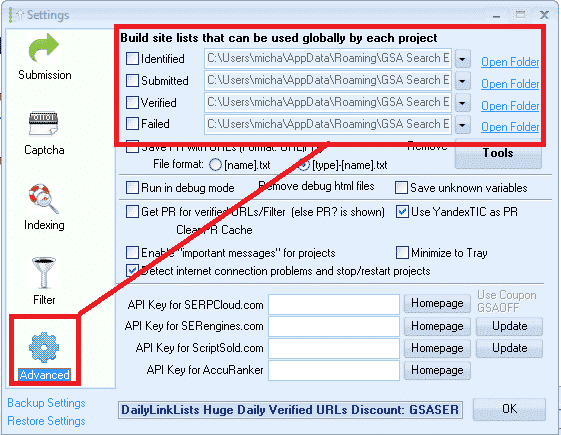
GSA SER Global Site List Location


What are the GSA SER global site list used for:

Global site list are link targets where GSA SER post to too, to create your backlinks.

When you first buy Công cụ xếp hạng công cụ tìm kiếm GSA the list will be all empty, and you can import links into the list by using the built in scraper in the projects, or by importing list via the TOOLS menu, or you make used of paid list via a shared folder such as Dropbox.

When creating a new GSA project you have the option to use the Global Site List to post to, as in the below screenshot.
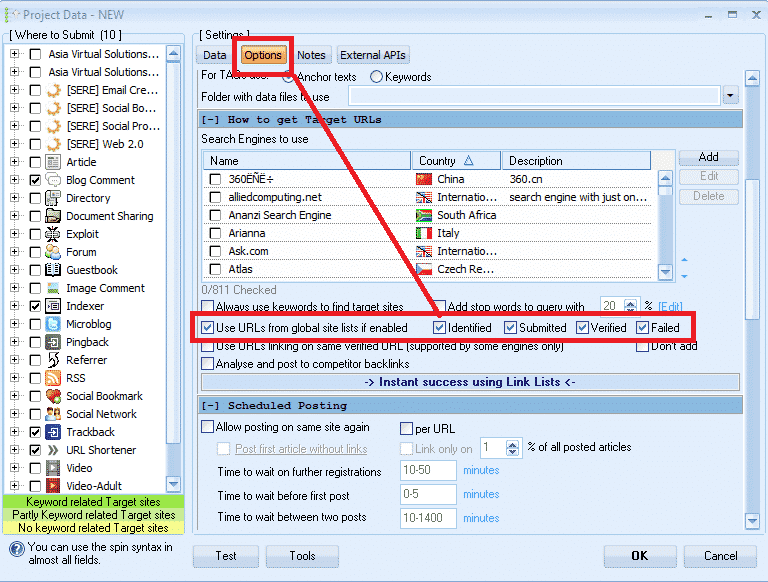
 

Select GSA Global Site List in a Project

What are those checkboxes next to the Identified, Submitted, Verified and Failed  Options?

PAY ATTENTION HERE – THIS IS THE NO.1 THING THAT 75% OF GSA SER USERS GET  WRONG

What I have seen is that most users are not really sure what those checkboxes are for, and most think that it is the option to select to use the list or not so they just go and check all the boxes, which is wrong, it has nothing to do with selecting to use or not use the list.
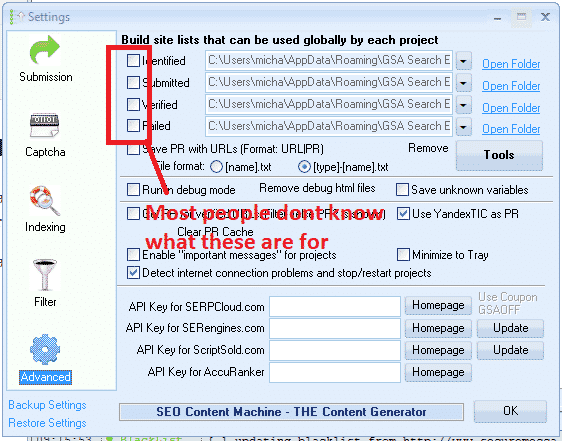
 

What are the global site list check boxes


What those checkboxes actually do is to enable or disable write permissions  to write to the list.


The Identified Checkbox :

If you use the search engines option in your projects to scrape, then it will add the scraped urls in this list

The Submitted Checkbox:

Every time GSA SER submit in any of your projects to a site, it will add the site it submitted to, to this list

The Verified Checkbox:

Every time GSA Verify a link that it has posted in any of your projects it will add that link to this list

The Failed Checkbox:

Every time GSA is unable to post to a site, it will add that site to this list

My recommendation is DO NOT CHECK ANY OF THOSE BOXES, specially if you are using paid link list which are shared via Dropbox or you build your own list.

Reason is because paid  list shared via Dropbox are normally read only, so you are wasting resources trying to save to a list which you only have read access to.

Another reason is because GSA SER already save the links it create and verify in the project data, there is very little to no point in saving then in additional list as this will just bloat your hard drive.

My main reason for not checking any of the boxes is that i use the global site list to load 4 different link list. ( we will cover that a little further below )

How to see the verified, failed and submitted URLs then in the projects you might ask, well it is simple. You right click on any project and select show urls, as in below screenshot.

Check GSA SER Project URLs

What are the 4 file paths next to each option of the GSA SER Global site list?

These are the location where the list are saved. As mentioned earlier, by default GSA create an empty folder for each list in the APPDATA folder, which is not all that easy to navigate to but luckily there is a shortcut in GSA  SER, namely the  OPEN FOLDER next to each list.

You can change the location to anywhere on your computer or even a shared network drive
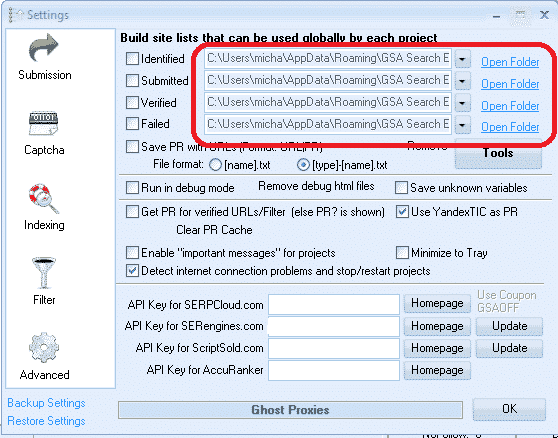
Location of the global site list
Location of the global site list folders


How to use paid link list shared via Dropbox from several providers, as well as your own list?

Many Công cụ xếp hạng công cụ tìm kiếm GSA users subscribe to paid link list, such as our own Asia Virtual Solutions Quality link list, which has a identified and a verified link list, and there are other list providers such as Auto Approve Market Place, SER Verified List and many others, and many of these list providers share there link list via Dropbox.

So what u will need to do is install Dropbox on your computer or your GSA SER Máy chủ ảo riêng (VPS), then use any of the 4 slots in the GSA SER global site list to load your list.

You don't have to worry about the fact that it is called Identified, Submitted, Verified or Failed, in fact you can totally ignore the names as it has no meaning if you don't plan to check the boxes and write to the list. So have a look at the below screenshot of a set up using 4 different list.
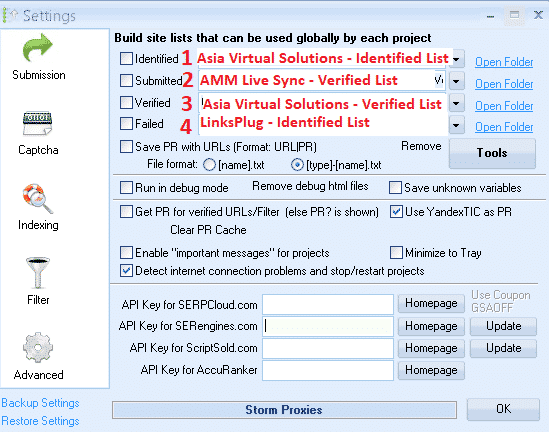
 

Using 4 Different List IN GSA SER Global list
Using 4 Different List in GSA SER Global link list


In the above screenshot all of the 4 list are shared with me via Dropbox, so all i did was click on the dropdown button and then navigate where that Dropbox folder is on my Máy chủ ảo (VPS) PC

  1. In position no.1 I used the Giải pháp Ảo hóa Châu Á – Identified Link list
  2. In position no.2 I used the AAM Live Sync Verified link list
  3. In position no.3 I used the Asia Virtual Solutions – Verified Link List
  4. In position no.4 I have used the List from LinksPlug

If you maybe want to also have your own list then you simply need to use one of the 4 slots – just browse to the folder where your list is located.


GSA Search Engine Ranker – How To Use Multiple GSA SER Link List at Same Time


How do you set your GSA Search Engine Ranker projects to use the global site list

When you create your projects you select to use the  Global Site list in the project options, like in the below screenshot.

You check the box to use the slot where your list is added. So if you are using several site list from several providers and you have added them as i showed you earlier on then in the project options you select Identified, Submitted, Verified or Failed if your list are in those slots. Your project will then pull the links from the list you have selected to use.

If you order our GSA Search Engine Ranker Data Packs then we by default check the Global site list for you like in the below screenshot.

How do you set your projects to use the global site list


How to use GSA Search Engine Ranker Global Site List in Your GSA SER Projects


What is the difference between GSA Search Engine target URLs and the global site list.

  • GSA Search Engine Ranker global site list

Global site list are list that you can use for any niche and any GSA SER project, they are just general list not scraped for a specific niche. Link list that you buy our subscribe to are all global site list.

  • GSA Search Engine Ranker  target URLs

Target URLs are links that are scraped for a specific project and the links are all relevant to a niche or topic. So you will use your scraper like GScraper or Scrapebox or any others and then bind keywords to the footprints, so the results all have content or titles related to the keyword.

Target URLs are not usually added to the danh sách trang web toàn cầu but they are added to the project for which the URLs were scraped, like in the below screenshot.

Target URLs can be imported as .txt or .sl format

How to import GSA Search Engine Ranker target URLs
How to import GSA SER Target URLs


Well that's it, I hope that this article has given you a better understanding about the GSA Search Engine Global Site list and how to correctly use it to get the most out of your GSA SER projects.

It is very important to have a good site list, and Giải pháp Ảo hóa Châu Á can help you with that as well, out Quality Link list is not only the biggest GSA format link list available on the internet, but it is also very good quality and we make use of it our self on a daily basis. Have a look below for more a link to more info on our quality global link list.

Asia Virtual Solutions – GSA SER Global Link List

Do you want to start using the best Công cụ xếp hạng công cụ tìm kiếm GSA Global Link List Available On The Internet?

Check Out Our Great Global Link Lis

Thẻ: Global Site ListGSA Global Site ListCông cụ tìm kiếm GSACông cụ xếp hạng công cụ tìm kiếm GSAGSA Search Engine Ranker Global Site Listgsa ser global site listCáchHow To Correctly Use GSA Search Engine RankerDanh sách trang web
Bài viết trước

GDPR: Giải mã sự ồn ào và đảm bảo tuân thủ

Bài viết tiếp theo

Asia Virtual Solutions – Dịch vụ Tín hiệu Mạng xã hội Cập nhật – Nâng cao SEO của bạn với Tín hiệu Mạng xã hội

Michael Swart

Michael Swart

Asia Virtual Solutions tự hào được sở hữu và vận hành bởi Michael Swart cùng đội ngũ trợ lý ảo tận tâm.

Bài viết tiếp theo
Dịch vụ Dấu hiệu Xã hội - Cập nhật

Asia Virtual Solutions - Social Signals Service Updated - Boost Your SEO with Social Signals

Sản phẩm được đề xuất

Các danh mục blog

  • Giải mã Captcha
  • Tạo nội dung
  • Trích xuất nội dung
  • Quay nội dung
  • Hướng dẫn xếp hạng công cụ tìm kiếm GSA và cẩm nang xây dựng liên kết
  • GSA Captcha Breaker
  • Dịch vụ lưu trữ & Tối ưu hóa VPS
  • Cách làm
  • Tin tức Giải pháp Ảo hóa Châu Á
  • Tiếp thị trực tuyến
  • Cách làm
  • Hướng dẫn sử dụng Money Robot
  • Tin tức Giải pháp Ảo hóa Châu Á
  • Đánh giá phần mềm SEO được khuyến nghị
  • Video
  • Hướng dẫn xếp hạng công cụ tìm kiếm GSA và cẩm nang xây dựng liên kết
  • Đánh giá phần mềm SEO được khuyến nghị
  • Tiếp thị trực tuyến
  • Xrumer & Xevil: Kỹ thuật và Hướng dẫn

Sản phẩm bạn cần

Những đánh giá gần đây

  • Giải pháp Ảo Châu Á - Lưu trữ liên kết xã hội Lưu trữ dấu trang xã hội để cải thiện SEO và tăng lưu lượng truy cập
    Đánh giá 5 trong số 5
    bởi shashwat asthana
  • Gói email RankerX Gói Email RankerX
    Đánh giá 5 trong số 5
    bởi vancuoc29
  • Quảng cáo dịch vụ tiếp thị kỹ thuật số giới thiệu các công cụ và tính năng SEO như dự án GSA SER, email riêng tư và bài viết liên quan đến từ khóa. Dự án Xếp hạng Công cụ Tìm kiếm GSA - Đã Hoàn Thành Cho Bạn
    Đánh giá 5 trong số 5
    Bởi Nick Smith
  • GSA Search Engine Ranker VPS GSA Search Engine Ranker VPS
    Đánh giá 5 trong số 5
    Bởi Nick Smith
  • GSA Search Engine Ranker VPS GSA Search Engine Ranker VPS
    Đánh giá 5 trong số 5
    bởi Mike
  • Nội dung có cấu trúc, các trang web có DA50+ Bài đăng Web 2.0 có nội dung có cấu trúc trên các trang web có DA50+
    Đánh giá 5 trong số 5
    Bởi ADE YUSUP
  • Nội dung có cấu trúc, các trang web có DA50+ Bài đăng Web 2.0 có nội dung có cấu trúc trên các trang web có DA50+
    Đánh giá 5 trong số 5
    của Joseph Conroy
  • Nội dung có cấu trúc, các trang web có DA50+ Bài đăng Web 2.0 có nội dung có cấu trúc trên các trang web có DA50+
    Đánh giá 5 trong số 5
    Bởi N/A N/A
  • Xevil Proxy XEvil Proxies cho việc giải quyết ReCaptcha siêu nhanh - Được bình chọn là số 1
    Đánh giá 5 trong số 5
    Bởi Talbert Williams
  • Quảng cáo dịch vụ tiếp thị kỹ thuật số giới thiệu các công cụ và tính năng SEO như dự án GSA SER, email riêng tư và bài viết liên quan đến từ khóa. Dự án Xếp hạng Công cụ Tìm kiếm GSA - Đã Hoàn Thành Cho Bạn
    Đánh giá 5 trong số 5
    Bởi Sunil Keshari

Tất cả các vấn đề pháp lý

  • Hợp đồng liên kết
  • Chống spam
  • Ưu tiên về giao tiếp
  • Lưu ý
  • Bánh quy Dart nhấp đúp
  • Chính sách liên kết ngoài
  • Chính sách của Facebook
  • Tuyên bố của FTC
  • Chính sách bảo mật
  • Chính sách hoàn tiền và bảo hành
  • Điều khoản và Điều kiện
  • Thông báo về các đánh giá của khách hàng

Mua sắm an toàn

Google Chứng nhận Lưu trữ Trình duyệt
Biểu tượng Norton Safe Website trên nền trắng.

Liên hệ với chúng tôi

Văn phòng chính tại Hoa Kỳ
  • Công ty TNHH Giải pháp Ảo Châu Á, 400 Rella Blvd, #123-298, Montebello, New York 10901
  •  co*****@******************ns.com
  • +1 (415) 851-6951
  •  asiavirtual
  •  Giải pháp Ảo hóa Châu Á trên LinkedIn
Văn phòng ảo tại Châu Á
  • Công ty TNHH Giải pháp Ảo Châu Á, Tầng 29, Tòa nhà Văn phòng Centralworld, 999/9 Đường Rama I, Quận Pathumwan, Bangkok, Thái Lan
  •  co*****@******************ns.com
  • +1 (415) 851-6951
  •  asiavirtual
  •  Giải pháp Ảo hóa Châu Á trên LinkedIn

© 2026 - Asia Virtual Solutions LLC. Mọi quyền được bảo lưu. Trang web được vận hành và bảo trì bởi: Asia Virtual Solutions LLC

Không có hình thu nhỏ
Đã tải lên
Thất bại
Xóa tệp đã tải lên
Không có kết quả
Xem tất cả kết quả
  • Trang chủ
  • Công cụ xếp hạng công cụ tìm kiếm GSA
    • Câu hỏi thường gặp về GSA Search Engine Ranker
    • Công cụ và tiện ích bổ sung GSA SER
    • Hướng dẫn xếp hạng công cụ tìm kiếm của GSA
    • Hướng dẫn sử dụng GSA Captcha Breaker
    • Dịch vụ lưu trữ GSA
  • Blog
    • Giải mã Captcha
    • Tạo nội dung
    • Trích xuất nội dung
    • Quay nội dung
    • Hướng dẫn xếp hạng công cụ tìm kiếm GSA và cẩm nang xây dựng liên kết
    • Dịch vụ lưu trữ VPS
    • Hướng dẫn sử dụng Money Robot
    • Cách làm
    • Tin tức Giải pháp Ảo hóa Châu Á
    • Đánh giá phần mềm SEO được khuyến nghị
    • Tiếp thị trực tuyến
    • Xrumer & Xevil: Kỹ thuật và Hướng dẫn
  • Cửa hàng
    • Nội dung & Bài viết về Trí tuệ nhân tạo (AI)
    • Công cụ và tiện ích bổ sung GSA SER
    • Dịch vụ lưu trữ
    • Dịch vụ Xây dựng Liên kết
    • Phần mềm nộp đơn tự động Money Robot
    • RankerX
    • Dịch vụ được khuyến nghị
    • Dịch vụ Mạng xã hội
    • Dịch vụ Xrumer

© 2026 - Asia Virtual Solutions LLC. Mọi quyền được bảo lưu. Trang web được vận hành và bảo trì bởi: Asia Virtual Solutions LLC

Tiếng Việt
English 简体中文 हिन्दी Bahasa Indonesia 日本語 한국어 Bahasa Melayu Русский Tagalog ไทย