


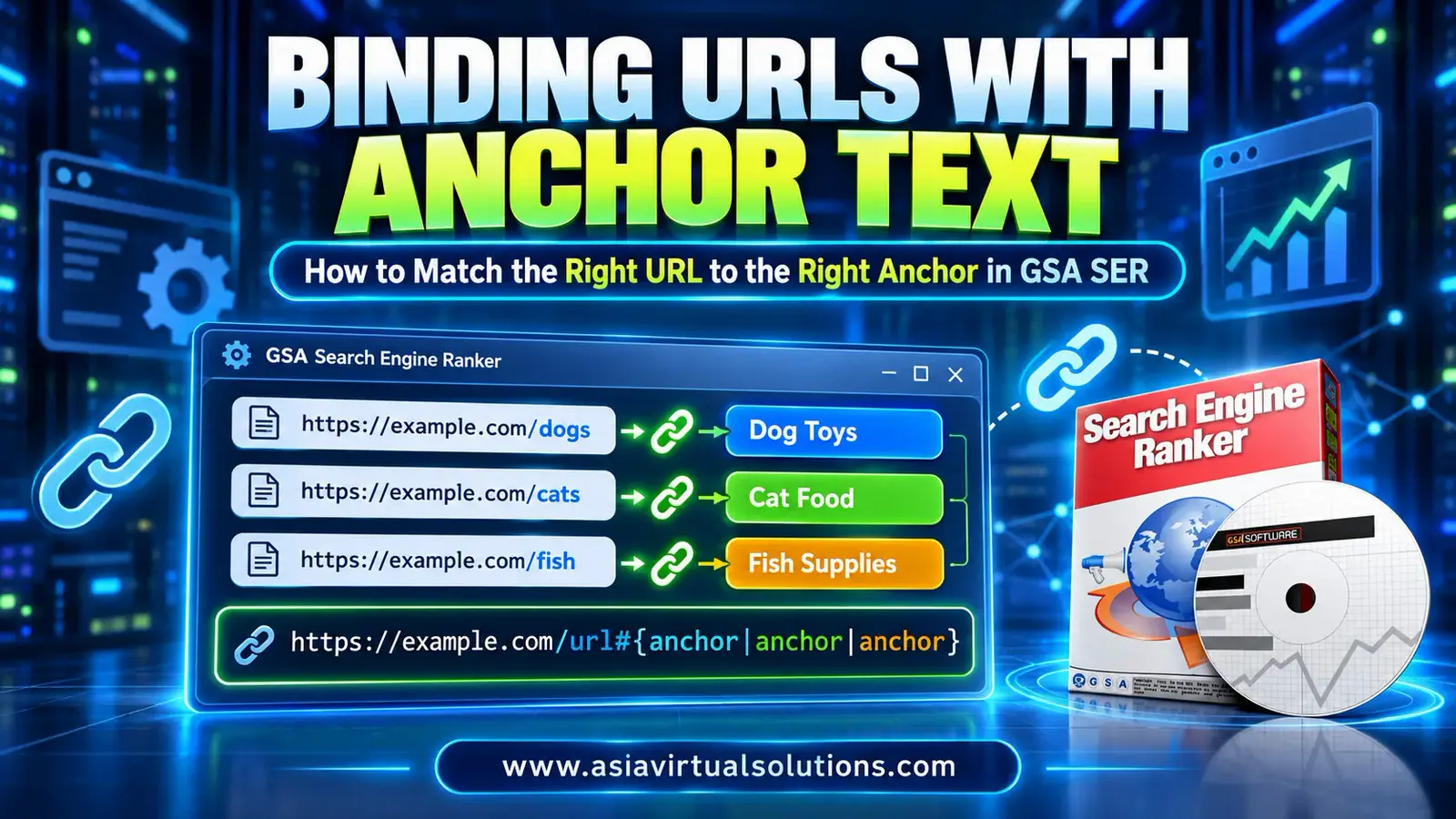
To bind a URL to its own anchor text in GSA Arama Motoru Sıralayıcısı, add the URL with the anchor after a hash sign, like https://example-petshop.com/dogs#Dog Food. For several anchors, put them in curly brackets and split them with a pipe: https://example-petshop.com/dogs#{Dog Food|Dog Toys|Dog Beds}. GSA SER then picks the anchor from the list you attached to that URL.
We have used GSA Arama Motoru Sıralayıcısı every day since December 2012. This guide shows why binding matters, the exact formats, how to import your list, and the mistakes to avoid. Last updated 14 October 2026.
💡 Kısaca
Binding means every URL carries its own anchors, so a link to your fish page never uses the anchor “Dogs”.
Use it whenever you promote a site with more than one page. If you only promote one URL, random anchors are fine.
- One anchor:
url#anchor - Many anchors:
url#{anchor1|anchor2|anchor3} - Write one URL per line in a plain text file, then import it from the project’s Data tab.
- Keep each URL’s anchors relevant to that page, and vary them.
- Without binding, GSA SER picks a random URL and a random anchor every time.
🎯 What does binding URLs with anchor text mean?
Binding means you attach a set of anchor texts to one specific URL, so GSA SER can only use those anchors for that URL. Without it, the two lists in your project are separate, and the software mixes them at random.
Anchor text is the clickable words of a link. Google says that good anchor text is “descriptive, reasonably concise, and relevant” in its guide to crawlable links. Binding is how you keep that true when a tool builds thousands of links for you.
⚠️ Why random URLs and anchors cause mismatched links
When we build GSA SER data packs, we do not write links into the articles. We use GSA SER tokens instead, so a link in the article looks like this:
<a href="/tr/%url%/">%anchor_text%</a>GSA SER replaces %url% with one of the URLs in your project and %anchor_text% with one of your anchors. It picks each one at random. If you promote a single URL, that works well. If you promote a large site with many categories, it does not.

Here is an example. You promote a pet shop with three category pages: https://example-petshop.com/cats, /dogs ve /fish. You import all three URLs and all your anchors together. Sooner or later GSA SER builds this link:
<a href="https://example-petshop.com/fish">Köpekler</a>The anchor says dogs, and the page is about fish. That confuses visitors, and it gives search engines a weak signal about what the page is. Binding stops it, because each URL carries only its own anchors.
🔧 How to bind URLs with anchor text in GSA SER
The feature is built into GSA Arama Motoru Sıralayıcısı, and you do not need a plugin or extra tool. Follow these steps:
- Open a plain text editor such as Notepad and type one URL per line.
- Add a hash sign right after each URL, then the anchor text for that URL.
- If you want variety, put several anchors in curly brackets and separate them with a pipe.
- Save the file as a .txt file.
- Open your GSA SER project, go to the Data tab and click Edit next to the URL box.
- Choose Import, then From File, and pick your text file. Use From Clipboard if you copied the list instead.
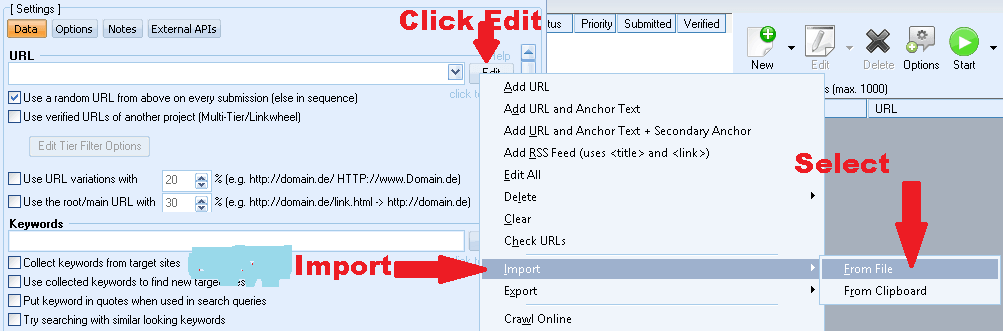
The same Edit menu also has Add URL and Anchor Text ve Add URL and Anchor Text + Secondary Anchor, if you prefer to add one URL at a time.
📋 The formats, with examples
| What you want | Format | Örnek |
|---|---|---|
| One anchor for a URL | url#anchor | https://example-petshop.com#Pet Shop |
| Many anchors for a URL | url#{anchor|anchor|anchor} | https://example-petshop.com#{Pet Shop|Pet Supplies|Pet Store} |
| Many anchors for an inner page | url/page#{anchor|anchor|anchor} | https://example-petshop.com/dogs#{Dog Food|Dog Toys|Dog Beds} |
GSA SER picks one anchor from the curly brackets each time. If you repeat an anchor in the list, it has more chances to be picked, so you can use repeats to make your main anchors more common.

✅ Best practices for anchor text
- Write the anchors for each page about that page only, as in the pet shop example.
- Mix branded, partial match, generic and domain anchors, and keep exact match anchors low. Our done-for-you projects use six anchor groups for this reason.
- Keep anchors short and descriptive. Avoid “click here” and other empty phrases.
- Keep one URL per line, and save the file as plain text so no hidden characters break the format.
- Review your list before you import it, because a typo in a bound URL is repeated in every link.
For a deeper look at anchor ratios, read our guide to optimizing anchor text variations in GSA SER.
🎥 Watch the video walkthrough
🧰 Want it built for you?
You can do all of this yourself, but building a tiered campaign by hand takes hours. Our hazır GSA SER projeleri start from your website URL, at least three keywords and your language. You can add more target pages in the optional fields. We write 50 unique articles per tier with the link tokens already in place, create six anchor text groups, set every filter, and deliver one restore file within 24 hours.
If you have a large site and want exact control over which anchors point to which page, use the method above in your own project, or contact us before you order.
From $9.95
Get a GSA SER project built for your site
Articles, anchor text groups, private email accounts and every setting done. Restore one file and press start.
Get Your GSA SER Project
❓ Sıkça sorulan sorular
What does binding URLs with anchor text mean in GSA Search Engine Ranker?
It means you attach anchor texts to a specific URL, so GSA SER only uses those anchors for that URL. Without binding, GSA SER picks a random URL and a random anchor for every link, which can pair the wrong anchor with the wrong page.
What is the format for binding a URL to an anchor?
Write the URL, then a hash sign, then the anchor: url#anchor. For example, https://example-petshop.com#Pet Shop. Put one URL per line in a plain text file, and import the file into your project.
How do I add more than one anchor to a URL?
Put the anchors inside curly brackets and separate them with a pipe: url#{anchor1|anchor2|anchor3}. GSA SER picks one of them each time it builds a link for that URL. Repeat an anchor to make it appear more often.
How do I import URLs with anchors into a GSA SER project?
Open the project, go to the Data tab and click Edit next to the URL box. Choose Import, then From File, and select your text file. Choose From Clipboard if you copied the list. The Edit menu also has Add URL and Anchor Text for single entries.
Do I need to bind URLs if I only promote one URL?
No. With a single URL, every anchor is relevant to it, so random picking works. Binding matters when you promote a larger site with many pages or categories, because that is where a random URL and a random anchor can end up mismatched.
What do the URL and anchor text tokens mean in GSA SER?
They are placeholders in your article content, written as %url% ve %anchor_text%. GSA SER swaps the URL token for one of your project URLs and the anchor text token for one of your anchors when it posts. That is why our data packs hold no fixed links in the articles.
What happens to the Anchor Text box if I bind anchors in the URL field?
GSA SER ignores the project’s Anchor Text box for those URLs. The Data tab states this next to the box: it is ignored if you use anchor texts in the URL field. Your bound anchors are used instead.
Can I get a GSA SER project built for me?
Yes. Our done-for-you GSA SER projects include 50 unique articles per tier, six anchor text groups, private email accounts and every setting done. You send your website, keywords and language, and we deliver a restore file within 24 hours.
📚 İlgili okumalar
- Optimizing anchor text variations for GSA Search Engine Ranker
- GSA Search Engine Ranker nasıl kurulur: Video eğitimleriyle 9 adım
- GSA Search Engine Ranker ile 200+ LPM nasıl elde edilir
- Best GSA link lists: how to choose GSA SER link lists that work
- How to create contextual, do-follow links with GSA Search Engine Ranker






 English
  简体中文
简体中文  Deutsch (Sie)
  Bahasa Indonesia
  Italiano
  日本語
日本語  한국어
한국어  Português do Brasil
  Русский
  Español de México
  ไทย
ไทย  Tiếng Việt
  Türkçe