


Promote a RSS Feed With GSA Search Engine Ranker
Most users of GSA Search Engine Ranker only promote just links for their projects that they have in a list or copy from their websites, or maybe links from another project, which is all OK and well, but not many people realize that there are many different ways to promote links with GSA Search Engine ranker.
Different ways of importing your links into GSA Search Engine ranker
- Normal way, which most users do, copy or import from a file.
- Import from an RSS Feed
- Import from a Sitemap
- Crawl a site

In this post we will look at how to add your RSS feed to Classificador de mecanismos de busca GSA and then also explore different kinds of feeds URLs that can be used to promote your sites
How to create a GSA project using a feed URL
Creating a project using a RSS feed URL is really super straight forward. I will walk you thru the steps below.
- Create your project as you will normally do, by adding all the content and anchor text, and selecting the platforms, but don’t add any URLs yet
- Under the Data tab , the first option you see is the URL option and this is where you would normally just import your URLs, but for a RSS feed project you do not add URLs, instead you add your RSS feed URL.
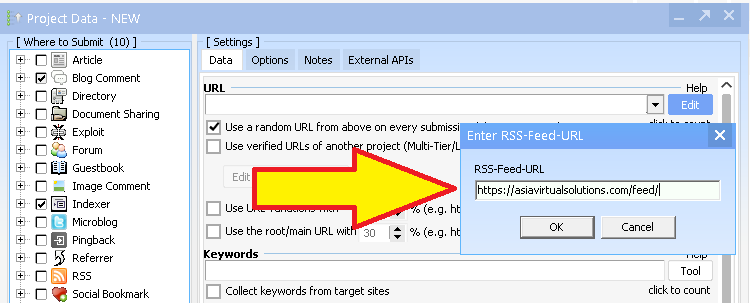
- To the Right of the URL field you will see a little button that says EDIT, click on that and select the option: Add RSS Feed (uses <title> and <link>)
- You then paste a single RSS feed URL in the box and click OK, as shown in the below screenshot below.
- And that is all there is to it, you can now save your project and GSA SER will automatically pull the url and title from your feed.
What will GSA Import from the feed URL, and how often.
What will GSA import from the Feed URL
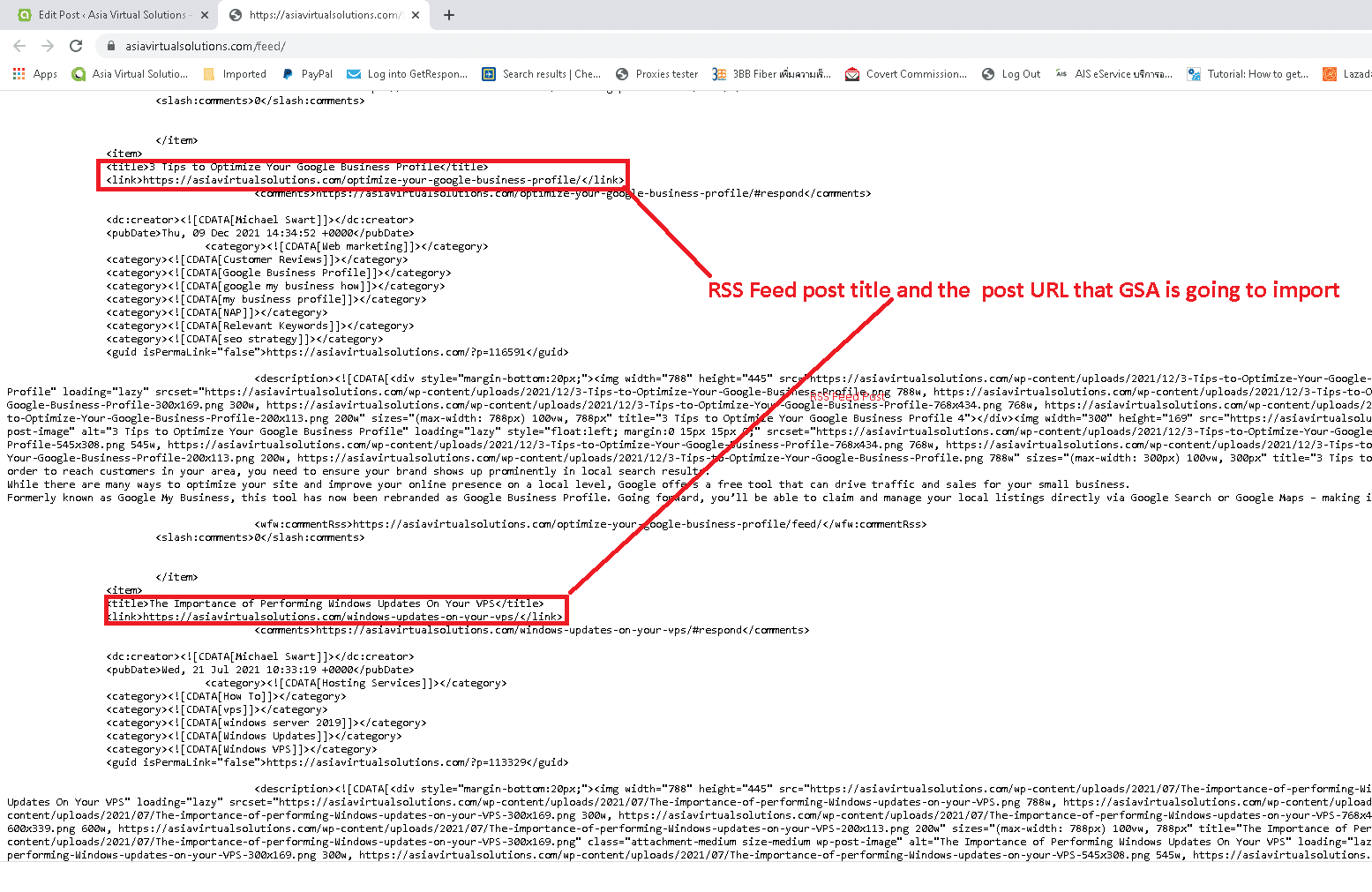
As was shown on the edit button where you added the feed, the only thing that GSA SER will import from your RSS Feeds is the RSS Feed post titles and the post URLs. Please note GSA WILL NOT import the feed content as well.
If you look at the below screenshot of the RSS Feed from Soluções virtuais da Ásia you will see where i have highlighted the RSS Feed post titles and the post URLs that GSA is going to import. The number of Titles and URLs it import will depend on how many is listed in your feed. (further down in this post I will give you some tips to increase the number of post displayed in your feed.)
What will GSA SER use as the anchor text when creating a RSS feed post
By default GSA Search Engine Ranker will use the RSS feed post title as anchor text, however if the feed post title is longer than 3 words it will not use the feed title as anchor text but it will randomly use a anchor text which you have added in the anchor text field in your Projeto GSA SER.
For example; in the above screenshot where i showed the RSS Feed post titles and the post URLs, my first post title looked like this;
<link>https://asiavirtualsolutions.com/marketing-planner-2022/</link>
In my case my RSS Post Feed Title is : O melhor planejador de marketing para as férias de 2022, which is 7 words. So this is too long and GSA SER will ignore the RSS Post Feed Title and use a random anchor text from the Anchor text field, shown in the below image.

On the other hand, if my post title was something like below which is only 3 words then it would have used Best Marketing Planner as the anchor text
Things to keep in mind when creating a GSA SER feed project:
If you have a WordPress site or a site that don’t get updated regularly then it means your RSS feed wont get updated also and the links in the feed wont change until you post on your site. As such it will make more sense to adjust your GSA SER project post frequency as well. Below are some settings in GSA Search Engine Ranker That you can use to slow things down a bit. Also remember RSS feed are for the long run, so you can create them to supplement your normal projects.
Feed projects are best for slow posting a regular updates.
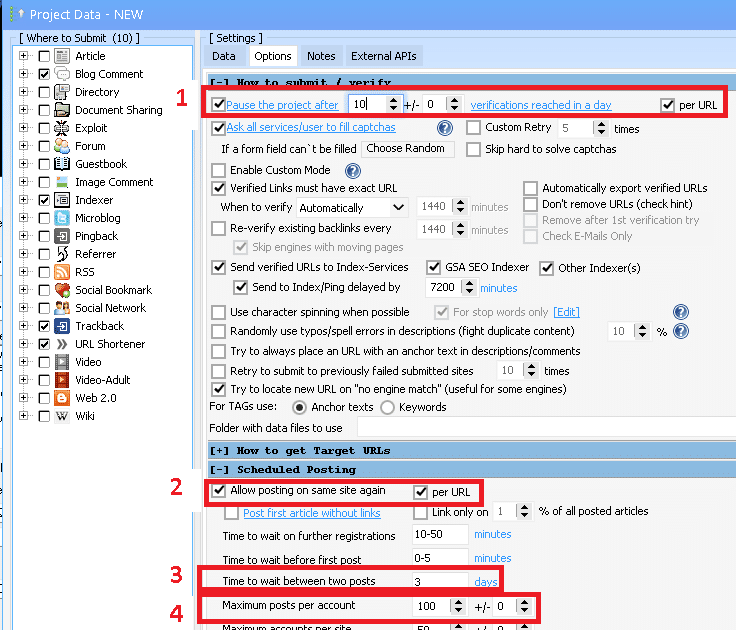
The above settings will greatly depends on your feed, there are feeds which update daily and then there are feeds updating weekly or monthly, so you really need to approach the settings based on how regularly your feeds are updating.
The below is based on my site which update maybe 1 time a week or 1 time a month. So my feed have 15 Links in it that will update every week or so:
- Since i don’t need to create many links quickly i set this to pause the project when it reach 10 verified links in a day. That way you are naturally growing your exposure.
- You definitely want to post to the same sites again – so your future RSS links can also get exposure. Just make sure you have allot of content and in syntax.
- Since my feed only update every week or so, i want to space out my post. So we make the initial post and then wait 3 days to make another. If you have a busy site and your feed updates regularly then i will change delay to every couple of hours.
- Why limit your self to a few post per account, I will set this number high so i can get all my future post on a account – also if you have to keep creating account then it cost time and money as u need to solve captchas and use resources.
What RSS Feeds can you get from your WordPress site.
Most people wrongly think that they only have 1 site feed, below are 5 feeds you can get from your WooCommerce \ WordPress site
- Blog feed or main feed
- Blog Comments feed
- Feeds da categoria do blog
- Shop products feed
- Shop product category feeds
Where to find the RSS Feeds on your WordPress site:
Lets look at where you will get these feeds. i will use my own website for the samples.
- Blog feed or main feed is normally your site address and it will display your latest blog post – https://asiavirtualsolutions.com/feed/
- Blog Comments feed contains all the comments that were made on your post – I don’t use this one so much – https://asiavirtualsolutions.com/comments/feed/
- Blog category feeds – Just select any category from your blog. In my view this is the best feed because you can really use more focused content and anchor text. – https://asiavirtualsolutions.com/category/gsa-search-engine-ranker/feed/
- Shop products feed – If you have a WooCommerce Shop page then you have a shop page feed – https://asiavirtualsolutions.com/shop/feed/
- Shop product category feeds – Again if you have a WooCommerce shop then you can just browse to a shop category and get the RSS feed, Same as with the blog category this is the best feed to use as you can use targeted content and anchor text based on what u have in the shop category – https://asiavirtualsolutions.com/product-category/gsa-products-services/feed/
How to increase the number of post seen in your WordPress feed:
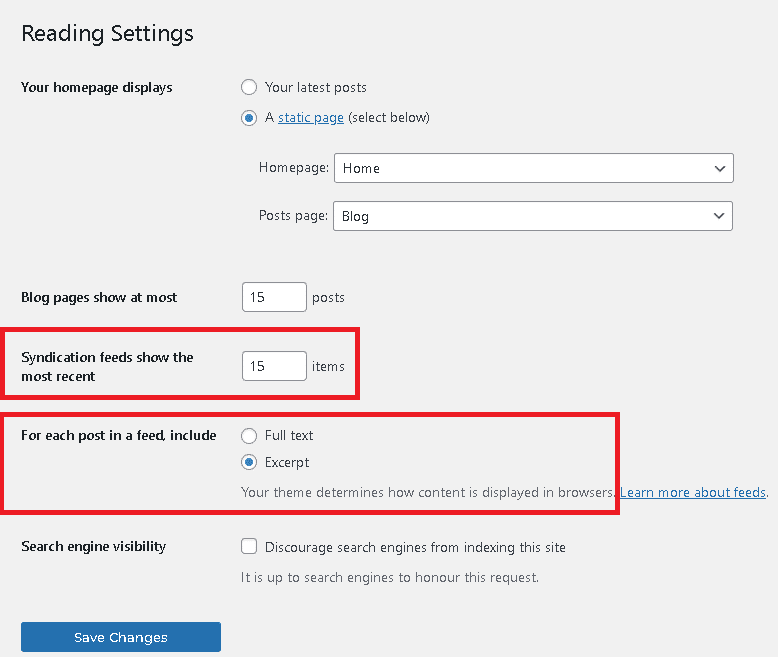
Did you know that you can control the number of post that shows in your WordPress RSS Feed. Simply follow the below steps.
- In WordPress Admin menu scroll down to Settings and expand it .
- Click on Reading
- Then scroll down to the section that says : Syndication feeds show the most recent
- The default s normally 1, you can increase it to what you want here. I normally have mine set at 15. The higher the number the more resources are used to load the list, so don’t go and set it to something crazy like 100.
- Then directedly below that last setting, you will see another option: For each post in a feed, include
- Full Text – This will display the full content of he blog post in the feed.
- Excerpt – This will only display a short Excerpt of you post.
- I recommend you set it to mostrar Excerpt, specially if you are just going to use it for GSA Search Engine Ranker RSS Feed post which will only use the title and the post link, and not the content or Excerpt
How To Find Your RSS Feeds
Sometimes it can be a little hard trying to figure out what exactly your RSS feed is or where to find it. In my case i was actually looking for a tool to help me find feeds that i can use in my auto blogs.
One handy tool that I came across and which i now use frequently is a little Google Chrome Extension called “Get RSS Feed URL“. You can view it in the Google Chrome Store here : https://chrome.google.com/webstore/detail/get-rss-feed-url/kfghpdldaipanmkhfpdcjglncmilendn
How to use Get RSS Feed URL
- Simply browse to the website of which you want to know the feed.
- Click on the Get RSS Feed URL icon on your browser bar.
- It will display the feeds available for that page.
- Browse to the shop page and click the Get RSS Feed URL It will display the feeds available for the Shop.
- Browse to the either a blog category or a shop category and click the Get RSS Feed URL It will display the feeds available for that category.
- The below screenshot is the result if i browse to https://asiavirtualsolutions.com/

How To Combine many feeds into a single feed
Some users have many sites on the same topic or some people use tools like Menterprise publisher that generate 1000’s of sub domains and web pages. So in these cases creating a GSA Search Engine Ranker Feed project is a bit unpractical as you can only specify 1 feed URL per GSA Feed project. But don’t worry there is a solution, read onwards…
There are many paid and also free services that allow you to combine multiple feed into a single feed
5 Free RSS Aggregator Tools to Combine Multiple RSS Feeds into 1
- RSS Mix
- RSS Mixer
- Feed Informer
- FeedForAll
- FeedCombine
From the above 5 Free RSS aggregators my favorite one which i use all the time is RSS Mix. It allows you to add up to 100 RSS feeds and combine them into a single feed. I use this all the time to combine all my Menterprise publisher feeds into single category feeds, and then use the RSS Mix feed in my GSA SER Feed project.
I use RSS mix all the time to combine all my category feeds on my Menterprise sub domains and then combine every 100 Menterprise feeds into a single feed, which i can then promote with GSA Search Engine ranker.
Creating RSS Feeds From your Social and Web 2.0 sites
I believe that most if not all people reading this post have at least one social site, some have allot of social sites and web 2.0 that they use as buffer sites. But i bet most of you will tell me that it it is not possible to create a feed for you Facebook page or Facebook group, or that you cant create a Feed of your Twitter and many more, but believe me it is possible, as you can see from the below social feeds for Soluções virtuais da Ásia
- Asia Virtual Solutions – Facebook page feed – https://rss.app/feeds/7VzknyEoAU1Va0q0.xml
- Asia Virtual Solutions – Twitter feed – https://rss.app/feeds/QgFBQPOHAVxwOLmb.xml
- Asia Virtual Solutions – YouTube Channel feed – https://rss.app/feeds/4I7b91OITFFrvQ8f.xml
- Asia Virtual Solutions – Youtube Playlist feed – https://rss.app/feeds/AYjZK8Wg9fRy5d1Q.xml
- Asia Virtual Solutions – Instagram RSS feed – https://rss.app/feeds/KSKgt4X7I6hbsa22.xml
- Asia Virtual Solutions – Imgur feed – https://rss.app/feeds/0buV1PaXPKMoXDe7.xml
- There are endless possibilities to create feeds from, check out the below service Asia Virtual Solutions use

Final Thoughts on RSS Feed With GSA Search Engine Ranker
As you can see there are many ways in which RSS feeds can be generated, and you can generate an RSS feed from almost any page. Creating GSA projects using RSS feeds mean you will have dynamically updated links and link titles that van be passed to GSA Search Engine ranker if and whenever the RSS feeds get updated every hour.
I encourage you to create a Projeto GSA for each and every RSS feed you have or combine them all into a single feed with RSS Mix and create only a single GSA SER post that is updated every hour with fresh feed content.







 English
  বাংলা
বাংলা  简体中文
简体中文  Nederlands
  हिन्दी
  Bahasa Indonesia
  日本語
日本語  한국어
한국어  Bahasa Melayu
  Português do Brasil
  Русский
  Español de México
  Tagalog
  ไทย
ไทย  Tiếng Việt
  اردو
اردو  Türkçe