



Leer in eenvoudige stappen hoe u de GSA Search Engine Ranker Global Site List correct gebruikt.
De wereldwijde lijst met GSA SER-sites is een van de belangrijkste dingen waarvan we hebben gemerkt dat meer dan 75% van alle GSA Search Engine Ranker-gebruikers het niet volledig begrijpen en fouten maken bij het instellen ervan. Hoe we dat weten, hoor ik u vragen? We kunnen de GSA SER-instellingen bekijken van de meer dan 50 gebruikers van onze GSA SER VPS-service, en we horen de vragen die mensen stellen wanneer ze onze GSA SER-linklijst en GSA Search Engine Ranker-datapakketten aanschaffen.
Ik heb daarom besloten dat het tijd is om een bericht te schrijven over het onderwerp... GSA SER Global Site List, Om mensen te helpen beter te begrijpen wat de Global Site-lijst inhoudt en hoe ze de lijst correct kunnen gebruiken.
Waar bevindt zich de wereldwijde sitelijst en waarvoor wordt deze gebruikt?
Waar bevindt zich de wereldwijde lijst met websites?
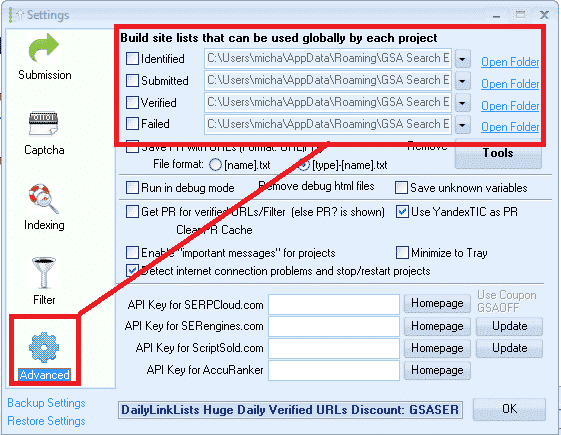
De wereldwijde lijst met sites vindt u door in het hoofdscherm op het tabblad OPTIES te klikken en vervolgens op het tabblad GEAVANCEERD, zoals in de onderstaande schermafbeelding te zien is.
Standaard worden de lijsten opgeslagen in uw APPDATA-map, maar u kunt deze locatie wijzigen naar elke gewenste plek.
Waarvoor wordt de GSA SER-lijst met wereldwijde locaties gebruikt?
Wereldwijde sitelijst Dit zijn linkdoelen waar GSA SER-berichten ook naartoe worden gestuurd om backlinks te creëren.
Wanneer u voor het eerst koopt GSA Zoekmachine Ranker De lijst zal helemaal leeg zijn. Je kunt links aan de lijst toevoegen met behulp van de ingebouwde scraper in de projecten, of door een lijst te importeren via het menu 'GEREEDSCHAP'. Je kunt ook gebruikmaken van betaalde lijsten via een gedeelde map zoals Dropbox.
Bij het aanmaken van een nieuw GSA-project heeft u de mogelijkheid om gebruik te maken van de Wereldwijde sitelijst om te posten, zoals in de onderstaande schermafbeelding.
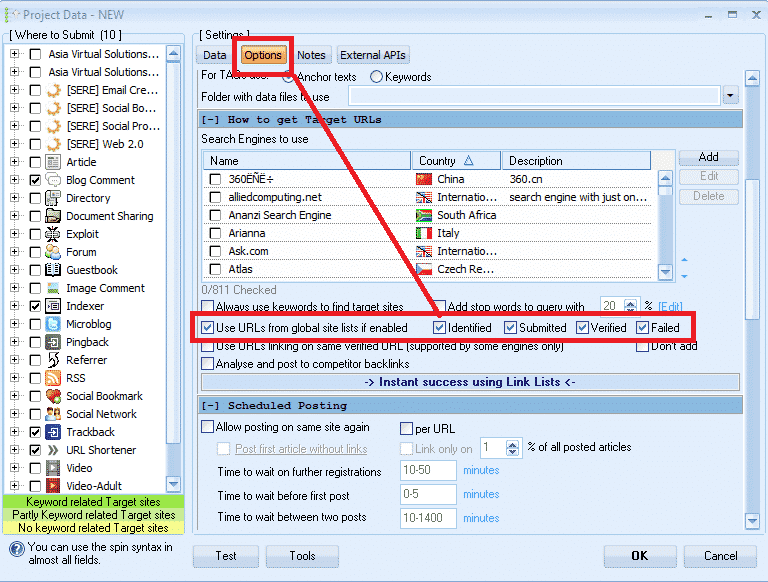
Wat betekenen die selectievakjes naast de opties 'Geïdentificeerd', 'Ingediend', 'Geverifieerd' en 'Mislukt'?
Wat ik heb gemerkt, is dat de meeste gebruikers niet precies weten waar die selectievakjes voor dienen. De meesten denken dat het een optie is om aan te geven of ze de lijst wel of niet willen gebruiken, dus vinken ze gewoon alle vakjes aan. Dat is echter onjuist; het heeft niets te maken met het wel of niet gebruiken van de lijst.
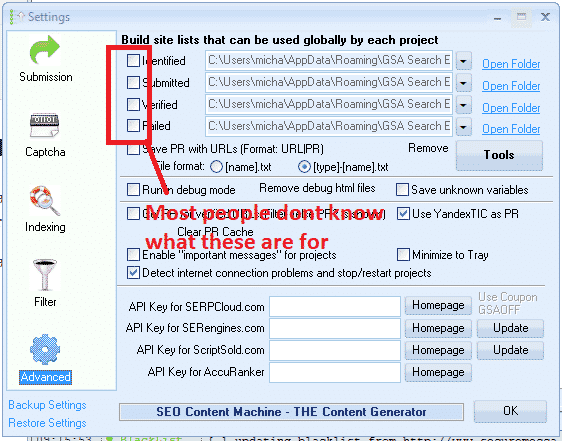
Wat die selectievakjes in feite doen, is schrijfrechten voor het bewerken van de lijst in- of uitschakelen.
Het geïdentificeerde selectievakje:
Als je in je projecten de zoekmachineoptie gebruikt om te scrapen, worden de gescrapte URL's aan deze lijst toegevoegd.
Het selectievakje 'Ingediend':
Elke keer GSA SER Als je een van je projecten indient bij een website, wordt die website aan deze lijst toegevoegd.
Het selectievakje 'Geverifieerd':
Telkens wanneer GSA een link verifieert die het in een van uw projecten heeft geplaatst, wordt die link aan deze lijst toegevoegd.
Het selectievakje 'Mislukt':
Telkens wanneer GSA niet in staat is om een bericht op een site te plaatsen, wordt die site aan deze lijst toegevoegd.
Mijn aanbeveling is VINK GEEN VAN DEZE VAKJES AAN, vooral als je betaalde diensten gebruikt. Een lijst met links die via Dropbox worden gedeeld of die je zelf samenstelt. je eigen lijst.
De reden is omdat er betaald is lijst gedeeld via Dropbox is normaal gesproken alleen-lezen, dus je verspilt resources door te proberen bestanden op te slaan in een lijst waar je alleen leesrechten voor hebt.
Een andere reden is dat GSA SER de aangemaakte en geverifieerde links al opslaat in de projectgegevens. Het heeft dus weinig tot geen zin om ze in een extra lijst op te slaan, omdat dit alleen maar uw harde schijf onnodig vol maakt.
De belangrijkste reden waarom ik geen van de vakjes aanvink, is dat ik de globale sitelijst gebruik om vier verschillende linklijsten te laden. (Hierover later meer.)
Je vraagt je misschien af hoe je de geverifieerde, mislukte en ingediende URL's in de projecten kunt zien. Dat is eenvoudig. Klik met de rechtermuisknop op een project en selecteer 'URL's weergeven', zoals in de onderstaande schermafbeelding.

Wat zijn de 4 bestandspaden naast elke optie in de GSA SER Global sitelijst?
Dit is de locatie waar de lijsten worden opgeslagen. Zoals eerder vermeld, maakt GSA standaard voor elke lijst een lege map aan in de APPDATA-map. Deze map is niet altijd even gemakkelijk te bereiken, maar gelukkig is er een snelkoppeling in GSA SER, namelijk de knop 'MAP OPENEN' naast elke lijst.
Je kunt de locatie wijzigen naar elke gewenste plek op je computer of zelfs naar een gedeelde netwerkschijf.
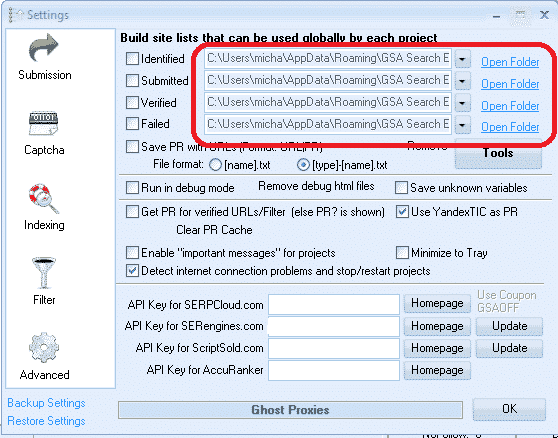
Veel GSA Zoekmachine Ranker Gebruikers abonneren zich op betaalde linklijsten, zoals die van ons. Lijst met kwaliteitslinks voor virtuele oplossingen in Azië, Er is een lijst met geïdentificeerde en geverifieerde links, en er zijn andere aanbieders van lijsten zoals Auto Approve Marketplace, SER Verified List en vele anderen, en veel van deze aanbieders delen hun linklijsten via Dropbox.
Wat je dus moet doen, is Dropbox installeren op je computer of je apparaat. GSA SER VPS, Gebruik vervolgens een van de 4 beschikbare plaatsen in de GSA SER-lijst met wereldwijde sites om uw lijst te laden.
Je hoeft je geen zorgen te maken over de namen zoals 'Geïdentificeerd', 'Ingediend', 'Geverifieerd' of 'Mislukt'. Sterker nog, je kunt de namen volledig negeren, want ze hebben geen betekenis als je niet van plan bent de vakjes aan te vinken en gegevens naar de lijst te schrijven. Bekijk de onderstaande schermafbeelding van een configuratie met 4 verschillende lijsten.
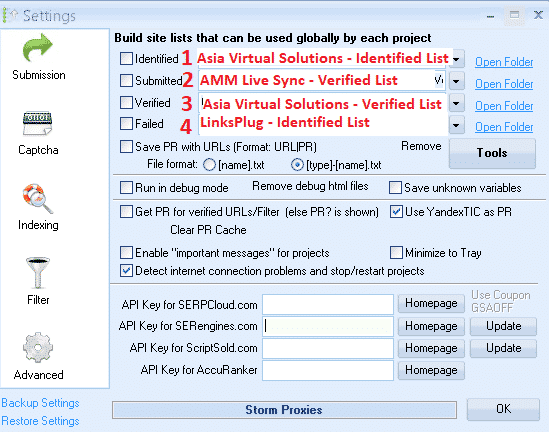
In de bovenstaande schermafbeelding zie je dat alle 4 lijsten met mij zijn gedeeld via Dropbox. Ik hoefde alleen maar op de dropdownknop te klikken en vervolgens naar de Dropbox-map op mijn computer te navigeren. VPS pc
- Op positie nr. 1 heb ik de lijst met geïdentificeerde links van Asia Virtual Solutions gebruikt.
- Op positie 2 heb ik de AAM Live Sync Verified-linklijst gebruikt.
- Op positie 3 heb ik de geverifieerde linklijst van Asia Virtual Solutions gebruikt.
- Op positie 4 heb ik de lijst van LinksPlug gebruikt.
Als je ook je eigen lijst wilt hebben, hoef je alleen maar een van de 4 beschikbare plekken te gebruiken – blader gewoon naar de map waar je lijst zich bevindt.
GSA Search Engine Ranker – Hoe u meerdere GSA SER-linklijsten tegelijk kunt gebruiken
Hoe stel ik mijn GSA Search Engine Ranker-projecten in om de wereldwijde sitelijst te gebruiken?
Wanneer je je projecten aanmaakt, selecteer je de optie om te gebruiken Wereldwijde sitelijst in de projectopties, zoals in de onderstaande schermafbeelding.
Je vinkt het vakje aan om de plek te gebruiken waar je lijst is toegevoegd. Dus als je meerdere sitelijsten van verschillende aanbieders gebruikt en je deze hebt toegevoegd zoals ik eerder heb laten zien, dan selecteer je in de projectopties 'Geïdentificeerd', 'Ingediend', 'Geverifieerd' of 'Mislukt' als je lijst zich in die vakjes bevindt. Je project haalt dan de links op uit de lijst die je hebt geselecteerd.
Als u onze bestelling plaatst GSA-zoekmachine-ranker-datapakketten Vervolgens controleren we standaard de lijst met wereldwijde sites voor u, zoals in de onderstaande schermafbeelding.
Hoe u de GSA Search Engine Ranker Global Site List kunt gebruiken in uw GSA SER-projecten
Wat is het verschil tussen de doel-URL's van de GSA-zoekmachine en de wereldwijde sitelijst?.
-
GSA Search Engine Ranker wereldwijde sitelijst
Globale sitelijsten zijn lijsten die je kunt gebruiken voor elke niche en elk type website. GSA SER-project, Het zijn algemene lijsten, niet samengesteld voor een specifieke niche. De linklijsten waar je een abonnement op neemt, bevatten wereldwijde websites.
-
Doel van GSA Search Engine Ranker URL's
Doel-URL's zijn links die voor een specifiek project worden verzameld en die allemaal relevant zijn voor een niche of onderwerp. Je gebruikt hiervoor een webscraper zoals GScraper, Scrapebox of een andere tool en koppelt vervolgens zoekwoorden aan de URL's, zodat alle resultaten inhoud of titels bevatten die gerelateerd zijn aan het zoekwoord.
Doel-URL's worden doorgaans niet toegevoegd aan de wereldwijde sitelijst Maar ze worden toegevoegd aan het project waarvoor de URL's zijn verzameld, zoals in de onderstaande schermafbeelding te zien is.
Doel-URL's kunnen worden geïmporteerd als .txt- of .sl-bestand.
Hoe importeer ik doel-URL's voor GSA Search Engine Ranker?

Nou, dat was het dan. Ik hoop dat dit artikel je een beter begrip heeft gegeven van de GSA-zoekmachine, wereldwijde sitelijst en hoe je het correct kunt gebruiken om het maximale uit je GSA SER-projecten te halen.
Het is erg belangrijk om een goede sitelijst te hebben, en Virtuele oplossingen Azië kan je daar ook bij helpen, buiten Kwaliteitslinklijst Dit is niet alleen de grootste lijst met GSA-links die online beschikbaar is, maar de kwaliteit ervan is ook erg goed en we maken er zelf dagelijks gebruik van. Kijk hieronder voor een link naar meer informatie over onze hoogwaardige wereldwijde linklijst.
Asia Virtual Solutions – GSA SER Global Link List
Wil je de beste technologie gaan gebruiken? GSA Zoekmachine Ranker Is er een wereldwijde linklijst beschikbaar op internet?












 English
  বাংলা
বাংলা  简体中文
简体中文  Nederlands
  Français
  Deutsch (Sie)
  हिन्दी
  Bahasa Indonesia
  Italiano
  日本語
日本語  한국어
한국어  Bahasa Melayu
  Português do Brasil
  Русский
  Español de México
  Tagalog
  ไทย
ไทย  Tiếng Việt
  اردو
اردو  Türkçe