• Sobre nosotros
    • Contribuya o colabore con Asia Virtual Solutions
  • Afiliados
  • Contáctenos
  • Mi cuenta
  • Tickets de soporte
Soluciones virtuales de Asia:
  • Hogar
  • Ranking de motores de búsqueda de GSA
    • Preguntas frecuentes sobre GSA Search Engine Ranker
    • Herramientas y complementos de GSA SER
    • Tutoriales de GSA SER
  • Blog
    • Contenido y SEO con IA
    • Tutoriales de GSA SER
    • Alojamiento y VPS
    • Estrategias para la creación de enlaces
    • Noticias y actualizaciones
    • Tutoriales de RankerX
    • Reseñas de software SEO
    • Xrumer y XEvil
  • Comercio
    • Artículos sobre contenido e inteligencia artificial
    • Herramientas y complementos de GSA SER
    • Servicios de alojamiento
    • Servicios de construcción de enlaces
    • Robot remitente de dinero
    • RankerX
    • Servicios recomendados
    • Servicios de redes sociales
    • Servicios de Xrumer
Sin resultado
Ver todos los resultados
Asia Virtual Solutions: Expertos en GSA SER y marketing digital

Hogar » Blog » Cómo evitar el error de “Memoria insuficiente” al usar GSA SER

Cómo evitar el error de “Memoria insuficiente” al usar GSA SER

Michael Swart por Michael Swart
14 marzo, 2023 - Updated on 21 mayo, 2026
in Tutoriales de GSA SER
0
Consejos para evitar errores de 'Memoria insuficiente' en GSA SER.
Table of Contents show
1 How To Avoid The “Out Of Memory” Error When Using GSA Search Engine Ranker
2 Understanding 32-bit vs. 64-bit Programs
3 Tips to Prevent the GSA Search Engine Ranker Out of Memory Error
3.1 Have Sufficient Resources
3.2 Reduce the Number of Threads
3.3 Use the GSA SER Auto Throttle
3.4 Optimize your GSA projects.
3.5 Stay Up To Date
3.6 Reduce the Number of Activate projects.
3.7 Check the proxy setup.
3.8 Regular GSA SER Maintenance.
4 Conclusion

How To Avoid The “Out Of Memory” Error When Using GSA Search Engine Ranker


Are you a GSA Search Engine Ranker VPS user who has encountered the frustrating “out of memory” error? Fear not, my fellow link builders, for I am here to shed some light on this issue and provide tips and tricks to avoid this pesky error.
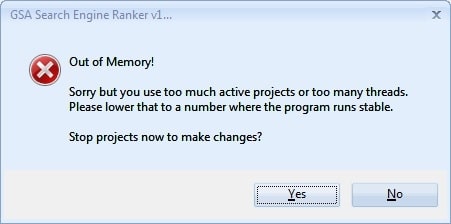
GSA Search Engine Ranker - Out of Memory


Understanding 32-bit vs. 64-bit Programs

First, let’s talk about the difference between 32-bit and 64-bit programs. In layman’s terms, a 32-bit program can only access a maximum of 4GB of RAM, while a 64-bit program can access much more. Unfortunately, GSA SER is a 32-bit coded software limited to using a maximum of 4GB of RAM. This has nothing to do with your VPS, which, I’m sure you know, has a whopping 12GB of RAM.

Here are some key differences between 32-bit and 64-bit programs:

  • 32-bit programs can only access up to 4GB of RAM, while 64-bit programs can access much more.
  • 64-bit programs are faster and more efficient than 32-bit programs.
  • 64-bit programs can handle larger files and datasets than 32-bit programs.

Tips to Prevent the GSA Search Engine Ranker Out of Memory Error

Here are some tips to help you prevent the out-of-memory error when using Ranking de motores de búsqueda de GSA on your VPS:

Have Sufficient Resources

Don’t use cheap, underpowered PCs or VPS with very little CPU power and not enough memory. Use a high-quality PC or VPS with at least 4 GB of RAM and a powerful CPU to ensure your system has enough resources to run GSA SER smoothly, all other Windows functions, and all other installed software. The more powerful your CPU is, the less memory GSA will use

Reduce the Number of Threads

If you’re running multiple projects simultaneously, consider lowering the number of threads used. So instead of using, for example, 500 threads, try reducing it down to 200 threads. This can help reduce the amount of memory consumed by GSA SER.

Use the GSA SER Auto Throttle

Use the GSA SER Auto Throttle feature to slow down the GSA SER sending requests rate.  This will automatically reduce the number of threads when GSA Search Engine Ranker detects that it reached 3,200 MB (the setting we set in the screenshot below). This can help to auto-reduce memory consumption when needed and prevent out-of-memory errors. From experience, we have found that a setting between 3000 and 3200 works best at preventing a GSA SER Out of Memory error. A higher setting will start reducing the treats to late, and u will get the GSA SER Out of Memory error.
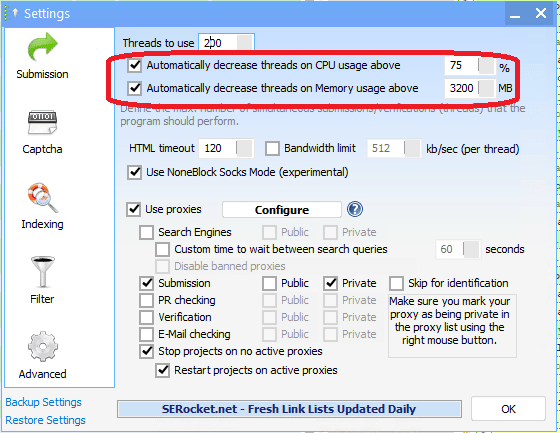
 

GSA Search Engine Ranker Auto Throttle


Optimize your GSA projects.

Yes, optimizing your projects so they consume less memory is possible. Here are a few things you can do for your projects.

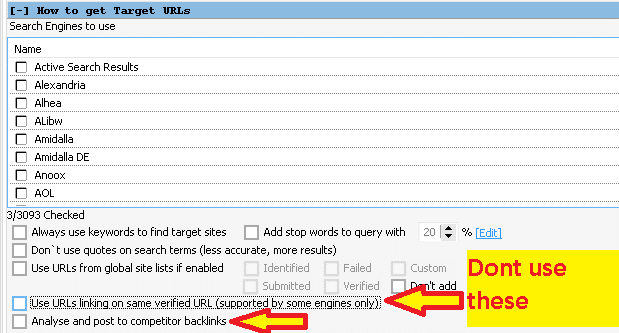
  1. By being more selective with which platforms you use. Focus on platforms that provide do-follow and contextual links, like Article directories, web 2.0, document sharing, wiki, etc. Avoid platforms that provide very little or no SEO value, like exploits, trackbacks, referrers, and pingbacks.
  2. Don’t use the GSA Scrape function to find targets. While GSA is great at posting and creating backlinks, it is unfortunately not a great scrapper, as it is slow and uses too many resources. You are better off using external tools like Scrapebox or aParser to do the scraping and just importing the URL’s into GSA SER.
  3. Do not collect keywords from target sites.
  4. Don’t use: “Try searching with similar-looking keywords.”
  5. Don’t use: “Use URLS linking on same verified URL.”
  6. Don’t use: “Analyze and post to competitor’s backlinks.”


Do not use GSA Keyword scraping..
Do not use GSA Keyword scraping.
Don't use these URL scraping in GSA SER
Don’t use these URL scraping in GSA SER

Stay Up To Date

Stay up-to-date with the latest versions of GSA SER, as newer versions often include bug fixes and performance improvements that can help reduce memory consumption and prevent errors. Updating is a pretty straightforward task. When you see an update is available, click on the green notice that says update available, and follow the prompts. Your GSA will close and install the new, updated version. Don’t worry; you won’t lose anything; all your data and projects will remain after the update.

 

How to Avoid the "Out of Memory" Error When Using GSA SER 1
GSA Search Engine Ranker update available

Reduce the Number of Activate projects. 

If you are experiencing frequent out-of-memory issues, then you should consider not making all projects active simultaneously because the more active projects you have active, the more memory your GSA Search Engine Ranker will consume. You can initially start with maybe ten active projects, and if the memory stays below 2.5GB, then you can gradually increase the number of active projects. Keep going until you find which number works best for your set-up. Keep monitoring the memory consumption; 2.5 – 3GB is the red zone, and you want it to be at our near 2.5 GB. An alternative would be to use the GSA scheduler to only work on a set number of projects simultaneously, but we will cover that in a separate blog post.

Check the proxy setup.

If you are using the built-in GSA SER proxy scraper, then you should not do what many newbies go and do, which is enable ALL the proxy sources. By enabling all the proxy sources, the proxy scraper will find 10’s of thousands of proxies, including duplicates, low quality, and or many dead proxies. It will then consume a lot of memory to process and check the proxies, which is a waste. It will be better to use the default selected proxy sources as those yield the best proxies, consuming far less memory to find and check.


Regular GSA SER Maintenance.

Maintenance tips for GSA Search Engine Ranker

Like a car needs regular maintenance, so does GSA Search Engine Ranker. An old post was done on 26 March 2016 – Maintenance Tips For GSA Search Engine Ranker Asia Virtual Solutions explaining the maintenance steps that should be done.  The post is from 7 years ago, but the principle remains the same. Performing these maintenance steps at least once a week will ensure you don’t use unnecessary hard disk space. Most importantly, you will ensure your  Ranking de motores de búsqueda de GSA runs smoothly and is not bogged down with out-of-memory issues,  dead and duplicate URLs, or accounts.


By following these tips, you can ensure that your link-building campaigns run smoothly and that you never have to deal with the frustrating out-of-memory error again!


Conclusion

In conclusion, the out-of-memory error is not a VPS issue but a limitation of the 32-bit coded GSA SER software. By understanding the difference between 32-bit and 64-bit programs and implementing the tips mentioned above, you can avoid this error and ensure your link-building campaigns run smoothly. So, go forth and optimize your projects, reduce your threads, and use that GSA Auto Throttle feature – your VPS (and your sanity) will thank you.

Tags: Error preventiongsa search engine rankerGSA Search Engine Ranker tipsGSA SERGSA SER Auto ThrottleGSA SER MaintenanceMemory managementOptimise your GSA projectsOptimization techniquesOut of MemorySufficient ResourcesTroubleshootingUnderstanding 32-bit vs 64-bit Programs
Previous Post

CyberSEO Pro Review

Next Post

Page Optimizer Pro Vs Surfer SEO: Which One Will Boost Your Website’s Ranking?

Michael Swart

Michael Swart

Asia Virtual Solutions is proudly owned and maintained by Michael Swart and a team of dedicated virtual assistants.

Next Post
Page Optimizer Pro Vs Surfer SEO

Page Optimizer Pro Vs Surfer SEO: Which One Will Boost Your Website's Ranking?

Recommended-Product

Blog Categories

  • Contenido y SEO con IA
  • Tutoriales de GSA SER
  • Alojamiento y VPS
  • Estrategias para la creación de enlaces
  • Noticias y actualizaciones
  • Reseñas de software SEO
  • Tutoriales de RankerX
  • Xrumer y XEvil

Product You Need

Recent Reviews

  • Obra de arte digital que representa una red global con dispositivos interconectados y enlaces coloridos, que publicita un servicio de "lista de enlaces GSA SER". Listas de backlinks de calidad n.° 1 para el ranking de motores de búsqueda de GSA
    5段階中5の評価
    投稿者: ali imani
  • Ilustración digital del concepto de servicio proxy con computadora portátil, globo terráqueo y racks de servidores proxy. Servicio proxy
    5段階中5の評価
    投稿者: Nick Nick
  • Marcadores sociales de Asia Virtual Solutions Marcadores sociales para un mejor SEO y mayor tráfico
    5段階中5の評価
    投稿者: shashwat asthana
  • Paquetes de correo electrónico de RankerX Paquetes de correo electrónico de RankerX
    5段階中5の評価
    投稿者: vancuoc29
  • Anuncio de servicio de marketing digital que muestra herramientas y funciones de SEO, como proyectos GSA SER, correos electrónicos privados y artículos relevantes para palabras clave. Proyectos de posicionamiento en buscadores de GSA: listos para usar
    5段階中5の評価
    投稿者: nick smith
  • VPS clasificador de motores de búsqueda de GSA VPS clasificador de motores de búsqueda de GSA
    5段階中5の評価
    投稿者: nick smith
  • VPS clasificador de motores de búsqueda de GSA VPS clasificador de motores de búsqueda de GSA
    5段階中5の評価
    投稿者: mike
  • Contenido estructurado, sitios DA50+ Publicaciones Web 2.0 con contenido estructurado en sitios DA50+
    5段階中5の評価
    投稿者: ADE YUSUP
  • Contenido estructurado, sitios DA50+ Publicaciones Web 2.0 con contenido estructurado en sitios DA50+
    5段階中5の評価
    投稿者: Joseph Conroy
  • Contenido estructurado, sitios DA50+ Publicaciones Web 2.0 con contenido estructurado en sitios DA50+
    5段階中5の評価
    投稿者: N/A N/A

Todos los asuntos legales

  • Acuerdo de afiliación
  • Antispam
  • Soluciones virtuales de Asia
  • Preferencias de comunicación
  • Descargo de responsabilidad
  • Cookie de dardo de doble clic
  • Política de enlaces externos
  • Política de Facebook
  • Declaración de la FTC
  • política de privacidad
  • Política de reembolso y garantía
  • Términos y condiciones
  • Divulgación de testimonios

Compras seguras

Navegación segura certificada por Google
El logotipo del sitio web Norton Safe sobre un fondo blanco.

Contáctanos

Oficina principal en EE. UU.
  • Soluciones virtuales de Asia LLC, 400 Rella Blvd, #123-298, Montebello, Nueva York 10901
  •  co*****@******************ns.com
  • +1 (415) 851-6951
  •  Asia Virtual
  •  Soluciones virtuales de Asia en LinkedIn
Oficina Virtual de Asia
  • Soluciones virtuales de Asia LLC, Nivel 29, Oficinas en Centralworld 999/9 Rama I Road, Pathumwan, Bangkok, Tailandia
  •  co*****@******************ns.com
  • +1 (415) 851-6951
  •  Asia Virtual
  •  Soluciones virtuales de Asia en LinkedIn

© 2026 - Asia Virtual Solutions LLC. Todos los derechos reservados. El sitio web es operado y mantenido por: Asia Virtual Solutions LLC

Sin miniatura
Subido
Fallido
Eliminar archivo cargado
We've detected you might be speaking a different language. Do you want to change to:
Change language to English English
Change language to বাংলা বাংলা
Change language to 简体中文 简体中文
Change language to Nederlands Nederlands
Change language to हिन्दी हिन्दी
Change language to Bahasa Indonesia Bahasa Indonesia
Change language to 日本語 日本語
Change language to 한국어 한국어
Change language to Bahasa Melayu Bahasa Melayu
Change language to Русский Русский
Español de México
Change language to Tagalog Tagalog
Change language to ไทย ไทย
Change language to Tiếng Việt Tiếng Việt
Change language to اردو اردو
Change language to Türkçe Türkçe
Change Language
Close and do not switch language
Sin resultado
Ver todos los resultados
  • Hogar
  • Ranking de motores de búsqueda de GSA
    • Preguntas frecuentes sobre GSA Search Engine Ranker
    • Herramientas y complementos de GSA SER
    • Tutoriales de GSA SER
  • Blog
    • Contenido y SEO con IA
    • Tutoriales de GSA SER
    • Alojamiento y VPS
    • Estrategias para la creación de enlaces
    • Noticias y actualizaciones
    • Tutoriales de RankerX
    • Reseñas de software SEO
    • Xrumer y XEvil
  • Comercio
    • Artículos sobre contenido e inteligencia artificial
    • Herramientas y complementos de GSA SER
    • Servicios de alojamiento
    • Servicios de construcción de enlaces
    • Robot remitente de dinero
    • RankerX
    • Servicios recomendados
    • Servicios de redes sociales
    • Servicios de Xrumer

© 2026 - Asia Virtual Solutions LLC. Todos los derechos reservados. El sitio web es operado y mantenido por: Asia Virtual Solutions LLC

Español de México
English বাংলা 简体中文 Nederlands हिन्दी Bahasa Indonesia 日本語 한국어 Bahasa Melayu Русский Tagalog ไทย Tiếng Việt اردو Türkçe