



Hoe je de “Out of Memory” fout kunt vermijden wanneer je GSA Zoekmachine Ranker gebruikt
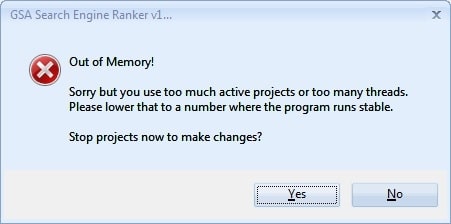
Ben jij een GSA Zoekmachine Ranker VPS gebruiker die de frustrerende “out of memory” foutmelding heeft? Vrees niet, collega linkbouwers, want ik ben hier om wat licht op dit probleem te werpen en tips en trucs te geven om deze vervelende fout te voorkomen.
32-bits vs. 64-bits programma's begrijpen
Laten we eerst het verschil tussen 32-bits en 64-bits programma's bespreken. Simpel gezegd: een 32-bits programma heeft toegang tot maximaal 4 GB RAM, terwijl een 64-bits programma toegang heeft tot veel meer. Helaas, GSA SER is een 32-bits gecodeerde software die beperkt is tot een maximum van 4 GB RAM. Dit heeft niets te maken met je VPS, die, zoals je ongetwijfeld weet, maar liefst 12 GB RAM heeft.
Hier zijn enkele belangrijke verschillen tussen 32-bits en 64-bits programma's:
- 32-bits programma's hebben slechts toegang tot 4 GB RAM, terwijl 64-bits programma's toegang hebben tot veel meer.
- 64-bits programma's zijn sneller en efficiënter dan 32-bits programma's.
- 64-bits programma's kunnen grotere bestanden en datasets aan dan 32-bits programma's.
Tips om de GSA Zoekmachine Ranker Geheugen Leeg-fout te voorkomen
Hier zijn enkele tips om de foutmelding 'out-of-memory' te voorkomen als je GSA Zoekmachine Ranker op je VPS:
Voldoende middelen hebben
Gebruik geen goedkope, ondermaatse pc's of VPS'en met weinig processorkracht en onvoldoende geheugen. Gebruik een hoogwaardige pc of VPS met minimaal 4 GB RAM en een krachtige processor om ervoor te zorgen dat uw systeem voldoende resources heeft om GSA SER, alle andere Windows-functies en alle andere geïnstalleerde software soepel te laten draaien. Hoe krachtiger uw processor, hoe minder geheugen GSA zal gebruiken.
Verminder het aantal threads
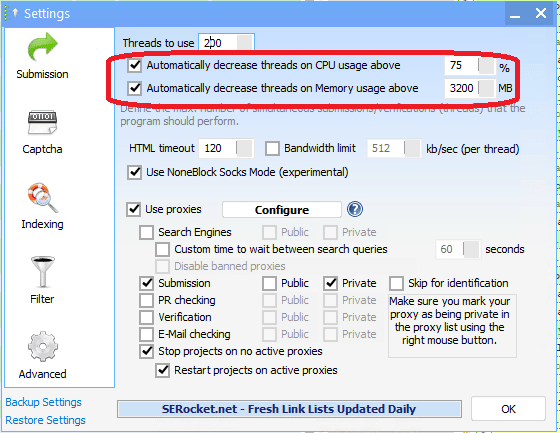
Als u meerdere projecten tegelijk uitvoert, kunt u overwegen het aantal gebruikte threads te verlagen. In plaats van bijvoorbeeld 500 threads te gebruiken, kunt u het aantal threads terugbrengen tot 200. Dit kan helpen om het geheugenverbruik van GSA SER te verminderen.
Gebruik de GSA SER Auto Throttle
Gebruik de functie GSA SER Auto Throttle om de verzendingssnelheid van de GSA SER te vertragen. Dit zal automatisch het aantal threads verminderen wanneer GSA Zoekmachine Ranker detecteert dat het 3.200 MB heeft bereikt (de instelling die we in de schermafbeelding hieronder hebben ingesteld). Dit kan helpen om het geheugengebruik automatisch te verminderen als dat nodig is en om out-of-memory fouten te voorkomen. Uit ervaring weten we dat een instelling tussen 3000 en 3200 het beste werkt om een GSA SER Out of Memory fout te voorkomen. Bij een hogere instelling worden de traktaties te laat gereduceerd en krijg je de GSA SER Out of Memory foutmelding.
Optimaliseer je GSA-projecten.
Ja, je projecten optimaliseren zodat ze minder geheugen gebruiken is mogelijk. Hier zijn een paar dingen die je kunt doen voor je projecten.
- Door selectiever te zijn met welke platforms je gebruikt. Richt je op platforms die do-follow en contextuele links bieden, zoals Artikelmappen, web 2.0, Documenten delen, wiki, etc. Vermijd platforms die weinig of geen SEO-waarde bieden, zoals exploits, trackbacks, referrers en pingbacks.
- Gebruik de GSA Scrape-functie niet om doelen te vinden. Hoewel GSA uitstekend is in het plaatsen en creëren van backlinks, is het helaas geen goede scraper, omdat het traag is en te veel resources verbruikt. Je kunt beter externe tools zoals Scrapebox of aParser gebruiken om het scrapen uit te voeren en de URL's vervolgens in GSA SER te importeren.
- Verzamel geen trefwoorden van doelsites.
- Gebruik niet: "Probeer te zoeken met vergelijkbare zoekwoorden."“
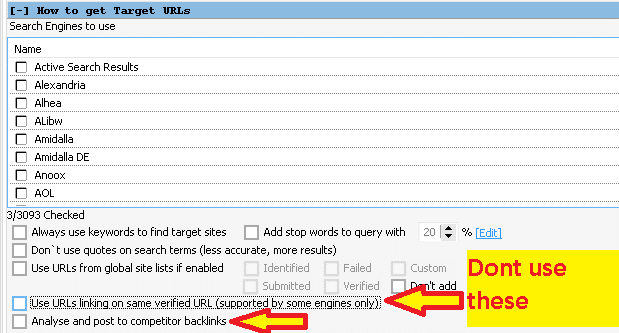
- Gebruik niet: “Gebruik URL’s die linken naar dezelfde geverifieerde URL.”
- Gebruik niet: "Analyseer en plaats berichten op de backlinks van concurrenten."“

Blijf op de hoogte
Zorg dat u altijd de nieuwste versie van GSA SER gebruikt, want nieuwere versies bevatten vaak bugfixes en prestatieverbeteringen die het geheugenverbruik kunnen verminderen en fouten kunnen voorkomen. Updaten is heel eenvoudig. Wanneer u ziet dat er een update beschikbaar is, klikt u op de groene melding 'Update beschikbaar' en volgt u de instructies. GSA wordt afgesloten en de nieuwe, bijgewerkte versie wordt geïnstalleerd. U hoeft zich geen zorgen te maken; al uw gegevens en projecten blijven na de update behouden.

Verminder het aantal Activeringsprojecten.
Als je last hebt van frequente out-of-memory problemen, Als je meer projecten tegelijk actief hebt, is het verstandig om niet alle projecten tegelijk te activeren. Hoe meer projecten je actief hebt, hoe meer geheugen je GSA Search Engine Ranker verbruikt. Je kunt bijvoorbeeld beginnen met tien actieve projecten. Als het geheugenverbruik onder de 2,5 GB blijft, kun je het aantal projecten geleidelijk verhogen. Ga hiermee door totdat je het optimale aantal voor jouw configuratie hebt gevonden. Houd het geheugenverbruik in de gaten; 2,5 tot 3 GB is een kritiek punt. Je wilt dat het geheugenverbruik rond de 2,5 GB blijft. Een alternatief is om de GSA-planner te gebruiken om slechts aan een beperkt aantal projecten tegelijk te werken, maar daarover meer in een aparte blogpost.
Controleer de proxy-instellingen.
Als u de ingebouwde GSA SER gebruikt proxy Als je een scraper gebruikt, moet je niet doen wat veel beginners doen, namelijk ALLE proxybronnen inschakelen. Door alle proxybronnen in te schakelen, zal de proxyscraper tienduizenden resultaten vinden. volmachten, inclusief duplicaten, lage kwaliteit en of veel dode proxy's. Het zal dan veel geheugen gebruiken om de proxy's te verwerken en te controleren, wat een verspilling is. Het is beter om de standaard geselecteerde proxybronnen te gebruiken, omdat die de beste proxy's opleveren en veel minder geheugen verbruiken om te zoeken en te controleren.
Regelmatig GSA SER-onderhoud.

Zoals een auto regelmatig onderhoud nodig heeft, zo heeft GSA Zoekmachine Ranker dat ook. Een oud bericht is gedaan op 26 maart 2016 -. Onderhoudstips voor GSA Zoekmachine Ranker Azië Virtuele Oplossingen Hierin worden de onderhoudsstappen uitgelegd die uitgevoerd moeten worden. Het bericht is van 7 jaar geleden, maar het principe blijft hetzelfde. Door deze onderhoudsstappen minstens één keer per week uit te voeren, voorkomt u dat u onnodig schijfruimte gebruikt. En, nog belangrijker, u zorgt ervoor dat uw GSA Zoekmachine Ranker soepel verloopt en niet vastloopt met out-of-memory problemen, dode en dubbele URL's of accounts.
Door deze tips te volgen, kun je ervoor zorgen dat je linkbuildingcampagnes soepel verlopen en dat je nooit meer te maken krijgt met de frustrerende foutmelding dat je geheugen leeg is!
Conclusie
Concluderend fout buiten het geheugen is geen VPS-probleem, maar een beperking van de 32-bits gecodeerde GSA SER-software. Door het verschil tussen 32-bits en 64-bits programma's te begrijpen en de bovenstaande tips toe te passen, kun je deze fout vermijden en ervoor zorgen dat je linkbuildingcampagnes soepel verlopen. Dus, ga je gang en optimaliseer je projecten, verminder je threads en gebruik die GSA Auto Throttle functie - je VPS (en je geestelijke gezondheid) zullen je dankbaar zijn.













 English
  বাংলা
বাংলা  简体中文
简体中文  Nederlands
  Français
  Deutsch (Sie)
  हिन्दी
  Bahasa Indonesia
  Italiano
  日本語
日本語  한국어
한국어  Bahasa Melayu
  Português do Brasil
  Русский
  Español de México
  Tagalog
  ไทย
ไทย  Tiếng Việt
  اردو
اردو  Türkçe