• Tungkol sa Amin
    • Mag-ambag o Makipagtulungan sa Asia Virtual Solutions
  • Mga Kaakibat
  • Makipag-ugnayan sa Amin
  • Aking Account
  • Portal ng Suporta
Mga Virtual na Solusyon sa Asya:
  • Tahanan
  • Tagapagraranggo ng Search Engine ng GSA
    • Mga Madalas Itanong (FAQ) para sa GSA Search Engine Ranker
    • Mga Kagamitan at Add-On ng GSA SER
    • Mga Gabay sa Pagraranggo ng Search Engine ng GSA
    • Gabay sa Pagbasag ng Captcha ng GSA
    • Pagho-host ng GSA
  • Blog
    • Paglutas ng Captcha
    • Paglikha ng Nilalaman
    • Pag-scrape ng Nilalaman
    • Pag-ikot ng Nilalaman
    • Mga Tutorial at Gabay sa Pagbuo ng Link sa GSA Search Engine Ranker
    • Mga Serbisyo sa Pagho-host ng VPS
    • Mga Tutorial sa Robot ng Pera
    • Paano
    • Balita sa mga Virtual na Solusyon sa Asya
    • Mga Inirerekomendang Review ng SEO Software
    • Pagmemerkado sa Web
    • Xrumer & Xevil Techniques & Tutorials
  • Tindahan
    • Mga Artikulo sa Nilalaman at AI
    • Mga Kagamitan at Add-On ng GSA SER
    • Mga Serbisyo sa Pagho-host
    • Mga Serbisyo sa Pagbuo ng Link
    • Tagapagsumite ng Robot ng Pera
    • RankerX
    • Mga Inirerekomendang Serbisyo
    • Mga Serbisyo sa Social Media
    • Mga Serbisyo ng Xrumer
Walang Resulta
Tingnan ang Lahat ng Resulta
Asia Virtual Solutions: Ekspertong GSA SER at Digital Marketing

Tahanan » Blog » Kumonekta sa isang VPS gamit ang Windows Remote Desktop Connection

Kumonekta sa isang VPS gamit ang Windows Remote Desktop Connection

Michael Swart ni Michael Swart
24 Nobyembre, 2015 - Na-update noong 14 Pebrero, 2026
sa Pag-setup at Pag-configure ng VPS
1
Tutorial sa Koneksyon sa Remote Desktop
Talaan ng mga Nilalaman palabas
1 Kumonekta sa isang VPS gamit ang Windows Remote Desktop Connection
1.1 The credentials:
1.2 What do you connect with:
1.3 Connecting to your VPS:
2 Paano Kumonekta sa isang VPS gamit ang Windows Remote Desktop Connection
3 GET YOUR GSA SER VPS HERE

Kumonekta sa isang VPS gamit ang Windows Remote Desktop Connection

How To Connect To A VPS with Windows Remote Desktop Connection is a questioned asked by many when they first start looking at the possibilities of getting a Windows VPS to run their SEO tools and other goodies.

The steps involved in connecting to a Windows VPS is really simple ones you know how, but then again we all need to start somewhere, so i have made this simple video tutorial below walking you thy the steps to connect to your Windows VPS.

The credentials:

When you sign up for your first VPS the hosting provider will send you a welcome letter in which among other things will be the below 3 items which are needed to connect to your VPS:

  • IP Address of your VPS
  • Username to Log in
  • Password to log in.

What do you connect with:

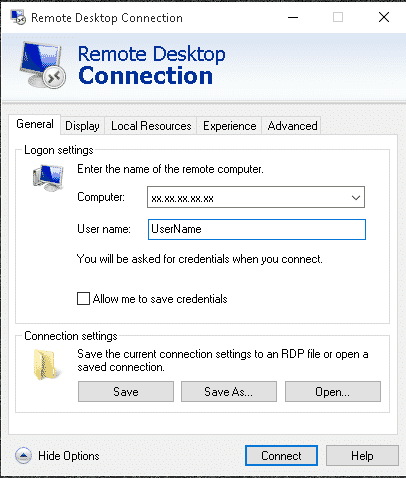
To connect to your Windows VPS you will use something called Koneksyon sa Malayuang Desktop. All Windows machines will have it already installed so you don't need to go download or buy something. Simply open the search function of your Windows machine and search for: “Remote Desktop Connection

Remote Desktop Connection AppConnecting to your VPS:

  • Once you have the Remote Desktop app open on your computer, simply fill in the IP address, and then click on “Show more Details”.
  • Now add your user name and check the box “Allow me to save my credentials”
  • Next click on “Save As” and save it in a somewhere like on your desktop.
  • Now click on connect and it will ask for your password.
  • Thats it you are now connected to your Windows VPS
  • One last step, right click on the Remote desktop icon which you have saved on your computer and click edit. Now uncheck the checked box that says “Allow me to save my credentials”

You re all done, next time just click the Remote Desktop Connection icon where you saved it.

[taas ng espasyo = "2px"]

For a detailed walk thru of the steps, please watch the below video

Paano Kumonekta sa isang VPS gamit ang Windows Remote Desktop Connection

[taas ng espasyo = "2px"]

GET YOUR GSA SER VPS HERE

Looking For An Awesome VPS TO Tagapangasiwa Tagapagraranggo ng Search Engine ng GSA ? – Look No More

Check out The Details

Mga Tag: how to connectTutorial sa Koneksyon sa Remote Desktoprmote desktop connectionmga vpsvps connection
Nakaraang Post

Gusto mo ba ng Mas Maraming Pera? Kumuha ng GSA SER VPS

Susunod na Post

Ang Kapangyarihan ng mga Backlink ng Edu at Gobyerno

Michael Swart

Michael Swart

Ang Asia Virtual Solutions ay pagmamay-ari at pinapanatili ni Michael Swart at ng isang pangkat ng mga dedikadong virtual assistant.

Susunod na Post
Ang Kapangyarihan ng mga Backlink ng Edu at Gobyerno

Ang Kapangyarihan ng mga Backlink ng Edu at Gobyerno

Inirerekomendang Produkto

Mga Kategorya ng Blog

  • Paglutas ng Captcha
  • Paglikha ng Nilalaman
  • Pag-scrape ng Nilalaman
  • Pag-ikot ng Nilalaman
  • Mga Tutorial at Gabay sa Pagbuo ng Link sa GSA Search Engine Ranker
  • Tagabasag ng Captcha ng GSA
  • Pag-host at Pag-optimize ng VPS
  • Paano
  • Balita sa mga Virtual na Solusyon sa Asya
  • Pagmemerkado sa web
  • Paano
  • Mga Tutorial sa Robot ng Pera
  • Balita sa mga Virtual na Solusyon sa Asya
  • Mga Inirerekomendang Review ng SEO Software
  • Bidyo
  • Mga Tutorial at Gabay sa Pagbuo ng Link sa GSA Search Engine Ranker
  • Mga Inirerekomendang Review ng SEO Software
  • Pagmemerkado sa Web
  • Xrumer & Xevil Techniques & Tutorials

Produkto na Kailangan Mo

Mga Kamakailang Review

  • Mga Social Bookmark ng Asia Virtual Solutions Social Bookmarking para sa Mas Mahusay na SEO at Mas Mataas na Trapiko
    Na-rate 5 mula sa 5
    ni shashwat asthana
  • Mga email pack ng RankerX Mga Pakete ng Email ng RankerX
    Na-rate 5 mula sa 5
    ni vancuoc29
  • Advertisement ng serbisyo sa digital marketing na nagtatampok ng mga tool at feature ng SEO tulad ng mga proyekto ng GSA SER, mga pribadong email, at mga artikulong may kaugnayan sa keyword. Mga Proyekto sa GSA Search Engine Ranker - Tapos na Para Sa Iyo
    Na-rate 5 mula sa 5
    ni Nick Smith
  • GSA Search Engine Ranker VPS GSA Search Engine Ranker VPS
    Na-rate 5 mula sa 5
    ni Nick Smith
  • GSA Search Engine Ranker VPS GSA Search Engine Ranker VPS
    Na-rate 5 mula sa 5
    ni Mike
  • Nakabalangkas na Nilalaman, mga site na DA50+ Web 2.0 Post na may Structured Content sa mga DA50+ site
    Na-rate 5 mula sa 5
    ni ADE YUSUP
  • Nakabalangkas na Nilalaman, mga site na DA50+ Web 2.0 Post na may Structured Content sa mga DA50+ site
    Na-rate 5 mula sa 5
    ni Joseph Conroy
  • Nakabalangkas na Nilalaman, mga site na DA50+ Web 2.0 Post na may Structured Content sa mga DA50+ site
    Na-rate 5 mula sa 5
    ni N/AN/A
  • Mga Xevil Proxy Mga XEvil Proxies para sa napakabilis na paglutas ng ReCaptcha - Binoto bilang No.1
    Na-rate 5 mula sa 5
    ni Talbert Williams
  • Advertisement ng serbisyo sa digital marketing na nagtatampok ng mga tool at feature ng SEO tulad ng mga proyekto ng GSA SER, mga pribadong email, at mga artikulong may kaugnayan sa keyword. Mga Proyekto sa GSA Search Engine Ranker - Tapos na Para Sa Iyo
    Na-rate 5 mula sa 5
    ni Sunil Keshari

Lahat ng Legal na Bagay

  • Kasunduan sa Kaakibat
  • Antispam
  • Mga kagustuhan sa komunikasyon
  • Pagtatanggi
  • Dobleng I-click na Dart Cookie
  • Patakaran sa mga Panlabas na Link
  • Patakaran sa Facebook
  • Pahayag ng FTC
  • Patakaran sa Pagkapribado
  • Patakaran sa Pag-refund at Garantiya
  • Mga Tuntunin at Kundisyon
  • Pagsisiwalat ng mga Testimonial

Ligtas na Pamimili

Sertipikado ang Pag-browse sa Google Save
Ang logo ng website na Norton Safe sa puting background.

Makipag-ugnayan sa Amin

Pangunahing Tanggapan ng Estados Unidos
  • Asia Virtual Solutions LLC, 400 Rella Blvd, #123-298, Montebello, NY 10901
  •  kasama*****@******************ns.com
  • +1 (415) 851-6951
  •  asiavirtual
  •  Asia Virtual Solutions sa LinkedIn
Asya Virtual Office
  • Asia Virtual Solutions LLC, Palapag 29, Ang mga Opisina sa Centralworld 999/9 Rama I Road, Pathumwan, Bangkok, Thailand
  •  kasama*****@******************ns.com
  • +1 (415) 851-6951
  •  asiavirtual
  •  Asia Virtual Solutions sa LinkedIn

© 2026 - Asia Virtual Solutions LLC. Lahat ng Karapatan ay Nakalaan. Ang website ay Pinapatakbo at Pinapanatili Ng: Asia Virtual Solutions LLC

Walang thumbnail
Na-upload
Nabigo
Alisin ang na-upload na file
Walang Resulta
Tingnan ang Lahat ng Resulta
  • Tahanan
  • Tagapagraranggo ng Search Engine ng GSA
    • Mga Madalas Itanong (FAQ) para sa GSA Search Engine Ranker
    • Mga Kagamitan at Add-On ng GSA SER
    • Mga Gabay sa Pagraranggo ng Search Engine ng GSA
    • Gabay sa Pagbasag ng Captcha ng GSA
    • Pagho-host ng GSA
  • Blog
    • Paglutas ng Captcha
    • Paglikha ng Nilalaman
    • Pag-scrape ng Nilalaman
    • Pag-ikot ng Nilalaman
    • Mga Tutorial at Gabay sa Pagbuo ng Link sa GSA Search Engine Ranker
    • Mga Serbisyo sa Pagho-host ng VPS
    • Mga Tutorial sa Robot ng Pera
    • Paano
    • Balita sa mga Virtual na Solusyon sa Asya
    • Mga Inirerekomendang Review ng SEO Software
    • Pagmemerkado sa Web
    • Xrumer & Xevil Techniques & Tutorials
  • Tindahan
    • Mga Artikulo sa Nilalaman at AI
    • Mga Kagamitan at Add-On ng GSA SER
    • Mga Serbisyo sa Pagho-host
    • Mga Serbisyo sa Pagbuo ng Link
    • Tagapagsumite ng Robot ng Pera
    • RankerX
    • Mga Inirerekomendang Serbisyo
    • Mga Serbisyo sa Social Media
    • Mga Serbisyo ng Xrumer

© 2026 - Asia Virtual Solutions LLC. Lahat ng Karapatan ay Nakalaan. Ang website ay Pinapatakbo at Pinapanatili Ng: Asia Virtual Solutions LLC

Tagalog
English 简体中文 हिन्दी Bahasa Indonesia 日本語 한국어 Bahasa Melayu Русский ไทย Tiếng Việt