• О нас
    • Присоединяйтесь к Asia Virtual Solutions и станьте её партнёром!
  • Аффилированные лица
  • Свяжитесь с нами
  • Мой счет
  • Портал поддержки
Asia Virtual Solutions:
  • Главная
  • GSA Search Engine Ranker
    • Вопросы и ответы для GSA Search Engine Ranker
    • Инструменты и дополнения GSA SER
    • Руководства GSA Search Engine Ranker
    • Руководство по взлому капчи GSA
    • Хостинг GSA
  • Блог
    • Решение проблем с капчей
    • Создание контента
    • Скраппинг содержимого
    • Раскрутка контента
    • Учебные пособия и руководства по построению ссылок GSA Search Engine Ranker
    • Услуги VPS-хостинга
    • Учебные пособия по денежному роботу
    • Как
    • Новости компании Asia Virtual Solutions
    • Рекомендуемые обзоры программного обеспечения для SEO
    • Веб-маркетинг
    • Техники и учебники Xrumer & Xevil
  • Магазин
    • Контент и статьи по искусственному интеллекту
    • Инструменты и дополнения GSA SER
    • Услуги хостинга
    • Услуги по созданию ссылок
    • Money Robot Submitter
    • RankerX
    • Рекомендуемые услуги
    • Услуги социальных сетей
    • Услуги Xrumer
Нет результатов
Посмотреть все результаты
Asia Virtual Solutions: Эксперт GSA SER и цифровой маркетинг

Главная » Блог » Узнай простые шаги, как правильно использовать GSA Global Site List

Узнай простые шаги, как правильно использовать GSA Global Site List

Майкл Сварт от Майкл Сварт
22 Июнь, 2018 - Updated on 20 Февраль, 2026
в Контекстные ссылки, Видео
0
Узнай простые шаги по использованию глобального списка сайтов GSA
Оглавление показать
1 Learn Simple Steps How To Correctly Use GSA Search Engine Ranker Global Site List
1.1 Where are the global site list and what is it used for?
1.1.1 Where are the global site list:
1.1.2 What are the GSA SER global site list used for:
1.2 What are those checkboxes next to the Identified, Submitted, Verified and Failed Options?
1.2.1 The Identified Checkbox :
1.2.2 The Submitted Checkbox:
1.2.3 The Verified Checkbox:
1.2.4 The Failed Checkbox:
1.3 What are the 4 file paths next to each option of the GSA SER Global site list?
1.4 How to use paid link list shared via Dropbox from several providers, as well as your own list?
2 GSA Search Engine Ranker – How To Use Multiple GSA SER Link List at Same Time
2.1 How do you set your GSA Search Engine Ranker projects to use the global site list
3 How to use GSA Search Engine Ranker Global Site List in Your GSA SER Projects
3.1 What is the difference between GSA Search Engine target URLs and the global site list.
3.1.1 GSA Search Engine Ranker global site list
3.1.2 GSA Search Engine Ranker target URLs
3.1.2.1 How to import GSA Search Engine Ranker target URLs
4 Asia Virtual Solutions – GSA SER Global Link List

Learn Simple Steps How To Correctly Use GSA Search Engine Ranker Global Site List

GSA SER global site list is one of the main things we have noticed that more than 75% of all GSA Search Engine Ranker users  don't fully understand and get wrong when they set up their GSA Search Engine Ranker. How do we know this I hear you ask. We can see the GSA SER settings from the 50+ users using our GSA SER VPS service, and we hear the questions people ask when they purchase our GSA SER Link List and GSA Search Engine Ranker data packs.

So I have decided it is time to create a post on the topic of GSA SER Global Site List, to help people better understand what the Global Site list are and how to use the list correctly.


Where are the global site list and what is it used for?

Where are the global site list:

The global site list can be found if you  click on OPTIONS  tab in the main screen, and then under the ADVANCED tab, as is shown in the below screenshot.

By default the the list are saved in your APPDATA folder, but this location can be changed to wherever you want to keep it.
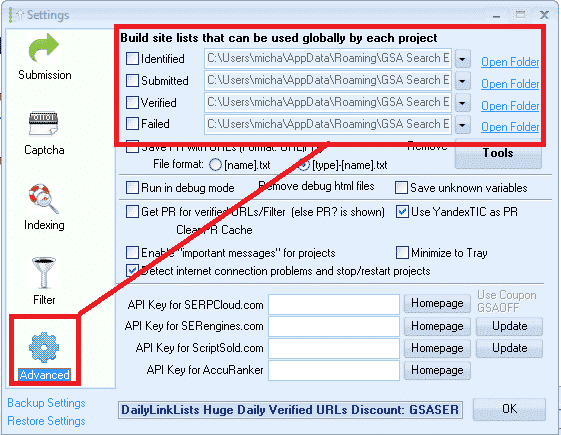
GSA SER Global Site List Location


What are the GSA SER global site list used for:

Global site list are link targets where GSA SER post to too, to create your backlinks.

When you first buy GSA Search Engine Ranker the list will be all empty, and you can import links into the list by using the built in scraper in the projects, or by importing list via the TOOLS menu, or you make used of paid list via a shared folder such as Dropbox.

When creating a new GSA project you have the option to use the Global Site List to post to, as in the below screenshot.
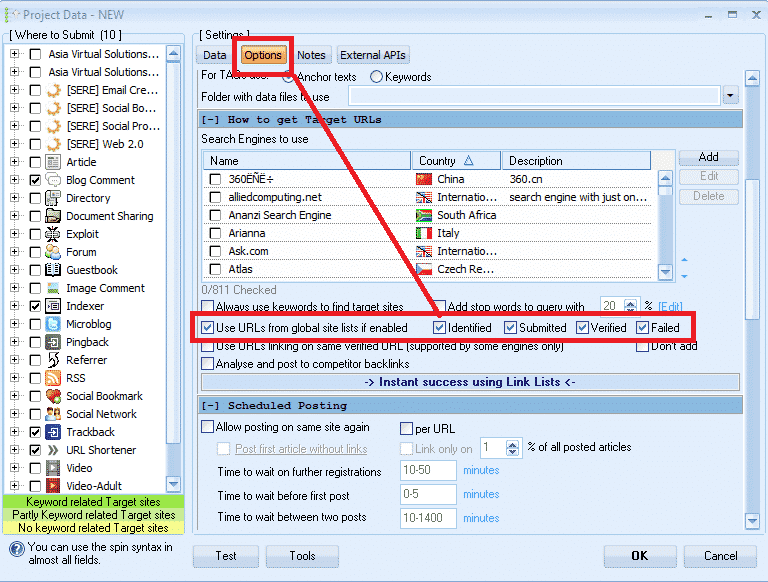
 

Select GSA Global Site List in a Project

What are those checkboxes next to the Identified, Submitted, Verified and Failed  Options?

PAY ATTENTION HERE – THIS IS THE NO.1 THING THAT 75% OF GSA SER USERS GET  WRONG

What I have seen is that most users are not really sure what those checkboxes are for, and most think that it is the option to select to use the list or not so they just go and check all the boxes, which is wrong, it has nothing to do with selecting to use or not use the list.
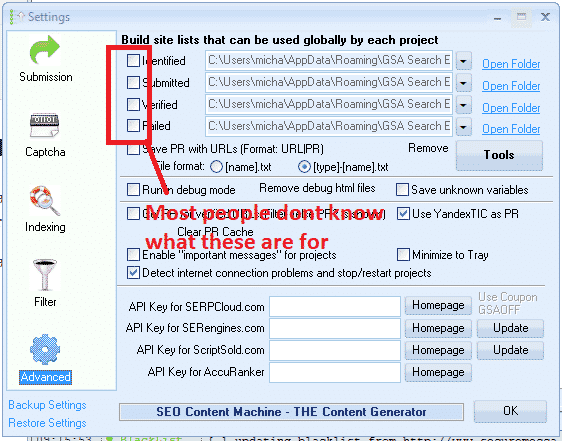
 

What are the global site list check boxes


What those checkboxes actually do is to enable or disable write permissions  to write to the list.


The Identified Checkbox :

If you use the search engines option in your projects to scrape, then it will add the scraped urls in this list

The Submitted Checkbox:

Every time GSA SER submit in any of your projects to a site, it will add the site it submitted to, to this list

The Verified Checkbox:

Every time GSA Verify a link that it has posted in any of your projects it will add that link to this list

The Failed Checkbox:

Every time GSA is unable to post to a site, it will add that site to this list

My recommendation is DO NOT CHECK ANY OF THOSE BOXES, specially if you are using paid link list which are shared via Dropbox or you build your own list.

Reason is because paid  list shared via Dropbox are normally read only, so you are wasting resources trying to save to a list which you only have read access to.

Another reason is because GSA SER already save the links it create and verify in the project data, there is very little to no point in saving then in additional list as this will just bloat your hard drive.

My main reason for not checking any of the boxes is that i use the global site list to load 4 different link list. ( we will cover that a little further below )

How to see the verified, failed and submitted URLs then in the projects you might ask, well it is simple. You right click on any project and select show urls, as in below screenshot.

Check GSA SER Project URLs

What are the 4 file paths next to each option of the GSA SER Global site list?

These are the location where the list are saved. As mentioned earlier, by default GSA create an empty folder for each list in the APPDATA folder, which is not all that easy to navigate to but luckily there is a shortcut in GSA  SER, namely the  OPEN FOLDER next to each list.

You can change the location to anywhere on your computer or even a shared network drive
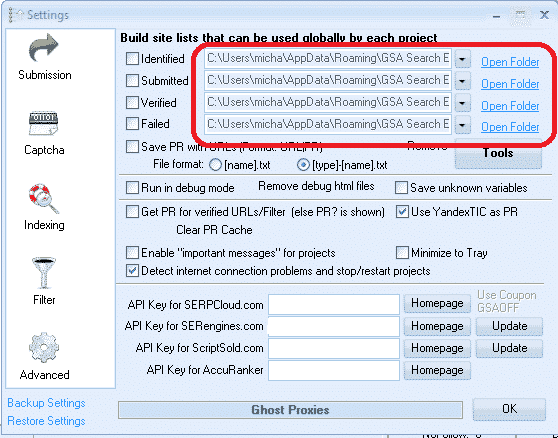
Location of the global site list
Location of the global site list folders


How to use paid link list shared via Dropbox from several providers, as well as your own list?

Many GSA Search Engine Ranker users subscribe to paid link list, such as our own Asia Virtual Solutions Quality link list, which has a identified and a verified link list, and there are other list providers such as Auto Approve Market Place, SER Verified List and many others, and many of these list providers share there link list via Dropbox.

So what u will need to do is install Dropbox on your computer or your GSA SER VPS, then use any of the 4 slots in the GSA SER global site list to load your list.

You don't have to worry about the fact that it is called Identified, Submitted, Verified or Failed, in fact you can totally ignore the names as it has no meaning if you don't plan to check the boxes and write to the list. So have a look at the below screenshot of a set up using 4 different list.
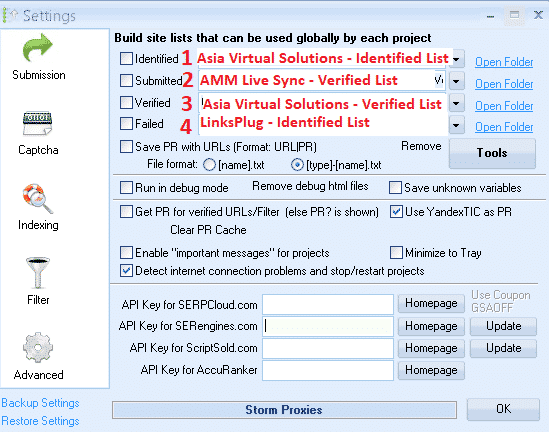
 

Using 4 Different List IN GSA SER Global list
Using 4 Different List in GSA SER Global link list


In the above screenshot all of the 4 list are shared with me via Dropbox, so all i did was click on the dropdown button and then navigate where that Dropbox folder is on my VPS PC

  1. In position no.1 I used the Азиатские виртуальные решения – Identified Link list
  2. In position no.2 I used the AAM Live Sync Verified link list
  3. In position no.3 I used the Asia Virtual Solutions – Verified Link List
  4. In position no.4 I have used the List from LinksPlug

If you maybe want to also have your own list then you simply need to use one of the 4 slots – just browse to the folder where your list is located.


GSA Search Engine Ranker – How To Use Multiple GSA SER Link List at Same Time


How do you set your GSA Search Engine Ranker projects to use the global site list

When you create your projects you select to use the  Global Site list in the project options, like in the below screenshot.

You check the box to use the slot where your list is added. So if you are using several site list from several providers and you have added them as i showed you earlier on then in the project options you select Identified, Submitted, Verified or Failed if your list are in those slots. Your project will then pull the links from the list you have selected to use.

If you order our GSA Search Engine Ranker Data Packs then we by default check the Global site list for you like in the below screenshot.

How do you set your projects to use the global site list


How to use GSA Search Engine Ranker Global Site List in Your GSA SER Projects


What is the difference between GSA Search Engine target URLs and the global site list.

  • GSA Search Engine Ranker global site list

Global site list are list that you can use for any niche and any GSA SER project, they are just general list not scraped for a specific niche. Link list that you buy our subscribe to are all global site list.

  • GSA Search Engine Ranker  target URLs

Target URLs are links that are scraped for a specific project and the links are all relevant to a niche or topic. So you will use your scraper like GScraper or Scrapebox or any others and then bind keywords to the footprints, so the results all have содержание or titles related to the keyword.

Target URLs are not usually added to the global site list but they are added to the project for which the URLs were scraped, like in the below screenshot.

Target URLs can be imported as .txt or .sl format

How to import GSA Search Engine Ranker target URLs
How to import GSA SER Target URLs


Well that's it, I hope that this article has given you a better understanding about the GSA Search Engine Global Site list and how to correctly use it to get the most out of your GSA SER projects.

It is very important to have a good site list, and Азиатские виртуальные решения can help you with that as well, out Quality Link list is not only the biggest GSA format link list available on the internet, but it is also very good quality and we make use of it our self on a daily basis. Have a look below for more a link to more info on our quality global link list.

Asia Virtual Solutions – GSA SER Global Link List

Do you want to start using the best GSA Search Engine Ranker Global Link List Available On The Internet?

Check Out Our Great Global Link Lis

Теги: Global Site ListGSA Global Site Listgsa search engineРанжировщик поисковых систем gsaGSA Search Engine Ranker Глобальный список сайтовgsa ser global site listкакHow To Correctly Use GSA Search Engine Rankersite list
Предыдущий пост

GDPR: как разобраться в шумихе и быть уверенным, что всё в порядке

Следующий пост

Asia Virtual Solutions - Обновление сервиса социальных сигналов - повысьте свой SEO с помощью социальных сигналов

Майкл Сварт

Майкл Сварт

Asia Virtual Solutions с гордостью принадлежит и поддерживается Майклом Свартом и командой преданных своему делу виртуальных помощников.

Следующий пост
Сервис социальных сигналов — обновлено

Asia Virtual Solutions - Social Signals Service Updated - Boost Your SEO with Social Signals

Рекомендуемая продукция

Категории блога

  • Решение проблем с капчей
  • Создание контента
  • Скраппинг содержимого
  • Раскрутка контента
  • Учебные пособия и руководства по построению ссылок GSA Search Engine Ranker
  • GSA Captcha Breaker
  • Оптимизация хостинга и VPS
  • Как
  • Новости компании Asia Virtual Solutions
  • Веб-маркетинг
  • Как
  • Учебные пособия по денежному роботу
  • Новости компании Asia Virtual Solutions
  • Рекомендуемые обзоры программного обеспечения для SEO
  • Видео
  • Учебные пособия и руководства по построению ссылок GSA Search Engine Ranker
  • Рекомендуемые обзоры программного обеспечения для SEO
  • Веб-маркетинг
  • Техники и учебники Xrumer & Xevil

Нужный вам продукт

Последние отзывы

  • Социальные закладки Asia Virtual Solutions Социальные закладки для улучшения SEO и увеличения трафика
    Номинальный 5 из 5
    Шашват Астхана
  • Пакеты электронных писем RankerX Пакеты электронных писем RankerX
    Номинальный 5 из 5
    by vancuoc29
  • Реклама услуг цифрового маркетинга, демонстрирующая инструменты и возможности seo, такие как проекты gsa ser, частные электронные письма и статьи, релевантные ключевым словам. Проекты GSA Search Engine Ranker - готовые проекты для вас
    Номинальный 5 из 5
    Ник Смит
  • GSA Search Engine Ranker VPS GSA Search Engine Ranker VPS
    Номинальный 5 из 5
    Ник Смит
  • GSA Search Engine Ranker VPS GSA Search Engine Ranker VPS
    Номинальный 5 из 5
    Майк
  • Структурированный контент, сайты DA50+ Посты Web 2.0 со структурированным контентом на сайтах DA50+
    Номинальный 5 из 5
    Автор: АДЕ ЮСУП
  • Структурированный контент, сайты DA50+ Посты Web 2.0 со структурированным контентом на сайтах DA50+
    Номинальный 5 из 5
    Джозеф Конрой
  • Структурированный контент, сайты DA50+ Посты Web 2.0 со структурированным контентом на сайтах DA50+
    Номинальный 5 из 5
    по N/A N/A
  • Прокси-серверы Xevil XEvil Proxies для супербыстрого решения ReCaptcha - признан №1
    Номинальный 5 из 5
    Талберт Уильямс
  • Реклама услуг цифрового маркетинга, демонстрирующая инструменты и возможности seo, такие как проекты gsa ser, частные электронные письма и статьи, релевантные ключевым словам. Проекты GSA Search Engine Ranker - готовые проекты для вас
    Номинальный 5 из 5
    Сунил Кешари

Все юридические вопросы

  • Партнерское соглашение
  • Антиспам
  • Коммуникативные предпочтения
  • Отказ от ответственности
  • Печенье для дартса с двойным щелчком
  • Политика в отношении внешних ссылок
  • Политика FaceBook
  • Заявление ФТК
  • Политика конфиденциальности
  • Политика возврата и гарантии
  • Условия и положения
  • Раскрытие отзывов

Безопасные покупки

Сертификация Google по сохранению просмотра
Логотип сайта norton safe на белом фоне.

Свяжитесь с нами

Главный офис в США
  • ООО "Азия Виртуальные Решения, 400 Rella Blvd, #123-298, Монтебелло, Нью-Йорк 10901
  •  co*****@******************ns.com
  • +1 (415) 851-6951
  •  asiavirtual
  •  Asia Virtual Solutions на LinkedIn
Виртуальный офис в Азии
  • ООО "Азия Виртуальные Решения, Уровень 29, The Offices at Centralworld 999/9 Rama I Road, Pathumwan, Bangkok, Thailand.
  •  co*****@******************ns.com
  • +1 (415) 851-6951
  •  asiavirtual
  •  Asia Virtual Solutions на LinkedIn

© 2026 - Asia Virtual Solutions LLC. Все права защищены. Веб-сайт управляется и поддерживается компанией Asia Virtual Solutions LLC.

Нет миниатюры
Загружено
Не получилось
Удалить загруженный файл
Нет результатов
Посмотреть все результаты
  • Главная
  • GSA Search Engine Ranker
    • Вопросы и ответы для GSA Search Engine Ranker
    • Инструменты и дополнения GSA SER
    • Руководства GSA Search Engine Ranker
    • Руководство по взлому капчи GSA
    • Хостинг GSA
  • Блог
    • Решение проблем с капчей
    • Создание контента
    • Скраппинг содержимого
    • Раскрутка контента
    • Учебные пособия и руководства по построению ссылок GSA Search Engine Ranker
    • Услуги VPS-хостинга
    • Учебные пособия по денежному роботу
    • Как
    • Новости компании Asia Virtual Solutions
    • Рекомендуемые обзоры программного обеспечения для SEO
    • Веб-маркетинг
    • Техники и учебники Xrumer & Xevil
  • Магазин
    • Контент и статьи по искусственному интеллекту
    • Инструменты и дополнения GSA SER
    • Услуги хостинга
    • Услуги по созданию ссылок
    • Money Robot Submitter
    • RankerX
    • Рекомендуемые услуги
    • Услуги социальных сетей
    • Услуги Xrumer

© 2026 - Asia Virtual Solutions LLC. Все права защищены. Веб-сайт управляется и поддерживается компанией Asia Virtual Solutions LLC.