

설명
🔗 Backlink Titan: AI Link Building Software That Does the Busy Work
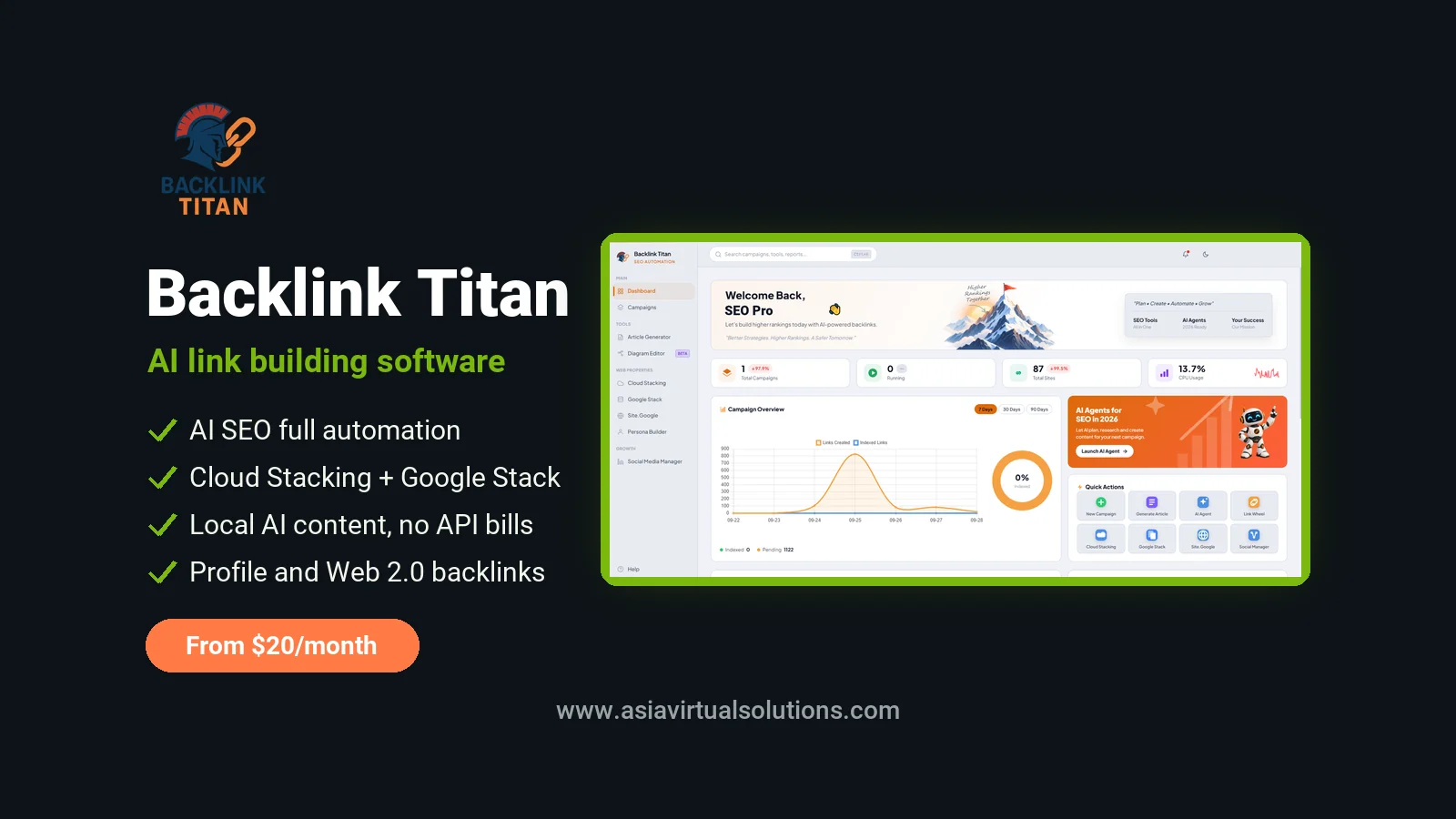
Building backlinks by hand takes hours. You find sites, write articles, create accounts and then check every link. Backlink Titan is AI-powered SEO link building software for Windows that does this work for you. You add a URL and a keyword. Its AI agent picks the sites, writes unique content, registers the accounts and posts your links.
It builds profile backlinks, Web 2.0 articles, Cloud Stacking sites, Google Stacks, Google Sites and persona sites from one dashboard. Content is written by an AI model you choose, including free local models, so there is no per-article API bill. Plans start at $20 per month.
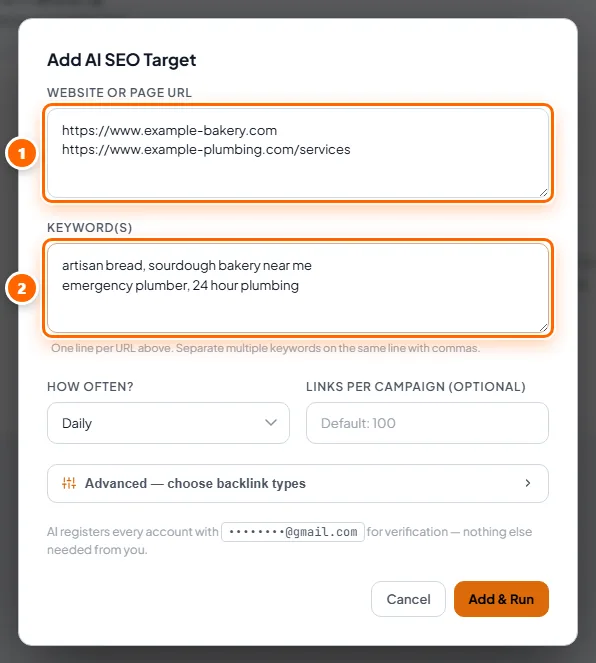
The quickest way in is AI SEO (Full Automation): add a link and a keyword, press Add & Run, and the AI does the rest.
Backlink Titan is sold by its developer. When you buy through our link we earn a commission, at no extra cost to you.

✅ What’s Included in Backlink Titan
Every plan includes every tool. There are no link caps, no credit limits and no per-campaign fees. The Monthly plan has a few usage limits, shown in the pricing table further down.
- AI SEO (Full Automation). Add your URLs and keywords and the AI builds the whole campaign. It can repeat daily, every 12 hours or weekly.
- Profile backlinks. Bots register accounts on social, business and community sites with your website in the profile. Every account is saved in a report you can export.
- Web 2.0 backlinks. Full articles on blogging platforms with your link inside the content. The text comes from you, from a saved article bucket, or from the AI writer.
- Cloud Stacking. AI articles are uploaded as static sites to Amazon S3, Cloudflare R2, Netlify, Backblaze B2, Neocities and Bunny CDN. Your links sit on some of the most trusted domains on the web.
- Google Stack and Site.Google. Interlinked Google Docs, Sheets and Slides, plus multi-page Google Sites. Everything is hosted on Google’s own domains.
- AI Silo Planner. Plans a pillar article with cluster articles and pre-planned internal links. It then writes and posts each piece for you.
- Persona Builder. Creates an author persona with its own five-page website and uploads it to the cloud. This puts a consistent author identity behind your content.
- Article Generator. Writes up to 50 SEO articles per run and files them in buckets. Your campaigns then pull articles from these buckets automatically.
- Link Wheel. Creates notes on HedgeDoc sites and links them to each other and to your target URLs. This helps search engines discover your backlinks faster.
- Automatic bot updates. When a website changes and a bot stops working, the fix is delivered while the app is open. You do not need to reinstall anything.
🤖 AI SEO Full Automation: Add a Link, Press Run
AI SEO is the easiest way to build backlinks with Backlink Titan. Enter one URL per line and the keywords for each URL. The first keyword on each line is your main keyword, and the others are used as partial anchors and woven into the articles. You can also choose the article language, so non-English sites get content and anchors in their own language.

Leave everything else on default and the AI chooses for you. Open the Advanced panel if you want control over backlink types, content length, pacing and proxies.
- Backlink types. Profile and Web 2.0 are always available. Google Stacking and Cloud Stacking switch on once you have signed in to Google or added cloud credentials.
- Anchor text mix. Set percentages for branded, naked URL, generic, partial and exact match anchors. The default “Natural” preset is 40% branded, 20% naked URL, 15% generic, 20% partial and 5% exact match.
- 콘텐츠. Choose short (about 700 words), medium (about 1,100) or long (about 1,800) articles. You can also pick a writing style and add extra keywords.
- Pacing. Set a daily link limit and spread the links through the day. You can also set active hours, so campaigns only run in a time window you choose.
- Inner pages and proxies. Send part of the links to inner pages with a slider. Paste proxies for one target only, or use your global proxy list.

Every target gets its own card with its status, a progress bar and the time of the next run. The “Check links” button opens every link built for that target and tells you how many are live and still show your link.

🎯 What Backlink Titan Can Help With
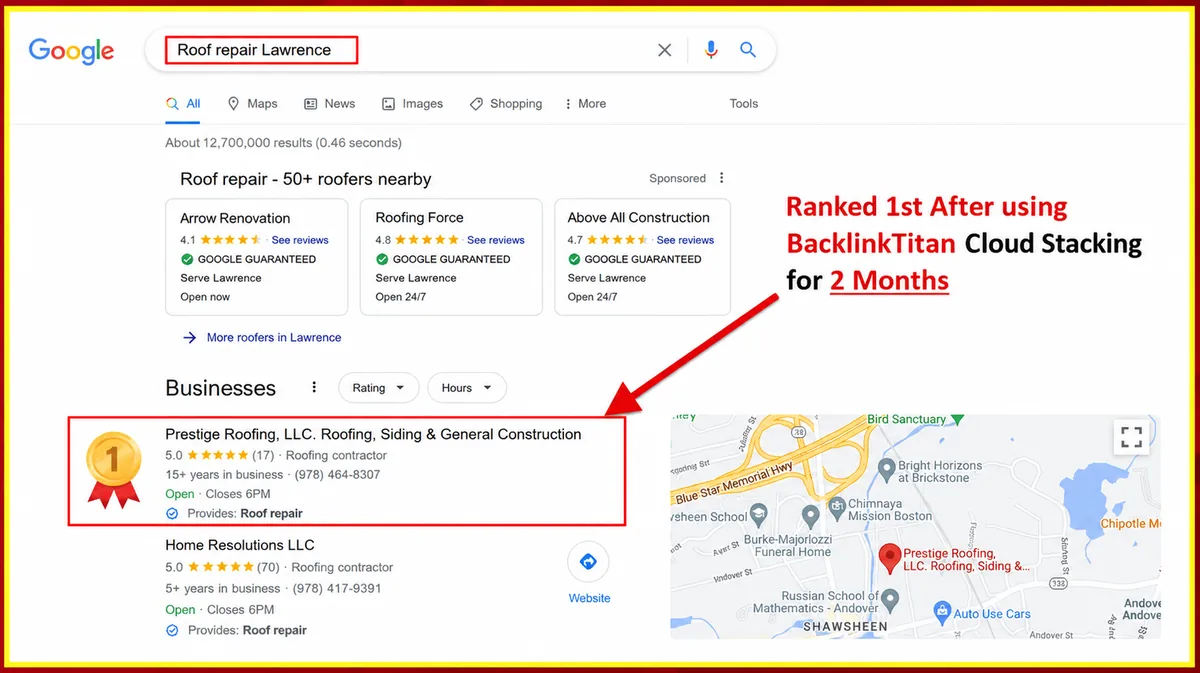
- Local SEO and Google Maps. Google Stacks, Google Sites and Persona Builder’s Local Mode give a local business authority signals tied to its area. The developer reports a roofing client reaching first place in the local map results in two months.
- Affiliate and niche sites. The AI Silo Planner builds topical authority around a keyword with pillar and cluster articles. Each article links to the next with planned anchor text.
- SEO agencies. One licence runs unlimited campaigns on the Yearly and Lifetime plans. Campaign reports list every account created, ready to export for a client.
- E-commerce stores. Spread links across product and category pages with the inner pages slider. This keeps your link profile from pointing only at the home page.
- Non-English websites. Choose the article language for each target. Articles, profile bios, stack content and generic anchors are all written in that language.
- Feeding other link building tools. Web 2.0 properties and cloud stacks make strong tier one links. You can then point GSA 검색 엔진 랭커 tier two links at them.

The Backlink Titan team publishes rank tracker screenshots from its own campaigns. One law and legal keyword moved from position 58 to position 3 in about two weeks. These are the developer’s results, not ours, and your results will depend on your niche, your competition and your on-page SEO.


🔧 Profile and Web 2.0 Campaigns With Full Control
Prefer to build campaigns yourself? The New Campaign form has a tab for each backlink type. Fill in only the Profile tab for a profile campaign, only the Web 2.0 tab for an article campaign, or both for a hybrid. A hybrid runs the profile phase first, then starts the Web 2.0 phase automatically.
For profile backlinks you enter a username, name, bio and website. The bio supports spintax, so every profile reads differently. You then pick the sites you want, sorted into Premium, Standard and Tier 2 bots.


Web 2.0 campaigns publish full articles with your link in the body. Choose Manual to paste your own article, Bucket to pull from a CSV of pre-written articles, or AI to write a new article for every post. The run count sets how often each bot publishes, so 10 bots with a run count of 3 gives you 30 articles.


A live console shows each bot working. When the campaign finishes, every posted link is listed and ready to copy. The campaign report records the site, username, email, password and live link for every account created, and exports to a file.


☁️ Cloud Stacking, Google Stack and AI Silos
These are the high authority link types that set Backlink Titan apart from older submitters. Cloud Stacking uploads AI-written pages as static HTML to cloud storage, so your links carry the authority of domains like amazonaws.com and r2.dev. You add your own credentials once under Settings, then publish from the Cloud Stacking page.
| Cloud provider | 필요한 것 |
|---|---|
| 아마존 S3 | Access key, secret key, region and a public bucket |
| Cloudflare R2 | Access key, secret key, account ID, bucket and public domain |
| Netlify | Personal access token and site ID |
| Backblaze B2 | Key ID, application key, region and bucket |
| Neocities | API key and site name |
| Bunny CDN | API key, storage zone and region |

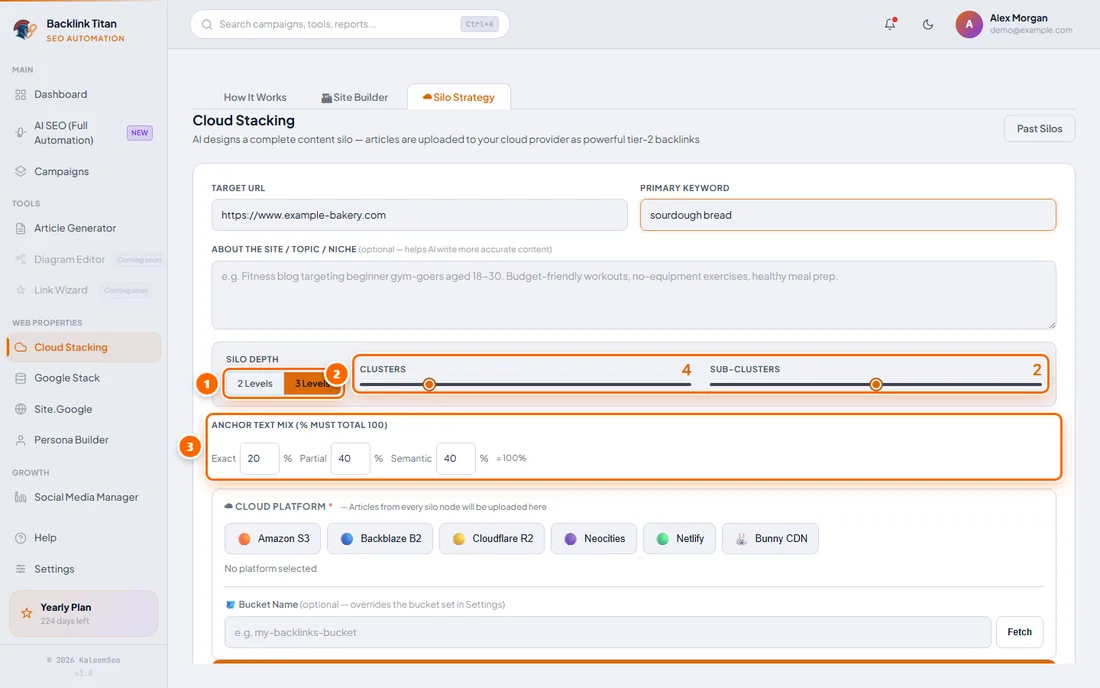
The Silo Strategy tab plans a full topic silo: one pillar article plus 3 to 8 cluster articles, with optional sub-clusters. The plan takes 30 to 60 seconds. You can review it as a diagram or a table, check each article’s relevance score, change which platform hosts each piece, and then start the campaign.

Google Stack creates interlinked Google Docs, Sheets and Slides filled with AI content that links to your site. Site.Google builds a multi-page Google Site with a pillar page and cluster pages. Both need a one-time Google login inside the app. The developer recommends a dedicated Google account for this, not your personal one.


Persona Builder generates an author persona with a name, profession, bio and a complete static website, then uploads it to a cloud provider. Local Mode ties the persona to a real country and city, and Existing Brand Mode builds the site around your real business instead. An Autopilot setting adds new articles every few days.

Link Wheel helps your new backlinks get found. It creates a note on every supported HedgeDoc site, then links each note to all the others and to the URLs you want indexed.

⚙️ AI, Captcha and Proxy Settings
AI provider. Choose Ollama, OpenAI, Claude or Google Gemini. OpenAI, Claude and Gemini need your own API key. The developer recommends Ollama with the free gpt-oss:120b cloud model, which needs only a free Ollama account. You can also download a smaller model and run it fully offline on your own PC.

캡차 해결. Many bots work without captcha solving. For sites that need it, Backlink Titan supports XEvil (self-hosted), 2Captcha, Anti-Captcha and CapMonster Cloud. If you run XEvil, our XEvil 프록시 keep it solving reCAPTCHA without your own IP being blocked. On one of our VPS plans, our 프리미엄 캡차 해결 서비스 works with any tool that supports XEvil.

프록시. Proxies are optional, but the developer recommends them for high-volume profile campaigns. Add one proxy per line as ip:port:username:password, in HTTP/HTTPS or SOCKS5 format. Web 2.0 and Google Stack bots usually work without proxies.

💻 Backlink Titan System Requirements
| 요구 사항 | 세부 사항 |
|---|---|
| 운영 체제 | Windows 10 or Windows 11, 64-bit only. No Mac or Linux version. |
| 메모리 | 8 GB RAM minimum, 16 GB recommended when using AI features |
| Disk space | About 1 GB, or about 2.5 GB with the local AI engine |
| 인터넷 | Needed for installation, licence checks and campaigns |
| 특허 | One Windows PC at a time. Moving to a new PC is free through support. |
One thing to plan for: AI SEO runs from inside the app, so scheduled campaigns only run while Backlink Titan is open. Many users run it on a Windows VPS so campaigns keep going when their own computer is off. A dedicated Backlink Titan VPS from us is coming soon. Until then, our 고성능 윈도우 VPS has 16 GB RAM and runs it comfortably.

💰 Backlink Titan Pricing and Plans
All three plans include every tool. These are the developer’s launch offer prices at the time of writing, so check the final price on their checkout page.
| 계획 | 가격 | Good to know |
|---|---|---|
| 월간 | $20 per month (was $25) | 3 active campaigns, 3 of 6 cloud providers, 2 AI silo runs per month, 3 persona templates |
| 매년 | $150 per year (was $199) | About $12.50 per month. Unlimited campaigns, all 6 cloud providers, unlimited silos, Search Console integration, priority support |
| 일생 | $200 once (was $499) | Everything in Yearly, all future updates, agency usage rights and no renewals |
You pay with PayPal or USDT (BEP20 or TRC20). Licences are activated by hand, usually within a few hours and always within 24 hours. There is no free trial, but the developer offers a 7-day money-back guarantee. The developer also says a built-in indexer is coming in the next update, for Lifetime members.
🎥 Video Resources
- Official channel. The developer posts walkthroughs on the Backlink Titan YouTube channel. It is a good place to see the software running before you buy.
- Our own tutorials. We are recording step-by-step Backlink Titan tutorials, from installation to your first AI SEO campaign. They will be added to this page as they are published.
⚙️ How to Get Started With Backlink Titan
- Choose your plan. Click the button on this page, create your Backlink Titan account and pay by PayPal or USDT.
- Get your licence. Your licence key (it starts with BT-) arrives by email. Download the Setup file from the Downloads section of your dashboard.
- Windows에 설치하세요. Run Setup on your PC or Windows VPS. Choose a permanent folder such as C:BacklinkTitan, then log in or activate with your key.
- Connect your tools. Pick an AI provider under Settings. Optionally sign in to Google for Google Stack, add cloud credentials and set up captcha solving.
- Run your first campaign. Open AI SEO, add your URL and keywords and press Add & Run. Use Check links to see how many backlinks are live.
⚖️ How Backlink Titan Compares
| 특징 | Backlink Titan | GSA SER | 랭커X | SEO NEO |
|---|---|---|---|---|
| 가격 | From $20 per month | $127 one-time | From $49.99 | 월 $149 |
| 실행 중 | Windows | Windows | Windows | Windows and Mac |
| Cloud stacking | 6 providers | 아니요 | 아니요 | 12개 제공업체 |
| 원시 링크 볼륨 | 보통의 | 제일 높은 | 보통의 | 보통의 |
| 가장 적합한 대상 | Beginners, local SEO and agencies on a budget | Volume and tiered links | 티어 1 웹 2.0 | Agencies and Mac users |
See our pages for GSA 검색 엔진 랭커, 랭커X 그리고 SEO NEO for the full details on each tool.
👍 Who Backlink Titan Suits
- Beginners. AI SEO needs only a URL and a keyword. You do not need to learn engines, diagrams or footprints first.
- Anyone tired of AI bills. Free local or Ollama cloud models write the content. There is no per-article or per-token charge.
- Local businesses and agencies. Google Stacks, Google Sites and local personas suit map pack work. Unlimited campaigns on Yearly and Lifetime suit client work.
👎 Who It Does Not Suit
- Mac and Linux users without a VPS. Backlink Titan is Windows only. A Windows VPS solves this.
- Anyone who wants maximum link volume. For huge tier two and tier three runs, GSA 검색 엔진 랭커 builds far more links.
- Anyone who needs a free trial. There is none. Read the features and the manual first, and rely on the 7-day money-back guarantee.
💡 아시아 버추얼 솔루션을 선택해야 하는 이유
- 저희는 2012년 12월부터 링크 구축 소프트웨어를 사용해 왔습니다. We started with GSA Search Engine Ranker and also work with RankerX, XRumer, SEO NEO and Money Robot, so we know what these tools need to perform.
- We supply what runs around it. Windows VPS hosting, XEvil proxies, captcha solving and proxies all come from the same team. A dedicated Backlink Titan VPS is on the way.
- We tell you where it loses. This page lists who Backlink Titan does not suit, because a refund helps nobody.
- Support from Thailand, on UTC+7. We answer questions about VPS hosting, captchas and proxies during our working day, Indochina Time.
AI link building from $20 per month
Stop building links by hand. Let the AI do the busy work.
Profile, Web 2.0, Cloud Stacking and Google Stack backlinks from one Windows app.
Get Backlink Titan❓ 자주 묻는 질문
What is Backlink Titan?
Backlink Titan is AI-powered SEO link building software for Windows. You add a URL and a keyword, and its AI agent chooses the sites, writes the content, creates the accounts and posts your backlinks. It builds profile, Web 2.0, Cloud Stacking, Google Stack, Google Sites and persona site links from one dashboard.
How much does Backlink Titan cost?
Backlink Titan costs $20 per month, $150 per year or $200 once for a Lifetime licence, at the developer’s current launch prices. Every plan includes every tool. The Monthly plan limits you to 3 active campaigns, while Yearly and Lifetime give unlimited campaigns and all six cloud providers.
Is there a free trial or a refund?
There is no free trial. The developer offers a 7-day money-back guarantee instead. Backlink Titan is sold by its developer, so refunds follow their terms. Anything you buy directly from us, such as a VPS, is covered by our 환불 및 보증 정책.
Do I have to pay for AI or API credits?
No, not unless you want to. Backlink Titan works with free models through Ollama, including the recommended gpt-oss:120b cloud model and smaller models that run offline on your PC. If you prefer OpenAI, Claude or Gemini, you add your own API key and pay those providers directly.
Does Backlink Titan run on a Mac?
No. Backlink Titan runs on Windows 10 and Windows 11, 64-bit only, and a Mac version is not planned. Mac and Linux users can run it on a Windows VPS and connect with Remote Desktop. It needs at least 8 GB of RAM, and 16 GB is recommended for the AI features.
Can I run Backlink Titan on a VPS?
Yes. Scheduled AI SEO campaigns only run while the app is open, so a Windows VPS keeps them running around the clock. Our 고성능 윈도우 VPS has 16 GB RAM and 10 AMD EPYC cores. A dedicated Backlink Titan VPS package is coming soon.
Do I need captcha solving and proxies?
Not always. Many bots work without captcha solving, and Web 2.0 and Google Stack bots usually work without proxies. For high-volume profile campaigns, the developer recommends proxies and a captcha solver. Backlink Titan supports XEvil, 2Captcha, Anti-Captcha and CapMonster Cloud, and our XEvil proxies help XEvil solve reCAPTCHA reliably.
Is Backlink Titan suitable for beginners?
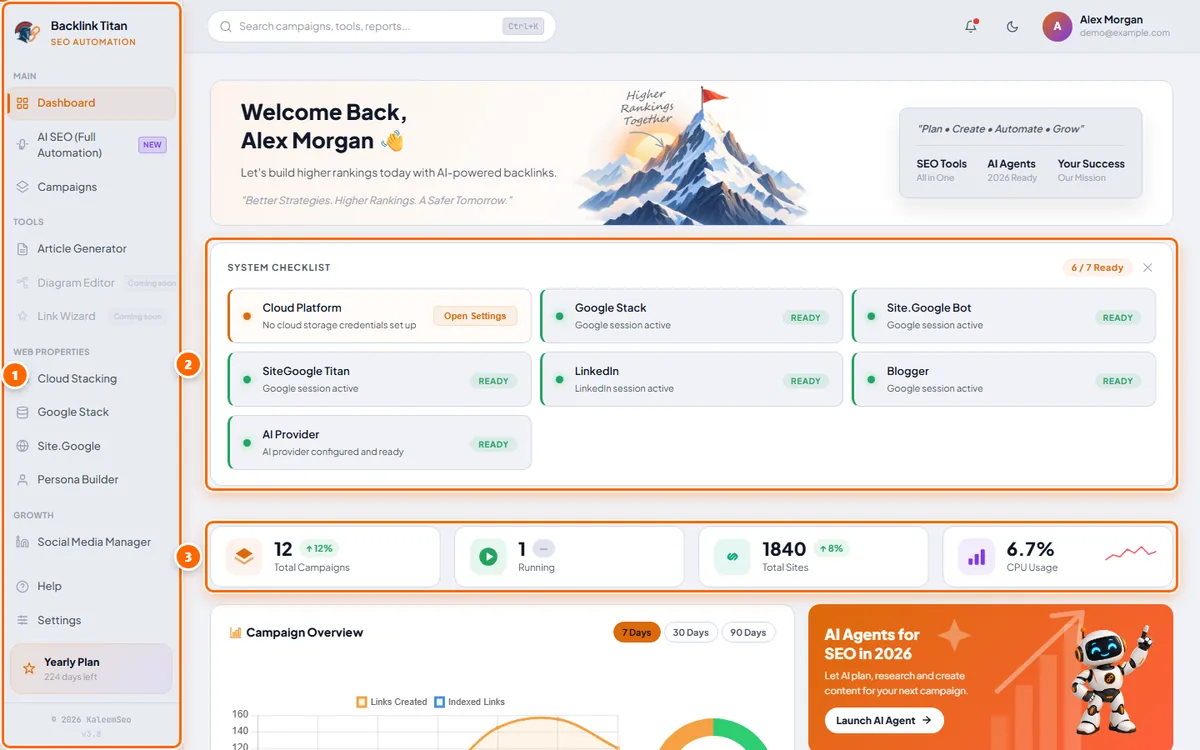
Yes. It is one of the easiest link building tools to start with. AI SEO needs only a URL and a keyword, and the dashboard checklist shows what still needs setting up. The developer says you can have your first backlinks in about 10 minutes, and advanced users can still build every campaign by hand.
Can I use one licence for client websites?
Yes. One licence lets you run campaigns for as many websites as you like, with no per-client fees. The Monthly plan allows 3 active campaigns at a time, so agencies should choose Yearly or Lifetime for unlimited campaigns. The Lifetime plan also includes agency-level usage rights.
How is the licence activated, and can I move it to a new PC?
Your licence is activated by hand after payment, usually within a few hours and always within 24 hours. You then log in with your account or your BT- licence key. A licence works on one PC at a time. To move it, contact Backlink Titan support and they reset it for free.
Who supports the software, and what are your hours?
The Backlink Titan team supports the software itself through tickets in your dashboard or by email. We support the products we sell around it, such as Windows VPS hosting, XEvil proxies and captcha solving. We are based in Thailand and work on Indochina Time, UTC+7.






 English
  简体中文
简体中文  Deutsch (Sie)
  Bahasa Indonesia
  Italiano
  日本語
日本語  한국어
한국어  Português do Brasil
  Русский
  Español de México
  ไทย
ไทย  Tiếng Việt
  Türkçe
상품평
아직 상품평이 없습니다.