엄마가 GSA 검색 엔진 랭커에 대해 알려주지 않은 10가지 사실
In life, there are many things that we are not aware of; fortunately, our moms are there to guide us and show us the way to most things we will come across. There are, unfortunately, ten things your mom never told you about GSA Search Engine Ranker, as she most likely never heard of it.

GSA Search Engine Ranker, like life, turns out to be full of surprises. At first, you are all hyped up and can't wait to get your copy of the GSA Search Engine Ranker. Still, once you have it, you soon realize there is a lot more to it than just a link builder, and soon you will learn that GSA 검색 엔진 랭커 on its own is pretty useless and you need to buy more stuff, and in the end, you spend four times more than you intended to. But is it worth all of it because you then own the best-automated 링크 구축 tool available
This article will look at ten things you need to use a GSA Search Engine ranker effectively.
Things you will need:
The below list is five essentials you need together with GSA Search Engine Ranker if you plan on having success with your GSA Ser link-building projects, and I highly recommend that you get all 5 of the below BEFORE you plan on starting any project.
GSA 캡차 차단기
This is most probably the most imported add-on for GSA Search Engine Ranker. GSA 캡차 차단기 integrates with GSA Search engine ranker to automatically solve many of the captchas that GSA Ser encounters when registering or submitting to sites. Without GSA 캡차 차단기, you will have a very low success rate.
If GSA 캡차 차단기 is a little out of your budget, then I suggest our very own 아시아 가상 솔루션 Captcha Solver, which does all that GSA Captcha Solver does and more for a much lower monthly fee. You can check it out over 여기.
Click on the image below for a step-by-step guide to configuring GSA Captcha Breaker.

 TXT Captcha Solver
Unfortunately, GSA Captcha Breaker has its limitation, and there are certain captchas it is not yet good at solving, including text captchas. Now I know you are probably wondering what a text captcha is. Well, text captchas are those where they ask you a question instead of showing a picture. For example, they will ask: “what one + 1” or things like: “How many legs does a cat have”
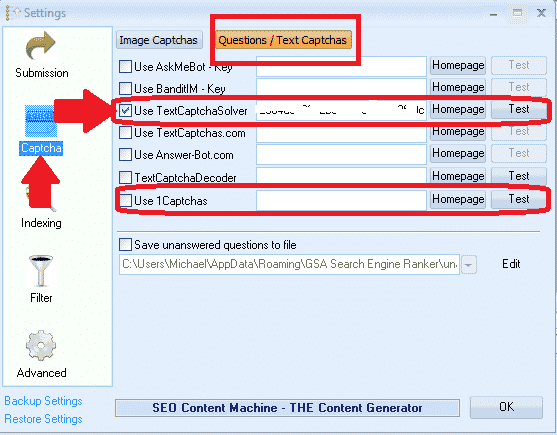
Unfortunately, GSA 캡차 차단기 does not always know how to answer this; therefore, we need to add a service that does. I highly recommend Text Captcha Solver, which claims to increase your GSA Search Engine ranker LPM by at least 25%, Starting from $9.97 per month for 5,000 text captcha solves. You can get more info from the Text Captcha Solver website over 여기
Once you have registered with Captcha Solver and received your API key, it is pretty easy to add it to GSA Search Engine Ranker; see the below screenshot.
Recaptcha Solver
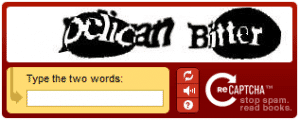
Recaptcha captchas are a pain in the backside for us internet marketers and most automated captcha solvers ( and even human ones ). Not only are there different types of Recaptchas, but they are changing from time to make it very hard to solve them. Recaptcha looks something like the below two captcha images.
 [/하나_하프][하나_하프]
 [/하나_반][/전체_폭]
Most of the sites you will be submitting to are now starting to use this ReCaptcha because they know it is tough for automated tools to solve them, and tools like GSA 캡차 차단기 have less than 10% success in solving these, which means if you are only using GSA Captcha Breaker for Captcha solving then you are losing out on a lot of potential links.
You need something to help GSA Captcha breaker solve these darn ReCaptchas, and you have two choices to go for here. The expensive option would be to use a paid human captcha-solving service such as Death by Captcha to solve ReCaptcha for you; this option will be costly because, as I mentioned, most sites are now starting to use these kinds of captchas.
The other option would be to use an automated captcha service specializing in solving ReCaptcha captchas. There are two services I know of that are worth mentioning. The 1st ones are CaptchaTronix, they used to be good years back when they came out, but in the past year, they went from great to total crap as they failed to keep up with the constant changes of ReCaptcha, so I would advise you not to use them.
Another service that only launched in early 2017 and I use on all my GSA Search Engine Ranker installs is called 2Captchas They are, at this time, the absolute best service for solving ReCaptcha; they by far outperform the competition. 2Captchas .
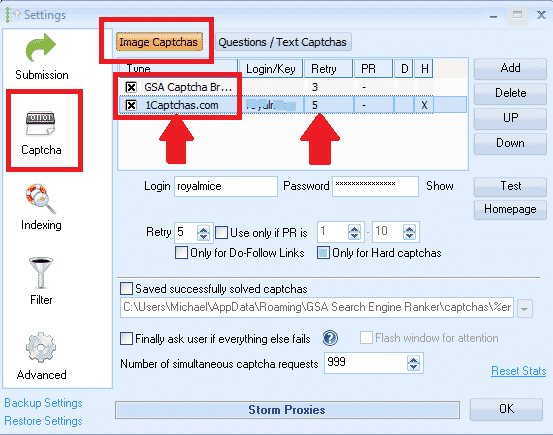
I use GSA Captcha Breaker as the first service and 1Captchas as the second service, with 5 Retries.
 SERengines.com
( Not a must-have but recommended add-on )
Web 2.0 backlinks are the most sought-after type as they carry a higher authority than other links, and most people use them for tier 1 linking; as such, you want as many of them pointing to your money site as possible.
While GSA Search engine ranker does have around 60 웹 2.0 to offer you, these are not necessarily optimized engines, and this is where Serengines comes into the picture. SER Engines is a development firm separate from GSA that creates and maintains engines compatible with GSA Search Engine Ranker. Serengines develop and maintain; Web 2.0 blogs and Web 2.0 High PR Profiles. In short, Serengine will boost your web 2.0 results.
Please note this is not essential, and GSA Search Engine Ranker will work fine with it, BUT it is highly recommended. When writing this, they are charging $14.95 per month.
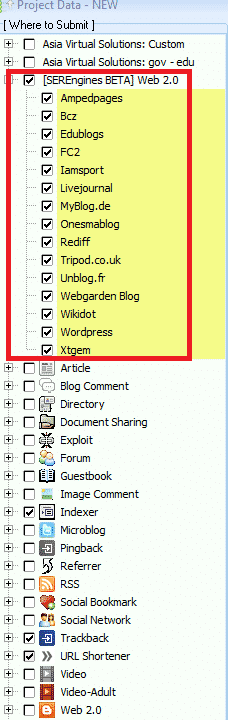
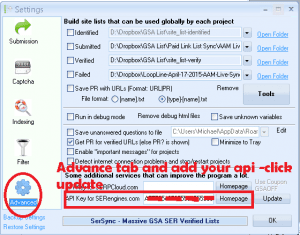
Installing Serengine is pretty straightforward. Once you sign up, you will be provided with an API key that you add to GSA Ser Options under the advance tab, as in the below image; after that, click the update button, and you will see Serengines towards the bottom of the Project Data View screen. That's it; ones added nothing else to do apart from selecting or deselecting which ones you wanted to use;
프록시
Proxies are essential and will make or break your success with GSA Search engine ranker; for this reason, I will cover this in more detail.
Let us take a few steps back now and look at what GSA Search Engine Ranker does; then; you will better understand where and why proxies are needed. Below is a summary of what it is that GSA Search engine ranker does;
- GSA Search Engine Ranker searches for places where it can register accounts. ( It will only do this if you have enabled to use search engines in your project )
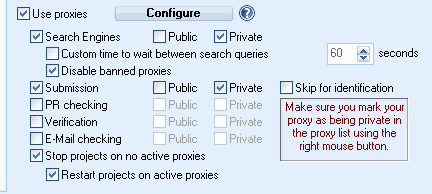
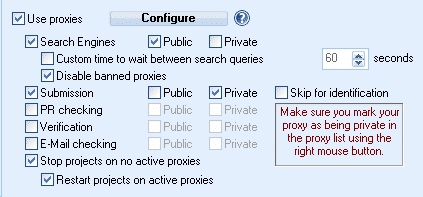
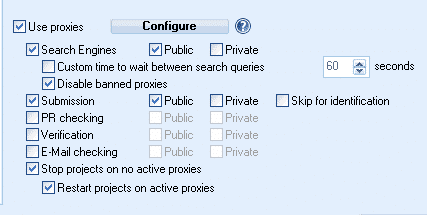
- Proxies are needed here because GSA Search engine ranker will take all the build footprints and then take your keywords and then combine them and end up with 10's thousands of search queries it will do. The search engines will very quickly get pissed off if you hit it with repeated searches repeatedly, and then it will start showing captchas when you want to search for something. To get around this, we need to use proxies so that the search engines think it is someone else each time GSA Search Engine Ranker makes a search query. The more proxies you have, the better. Because search engines like Google are pretty clever about proxies, it is best to use private proxies here. If you absolutely must use public proxies ( which I don't encourage), then make sure they are anonymous elite public proxies working.
- Proxies are needed here because GSA Search engine ranker will take all the build footprints and then take your keywords and then combine them and end up with 10's thousands of search queries it will do. The search engines will very quickly get pissed off if you hit it with repeated searches repeatedly, and then it will start showing captchas when you want to search for something. To get around this, we need to use proxies so that the search engines think it is someone else each time GSA Search Engine Ranker makes a search query. The more proxies you have, the better. Because search engines like Google are pretty clever about proxies, it is best to use private proxies here. If you absolutely must use public proxies ( which I don't encourage), then make sure they are anonymous elite public proxies working.
- GSA Search Engine Ranker registers accounts at the places it found. ( If you use the global site list or import target URLs, it will try registering accounts for you on those sites.
- Proxies are needed because we plan on registering as many accounts as possible. Still, the problem is most of the sites we register on only allow one registration per IP address. To get around this, we hide behind proxies so the site you are registering does not know you are the same person creating hundreds of accounts. I recommend the use of public proxies for this to ensure you get as many accounts as possible.
- Proxies are needed because we plan on registering as many accounts as possible. Still, the problem is most of the sites we register on only allow one registration per IP address. To get around this, we hide behind proxies so the site you are registering does not know you are the same person creating hundreds of accounts. I recommend the use of public proxies for this to ensure you get as many accounts as possible.
- GSA Search Engine Ranker post content ( comments, 기사, videos, etc.) to the accounts it created. Proxies are needed
- GSA Search engine typically posts the content just after registering the accounts ( a delay can be set in project settings). Still, since it posts just after registering, it will probably be on the same IP; I recommend using good-quality proxies.
- GSA 검색 엔진 순위 verifies to see if the links are still where it posted with your content. Proxies are not needed.
- So after GSA Ser has posted your content, it will return to where it was posted to see if it is still there. Since we are not registering or posting anything, there is no need to use proxies for this, if you want to be cautious and operate like a ninja, you can use public proxies here.
[전체_폭][하나_반쪽]
Using ONLY Private Proxies
 [/하나_하프][하나_하프]
Using Private & Public Proxies
 [/하나_반][/전체_폭]
Using ONLY public Proxies
Why not use proxies for PR Checking? It is a waste of time since the last Google PR update was in December 2013. Therefore you should uncheck all filters to use PR as it is no longer used, and just a waste of system resources if you are still checking the PR.
How many proxies to use:
This is a question I get asked very often, and it seems most people, including some advanced users, don't know precisely how many proxies they need. The standard rule of more is better applies here, but if you want to know what a minimum is, then I would suggest you work on a 2:1 ratio, meaning if you have one proxy, then you should run two threads or be more realistic if you have 50 proxies then you can run 100 threads. This ratio is based on the fact that you will be running on dedicated proxies. Please don't waste your time with shared proxies! If you want results, pay the extra couple of $'s and get dedicated.
Which proxy provider:
“Proxy service by Asia Virtual Solution offers quality dedicated and semi-dedicated, private and anonymous proxies with unlimited bandwidth from hundreds of locations using nearly 10,000 subnets. Our dedicated proxies are fast and reliable and for your exclusive use. Our semi-dedicated proxies are reliable and shared with no more than three users at a time. ” You can

[스페이서 높이=”2px”]
Important Settings
[스페이서 높이=”2px”]
Now that we looked at the software side of what you will need, there are a few essential settings your mom never told you about that will help you. We will take a look at a few that are going to help your GSA SER run smoother.
Auto Throttling
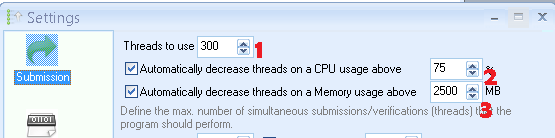
Many people don't understand this setting or don't use it because they don't know what it does. But this is an essential setting and is the key to running 100's GSA projects simultaneously, without your VPS or Home PC crashing under the load.
So let's take a look at the options in the above screenshot.
- Threads To Use: I think most people understand this option; this is the number of threads you will run. Before you set it to 300, remember what we said above by proxies; it should be on a ratio of 2:1, meaning that if you want to run at 300 threads, then you need 150 proxies. Also, don't expect to pay $15 monthly for a VPS and expect to run at 300 threads; you don't have the resources. I suggest starting low, maybe 20 threads, and see how your machine handles it. Then, increase it by ten threads after a few days, and continue until you find what works best on your machine. Remember, 링크 구축 should not be rushed; it should be done slowly, consistently, and over time if you want to do it right. Ignore those idiots that think the more LPM, the better; that is pure BS – Anybody that has been in internet marketing for some time will tell you that building 1000's links in a very short time is not suitable for your site's health Google will kick those links as fast as you build them.
- Automatically Decrease Threads on a CPU Usage Above: This is a beneficial setting, especially for those people on not very powerful machines with limited CPU power. If you push the VPS or server so hard that it runs out of resources, then you will find GSA SER will crash a lot, or you will get “Out of Resources ” pop-ups. To avoid this, I would suggest using a setting of 75 over here. So what will happen is when your projects are running, the CPU usage will go up and down depending on what tasks are being performed; when GSA SER sees the CPU is running at 75% or more, it will automatically reduce the number of threads currently running until the CPU usage goes below 75%, when the CPU usage is below 75% it will automatically increase the threads slowly and monitor CPU all the time.
- Automatically Decrease Threads on Memory Usage Above This is the most valuable of these 3 settings. This works on the same basis as the CPU usage above, except this is for RAM. Many people, when they first start with GSA will see the annoying Out of Memory error pop up, well this setting will help you prevent getting out-of-memory errors. It does not matter if your PC or VPS has 16 or 32 GB of RAM because the simple fact is that GSA Search Engine Ranker is a 32Bit application which means it cannot work with more than 3GB of RAM – If GSA is pushed hard. It uses over 3GB of RAM, giving error pop-ups ( yes, even if you have 16 or 32 GB or however much RAM installed ). So to avoid it reaching 3 GB, we set it here to start lowering threads when it reaches 2,500 MB of RAM ( 2.5GB ). So same as with the CPU setting, when it exceeds 2,500MB of RAM usage, GSA will automatically lower the number of running threads to get the RAM usage below 2,500MB, and then once it is below, it will slowly start increasing again. So it will monitor and adjust all the time.
HTML Time Out

HTML timeout means how long to wait for a page to load. If it does not load within the given time, the system will skip this page.
GSA Search Engine ranker will connect to sites to register, post, and verify links. Now remember, same as on your home PC, if you have many things open and like 20 browsers open at the same time, then it takes longer to load a website; the same applies to GSA Search Engine Ranker; the more threads you are running, the longer it will take to load the pages.
A good HTML timeout should be between 120 – 180. If you are running very few threads, use 120, and if you are blasting away all the time, use 180
Blacklist Filter
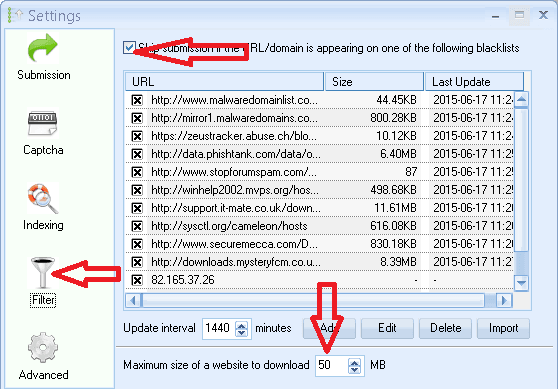
Many people don't use this option, maybe because there is not much info on what it does, or maybe people care.
This filter is a list of sites that keeps a list of all spam sites and sites with malware or that are up to no good. Now ask yourself the question – Do you want a link to your money site on a website known as a spammer that infects people's computers with viruses and other nasty things? Well, my answer would be hell no !!! I don't want my site link on a bad site.
So if your answer was no, you don't want your site to appear on a bad site link, then you should enable this filter and select all the lists.
Just leave the default interval to 1,440 Min. ( which is once a day)
GSA Search Engine Ranker will download a list from each site containing the bad list; if you have plenty of disk space, I suggest going with a 50MB download size, but if you are a bit tight on disk space, reduce it to maybe 20.
[스페이서 높이=”2px”]
Advance Settings
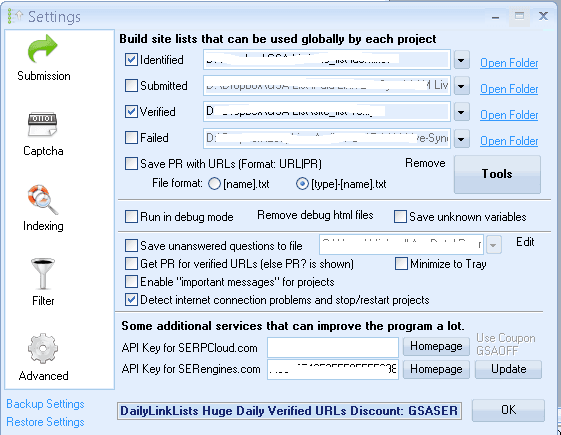
The first part in advance settings is for your Global site list. GSA Will, by default, install the folders and set the links for you in this location: C: Users사용자 이름AppDataRoamingGSA Search Engine Ranker, and you will create four folders for you as follow: site_list-identified, site_list-success, site_list-verify and site_list-failed. You can leave these default locations for now,
The ones you want to make a checkmark next to are Identified and Verified, as these are the two important ones. By making a checkmark in the box, you enable GSA SER to write to the folder you made the check against.
Don't select to save PR because, as I explained earlier, PR is a thing of the past, and Google has not updated it since December 2013.
All other settings are as per the screenshot.
I will post a more detailed post about the Global site list, how to import and clean them, etc., later.
Be sure to sign up below for our weekly updates so you receive a notification when the post on GSA Search Engine Ranker site list gets posted.
인덱싱
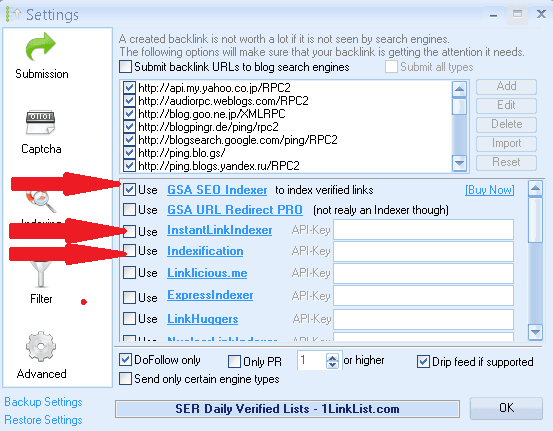
인덱싱 is one of the options you don't have to set to use GSA Search Engine Ranker, but many people ask about it, so I thought I would briefly cover this.
In my personal opinion, 인덱싱 services are overrated and a waste of money. Instead, I would create one extra tier in GSA to ensure the 링크 are indexed, but some people firmly believe they help index your links. I have used several 인덱싱 services in the past, so I can tell you from my experience which ones offer the best bang for your buck.
Even if you use any of the other services, I highly recommend you get the GSA SEO indexer, as this offers you seamless integration with GSA Search Engine Ranker, and apart from a one-time payment, it is also a set-and-forget solution. If you set the settings like in the above screenshot, GSA Ser will automatically send the verified links to GSA SEO 인덱서.
The other 2 Indexing services I recommend are the below two

그리고

Remember that it does not matter which indexer you use. I suggest you only send the Do Follow links to them; you do this by selecting the option for Do Follow only, as in the screenshot above. I would also suggest dripping the link; for that, there is an option. Do not use the PR filter setting because, as I have explained, PR is no longer maintained by Google.
And that, my friend, is the “10 things your mom never told you about GSA 검색 엔진 랭커” If you have implemented all the above, you are ready to create severe backlinks. I shall post more articles on setting up campaigns and other GSA Search Engine Related services. So make sure you have signed up to receive our updates.
Now that you have already set up, I highly recommend you get a GSA Search engine ranker data pack from us, as this will give you an excellent idea of how to fill in all project settings.
Get Your GSA SER Data pack
Get Awesome Content for your GSA Search Engine Ranker project