

説明
XRumer is automated link building software that registers accounts and posts your links across forums, blogs, guestbooks, wikis and contact forms — at a scale no human team can match.
🚀 What Is XRumer?
XRumer is a Windows-based link building tool from BotmasterLabs that finds link opportunities, creates accounts, solves the captcha and posts your content automatically. It ships with a database of over 22 million sites, so you can start posting on day one instead of spending weeks scraping targets.
Most link tools stop at forums and blog comments. XRumer handles those, then keeps going into wikis, guestbooks, bulletin boards, link directories and contact forms. Its captcha solver, XEvil, is bundled with the Standard and Business licences, so you are not paying a solving service for every submission.
The software has been in active development since 2006. The current release is XRumer 23.0.8 StrongAI, published on 20 August 2026.
🆕 What’s New in XRumer 23.0.8 StrongAI
Version 23.0.8 is the biggest release in years. It adds two things no other automated リンクビルディング tool has: a full large language model layer, and an MCP connector that lets an AI agent drive the software directly.
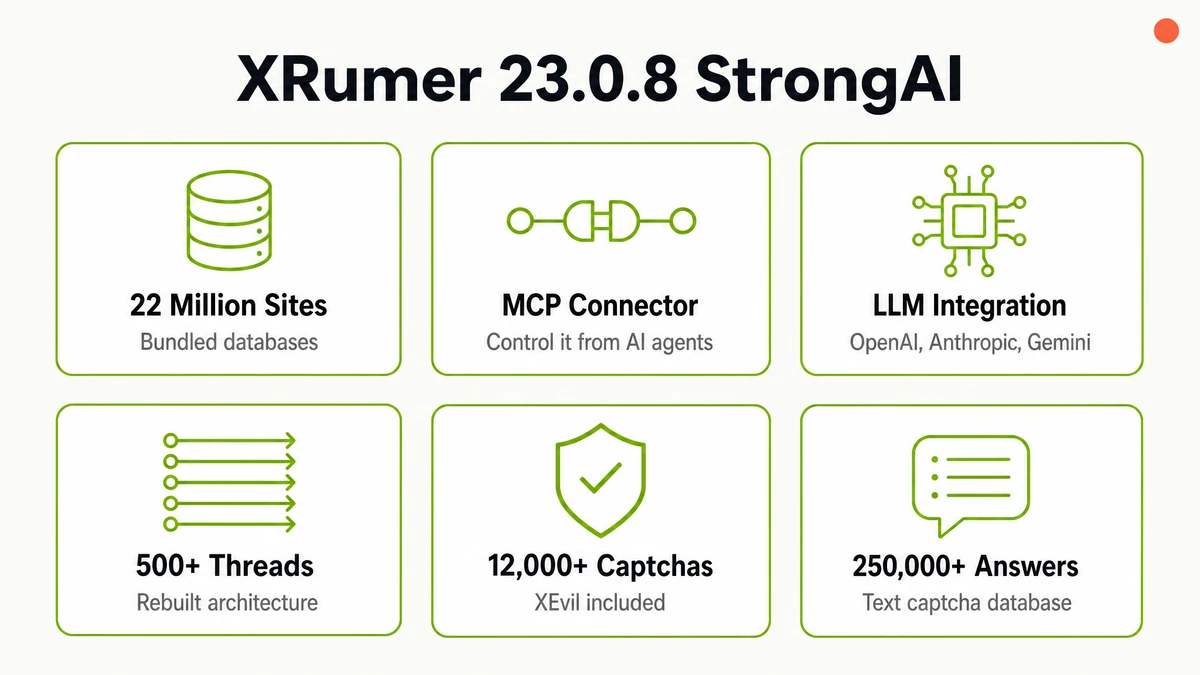
- Databases updated to over 22 million sites. The bundled target lists grew again in this release, and Botmaster reports higher success rates on trusted resources in particular.
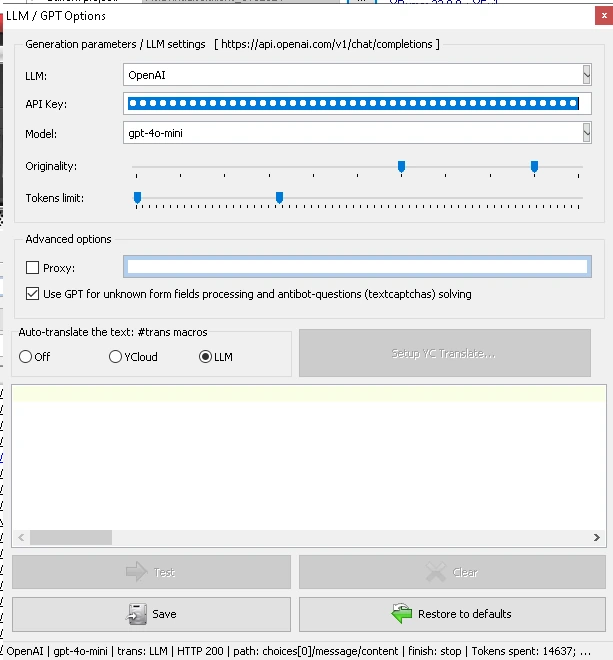
- Full LLM integration. Version 23.0.8 is no longer tied to OpenAI. It works with Anthropic, Gemini, OpenRouter and any compatible provider, configured through the interface or by editing
xllm.jsonそしてxllm.inidirectly. - Run the model on your own hardware and pay nothing per token. XRumer supports local models through Ollama, LM Studio, llama.cpp and vLLM. Botmaster’s own guidance is that a 14B model is plenty for this work, on an NVIDIA GPU with 8–24 GB. Your text never leaves your machine.
- The #trans macro now runs through an LLM. Translations are handled by the model you choose rather than only Yandex Cloud, and cached locally, so repeat runs cost you nothing.
- MCP connector. Control XRumer externally from a Python script, an AI agent or a Telegram bot. Built for running several instances across different servers.
- 500+ threads. A deep refactor of how the program uses system resources lifted the practical thread ceiling well past where it used to sit.
- Better Database Analyzer and authorisation. The analyser is more reliable, login handling was fixed in several places, and the
#file_linksmacro now uses a fraction of the resources on large files.
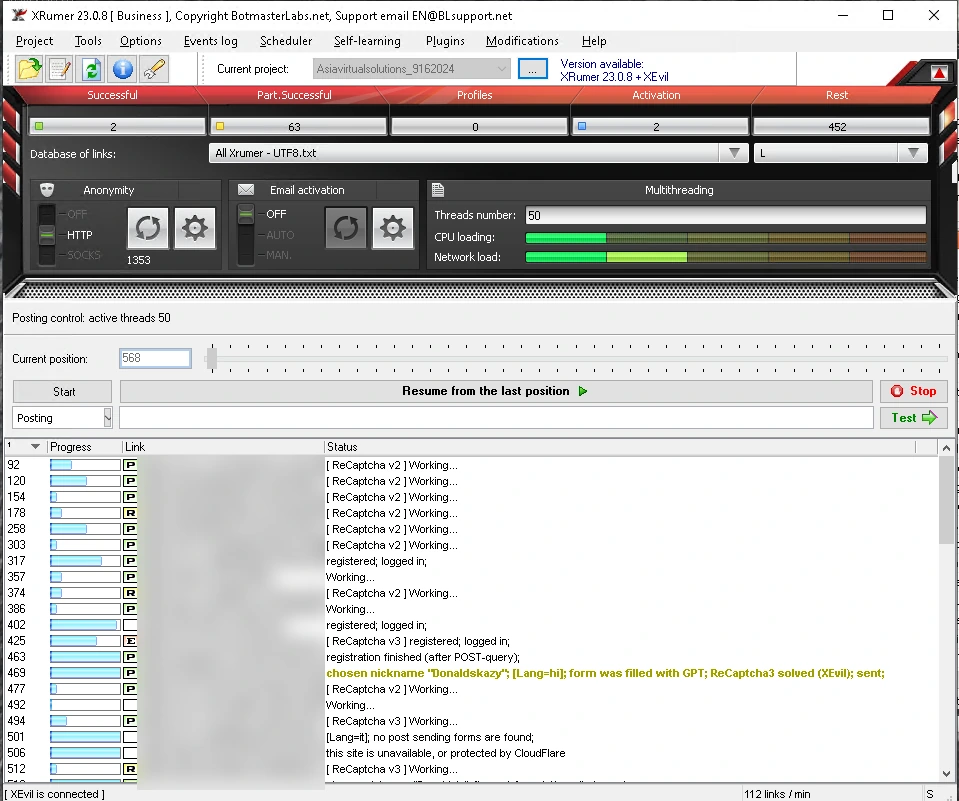
The LLM does four separate jobs inside XRumer: it writes post subjects and bodies relevant to each forum’s topic, answers anti-bot questions such as “how much is two plus three”, fills form fields the program cannot identify on its own, and handles translation. You choose the provider and model, and set how original the output should be.
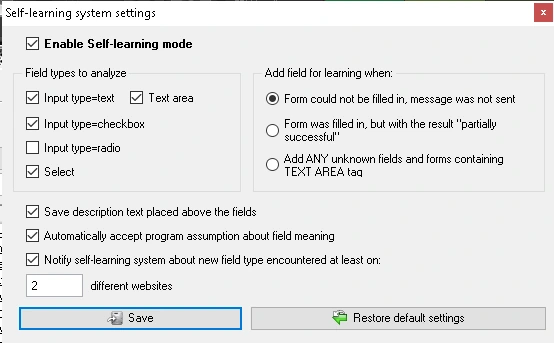
Alongside the LLM, the self-learning system watches what fails. When a form cannot be filled or a post only partly succeeds, XRumer records the unknown field type and learns it, so the same platform works next time. You control which field types it studies and how many sites it must see before it trusts a pattern.
🔌 Control XRumer From an AI Agent
The MCP connector is the single biggest reason to look at XRumer again in 2026. MCP is the standard that AI agents use to talk to external software. With it enabled, your agent can start a run, watch it, change settings mid-campaign and pull a live screenshot of the program window.
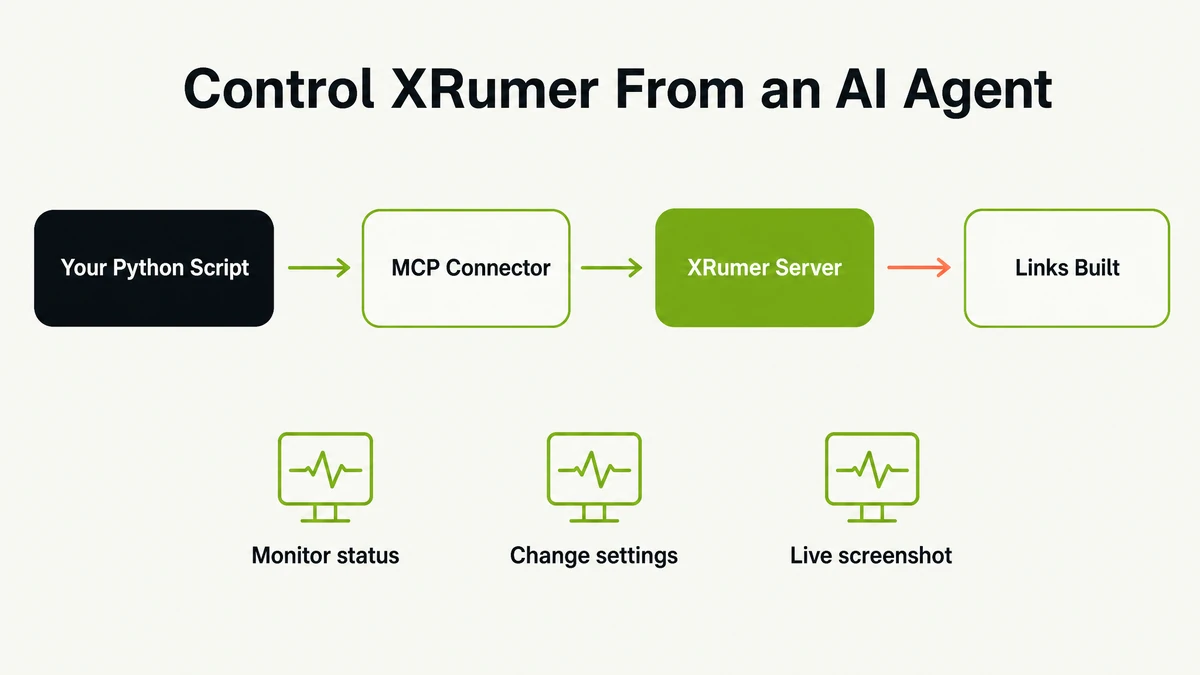
This matters most if you run XRumer on more than one server. Instead of logging into each machine by remote desktop, you drive them all from one place. A Standard licence exposes two copies this way, a Business licence five.
Setup takes about five minutes. You enable the MCP checkbox in XRumer’s settings, copy your MCP key from your Botmaster account, and run the mcp_client.py script that ships in the MCP folder. It opens a control panel in your browser on 127.0.0.1 — nothing is exposed to the internet, and it needs only plain Python 3 with no extra libraries.
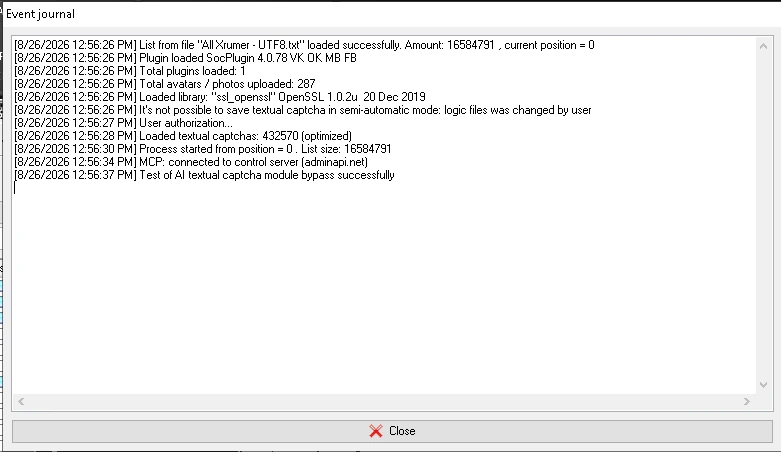
Two details worth knowing. XRumer checks in with the relay server roughly every ten seconds, so commands take ten to fifteen seconds rather than being instant. And your XRumer password is never transmitted — only state and commands pass through. The same mechanism is coming to XEvil 7.0.
Because it is plain HTTP underneath, the “remote” can be anything: Python, PHP, Node.js, C#, Go, or curl from a terminal. Point an AI agent at it and you can ask in words — “how many successes today?”, “set 200 threads on the first copy”, “stop the second one” — and the agent makes the calls for you.
✅ What You Get in the XRumer Package
- XRumer 23.0.8 StrongAI — the posting engine itself, with bundled databases of over 22 million sites and a text captcha library of more than 250,000 stored answers — our own install loads 432,570.
- XEvil captcha solver — recognises over 8,400 captcha types locally on your own hardware. Included with Standard and Business licences, and it works with other software too, including GSA Search Engine Ranker.
- Hrefer search engine parser — builds your own fresh target lists by footprint instead of relying only on the bundled databases. Included with every licence tier.
- ソーシャルプラグイン — posts and comments on VKontakte and Odnoklassniki. Both are Russian networks, so most Western users will not need it. It comes free with Standard and Business.
- Three months of updates included. The licence itself is lifetime. The update subscription runs free for the first three months, then costs $10 per month or $100 per year.
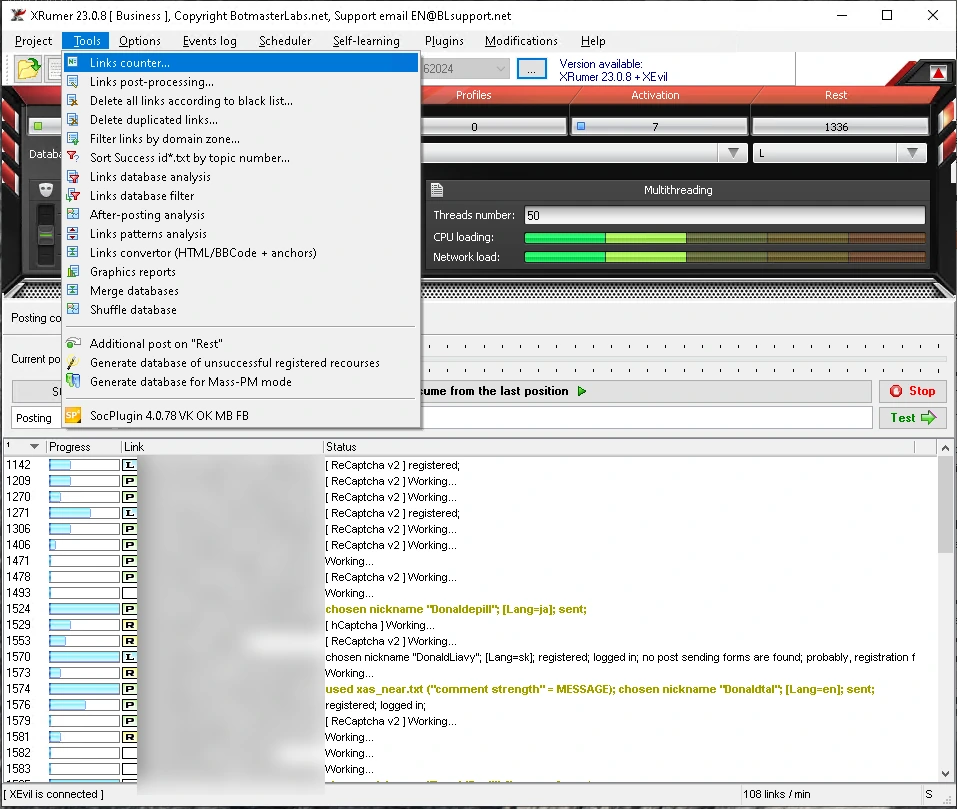
Beyond posting, the Tools menu carries the parts that make a campaign manageable: link counters, database analysis and filtering, duplicate removal, blacklists, after-posting analysis, patterns analysis, graphics reports, database merging and a Mass-PM generator.
🎯 Where XRumer Builds Links
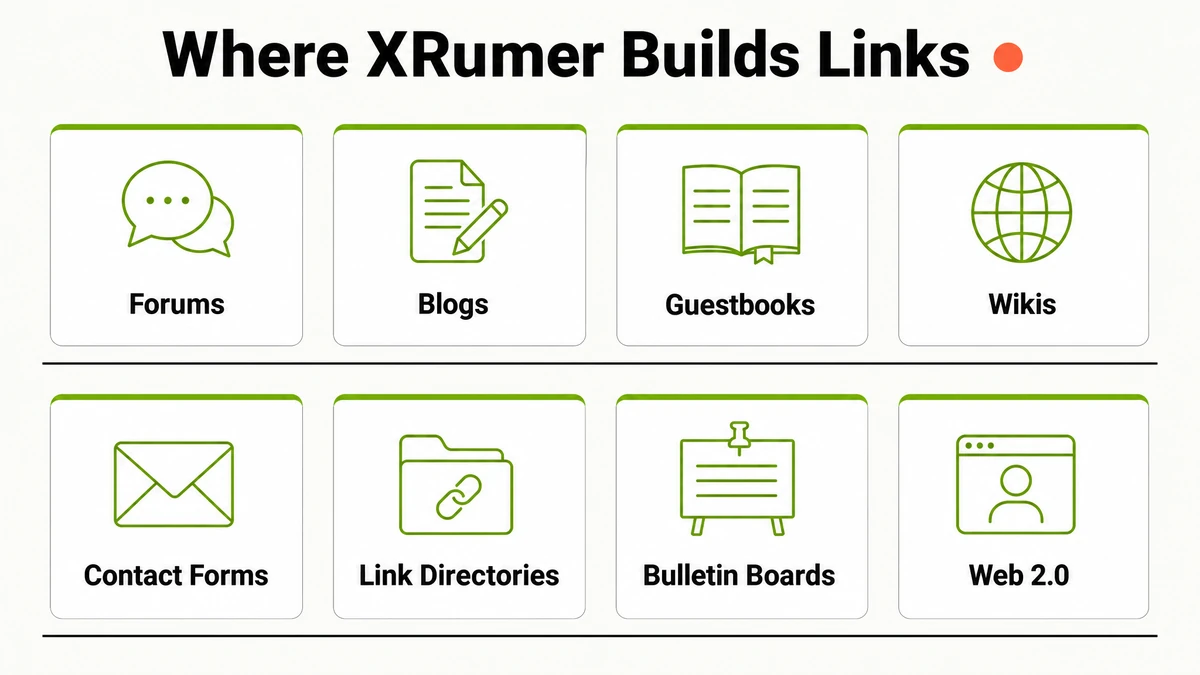
XRumer’s thematic posting system, called アンチスパム, matches each message to the topic of the site it is posting on, in whatever language that site uses. That is what separates a relevant forum reply from an obvious blast, and it works across every platform type below.
Forum engines get the deepest support: phpBB, Invision Power Board, vBulletin, XenForo, MyBB and more. Blogs, wikis, guestbooks, bulletin boards, link directories, contact forms and ウェブ2.0 platforms are all handled as standard.
💰 XRumer Licence Options and Pricing
XRumer comes in three tiers. The important difference is XEvil: the Lite licence does not include it, which means you would be paying an external captcha service for every solve. For most people Standard is the sensible starting point.
| 特徴 | Lite | 標準 | ビジネス |
|---|---|---|---|
| 価格 | $56 | $133 | $210 |
| Functionality | 部分的 | 満杯 | 満杯 |
| XEvil captcha solver | いいえ | そうだ | そうだ |
| Hrefer parser | そうだ | そうだ | そうだ |
| ソーシャルプラグイン | いいえ | そうだ | そうだ |
| Tech support forum | いいえ | そうだ | そうだ |
| Simultaneous installs | 1 | 2 | 5 |
Two costs are easy to miss. First, every licence includes three months of updates free, after which the subscription is $10 per month or $100 per year. Second, access to the version 23 StrongAI branch is a separate purchase on top of a Standard or Business licence — budget for it.
Upgrading later is possible: Lite to Standard costs $133, and Standard to Business costs $77.
⚙️ How to Get Started
- Create your free Botmaster account through our link. Registering through Asia Virtual Solutions applies our affiliate discount to your account automatically. Note that Botmaster’s public price list always shows full price — your reduced price appears once you are registered and logged in.
- Choose your licence tier. Standard covers most users because it includes XEvil. Pick Business if you need to run five installs at once across several servers.
- Add version 23 StrongAI access. This is a separate item in your account’s Downloads section. Without it you get the older version 19 branch instead of 23.0.8.
- Install on a Windows ブイピーエス or dedicated server. XRumer needs 64-bit Windows and at least 16 GB of RAM. Running it on your desktop works, but a dedicated machine lets campaigns run around the clock.
- Load your targets and start posting. Use the bundled databases to begin, then build your own lists with Hrefer as you learn which platforms convert for your niche.
🖥️ System Requirements
XRumer is heavier than most link tools, and the requirements below are the ones Botmaster publishes rather than a comfortable minimum. XEvil is the component that eats resources, and it scales with the number of solver threads you run.
| 要件 | 仕様 |
|---|---|
| オペレーティングシステム | Windows 7, 8, 8.1, 10 or 11 — 64-bit only |
| Windowsサーバー | Server 2012 R2 works. Server 2016 and 2019 are not recommended |
| Processor | 2 GHz or faster |
| メモリ | 16 GB RAM minimum |
| 繋がり | Fast, unmetered internet |
If you are on Windows 11 24H2 or 25H2 you will need a compatibility patch, which Botmaster support supplies on request through Telegram. If you do not have a suitable machine, our VPSホスティング is built for exactly this kind of workload.
💡 Why Buy XRumer Through Asia Virtual Solutions
- You pay less than list price. Registering through our link applies a discount to your Botmaster account automatically.
- We run these tools ourselves. アジア・バーチャル・ソリューションズ has worked with automated link building software since December 2012 — over 13 years of running campaigns, not reviewing them from the outside.
- Hardware that actually fits. We host around 65 to 70 VPS instances on our own AMD EPYC dedicated server in Singapore, sized for link building software rather than generic web ホスティング.
- Support in plain English. Botmaster’s own support forum runs mainly in Russian. We answer in English, and we have been through the setup many times.
- The rest of your stack in one place. プロキシ, verified link lists, email accounts and captcha solving all come from us too, so your XRumer setup is not a collection of loose parts.
Version 23.0.8 StrongAI is out now
Get XRumer at a reduced rate through Asia Virtual Solutions
❓よくある質問
What is XRumer used for?
XRumer is used to build backlinks automatically at scale. It registers accounts, solves captchas and posts your links on forums, blogs, guestbooks, wikis, bulletin boards, link directories and contact forms. Most people use it for tier two and tier three link building, feeding power to the links that point at their money pages.
Does XRumer still work in 2026?
Yes. Botmaster shipped version 23.0.8 in August 2026 with LLM integration, an MCP connector and a database of over 22 million sites. Results depend far more on your targets and settings than on the software. Random blasting produces nothing useful; careful targeting on relevant platforms still works.
What is the difference between XRumer 19 and XRumer 23 StrongAI?
Version 23 StrongAI is the newer branch, with AI-driven site processing, LLM-generated content, the MCP connector and support for 500+ threads. Version 19 is the older stable branch. Access to version 23 is a separate purchase on top of a Standard or Business licence, so check you have added it.
Do I need XEvil, and is it included?
You need a captcha solver, and XEvil is included free with the Standard and Business licences. It solves captchas locally on your own hardware, so there is no per-solve fee. The Lite licence excludes XEvil, which means paying an external service for every captcha — usually a false economy.
Can I use XEvil with GSA Search Engine Ranker?
Yes. XEvil runs as a standalone captcha server and works with GSA Search Engine Ranker, ZennoPoster, BAS, A-Parser and others. Botmaster has built neural networks aimed specifically at captchas that GSA SER encounters. Many people buy the XRumer package and use XEvil across their whole toolset.
Do I have to pay OpenAI to use the AI features?
No. XRumer 23.0.8 runs against local models through Ollama, LM Studio, llama.cpp or vLLM, which costs nothing per token and keeps your text on your own machine. Botmaster suggests a 14B model is enough, on an NVIDIA GPU with 8 to 24 GB. A cloud provider is simpler to start with; move local once the bills grow.
What does XRumer cost per year?
The licence is a one-time cost of $56, $133 or $210 depending on tier. Updates are free for three months, then $10 per month or $100 per year. Access to the version 23 StrongAI branch is charged separately. Registering through our link reduces the licence cost.
Why does Botmaster’s site show full price after I click your link?
Botmaster’s public price list always displays list price to everyone. The discount attached to our link is applied to your account at registration, so you see the reduced figure once you have created your free account and logged in — not on the public pricing page beforehand.
What hardware do I need to run XRumer?
You need 64-bit Windows, a 2 GHz or faster processor and at least 16 GB of RAM. Windows Server 2012 R2 is supported, but Server 2016 and 2019 are not recommended. XEvil is the part that consumes memory, and it scales with solver threads. A VPS built for link building handles this comfortably.
Is XRumer suitable for beginners?
It has a steeper learning curve than most link tools, and much of the community documentation is in Russian. If you have run GSA Search Engine Ranker or similar software before, you will find your way around. Complete beginners should expect to spend real time learning the settings before seeing results.
Only through SocPlugin, and only to VKontakte and Odnoklassniki. Both are Russian social networks. If you are targeting a Western audience, treat SocPlugin as a bonus you will probably never use rather than a reason to buy. The core value is in forums, blogs and contact forms.
How many threads can XRumer run?
Version 23.0.8 supports 500 or more threads after a rebuild of how the program handles system resources. The practical number depends on your hardware, your proxies and how many XEvil solver threads you are running alongside it. Start conservatively and increase until throughput stops improving.
What payment methods does Botmaster accept?
Botmaster accepts credit and debit cards, PayPal, WebMoney, Bitcoin and USDT. Payment happens on the BotmasterLabs website, not here — we are an authorised partner, so your licence and your support relationship are with Botmaster directly.
📚 Related Reading
- GSAサーチエンジンランカー — the lighter, cheaper alternative many people run alongside XRumer.
- VPS hosting for link building tools — sized for the 16 GB requirement above.
- Verified link lists — better targets than any bundled database.















 English
  বাংলা
বাংলা  简体中文
简体中文  Nederlands
  Français
  Deutsch (Sie)
  हिन्दी
  Bahasa Indonesia
  Italiano
  日本語
日本語  한국어
한국어  Bahasa Melayu
  Português do Brasil
  Русский
  Español de México
  Tagalog
  ไทย
ไทย  Tiếng Việt
  اردو
اردو  Türkçe