• Tungkol sa Amin
    • Mag-ambag o Makipagtulungan sa Asia Virtual Solutions
  • Mga Kaakibat
  • Makipag-ugnayan sa Amin
  • Aking Account
  • Portal ng Suporta
Mga Virtual na Solusyon sa Asya:
  • Tahanan
  • Tagapagraranggo ng Search Engine ng GSA
    • Mga Madalas Itanong (FAQ) para sa GSA Search Engine Ranker
    • Mga Kagamitan at Add-On ng GSA SER
    • Mga Gabay sa Pagraranggo ng Search Engine ng GSA
    • Gabay sa Pagbasag ng Captcha ng GSA
    • Pagho-host ng GSA
  • Blog
    • Paglutas ng Captcha
    • Paglikha ng Nilalaman
    • Pag-scrape ng Nilalaman
    • Pag-ikot ng Nilalaman
    • Mga Tutorial at Gabay sa Pagbuo ng Link sa GSA Search Engine Ranker
    • Mga Serbisyo sa Pagho-host ng VPS
    • Mga Tutorial sa Robot ng Pera
    • Paano
    • Balita sa mga Virtual na Solusyon sa Asya
    • Mga Inirerekomendang Review ng SEO Software
    • Pagmemerkado sa Web
    • Xrumer & Xevil Techniques & Tutorials
  • Tindahan
    • Mga Artikulo sa Nilalaman at AI
    • Mga Kagamitan at Add-On ng GSA SER
    • Mga Serbisyo sa Pagho-host
    • Mga Serbisyo sa Pagbuo ng Link
    • Tagapagsumite ng Robot ng Pera
    • RankerX
    • Mga Inirerekomendang Serbisyo
    • Mga Serbisyo sa Social Media
    • Mga Serbisyo ng Xrumer
Walang Resulta
Tingnan ang Lahat ng Resulta
Asia Virtual Solutions: Ekspertong GSA SER at Digital Marketing

Tahanan » Blog » Maintenance tips for GSA Search Engine Ranker

Maintenance tips for GSA Search Engine Ranker

Michael Swart ni Michael Swart
26 Marso, 2016 - Updated on 18 Pebrero, 2026
sa Optimization & Maintenance
0
Maintenance tips for GSA Search Engine Ranker
Talaan ng mga Nilalaman palabas
1 Maintenance tips for GSA Search Engine Ranker
1.1 Global Link List
1.1.1 Why You want to clean the Global site list
1.1.2 Clean up the Global Site List is simple; please follow these steps:
1.2 Ping Sites
1.2.1 Clean up the Ping Sites is simple; please follow these steps:
1.3 Project Target URLs
1.3.1 The below images are filters that cause the list to grow.
1.3.2 Clean up the Target URLs is simple; please follow these steps:
1.4 Unused Dead Project Accounts
1.4.1 Clean up the dead and unused project accounts is simple; please follow these steps:
1.5 Project Verified URLs
1.5.1 To clean it up and re-verified links is relatively simple; please follow these steps:
1.5.2 Important maintenance tips for GSA Search Engine Ranker – Conclusion

Maintenance tips for GSA Search Engine Ranker

GSA Search Engine Ranker is one of the best automated “all in one”  link build tools available for web marketers, but unfortunately, it does not do an excellent job of cleaning up after itself. Therefore, you must clean up after your GSA Search Engine Ranker to ensure your hard disk does not get bloated and to ensure your GSA SER is running optimally. The following are some essential maintenance tips for GSA Search Engine Ranker that you should try and perform at least once a week.


  • Global Link List
  • Ping Sites
  • Project Target URLs
  • Unused Dead  Project Accounts
  • Project Verified URLs

Global Link List

If you are using a paid list that is shared via Dropbox, you can skip this section, as all paid link lists shared via Dropbox are usually read-only, so you won't be able to change it.

The global site list is the first section under the advance tab. This is where you usually import a new list that you have scraped or maybe a list that you have purchased. Also, if you have checked a checkbox next to each option, then GSA will continuously add to the list when you make a post or when it verifies links, heck it even writes to the failed list if you have that checked.
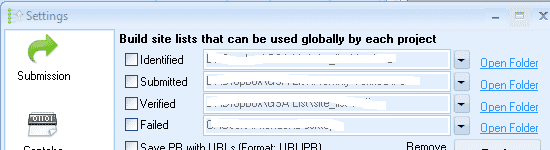
GSA Search Engine Ranker - Global Site list

Why You want to clean the Global site list

This list will get messy over time because Tagapagraranggo ng Search Engine ng GSA does not check if a link is already in the list. Instead, it just keeps adding and adding to the list, and the result is that your hard drive is going to get full very quickly, and even worse is that GSA Search Engine Ranker is going to slow down because now the list is so full of duplicates it has to work harder to look for new links.

 Clean up the Global Site List is simple; please follow these steps:

  • Go to Settings
  • Click on The Advance Tab
  • Click on Tools
  • Scroll down and select: Remove Duplicate URLs
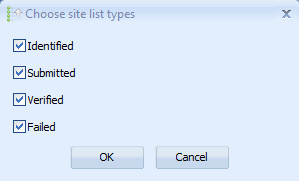
  • A pop-up will show asking you which list to clean: Select them all
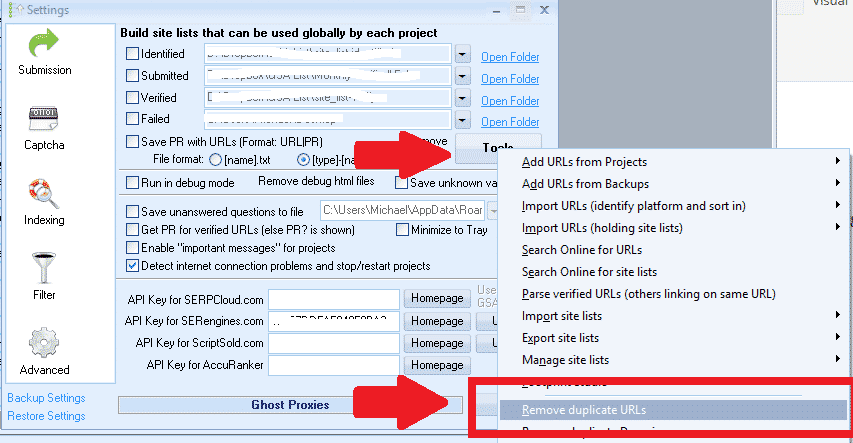
GSA Search Engine Ranker - Remove Duplicate URLs

GSA Search Engine Ranker - Select List to clean

Ping Sites

Not many people use ping sites because they prefer paid indexers. Still, if you do make use of pinging, you must remove the ones that keep failing, as it will slow down your site and increase resource usage if GSA Search Engine Ranker continuously tries to ping a ping site which is dead or doesn't work.

Fortunately, cleaning out the dead ones is easy, as Tagapagraranggo ng Search Engine ng GSA gives us some help here. Just make sure you do it BEFORE updating or restarting h=GSA SER because if you don't, GSA ser will reset the stats, and you won't know which ones are the ones failing, and you will need to rerun it for some time.

Clean up the Ping Sites is simple; please follow these steps:

  • Go to the Pag-iindeks section
  • Click on Delete
  • Select: Previously failed ( at least three times in a row)
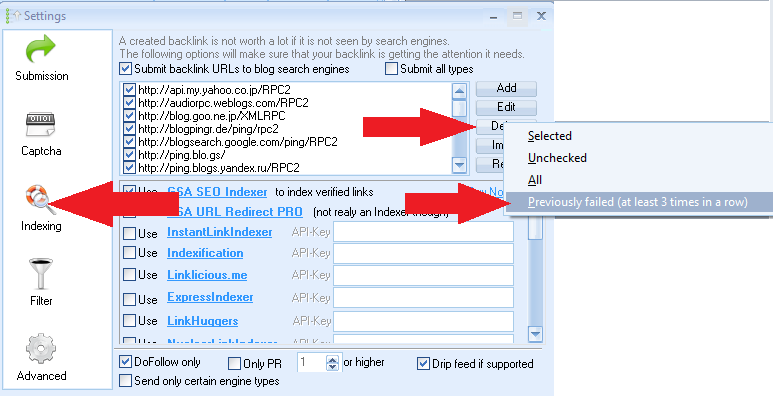
 

GSA Search Engine ranker - Ping Sites maintenance

Project Target URLs

Project target URLs are one of the biggest troublemakers regarding duplicates and quickly filling up your hard drive. You might wonder what these URLs are and where they come from.

In short, target URLs that have been added to your project either by yourself (imported) or by GSA Search Engine ranker; if you have selected to look for more URLs or if you are using the search engine option to scrape for targets then those links are the saved in your project as target URLs. That is all great, but unfortunately, GSA SER does not do a good job here because it just keeps adding and adding to the list without first checking if the link is not maybe already on the list.

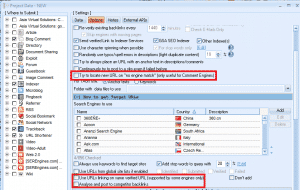
The below images are filters that cause the list to grow.
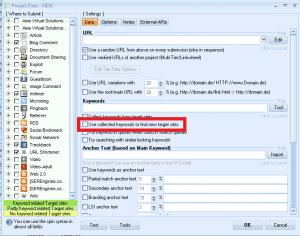
 GSA Search Engine Ranker - Target URLs 2  GSA Search Engine Ranker - Target URLs 3 GSA Search Engine Ranker - Target URLs 1

Clean up the Target URLs is simple; please follow these steps:

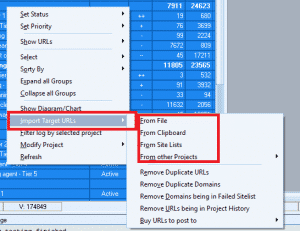
  • Highlight all of your projects.
  • Right-click anywhere in the project window.
  • Select:  Import Target URLs
  • Then scroll to: Remove Duplicate URLs
  • Wait for it to finish. If you have many projects, this could take a while, so maybe start it before you go to lunch or overnight.
  • When completed, it will show you how many duplicates were removed.
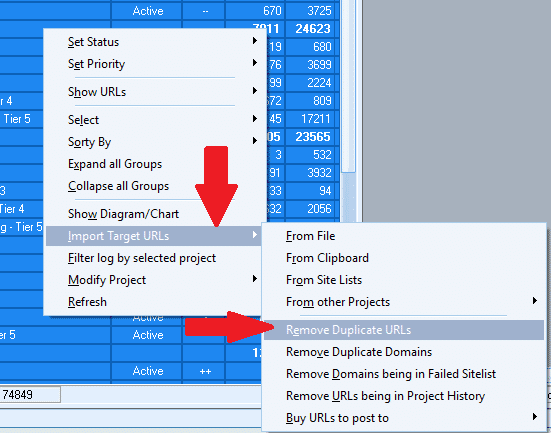
Remove Duplicate target URLs

Unused Dead  Project Accounts

When you run a GSA Search Engine Ranker project, it is all the time trying to create accounts on the platforms you have selected. When it creates an account, GSA Search Engine Ranker saves all information with the account, such as login details, the email used, the date created, etc. Unfortunately, over time, some of these accounts stopped working for various reasons, such as the account not getting verified, the account is terminated by the owner, the site not existing, or some other reason. Unfortunately, when the accounts no longer work, that information it saved sits there, taking up space, and it also slows down your submissions as GSA Search Engine Ranker will continue to try and post to these dead accounts.

The good news is that Tagapagraranggo ng Search Engine ng GSA can tell you which accounts are dead and unused, but you have to instruct GSA SER to remove the dead unused accounts.

Removing the dead and unused accounts will speed up your submissions and slightly reduce the space used.

Clean up the dead and unused project accounts is simple; please follow these steps:

  • Highlight all of your projects
  • Right-click anywhere in the project window
  • Select:  Modify Projects
  • Then scroll to Delete Unused Accounts
  • Wait for it to finish; it will take a couple of minutes, pending how many projects you have
  • When completed, it will show you how many dead unused accounts were removed
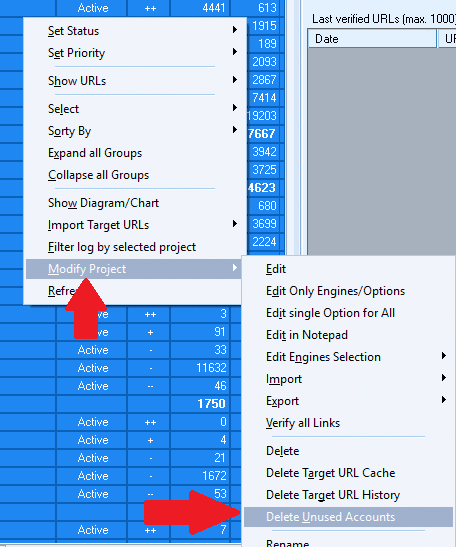
 Remove unused GSA Ser Accounts

Project Verified URLs

Project Verified URLs are the URLs that Tagapagraranggo ng Search Engine ng GSA has created and which it at some point has verified. Unfortunately, over time some links will be moderated, and the site owners will have removed the links that GSA SER has to build for you or various reasons. The link is no longer available. Still, GSA SER has not rechecked it to see if it is no longer verified.
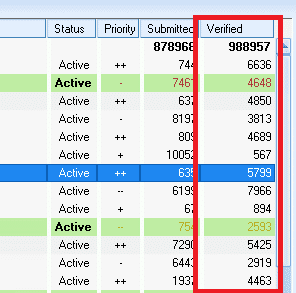
GSA Search Engine Ranker Verified Links maintanance


Dead verified links are terrible for you, especially if you are building tiered projects because you will be wasting your time and resources building links to verified links which are dead, a total waste of time.

One way to ensure your project's links are all still verified is to do a force recheck of the URLs. Please note that if you have many projects, this can take some time, so I suggest starting the check before going to bed and letting it run until completed. The benefit of rechecking your verified links is that you will get better results, as your lower tiers will only be building inks to verified links which are still working.


To clean it up and re-verified links is relatively simple; please follow these steps:

Selecting Verified URLs in GSA Search Engine Ranker

  • Highlight all of your projects
  • Right-click anywhere in the project window
  • Select:  Show URLs
  • Then scroll to and select: Verified (It will take some time to load all of the URLs ( be patient))
  • Once loaded, select: Verify and then All URLs
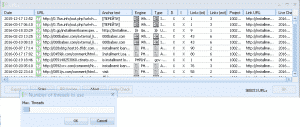
  • Next, Select the Number of Threads (Select as many as you can, usually the same amount at which you run your GSA Ser ).
  • It will now start, and you can see the progress bar. Pending how many links you have to check, this can typically take a long time, so best to do it overnight.
  • Once completed, it will pop up and show you an option:  Remove Unsuccessful Verification  – I usually select to remove both failed and time-out verification.
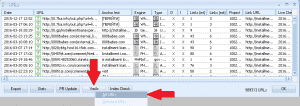
Select All Verified URLs  Select the maximum number of threads

Remove Unsuccesfull Verifications


Important maintenance tips for GSA Search Engine Ranker – Conclusion

Performing these maintenance steps at least once a week will ensure you don't use unnecessary hard disk space. Most importantly, you will ensure that your  Tagapagraranggo ng Search Engine ng GSA runs smoothly and is not bogged down with out-of-memory issues,  dead and duplicate URLs or accounts.

Let me know if you need any clarification on the above steps.

Mga Tag: gsa search engine rankerMaintenance tips for GSA Search Engine Ranker
Nakaraang Post

Online Marketing Tips For Super Heroes

Susunod na Post

How to get 200+ LPM with GSA Search Engine Ranker

Michael Swart

Michael Swart

Ang Asia Virtual Solutions ay pagmamay-ari at pinapanatili ni Michael Swart at ng isang pangkat ng mga dedikadong virtual assistant.

Susunod na Post
How to get 200 lpm

How to get 200+ LPM with GSA Search Engine Ranker

Inirerekomendang Produkto

Mga Kategorya ng Blog

  • Paglutas ng Captcha
  • Paglikha ng Nilalaman
  • Pag-scrape ng Nilalaman
  • Pag-ikot ng Nilalaman
  • Mga Tutorial at Gabay sa Pagbuo ng Link sa GSA Search Engine Ranker
  • Tagabasag ng Captcha ng GSA
  • Pag-host at Pag-optimize ng VPS
  • Paano
  • Balita sa mga Virtual na Solusyon sa Asya
  • Pagmemerkado sa web
  • Paano
  • Mga Tutorial sa Robot ng Pera
  • Balita sa mga Virtual na Solusyon sa Asya
  • Mga Inirerekomendang Review ng SEO Software
  • Bidyo
  • Mga Tutorial at Gabay sa Pagbuo ng Link sa GSA Search Engine Ranker
  • Mga Inirerekomendang Review ng SEO Software
  • Pagmemerkado sa Web
  • Xrumer & Xevil Techniques & Tutorials

Produkto na Kailangan Mo

Mga Kamakailang Review

  • Mga Social Bookmark ng Asia Virtual Solutions Social Bookmarking para sa Mas Mahusay na SEO at Mas Mataas na Trapiko
    Оценка 5 из 5
    от shashwat asthana
  • Mga email pack ng RankerX Mga Pakete ng Email ng RankerX
    Оценка 5 из 5
    от vancuoc29
  • Advertisement ng serbisyo sa digital marketing na nagtatampok ng mga tool at feature ng SEO tulad ng mga proyekto ng GSA SER, mga pribadong email, at mga artikulong may kaugnayan sa keyword. Mga Proyekto sa GSA Search Engine Ranker - Tapos na Para Sa Iyo
    Оценка 5 из 5
    от nick smith
  • GSA Search Engine Ranker VPS GSA Search Engine Ranker VPS
    Оценка 5 из 5
    от nick smith
  • GSA Search Engine Ranker VPS GSA Search Engine Ranker VPS
    Оценка 5 из 5
    от mike
  • Nakabalangkas na Nilalaman, mga site na DA50+ Web 2.0 Post na may Structured Content sa mga DA50+ site
    Оценка 5 из 5
    от ADE YUSUP
  • Nakabalangkas na Nilalaman, mga site na DA50+ Web 2.0 Post na may Structured Content sa mga DA50+ site
    Оценка 5 из 5
    от Joseph Conroy
  • Nakabalangkas na Nilalaman, mga site na DA50+ Web 2.0 Post na may Structured Content sa mga DA50+ site
    Оценка 5 из 5
    от N/A N/A
  • Mga Xevil Proxy Mga XEvil Proxies para sa napakabilis na paglutas ng ReCaptcha - Binoto bilang No.1
    Оценка 5 из 5
    от Talbert Williams
  • Advertisement ng serbisyo sa digital marketing na nagtatampok ng mga tool at feature ng SEO tulad ng mga proyekto ng GSA SER, mga pribadong email, at mga artikulong may kaugnayan sa keyword. Mga Proyekto sa GSA Search Engine Ranker - Tapos na Para Sa Iyo
    Оценка 5 из 5
    от Sunil Keshari

Lahat ng Legal na Bagay

  • Kasunduan sa Kaakibat
  • Antispam
  • Mga kagustuhan sa komunikasyon
  • Pagtatanggi
  • Dobleng I-click na Dart Cookie
  • Patakaran sa mga Panlabas na Link
  • Patakaran sa Facebook
  • Pahayag ng FTC
  • Patakaran sa Pagkapribado
  • Patakaran sa Pag-refund at Garantiya
  • Mga Tuntunin at Kundisyon
  • Pagsisiwalat ng mga Testimonial

Ligtas na Pamimili

Sertipikado ang Pag-browse sa Google Save
Ang logo ng website na Norton Safe sa puting background.

Makipag-ugnayan sa Amin

Pangunahing Tanggapan ng Estados Unidos
  • Asia Virtual Solutions LLC, 400 Rella Blvd, #123-298, Montebello, NY 10901
  •  kasama*****@******************ns.com
  • +1 (415) 851-6951
  •  asiavirtual
  •  Asia Virtual Solutions sa LinkedIn
Asya Virtual Office
  • Asia Virtual Solutions LLC, Palapag 29, Ang mga Opisina sa Centralworld 999/9 Rama I Road, Pathumwan, Bangkok, Thailand
  •  kasama*****@******************ns.com
  • +1 (415) 851-6951
  •  asiavirtual
  •  Asia Virtual Solutions sa LinkedIn

© 2026 - Asia Virtual Solutions LLC. Lahat ng Karapatan ay Nakalaan. Ang website ay Pinapatakbo at Pinapanatili Ng: Asia Virtual Solutions LLC

Walang thumbnail
Na-upload
Nabigo
Alisin ang na-upload na file
Walang Resulta
Tingnan ang Lahat ng Resulta
  • Tahanan
  • Tagapagraranggo ng Search Engine ng GSA
    • Mga Madalas Itanong (FAQ) para sa GSA Search Engine Ranker
    • Mga Kagamitan at Add-On ng GSA SER
    • Mga Gabay sa Pagraranggo ng Search Engine ng GSA
    • Gabay sa Pagbasag ng Captcha ng GSA
    • Pagho-host ng GSA
  • Blog
    • Paglutas ng Captcha
    • Paglikha ng Nilalaman
    • Pag-scrape ng Nilalaman
    • Pag-ikot ng Nilalaman
    • Mga Tutorial at Gabay sa Pagbuo ng Link sa GSA Search Engine Ranker
    • Mga Serbisyo sa Pagho-host ng VPS
    • Mga Tutorial sa Robot ng Pera
    • Paano
    • Balita sa mga Virtual na Solusyon sa Asya
    • Mga Inirerekomendang Review ng SEO Software
    • Pagmemerkado sa Web
    • Xrumer & Xevil Techniques & Tutorials
  • Tindahan
    • Mga Artikulo sa Nilalaman at AI
    • Mga Kagamitan at Add-On ng GSA SER
    • Mga Serbisyo sa Pagho-host
    • Mga Serbisyo sa Pagbuo ng Link
    • Tagapagsumite ng Robot ng Pera
    • RankerX
    • Mga Inirerekomendang Serbisyo
    • Mga Serbisyo sa Social Media
    • Mga Serbisyo ng Xrumer

© 2026 - Asia Virtual Solutions LLC. Lahat ng Karapatan ay Nakalaan. Ang website ay Pinapatakbo at Pinapanatili Ng: Asia Virtual Solutions LLC

Tagalog
English 简体中文 हिन्दी Bahasa Indonesia 日本語 한국어 Bahasa Melayu Русский ไทย Tiếng Việt